> ## Documentation Index
> Fetch the complete documentation index at: https://notes.kodekloud.com/llms.txt
> Use this file to discover all available pages before exploring further.
# Plan and Deploy Microsoft 365 Copilot and Agents
> Guidance for planning, configuring, governing, and measuring Microsoft 365 Copilot and Copilot Agents deployments to drive adoption, automation, and secure business value
In this lesson, we cover the essential planning and deployment considerations for Microsoft 365 Copilot and Copilot Agents. The goal is to outline the technical and organizational areas you should address to enable adoption, enforce governance, and deliver measurable business value.
Why Microsoft 365 Copilot delivers impact
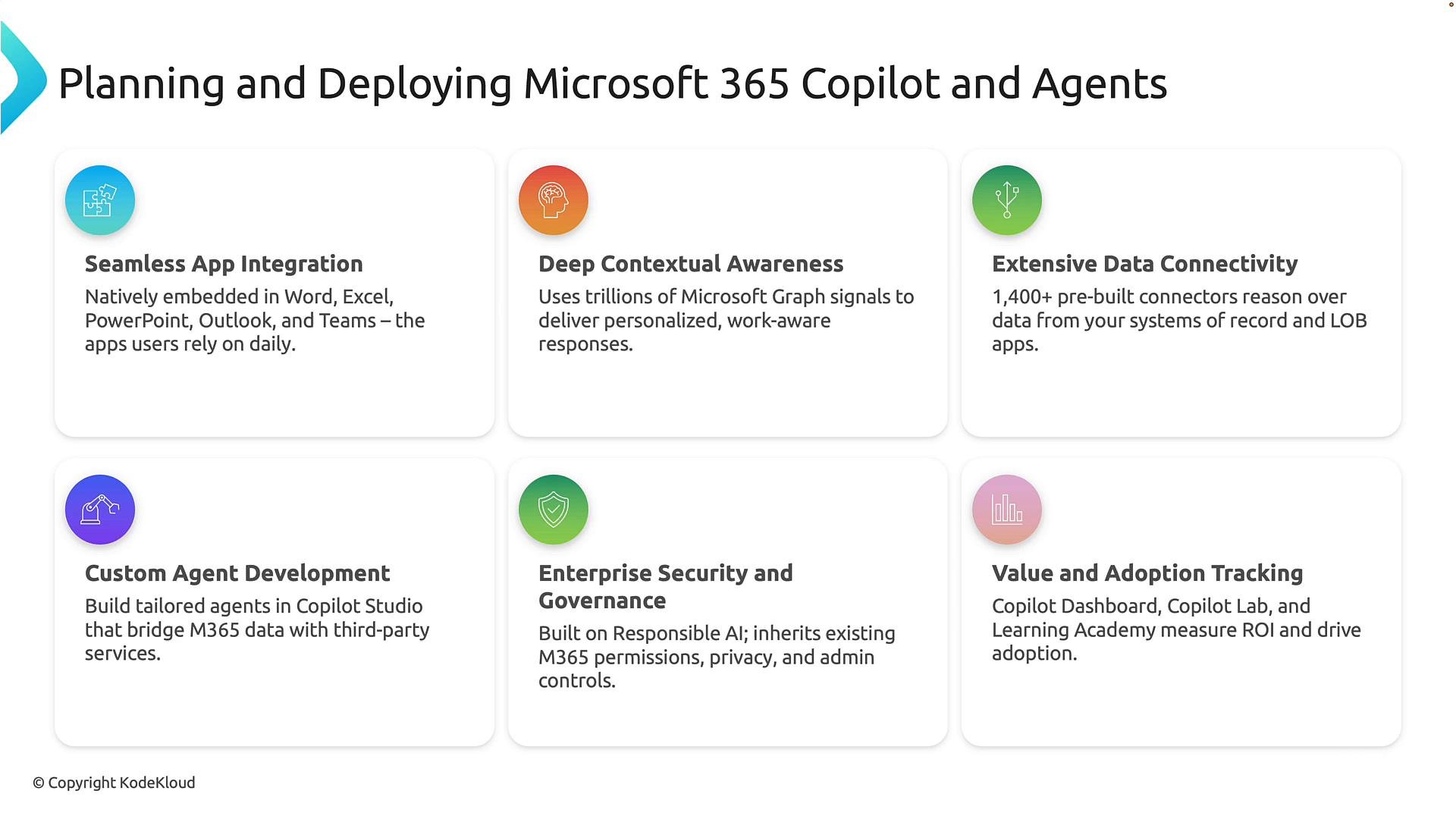
* Seamless app integration: Copilot is embedded in Word, Excel, PowerPoint, Outlook, and Teams, so users interact with AI inside familiar workflows—reducing training friction and accelerating adoption.
* Context-rich responses: Copilot uses Microsoft Graph signals from emails, meetings, chats, documents, and calendars to produce personalized, relevant output that reflects the user’s recent workplace context.
* Broad connectivity: Over 1,400 pre-built connectors let Copilot and agents access CRM, HR, ITSM, finance, and other systems so they can reason over data outside core Microsoft 365.
* Extensible automation: Copilot Studio supports building custom agents that incorporate business logic, third-party services, and multi-step workflows for process automation.
* Enterprise-grade governance: Agents inherit Microsoft 365 permissions, privacy controls, compliance policies, and admin governance so data access respects established boundaries.
* Measurable adoption and value: Administrative tools and telemetry let leadership monitor usage, identify high-value scenarios, and measure ROI.
Quick summary table
| Feature | What it delivers | Suggested action |
| - | - | - |
| Seamless App Integration | Copilot appears directly in productivity apps | Enable in targeted apps and run pilot groups |
| Deep Contextual Awareness | Uses Microsoft Graph signals for personalized output | Map critical Graph signals to your use cases |
| Extensive Data Connectivity | Pre-built connectors to business systems | Inventory systems to connect (CRM, HR, ITSM, finance) |
| Custom Agent Development | Tailored agents and workflows with Copilot Studio | Prioritize 2–3 pilot agents (e.g., procurement, onboarding) |
| Enterprise Security & Governance | Inherits M365 permissions and compliance | Define guardrails, approval flows, and DLP rules |
| Value & Adoption Tracking | Admin telemetry and learning resources | Configure dashboards and KPIs (time saved, tasks automated) |
 Key capability details
Seamless app integration
* Copilot appears inside the apps people already use, minimizing context switches and helping teams adopt AI features more quickly. Plan training and change management material in-app (short tips, suggested prompts).
Deep contextual awareness
* Microsoft Graph supplies signals from emails, meetings, chats, documents, and calendars so responses are personalized and actionable. Example: when preparing for a customer meeting, Copilot can combine recent emails, meeting notes, related documents, and calendar context.
Extensive data connectivity
* Use pre-built connectors to bring CRM, HR, finance, and other systems into Copilot’s reasoning. This lets agents fetch authoritative data (e.g., customer records, invoice status) without copying sensitive information into chat.
Custom agent development
* Copilot Studio enables building agents that combine Microsoft 365 context with custom actions and third-party services. Example use case: a procurement agent that accepts purchase requests, checks approval status, and retrieves supplier details from your ERP.
Enterprise security and governance
* Copilot and agents respect Microsoft 365 permissions, compliance policies, and admin controls so users only access data they are authorized to view.
Copilot respects existing Microsoft 365 access controls and compliance settings—agents do not circumvent permission boundaries.
Value and adoption tracking
* Configure admin telemetry to monitor usage, identify high-value scenarios, and measure ROI. Use adoption metrics (active users, frequency, time saved) to prioritize scaling and training.
Core takeaway
A successful deployment balances a seamless user experience, rich organizational context, broad data connectivity, custom automation, strong governance, and ongoing adoption measurement. When aligned, Microsoft 365 Copilot and Agents become strategic platforms that drive productivity and transformation.
Now let's look at Copilot Chat and how agents are constructed.
This section reviews the configuration elements that define agent behavior. These same settings are used whether you create an agent via natural language or manually in the UI.
High-level steps to create and configure an agent
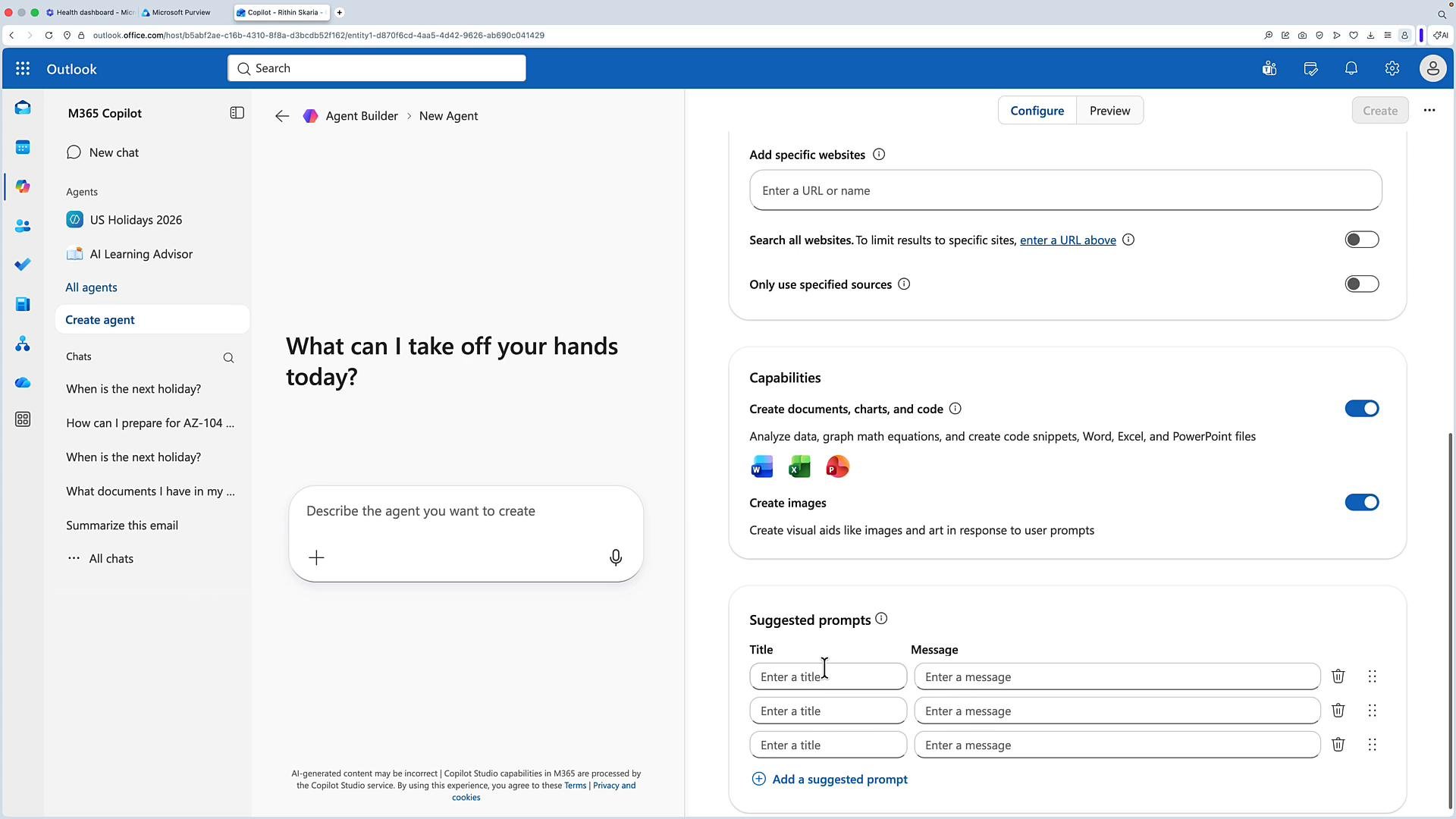
1. Click Create agent and choose “Skip wizard” to go directly to configuration.
2. Complete the required fields:
* Name: a concise identifier for the agent.
* Description: a short summary of the agent’s purpose and scope.
* Instructions: operational guidelines controlling tone, behavior rules, allowed actions, and guardrails (for example, require a legal question to be escalated to qualified staff).
3. Add knowledge sources:
* Index public websites, internal SharePoint sites, or URLs that the agent should reference.
4. Enable capabilities and integrations:
* Toggle Microsoft 365 capabilities (document creation, image generation, Excel interactions) and enable connectors to external systems as needed.
5. Provide suggested prompts:
* Add starter prompts or follow-up templates so end users know how to interact with the agent and get consistent results.
6. Test iteratively:
* Use preview and test tools to validate outputs, refine instructions, and confirm connectors are returning expected results.
Recommended configuration table
| Setting | Purpose | Recommendation |
| - | - | - |
| `Name` | Identifier | Keep concise and role-specific (e.g., “Procurement Agent”) |
| `Description` | Purpose summary | Include scope and target users |
| `Instructions` | Behavior & guardrails | Define tone, escalation, and “do not do” policies |
| Knowledge sources | Indexed content | Add authoritative internal sites and key external resources |
| Capabilities | Allowed actions | Enable only required capabilities (least privilege) |
| Suggested prompts | User guidance | Provide 3–5 examples to improve success rates |
Key capability details
Seamless app integration
* Copilot appears inside the apps people already use, minimizing context switches and helping teams adopt AI features more quickly. Plan training and change management material in-app (short tips, suggested prompts).
Deep contextual awareness
* Microsoft Graph supplies signals from emails, meetings, chats, documents, and calendars so responses are personalized and actionable. Example: when preparing for a customer meeting, Copilot can combine recent emails, meeting notes, related documents, and calendar context.
Extensive data connectivity
* Use pre-built connectors to bring CRM, HR, finance, and other systems into Copilot’s reasoning. This lets agents fetch authoritative data (e.g., customer records, invoice status) without copying sensitive information into chat.
Custom agent development
* Copilot Studio enables building agents that combine Microsoft 365 context with custom actions and third-party services. Example use case: a procurement agent that accepts purchase requests, checks approval status, and retrieves supplier details from your ERP.
Enterprise security and governance
* Copilot and agents respect Microsoft 365 permissions, compliance policies, and admin controls so users only access data they are authorized to view.
Copilot respects existing Microsoft 365 access controls and compliance settings—agents do not circumvent permission boundaries.
Value and adoption tracking
* Configure admin telemetry to monitor usage, identify high-value scenarios, and measure ROI. Use adoption metrics (active users, frequency, time saved) to prioritize scaling and training.
Core takeaway
A successful deployment balances a seamless user experience, rich organizational context, broad data connectivity, custom automation, strong governance, and ongoing adoption measurement. When aligned, Microsoft 365 Copilot and Agents become strategic platforms that drive productivity and transformation.
Now let's look at Copilot Chat and how agents are constructed.
This section reviews the configuration elements that define agent behavior. These same settings are used whether you create an agent via natural language or manually in the UI.
High-level steps to create and configure an agent
1. Click Create agent and choose “Skip wizard” to go directly to configuration.
2. Complete the required fields:
* Name: a concise identifier for the agent.
* Description: a short summary of the agent’s purpose and scope.
* Instructions: operational guidelines controlling tone, behavior rules, allowed actions, and guardrails (for example, require a legal question to be escalated to qualified staff).
3. Add knowledge sources:
* Index public websites, internal SharePoint sites, or URLs that the agent should reference.
4. Enable capabilities and integrations:
* Toggle Microsoft 365 capabilities (document creation, image generation, Excel interactions) and enable connectors to external systems as needed.
5. Provide suggested prompts:
* Add starter prompts or follow-up templates so end users know how to interact with the agent and get consistent results.
6. Test iteratively:
* Use preview and test tools to validate outputs, refine instructions, and confirm connectors are returning expected results.
Recommended configuration table
| Setting | Purpose | Recommendation |
| - | - | - |
| `Name` | Identifier | Keep concise and role-specific (e.g., “Procurement Agent”) |
| `Description` | Purpose summary | Include scope and target users |
| `Instructions` | Behavior & guardrails | Define tone, escalation, and “do not do” policies |
| Knowledge sources | Indexed content | Add authoritative internal sites and key external resources |
| Capabilities | Allowed actions | Enable only required capabilities (least privilege) |
| Suggested prompts | User guidance | Provide 3–5 examples to improve success rates |
 Advanced agent scenarios with Copilot Studio
* Multi-step workflows: chain actions, conditions, and data transforms for end-to-end automation.
* Connectors and custom actions: integrate third-party APIs or internal services for authoritative responses and transactions.
* Testing and iteration: run sandboxed tests, collect conversation traces, and refine instructions and data sources before broad deployment.
Deployment checklist (operational)
* Define pilot scope and success metrics (e.g., time saved, tickets reduced, approval process time).
* Map data sources and required connectors.
* Establish governance: RBAC, DLP, retention, and escalation procedures.
* Create training materials and suggested prompts for end users.
* Configure telemetry and dashboards for adoption and ROI tracking.
* Iterate: use pilot feedback to improve prompts, instructions, and connectors.
Links and references
* [Microsoft Graph documentation](https://learn.microsoft.com/graph/overview)
* [Microsoft 365 Copilot documentation](https://learn.microsoft.com/microsoft-365/copilot/overview)
* [Copilot Studio guidance](https://learn.microsoft.com/copilot-studio) (check your tenant’s documentation for availability and admin controls)
With these planning and configuration steps in place, you can design, secure, and measure Copilot and agent deployments that deliver measurable business impact.
This completes the lesson.
This documentation is built and hosted on [Mintlify](https://mintlify.com), a developer documentation platform.
Advanced agent scenarios with Copilot Studio
* Multi-step workflows: chain actions, conditions, and data transforms for end-to-end automation.
* Connectors and custom actions: integrate third-party APIs or internal services for authoritative responses and transactions.
* Testing and iteration: run sandboxed tests, collect conversation traces, and refine instructions and data sources before broad deployment.
Deployment checklist (operational)
* Define pilot scope and success metrics (e.g., time saved, tickets reduced, approval process time).
* Map data sources and required connectors.
* Establish governance: RBAC, DLP, retention, and escalation procedures.
* Create training materials and suggested prompts for end users.
* Configure telemetry and dashboards for adoption and ROI tracking.
* Iterate: use pilot feedback to improve prompts, instructions, and connectors.
Links and references
* [Microsoft Graph documentation](https://learn.microsoft.com/graph/overview)
* [Microsoft 365 Copilot documentation](https://learn.microsoft.com/microsoft-365/copilot/overview)
* [Copilot Studio guidance](https://learn.microsoft.com/copilot-studio) (check your tenant’s documentation for availability and admin controls)
With these planning and configuration steps in place, you can design, secure, and measure Copilot and agent deployments that deliver measurable business impact.
This completes the lesson.
This documentation is built and hosted on [Mintlify](https://mintlify.com), a developer documentation platform.