> ## Documentation Index
> Fetch the complete documentation index at: https://notes.kodekloud.com/llms.txt
> Use this file to discover all available pages before exploring further.
# Adding a Custom Skill to a Skillset
> Guide to adding a custom Web API skill to Azure Cognitive Search skillsets, implementing an Azure Function extractor and mapping outputs into an indexer for enrichment.
In this lesson you'll learn how to integrate a custom skill into an Azure AI Search enrichment pipeline. This final step wires your custom logic (commonly an Azure Function) into a skillset so the indexer can call it during document enrichment.
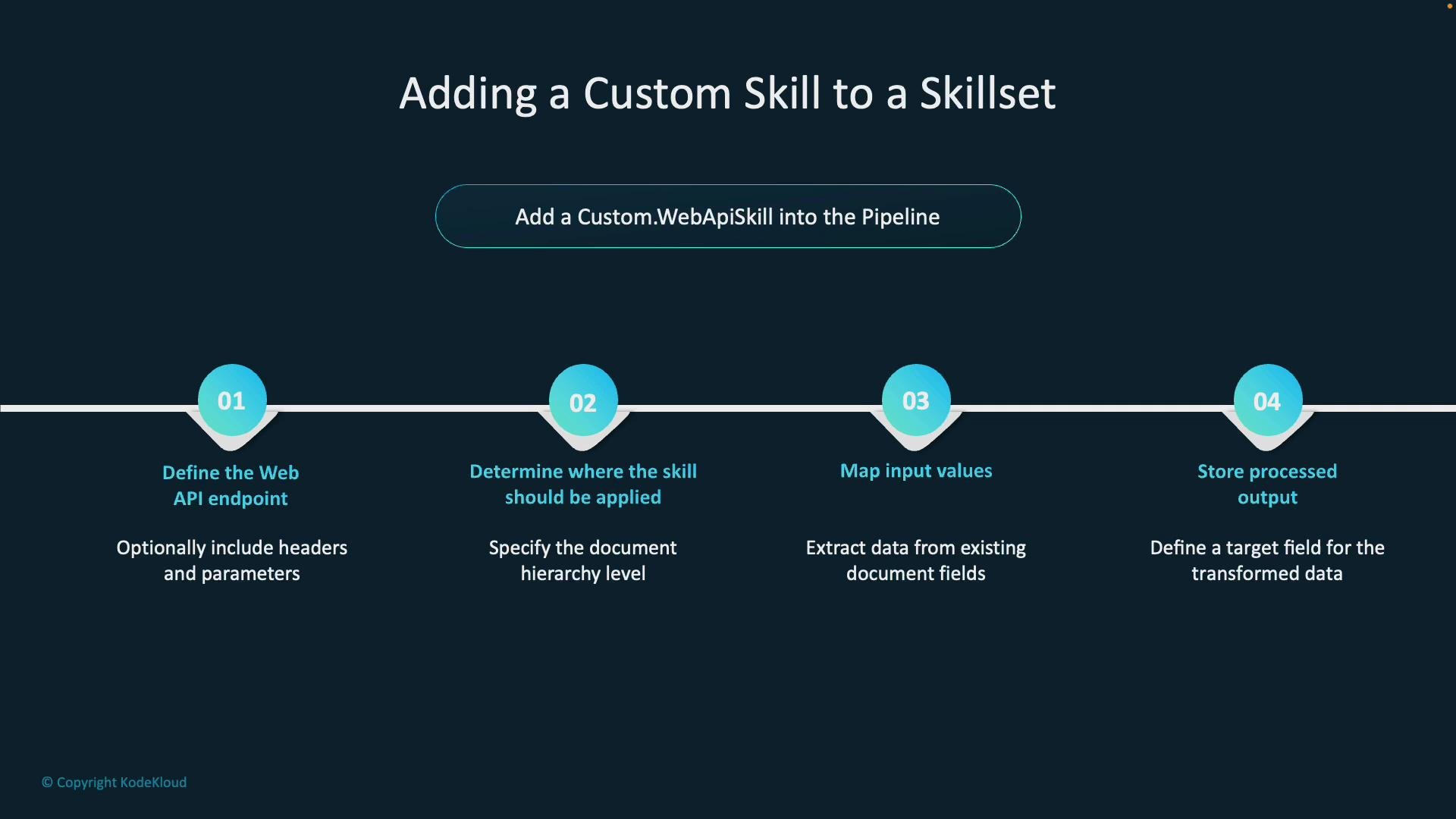
Overview — the four steps to add a custom skill into the pipeline:
1. Define the API endpoint — point to the API that hosts your custom skill (commonly an [Azure Function](https://learn.microsoft.com/azure/azure-functions/)). Optionally include any required HTTP headers and parameters.
2. Determine where the skill should be applied — specify the document context (whole document, section, or field).
3. Map input values — map document fields to the skill's expected inputs (for example, mapping the document's content field).
4. Store the processed output — specify the output field(s) that will be added to the document and indexed.
 Before you begin, ensure you have an Azure Storage container with input documents, an Azure Cognitive Search service, and a hosted Web API (such as an Azure Function) accessible via HTTPS. You will also need permission to create data sources, skillsets, indexes, and indexers in the Search service.
Custom skill JSON (typical structure)
Below is a minimal, focused JSON fragment showing the important properties for a custom Web API skill. Key attributes:
* `@odata.type` — declares the custom Web API skill type.
* `uri` — the HTTP endpoint that implements the skill (include a function key if required).
* `httpHeaders` — optional headers for auth or other metadata.
* `context` — where the skill is applied (for example, `/document`).
* `inputs` — maps document fields to skill inputs.
* `outputs` — names the fields the skill will add to the document.
```json theme={null}
{
"skills": [
{
"@odata.type": "#Microsoft.Skills.Custom.WebApiSkill",
"name": "customemployeeskill",
"description": "Extract employee IDs from document content",
"uri": "https://.azurewebsites.net/api/?code=",
"httpHeaders": {},
"httpMethod": "POST",
"timeout": "PT30S",
"batchSize": 1000,
"context": "/document",
"inputs": [
{
"name": "content",
"source": "/document/content"
}
],
"outputs": [
{
"name": "employeeIds",
"targetName": "employeeIds"
}
]
}
]
}
```
How the Web API must receive and return data
Your Web API must accept and return the Azure Cognitive Search custom skill contract format: a POST body with a `values` array. Each item must include `recordId` and `data` (the input fields). The response must return a `values` array with each `recordId` and `data` containing the output fields (for example, `employeeIds`).
The custom Web API must accept and return the [Azure Cognitive Search](https://learn.microsoft.com/azure/search) document array format (a `values` array with `recordId` and `data` for each item). The response must include `recordId` and `data` with the output field(s) (for example, `employeeIds`).
Sample document files
These sample text files (stored in a blob container) include employee IDs in the `EMP-xxxxx` format. The custom skill will extract and normalize these identifiers.
```text theme={null}
QUARTERLY PERFORMANCE REPORT
Department: Engineering
Date: March 15, 2025
Employee ID: EMP-23791
Performance Rating: Exceeds Expectations
Key Achievements:
- Successfully delivered the cloud migration project two weeks ahead of schedule
- Mentored two junior developers (EMP-45023, EMP-67281)
- Reduced API response time by 35%
Employee ID: EMP-45023
Performance Rating: Meets Expectations
Key Achievements:
- Completed all assigned tasks within deadline
- Participated in cross-functional team collaboration
- Implemented 3 new feature requests
```
```text theme={null}
1 PROJECT IMPLEMENTATION PLAN
2 Project: Mobile App Redesign
3 Manager: EMP-12388
4
5 Team Members:
6 - Lead Designer (EMP-34567)
7 - Senior Developer (EMP-23791)
8 - QA Engineer (EMP-89012)
9 - Content Writer (EMP-56789)
10
11 Timeline:
12 Phase 1: Design - 2 weeks
13 Phase 2: Development - 4 weeks
14 Phase 3: Testing - 2 weeks
15 Phase 4: Deployment - 1 week
```
Implementing the Web API (Azure Function)
A common approach is to implement the custom skill as an Azure Function using Node.js. The function receives a POST with `req.body.values` (an array of records). For each record, extract EMP identifiers from the `content` input and return them in `data.employeeIds` inside the response `values` array.
The example below is resilient: it normalizes matches to `EMP-xxxxx`, deduplicates results, and handles errors per record.
```javascript theme={null}
// Azure Function: index.js
module.exports = async function (context, req) {
context.log('Employee ID Extractor function processed a request.');
if (!req.body || !req.body.values || !Array.isArray(req.body.values)) {
context.res = {
status: 400,
headers: { "Content-Type": "application/json" },
body: { values: [] }
};
return;
}
const response = { values: [] };
for (const record of req.body.values) {
const recordId = record.recordId || null;
const data = record.data || {};
const content = typeof data.content === 'string' ? data.content : '';
try {
context.log(`Processing record ${recordId}`);
// Regex to find EMP identifiers like EMP-12345 or EMP 12345 or EMP12345
const matches = content.match(/EMP[- ]?\d{3,}/gi) || [];
// Normalize matches to format EMP-xxxxx with a single hyphen
const normalized = Array.from(new Set(matches.map(m => m.toUpperCase().replace(/EMP[- ]?/, 'EMP-'))));
response.values.push({
recordId,
data: {
employeeIds: normalized
}
});
} catch (err) {
context.log.error(`Error processing record ${recordId}:`, err);
response.values.push({
recordId,
data: {
employeeIds: []
}
});
}
}
context.res = {
status: 200,
headers: { "Content-Type": "application/json" },
body: response
};
};
```
Creating the data source in Azure AI Search
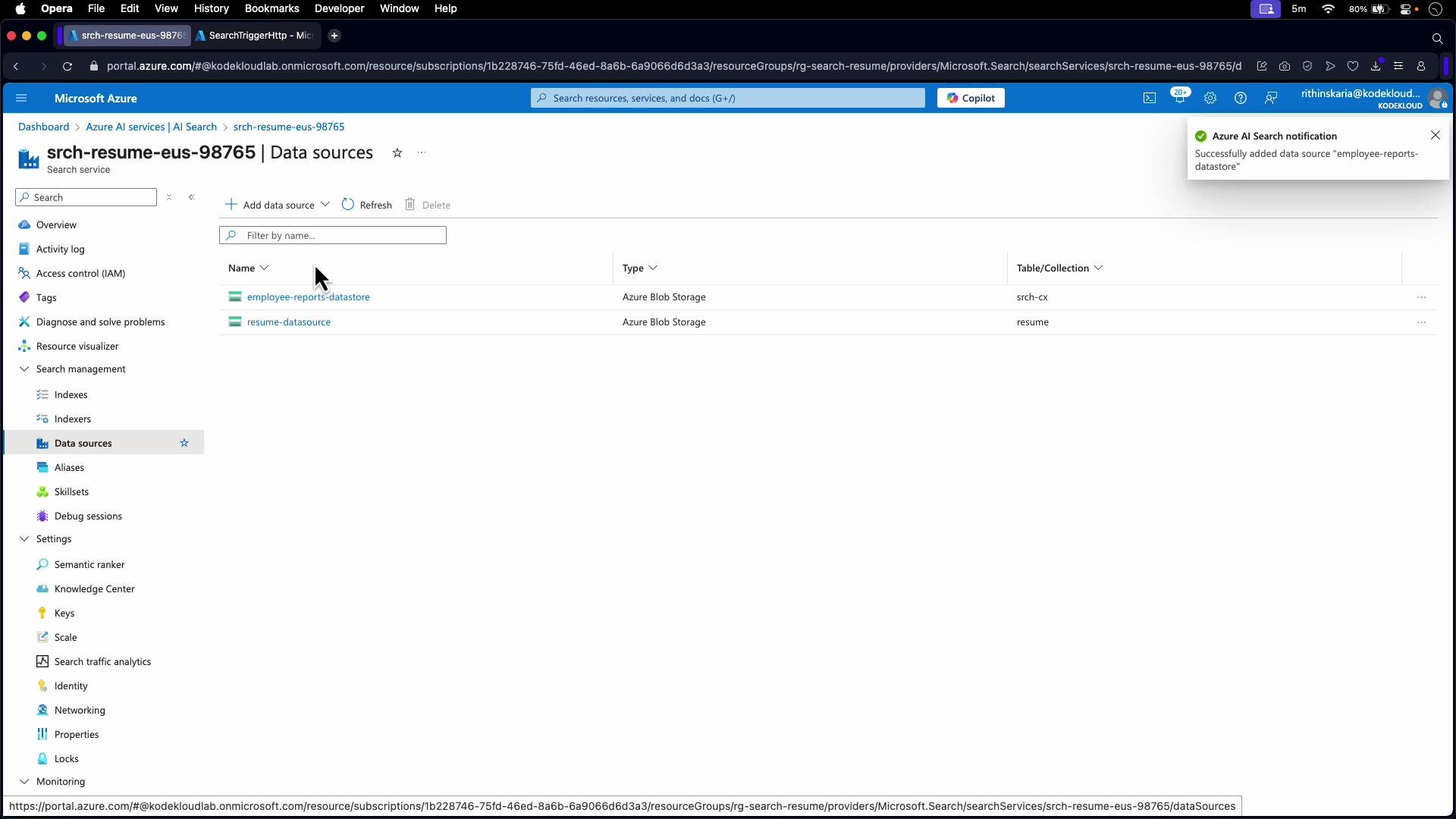
Create a data source that points to your storage account and the container holding the text files. This data source is later used by the indexer to pull raw documents for enrichment.
Before you begin, ensure you have an Azure Storage container with input documents, an Azure Cognitive Search service, and a hosted Web API (such as an Azure Function) accessible via HTTPS. You will also need permission to create data sources, skillsets, indexes, and indexers in the Search service.
Custom skill JSON (typical structure)
Below is a minimal, focused JSON fragment showing the important properties for a custom Web API skill. Key attributes:
* `@odata.type` — declares the custom Web API skill type.
* `uri` — the HTTP endpoint that implements the skill (include a function key if required).
* `httpHeaders` — optional headers for auth or other metadata.
* `context` — where the skill is applied (for example, `/document`).
* `inputs` — maps document fields to skill inputs.
* `outputs` — names the fields the skill will add to the document.
```json theme={null}
{
"skills": [
{
"@odata.type": "#Microsoft.Skills.Custom.WebApiSkill",
"name": "customemployeeskill",
"description": "Extract employee IDs from document content",
"uri": "https://.azurewebsites.net/api/?code=",
"httpHeaders": {},
"httpMethod": "POST",
"timeout": "PT30S",
"batchSize": 1000,
"context": "/document",
"inputs": [
{
"name": "content",
"source": "/document/content"
}
],
"outputs": [
{
"name": "employeeIds",
"targetName": "employeeIds"
}
]
}
]
}
```
How the Web API must receive and return data
Your Web API must accept and return the Azure Cognitive Search custom skill contract format: a POST body with a `values` array. Each item must include `recordId` and `data` (the input fields). The response must return a `values` array with each `recordId` and `data` containing the output fields (for example, `employeeIds`).
The custom Web API must accept and return the [Azure Cognitive Search](https://learn.microsoft.com/azure/search) document array format (a `values` array with `recordId` and `data` for each item). The response must include `recordId` and `data` with the output field(s) (for example, `employeeIds`).
Sample document files
These sample text files (stored in a blob container) include employee IDs in the `EMP-xxxxx` format. The custom skill will extract and normalize these identifiers.
```text theme={null}
QUARTERLY PERFORMANCE REPORT
Department: Engineering
Date: March 15, 2025
Employee ID: EMP-23791
Performance Rating: Exceeds Expectations
Key Achievements:
- Successfully delivered the cloud migration project two weeks ahead of schedule
- Mentored two junior developers (EMP-45023, EMP-67281)
- Reduced API response time by 35%
Employee ID: EMP-45023
Performance Rating: Meets Expectations
Key Achievements:
- Completed all assigned tasks within deadline
- Participated in cross-functional team collaboration
- Implemented 3 new feature requests
```
```text theme={null}
1 PROJECT IMPLEMENTATION PLAN
2 Project: Mobile App Redesign
3 Manager: EMP-12388
4
5 Team Members:
6 - Lead Designer (EMP-34567)
7 - Senior Developer (EMP-23791)
8 - QA Engineer (EMP-89012)
9 - Content Writer (EMP-56789)
10
11 Timeline:
12 Phase 1: Design - 2 weeks
13 Phase 2: Development - 4 weeks
14 Phase 3: Testing - 2 weeks
15 Phase 4: Deployment - 1 week
```
Implementing the Web API (Azure Function)
A common approach is to implement the custom skill as an Azure Function using Node.js. The function receives a POST with `req.body.values` (an array of records). For each record, extract EMP identifiers from the `content` input and return them in `data.employeeIds` inside the response `values` array.
The example below is resilient: it normalizes matches to `EMP-xxxxx`, deduplicates results, and handles errors per record.
```javascript theme={null}
// Azure Function: index.js
module.exports = async function (context, req) {
context.log('Employee ID Extractor function processed a request.');
if (!req.body || !req.body.values || !Array.isArray(req.body.values)) {
context.res = {
status: 400,
headers: { "Content-Type": "application/json" },
body: { values: [] }
};
return;
}
const response = { values: [] };
for (const record of req.body.values) {
const recordId = record.recordId || null;
const data = record.data || {};
const content = typeof data.content === 'string' ? data.content : '';
try {
context.log(`Processing record ${recordId}`);
// Regex to find EMP identifiers like EMP-12345 or EMP 12345 or EMP12345
const matches = content.match(/EMP[- ]?\d{3,}/gi) || [];
// Normalize matches to format EMP-xxxxx with a single hyphen
const normalized = Array.from(new Set(matches.map(m => m.toUpperCase().replace(/EMP[- ]?/, 'EMP-'))));
response.values.push({
recordId,
data: {
employeeIds: normalized
}
});
} catch (err) {
context.log.error(`Error processing record ${recordId}:`, err);
response.values.push({
recordId,
data: {
employeeIds: []
}
});
}
}
context.res = {
status: 200,
headers: { "Content-Type": "application/json" },
body: response
};
};
```
Creating the data source in Azure AI Search
Create a data source that points to your storage account and the container holding the text files. This data source is later used by the indexer to pull raw documents for enrichment.
 Creating the skillset and adding the custom Web API skill
When you create the skillset (via the portal or REST), choose "Custom Web API skill" and configure these key settings:
* Name: `customemployeeskill` (for example)
* Context: `/document` — applies the skill to the entire document
* Inputs: map `content` to `/document/content`
* Outputs: map `employeeIds` to target `employeeIds`
* URI: Azure Function URL (include function key if required)
* HTTP Method: `POST`
* Adjust `timeout`, `batchSize`, and `httpHeaders` as needed
Final skillset JSON example (illustrative):
```json theme={null}
{
"name": "customwebapiskill",
"description": "Skillset with custom employee ID extraction skill",
"skills": [
{
"name": "customemployeeskill",
"description": "Extract employee IDs from document content",
"context": "/document",
"inputs": [
{
"name": "content",
"source": "/document/content"
}
],
"outputs": [
{
"name": "employeeIds",
"targetName": "employeeIds"
}
],
"uri": "https://.azurewebsites.net/api/?code=",
"httpHeaders": {},
"httpMethod": "POST",
"timeout": "PT30S",
"batchSize": 1000,
"@odata.type": "#Microsoft.Skills.Custom.WebApiSkill"
}
]
}
```
Create the index
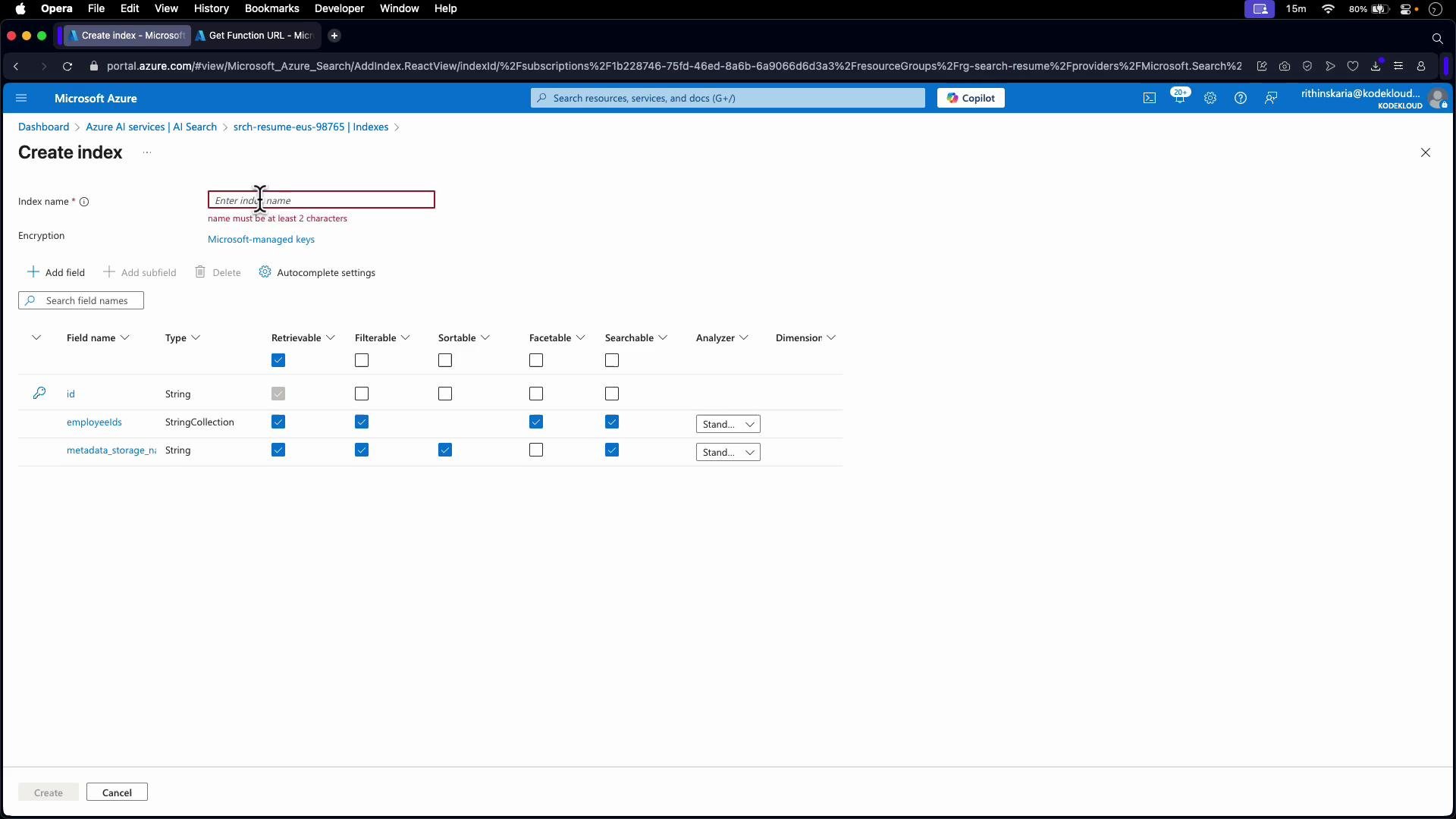
Define an index that contains a field to hold the extracted employee IDs. The recommended field configuration:
| Field name | Type | Retrievable | Searchable | Filterable | Notes |
| ------------- | -----------------------: | :---------: | :------------: | :----------------------: | --------------------------------------------------------------- |
| `employeeIds` | `Collection(Edm.String)` | Yes | Yes (optional) | Yes (if you will filter) | Use `Collection(Edm.String)` to allow multiple IDs per document |
Configure other index fields (for example `id`, `content`, `metadata_storage_name`) as appropriate.
Creating the skillset and adding the custom Web API skill
When you create the skillset (via the portal or REST), choose "Custom Web API skill" and configure these key settings:
* Name: `customemployeeskill` (for example)
* Context: `/document` — applies the skill to the entire document
* Inputs: map `content` to `/document/content`
* Outputs: map `employeeIds` to target `employeeIds`
* URI: Azure Function URL (include function key if required)
* HTTP Method: `POST`
* Adjust `timeout`, `batchSize`, and `httpHeaders` as needed
Final skillset JSON example (illustrative):
```json theme={null}
{
"name": "customwebapiskill",
"description": "Skillset with custom employee ID extraction skill",
"skills": [
{
"name": "customemployeeskill",
"description": "Extract employee IDs from document content",
"context": "/document",
"inputs": [
{
"name": "content",
"source": "/document/content"
}
],
"outputs": [
{
"name": "employeeIds",
"targetName": "employeeIds"
}
],
"uri": "https://.azurewebsites.net/api/?code=",
"httpHeaders": {},
"httpMethod": "POST",
"timeout": "PT30S",
"batchSize": 1000,
"@odata.type": "#Microsoft.Skills.Custom.WebApiSkill"
}
]
}
```
Create the index
Define an index that contains a field to hold the extracted employee IDs. The recommended field configuration:
| Field name | Type | Retrievable | Searchable | Filterable | Notes |
| ------------- | -----------------------: | :---------: | :------------: | :----------------------: | --------------------------------------------------------------- |
| `employeeIds` | `Collection(Edm.String)` | Yes | Yes (optional) | Yes (if you will filter) | Use `Collection(Edm.String)` to allow multiple IDs per document |
Configure other index fields (for example `id`, `content`, `metadata_storage_name`) as appropriate.
 Create the indexer and map outputs
Create (or update) an indexer that ties together the data source, the skillset, and the target index. The crucial configuration is `outputFieldMappings`, which maps skill outputs into index fields. In the portal this is often a UI mapping; with REST you configure `outputFieldMappings` directly.
Create the indexer and map outputs
Create (or update) an indexer that ties together the data source, the skillset, and the target index. The crucial configuration is `outputFieldMappings`, which maps skill outputs into index fields. In the portal this is often a UI mapping; with REST you configure `outputFieldMappings` directly.
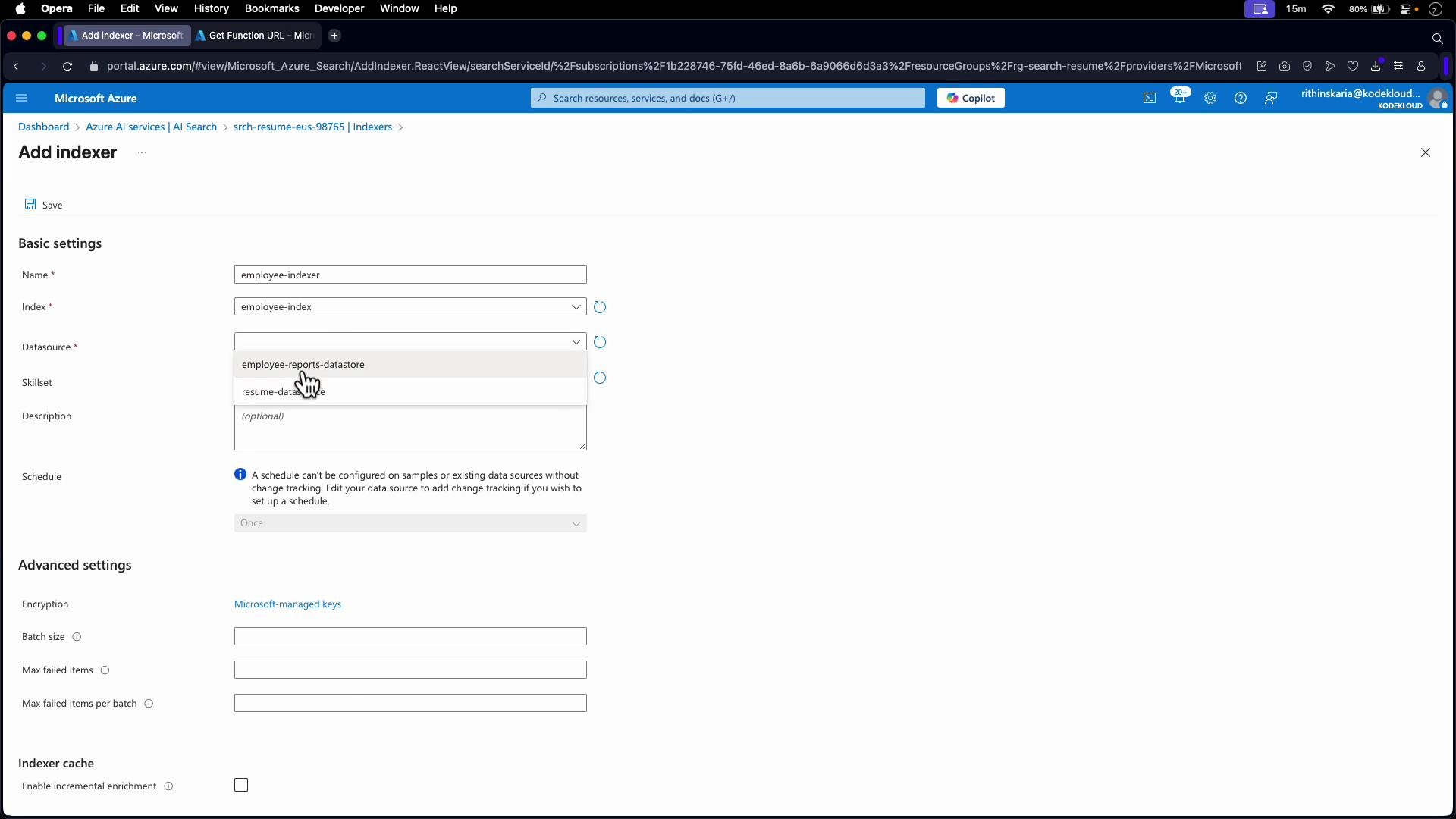 Indexer JSON snippet showing `outputFieldMappings`:
```json theme={null}
{
"name": "employee-indexer",
"dataSourceName": "employee-reports-datastore",
"skillsetName": "customwebapiskill",
"targetIndexName": "employee-index",
"fieldMappings": [],
"outputFieldMappings": [
{
"sourceFieldName": "/document/employeeIds",
"targetFieldName": "employeeIds"
}
]
}
```
Run/reindex and verify results
After you save the indexer, run it (or reset it and run for a full re-index). Initially you may see empty `employeeIds` arrays until the custom skill runs and the output mapping is applied.
Example response before enrichment (employeeIds empty):
```json theme={null}
{
"@odata.count": 3,
"value": [
{
"id": "project-plan.txt",
"employeeIds": [],
"metadata_storage_name": "project-plan.txt"
},
{
"id": "meeting-minutes.txt",
"employeeIds": [],
"metadata_storage_name": "meeting-minutes.txt"
},
{
"id": "employee-report.txt",
"employeeIds": [],
"metadata_storage_name": "employee-report.txt"
}
]
}
```
Example response after enrichment (employeeIds populated):
```json theme={null}
{
"@odata.count": 3,
"value": [
{
"id": "project-plan.txt",
"employeeIds": [
"EMP-12388",
"EMP-34567",
"EMP-23791",
"EMP-89012",
"EMP-56789"
],
"metadata_storage_name": "project-plan.txt"
},
{
"id": "meeting-minutes.txt",
"employeeIds": [
"EMP-12388",
"EMP-23791",
"EMP-45023",
"EMP-89012"
],
"metadata_storage_name": "meeting-minutes.txt"
},
{
"id": "employee-report.txt",
"employeeIds": [
"EMP-23791",
"EMP-45023",
"EMP-67281"
],
"metadata_storage_name": "employee-report.txt"
}
]
}
```
Once indexed, `employeeIds` behaves like any other index field: you can search, filter, facet, and sort depending on the field attributes you chose.
Summary
* Implement a Web API (typically an Azure Function) that accepts the `values` contract and returns `values` with `data` containing your output fields.
* Create a custom Web API skill that points to your function, and configure `context`, `inputs` (e.g., `/document/content`), and `outputs` (e.g., `employeeIds`).
* Create an index field of type `Collection(Edm.String)` to hold the extracted IDs and set retrievable/searchable/filterable options as required.
* Configure the indexer with `outputFieldMappings` to map the skill output (`/document/employeeIds`) to the index field (`employeeIds`).
* Run (or reset and run) the indexer to apply enrichment, then verify that the indexed documents contain the expected results.
Links and References
* [Azure Cognitive Search documentation](https://learn.microsoft.com/azure/search)
* [Azure Functions documentation](https://learn.microsoft.com/azure/azure-functions/)
* [Cognitive Search custom skill interface](https://learn.microsoft.com/azure/search/cognitive-search-custom-skill-interface)
* [Azure Storage account overview](https://learn.microsoft.com/azure/storage/common/storage-account-overview)
* [Search index overview](https://learn.microsoft.com/azure/search/search-index-overview)
* [Search indexer overview](https://learn.microsoft.com/azure/search/search-indexer-overview)
Indexer JSON snippet showing `outputFieldMappings`:
```json theme={null}
{
"name": "employee-indexer",
"dataSourceName": "employee-reports-datastore",
"skillsetName": "customwebapiskill",
"targetIndexName": "employee-index",
"fieldMappings": [],
"outputFieldMappings": [
{
"sourceFieldName": "/document/employeeIds",
"targetFieldName": "employeeIds"
}
]
}
```
Run/reindex and verify results
After you save the indexer, run it (or reset it and run for a full re-index). Initially you may see empty `employeeIds` arrays until the custom skill runs and the output mapping is applied.
Example response before enrichment (employeeIds empty):
```json theme={null}
{
"@odata.count": 3,
"value": [
{
"id": "project-plan.txt",
"employeeIds": [],
"metadata_storage_name": "project-plan.txt"
},
{
"id": "meeting-minutes.txt",
"employeeIds": [],
"metadata_storage_name": "meeting-minutes.txt"
},
{
"id": "employee-report.txt",
"employeeIds": [],
"metadata_storage_name": "employee-report.txt"
}
]
}
```
Example response after enrichment (employeeIds populated):
```json theme={null}
{
"@odata.count": 3,
"value": [
{
"id": "project-plan.txt",
"employeeIds": [
"EMP-12388",
"EMP-34567",
"EMP-23791",
"EMP-89012",
"EMP-56789"
],
"metadata_storage_name": "project-plan.txt"
},
{
"id": "meeting-minutes.txt",
"employeeIds": [
"EMP-12388",
"EMP-23791",
"EMP-45023",
"EMP-89012"
],
"metadata_storage_name": "meeting-minutes.txt"
},
{
"id": "employee-report.txt",
"employeeIds": [
"EMP-23791",
"EMP-45023",
"EMP-67281"
],
"metadata_storage_name": "employee-report.txt"
}
]
}
```
Once indexed, `employeeIds` behaves like any other index field: you can search, filter, facet, and sort depending on the field attributes you chose.
Summary
* Implement a Web API (typically an Azure Function) that accepts the `values` contract and returns `values` with `data` containing your output fields.
* Create a custom Web API skill that points to your function, and configure `context`, `inputs` (e.g., `/document/content`), and `outputs` (e.g., `employeeIds`).
* Create an index field of type `Collection(Edm.String)` to hold the extracted IDs and set retrievable/searchable/filterable options as required.
* Configure the indexer with `outputFieldMappings` to map the skill output (`/document/employeeIds`) to the index field (`employeeIds`).
* Run (or reset and run) the indexer to apply enrichment, then verify that the indexed documents contain the expected results.
Links and References
* [Azure Cognitive Search documentation](https://learn.microsoft.com/azure/search)
* [Azure Functions documentation](https://learn.microsoft.com/azure/azure-functions/)
* [Cognitive Search custom skill interface](https://learn.microsoft.com/azure/search/cognitive-search-custom-skill-interface)
* [Azure Storage account overview](https://learn.microsoft.com/azure/storage/common/storage-account-overview)
* [Search index overview](https://learn.microsoft.com/azure/search/search-index-overview)
* [Search indexer overview](https://learn.microsoft.com/azure/search/search-indexer-overview)