> ## Documentation Index
> Fetch the complete documentation index at: https://notes.kodekloud.com/llms.txt
> Use this file to discover all available pages before exploring further.
# Deploying Generative AI Models
> Guide to deploying and integrating generative AI models with Azure AI Foundry covering quota checks, portal and CLI deployments including fine tuning, and SDK-based application integration.
This guide shows a practical, end-to-end approach to deploying generative AI models with Azure AI Foundry (Azure OpenAI). You'll learn how to check quotas, automate deployments with Azure CLI, deploy from the AI Foundry portal (including fine-tuning), and call your deployed model from an application using the official SDK.
Overview
* Use Azure AI Foundry to simplify model hosting, scaling, and operational management.
* Choose between deploying a base model or creating a fine-tuned model using labeled data.
* Automate repeatable deployments via Azure CLI and integrate models into apps via SDKs.
Meet Alex, an AI engineer who needs a production-ready generative model for a customer-facing application. He chooses Azure AI Foundry because it abstracts infrastructure and provides portal, CLI, and SDK tooling for deployment, testing, and integration.
Before you deploy: check quotas and capacity
Quota in Azure determines how many deployments and what VM SKUs/capacity you can run in a region. Deploying GPT-4-class models (for example, GPT-4-32K) typically requires higher quota than lighter models. Check quotas in the Azure Portal and request increases proactively to avoid deployment failures or delays.
Check your subscription and regional quotas (and request increases if needed) before attempting to deploy larger models. Quota affects both the number of concurrent deployments and the capacity/VM sizes available.
Automating deployments with Azure CLI
For repeatable provisioning across environments (dev, staging, prod), use the Azure CLI. Automation is helpful when deploying multiple instances or managing infrastructure-as-code workflows.
Example: create a GPT-4 32K deployment
Modify resource names, model version, capacity, or SKU to match your subscription and quota.
```bash theme={null}
az cognitiveservices account deployment create \
--resource-group MyResourceGroup \
--name MyAIResource \
--deployment-name my-custom-model \
--model-name gpt-4-32k \
--model-version "0613" \
--model-format OpenAI \
--sku Premium \
--capacity 5
```
 Deploying from the AI Foundry Portal
The portal supports both direct deployment of base models and creating fine-tuned variants:
* Deploy base model: open the model page, click Deploy, choose deployment options, and confirm. You can edit the deployment name or accept the default.
* Fine-tune: use the portal dialog to upload training and validation datasets, set the tuning method and hyperparameters, and create a fine-tuned model.
The portal also includes quick testing via the Playground and provides SDK code snippets for different languages to reduce context switching.
Deploying from the AI Foundry Portal
The portal supports both direct deployment of base models and creating fine-tuned variants:
* Deploy base model: open the model page, click Deploy, choose deployment options, and confirm. You can edit the deployment name or accept the default.
* Fine-tune: use the portal dialog to upload training and validation datasets, set the tuning method and hyperparameters, and create a fine-tuned model.
The portal also includes quick testing via the Playground and provides SDK code snippets for different languages to reduce context switching.
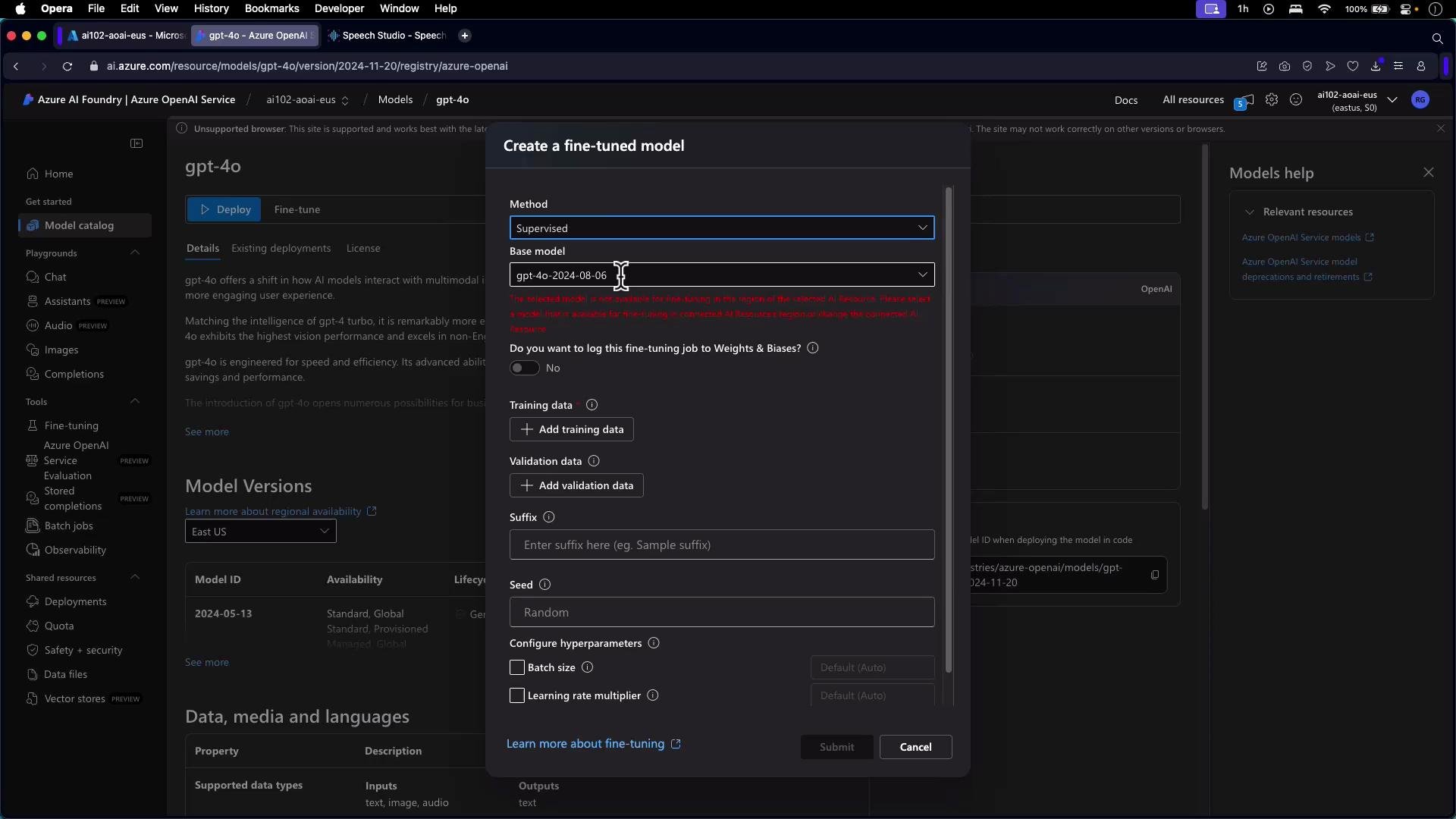 After you click Deploy and the deployment completes, open the model in the Playground to test chat completions, prompt designs, or other interactions. The portal also surfaces client SDK examples for quick integration.
 Calling your deployed model from an application
Once your model is deployed and validated, integrate it into your app. Below is a concise Python example using the official azure-ai-openai package. Replace endpoint, key, and deployment\_id with your values.
Install the package:
```bash theme={null}
pip install azure-ai-openai
```
Python example:
```python theme={null}
from azure.ai.openai import OpenAIClient
from azure.core.credentials import AzureKeyCredential
import os
endpoint = "https://ai102-aoai-eus.openai.azure.com/"
key = os.environ["AZURE_OPENAI_KEY"] # set your Azure OpenAI key in env
client = OpenAIClient(endpoint, AzureKeyCredential(key))
# Get model metadata
model_info = client.get_model("gpt-4o")
print(model_info)
# Create a chat completion using a deployed model
response = client.chat.completions.create(
deployment_id="my-custom-model", # the deployment name you created
messages=[
{"role": "system", "content": "You are a helpful assistant."},
{"role": "user", "content": "Write a short welcome message for new users."}
],
)
print(response.choices[0].message.content)
```
Tips for integration
* Use the Playground to iterate on prompts and system messages before embedding them in production code.
* Respect rate limits and scale your deployment capacity based on expected traffic.
* Store and rotate keys securely (e.g., Azure Key Vault or environment variables).
Quick reference: deployment methods and use cases
| Deployment method | Use case | Example / Note |
| ------------------------: | ------------------------------------------------------- | ------------------------------------------------ |
| Azure Portal (AI Foundry) | Interactive deployments, fine-tuning, and quick testing | Use for experimentation and Playground testing |
| Azure CLI | Automated, repeatable deployments across environments | Scripted provisioning and CI/CD integration |
| SDKs (Python, JS, etc.) | Application integration and runtime calls | Use azure-ai-openai package for managed clients |
| Fine-tuning via portal | Custom behavior for domain-specific tasks | Provide labeled training and validation datasets |
Recap and next steps
* Verify subscription and regional quotas before deploying larger models to avoid interruptions.
* Use the Azure Portal for interactive deployment, fine-tuning, and Playground testing.
* Automate deployments with Azure CLI to make provisioning repeatable across environments.
* Integrate deployed models into applications using SDKs like azure-ai-openai and follow best practices for prompt design and security.
Links and references
* [Azure OpenAI Service documentation](https://learn.microsoft.com/azure/cognitive-services/openai/)
* [azure-ai-openai (PyPI)](https://pypi.org/project/azure-ai-openai/)
* [Azure CLI documentation](https://learn.microsoft.com/cli/azure/)
* [Azure quotas and limits](https://learn.microsoft.com/azure/azure-subscriptions/manage-subscription-services-resources)
Now that you know how to deploy models with Azure AI Foundry, continue by exploring prompt engineering strategies and experiment in the Playground to optimize responses for your application.
Calling your deployed model from an application
Once your model is deployed and validated, integrate it into your app. Below is a concise Python example using the official azure-ai-openai package. Replace endpoint, key, and deployment\_id with your values.
Install the package:
```bash theme={null}
pip install azure-ai-openai
```
Python example:
```python theme={null}
from azure.ai.openai import OpenAIClient
from azure.core.credentials import AzureKeyCredential
import os
endpoint = "https://ai102-aoai-eus.openai.azure.com/"
key = os.environ["AZURE_OPENAI_KEY"] # set your Azure OpenAI key in env
client = OpenAIClient(endpoint, AzureKeyCredential(key))
# Get model metadata
model_info = client.get_model("gpt-4o")
print(model_info)
# Create a chat completion using a deployed model
response = client.chat.completions.create(
deployment_id="my-custom-model", # the deployment name you created
messages=[
{"role": "system", "content": "You are a helpful assistant."},
{"role": "user", "content": "Write a short welcome message for new users."}
],
)
print(response.choices[0].message.content)
```
Tips for integration
* Use the Playground to iterate on prompts and system messages before embedding them in production code.
* Respect rate limits and scale your deployment capacity based on expected traffic.
* Store and rotate keys securely (e.g., Azure Key Vault or environment variables).
Quick reference: deployment methods and use cases
| Deployment method | Use case | Example / Note |
| ------------------------: | ------------------------------------------------------- | ------------------------------------------------ |
| Azure Portal (AI Foundry) | Interactive deployments, fine-tuning, and quick testing | Use for experimentation and Playground testing |
| Azure CLI | Automated, repeatable deployments across environments | Scripted provisioning and CI/CD integration |
| SDKs (Python, JS, etc.) | Application integration and runtime calls | Use azure-ai-openai package for managed clients |
| Fine-tuning via portal | Custom behavior for domain-specific tasks | Provide labeled training and validation datasets |
Recap and next steps
* Verify subscription and regional quotas before deploying larger models to avoid interruptions.
* Use the Azure Portal for interactive deployment, fine-tuning, and Playground testing.
* Automate deployments with Azure CLI to make provisioning repeatable across environments.
* Integrate deployed models into applications using SDKs like azure-ai-openai and follow best practices for prompt design and security.
Links and references
* [Azure OpenAI Service documentation](https://learn.microsoft.com/azure/cognitive-services/openai/)
* [azure-ai-openai (PyPI)](https://pypi.org/project/azure-ai-openai/)
* [Azure CLI documentation](https://learn.microsoft.com/cli/azure/)
* [Azure quotas and limits](https://learn.microsoft.com/azure/azure-subscriptions/manage-subscription-services-resources)
Now that you know how to deploy models with Azure AI Foundry, continue by exploring prompt engineering strategies and experiment in the Playground to optimize responses for your application.