> ## Documentation Index
> Fetch the complete documentation index at: https://notes.kodekloud.com/llms.txt
> Use this file to discover all available pages before exploring further.
# Azure AI Search
> Overview of Azure AI Search, an AI-powered service that enriches, indexes, and semantically ranks documents using OCR, NLP, embeddings, and knowledge mining for improved enterprise search
Azure AI Search (formerly Azure Cognitive Search) is an AI-powered search and knowledge-mining service that helps users find the most relevant information across large, heterogeneous data collections. It combines document cracking, AI enrichment, indexing, semantic ranking, and querying to turn raw documents into actionable, searchable knowledge.
Key SEO terms: Azure AI Search, Azure Cognitive Search, AI enrichment, semantic ranking, vector search, knowledge mining, indexing, OCR, entity recognition.
## What Azure AI Search does — at a glance
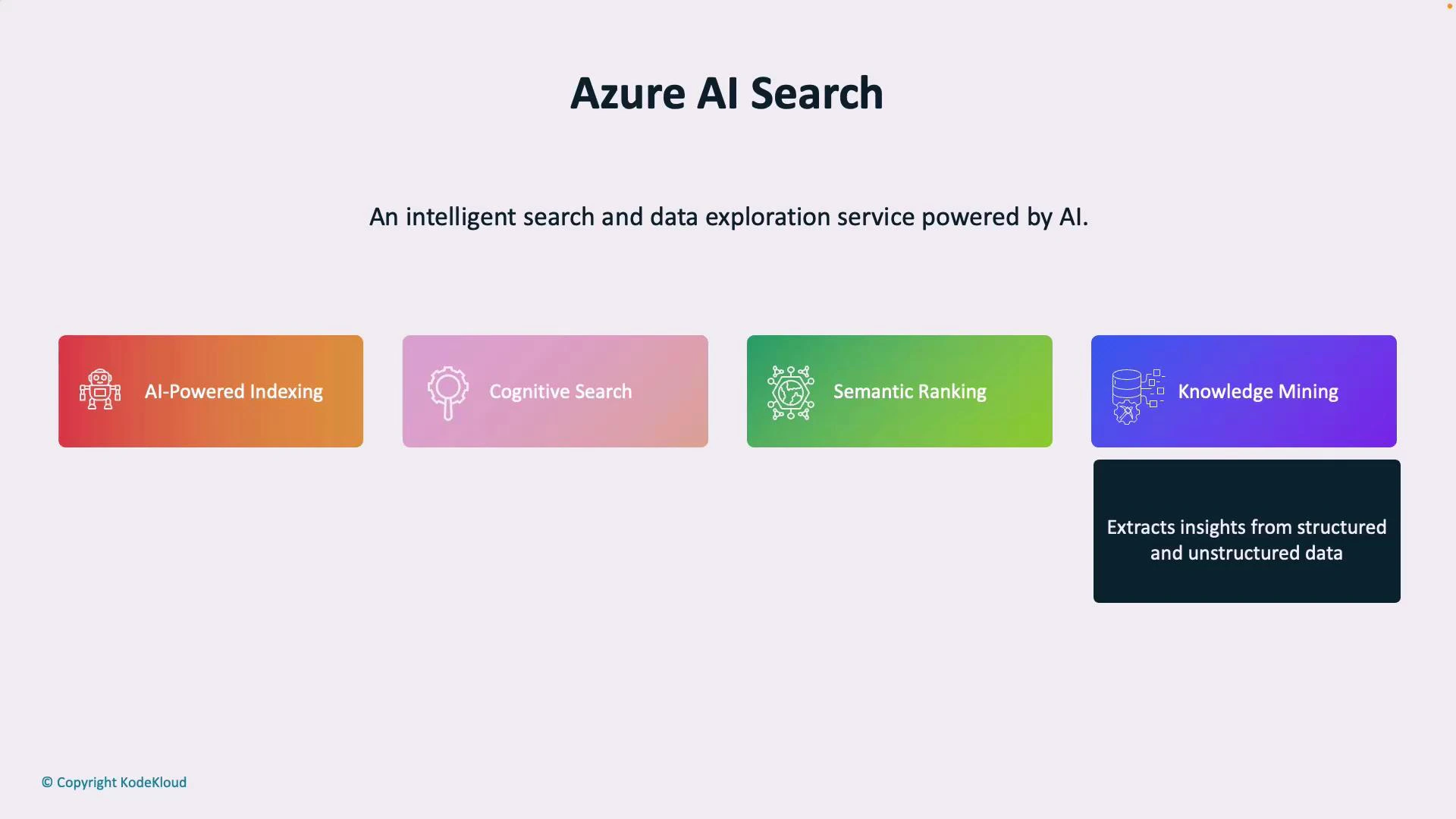
* AI-powered indexing: Automatically extracts and structures searchable fields from documents, databases, and file stores.
* Natural-language understanding: Uses NLP to interpret user intent and return conceptually relevant results beyond exact keyword matches.
* Semantic ranking: Prioritizes results that are most relevant by understanding relationships between words and concepts.
* Knowledge mining: Extracts entities, key phrases, and relationships from structured and unstructured sources (PDFs, images, spreadsheets, etc.) for downstream use.
| Capability | What it does | Typical use case |
| ----------------------: | --------------------------------------------------------------------------------------------- | ---------------------------------------------------------------------- |
| AI-powered indexing | Enriches content (OCR, entity extraction, key phrases) and converts it into searchable fields | Indexing large sets of PDFs or scanned documents for enterprise search |
| Natural-language search | Interprets intent and matches concepts rather than exact keywords | Conversational search queries like “top-selling product in Q1” |
| Semantic ranking | Ranks results using embeddings/semantic models to surface most helpful answers | Improving relevance for question-answering or knowledge base lookups |
| Knowledge mining | Detects entities and builds relationships across documents | Building knowledge graphs or metadata layers for BI and analytics |
 ## How Azure AI Search works — the pipeline
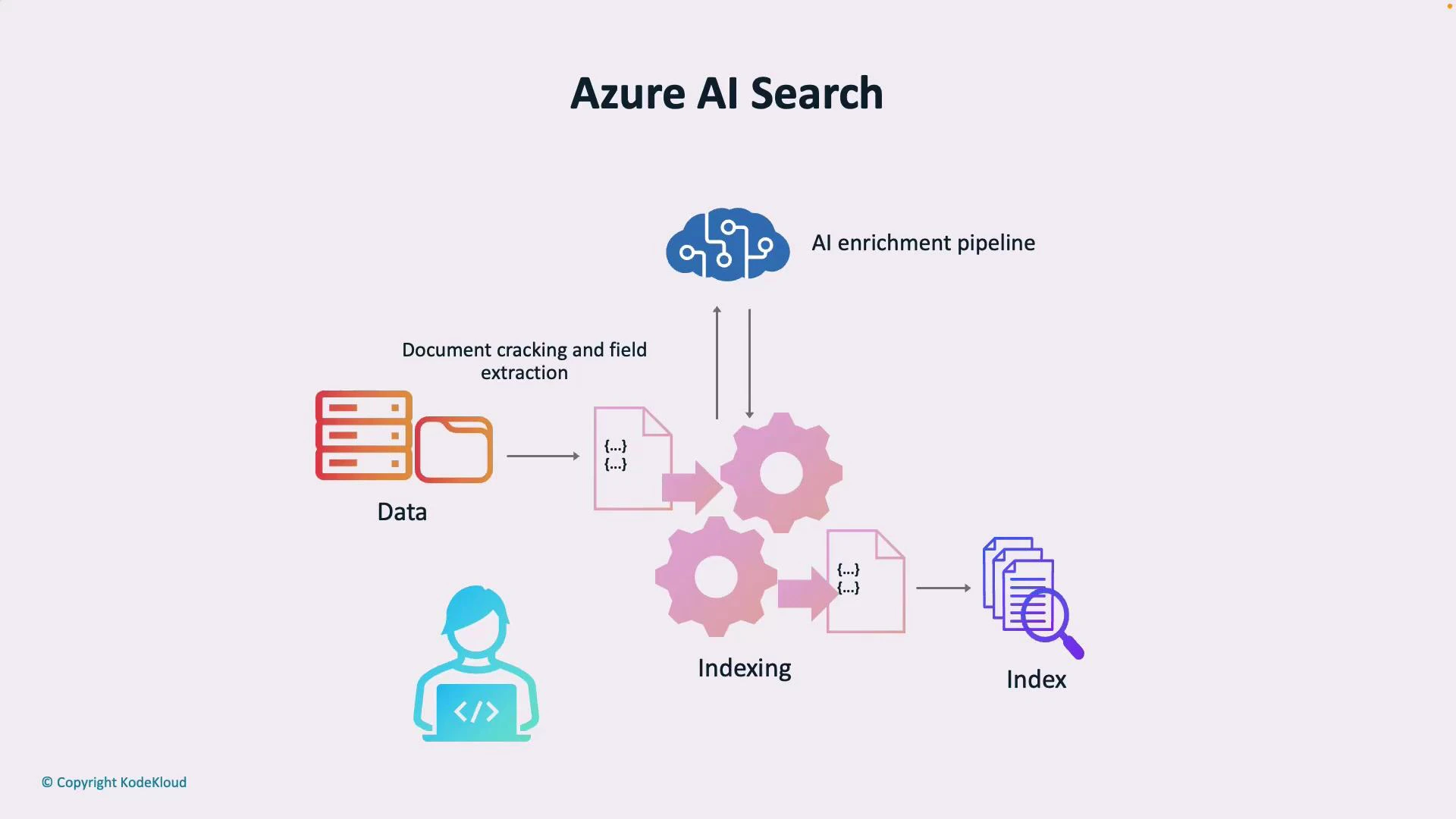
Azure AI Search usually follows a simple pipeline: ingestion → AI enrichment → indexing → querying. Each stage transforms your raw data into structured, searchable knowledge.
1. Raw data sources
* Files, blobs, databases, or other storage systems.
2. AI enrichment pipeline
* Applies cognitive skills such as OCR (for scanned images), entity recognition, key-phrase extraction, language detection, translation, and custom skills to extract structured content from unstructured documents.
3. Indexing
* Converts enriched content into a searchable index: text fields, filters, facets, scoring profiles, and optionally vector embeddings for semantic or vector search.
4. Querying and ranking
* Applications and users query the index using text queries, filters, facets, or semantic queries. Results are ranked by relevance, scoring profiles, and semantic ranking when enabled.
| Pipeline stage | Primary function | Output |
| -------------- | --------------------------------------------------- | ------------------------------------- |
| Ingestion | Bring raw files and data into the pipeline | Documents/blobs/records |
| AI enrichment | Extract structured fields and metadata from content | Enriched documents (JSON) |
| Indexing | Create searchable index and optional vectors | Search index with fields & embeddings |
| Querying | Execute queries and return ranked results | Ranked search results & facets |
## How Azure AI Search works — the pipeline
Azure AI Search usually follows a simple pipeline: ingestion → AI enrichment → indexing → querying. Each stage transforms your raw data into structured, searchable knowledge.
1. Raw data sources
* Files, blobs, databases, or other storage systems.
2. AI enrichment pipeline
* Applies cognitive skills such as OCR (for scanned images), entity recognition, key-phrase extraction, language detection, translation, and custom skills to extract structured content from unstructured documents.
3. Indexing
* Converts enriched content into a searchable index: text fields, filters, facets, scoring profiles, and optionally vector embeddings for semantic or vector search.
4. Querying and ranking
* Applications and users query the index using text queries, filters, facets, or semantic queries. Results are ranked by relevance, scoring profiles, and semantic ranking when enabled.
| Pipeline stage | Primary function | Output |
| -------------- | --------------------------------------------------- | ------------------------------------- |
| Ingestion | Bring raw files and data into the pipeline | Documents/blobs/records |
| AI enrichment | Extract structured fields and metadata from content | Enriched documents (JSON) |
| Indexing | Create searchable index and optional vectors | Search index with fields & embeddings |
| Querying | Execute queries and return ranked results | Ranked search results & facets |
 If terms like "indexing", "AI enrichment", or "skillset" are unfamiliar, think of them this way: indexing is how documents are organized for fast search; enrichment is the AI work that extracts searchable metadata; a skillset is the collection of enrichment steps (OCR, entity extraction, custom code).
## Core concepts explained
* Index: A data structure that Azure Search uses to enable fast search operations (fields, data types, analyzers).
* Skillset: A pipeline of cognitive skills that transform raw content into enriched JSON fields.
* Cognitive skills: Prebuilt (OCR, language detection) or custom functions that extract entities, key phrases, or apply business logic.
* Semantic configurations: Settings that enable semantic ranking and passage retrieval using embeddings or language models.
* Vector/semantic search: Uses vector embeddings to find conceptually similar content, especially useful for natural language queries and question-answering.
## Example: Minimal REST search request
Below is a simplified example of a search POST request to an Azure Search index (semantic search preview API). Replace placeholders with your service name, index name, and API key.
```http theme={null}
POST https://.search.windows.net/indexes//docs/search?api-version=2021-04-30-Preview
api-key:
Content-Type: application/json
{
"search": "top-selling product in Q1",
"queryType": "semantic",
"semantic": {
"configuration": "default"
},
"top": 5
}
```
Use the latest API version for production and consult Azure docs for semantic features and vector search options:
* [https://learn.microsoft.com/azure/search/](https://learn.microsoft.com/azure/search/)
## When to use Azure AI Search
* Enterprise search portals across documents and knowledge bases.
* Customer support knowledge bases, to power FAQ and conversational interfaces.
* Content discovery for digital asset management (images, video transcripts, PDFs).
* Building knowledge graphs and downstream analytics from mined entities.
## Quick-start checklist
* Create an Azure AI Search service in the Azure portal.
* Define an index schema for fields and data types.
* Create a skillset for AI enrichments (OCR, named-entity recognition, key phrases).
* Run indexer to ingest and enrich documents.
* Configure semantic settings or vector search for better relevance.
* Integrate via REST SDKs or client libraries and tune scoring profiles.
## Links and references
* [Azure AI Search documentation](https://learn.microsoft.com/azure/search/)
* [Azure Cognitive Services overview](https://learn.microsoft.com/azure/cognitive-services/)
* [Semantic search with Azure Cognitive Search](https://learn.microsoft.com/azure/search/semantic-search-overview)
We have completed the introduction to Azure AI Services. Upcoming lessons will cover how to deploy these services, configure indexes and skillsets, and make REST API calls to interact with the search service.
Next up: hands-on configuration — creating a search service, defining an index, and applying AI enrichments to real data.
If terms like "indexing", "AI enrichment", or "skillset" are unfamiliar, think of them this way: indexing is how documents are organized for fast search; enrichment is the AI work that extracts searchable metadata; a skillset is the collection of enrichment steps (OCR, entity extraction, custom code).
## Core concepts explained
* Index: A data structure that Azure Search uses to enable fast search operations (fields, data types, analyzers).
* Skillset: A pipeline of cognitive skills that transform raw content into enriched JSON fields.
* Cognitive skills: Prebuilt (OCR, language detection) or custom functions that extract entities, key phrases, or apply business logic.
* Semantic configurations: Settings that enable semantic ranking and passage retrieval using embeddings or language models.
* Vector/semantic search: Uses vector embeddings to find conceptually similar content, especially useful for natural language queries and question-answering.
## Example: Minimal REST search request
Below is a simplified example of a search POST request to an Azure Search index (semantic search preview API). Replace placeholders with your service name, index name, and API key.
```http theme={null}
POST https://.search.windows.net/indexes//docs/search?api-version=2021-04-30-Preview
api-key:
Content-Type: application/json
{
"search": "top-selling product in Q1",
"queryType": "semantic",
"semantic": {
"configuration": "default"
},
"top": 5
}
```
Use the latest API version for production and consult Azure docs for semantic features and vector search options:
* [https://learn.microsoft.com/azure/search/](https://learn.microsoft.com/azure/search/)
## When to use Azure AI Search
* Enterprise search portals across documents and knowledge bases.
* Customer support knowledge bases, to power FAQ and conversational interfaces.
* Content discovery for digital asset management (images, video transcripts, PDFs).
* Building knowledge graphs and downstream analytics from mined entities.
## Quick-start checklist
* Create an Azure AI Search service in the Azure portal.
* Define an index schema for fields and data types.
* Create a skillset for AI enrichments (OCR, named-entity recognition, key phrases).
* Run indexer to ingest and enrich documents.
* Configure semantic settings or vector search for better relevance.
* Integrate via REST SDKs or client libraries and tune scoring profiles.
## Links and references
* [Azure AI Search documentation](https://learn.microsoft.com/azure/search/)
* [Azure Cognitive Services overview](https://learn.microsoft.com/azure/cognitive-services/)
* [Semantic search with Azure Cognitive Search](https://learn.microsoft.com/azure/search/semantic-search-overview)
We have completed the introduction to Azure AI Services. Upcoming lessons will cover how to deploy these services, configure indexes and skillsets, and make REST API calls to interact with the search service.
Next up: hands-on configuration — creating a search service, defining an index, and applying AI enrichments to real data.