> ## Documentation Index
> Fetch the complete documentation index at: https://notes.kodekloud.com/llms.txt
> Use this file to discover all available pages before exploring further.
# Computer Vision Models
> Overview of CNNs, Vision Transformers, and Diffusion Models explaining methods, applications, and Azure services for image analysis, generation, and multimodal vision tasks.
This lesson surveys the core model families that enable machines to understand, analyze, and create visual content. We'll cover Convolutional Neural Networks (CNNs), Vision Transformers (ViT), and Diffusion Models, with practical examples and links to relevant Azure services. Each section explains the core idea, how the model processes images, and where it's commonly used.
## Convolutional Neural Networks (CNNs)
Convolutional Neural Networks (CNNs) convert raw pixels into progressively richer visual features. Think of a CNN as a system that scans an image for local patterns (edges, textures, colors) and combines those patterns into higher-level concepts (shapes, object parts) that are useful for tasks like classification, detection, and segmentation.
How training works (high level)
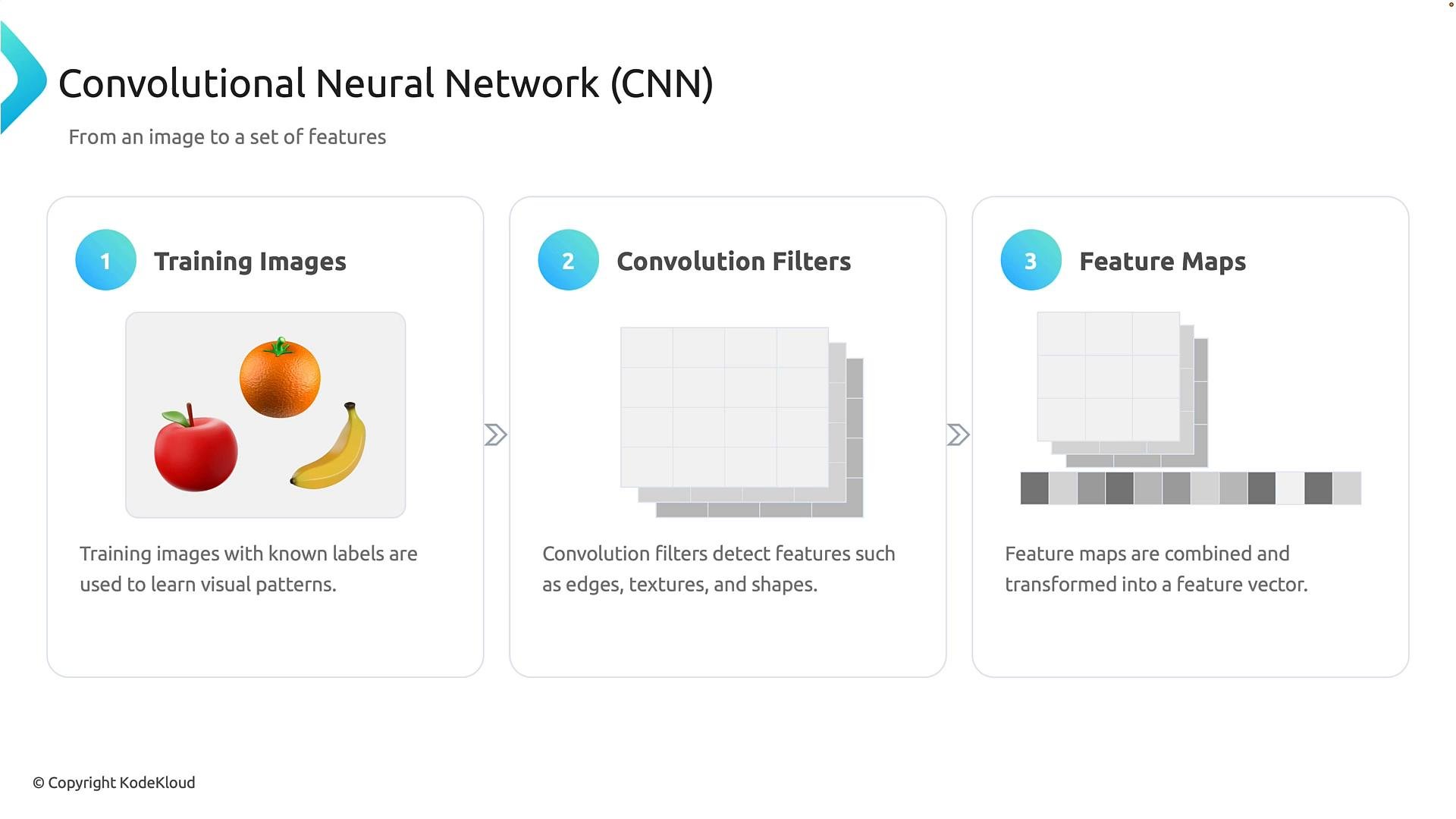
* Collect labeled images (e.g., apples, oranges, bananas).
* Learn convolutional filters that detect informative local patterns.
* Stack layers so deeper layers build on earlier features.
* Use classification (dense) layers to map extracted features to class scores.
The core operation is convolution: a small filter (kernel) slides over the image and produces a feature map indicating where a pattern occurs. Early layers typically learn simple filters (edges, colors); later layers learn complex combinations useful for discrimination.
 After feature extraction, dense (fully connected) classification layers combine signals from feature maps to produce scores for each class. For example, a network might output scores like apple: 0.94, orange: 0.04, banana: 0.02, which are commonly normalized with softmax to provide relative confidences.
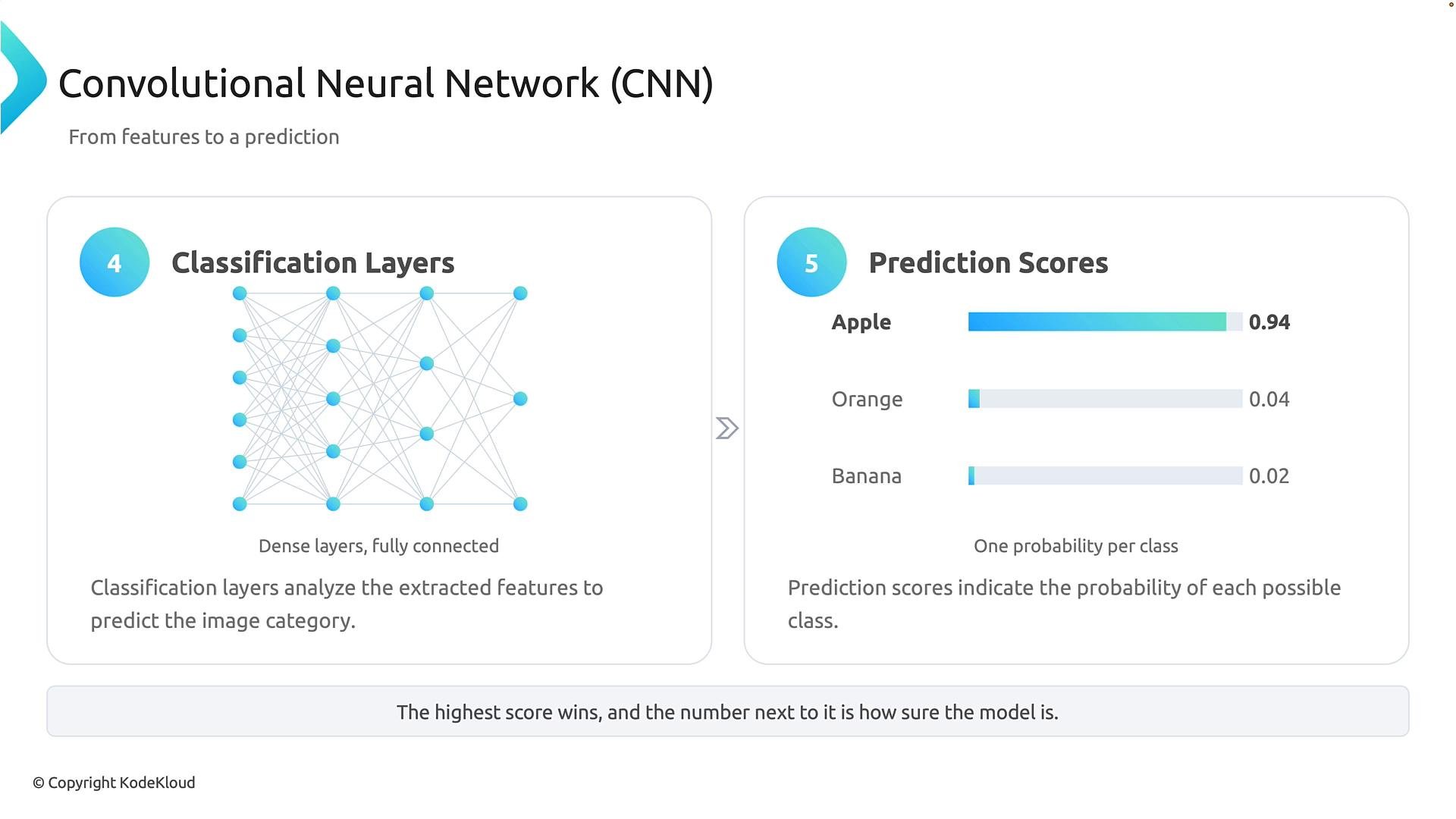 Model output scores indicate how strongly a model favors each class but are not guaranteed to be perfectly calibrated probabilities. Treat these scores as informative signals and apply calibration or uncertainty measures when required by your application.
Common CNN applications
* Photo organization and image search
* Object detection and instance segmentation
* Facial recognition and biometric analysis
## Vision Transformers (ViT)
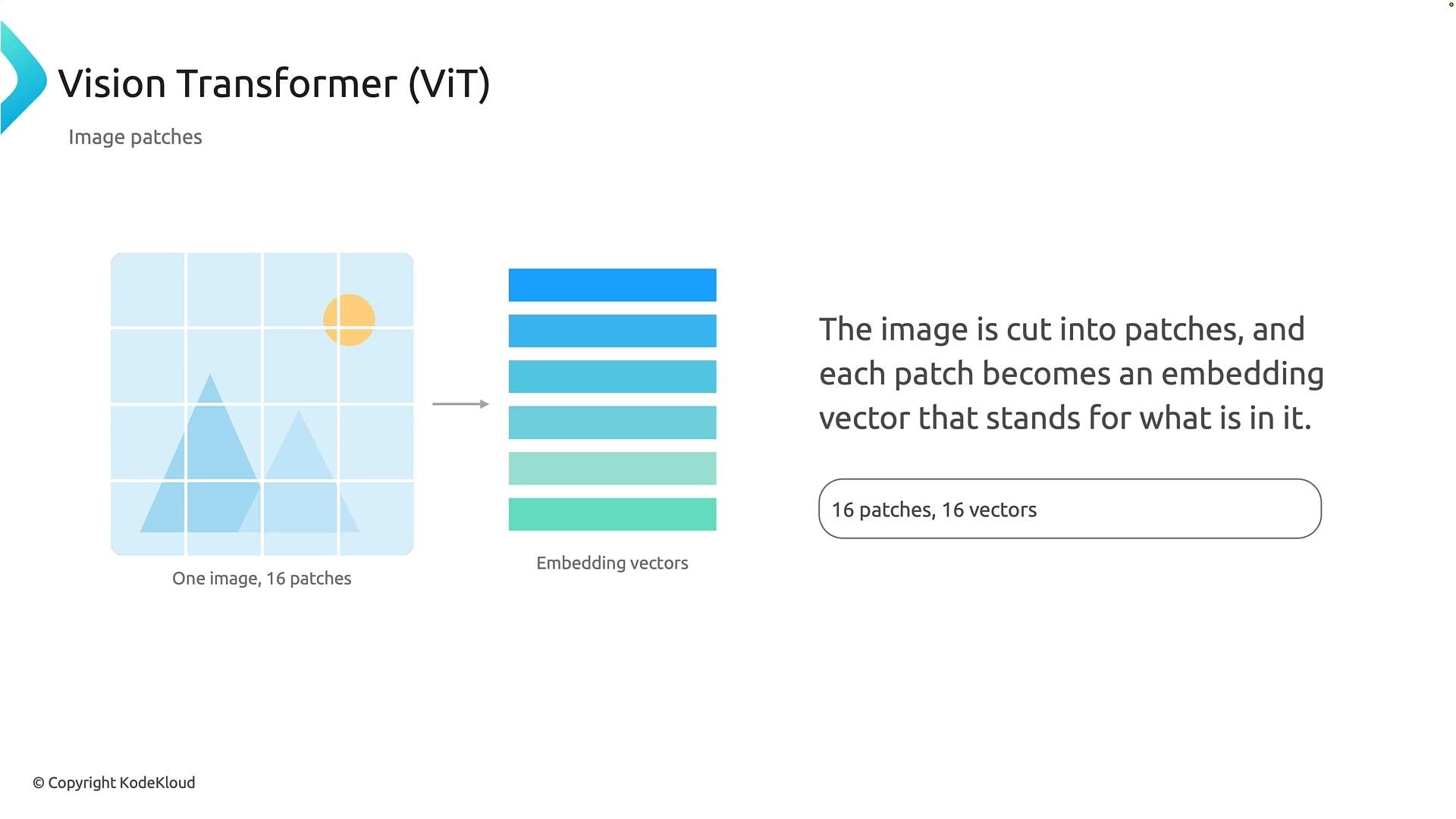
Vision Transformers adapt transformer architectures from NLP to images by converting image patches into a sequence of token-like embeddings. Each patch becomes an embedding vector, and the transformer then models relationships among those patches using self-attention.
Why patching works
* Splitting an image into fixed-size patches turns spatial data into a sequence.
* Each patch becomes a visual token, analogous to a word embedding in language models.
* Transformers process the sequence and learn global relationships between patches.
Model output scores indicate how strongly a model favors each class but are not guaranteed to be perfectly calibrated probabilities. Treat these scores as informative signals and apply calibration or uncertainty measures when required by your application.
Common CNN applications
* Photo organization and image search
* Object detection and instance segmentation
* Facial recognition and biometric analysis
## Vision Transformers (ViT)
Vision Transformers adapt transformer architectures from NLP to images by converting image patches into a sequence of token-like embeddings. Each patch becomes an embedding vector, and the transformer then models relationships among those patches using self-attention.
Why patching works
* Splitting an image into fixed-size patches turns spatial data into a sequence.
* Each patch becomes a visual token, analogous to a word embedding in language models.
* Transformers process the sequence and learn global relationships between patches.
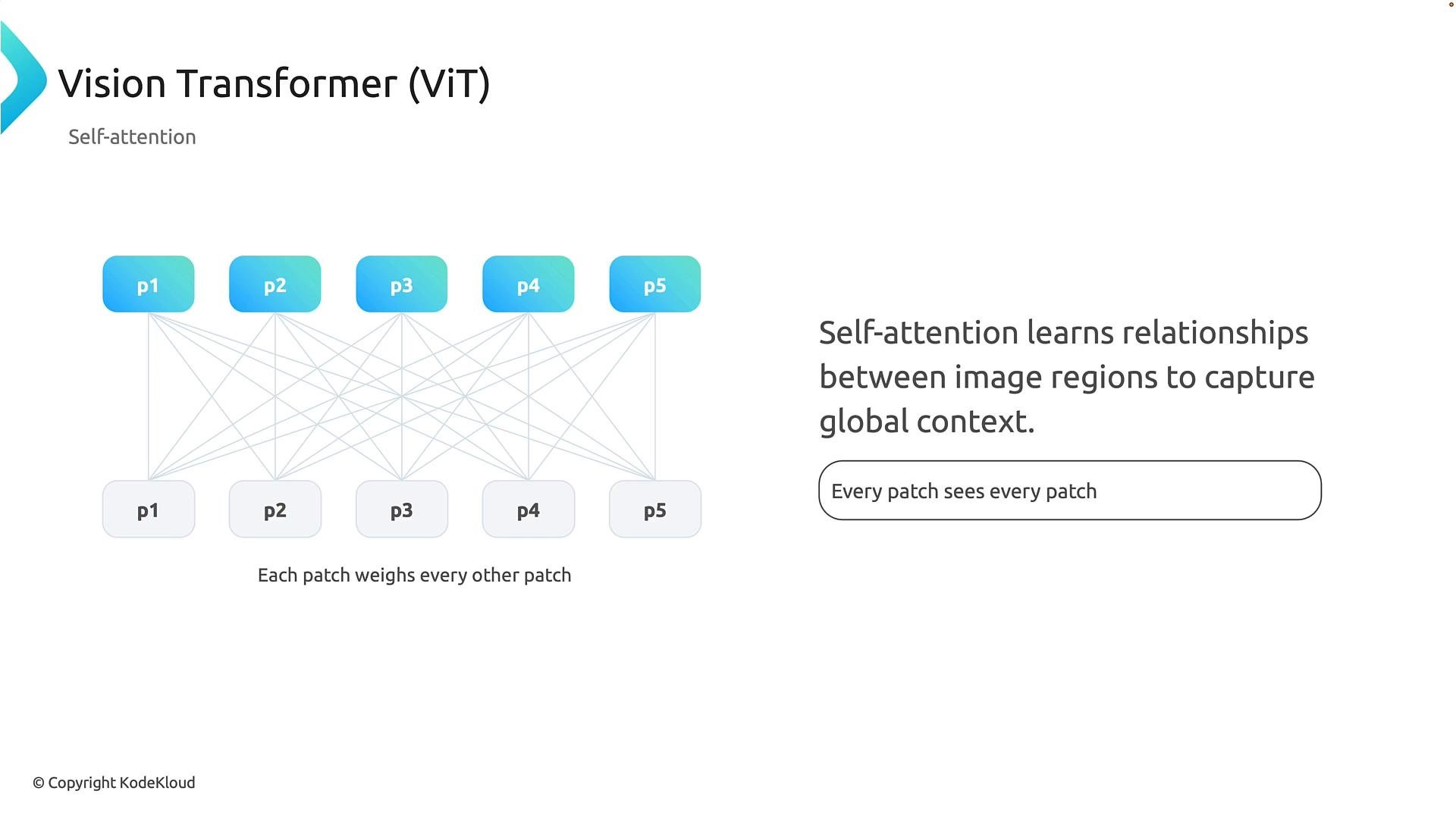
 The power of ViT comes from self-attention: each patch embedding can attend to every other patch, enabling the model to learn long-range dependencies and contextual relationships. For instance, a patch containing a hand can leverage information from patches containing bike handlebars or wheels to form a coherent interpretation.
 Use cases and multimodal integration
* ViT variants are excellent for tasks needing global reasoning, such as document layout analysis or complex scene understanding.
* Vision embeddings integrate well with text embeddings in multimodal systems (image + text), enabling tasks like image captioning and visual question answering.
Multimodal models combine visual and textual embeddings to answer questions about images or generate captions. For example, an assistant might analyze a photo of your fridge and respond: “You have spinach and tomatoes,” by aligning visual features with your language query.
Azure multimodal services
* Azure AI Vision: image analysis, OCR, and structured extraction — [https://learn.microsoft.com/azure/ai-services/vision/](https://learn.microsoft.com/azure/ai-services/vision/)
* Azure OpenAI: multimodal models that accept images and return text responses — [https://learn.microsoft.com/azure/ai-services/openai/](https://learn.microsoft.com/azure/ai-services/openai/)
## Diffusion Models (Generative Models)
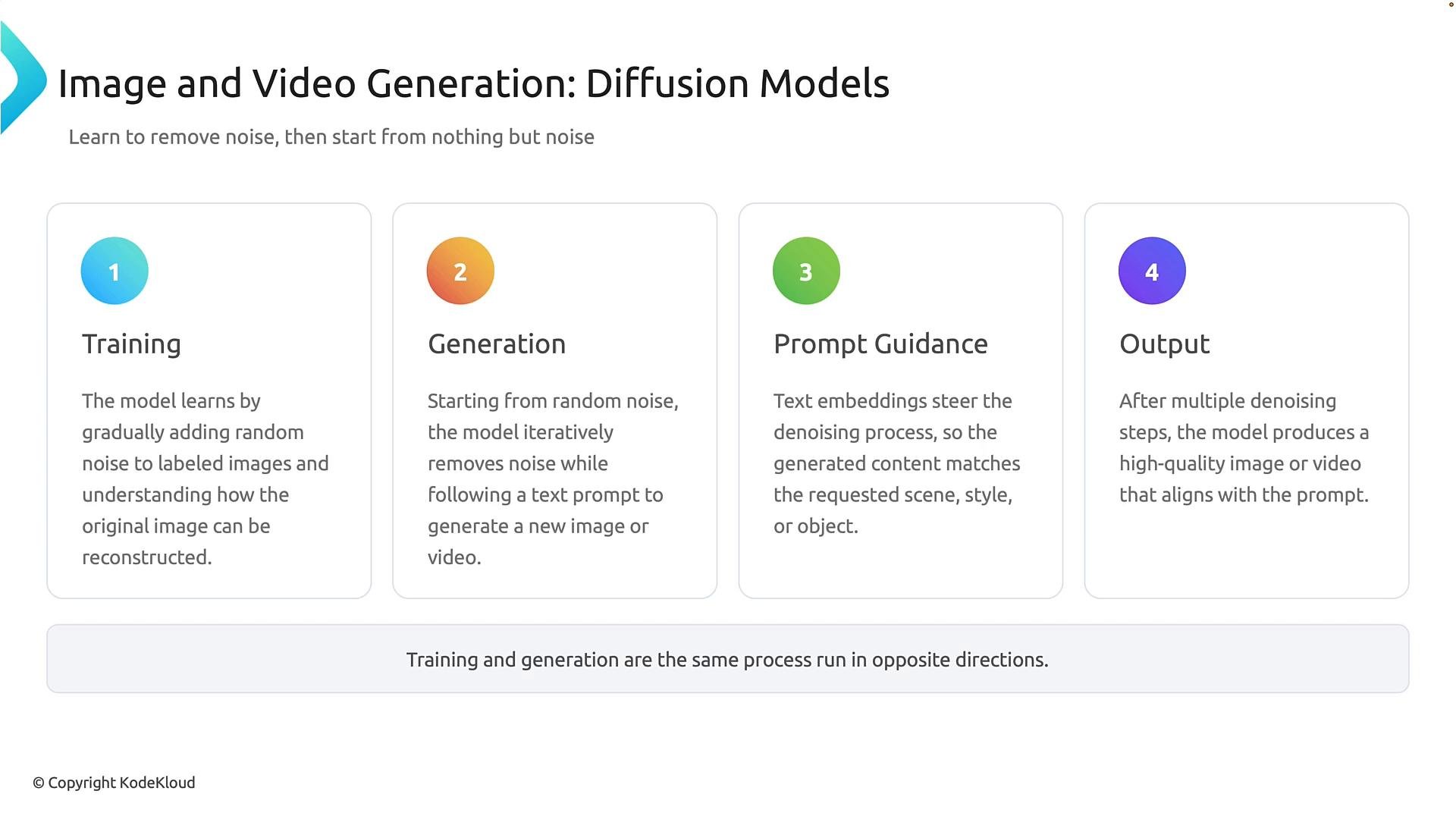
Diffusion models are generative models trained to reverse a noise-adding process. During training, images are progressively corrupted by noise; the model learns to predict and remove that noise. During generation, the model starts from random noise and iteratively denoises it into a final image, often guided by a text prompt.
High-level generation pipeline
* Start from random noise.
* Apply a sequence of learned denoising steps.
* Optionally use prompts (text or image guidance) to steer denoising.
* After many iterations, output the synthesized image (or video).
Use cases and multimodal integration
* ViT variants are excellent for tasks needing global reasoning, such as document layout analysis or complex scene understanding.
* Vision embeddings integrate well with text embeddings in multimodal systems (image + text), enabling tasks like image captioning and visual question answering.
Multimodal models combine visual and textual embeddings to answer questions about images or generate captions. For example, an assistant might analyze a photo of your fridge and respond: “You have spinach and tomatoes,” by aligning visual features with your language query.
Azure multimodal services
* Azure AI Vision: image analysis, OCR, and structured extraction — [https://learn.microsoft.com/azure/ai-services/vision/](https://learn.microsoft.com/azure/ai-services/vision/)
* Azure OpenAI: multimodal models that accept images and return text responses — [https://learn.microsoft.com/azure/ai-services/openai/](https://learn.microsoft.com/azure/ai-services/openai/)
## Diffusion Models (Generative Models)
Diffusion models are generative models trained to reverse a noise-adding process. During training, images are progressively corrupted by noise; the model learns to predict and remove that noise. During generation, the model starts from random noise and iteratively denoises it into a final image, often guided by a text prompt.
High-level generation pipeline
* Start from random noise.
* Apply a sequence of learned denoising steps.
* Optionally use prompts (text or image guidance) to steer denoising.
* After many iterations, output the synthesized image (or video).
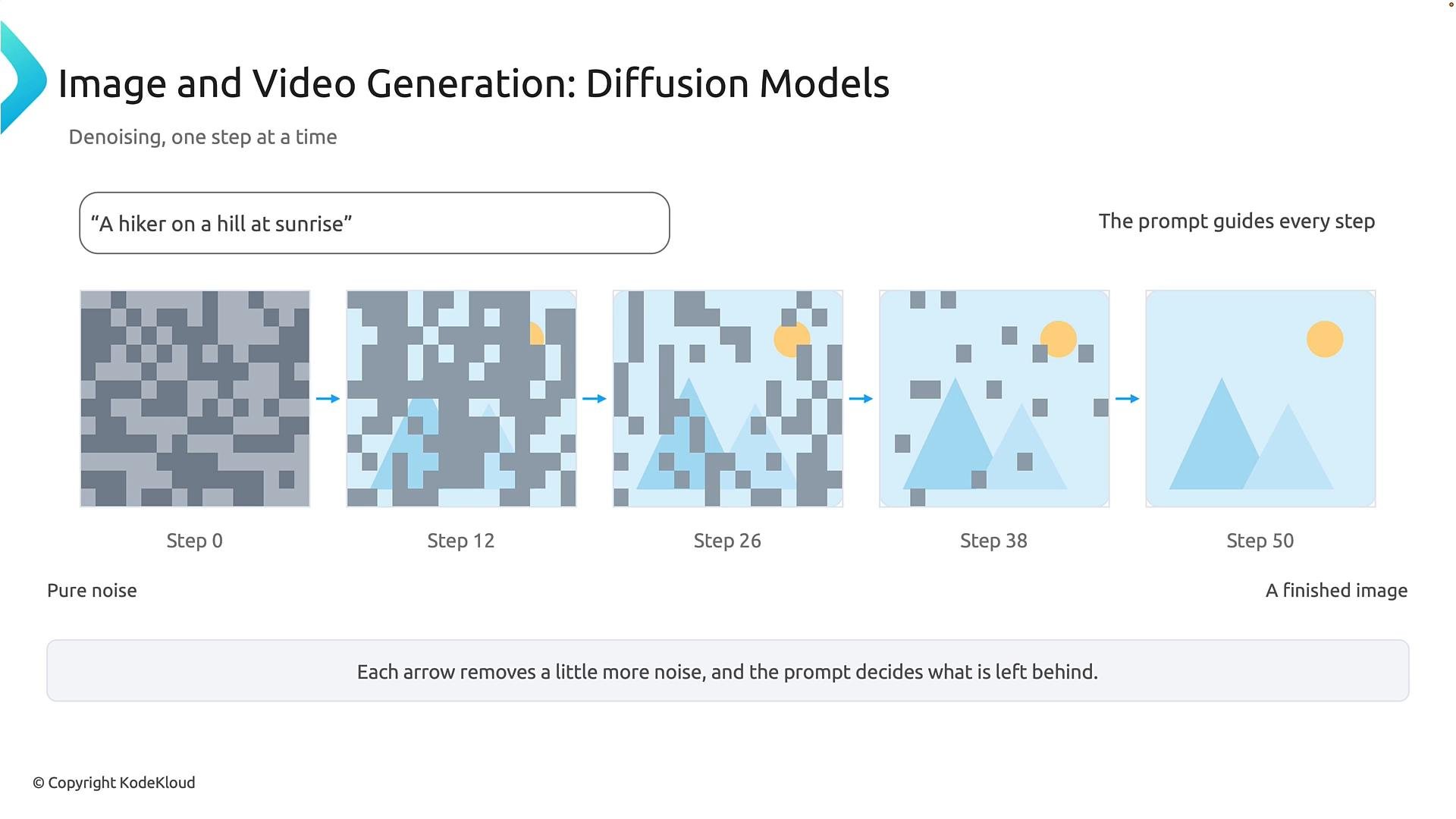
 A typical denoising timeline shows the image gradually emerging: early steps reveal broad structure and composition; middle steps add shapes and colors; later steps refine texture and fine details. The number and granularity of steps vary by model and quality/performance trade-offs.
 Practical notes
* Diffusion models excel at generating high-fidelity images and supporting flexible guidance (text prompts, image-conditioned generation).
* Generation is iterative and computationally heavier than single-shot methods, but it often produces superior detail and diversity.
## Quick Comparison
| Model family | Primary purpose | Strengths | Typical applications |
| - | - | -: | - |
| CNNs | Feature extraction and supervised vision tasks | Efficient local pattern learning, well-optimized for many tasks | Image classification, object detection, face recognition |
| Vision Transformers (ViT) | Global context modeling via self-attention | Long-range dependency modeling, flexible for multimodal fusion | Document layout analysis, multimodal models, large-scale vision tasks |
| Diffusion Models | Generative image (and video) synthesis | High-quality, prompt-guided image generation with controllable detail | Creative image synthesis, inpainting, text-to-image generation |
## Final takeaway
CNNs, Vision Transformers, and Diffusion Models form a complementary toolkit for modern computer vision:
* Use CNNs for efficient hierarchical feature extraction and classical vision tasks.
* Use ViT when global relationships and multimodal fusion matter.
* Use Diffusion Models for high-quality, prompt-driven image generation.
These techniques power real-world applications from content organization and accessibility to creative image synthesis and multimodal assistants.
## Links and References
* Azure AI Vision — [https://learn.microsoft.com/azure/ai-services/vision/](https://learn.microsoft.com/azure/ai-services/vision/)
* Azure OpenAI Service — [https://learn.microsoft.com/azure/ai-services/openai/](https://learn.microsoft.com/azure/ai-services/openai/)
* For deeper reading on transformers in vision: "An Image is Worth 16x16 Words" (Dosovitskiy et al.)
This documentation is built and hosted on [Mintlify](https://mintlify.com), a developer documentation platform.
Practical notes
* Diffusion models excel at generating high-fidelity images and supporting flexible guidance (text prompts, image-conditioned generation).
* Generation is iterative and computationally heavier than single-shot methods, but it often produces superior detail and diversity.
## Quick Comparison
| Model family | Primary purpose | Strengths | Typical applications |
| - | - | -: | - |
| CNNs | Feature extraction and supervised vision tasks | Efficient local pattern learning, well-optimized for many tasks | Image classification, object detection, face recognition |
| Vision Transformers (ViT) | Global context modeling via self-attention | Long-range dependency modeling, flexible for multimodal fusion | Document layout analysis, multimodal models, large-scale vision tasks |
| Diffusion Models | Generative image (and video) synthesis | High-quality, prompt-guided image generation with controllable detail | Creative image synthesis, inpainting, text-to-image generation |
## Final takeaway
CNNs, Vision Transformers, and Diffusion Models form a complementary toolkit for modern computer vision:
* Use CNNs for efficient hierarchical feature extraction and classical vision tasks.
* Use ViT when global relationships and multimodal fusion matter.
* Use Diffusion Models for high-quality, prompt-driven image generation.
These techniques power real-world applications from content organization and accessibility to creative image synthesis and multimodal assistants.
## Links and References
* Azure AI Vision — [https://learn.microsoft.com/azure/ai-services/vision/](https://learn.microsoft.com/azure/ai-services/vision/)
* Azure OpenAI Service — [https://learn.microsoft.com/azure/ai-services/openai/](https://learn.microsoft.com/azure/ai-services/openai/)
* For deeper reading on transformers in vision: "An Image is Worth 16x16 Words" (Dosovitskiy et al.)
This documentation is built and hosted on [Mintlify](https://mintlify.com), a developer documentation platform.