> ## Documentation Index
> Fetch the complete documentation index at: https://notes.kodekloud.com/llms.txt
> Use this file to discover all available pages before exploring further.
# Text Preprocessing
> Overview of text preprocessing techniques for NLP including tokenization, normalization, stop-word removal, lemmatization, POS tagging and guidance for different model pipelines
Before an AI model can effectively work with text, we first clean and organize the raw text into a consistent form the model can process. This step—text preprocessing—is like preparing ingredients before cooking: you wash, cut, and sort so the final dish is easier to make. Preprocessing similarly transforms text so its most important signals become easier for models to analyze.
Example sentence used throughout this guide:
```text theme={null}
Zara is running quickly through the park because she wants to catch the last train.
```
We progressively transform this sentence using common preprocessing techniques: tokenization, normalization, stop-word removal, lemmatization, and part-of-speech (POS) tagging. Each step has trade-offs, so choose the steps that match your task and model.
## Tokenization
Tokenization breaks text into smaller units called tokens. Tokens can be words, subwords, or sentences depending on the tokenizer.
Example (word-level tokenization):
Tokens:
`Zara`, `is`, `running`, `quickly`, `through`, `the`, `park`, `because`, `she`, `wants`, `to`, `catch`, `the`, `last`, `train`
Why tokenization matters:
* Models require discrete, manageable units to learn relationships between tokens.
* Subword tokenizers (used by most transformer models) split rare or compound words into subword pieces so the model can handle unseen forms.
* Choice of tokenizer affects vocabulary size, downstream performance, and handling of out-of-vocabulary words.
Key idea: tokenization converts raw text into the basic units a model consumes.
## Normalization
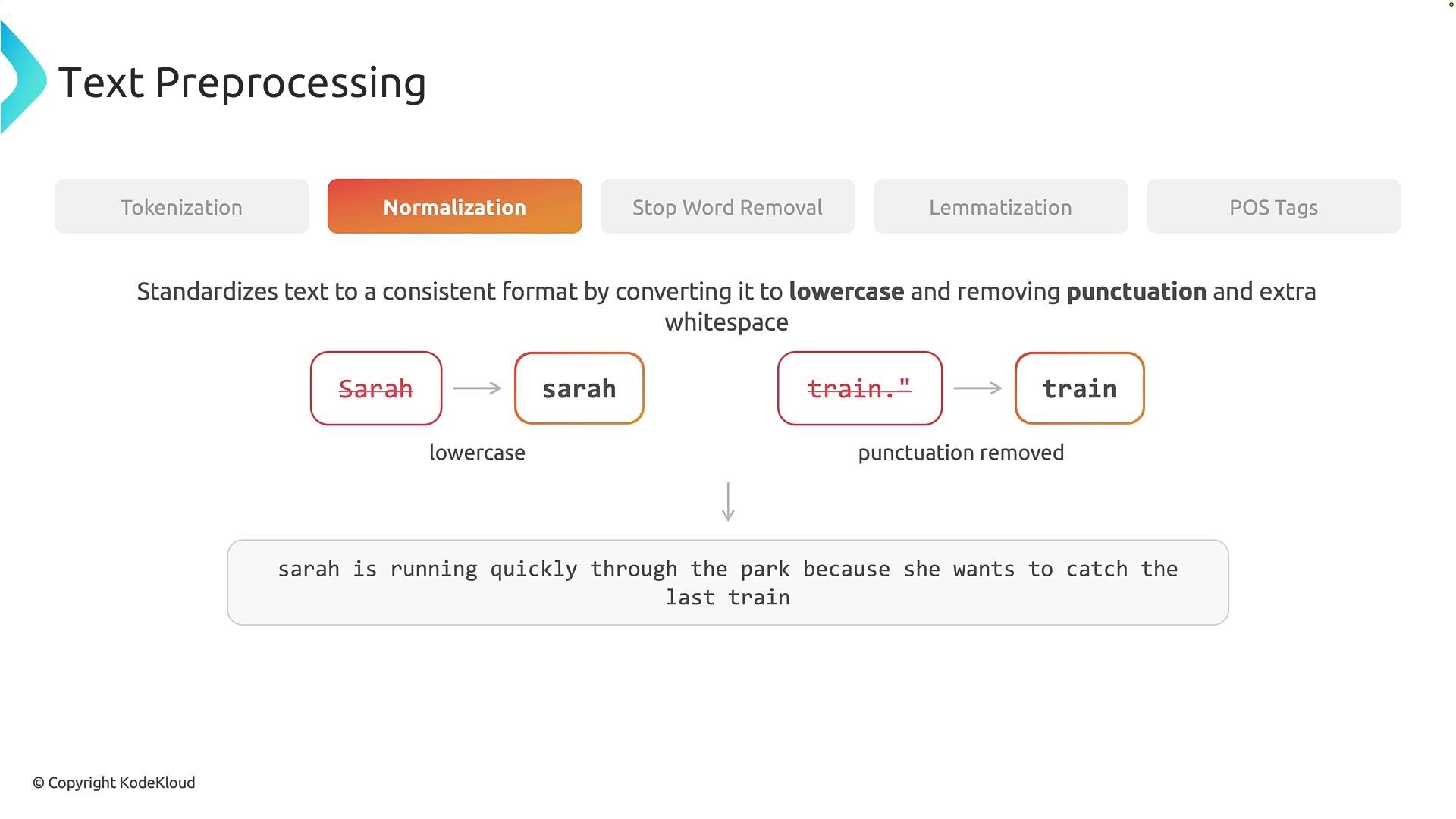
Normalization makes tokens consistent by applying standard formatting steps like lowercasing, punctuation removal, and collapsing whitespace. These are simple but impactful transformations.
Common normalization steps:
* Lowercasing: `Zara` → `zara`
* Punctuation removal: `train.` → `train`
* Whitespace normalization: collapse extra spaces or tabs
Normalized sentence example:
```text theme={null}
zara is running quickly through the park because she wants to catch the last train
```
Normalization is task-dependent. Preserving case or punctuation may be essential for tasks such as named-entity recognition or sentiment analysis where case or punctuation carry meaning.
 Normalization choices depend on your task. Preserve case or punctuation when they are meaningful for downstream analysis.
## Stop-word removal
Stop words are high-frequency words that often contribute little signal for some analyses (e.g., `the`, `is`, `to`). Removing them can reduce input size and sometimes improve performance for traditional NLP pipelines.
Example after removing common stop words (`is`, `through`, `the`, `because`, `she`, `to`):
```text theme={null}
Zara running quickly park wants catch last train
```
When to be careful:
* Modern transformer models often rely on stop words for syntactic context; removing them can degrade performance.
* Removing stop words can change meaning (e.g., "I like this" vs. "I do not like this").
Stop-word removal can change sentence meaning. Only remove stop words when you are sure it won't harm your downstream task.
## Lemmatization
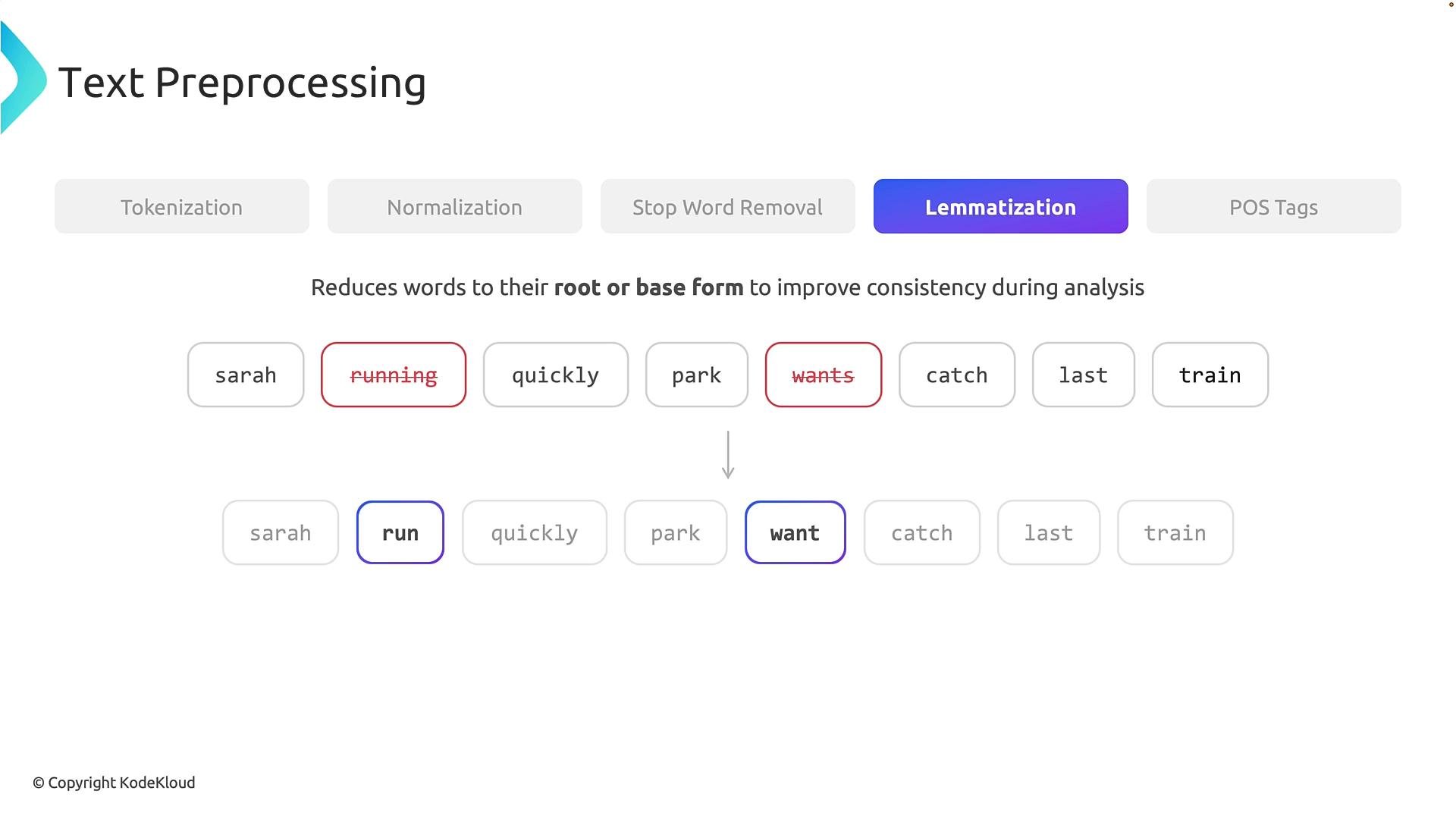
Lemmatization reduces inflected words to their dictionary (base) form, called a lemma, using morphological analysis and POS information.
Examples:
* `running` → `run`
* `wants` → `want`
Lemmatization is linguistically informed and typically uses POS tags to choose the correct base form. It helps group morphological variants (run, runs, running, ran) so models can generalize over the same underlying concept.
After lemmatization (applied to normalized tokens), typical result:
```text theme={null}
zara, run, quickly, park, want, catch, last, train
```
Normalization choices depend on your task. Preserve case or punctuation when they are meaningful for downstream analysis.
## Stop-word removal
Stop words are high-frequency words that often contribute little signal for some analyses (e.g., `the`, `is`, `to`). Removing them can reduce input size and sometimes improve performance for traditional NLP pipelines.
Example after removing common stop words (`is`, `through`, `the`, `because`, `she`, `to`):
```text theme={null}
Zara running quickly park wants catch last train
```
When to be careful:
* Modern transformer models often rely on stop words for syntactic context; removing them can degrade performance.
* Removing stop words can change meaning (e.g., "I like this" vs. "I do not like this").
Stop-word removal can change sentence meaning. Only remove stop words when you are sure it won't harm your downstream task.
## Lemmatization
Lemmatization reduces inflected words to their dictionary (base) form, called a lemma, using morphological analysis and POS information.
Examples:
* `running` → `run`
* `wants` → `want`
Lemmatization is linguistically informed and typically uses POS tags to choose the correct base form. It helps group morphological variants (run, runs, running, ran) so models can generalize over the same underlying concept.
After lemmatization (applied to normalized tokens), typical result:
```text theme={null}
zara, run, quickly, park, want, catch, last, train
```
 ## POS tagging
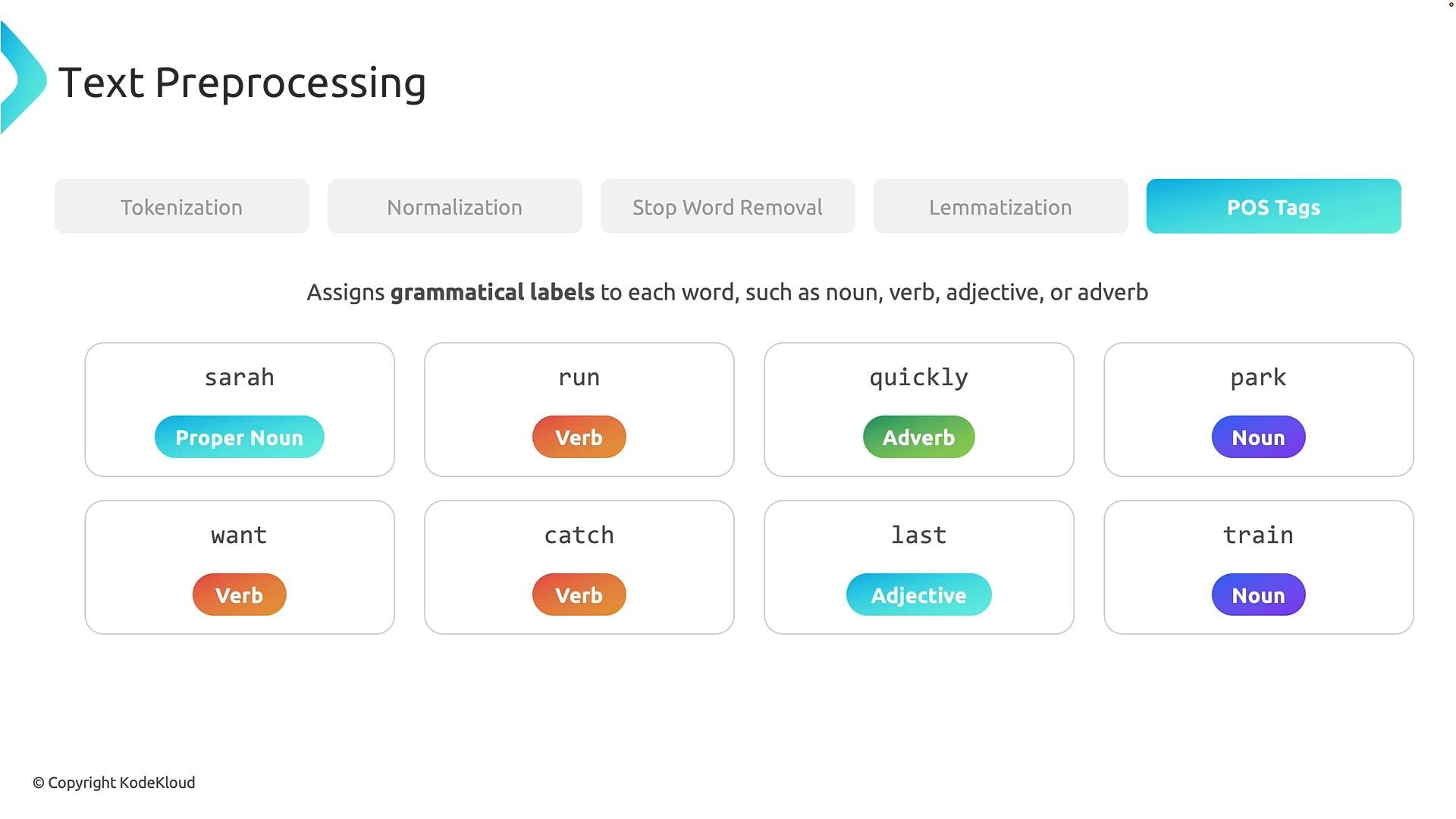
Part-of-speech (POS) tagging assigns a grammatical label to each token (noun, verb, adjective, etc.). POS tags provide syntactic context and help disambiguate words that can function differently in different contexts.
Example POS tags for the lemmatized sentence:
* `Zara` → PROPN (proper noun)
* `run` → VERB
* `quickly` → ADV (adverb)
* `park` → NOUN
* `want` → VERB
* `catch` → VERB
* `last` → ADJ (adjective)
* `train` → NOUN
POS tagging is context-sensitive; the same token can receive different tags depending on usage (e.g., `run` as VERB vs. NOUN). This syntactic information supports tasks such as information extraction, dependency parsing, and feature engineering.
## POS tagging
Part-of-speech (POS) tagging assigns a grammatical label to each token (noun, verb, adjective, etc.). POS tags provide syntactic context and help disambiguate words that can function differently in different contexts.
Example POS tags for the lemmatized sentence:
* `Zara` → PROPN (proper noun)
* `run` → VERB
* `quickly` → ADV (adverb)
* `park` → NOUN
* `want` → VERB
* `catch` → VERB
* `last` → ADJ (adjective)
* `train` → NOUN
POS tagging is context-sensitive; the same token can receive different tags depending on usage (e.g., `run` as VERB vs. NOUN). This syntactic information supports tasks such as information extraction, dependency parsing, and feature engineering.
 ## Summary
Core preprocessing techniques and their primary purpose:
| Technique | Purpose | Example |
| - | - | - |
| Tokenization | Break raw text into processing units (words/subwords) | `Zara` → `Zara` |
| Normalization | Make text consistent (case, punctuation, whitespace) | `Zara.` → `zara` |
| Stop-word removal | Optionally drop high-frequency low-value words | `is`, `the`, `to` removed |
| Lemmatization | Map words to dictionary base forms using context | `running` → `run` |
| POS tagging | Assign grammatical role to each token | `run` → `VERB` |
Use these techniques in combination depending on the task and model:
* For classic pipelines (e.g., bag-of-words, TF-IDF) normalization, stop-word removal, and lemmatization are common.
* For transformer-based models, minimal normalization and careful preservation of tokens (including stop words and punctuation) often yield better results.
Next steps: convert preprocessed tokens to numeric representations via feature extraction and vectorization (e.g., TF-IDF, word2vec, contextual embeddings from transformer models).
## Links and References
* Hugging Face Tokenizers: [https://huggingface.co/docs/tokenizers](https://huggingface.co/docs/tokenizers)
* spaCy documentation (tokenization, lemmatization, POS): [https://spacy.io/usage](https://spacy.io/usage)
* NLTK (classic NLP tools): [https://www.nltk.org/](https://www.nltk.org/)
* Transformer models and tokenization best practices: [https://huggingface.co/docs/transformers/index](https://huggingface.co/docs/transformers/index)
This documentation is built and hosted on [Mintlify](https://mintlify.com), a developer documentation platform.
## Summary
Core preprocessing techniques and their primary purpose:
| Technique | Purpose | Example |
| - | - | - |
| Tokenization | Break raw text into processing units (words/subwords) | `Zara` → `Zara` |
| Normalization | Make text consistent (case, punctuation, whitespace) | `Zara.` → `zara` |
| Stop-word removal | Optionally drop high-frequency low-value words | `is`, `the`, `to` removed |
| Lemmatization | Map words to dictionary base forms using context | `running` → `run` |
| POS tagging | Assign grammatical role to each token | `run` → `VERB` |
Use these techniques in combination depending on the task and model:
* For classic pipelines (e.g., bag-of-words, TF-IDF) normalization, stop-word removal, and lemmatization are common.
* For transformer-based models, minimal normalization and careful preservation of tokens (including stop words and punctuation) often yield better results.
Next steps: convert preprocessed tokens to numeric representations via feature extraction and vectorization (e.g., TF-IDF, word2vec, contextual embeddings from transformer models).
## Links and References
* Hugging Face Tokenizers: [https://huggingface.co/docs/tokenizers](https://huggingface.co/docs/tokenizers)
* spaCy documentation (tokenization, lemmatization, POS): [https://spacy.io/usage](https://spacy.io/usage)
* NLTK (classic NLP tools): [https://www.nltk.org/](https://www.nltk.org/)
* Transformer models and tokenization best practices: [https://huggingface.co/docs/transformers/index](https://huggingface.co/docs/transformers/index)
This documentation is built and hosted on [Mintlify](https://mintlify.com), a developer documentation platform.