> ## Documentation Index
> Fetch the complete documentation index at: https://notes.kodekloud.com/llms.txt
> Use this file to discover all available pages before exploring further.
# How LLMs work in real time
> Explains how large language models use context windows in real time and practical methods to enable accurate queries over private documents using chunking, embeddings, vector search, and RAG.
This lesson explains what happens when you ask an AI a question, how large language models (LLMs) use context, and practical strategies for letting models answer questions about private documents.
When you ask an AI a question, the reply usually comes from a family of models called large language models (LLMs). LLMs surged in popularity after the release of [ChatGPT](https://openai.com/blog/chatgpt) in late 2022, as researchers and companies scaled both model size and training data to improve performance.
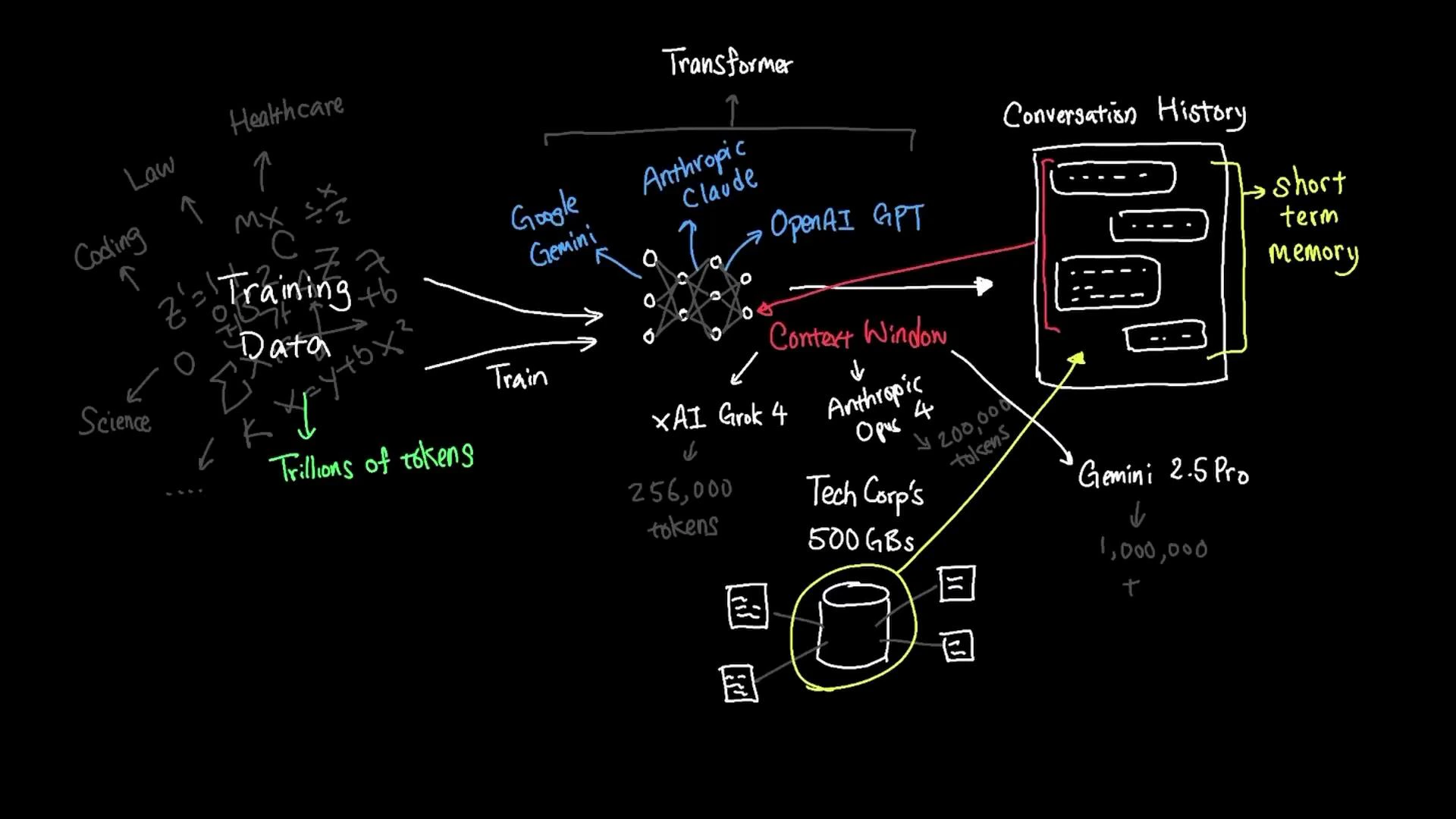
Popular LLMs such as [OpenAI’s GPT series](https://openai.com/gpt-4), [Anthropic’s Claude](https://www.anthropic.com/claude), and [Google’s Gemini](https://gemini.google/) are built on the transformer architecture and trained on extremely large corpora. Training datasets can reach tens of trillions of tokens drawn from thousands of domains — healthcare, law, code, science, and more.
Pretraining datasets do not include your private company files (for example, TechCorp’s 500 GB of internal documents) unless they were explicitly added to the training data. To get an LLM to answer questions about private data, you must provide that data to the model at query time.
One common way to supply private data to an LLM is to include relevant material in the conversation’s context — a form of short-term memory the model uses while the conversation is active. This short-term memory is called the context window.
Here are typical context-window sizes for various models:
| Model / Variant | Approx. context window |
| ---------------------------- | ------------------------ |
| xAI Grok-4 | \~256,000 tokens |
| Anthropic Claude Opus | \~200,000 tokens |
| Google Gemini (Pro variants) | up to \~1,000,000 tokens |
| Smaller “nano” / base models | 2,000–4,000 tokens |
 The context window defines how much text the model can attend to at once. A token is roughly three quarters of a typical English word, so token counts translate approximately to word counts. Practical consequences:
* Smaller models (2k–4k tokens) are well-suited to short interactions and lower-latency use cases.
* Larger models with huge windows (hundreds of thousands to a million tokens) can handle long documents, entire books, or many source files at once.
* Regardless of size, only the tokens that are actually included in the context are visible to the model at query time.
Think of the context window as short-term memory: it can hold only so many facts and details simultaneously. Irrelevant content in the supplied context consumes token budget and can distract the model, while extremely large knowledge stores (e.g., a company’s 500 GB of documents) cannot be loaded into context all at once.
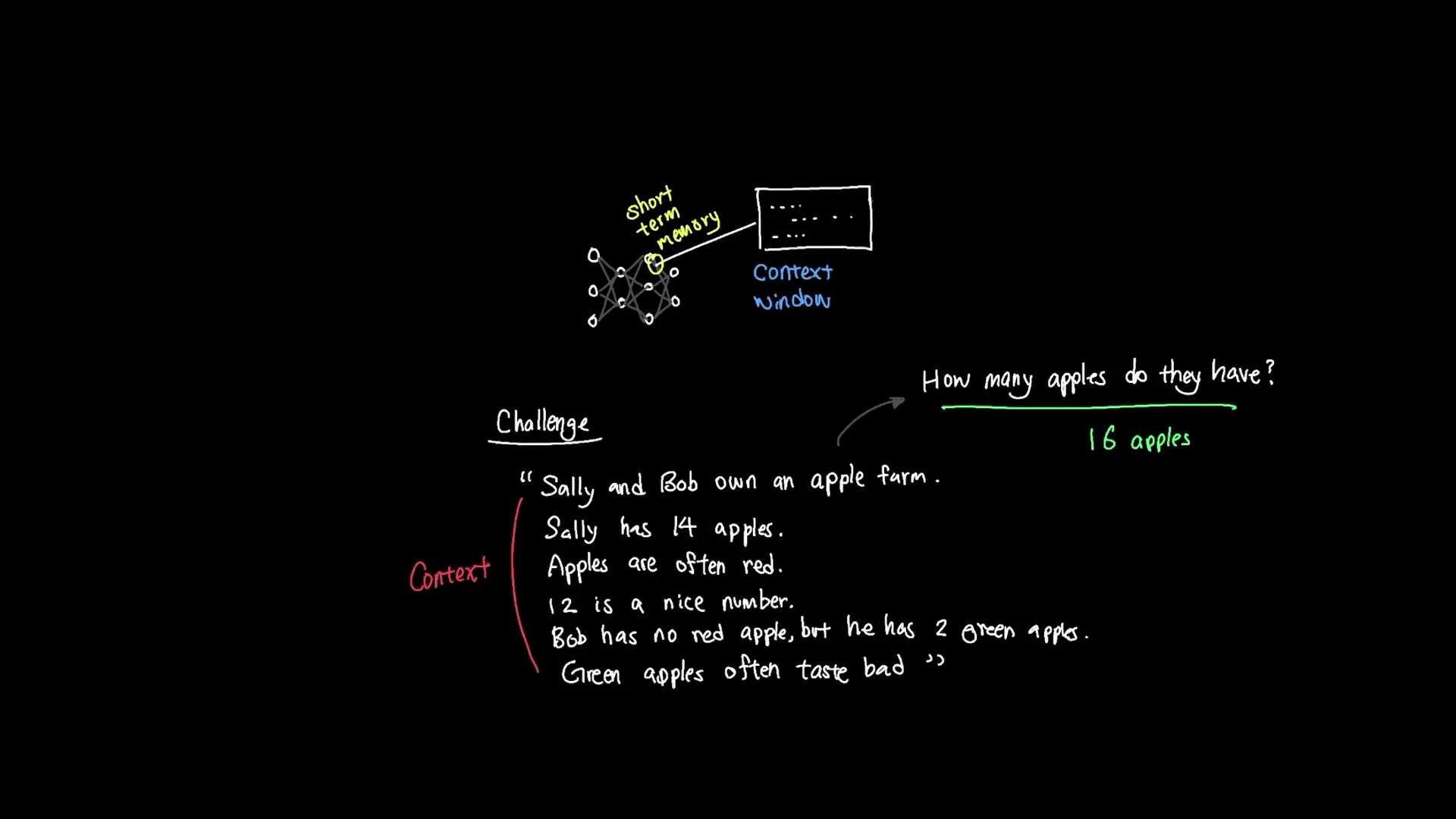
Here’s a simple example to illustrate relevance extraction from context:
Sally and Bob own an apple farm.\
Sally has 14 apples.\
Apples are often red.\
12 is a nice number.\
Bob has no red apples, but he has two green apples.\
Green apples often taste bad.
How many apples do they all have?
To answer correctly, the model must extract the relevant facts (Sally has 14, Bob has 2) and ignore irrelevant details (apple color, taste, or unrelated numbers). The correct total is 16.
The context window defines how much text the model can attend to at once. A token is roughly three quarters of a typical English word, so token counts translate approximately to word counts. Practical consequences:
* Smaller models (2k–4k tokens) are well-suited to short interactions and lower-latency use cases.
* Larger models with huge windows (hundreds of thousands to a million tokens) can handle long documents, entire books, or many source files at once.
* Regardless of size, only the tokens that are actually included in the context are visible to the model at query time.
Think of the context window as short-term memory: it can hold only so many facts and details simultaneously. Irrelevant content in the supplied context consumes token budget and can distract the model, while extremely large knowledge stores (e.g., a company’s 500 GB of documents) cannot be loaded into context all at once.
Here’s a simple example to illustrate relevance extraction from context:
Sally and Bob own an apple farm.\
Sally has 14 apples.\
Apples are often red.\
12 is a nice number.\
Bob has no red apples, but he has two green apples.\
Green apples often taste bad.
How many apples do they all have?
To answer correctly, the model must extract the relevant facts (Sally has 14, Bob has 2) and ignore irrelevant details (apple color, taste, or unrelated numbers). The correct total is 16.
 This example highlights two practical limits of context windows:
* Irrelevant information in the context consumes token budget and can distract the model.
* Only a fraction of a very large knowledge store can be presented to the model at one time.
Strategies to provide relevant private data at query time
* Document chunking: split large files into smaller, semantically coherent chunks that fit the context window.
* Embeddings + vector search: convert chunks to embeddings, perform similarity search to find the most relevant passages, and surface those passages in the prompt.
* Retrieval-augmented generation (RAG): combine retrieval (vector search) with generation so the model uses retrieved documents to answer queries.
* Summaries & hierarchical retrieval: use summaries to locate relevant sections, then retrieve full content for finer-grained answers.
* External tools & workflows: call external search engines, databases, or specialized tools to fetch data the model can use.
| Approach | When to use | Example |
| -------------------------- | --------------------------------------------------- | ---------------------------------------------------------------------- |
| Chunking | Large documents that exceed context windows | Break a 100-page manual into 2–5 page chunks |
| Embeddings + vector search | Fast retrieval of semantically similar passages | Search index of meeting notes to find relevant discussions |
| RAG | QA over large corpora where accuracy matters | Combine vector search with a model to answer customer support queries |
| Summarization | Reduce token usage when exact details aren't needed | Summarize monthly reports, then retrieve specific sections if required |
When designing systems that use private documents with LLMs, combine embeddings-based retrieval with concise prompt engineering (and fine-grained chunking) to ensure the model receives only the most relevant context within its token budget.
Further reading and references
* Transformer architecture: [https://en.wikipedia.org/wiki/Transformer\_(machine\_learning\_model)](https://en.wikipedia.org/wiki/Transformer_\(machine_learning_model\))
* Retrieval-augmented generation (RAG): [https://en.wikipedia.org/wiki/Retrieval-augmented\_generation](https://en.wikipedia.org/wiki/Retrieval-augmented_generation)
* OpenAI GPT: [https://openai.com/gpt-4](https://openai.com/gpt-4)
* Anthropic Claude: [https://www.anthropic.com/claude](https://www.anthropic.com/claude)
* Google Gemini: [https://gemini.google/](https://gemini.google/)
This example highlights two practical limits of context windows:
* Irrelevant information in the context consumes token budget and can distract the model.
* Only a fraction of a very large knowledge store can be presented to the model at one time.
Strategies to provide relevant private data at query time
* Document chunking: split large files into smaller, semantically coherent chunks that fit the context window.
* Embeddings + vector search: convert chunks to embeddings, perform similarity search to find the most relevant passages, and surface those passages in the prompt.
* Retrieval-augmented generation (RAG): combine retrieval (vector search) with generation so the model uses retrieved documents to answer queries.
* Summaries & hierarchical retrieval: use summaries to locate relevant sections, then retrieve full content for finer-grained answers.
* External tools & workflows: call external search engines, databases, or specialized tools to fetch data the model can use.
| Approach | When to use | Example |
| -------------------------- | --------------------------------------------------- | ---------------------------------------------------------------------- |
| Chunking | Large documents that exceed context windows | Break a 100-page manual into 2–5 page chunks |
| Embeddings + vector search | Fast retrieval of semantically similar passages | Search index of meeting notes to find relevant discussions |
| RAG | QA over large corpora where accuracy matters | Combine vector search with a model to answer customer support queries |
| Summarization | Reduce token usage when exact details aren't needed | Summarize monthly reports, then retrieve specific sections if required |
When designing systems that use private documents with LLMs, combine embeddings-based retrieval with concise prompt engineering (and fine-grained chunking) to ensure the model receives only the most relevant context within its token budget.
Further reading and references
* Transformer architecture: [https://en.wikipedia.org/wiki/Transformer\_(machine\_learning\_model)](https://en.wikipedia.org/wiki/Transformer_\(machine_learning_model\))
* Retrieval-augmented generation (RAG): [https://en.wikipedia.org/wiki/Retrieval-augmented\_generation](https://en.wikipedia.org/wiki/Retrieval-augmented_generation)
* OpenAI GPT: [https://openai.com/gpt-4](https://openai.com/gpt-4)
* Anthropic Claude: [https://www.anthropic.com/claude](https://www.anthropic.com/claude)
* Google Gemini: [https://gemini.google/](https://gemini.google/)