> ## Documentation Index
> Fetch the complete documentation index at: https://notes.kodekloud.com/llms.txt
> Use this file to discover all available pages before exploring further.
# How LangChain works
> Explains how LangChain composes LLMs, embeddings, vector stores, memory, and tools to build retrieval augmented conversational agents and workflows for production chatbots
Now that we understand how LLMs and embeddings function, we need a system that ties those primitives together into a reliable, maintainable product.
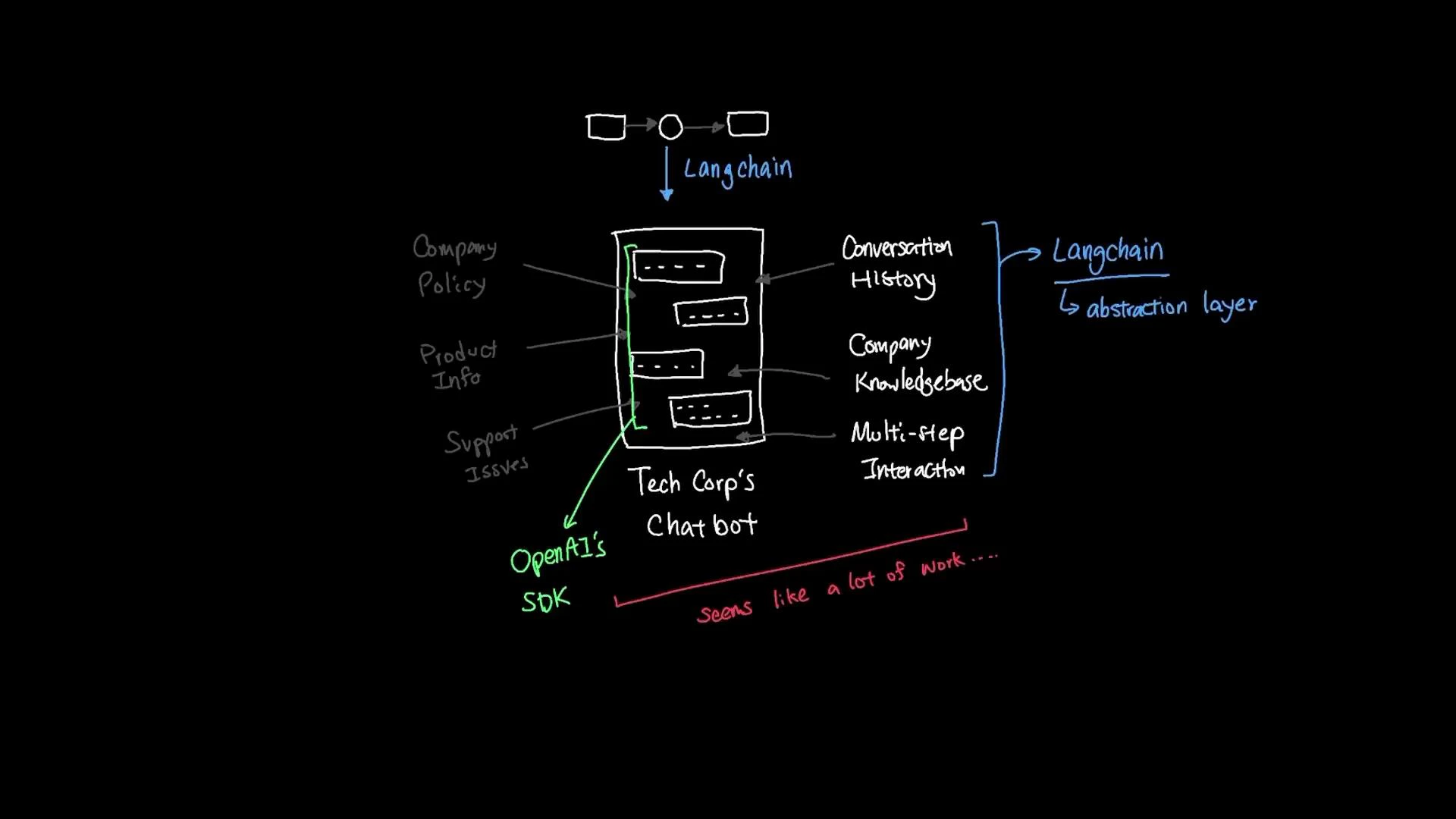
TechCorp needs a chatbot that lets customers ask questions about company policy, product details, and support issues. The system must:
* Remember conversation history
* Access the company knowledge base (documents, FAQs, manuals)
* Handle complex multi-step interactions and take actions when needed
A naive implementation might call an LLM provider's SDK (for example, [OpenAI](https://learn.kodekloud.com/user/courses/introduction-to-openai)) for every user message. But that leaves several engineering gaps: storing chat messages, maintaining conversational context, performing semantic search over internal documents, routing calls to internal tools, and keeping the solution portable across providers (OpenAI → Anthropic → Google). What looks small quickly grows into a large integration project.
LangChain provides an abstraction layer that addresses these gaps with composable, standardized components and interfaces.
 Understanding LLM vs Agent
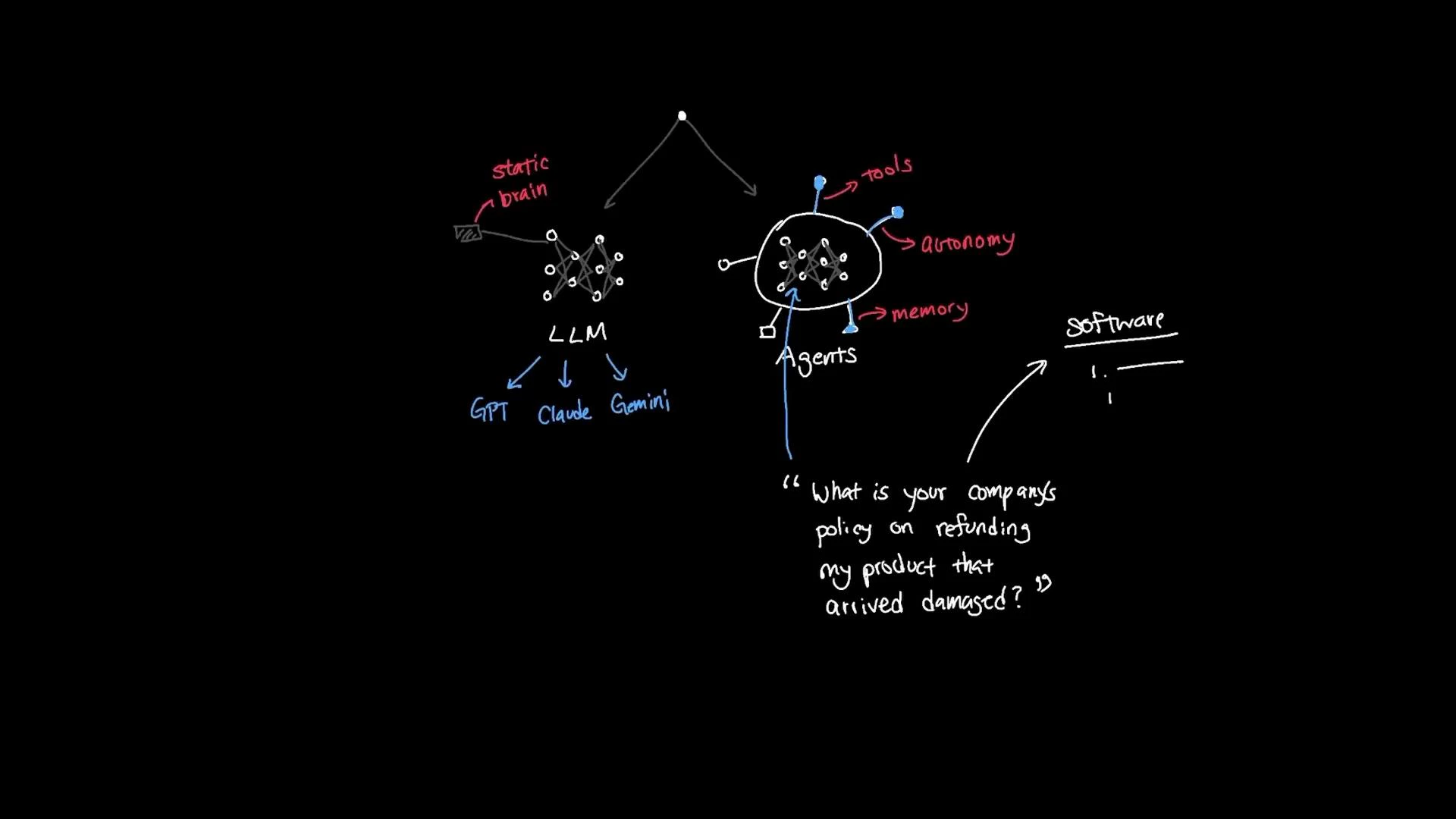
When you call a large language model (GPT, Claude, Gemini) directly, it acts as a static "brain" that generates answers from its training and prompt context. An agent, by contrast, augments that brain with autonomy, memory, and access to external tools — enabling it to decide which steps to take to satisfy a user request.
For TechCorp’s support scenario, consider the question: "What's your policy on refunds for a product that arrived damaged?" An agent might:
* Retrieve the relevant policy from the company knowledge base,
* Check prior conversation context to confirm whether the customer already provided an order number,
* Call an internal customer-database tool to validate purchase details,
* Open a support ticket if required — without you hard-coding an if/else flow for each step.
Understanding LLM vs Agent
When you call a large language model (GPT, Claude, Gemini) directly, it acts as a static "brain" that generates answers from its training and prompt context. An agent, by contrast, augments that brain with autonomy, memory, and access to external tools — enabling it to decide which steps to take to satisfy a user request.
For TechCorp’s support scenario, consider the question: "What's your policy on refunds for a product that arrived damaged?" An agent might:
* Retrieve the relevant policy from the company knowledge base,
* Check prior conversation context to confirm whether the customer already provided an order number,
* Call an internal customer-database tool to validate purchase details,
* Open a support ticket if required — without you hard-coding an if/else flow for each step.
 Why use LangChain?
LangChain exposes composable building blocks that map directly to the integration concerns above:
* Chat models: unified interfaces to LLM providers (OpenAI, Anthropic, Google). Switching providers often becomes a single-line change.
* Memory: session-aware memory components to store and retrieve conversation state without implementing a custom schema.
* Vector DB integration: standard adapters for vector databases (Chroma, Pinecone, etc.) so semantic search is consistent across providers.
* Embeddings: standardized embedding components to convert documents into vectors.
* Tools: easy definitions for external tool access (customer DB queries, web search, ticket creation), which agents can call when appropriate.
Without LangChain, you must implement API clients, connection management, storage layers, embedding pipelines, semantic search, memory systems, and tool routing yourself — complexity multiplies fast.
LangChain’s component library typically includes connectors and classes such as chat model wrappers, vectorstore adapters, embedding wrappers, memory classes for chat history, and a mechanism to define tools that agents can call. The agent orchestrates these components based on conversation context and system prompts.
LangChain components at a glance
| Component Type | Purpose | Example |
| ------------------------ | -------------------------------------------------------- | ----------------------------------------------- |
| Chat model | Conversational LLM wrapper supporting multiple providers | `ChatOpenAI(model_name="gpt-3.5-turbo")` |
| Memory | Stores session conversation history and state | `ConversationBufferMemory` |
| Embeddings | Converts text/documents to numeric vectors | `OpenAIEmbeddings()` |
| Vector store / Retriever | Indexes vectors and supports semantic search | `Chroma`, `Pinecone` |
| Chains / Agents | Compose LLM, retriever, memory, and tools into workflows | `ConversationalRetrievalChain` |
| Tools | Integrations for external APIs and actions | Customer DB query, web search, ticketing system |
Putting it together (example)
This concise example shows one way to wire a chat model, embeddings, vectorstore, memory, and a conversational retrieval chain — the core pattern for a retrieval-augmented chat agent. Import paths and class names can change between LangChain releases; check the documentation for your version.
```python theme={null}
from langchain.chat_models import ChatOpenAI, ChatAnthropic
from langchain.embeddings import OpenAIEmbeddings
from langchain.vectorstores import Chroma
from langchain.memory import ConversationBufferMemory
from langchain.chains import ConversationalRetrievalChain
# Choose your LLM provider
llm = ChatOpenAI(model_name="gpt-3.5-turbo")
# Alternative provider example:
# Memory for storing conversational history
memory = ConversationBufferMemory(memory_key="chat_history", return_messages=True)
# Embeddings convert documents into vectors
embedding = OpenAIEmbeddings()
# Vector store that holds TechCorp documents (indexed using the embeddings)
db = Chroma(collection_name="techcorp_docs", embedding_function=embedding)
# Create a conversational retrieval chain that uses the LLM + vector DB + memory
qa_chain = ConversationalRetrievalChain.from_llm(
llm=llm,
retriever=db.as_retriever(),
memory=memory
)
# Run a query through the chain
response = qa_chain.run("What is TechCorp's customer data policy?")
print(response)
```
Note: LangChain import locations and class names can change across releases. If an import fails, consult the LangChain docs for your installed version. Also ensure environment variables for provider API keys (e.g., OPENAI\_API\_KEY, ANTHROPIC\_API\_KEY) are set before running the code.
How the agent uses components
* LLM: natural-language reasoning and response generation.
* Embeddings: convert company documents into dense vectors for semantic indexing.
* Vector store / Retriever: performs semantic search over indexed documents and returns relevant context to the agent.
* Memory: holds recent chat history so replies are context-aware and coherent across turns.
* Tools: allow the agent to call external APIs or perform actions (customer DB lookups, ticket creation, web searches).
This modularity makes extending the agent straightforward: add new tools, swap the LLM provider, or change the vectorstore with minimal code changes.
Warning: Avoid sending sensitive PII or confidential documents to third-party LLMs unless you have contracts and controls in place. Review your data privacy, retention, and compliance requirements before indexing private documents or integrating internal systems.
Conclusion and next steps
Using LangChain speeds up building production-ready conversational agents by providing tested building blocks for common integration tasks: RAG (retrieval-augmented generation), memory management, tool invocation, and multi-provider support. Start by:
1. Defining your data sources (documents, databases, support tickets).
2. Choosing an embedding provider and vector store (Chroma, Pinecone).
3. Wiring a conversational chain with memory and a retriever.
4. Adding tools for any external actions your agent must perform.
Links and references
* [LangChain — learn.kodekloud course](https://learn.kodekloud.com/user/courses/langchain)
* [OpenAI Docs](https://platform.openai.com/docs)
* Chroma: [https://www.trychroma.com/](https://www.trychroma.com/)
* Pinecone: [https://www.pinecone.io/](https://www.pinecone.io/)
* Retrieval-augmented generation (RAG) overview: [https://en.wikipedia.org/wiki/Retrieval-augmented\_generation](https://en.wikipedia.org/wiki/Retrieval-augmented_generation)
Now that you’ve seen the conceptual elements and a practical snippet, you should have a clear idea of how LangChain brings together LLMs, embeddings, vector stores, memory, and tool integration to build reliable conversational agents.
Why use LangChain?
LangChain exposes composable building blocks that map directly to the integration concerns above:
* Chat models: unified interfaces to LLM providers (OpenAI, Anthropic, Google). Switching providers often becomes a single-line change.
* Memory: session-aware memory components to store and retrieve conversation state without implementing a custom schema.
* Vector DB integration: standard adapters for vector databases (Chroma, Pinecone, etc.) so semantic search is consistent across providers.
* Embeddings: standardized embedding components to convert documents into vectors.
* Tools: easy definitions for external tool access (customer DB queries, web search, ticket creation), which agents can call when appropriate.
Without LangChain, you must implement API clients, connection management, storage layers, embedding pipelines, semantic search, memory systems, and tool routing yourself — complexity multiplies fast.
LangChain’s component library typically includes connectors and classes such as chat model wrappers, vectorstore adapters, embedding wrappers, memory classes for chat history, and a mechanism to define tools that agents can call. The agent orchestrates these components based on conversation context and system prompts.
LangChain components at a glance
| Component Type | Purpose | Example |
| ------------------------ | -------------------------------------------------------- | ----------------------------------------------- |
| Chat model | Conversational LLM wrapper supporting multiple providers | `ChatOpenAI(model_name="gpt-3.5-turbo")` |
| Memory | Stores session conversation history and state | `ConversationBufferMemory` |
| Embeddings | Converts text/documents to numeric vectors | `OpenAIEmbeddings()` |
| Vector store / Retriever | Indexes vectors and supports semantic search | `Chroma`, `Pinecone` |
| Chains / Agents | Compose LLM, retriever, memory, and tools into workflows | `ConversationalRetrievalChain` |
| Tools | Integrations for external APIs and actions | Customer DB query, web search, ticketing system |
Putting it together (example)
This concise example shows one way to wire a chat model, embeddings, vectorstore, memory, and a conversational retrieval chain — the core pattern for a retrieval-augmented chat agent. Import paths and class names can change between LangChain releases; check the documentation for your version.
```python theme={null}
from langchain.chat_models import ChatOpenAI, ChatAnthropic
from langchain.embeddings import OpenAIEmbeddings
from langchain.vectorstores import Chroma
from langchain.memory import ConversationBufferMemory
from langchain.chains import ConversationalRetrievalChain
# Choose your LLM provider
llm = ChatOpenAI(model_name="gpt-3.5-turbo")
# Alternative provider example:
# Memory for storing conversational history
memory = ConversationBufferMemory(memory_key="chat_history", return_messages=True)
# Embeddings convert documents into vectors
embedding = OpenAIEmbeddings()
# Vector store that holds TechCorp documents (indexed using the embeddings)
db = Chroma(collection_name="techcorp_docs", embedding_function=embedding)
# Create a conversational retrieval chain that uses the LLM + vector DB + memory
qa_chain = ConversationalRetrievalChain.from_llm(
llm=llm,
retriever=db.as_retriever(),
memory=memory
)
# Run a query through the chain
response = qa_chain.run("What is TechCorp's customer data policy?")
print(response)
```
Note: LangChain import locations and class names can change across releases. If an import fails, consult the LangChain docs for your installed version. Also ensure environment variables for provider API keys (e.g., OPENAI\_API\_KEY, ANTHROPIC\_API\_KEY) are set before running the code.
How the agent uses components
* LLM: natural-language reasoning and response generation.
* Embeddings: convert company documents into dense vectors for semantic indexing.
* Vector store / Retriever: performs semantic search over indexed documents and returns relevant context to the agent.
* Memory: holds recent chat history so replies are context-aware and coherent across turns.
* Tools: allow the agent to call external APIs or perform actions (customer DB lookups, ticket creation, web searches).
This modularity makes extending the agent straightforward: add new tools, swap the LLM provider, or change the vectorstore with minimal code changes.
Warning: Avoid sending sensitive PII or confidential documents to third-party LLMs unless you have contracts and controls in place. Review your data privacy, retention, and compliance requirements before indexing private documents or integrating internal systems.
Conclusion and next steps
Using LangChain speeds up building production-ready conversational agents by providing tested building blocks for common integration tasks: RAG (retrieval-augmented generation), memory management, tool invocation, and multi-provider support. Start by:
1. Defining your data sources (documents, databases, support tickets).
2. Choosing an embedding provider and vector store (Chroma, Pinecone).
3. Wiring a conversational chain with memory and a retriever.
4. Adding tools for any external actions your agent must perform.
Links and references
* [LangChain — learn.kodekloud course](https://learn.kodekloud.com/user/courses/langchain)
* [OpenAI Docs](https://platform.openai.com/docs)
* Chroma: [https://www.trychroma.com/](https://www.trychroma.com/)
* Pinecone: [https://www.pinecone.io/](https://www.pinecone.io/)
* Retrieval-augmented generation (RAG) overview: [https://en.wikipedia.org/wiki/Retrieval-augmented\_generation](https://en.wikipedia.org/wiki/Retrieval-augmented_generation)
Now that you’ve seen the conceptual elements and a practical snippet, you should have a clear idea of how LangChain brings together LLMs, embeddings, vector stores, memory, and tool integration to build reliable conversational agents.