> ## Documentation Index
> Fetch the complete documentation index at: https://notes.kodekloud.com/llms.txt
> Use this file to discover all available pages before exploring further.
# Practice Labs Build Stateful AI Workflows
> Guide to building stateful AI workflows using LangGraph including nodes, routers, tool integrations and a research agent example
This guide walks through building stateful AI workflows using LangGraph and related tools. You'll set up a Python environment, create nodes that transform shared state, connect them into directed graphs, add routers for conditional routing, integrate tools (calculator and web search), and combine everything into a simple research agent.
Table of contents
* Environment setup
* Task overview
* Task 1 — Imports & minimal state
* Task 2 — Simple nodes
* Task 3 — Wiring nodes with edges
* Task 4 — Multi-step flow (outline → draft → review)
* Task 5 — Conditional routing (routers)
* Task 6 — Tool integration (calculator)
* Task 7 — Research agent: combining tools (DDGS + calculator + LLM)
* Architecture diagrams
* Integrating external systems with self-describing interfaces
* Further exploration
* Links & references
Environment setup
Prepare a virtual environment and install the runtime dependencies used in these examples: LangGraph, LangChain, an OpenAI wrapper, and the DuckDuckGo search client (`ddgs`). After installation, optionally run a verification script if you have one.
```bash theme={null}
cd /root
source /root/venv/bin/activate
pip install langgraph langchain langchain-openai ddgs
# Optionally run a verification script if provided:
# python3 /root/code/verify_setup.py
```
Activate the virtual environment in every new shell where you run these examples. Use a requirements file or pinned versions in production to ensure reproducible installs.
Task overview
| Task | Goal |
| ------ | ------------------------------------------------------------------------- |
| Task 1 | Verify imports and define a minimal `State` TypedDict |
| Task 2 | Implement simple node functions that return partial state updates |
| Task 3 | Connect nodes in a `StateGraph` and execute a linear workflow |
| Task 4 | Build a multi-step content pipeline (outline → draft → review) |
| Task 5 | Add routers for conditional branching |
| Task 6 | Integrate a tool (calculator) safely |
| Task 7 | Combine a calculator, web search (ddgs), and an LLM into a research agent |
Task 1 — Understanding imports and basic state definition
Start by importing the core classes from LangGraph and creating a minimal `State` type used by the graph runtime.
```python theme={null}
from langgraph.graph import StateGraph, END
from typing import TypedDict, List
print("🍕 Task 1: Understanding Imports\n")
class State(TypedDict):
messages: List[str]
# Test that imports work by constructing a StateGraph
print("Testing imports...")
try:
test_graph = StateGraph(State)
print("✅ StateGraph imported and constructed successfully!")
except Exception as e:
print("❌ Error constructing StateGraph:", e)
```
What to remember
* `StateGraph` represents the workflow and enforces the shape of the shared state.
* `END` is used to mark termination nodes in more advanced flows.
* `TypedDict` helps document and type-check the keys passed across nodes.
Task 2 — Creating simple nodes
Nodes are plain Python functions that accept the global `state` and return only the partial state updates they produce. Below are two example nodes: `greet_node` and `enhance_node`. We also show how to merge returned partial state with the running state (the graph runtime normally handles this merge).
```python theme={null}
import time
from typing import TypedDict
class State(TypedDict):
name: str
greeting: str
def greet_node(state: State):
"""Create a greeting from the name."""
print("⏳ Processing in greet_node...")
time.sleep(1) # Simulate processing time
greeting = f"Hello, {state['name']}!"
print("Node returned:", {"greeting": greeting})
return {"greeting": greeting}
def enhance_node(state: State):
"""Enhance the greeting with a follow-up question."""
print("⏳ Processing in enhance_node...")
time.sleep(1)
enhanced = state["greeting"] + " How are you?"
print("Node returned:", {"greeting": enhanced})
return {"greeting": enhanced}
# Test nodes directly (no graph)
initial_state: State = {"name": "Alice", "greeting": ""}
g = greet_node(initial_state)
state_after_greet = {**initial_state, **g}
print("State after greet:", state_after_greet)
h = enhance_node(state_after_greet)
final_state = {**state_after_greet, **h}
print("Final state:", final_state)
```
Key points
* Nodes return only the fields they update (partial state).
* The graph runtime merges these partial updates into the running state.
Task 3 — Wiring nodes with edges
Use `StateGraph` to compose nodes into directed workflows. The graph runtime invokes nodes following the topology you define via edges and entry points.
```python theme={null}
from langgraph.graph import StateGraph, END
from typing import TypedDict
import time
class State(TypedDict):
name: str
greeting: str
def greet_node(state: State):
print("⏳ Processing in greet_node...")
time.sleep(1)
return {"greeting": f"Hello, {state['name']}!"}
def enhance_node(state: State):
print("⏳ Processing in enhance_node...")
time.sleep(1)
return {"greeting": state["greeting"] + " How are you?"}
# Build a graph and add nodes/edges
graph = StateGraph(State)
graph.add_node("greet", greet_node)
graph.add_node("enhance", enhance_node)
graph.add_edge("greet", "enhance")
graph.set_entry_point("greet")
# Invoke the graph with an initial state
initial_state: State = {"name": "Alice", "greeting": ""}
result = graph.invoke(initial_state)
print("Graph result:", result)
```
This constructs a simple linear workflow: `greet` → `enhance`. The graph runtime handles ordering and state merging.
Task 4 — Multi-step flow (draft & review)
Workflows often have several transformation steps. The following example shows an `outline` → `draft` → `review` pipeline, where each node adds or refines pieces of the document.
```python theme={null}
from langgraph.graph import StateGraph
from typing import TypedDict
import time
class State(TypedDict):
topic: str
outline: str
draft: str
final: str
def outline_node(state: State):
print("📝 Creating outline...")
time.sleep(1)
return {"outline": f"Outline for '{state['topic']}':\n1. Introduction\n2. Main points\n3. Conclusion"}
def draft_node(state: State):
print("✍️ Writing draft from outline...")
time.sleep(1)
return {"draft": f"Draft: Expanding on the outline for '{state['topic']}' based on:\n{state['outline']}"}
def review_node(state: State):
print("🔍 Reviewing draft...")
time.sleep(1)
return {"final": f"Final: Reviewed and polished content about '{state['topic']}'. Ready to publish!"}
graph = StateGraph(State)
graph.add_node("outline", outline_node)
graph.add_node("draft", draft_node)
graph.add_node("review", review_node)
graph.add_edge("outline", "draft")
graph.add_edge("draft", "review")
graph.set_entry_point("outline")
initial_state: State = {"topic": "LangGraph Basics", "outline": "", "draft": "", "final": ""}
result = graph.invoke(initial_state)
print("=" * 50)
print("WORKFLOW RESULTS:")
print("Topic:", result["topic"])
print("Outline:", result["outline"])
print("Draft:", result["draft"][:80] + "..." if len(result["draft"]) > 80 else result["draft"])
print("Final:", result["final"])
print("=" * 50)
```
Benefits of multi-step flows
* Encourages single-responsibility nodes.
* Easier debugging and targeted retries.
* State captures intermediate artifacts useful for observability.
Task 5 — Conditional routing (routers)
Routers enable state-driven branching: inspect the state and return the next node name. This pattern supports dynamic workflows such as choosing between a quick answer or a detailed response.
```python theme={null}
from langgraph.graph import StateGraph
from typing import TypedDict
import time
class State(TypedDict):
query: str
query_length: str # "short" or "detailed"
response: str
def classify_length(state: State):
print("🔍 Classifying query length...")
time.sleep(0.5)
qlen = "short" if len(state["query"]) < 30 else "detailed"
return {"query_length": qlen}
def quick_answer_node(state: State):
print("⚡ Providing a quick answer...")
return {"response": f"Quick answer to: {state['query']}"}
def detailed_answer_node(state: State):
print("🧩 Providing a detailed answer...")
return {"response": f"Detailed response to: {state['query']}"}
def router(state: State):
if state["query_length"] == "short":
return "quick_answer"
return "detailed_answer"
graph = StateGraph(State)
graph.add_node("classify_length", classify_length)
graph.add_node("quick_answer", quick_answer_node)
graph.add_node("detailed_answer", detailed_answer_node)
graph.add_router("classify_length", router) # router decides next node after classification
graph.set_entry_point("classify_length")
res = graph.invoke({"query": "What is Python?", "query_length": "", "response": ""})
print("Query:", res["query"])
print("Route taken:", res["query_length"])
print("Response:", res["response"])
```
Routers let you build flexible, branchable workflows driven by runtime state.
Task 6 — Tool integration (calculator)
Tools are nodes that encapsulate specialized capabilities. The example below demonstrates a simple calculator tool and a detector that decides whether to use it.
```python theme={null}
from langgraph.graph import StateGraph
from typing import TypedDict
import math
class State(TypedDict):
query: str
is_math: bool
result: str
def math_detector(state: State):
# Very simple heuristic; real systems would use an LLM classifier
is_math = any(ch.isdigit() for ch in state["query"]) and any(op in state["query"] for op in ["+", "-", "*", "/"])
return {"is_math": is_math}
def calculator_tool(state: State):
print("🧮 Processing with calculator...")
try:
# WARNING: Using eval is dangerous; in production use a safe math parser
answer = str(eval(state["query"], {"__builtins__": {}}, {}))
except Exception as e:
answer = f"Error calculating expression: {e}"
return {"result": answer}
def default_answer(state: State):
return {"result": "This is not a math question. Please ask a calculation!"}
def router(state: State):
return "calculator" if state["is_math"] else "default"
graph = StateGraph(State)
graph.add_node("math_detector", math_detector)
graph.add_node("calculator", calculator_tool)
graph.add_node("default", default_answer)
graph.add_router("math_detector", router)
graph.set_entry_point("math_detector")
# Example: non-math
res = graph.invoke({"query": "What is the weather today?", "is_math": False, "result": ""})
print("Query:", res["query"])
print("Result:", res["result"])
# Example: math
res2 = graph.invoke({"query": "2 + 2 * 3", "is_math": False, "result": ""})
print("Query:", res2["query"])
print("Result:", res2["result"])
```
Never use `eval` on untrusted input in production. Replace it with a safe mathematical expression evaluator or sandboxed execution environment.
Task 7 — Research Agent: combining tools (DDGS + calculator + LLM)
Combine classification, routing, a calculator tool, and a DuckDuckGo search client to build a small research agent. This example shows how to integrate external tools and orchestrate them with LangGraph.
```python theme={null}
import os
import time
from typing import TypedDict
from ddgs import DDGS
from langchain.chat_models import ChatOpenAI # or other LLM wrapper
from langgraph.graph import StateGraph
class State(TypedDict):
query: str
query_type: str # "math" or "search"
result: str
# Initialize LLM (example)
llm = ChatOpenAI(
model_name=os.getenv("OPENAI_MODEL", "gpt-4o-mini"),
temperature=0.7,
openai_api_key=os.getenv("OPENAI_API_KEY"),
openai_api_base=os.getenv("OPENAI_API_BASE")
)
# Initialize DuckDuckGo search client
ddgs = DDGS()
def classify_query(state: State):
"""Classify query as math or search using simple heuristics or LLM."""
print("🔍 Analyzing query type...")
time.sleep(0.5)
# Simple heuristic for demo; replace with LLM classification as needed
q = state["query"].lower()
is_math = any(ch.isdigit() for ch in q) and any(op in q for op in ["+", "-", "*", "/"])
return {"query_type": "math" if is_math else "search"}
def router(state: State):
if state["query_type"] == "math":
return "calculator_tool"
return "search_tool"
def calculator_tool(state: State):
print("🧮 Calculator tool invoked for:", state["query"])
try:
answer = str(eval(state["query"], {"__builtins__": {}}, {}))
except Exception as e:
answer = f"Error calculating expression: {e}"
return {"result": f"Answer: {answer}"}
def search_tool(state: State):
print("🔎 Searching the web for:", state["query"])
# Perform a simple search and collect top results
results = []
try:
with ddgs as client:
for r in client.search(state["query"], max_results=3):
results.append(f"- {r.get('title', '')}: {r.get('body', '')}")
except Exception as e:
results = [f"Search error: {e}"]
content = "Search results:\n" + "\n".join(results)
return {"result": content}
# Build graph
graph = StateGraph(State)
graph.add_node("classify", classify_query)
graph.add_node("calculator_tool", calculator_tool)
graph.add_node("search_tool", search_tool)
graph.add_router("classify", router)
graph.set_entry_point("classify")
# Test: math query
math_test = {"query": "12 / (2 + 4)", "query_type": "", "result": ""}
print("\nTEST 1: Math query")
res_math = graph.invoke(math_test)
print("Result:", res_math["result"])
# Test: search query
search_test = {"query": "What is LangGraph used for?", "query_type": "", "result": ""}
print("\nTEST 2: Search query")
res_search = graph.invoke(search_test)
print("Result:", res_search["result"][:300], "...")
```
This research agent demonstrates:
* Classification of queries (heuristic or LLM-based)
* Conditional routing to specialized tools
* Integration with external search (DuckDuckGo via `ddgs`)
* Orchestration of tools and LLMs in a single `StateGraph`
 Integrating external systems with self-describing interfaces
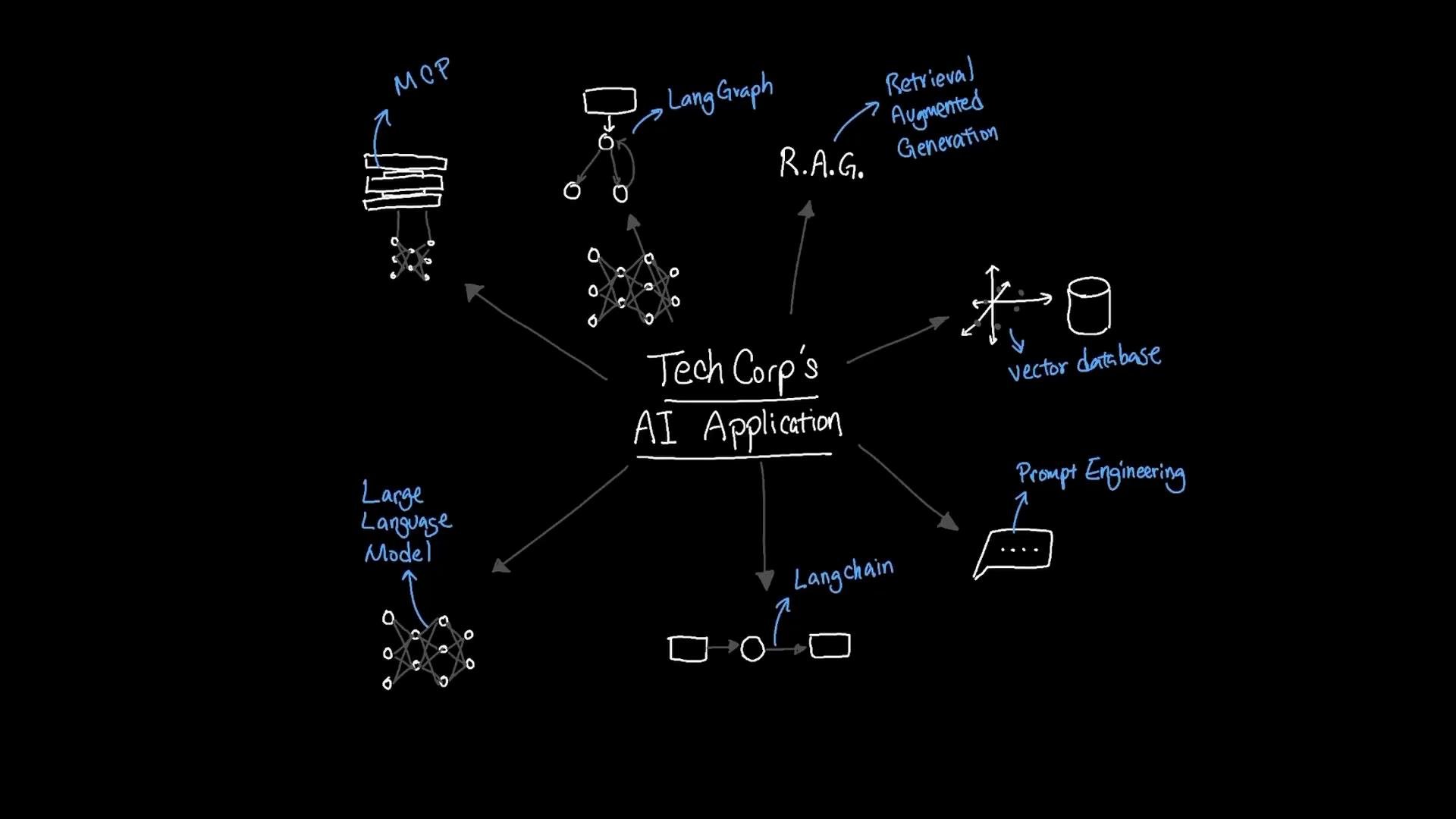
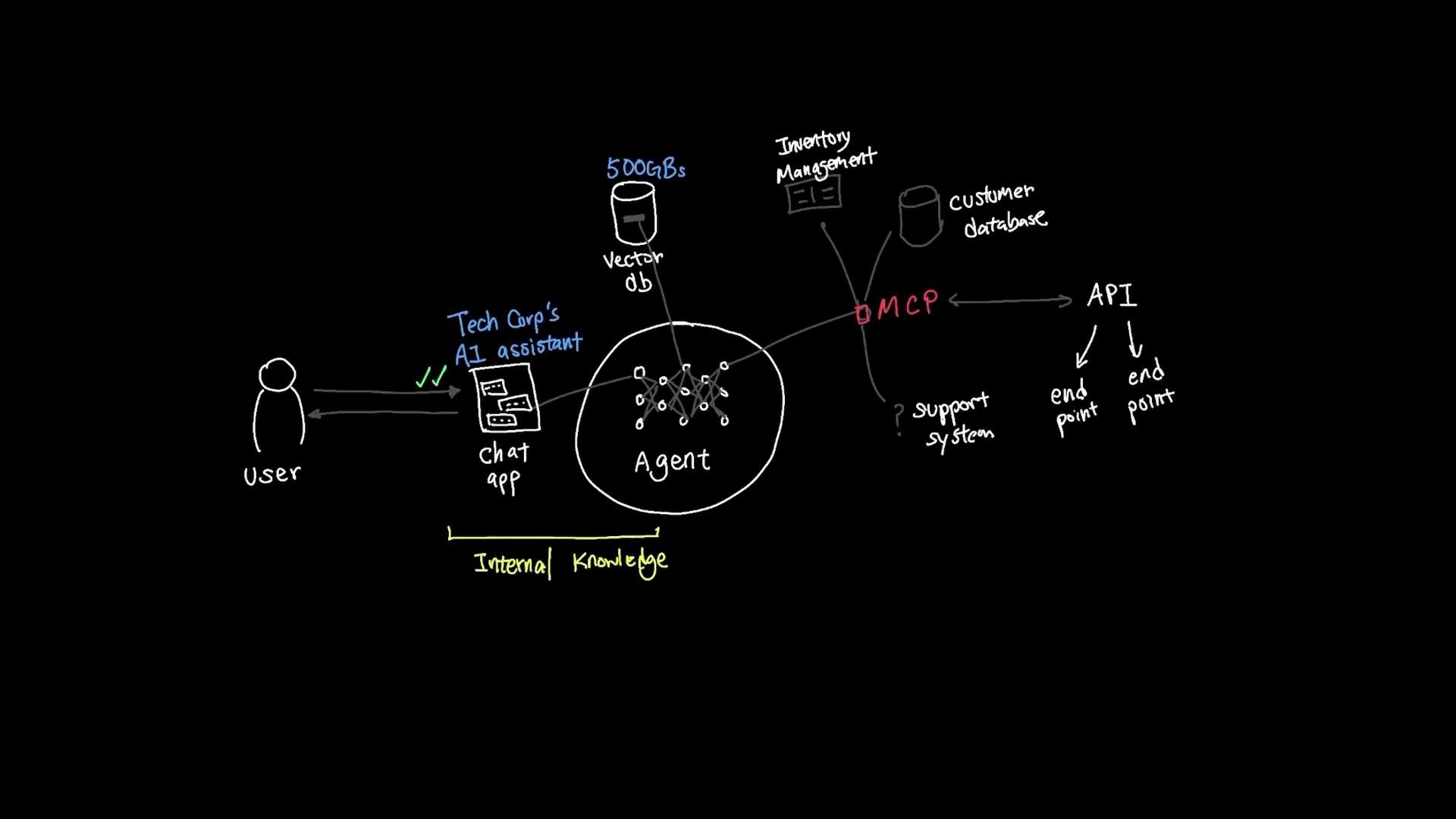
TechCorp's internal AI document assistant works well for internal content, but real-world deployments need access to external systems such as customer databases, ticketing systems, inventory, and third-party APIs. Building a custom adapter for each system quickly becomes costly and brittle.
A model-facing, self-describing interface reduces this friction. Instead of exposing raw endpoints tied to low-level implementation details, these interfaces expose machine-readable capability descriptions that agents can query and invoke. Advantages include:
* Easier discovery of available actions and required inputs
* Reduced brittle, hand-coded adapter logic
* Safer orchestration across heterogeneous systems
In practice, a self-describing interface might provide an OpenAPI-like schema, examples of usage, and type-safe I/O contracts the agent can read at runtime to plan its interactions.
Integrating external systems with self-describing interfaces
TechCorp's internal AI document assistant works well for internal content, but real-world deployments need access to external systems such as customer databases, ticketing systems, inventory, and third-party APIs. Building a custom adapter for each system quickly becomes costly and brittle.
A model-facing, self-describing interface reduces this friction. Instead of exposing raw endpoints tied to low-level implementation details, these interfaces expose machine-readable capability descriptions that agents can query and invoke. Advantages include:
* Easier discovery of available actions and required inputs
* Reduced brittle, hand-coded adapter logic
* Safer orchestration across heterogeneous systems
In practice, a self-describing interface might provide an OpenAPI-like schema, examples of usage, and type-safe I/O contracts the agent can read at runtime to plan its interactions.
 Best practices when integrating external tools
* Use machine-readable schemas (OpenAPI, JSON Schema) to let agents discover capabilities.
* Implement authentication, role-based access control, and audit logging.
* Provide clear error semantics so agents can retry or escalate correctly.
* Validate and sanitize inputs; never run untrusted code directly.
Further exploration
* Replace simple heuristics with LLM-based classifiers to improve routing decisions.
* Use safe math parsers (e.g., `asteval`, `numexpr`, or a dedicated math library) rather than `eval`.
* Add caching or vector search (RAG) to improve performance and relevance for search-oriented tools.
* Implement observability (tracing, logs, per-node metrics) for reliability and debugging.
* Experiment with multi-agent orchestration and cross-graph communication patterns.
Links and references
* LangGraph (project) — [LangGraph docs](https://github.com/langgraph) (replace with the official docs link as available)
* LangChain — [https://langchain.dev/](https://langchain.dev/)
* DuckDuckGo Search (ddgs) — [https://pypi.org/project/ddgs/](https://pypi.org/project/ddgs/)
* OpenAI API and Chat Models — [https://platform.openai.com/docs/](https://platform.openai.com/docs/)
Happy building!
Best practices when integrating external tools
* Use machine-readable schemas (OpenAPI, JSON Schema) to let agents discover capabilities.
* Implement authentication, role-based access control, and audit logging.
* Provide clear error semantics so agents can retry or escalate correctly.
* Validate and sanitize inputs; never run untrusted code directly.
Further exploration
* Replace simple heuristics with LLM-based classifiers to improve routing decisions.
* Use safe math parsers (e.g., `asteval`, `numexpr`, or a dedicated math library) rather than `eval`.
* Add caching or vector search (RAG) to improve performance and relevance for search-oriented tools.
* Implement observability (tracing, logs, per-node metrics) for reliability and debugging.
* Experiment with multi-agent orchestration and cross-graph communication patterns.
Links and references
* LangGraph (project) — [LangGraph docs](https://github.com/langgraph) (replace with the official docs link as available)
* LangChain — [https://langchain.dev/](https://langchain.dev/)
* DuckDuckGo Search (ddgs) — [https://pypi.org/project/ddgs/](https://pypi.org/project/ddgs/)
* OpenAI API and Chat Models — [https://platform.openai.com/docs/](https://platform.openai.com/docs/)
Happy building!