> ## Documentation Index
> Fetch the complete documentation index at: https://notes.kodekloud.com/llms.txt
> Use this file to discover all available pages before exploring further.
# Practice Labs RAG Implementation
> Guide to building a Retrieval-Augmented Generation pipeline using ChromaDB, sentence-transformers, smart chunking, prompt engineering, and LLM integration for grounded answers with source attributions.
This lesson extends a semantic search system into a Retrieval-Augmented Generation (RAG) pipeline. Instead of returning only matching documents (for example, returning `remote-work-policy.pdf` for the query "work from home"), the RAG pipeline retrieves relevant context and uses a large language model (LLM) to generate concise, grounded answers such as: "Yes — employees may work up to three days per week from home."
Key concepts covered:
* Vector store initialization and persistence (ChromaDB)
* Semantic embeddings with sentence-transformers
* Smart document chunking for context preservation
* LLM integration and prompt engineering for RAG
* A complete pipeline that returns answers with source attributions
Project files:
| File | Purpose |
| -------------------------------- | ----------------------------------------------- |
| README.md | Project overview and instructions |
| task\_1\_setup\_vectorstore.py | Initialize ChromaDB and load embedding model |
| task\_2\_document\_processing.py | Document parsing and smart chunking |
| task\_3\_llm\_integration.py | LLM client initialization and test generation |
| task\_4\_prompt\_engineering.py | Build RAG-safe prompts that avoid hallucination |
| task\_5\_complete\_rag.py | End-to-end RAG pipeline orchestration |
| verify\_environment.py | Environment and dependency verification |
***
## Environment setup and verification
Install required libraries. Common libraries used in this lab:
* ChromaDB (vector database): [https://www.trychroma.com/](https://www.trychroma.com/)
* Sentence Transformers (embeddings): [https://www.sbert.net/](https://www.sbert.net/)
* LangChain (RAG orchestration): [https://python.langchain.com/](https://python.langchain.com/)
* OpenAI-compatible model endpoints (for example, GPT-4.1 Mini)
After installing, run the verification script to confirm dependencies and environment variables are available:
```bash theme={null}
# Run the verification script
python3 /root/code/verify_environment.py
```
Example verification output:
```bash theme={null}
🔧 RAG Lab Environment Verification
===================================
📦 Checking Python Environment:
✅ Virtual environment is active
📦 Checking Required Packages:
✅ ChromaDB (vector database) available
✅ Sentence Transformers (embeddings) available
✅ LangChain (RAG framework) available
```
Once dependencies are confirmed, proceed to initialize the vector store and embedding model.
***
## Task 1 — Setup the vector store (ChromaDB)
Create a persistent ChromaDB client and a collection to store document embeddings. Load the sentence-transformers model `all-MiniLM-L6-v2` (384-d vectors) to embed document chunks and queries.
Example setup code (task\_1\_setup\_vectorstore.py):
```python theme={null}
# task_1_setup_vectorstore.py
from sentence_transformers import SentenceTransformer
import chromadb
print("=" * 50)
# 1: Initialize ChromaDB client for persistent storage
client = chromadb.PersistentClient(path="./chroma_db")
print("✅ ChromaDB client initialized")
# 2: Create or get collection named "techcorp_rag"
collection = client.get_or_create_collection(name="techcorp_rag")
print(f"✅ Collection '{collection.name}' ready")
# 3: Initialize embedding model for 384-dimension vectors
model = SentenceTransformer("all-MiniLM-L6-v2")
print("✅ Embedding model loaded")
# test the setup
test_text = "Testing RAG setup"
test_embedding = model.encode(test_text)
print(f"✅ Test embedding created: {len(test_embedding)} dimensions")
```
Expected run summary:
```bash theme={null}
vocab.txt: 232kB [00:00, 9.61MB/s]
tokenizer.json: 466kB [00:00, 26.7MB/s]
special_tokens_map.json: 100%
config.json: 100%
(✅) Embedding model loaded
(✅) Test embedding created: 384 dimensions
=> SUCCESS! Your vector store is ready for RAG!
- ChromaDB initialized
- Collection: techcorp_rag
- Embedding model: all-MiniLM-L6-v2
- Vector dimensions: 384
```
This collection is your persistent RAG memory where company documents are stored as vectors for semantic retrieval.
***
## Task 2 — Document processing and smart chunking
Chunking strategy is critical for RAG quality. Prefer paragraph-based chunking with small overlaps so chunks preserve complete thoughts and transitions. This helps the LLM use coherent context without requiring large token budgets.
Example implementation (task\_2\_document\_processing.py):
```python theme={null}
# task_2_document_processing.py
from pathlib import Path
from typing import List
import os
def smart_chunk_document(text: str, max_paragraphs_per_chunk: int = 3, overlap_paragraphs: int = 1) -> List[str]:
"""
Chunk text by paragraphs, grouping up to max_paragraphs_per_chunk paragraphs per chunk.
Apply a small overlap so adjacent chunks share overlap_paragraphs to preserve continuity.
"""
paragraphs = [p.strip() for p in text.split("\n\n") if p.strip()]
if not paragraphs:
return []
chunks = []
i = 0
while i < len(paragraphs):
prev_i = i
end = min(i + max_paragraphs_per_chunk, len(paragraphs))
chunk = "\n\n".join(paragraphs[i:end])
chunks.append(chunk)
# If we've reached the end, break
if end >= len(paragraphs):
break
# advance with overlap: start next chunk overlap_paragraphs paragraphs before end,
# but ensure progress to avoid infinite loops
i = end - overlap_paragraphs
if i <= prev_i:
i = end
return chunks
# Process documents
doc_dir = Path("/root/techcorp-docs")
total_chunks = 0
docs_processed = 0
for category_dir in doc_dir.iterdir():
if category_dir.is_dir():
print(f"\n📁 Processing {category_dir.name}:")
for doc_file in category_dir.glob("*.md"):
metadata = {
"source": doc_file.name,
"section": category_dir.name
}
with open(doc_file, "r", encoding="utf-8") as f:
content = f.read()
chunks = smart_chunk_document(content, max_paragraphs_per_chunk=3, overlap_paragraphs=1)
# Example: here you would encode chunks and add them to ChromaDB with metadata
total_chunks += len(chunks)
docs_processed += 1
print(f"\nProcessed {docs_processed} documents into {total_chunks} chunks.")
```
Notes:
* Paragraph-based chunking preserves semantics better than fixed-character slices.
* Make chunk size and overlap parameters configurable for tuning to prompt token limits.
***
## Task 3 — LLM integration
Connect a deterministic, production-ready LLM client (for example, GPT-4.1 Mini via an OpenAI-compatible client). Use conservative generation settings (low temperature, token limits) to reduce hallucination and produce concise answers.
Example code (task\_3\_llm\_integration.py):
```python theme={null}
# task_3_llm_integration.py
from langchain.chat_models import ChatOpenAI
# Initialize client (API key and base should be configured in your environment)
client = ChatOpenAI(model="openai/gpt-4.1-mini")
print("✅ OpenAI client initialized")
def test_generation(client):
"""Test basic LLM generation"""
temperature = 0.3 # focused, lower chance of hallucination
max_tokens = 500 # concise answers
client.temperature = temperature
client.max_tokens = max_tokens
print(f"\n🔬 Testing openai/gpt-4.1-mini with temperature={temperature}")
messages = [
{"role": "system", "content": "You are a helpful AI assistant."},
{"role": "user", "content": "What is RAG in AI? Answer in one sentence."},
]
# Use client's chat completion method appropriate to your SDK (example below)
response = client(messages)
print("\n● Test Response:", response.content)
```
Example test output:
```bash theme={null}
🔬 Testing openai/gpt-4.1-mini with temperature=0.3
● Test Response: RAG (Retrieval-Augmented Generation) in AI is a technique that combines retrieval of relevant documents from a large dataset with generative models to produce more accurate and contextually informed responses.
```
With the LLM client verified, you can assemble a RAG prompt template and wire retrieval and generation together.
***
## Task 4 — Prompt engineering for RAG
Craft a prompt template that:
* Injects retrieved context chunks into the prompt,
* Explicitly instructs the model to answer only from the provided context,
* Requires a fixed fallback phrase when the context does not contain the answer to avoid hallucination.
Example prompt builder (task\_4\_prompt\_engineering.py):
```python theme={null}
# task_4_prompt_engineering.py
def create_rag_prompt(context_chunks, user_question):
"""
Build a system and user prompt that forces the model to use only the provided context.
If the information is not in the context, the model must say:
"I don't have that information in the provided documents."
"""
system_prompt = (
"You are a helpful AI assistant. Answer the user's question using ONLY the information "
"present in the provided context chunks. If the answer is not contained in the context, "
"reply exactly: \"I don't have that information in the provided documents.\" "
"Be concise and accurate."
)
# Build context section from retrieved chunks
context_text = "Context from TechCorp documents:\n\n"
for i, chunk in enumerate(context_chunks, 1):
context_text += f"[Document {i}]\n{chunk}\n\n"
# Create the user prompt with context and question
user_prompt = f"""{context_text}
Question: {user_question}
Answer:"""
return system_prompt, user_prompt
# Example test
context_chunks = ["TechCorp allows up to 3 days/week remote work.", "During emergencies, 100% remote may be authorized."]
system_prompt, user_prompt = create_rag_prompt(context_chunks, "How many days per week can employees work from home?")
print(system_prompt)
print(user_prompt)
```
Design prompts that explicitly constrain the model to the retrieved context and provide a clear fallback phrase for missing information to prevent hallucinations.
Example generated answer (illustrative):
```text theme={null}
You can work from home up to 3 days per week.
Sources: remote-work-policy.md
```
***
## Task 5 — Complete RAG pipeline
Assemble the end-to-end pipeline:
1. Embed the user's query using the same embedding model that encoded document chunks.
2. Query ChromaDB for top-k most relevant chunks (semantic search).
3. Build a context-aware prompt from those chunks.
4. Send the system + user prompt to the LLM to generate an answer.
5. Return the answer along with source attributions (document metadata).
Example pipeline (task\_5\_complete\_rag.py):
```python theme={null}
# task_5_complete_rag.py
import os
def test_rag_pipeline(collection, embedding_model, llm_client, user_question, top_k=3):
# 1. Embed the question
q_emb = embedding_model.encode(user_question)
# 2. Query the collection (ChromaDB query interface may vary)
results = collection.query(
query_embeddings=[q_emb],
n_results=top_k,
include=["metadatas", "documents", "distances"]
)
# Extract chunks and sources
retrieved_chunks = []
sources = set()
docs = results.get("documents", [[]])[0]
metadatas = results.get("metadatas", [[]])[0]
for i, doc_text in enumerate(docs):
if not doc_text:
continue
retrieved_chunks.append(doc_text)
meta = metadatas[i] if i < len(metadatas) else {}
if meta.get("source"):
sources.add(meta["source"])
# 3. Build prompts
system_prompt, user_prompt = create_rag_prompt(retrieved_chunks, user_question)
# 4. Call LLM (example usage; adapt to your SDK)
messages = [
{"role": "system", "content": system_prompt},
{"role": "user", "content": user_prompt},
]
response = llm_client(messages)
# 5. Return result with sources
answer_text = response.content.strip()
return answer_text, list(sources)
# Example orchestration
if __name__ == "__main__":
try:
# Assume collection, model, and client are initialized as in earlier tasks
print(f"\n⏳ Database has {collection.count()} chunks ready")
answer, sources = test_rag_pipeline(collection, model, client, "Can I work from home three days a week?")
print("\nGENERATE: Creating answer...\n")
print("ANSWER:")
print(answer)
print("\nSources:", ", ".join(sources))
print("\n" + "=" * 50)
print(" 🧪 RAG Pipeline Complete!")
print(" - Retrieval: Semantic search working")
print(" - Augmentation: Context injection ready")
print(" - Generation: LLM producing answers")
print(" - Citations: Sources included")
print("=" * 50)
# Create marker file
os.makedirs("/root/markers", exist_ok=True)
with open("/root/markers/task5_rag_complete.txt", "w") as f:
f.write("TASK5_COMPLETE:RAG_PIPELINE_READY")
except Exception as e:
print(f"\n❌ Error: {e}")
print("\n✅ You've built a complete RAG system — from search to answers!")
```
Example run and result (illustrative):
```bash theme={null}
⏳ Database has 124 chunks ready
GENERATE: Creating answer...
ANSWER:
TechCorp's remote work policy embraces flexible work arrangements to promote work-life balance and productivity. It outlines a hybrid work model and remote work guidelines. During emergency situations such as severe weather or health emergencies, 100% remote work may be authorized; essential personnel are notified separately, and the business continuity plan is activated.
Sources: remote-work-policy.md, remote-work.md
============================================================
🎉 RAG Pipeline Complete!
- Retrieval: Semantic search working
- Augmentation: Context injection ready
- Generation: LLM producing answers
- Citations: Sources included
============================================================
```
This pattern ensures queries are answered using retrieved context and that sources are included for traceability and auditability.
***
## Practical considerations and next steps
* Tune chunking size and overlap to balance contextual completeness against token limits for your target LLM.
* Experiment with embedding models (quality vs. cost) and with LLM temperature/length settings.
* Add filters for document recency, confidentiality tags, or department-level access control.
* Implement caching, rate limiting, and logging for production usage.
* Consider connecting to HR systems or identity-aware access control when answers depend on user-specific entitlements.
Handle confidential or restricted documents with care. Ensure access controls and document classification are enforced before including sensitive content in embeddings or returning it in generated answers.
Suggested links and references:
* [ChromaDB Documentation](https://www.trychroma.com/)
* [Sentence Transformers Models](https://huggingface.co/sentence-transformers)
* [LangChain Documentation](https://python.langchain.com/)
* [OpenAI Platform](https://platform.openai.com/)
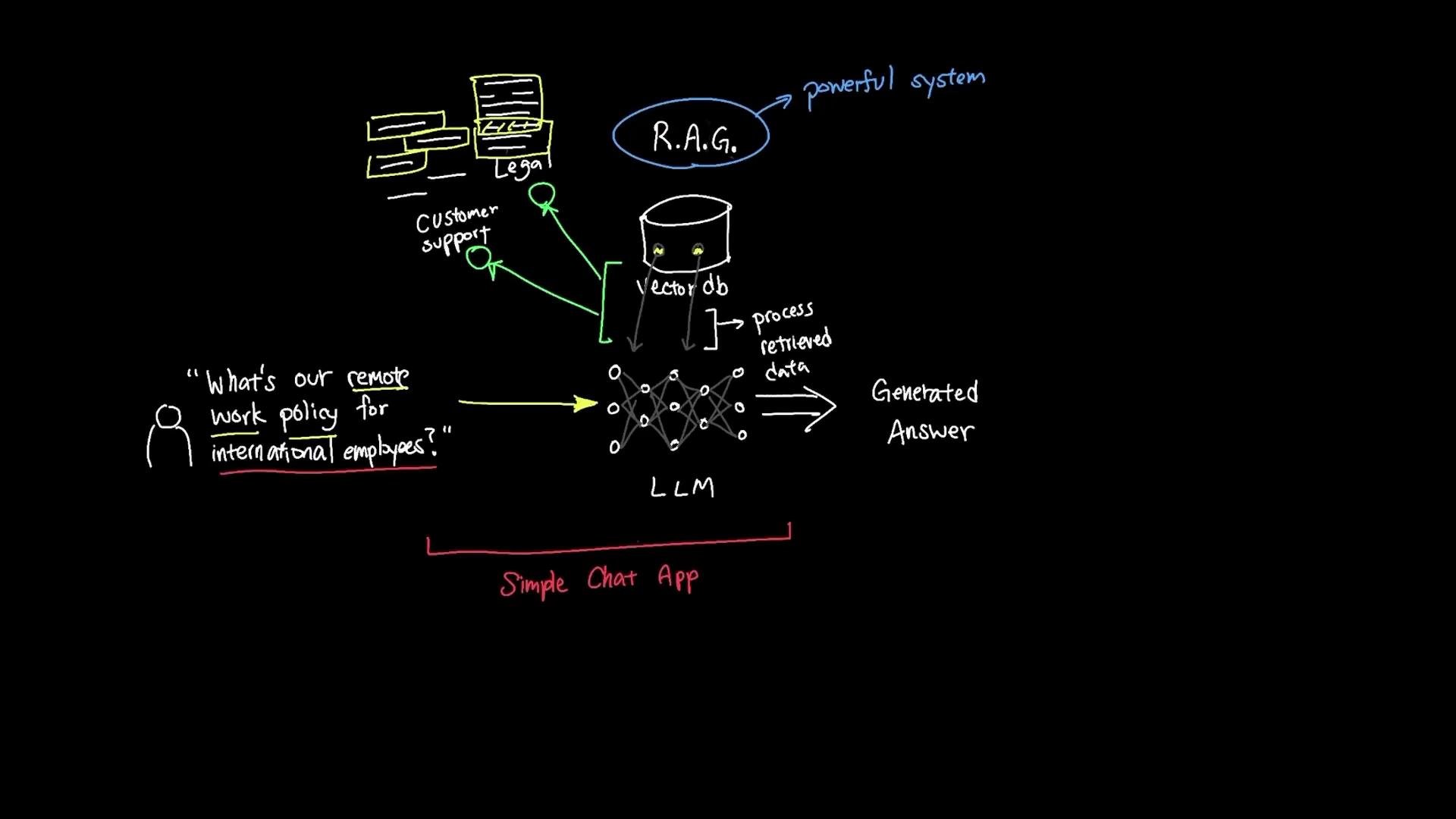 The diagram above illustrates the simple chat app architecture: documents are embedded into a vector DB, relevant chunks are retrieved for a user question, and an LLM produces a grounded answer that includes source attributions.
You're now set up with a working RAG architecture — retrieval, augmentation, and generation — ready to iterate and adapt for your production use case.
The diagram above illustrates the simple chat app architecture: documents are embedded into a vector DB, relevant chunks are retrieved for a user question, and an LLM produces a grounded answer that includes source attributions.
You're now set up with a working RAG architecture — retrieval, augmentation, and generation — ready to iterate and adapt for your production use case.