> ## Documentation Index
> Fetch the complete documentation index at: https://notes.kodekloud.com/llms.txt
> Use this file to discover all available pages before exploring further.
# Agentic Patterns
> Catalog of agent design patterns for building reliable, auditable AI agents, covering augmented LLMs, tool selection, structured outputs, guardrails, human approval, and model fallback.
Building agents from scratch every time is slow and error-prone. Experienced builders reuse patterns — tested solutions to recurring problems — to accelerate development and reduce risk.
This article catalogs common agentic patterns, explains when to apply them, and shows how they fit together in production systems for reliable, auditable AI agents.
## Augmented LLM
At the core of most agents is the Augmented LLM pattern: take a base LLM and equip it with three complementary capabilities:
* Retrieval — fetch relevant external knowledge (embeddings, vector search, or document stores).
* Tools — execute actions (APIs, browser automation, shell commands, calculators).
* Memory — persist and recall context across sessions or tasks.
The LLM remains the central orchestrator while Retrieval, Tools, and Memory provide the external functionality that turns a general model into an agent that can do real work.
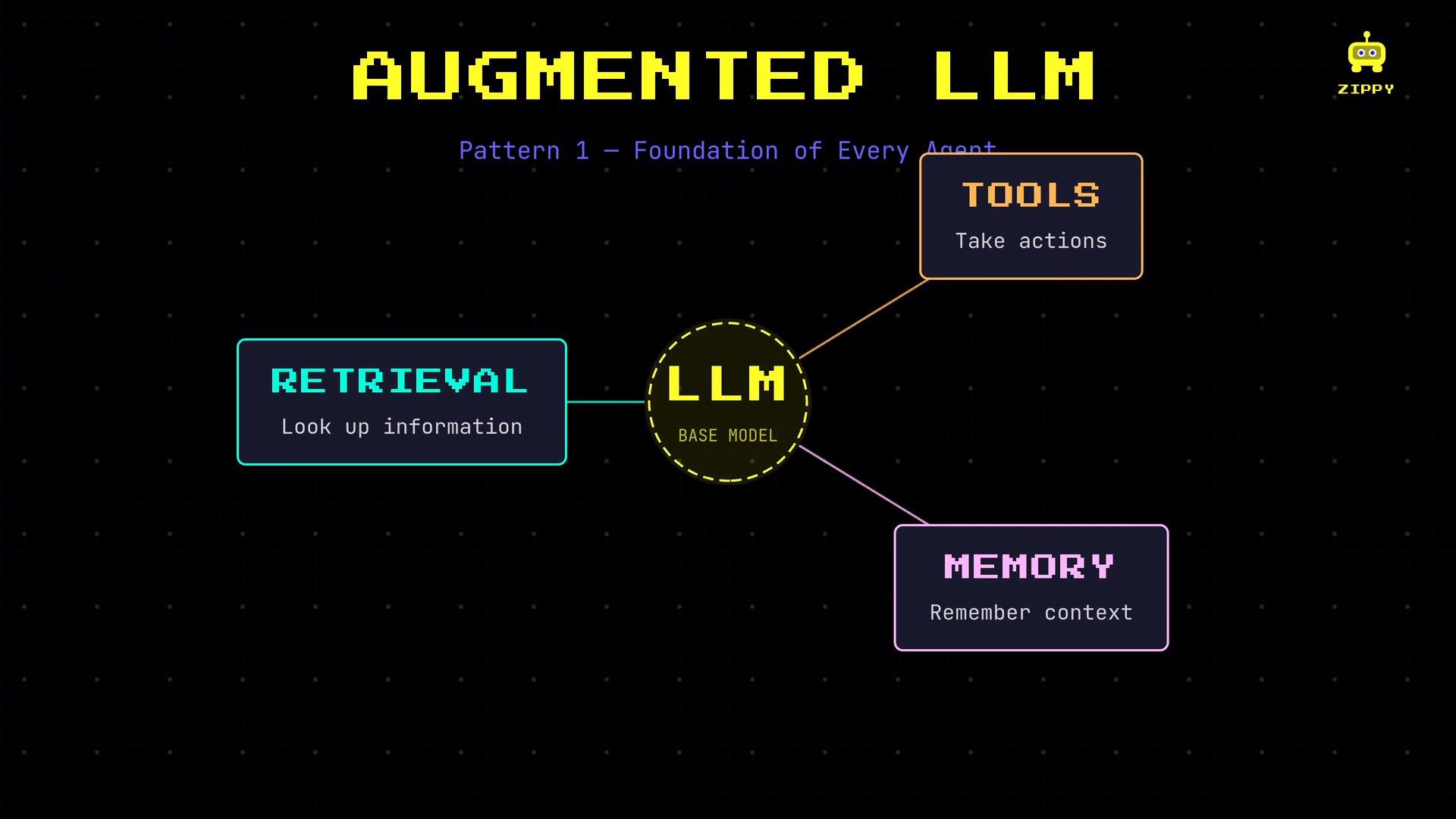 Every production agent should start as an augmented LLM: combine a reliable base model with robust retrieval, well-defined tools, and persistent memory.
## Pattern 2 — Tool selection
When an agent can call multiple tools, reliable tool selection is essential. The agent chooses tools based on the descriptions and interfaces you provide, so invest in precise tool manifests.
Poor tool manifests are ambiguous and lead to wrong decisions:
```yaml theme={null}
name: "search"
description: "Searches things"
```
A clear manifest includes purpose, typed parameters, return schema, and guidance on when to use the tool:
```yaml theme={null}
name: "search"
description: "Full-text document search over the internal knowledge base."
parameters:
query:
type: string
description: "Search query string (natural language)"
max_results:
type: integer
description: "Maximum number of results to return"
returns:
type: array
items:
type: object
properties:
id:
type: string
title:
type: string
snippet:
type: string
score:
type: number
when_to_use: "Use when the user asks for factual information or documentation present in the company knowledge base. Do not use for web search or for actions like booking."
```
Best practices for tool selection:
* Use concise, explicit descriptions that explain purpose and limits.
* Define parameter types and validation rules.
* Provide an explicit return schema to make parsing predictable.
* Include guidance about when to use the tool (and when not to).
Invest in typed tool manifests, structured outputs, and interface documentation so the LLM can reliably pick and call the right tool.
## Pattern 3 — Structured output
When agent outputs feed downstream systems (APIs, databases, analytics), enforce machine-readable structure. Structured output improves predictability, simplifies validation, and reduces error-prone parsing.
Use strict schemas (JSON Schema or equivalent) and validate model responses before acting on them.
Example JSON Schema:
```json theme={null}
{
"type": "object",
"properties": {
"answer": { "type": "string" },
"confidence": { "type": "number", "minimum": 0, "maximum": 1 },
"sources": { "type": "array", "items": { "type": "string" } }
},
"required": ["answer", "confidence", "sources"]
}
```
Tips:
* Provide the schema to the model in the system prompt and instruct: "Always respond with valid JSON conforming to the provided schema."
* Parse and validate the model output; re-prompt or use fallback logic if validation fails.
* When possible, use model-provider features that enforce response schemas or typed outputs.
## Pattern 4 — Guardrails
Guardrails are automated checks and rule systems that constrain agent behavior. They protect against prompt injection, harmful content, data leaks, and other undesired actions. Implement guardrails both before and after the agent runs.
* Input guardrails: sanitize and validate user requests (prompt-injection detection, authorization checks, scope enforcement).
* Output guardrails: validate and sanitize agent responses (format enforcement, hallucination detection, PII redaction).
These checks usually form a pipeline:
user input → input guardrails → agent processing → output guardrails → user
Every production agent should start as an augmented LLM: combine a reliable base model with robust retrieval, well-defined tools, and persistent memory.
## Pattern 2 — Tool selection
When an agent can call multiple tools, reliable tool selection is essential. The agent chooses tools based on the descriptions and interfaces you provide, so invest in precise tool manifests.
Poor tool manifests are ambiguous and lead to wrong decisions:
```yaml theme={null}
name: "search"
description: "Searches things"
```
A clear manifest includes purpose, typed parameters, return schema, and guidance on when to use the tool:
```yaml theme={null}
name: "search"
description: "Full-text document search over the internal knowledge base."
parameters:
query:
type: string
description: "Search query string (natural language)"
max_results:
type: integer
description: "Maximum number of results to return"
returns:
type: array
items:
type: object
properties:
id:
type: string
title:
type: string
snippet:
type: string
score:
type: number
when_to_use: "Use when the user asks for factual information or documentation present in the company knowledge base. Do not use for web search or for actions like booking."
```
Best practices for tool selection:
* Use concise, explicit descriptions that explain purpose and limits.
* Define parameter types and validation rules.
* Provide an explicit return schema to make parsing predictable.
* Include guidance about when to use the tool (and when not to).
Invest in typed tool manifests, structured outputs, and interface documentation so the LLM can reliably pick and call the right tool.
## Pattern 3 — Structured output
When agent outputs feed downstream systems (APIs, databases, analytics), enforce machine-readable structure. Structured output improves predictability, simplifies validation, and reduces error-prone parsing.
Use strict schemas (JSON Schema or equivalent) and validate model responses before acting on them.
Example JSON Schema:
```json theme={null}
{
"type": "object",
"properties": {
"answer": { "type": "string" },
"confidence": { "type": "number", "minimum": 0, "maximum": 1 },
"sources": { "type": "array", "items": { "type": "string" } }
},
"required": ["answer", "confidence", "sources"]
}
```
Tips:
* Provide the schema to the model in the system prompt and instruct: "Always respond with valid JSON conforming to the provided schema."
* Parse and validate the model output; re-prompt or use fallback logic if validation fails.
* When possible, use model-provider features that enforce response schemas or typed outputs.
## Pattern 4 — Guardrails
Guardrails are automated checks and rule systems that constrain agent behavior. They protect against prompt injection, harmful content, data leaks, and other undesired actions. Implement guardrails both before and after the agent runs.
* Input guardrails: sanitize and validate user requests (prompt-injection detection, authorization checks, scope enforcement).
* Output guardrails: validate and sanitize agent responses (format enforcement, hallucination detection, PII redaction).
These checks usually form a pipeline:
user input → input guardrails → agent processing → output guardrails → user
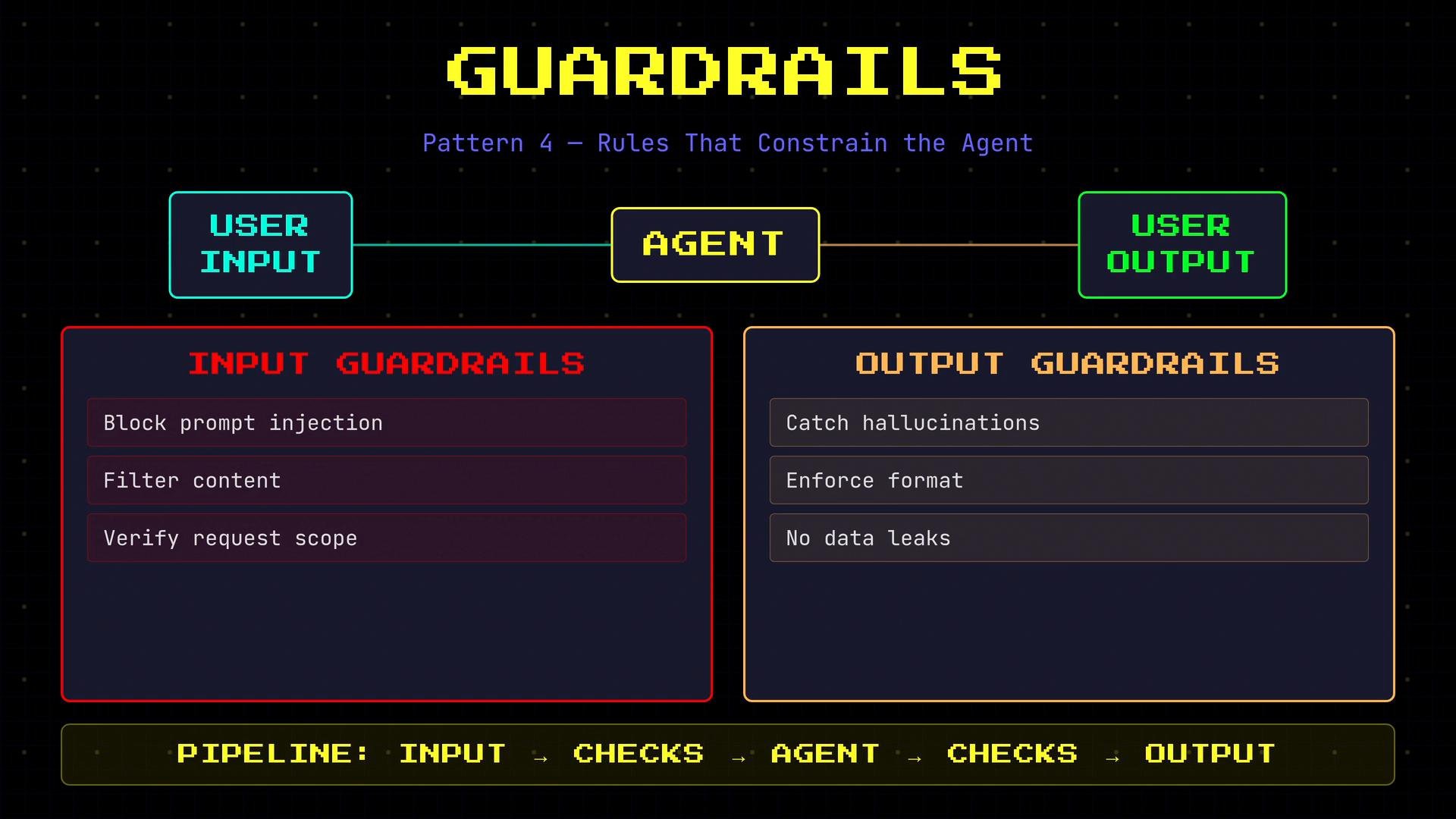 Always validate both inputs and outputs. Guardrails are critical for any user-facing agent or agent that handles sensitive data.
## Pattern 5 — Human-in-the-loop
Not every decision should be fully automated. For irreversible, costly, or legally-sensitive actions, require explicit human approval. Human-in-the-loop patterns insert checkpoints so people can review and confirm high-stakes operations.
Example flow:
* Agent: "I found a flight for \$280 at 2:30 p.m. on Friday. Should I book it?"
* User: confirms
* Agent: proceeds only after confirmation
Design explicit confirmation flows and audit trails for approvals. Store decisions in logs for accountability and compliance.
Always validate both inputs and outputs. Guardrails are critical for any user-facing agent or agent that handles sensitive data.
## Pattern 5 — Human-in-the-loop
Not every decision should be fully automated. For irreversible, costly, or legally-sensitive actions, require explicit human approval. Human-in-the-loop patterns insert checkpoints so people can review and confirm high-stakes operations.
Example flow:
* Agent: "I found a flight for \$280 at 2:30 p.m. on Friday. Should I book it?"
* User: confirms
* Agent: proceeds only after confirmation
Design explicit confirmation flows and audit trails for approvals. Store decisions in logs for accountability and compliance.
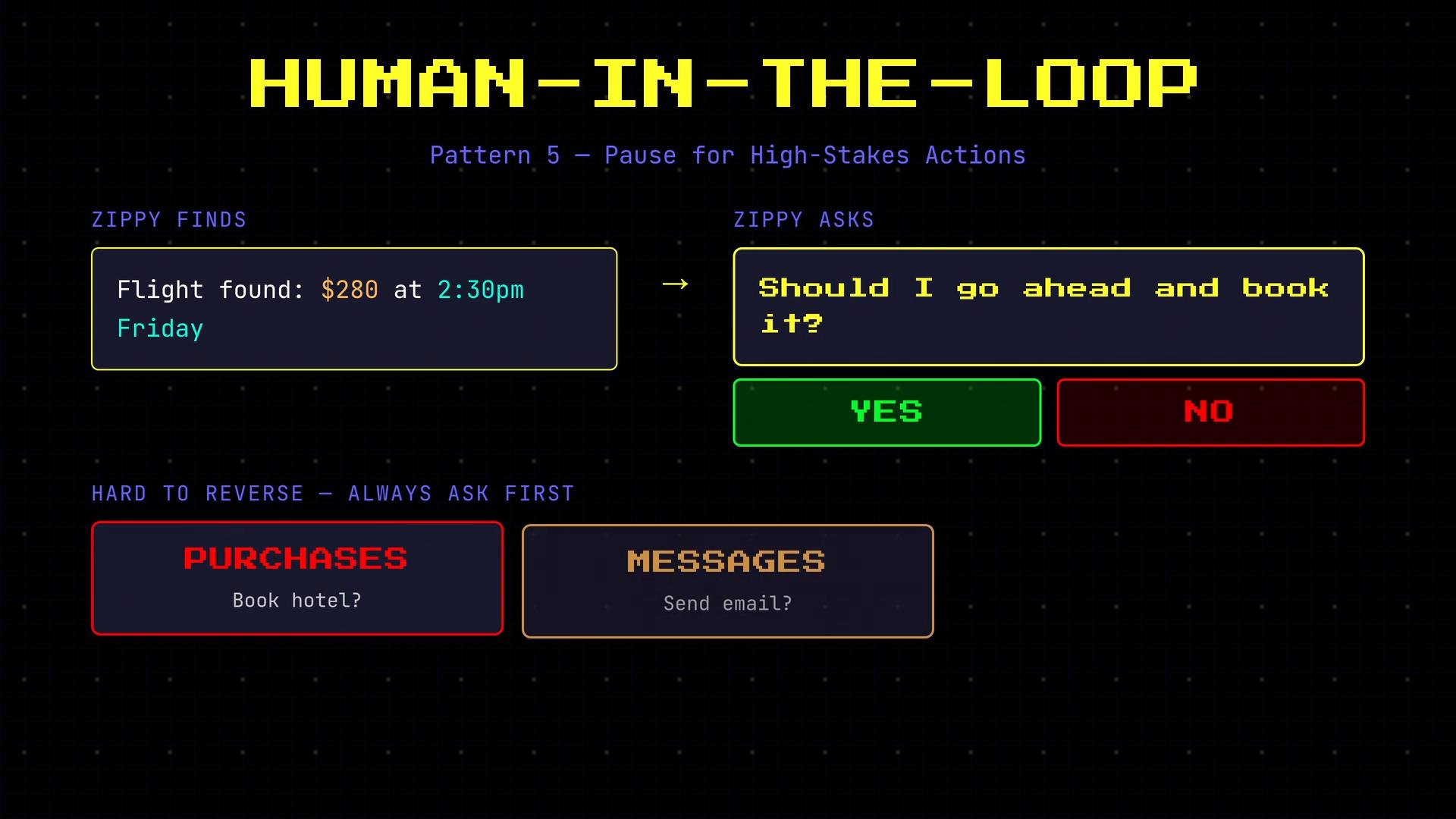 Require explicit confirmations for actions that are destructive, costly, or privacy-sensitive — and log those approvals for auditability.
## Pattern 6 — Model fallback
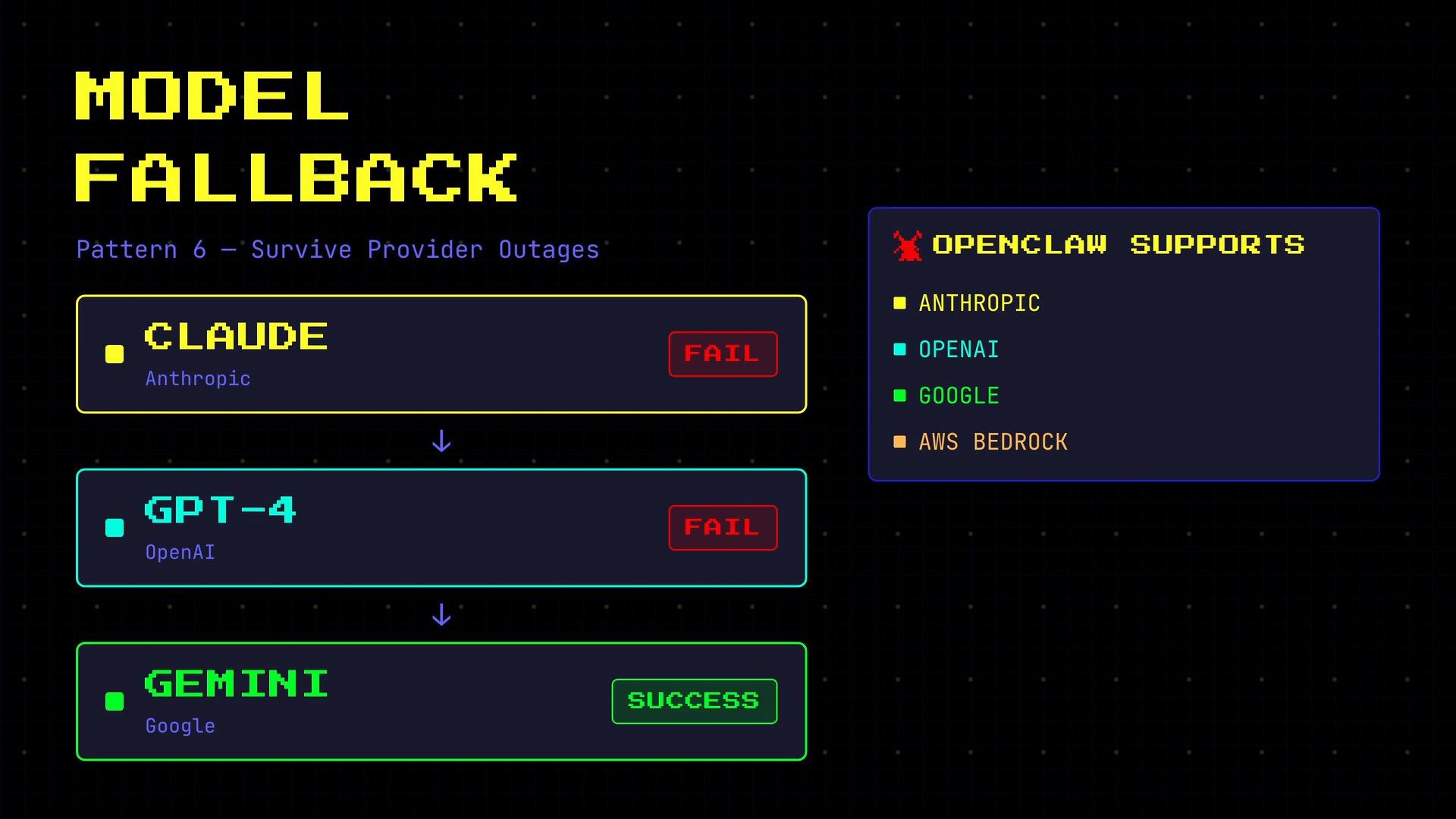
Models and providers can experience outages, rate limits, or degraded performance. Implement model fallback so the agent stays available and responsive when a primary model fails.
A simple fallback chain example:
1. Try Anthropic Claude —> if unavailable,
2. Try OpenAI GPT-4 —> if unavailable,
3. Try Google Gemini.
Services like OpenClaw and similar platforms can help by supporting multiple providers and automated failover to maintain uptime.
Require explicit confirmations for actions that are destructive, costly, or privacy-sensitive — and log those approvals for auditability.
## Pattern 6 — Model fallback
Models and providers can experience outages, rate limits, or degraded performance. Implement model fallback so the agent stays available and responsive when a primary model fails.
A simple fallback chain example:
1. Try Anthropic Claude —> if unavailable,
2. Try OpenAI GPT-4 —> if unavailable,
3. Try Google Gemini.
Services like OpenClaw and similar platforms can help by supporting multiple providers and automated failover to maintain uptime.
 ## Combining patterns
These patterns are complementary and commonly used together in production agents:
* Augmented LLM: always start here.
* Tool selection: necessary when the agent exposes multiple action primitives.
* Structured output: required when downstream systems consume agent output.
* Guardrails: must be present for user-facing or sensitive workflows.
* Human-in-the-loop: use for irreversible or high-risk actions.
* Model fallback: add when uptime, resilience, or cross-provider diversity matters.
Apply patterns thoughtfully: pick the minimal set that addresses your reliability, safety, and compliance goals.
## Patterns quick reference
| Pattern | Problem solved | When to apply |
| - | - | - |
| Augmented LLM | General LLM needs external knowledge, actions, and context | Always — baseline for agents |
| Tool selection | Wrong tool calls due to ambiguous interfaces | When agents expose multiple tools (APIs/actions) |
| Structured output | Unreliable or unparseable responses | When outputs feed downstream systems |
| Guardrails | Unsafe, leaked, or hallucinated outputs | All user-facing and sensitive workflows |
| Human-in-the-loop | High-stakes or irreversible actions | Purchases, deletions, legal decisions |
| Model fallback | Provider outages or throttling | Systems requiring high availability |
Links and references
* JSON Schema: [https://json-schema.org/](https://json-schema.org/)
* Anthropic Claude: [https://www.anthropic.com/claude](https://www.anthropic.com/claude)
* OpenAI GPT-4: [https://openai.com/research/gpt-4](https://openai.com/research/gpt-4)
* Google Gemini: [https://ai.google/discover/gemini](https://ai.google/discover/gemini)
* OpenClaw course: [https://learn.kodekloud.com/user/courses/ai-agents-for-beginner-openclaw-case-study](https://learn.kodekloud.com/user/courses/ai-agents-for-beginner-openclaw-case-study)
Patterns solve concrete operational problems. Use them together to build agents that are reliable, auditable, and safe for production.
This documentation is built and hosted on [Mintlify](https://mintlify.com), a developer documentation platform.
## Combining patterns
These patterns are complementary and commonly used together in production agents:
* Augmented LLM: always start here.
* Tool selection: necessary when the agent exposes multiple action primitives.
* Structured output: required when downstream systems consume agent output.
* Guardrails: must be present for user-facing or sensitive workflows.
* Human-in-the-loop: use for irreversible or high-risk actions.
* Model fallback: add when uptime, resilience, or cross-provider diversity matters.
Apply patterns thoughtfully: pick the minimal set that addresses your reliability, safety, and compliance goals.
## Patterns quick reference
| Pattern | Problem solved | When to apply |
| - | - | - |
| Augmented LLM | General LLM needs external knowledge, actions, and context | Always — baseline for agents |
| Tool selection | Wrong tool calls due to ambiguous interfaces | When agents expose multiple tools (APIs/actions) |
| Structured output | Unreliable or unparseable responses | When outputs feed downstream systems |
| Guardrails | Unsafe, leaked, or hallucinated outputs | All user-facing and sensitive workflows |
| Human-in-the-loop | High-stakes or irreversible actions | Purchases, deletions, legal decisions |
| Model fallback | Provider outages or throttling | Systems requiring high availability |
Links and references
* JSON Schema: [https://json-schema.org/](https://json-schema.org/)
* Anthropic Claude: [https://www.anthropic.com/claude](https://www.anthropic.com/claude)
* OpenAI GPT-4: [https://openai.com/research/gpt-4](https://openai.com/research/gpt-4)
* Google Gemini: [https://ai.google/discover/gemini](https://ai.google/discover/gemini)
* OpenClaw course: [https://learn.kodekloud.com/user/courses/ai-agents-for-beginner-openclaw-case-study](https://learn.kodekloud.com/user/courses/ai-agents-for-beginner-openclaw-case-study)
Patterns solve concrete operational problems. Use them together to build agents that are reliable, auditable, and safe for production.
This documentation is built and hosted on [Mintlify](https://mintlify.com), a developer documentation platform.