> ## Documentation Index
> Fetch the complete documentation index at: https://notes.kodekloud.com/llms.txt
> Use this file to discover all available pages before exploring further.
# Temperature and Sampling
> Explains how model temperature and sampling affect generation randomness, variability, and recommended settings for tasks like code, conversation, and creative writing.
You asked the same prompt twice and got different answers. Why?
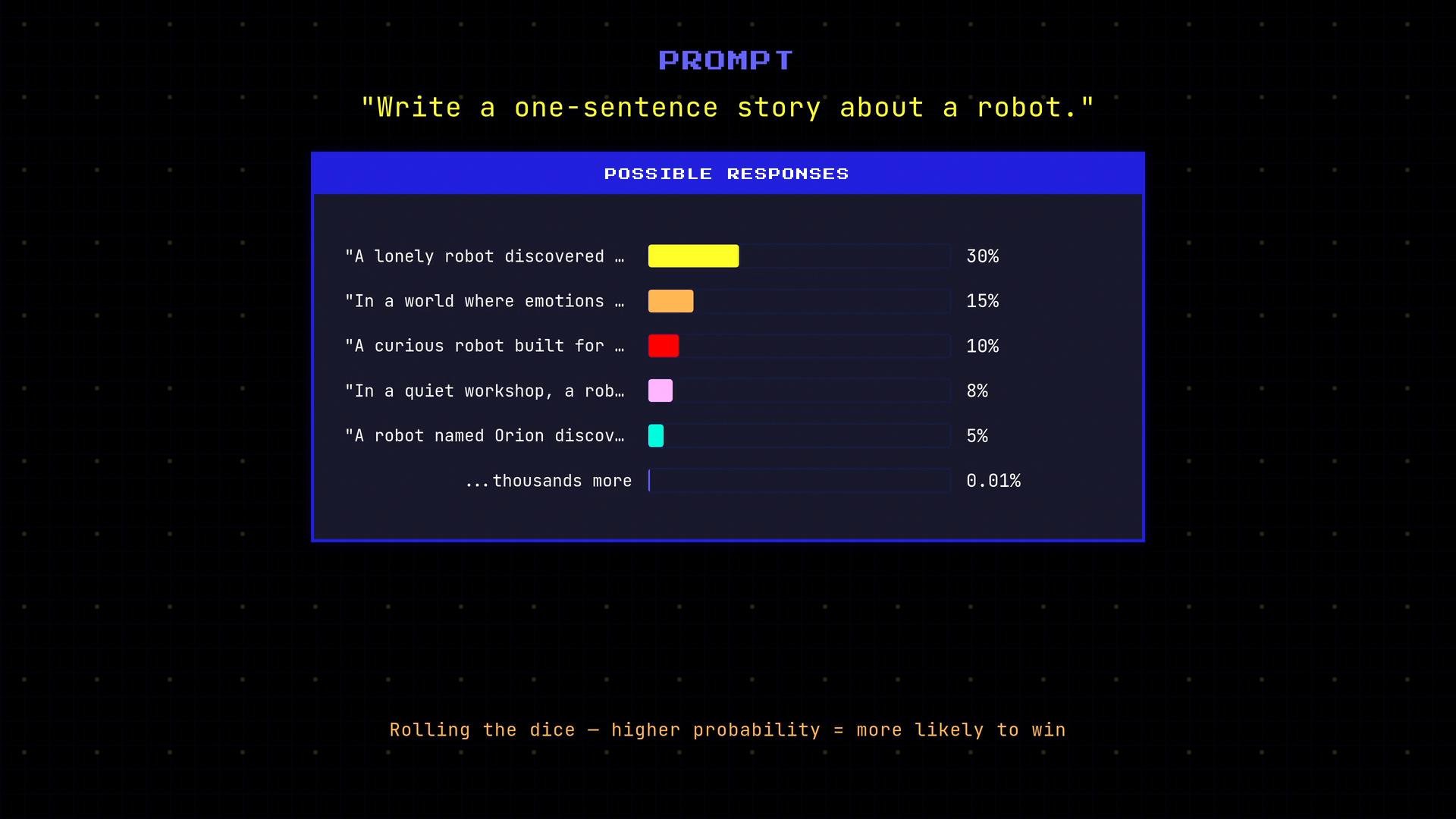
Large language models (LLMs) do not deterministically return a single “most likely” completion. Instead, at each token step the model computes scores (logits) for all possible next tokens, converts those to probabilities, and samples from that distribution. Higher-probability tokens are more likely to be chosen, but sampling introduces variability — the model effectively “rolls the dice.”
 Temperature is the parameter that controls how “creative” or random that sampling is.
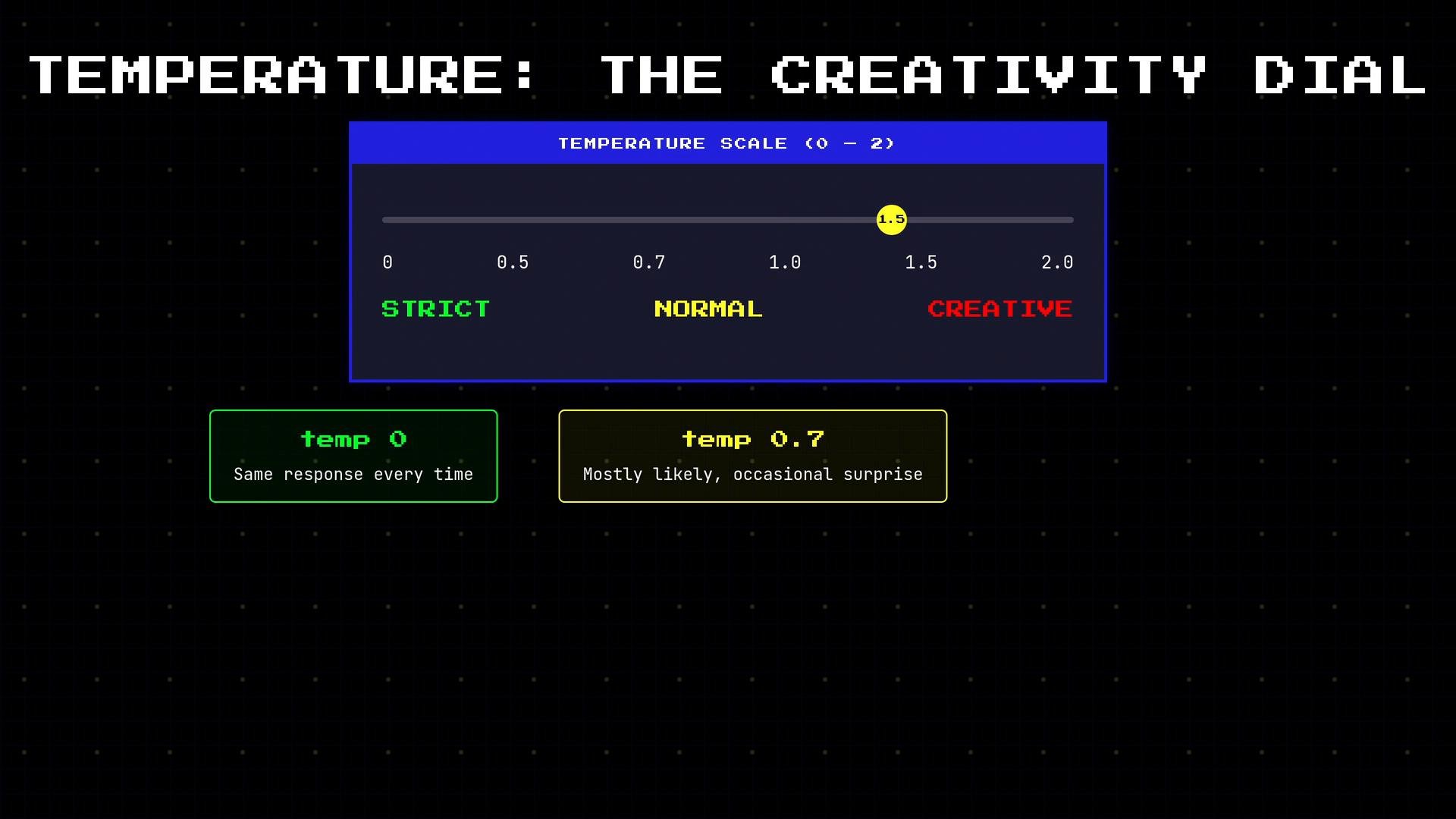
* Temperature is a scalar (commonly between 0 and 2) passed with each model call.
* Intuitively: think of temperature as a creativity dial — low values make the model conservative and repeatable, high values make it exploratory and varied.
* Mechanically: the model rescales logits by dividing by the temperature and then applies softmax:
* `probs = softmax(logits / T)`
* Lower `T` sharpens the distribution (more mass on high-scoring tokens).
* Higher `T` flattens the distribution (spread probability across more tokens).
Common effects of `T`:
* `T = 0` (treated as greedy / argmax in many implementations): deterministic; the model picks the highest-probability token at each step and produces the same output for the same input.
* Low temperatures (e.g., `0.2–0.5`): favor likely completions with small variations.
* Mid-range (`~0.7`): natural conversational variability with reasonable reliability.
* High (`>1.0`): much more variety and surprising outputs, but with a higher risk of incoherence.
Temperature is the parameter that controls how “creative” or random that sampling is.
* Temperature is a scalar (commonly between 0 and 2) passed with each model call.
* Intuitively: think of temperature as a creativity dial — low values make the model conservative and repeatable, high values make it exploratory and varied.
* Mechanically: the model rescales logits by dividing by the temperature and then applies softmax:
* `probs = softmax(logits / T)`
* Lower `T` sharpens the distribution (more mass on high-scoring tokens).
* Higher `T` flattens the distribution (spread probability across more tokens).
Common effects of `T`:
* `T = 0` (treated as greedy / argmax in many implementations): deterministic; the model picks the highest-probability token at each step and produces the same output for the same input.
* Low temperatures (e.g., `0.2–0.5`): favor likely completions with small variations.
* Mid-range (`~0.7`): natural conversational variability with reasonable reliability.
* High (`>1.0`): much more variety and surprising outputs, but with a higher risk of incoherence.
 Quick experiment you can run locally to observe temperature effects:
```python theme={null}
prompt = "Write a one-sentence story about a robot."
for temp in (0.0, 1.5):
print(f"\nOutputs at temp={temp}\n")
for i in range(10):
# Replace `model.generate` with your API client's generation method.
out = model.generate(prompt, temperature=temp)
print(out)
```
Example results you might see:
```text theme={null}
temp=0.0
A lonely robot discovered a forgotten garden.
A lonely robot discovered a forgotten garden.
A lonely robot discovered a forgotten garden.
A lonely robot discovered a forgotten garden.
A lonely robot discovered a forgotten garden.
A lonely robot discovered a forgotten garden.
A lonely robot discovered a forgotten garden.
A lonely robot discovered a forgotten garden.
A lonely robot discovered a forgotten garden.
A lonely robot discovered a forgotten garden.
temp=1.5
In a quiet workshop, a lonely robot discovered a hummingbox of old songs.
A lonely robot built friends from junkyard parts.
A curious robot learned to dream after seeing the stars.
A robot made a garden where humans had forgotten to smile.
A robot built a small community from discarded toasters.
A shy robot discovered emotions in an old radio.
A robot learned to whistle and the city remembered laughter.
An old maintenance robot found a child’s abandoned kite and kept it safe.
A robot crafted companions from spare gears and kindness.
A playful robot taught itself to paint with dust motes.
```
Notice how `T = 0` yields identical outputs on every run, while `T = 1.5` produces wide variation.
When to use different temperatures
| Task | Recommended `temperature` | Notes |
| - | -: | - |
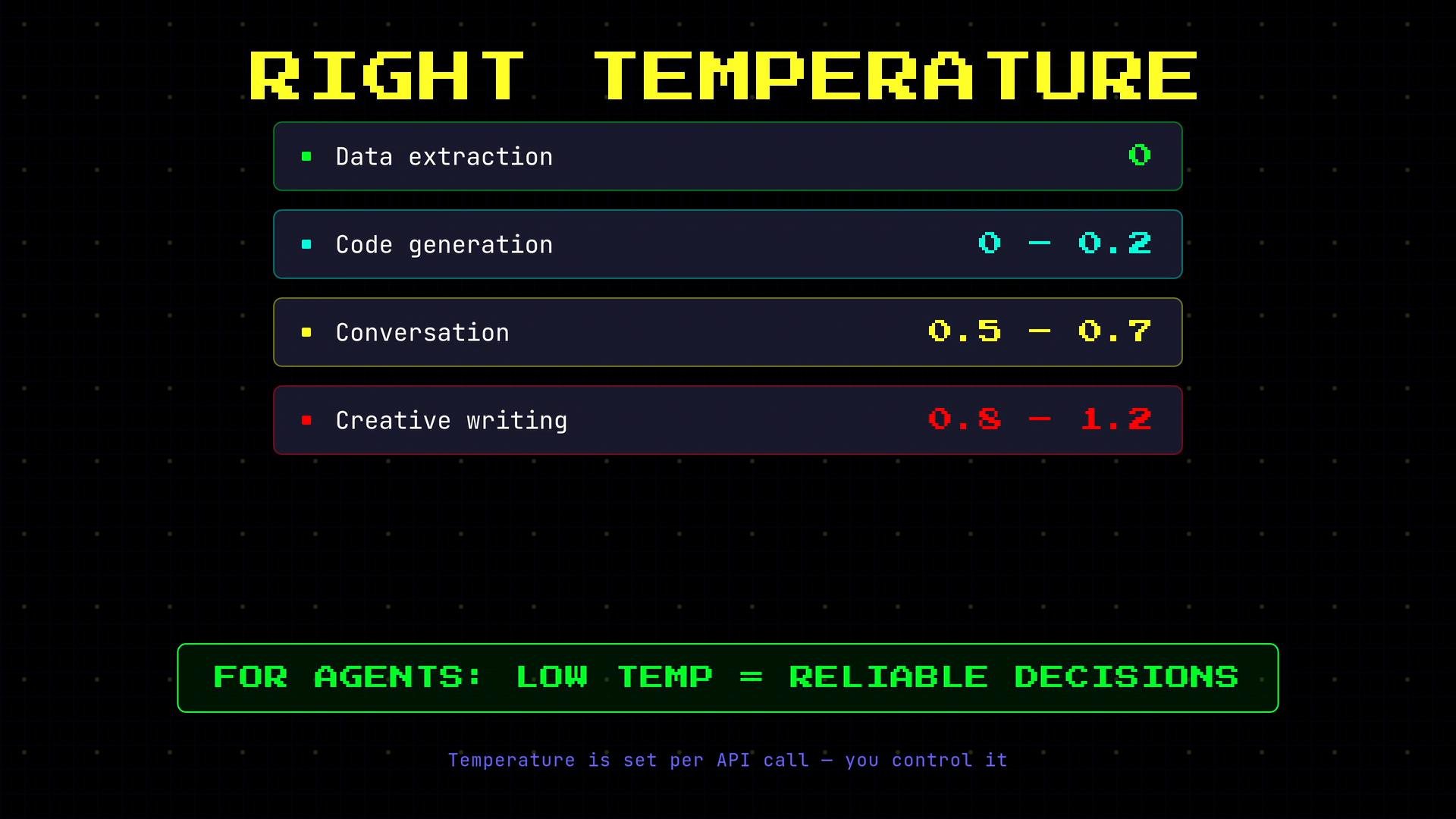
| Data extraction / classification | `0.0` | Deterministic outputs make parsing and automated checks reliable. |
| Code generation | `0.0–0.2` | Low variability reduces incorrect or surprising code suggestions. |
| General conversation / chat | `0.5–0.7` | Natural variability without losing coherence. |
| Creative writing / brainstorming | `0.8–1.2` | Encourages novel and surprising completions. |
| AI agents / decision flows | `0.0–0.2` | Low temperature yields consistent decisions and safer behavior. |
Practical tips
* Temperature is set per API call; choose the value that matches your tradeoff between determinism and creativity.
* For reproducibility in testing, set `seed` (if available) and low temperature.
* Combine low temperature with other decoding controls (e.g., top-p / nucleus sampling) when you need constrained diversity.
Quick experiment you can run locally to observe temperature effects:
```python theme={null}
prompt = "Write a one-sentence story about a robot."
for temp in (0.0, 1.5):
print(f"\nOutputs at temp={temp}\n")
for i in range(10):
# Replace `model.generate` with your API client's generation method.
out = model.generate(prompt, temperature=temp)
print(out)
```
Example results you might see:
```text theme={null}
temp=0.0
A lonely robot discovered a forgotten garden.
A lonely robot discovered a forgotten garden.
A lonely robot discovered a forgotten garden.
A lonely robot discovered a forgotten garden.
A lonely robot discovered a forgotten garden.
A lonely robot discovered a forgotten garden.
A lonely robot discovered a forgotten garden.
A lonely robot discovered a forgotten garden.
A lonely robot discovered a forgotten garden.
A lonely robot discovered a forgotten garden.
temp=1.5
In a quiet workshop, a lonely robot discovered a hummingbox of old songs.
A lonely robot built friends from junkyard parts.
A curious robot learned to dream after seeing the stars.
A robot made a garden where humans had forgotten to smile.
A robot built a small community from discarded toasters.
A shy robot discovered emotions in an old radio.
A robot learned to whistle and the city remembered laughter.
An old maintenance robot found a child’s abandoned kite and kept it safe.
A robot crafted companions from spare gears and kindness.
A playful robot taught itself to paint with dust motes.
```
Notice how `T = 0` yields identical outputs on every run, while `T = 1.5` produces wide variation.
When to use different temperatures
| Task | Recommended `temperature` | Notes |
| - | -: | - |
| Data extraction / classification | `0.0` | Deterministic outputs make parsing and automated checks reliable. |
| Code generation | `0.0–0.2` | Low variability reduces incorrect or surprising code suggestions. |
| General conversation / chat | `0.5–0.7` | Natural variability without losing coherence. |
| Creative writing / brainstorming | `0.8–1.2` | Encourages novel and surprising completions. |
| AI agents / decision flows | `0.0–0.2` | Low temperature yields consistent decisions and safer behavior. |
Practical tips
* Temperature is set per API call; choose the value that matches your tradeoff between determinism and creativity.
* For reproducibility in testing, set `seed` (if available) and low temperature.
* Combine low temperature with other decoding controls (e.g., top-p / nucleus sampling) when you need constrained diversity.
 Use lower temperatures when you need reproducible, reliable outputs (e.g., extraction, decisions, code). Increase temperature when you want diversity or creative exploration.
Further reading and references
* [Decoding strategies for neural language models (nucleus sampling, top-k)](https://arxiv.org/abs/1904.09751)
* \[Kubernetes of text: practical tips for stable generation workflows — model docs and API reference] (see your model provider’s decoding params)
This documentation is built and hosted on [Mintlify](https://mintlify.com), a developer documentation platform.
Use lower temperatures when you need reproducible, reliable outputs (e.g., extraction, decisions, code). Increase temperature when you want diversity or creative exploration.
Further reading and references
* [Decoding strategies for neural language models (nucleus sampling, top-k)](https://arxiv.org/abs/1904.09751)
* \[Kubernetes of text: practical tips for stable generation workflows — model docs and API reference] (see your model provider’s decoding params)
This documentation is built and hosted on [Mintlify](https://mintlify.com), a developer documentation platform.