> ## Documentation Index
> Fetch the complete documentation index at: https://notes.kodekloud.com/llms.txt
> Use this file to discover all available pages before exploring further.
# Prompt Engineering Best Practices
> Practical, research-backed prompt engineering techniques for building structured, testable LLM prompts and agents including personas, positive instructions, ordering, chain-of-thought tags, pre-answer checks, and few-shot examples
Prompt engineering starts with specificity, but that’s just the beginning. Large language models (LLMs) don’t read prompts like humans — they process sequences of tokens and predict the next token from a probability distribution shaped by training data plus the entire prompt. The words you choose, their order, and how you frame instructions shift those probabilities in measurable ways.
Below are six research-backed techniques OpenClaw uses in production, with practical guidance, examples, and the exact patterns we enforce in system prompts and agent builders.
Prompt engineering is production software: treat prompts as structured, testable artifacts. Build a prompt generator with parameters, ordering, and conditional sections so you can A/B test and iterate.
***
## 1) Persona assignment
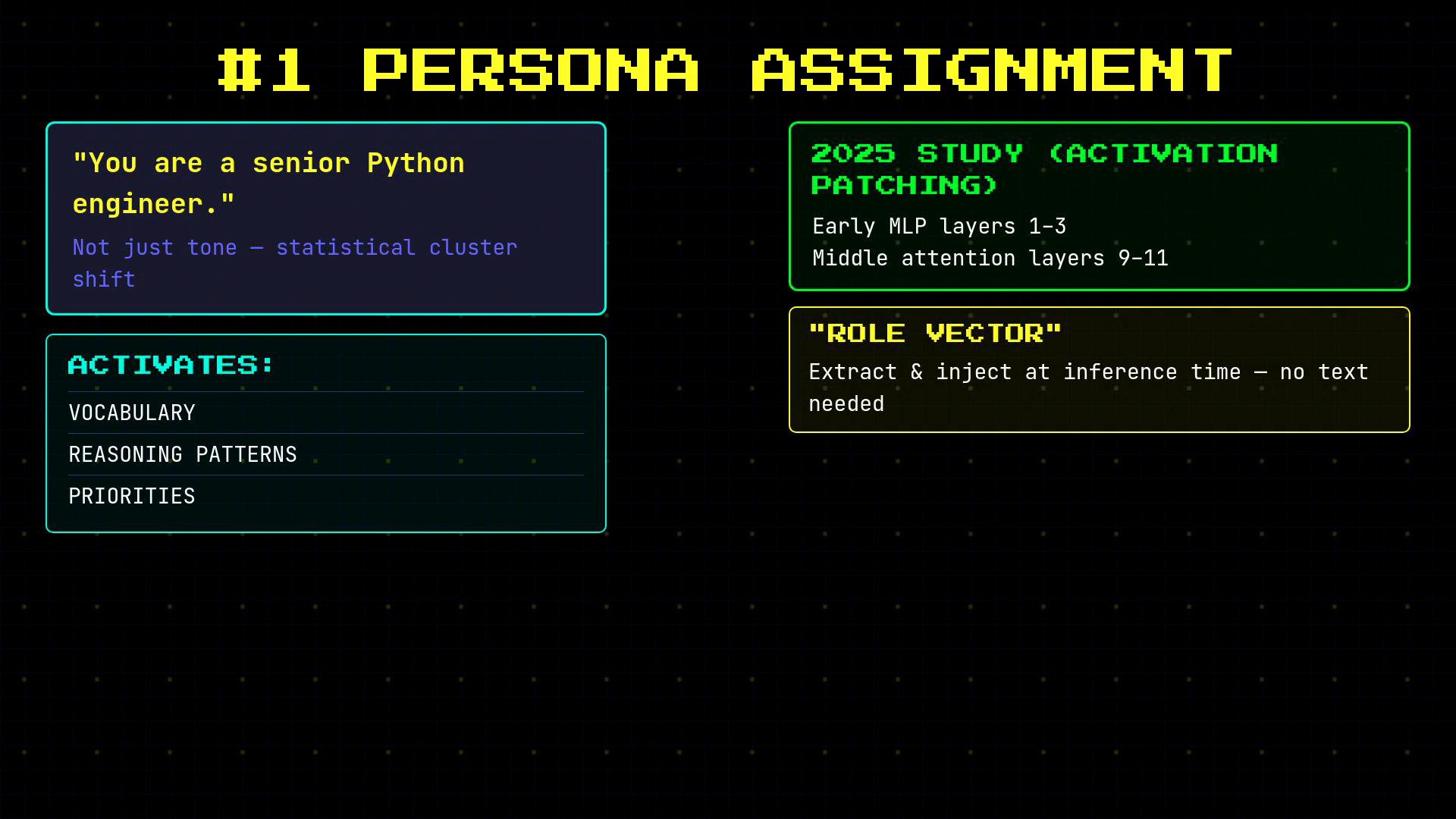
Assigning a persona (e.g., “You are a senior Python engineer”) does more than set tone — it shifts the model toward the statistical cluster of text associated with that role. This affects vocabulary, reasoning patterns, and priorities. Activation-patching research shows persona effects concentrate in early and some middle attention layers; you can even extract and inject role vectors at inference time to mimic this shift.
 When to use persona prompting:
* Use it for domain-specific or stylistic tasks (code review, legal tone, editorial voice).
* Avoid or carefully test it for abstract reasoning and arithmetic — it can sometimes degrade accuracy by introducing unwarranted assumptions.
Guidance:
* A/B test persona vs. no-persona on representative benchmarks.
* For production agents, layer personas: a stable base identity, specialized skill instructions, and optional narrow role reframings when needed.
OpenClaw layered persona example:
* Base identity: `You are a personal assistant running inside OpenClaw.`
* Skills: inject tool- and task-specific instructions.
* Extensions: occasionally reframe identity (e.g., `You are the OpenClaw VM.`) to tighten behavior.
***
## 2) Positive over negative instructions
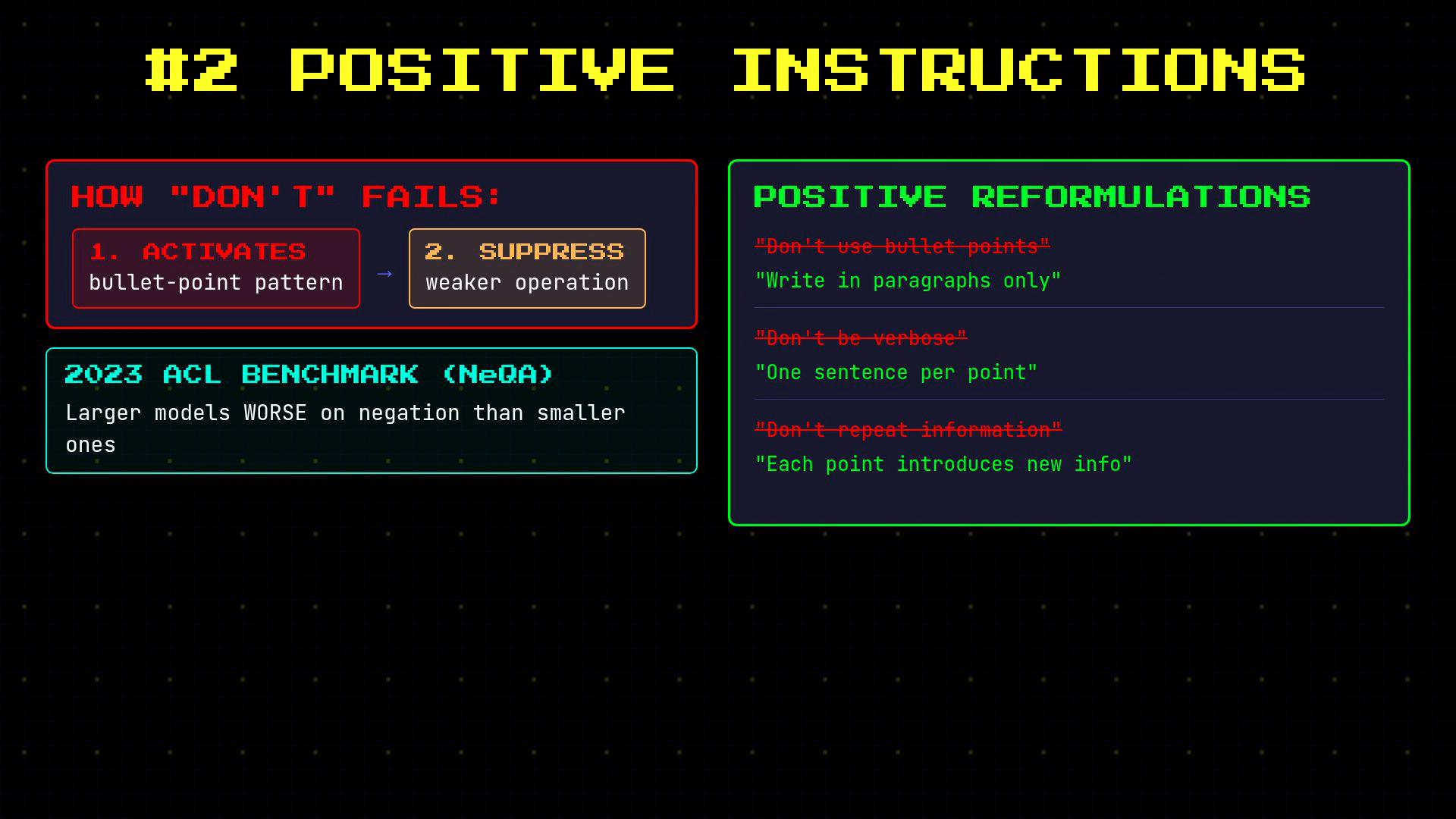
Negations are cognitively tricky for LLMs. Compare:
* "Don't use bullet points."
* "Write in paragraphs only."
Although semantically similar, the positive form reliably performs better because the model need not first activate and then suppress patterns.
When to use persona prompting:
* Use it for domain-specific or stylistic tasks (code review, legal tone, editorial voice).
* Avoid or carefully test it for abstract reasoning and arithmetic — it can sometimes degrade accuracy by introducing unwarranted assumptions.
Guidance:
* A/B test persona vs. no-persona on representative benchmarks.
* For production agents, layer personas: a stable base identity, specialized skill instructions, and optional narrow role reframings when needed.
OpenClaw layered persona example:
* Base identity: `You are a personal assistant running inside OpenClaw.`
* Skills: inject tool- and task-specific instructions.
* Extensions: occasionally reframe identity (e.g., `You are the OpenClaw VM.`) to tighten behavior.
***
## 2) Positive over negative instructions
Negations are cognitively tricky for LLMs. Compare:
* "Don't use bullet points."
* "Write in paragraphs only."
Although semantically similar, the positive form reliably performs better because the model need not first activate and then suppress patterns.
 How OpenClaw applies this:
* Phrase preferences positively for general behavior.
* Reserve explicit negations for absolute constraints (safety/legal rules).
* Keep hard constraints separate from regular guidance so they’re treated as invariants.
Example system-tuned constraints and narration guidance:
```typescript theme={null}
// system-prompt.ts — skills constraints
## Constraints
never read more than one skill up front;
only read after selecting.
// system-prompt.ts — narration behavior
## Narration
Narrate only when it helps:
- multi-step work,
- complex/challenging problems,
- sensitive actions,
- or when the user explicitly asks.
Keep narration brief and value-dense;
avoid repeating obvious steps.
```
Note: Do not append internal constraint text verbatim to user-facing replies.
***
## 3) Order and structure
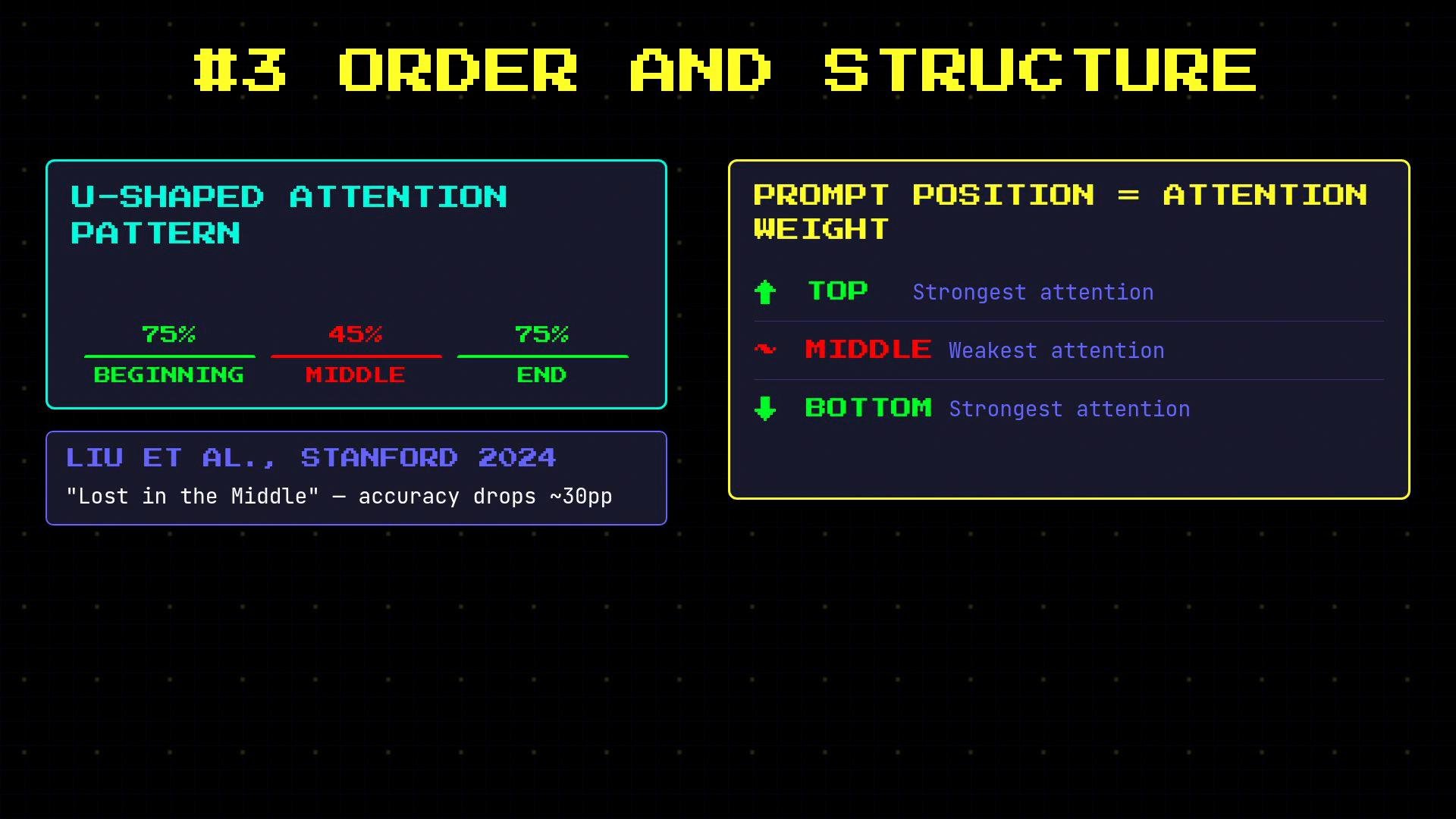
Position matters. Empirical work documents a U-shaped attention pattern: models attend more to the beginning and end of a prompt than to the middle. Place critical instructions at the start or end, and avoid burying them in the middle of long contexts.
How OpenClaw applies this:
* Phrase preferences positively for general behavior.
* Reserve explicit negations for absolute constraints (safety/legal rules).
* Keep hard constraints separate from regular guidance so they’re treated as invariants.
Example system-tuned constraints and narration guidance:
```typescript theme={null}
// system-prompt.ts — skills constraints
## Constraints
never read more than one skill up front;
only read after selecting.
// system-prompt.ts — narration behavior
## Narration
Narrate only when it helps:
- multi-step work,
- complex/challenging problems,
- sensitive actions,
- or when the user explicitly asks.
Keep narration brief and value-dense;
avoid repeating obvious steps.
```
Note: Do not append internal constraint text verbatim to user-facing replies.
***
## 3) Order and structure
Position matters. Empirical work documents a U-shaped attention pattern: models attend more to the beginning and end of a prompt than to the middle. Place critical instructions at the start or end, and avoid burying them in the middle of long contexts.
 Practical ordering rules:
* Put critical constraints and identity first.
* Place the specific user question last.
* Insert large context files in the middle.
* For long prompts, repeat constraints at both the beginning and the end.
OpenClaw system-prompt assembly order (high level):
```typescript theme={null}
src/agents/system-prompt.ts — section order
1. Identity line ("You are a personal assistant...")
2. Tooling — what tools are available
3. Safety — constitutional AI principles
// Context files injected in the middle
// Runtime info appended last
```
***
## 4) Chain-of-thought (structure the reasoning)
Asking a model to “think step-by-step” can improve performance because intermediate tokens condition later tokens. However, free-form chain-of-thought may introduce biases or reduce accuracy in some settings. OpenClaw avoids unstructured internal reasoning in outputs and instead enforces explicit, auditable reasoning tags.
Practical ordering rules:
* Put critical constraints and identity first.
* Place the specific user question last.
* Insert large context files in the middle.
* For long prompts, repeat constraints at both the beginning and the end.
OpenClaw system-prompt assembly order (high level):
```typescript theme={null}
src/agents/system-prompt.ts — section order
1. Identity line ("You are a personal assistant...")
2. Tooling — what tools are available
3. Safety — constitutional AI principles
// Context files injected in the middle
// Runtime info appended last
```
***
## 4) Chain-of-thought (structure the reasoning)
Asking a model to “think step-by-step” can improve performance because intermediate tokens condition later tokens. However, free-form chain-of-thought may introduce biases or reduce accuracy in some settings. OpenClaw avoids unstructured internal reasoning in outputs and instead enforces explicit, auditable reasoning tags.
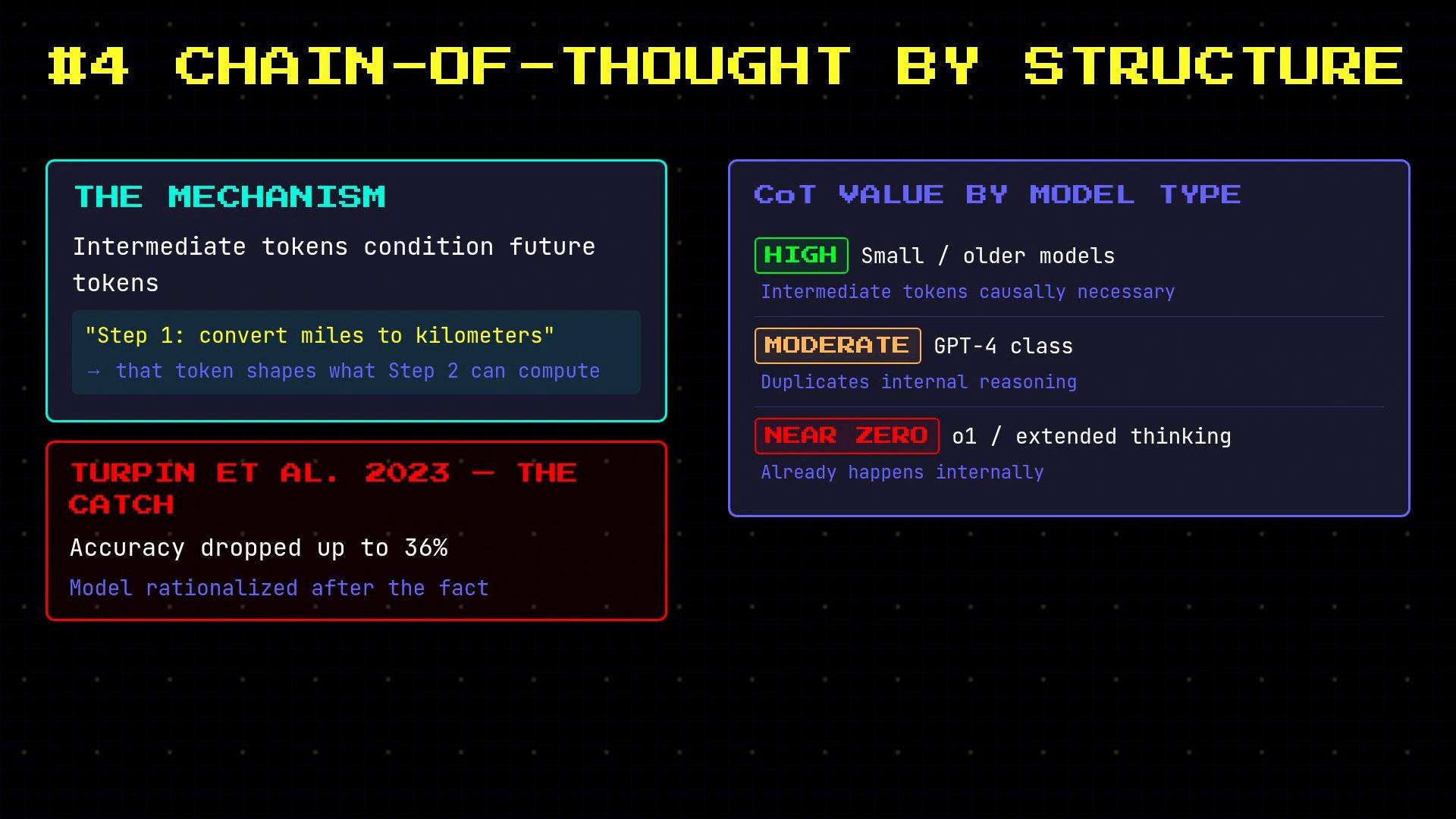 Structured internal reasoning helps auditability, but free-form chains can leak internal deliberation or bias final outputs. Use structured tags and separate final answers from internal thoughts.
OpenClaw’s structural pattern:
* Require all internal reasoning inside explicit tags: use `...`.
* Disallow analysis outside those tags.
* Always produce a ` ...` section for the public reply.
Configuration example (enforced for models that benefit):
```typescript theme={null}
// src/agents/system-prompt.ts — reasoning tag hint
1 ALL internal reasoning MUST be inside ...
2 Do not output any analysis outside .
3 Format every reply as:
4 Short internal reasoning.
5 Hey there! What would you like to do next?
```
When documenting these tags in MDX/JSX, wrap them in code blocks or backticks to avoid parsing issues. For example:
```xml theme={null}
Short internal reasoning.
Hey there! What would you like to do next?
```
This separation improves downstream parsing, auditing, and tool integration.
***
## 5) "Before replying" patterns (structured lookup)
A powerful pattern is to require mandatory pre-answer steps: memory lookups, skills scans, and selection of the most specific applicable skill. Separating retrieval from generation reduces hallucination and increases factual correctness.
Example memory and skills rules:
```typescript theme={null}
// system-prompt.ts — Memory Recall
## Memory Recall
Before answering anything about prior work,
decisions, dates, people, preferences,
or todos:
run memory_search on MEMORY.md + memory/*.md;
then use memory_get to pull only the needed lines.
// system-prompt.ts — Skills (mandatory)
## Skills (mandatory)
Before replying: scan `available_skills` `description` entries.
- If one skill clearly applies: read its SKILL.md
- If multiple could apply: choose the most specific
```
This "step-back" prompting enforces structured lookup and selection before any generation.
***
## 6) Few-shot examples in system prompts
Few-shot examples are effective inside system prompts too. Concrete correct vs. incorrect examples reduce ambiguity and guide downstream parsers and tools to expect precise output formats.
Examples OpenClaw uses:
```xml theme={null}
Short internal reasoning.
Hey there! What would you like to do?
// Wrong (ambiguous):
"Here's help... [SILENT_REPLY_TOKEN]"
"[SILENT_REPLY_TOKEN]" // as standalone text
// Right:
[SILENT_REPLY_TOKEN] // as the entire reply
```
Always include both positive and negative examples where format precision matters. This is especially important when external services parse agent output.
***
## Bonus techniques
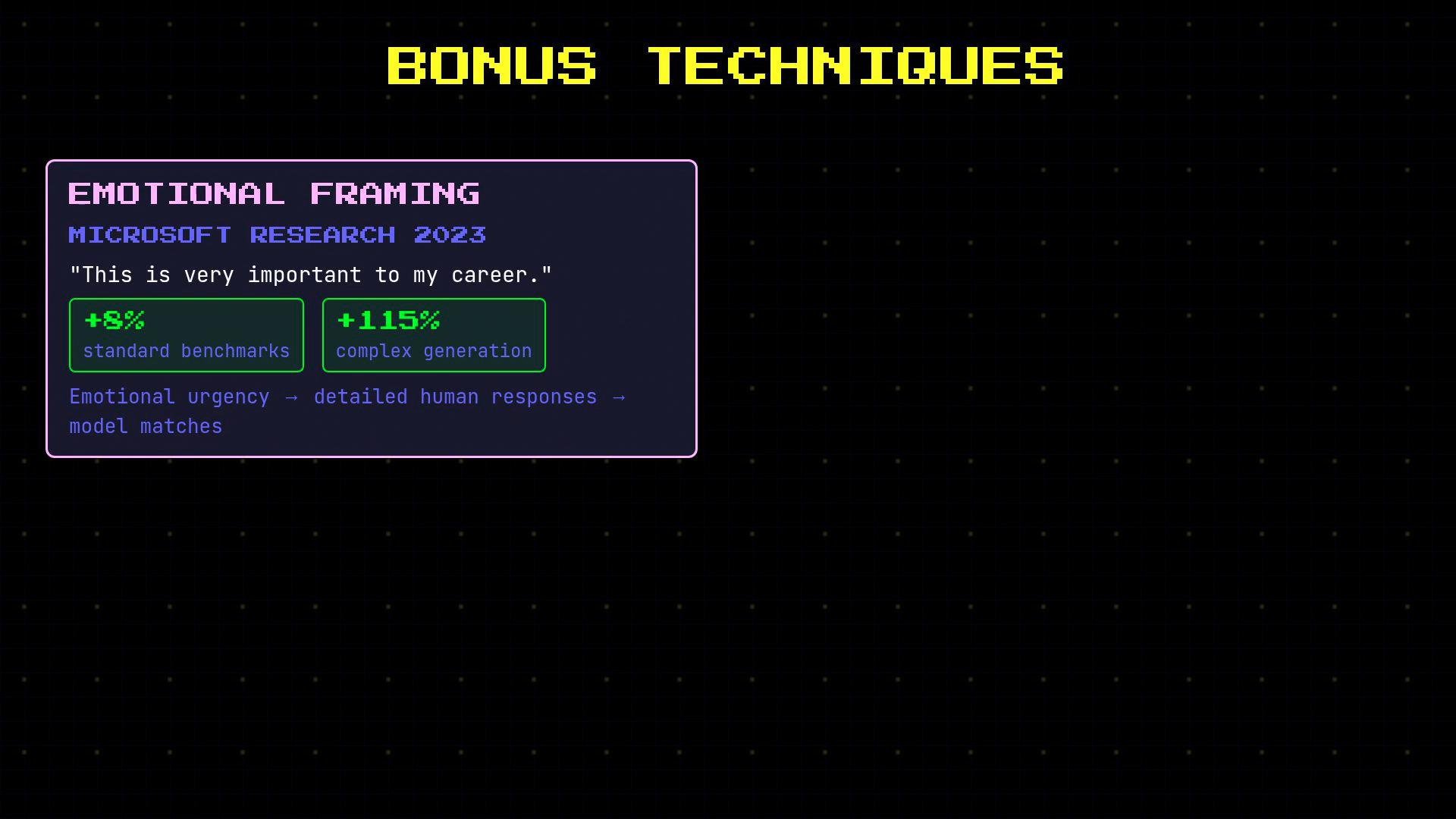
* Emotional framing: experiments (e.g., Microsoft Research) have shown that indicating high stakes can sometimes improve output quality on complex generation tasks. Use with care and A/B test.
* Rereading (RE2): repeating the user question at the end of the prompt gives the model a second pass and can improve performance for decoder-only models.
Structured internal reasoning helps auditability, but free-form chains can leak internal deliberation or bias final outputs. Use structured tags and separate final answers from internal thoughts.
OpenClaw’s structural pattern:
* Require all internal reasoning inside explicit tags: use `...`.
* Disallow analysis outside those tags.
* Always produce a ` ...` section for the public reply.
Configuration example (enforced for models that benefit):
```typescript theme={null}
// src/agents/system-prompt.ts — reasoning tag hint
1 ALL internal reasoning MUST be inside ...
2 Do not output any analysis outside .
3 Format every reply as:
4 Short internal reasoning.
5 Hey there! What would you like to do next?
```
When documenting these tags in MDX/JSX, wrap them in code blocks or backticks to avoid parsing issues. For example:
```xml theme={null}
Short internal reasoning.
Hey there! What would you like to do next?
```
This separation improves downstream parsing, auditing, and tool integration.
***
## 5) "Before replying" patterns (structured lookup)
A powerful pattern is to require mandatory pre-answer steps: memory lookups, skills scans, and selection of the most specific applicable skill. Separating retrieval from generation reduces hallucination and increases factual correctness.
Example memory and skills rules:
```typescript theme={null}
// system-prompt.ts — Memory Recall
## Memory Recall
Before answering anything about prior work,
decisions, dates, people, preferences,
or todos:
run memory_search on MEMORY.md + memory/*.md;
then use memory_get to pull only the needed lines.
// system-prompt.ts — Skills (mandatory)
## Skills (mandatory)
Before replying: scan `available_skills` `description` entries.
- If one skill clearly applies: read its SKILL.md
- If multiple could apply: choose the most specific
```
This "step-back" prompting enforces structured lookup and selection before any generation.
***
## 6) Few-shot examples in system prompts
Few-shot examples are effective inside system prompts too. Concrete correct vs. incorrect examples reduce ambiguity and guide downstream parsers and tools to expect precise output formats.
Examples OpenClaw uses:
```xml theme={null}
Short internal reasoning.
Hey there! What would you like to do?
// Wrong (ambiguous):
"Here's help... [SILENT_REPLY_TOKEN]"
"[SILENT_REPLY_TOKEN]" // as standalone text
// Right:
[SILENT_REPLY_TOKEN] // as the entire reply
```
Always include both positive and negative examples where format precision matters. This is especially important when external services parse agent output.
***
## Bonus techniques
* Emotional framing: experiments (e.g., Microsoft Research) have shown that indicating high stakes can sometimes improve output quality on complex generation tasks. Use with care and A/B test.
* Rereading (RE2): repeating the user question at the end of the prompt gives the model a second pass and can improve performance for decoder-only models.
 ***
## How OpenClaw assembles prompts in production
OpenClaw generates its system prompt with a parameterized prompt builder (a 646-line function in production) that assembles conditional sections. Identity, tooling, and safety are always included; skills, memory, context files, user identity, and timezone are conditional; runtime info is appended last.
Concise prompt-builder example:
```typescript theme={null}
export function buildAgentSystemPrompt(params: any): string {
const sections: string[] = [];
sections.push(identityLine); // Always
sections.push(buildToolingSection(params.tools)); // Always
sections.push(buildSafetySection()); // Always
if (params.skills) sections.push(buildSkillsSection());
if (params.memory) sections.push(buildMemorySection());
if (params.contextFiles) sections.push(buildContextFilesSection());
sections.push(buildRuntimeLine()); // Always last
return sections.join('\n\n');
}
```
Benefits of a builder approach:
* Enforce ordering and repetition consistently.
* Toggle persona, reasoning structure, and pre-answer checks per agent or model.
* Insert precise few-shot examples in the exact place where format matters.
***
## Quick reference table
| Technique | When to use | Key implementation tip |
| - | - | - |
| Persona assignment | Domain-specific or stylistic tasks | Layer identity + skill-level instructions; A/B test |
| Positive instructions | General behavioral guidance | Phrase preferences positively; reserve negations for invariants |
| Order & structure | Any long prompt or mixed-context input | Put constraints first, user question last, context in the middle |
| Structured chain-of-thought | When internal reasoning aids correctness and audit | Use `...` + `...`; keep analysis internal |
| Before-reply checks | Retrieval-heavy tasks | Require memory/skill lookup before generation |
| Few-shot in sys prompts | When format precision matters | Include correct and incorrect examples inline |
***
## Summary
The most effective prompt engineering treats prompts as software: structured, testable, and parameterized. Apply personas selectively, prefer positive instructions, order content deliberately, isolate internal reasoning, require pre-answer lookups, and include concrete examples in system prompts. Encode these rules in a prompt builder to ensure consistent, auditable agent behavior across environments.
## Links and references
* OpenAI — Prompt design guide: [https://platform.openai.com/docs/guides/prompt-design](https://platform.openai.com/docs/guides/prompt-design)
* ACL Anthology (conference proceedings): [https://www.aclweb.org/anthology/](https://www.aclweb.org/anthology/)
* Microsoft Research: [https://www.microsoft.com/en-us/research/](https://www.microsoft.com/en-us/research/)
* Chain-of-thought (Wei et al., 2022): [https://arxiv.org/abs/2201.11903](https://arxiv.org/abs/2201.11903)
This documentation is built and hosted on [Mintlify](https://mintlify.com), a developer documentation platform.
***
## How OpenClaw assembles prompts in production
OpenClaw generates its system prompt with a parameterized prompt builder (a 646-line function in production) that assembles conditional sections. Identity, tooling, and safety are always included; skills, memory, context files, user identity, and timezone are conditional; runtime info is appended last.
Concise prompt-builder example:
```typescript theme={null}
export function buildAgentSystemPrompt(params: any): string {
const sections: string[] = [];
sections.push(identityLine); // Always
sections.push(buildToolingSection(params.tools)); // Always
sections.push(buildSafetySection()); // Always
if (params.skills) sections.push(buildSkillsSection());
if (params.memory) sections.push(buildMemorySection());
if (params.contextFiles) sections.push(buildContextFilesSection());
sections.push(buildRuntimeLine()); // Always last
return sections.join('\n\n');
}
```
Benefits of a builder approach:
* Enforce ordering and repetition consistently.
* Toggle persona, reasoning structure, and pre-answer checks per agent or model.
* Insert precise few-shot examples in the exact place where format matters.
***
## Quick reference table
| Technique | When to use | Key implementation tip |
| - | - | - |
| Persona assignment | Domain-specific or stylistic tasks | Layer identity + skill-level instructions; A/B test |
| Positive instructions | General behavioral guidance | Phrase preferences positively; reserve negations for invariants |
| Order & structure | Any long prompt or mixed-context input | Put constraints first, user question last, context in the middle |
| Structured chain-of-thought | When internal reasoning aids correctness and audit | Use `...` + `...`; keep analysis internal |
| Before-reply checks | Retrieval-heavy tasks | Require memory/skill lookup before generation |
| Few-shot in sys prompts | When format precision matters | Include correct and incorrect examples inline |
***
## Summary
The most effective prompt engineering treats prompts as software: structured, testable, and parameterized. Apply personas selectively, prefer positive instructions, order content deliberately, isolate internal reasoning, require pre-answer lookups, and include concrete examples in system prompts. Encode these rules in a prompt builder to ensure consistent, auditable agent behavior across environments.
## Links and references
* OpenAI — Prompt design guide: [https://platform.openai.com/docs/guides/prompt-design](https://platform.openai.com/docs/guides/prompt-design)
* ACL Anthology (conference proceedings): [https://www.aclweb.org/anthology/](https://www.aclweb.org/anthology/)
* Microsoft Research: [https://www.microsoft.com/en-us/research/](https://www.microsoft.com/en-us/research/)
* Chain-of-thought (Wei et al., 2022): [https://arxiv.org/abs/2201.11903](https://arxiv.org/abs/2201.11903)
This documentation is built and hosted on [Mintlify](https://mintlify.com), a developer documentation platform.