> ## Documentation Index
> Fetch the complete documentation index at: https://notes.kodekloud.com/llms.txt
> Use this file to discover all available pages before exploring further.
# AI Workflows
> Guide to designing and operating AI workflows that orchestrate LLM calls with deterministic code, outlining common patterns, tradeoffs, validation, cost control, and observability.
This lesson explains how developers combine large language model (LLM) calls and tools into larger systems — AI workflows. These workflows are orchestrated by predefined code paths: developers design the steps and ordering in advance, while LLMs perform the uncertain, generative parts at each step. That separation (deterministic control in code + probabilistic generation in models) makes systems easier to reason about, test, and audit.
Below you’ll find common architecture patterns for building AI workflows, guidance on when to choose each pattern, and practical considerations such as validation, cost, latency, and stopping criteria.
Summary table — choose a pattern at a glance
| Pattern | What it does | Best when | Key trade-offs |
| - | - | - | - |
| Prompt chaining | Sequential LLM calls where each step consumes the previous output | You need auditable, stepwise transformations | Easier to reason about, increases end-to-end latency |
| Routing (classifier + handler) | Classify input and route to specialized handlers | Diverse request types with different cost/latency needs | Depends on classifier accuracy; misrouting costs matter |
| Parallelization | Run independent subtasks concurrently or use voting across runs | Independent subtasks or need robustness via redundancy | Lower latency, higher concurrent compute & cost |
| Orchestrator-Worker | Central orchestrator dynamically decomposes tasks into workers | Inputs vary widely and require runtime decomposition | Complex orchestration, potential runaway cost from many workers |
| Evaluator-Optimizer | Generate, evaluate, and iterate until acceptance criteria are met | High-quality or safety-sensitive outputs (code, legal, translation) | Higher compute/latency; requires clear stopping rules |
Pattern 1 — Prompt chaining (sequential steps)
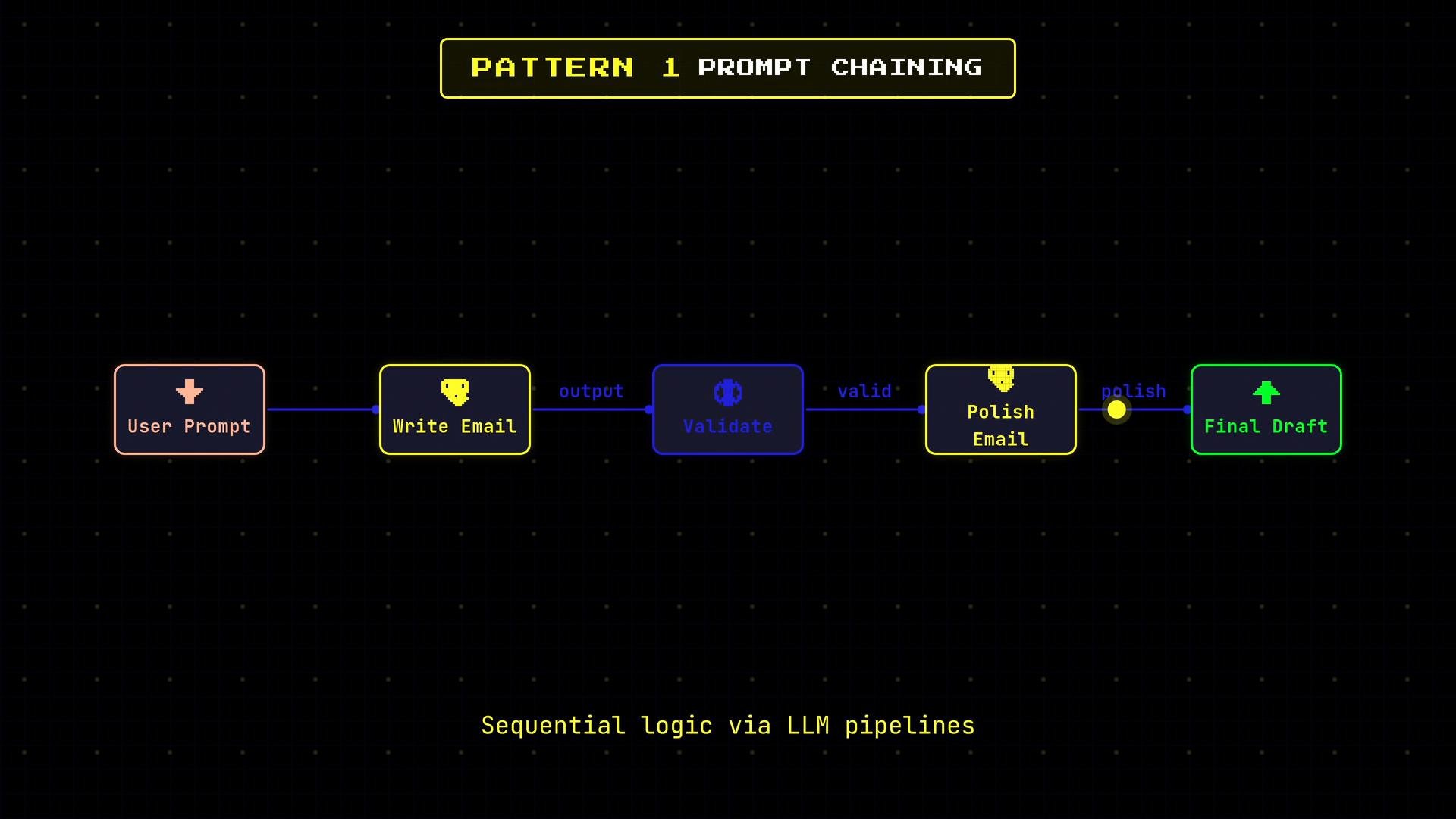
* Break a task into sequential steps; each LLM call consumes the previous step’s output.
* Insert programmatic checks between steps (length, schema, content safety) and decide whether to continue, retry, or abort.
* Typical use case: Draft an email (step 1) → validate required sections → polish the draft (step 2) → final review.
 When to use:
* Need deterministic, auditable transformations and clear retry semantics.
* Simple to implement and debug.
Considerations:
* Latency accumulates as steps are run serially.
* Validate intermediate outputs programmatically to avoid cascading failures.
Example pseudocode (sequential with validation and retry):
```python theme={null}
draft = llm.call(prompt="Draft an email about X")
if not validate_schema(draft):
draft = retry_with_clarified_prompt(draft)
polished = llm.call(prompt=f"Polish this email:\n\n{draft}")
final = content_safety_check(polished)
```
Pattern 2 — Routing (classifier + handler)
* Use a classifier model to route requests to an appropriate handler pipeline: trivial Q\&A vs. scheduling vs. complex planning.
* Enables cost optimization: route simple queries to cheap, low-latency models and hard tasks to larger, more capable models.
When to use:
* Need deterministic, auditable transformations and clear retry semantics.
* Simple to implement and debug.
Considerations:
* Latency accumulates as steps are run serially.
* Validate intermediate outputs programmatically to avoid cascading failures.
Example pseudocode (sequential with validation and retry):
```python theme={null}
draft = llm.call(prompt="Draft an email about X")
if not validate_schema(draft):
draft = retry_with_clarified_prompt(draft)
polished = llm.call(prompt=f"Polish this email:\n\n{draft}")
final = content_safety_check(polished)
```
Pattern 2 — Routing (classifier + handler)
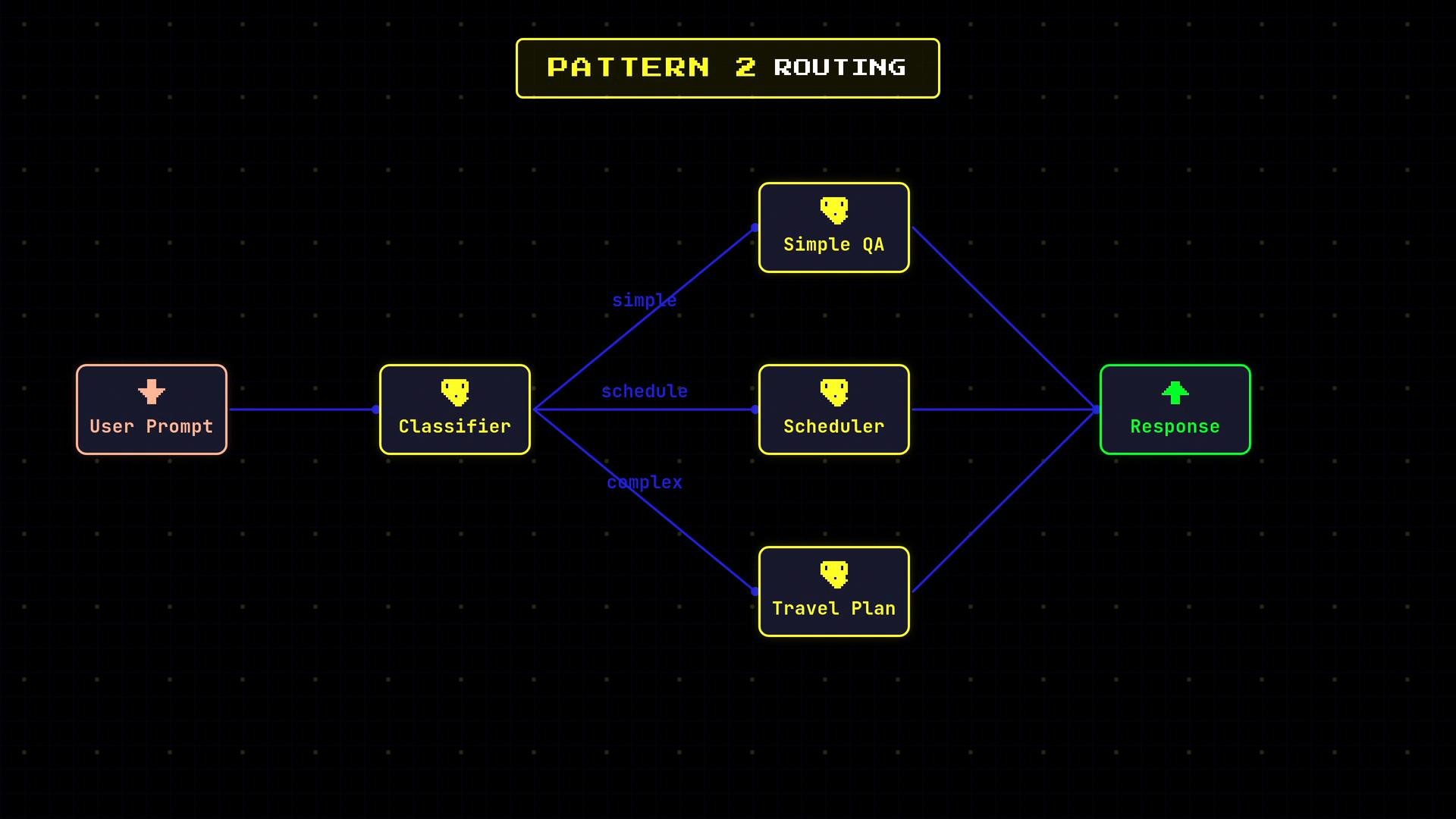
* Use a classifier model to route requests to an appropriate handler pipeline: trivial Q\&A vs. scheduling vs. complex planning.
* Enables cost optimization: route simple queries to cheap, low-latency models and hard tasks to larger, more capable models.
 When to use:
* Heterogeneous inputs where specialized handlers provide better quality/cost tradeoffs.
Considerations:
* Classifier precision is critical; add fallback or human-in-the-loop paths for uncertain classifications.
* Log routing decisions for auditing and to measure misroute cost.
Sample routing logic:
```js theme={null}
intent = classifier.predict(user_input)
switch(intent) {
case "faq": return handle_faq(user_input) // cheap model
case "schedule": return handle_scheduler(user_input)
default: return handle_complex_plan(user_input) // expensive model
}
```
Pattern 3 — Parallelization (sectioning and voting)
* Sectioning: split input into independent subtasks and run them concurrently (e.g., “Plan my Thursday”: check calendar, email, weather).
* Voting: run the same prompt across different models or random seeds and aggregate via majority/consensus to reduce hallucination.
When to use:
* Heterogeneous inputs where specialized handlers provide better quality/cost tradeoffs.
Considerations:
* Classifier precision is critical; add fallback or human-in-the-loop paths for uncertain classifications.
* Log routing decisions for auditing and to measure misroute cost.
Sample routing logic:
```js theme={null}
intent = classifier.predict(user_input)
switch(intent) {
case "faq": return handle_faq(user_input) // cheap model
case "schedule": return handle_scheduler(user_input)
default: return handle_complex_plan(user_input) // expensive model
}
```
Pattern 3 — Parallelization (sectioning and voting)
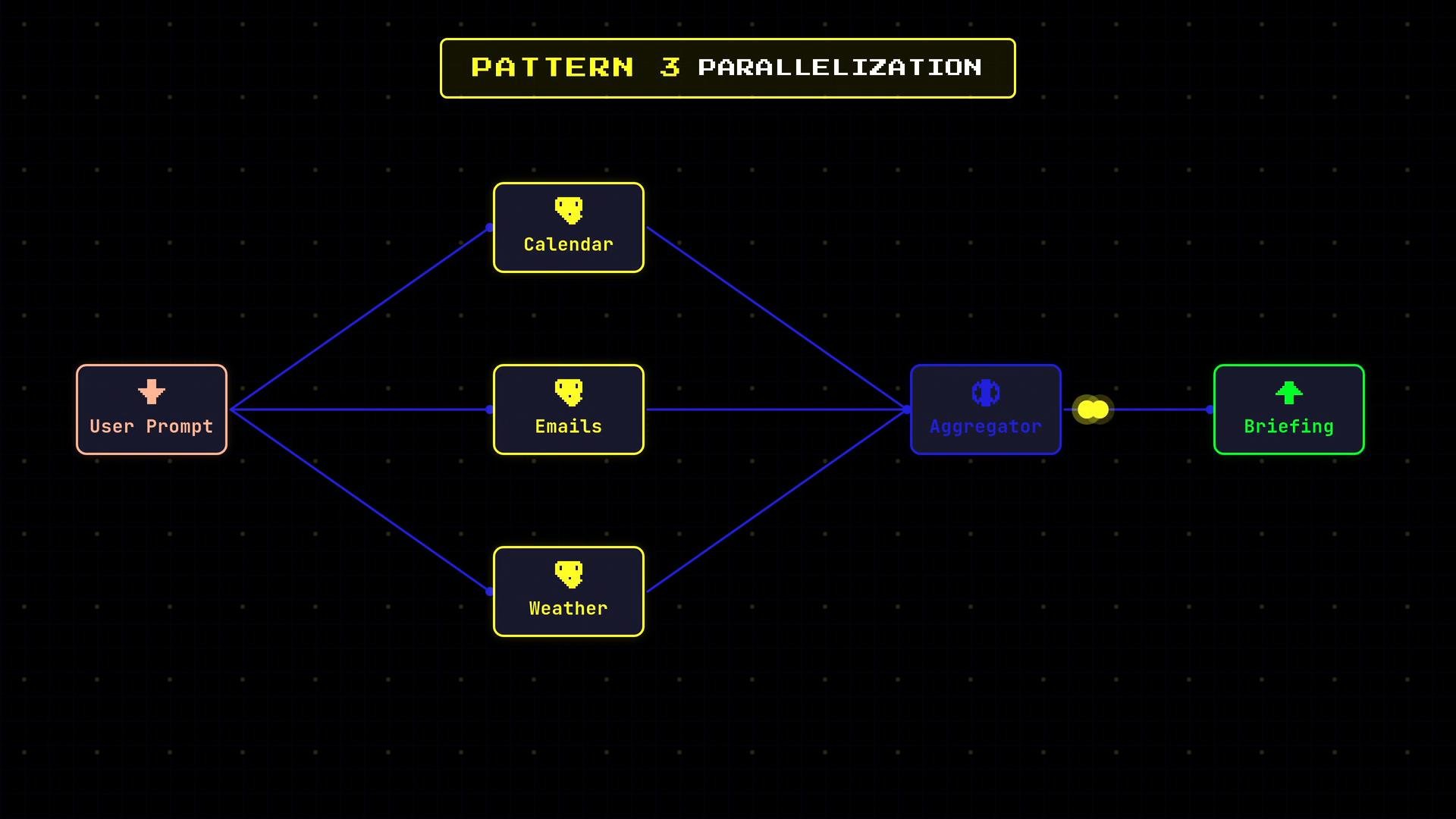
* Sectioning: split input into independent subtasks and run them concurrently (e.g., “Plan my Thursday”: check calendar, email, weather).
* Voting: run the same prompt across different models or random seeds and aggregate via majority/consensus to reduce hallucination.
 When to use:
* Independent subtasks that don’t block each other.
* Need lower latency for aggregated results or higher reliability through redundancy.
Considerations:
* Parallel calls increase concurrency and cost.
* Aggregator logic must handle partial failures and inconsistent results.
Pattern 4 — Orchestrator-Worker (dynamic decomposition)
* A central orchestrator inspects the input, decides which subtasks are needed at runtime, and delegates those to worker LLMs.
* Subtasks are dynamically determined, not predeclared.
When to use:
* Independent subtasks that don’t block each other.
* Need lower latency for aggregated results or higher reliability through redundancy.
Considerations:
* Parallel calls increase concurrency and cost.
* Aggregator logic must handle partial failures and inconsistent results.
Pattern 4 — Orchestrator-Worker (dynamic decomposition)
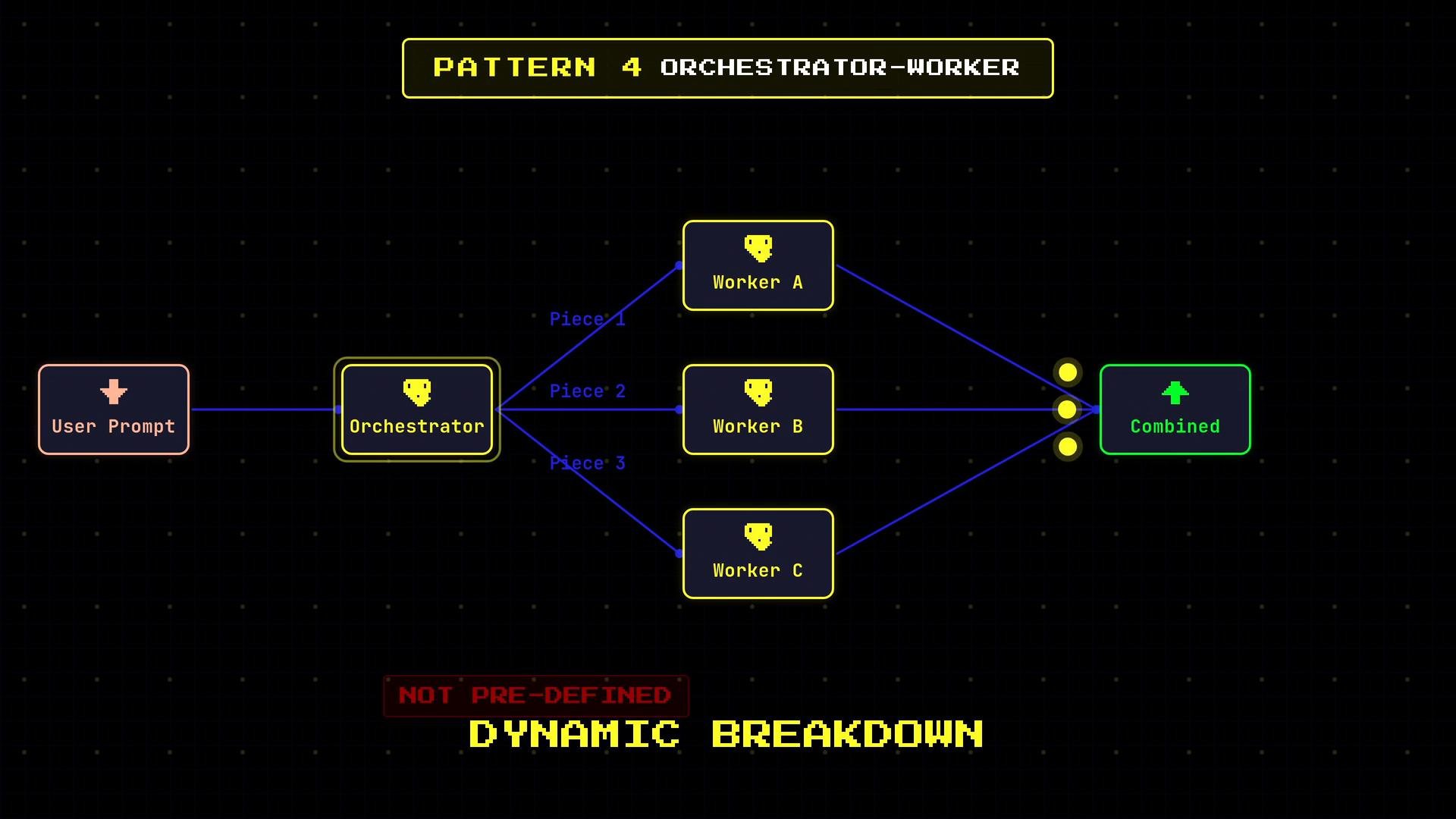
* A central orchestrator inspects the input, decides which subtasks are needed at runtime, and delegates those to worker LLMs.
* Subtasks are dynamically determined, not predeclared.
 When to use:
* Inputs vary widely and benefit from a centralized coordinator that decides decomposition.
* Good for complex, open-ended tasks where fixed pipelines would be brittle.
Considerations:
* Orchestrator must be robust: enforce limits (max workers, cost caps), idempotency, and retry/backoff behavior.
* Instrumentation is essential to prevent runaway costs from large dynamic decompositions.
Pattern 5 — Evaluator-Optimizer (generate + critique loop)
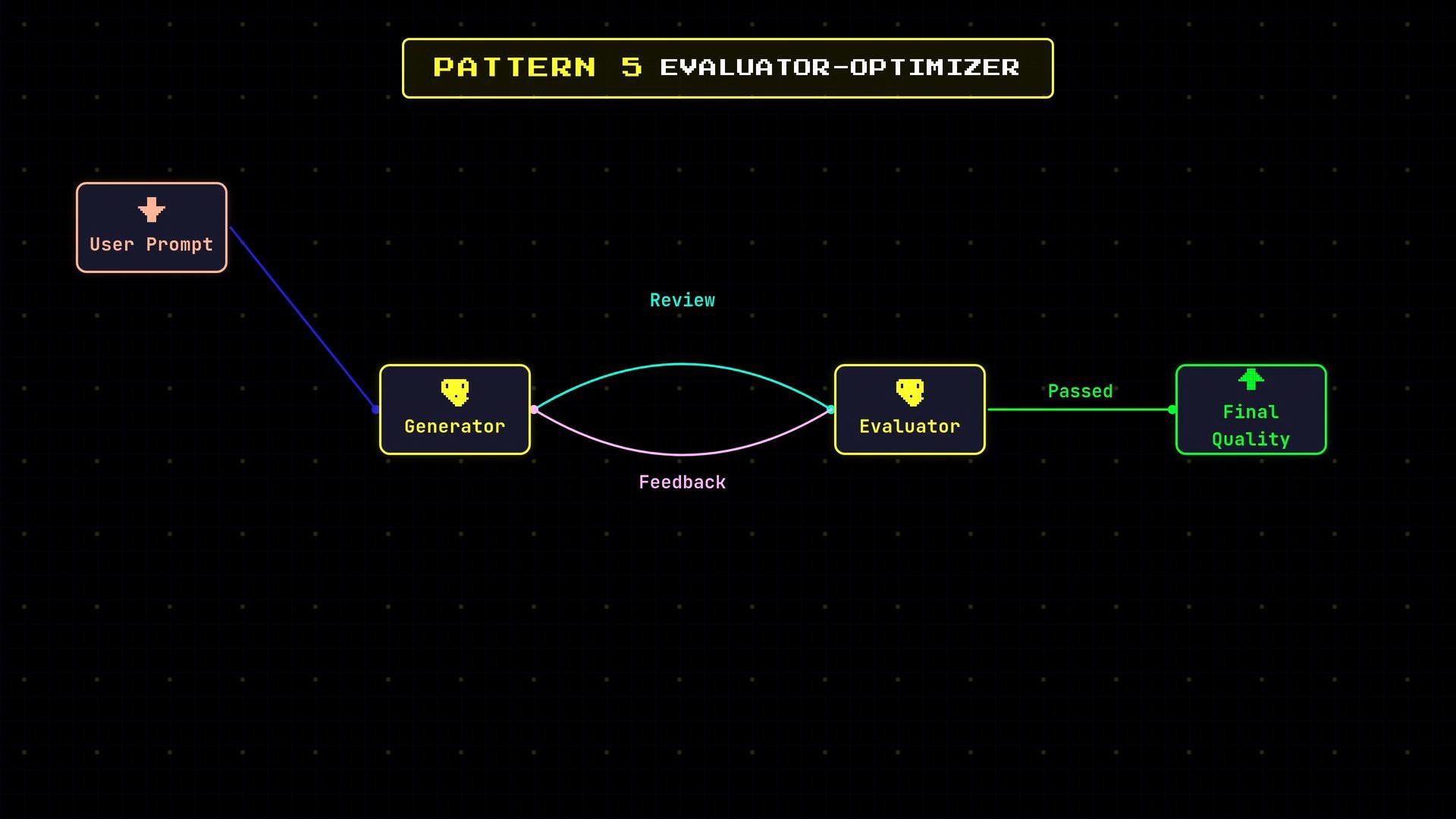
* Two distinct roles interact: a generator produces candidate outputs; an evaluator reviews and gives feedback. The generator refines outputs iteratively until acceptance criteria or retry limits are reached.
* Ideal for tasks demanding high correctness or nuanced judgment (legal text, code, translations).
When to use:
* Inputs vary widely and benefit from a centralized coordinator that decides decomposition.
* Good for complex, open-ended tasks where fixed pipelines would be brittle.
Considerations:
* Orchestrator must be robust: enforce limits (max workers, cost caps), idempotency, and retry/backoff behavior.
* Instrumentation is essential to prevent runaway costs from large dynamic decompositions.
Pattern 5 — Evaluator-Optimizer (generate + critique loop)
* Two distinct roles interact: a generator produces candidate outputs; an evaluator reviews and gives feedback. The generator refines outputs iteratively until acceptance criteria or retry limits are reached.
* Ideal for tasks demanding high correctness or nuanced judgment (legal text, code, translations).
 When to use:
* Outputs must meet strict quality thresholds and benefit from iterative critique.
Considerations:
* Define clear acceptance criteria to avoid infinite loops.
* Combine automated checks (unit tests, linters, schema validators) with model-based evaluation for stronger guarantees.
Example evaluate-refine loop:
```python theme={null}
for i in range(max_iters):
candidate = generator.generate(prompt)
score, feedback = evaluator.review(candidate)
if score >= threshold:
return candidate
prompt = incorporate_feedback(prompt, feedback)
# fallback if threshold never met
return best_seen_candidate
```
Operational considerations (applies to all patterns)
* Stop conditions: enforce max iterations, runtime limits, and quality thresholds.
* Intermediate validation: use schema validation, token/length checks, content-safety filters, and unit tests where applicable.
* Model selection: route low-latency/low-cost tasks to smaller models and reserve large models for tasks that need them.
* Observability: log inputs, outputs, routing decisions, retries, and evaluation scores for auditing, debugging, and cost analysis.
* Cost control: set per-request and per-workflow budgets, hard limits on spawned subtasks, and monitor for anomalies.
Best practices checklist
* Keep control logic deterministic and in code; use LLMs for uncertain or generative work only.
* Implement programmatic guards before and after LLM calls (schema checks, sanitization).
* Provide fallbacks for classifier or orchestrator uncertainty (human review, simpler model).
* Track and visualize workflow metrics: latency, cost per pattern, success rate, and misroute rates.
Design workflows so that control logic lives in your code (deterministic and auditable) while LLMs handle the uncertain parts (content generation, classification, synthesis). This separation makes behavior predictable and easier to test and monitor.
In all patterns the developer decides which steps run, their order, what data passes between them, and when to stop. LLMs are powerful components within the structure you design — use orchestration, validation, and observability to build reliable, cost-effective AI workflows.
Further reading and references
* [Designing reliable LLM systems — patterns and tradeoffs](https://example.com/llm-patterns) (replace with your internal docs)
* [Content safety and moderation best practices](https://example.com/content-safety)
* [Instrumentation and observability for AI pipelines](https://example.com/ai-observability)
This documentation is built and hosted on [Mintlify](https://mintlify.com), a developer documentation platform.
When to use:
* Outputs must meet strict quality thresholds and benefit from iterative critique.
Considerations:
* Define clear acceptance criteria to avoid infinite loops.
* Combine automated checks (unit tests, linters, schema validators) with model-based evaluation for stronger guarantees.
Example evaluate-refine loop:
```python theme={null}
for i in range(max_iters):
candidate = generator.generate(prompt)
score, feedback = evaluator.review(candidate)
if score >= threshold:
return candidate
prompt = incorporate_feedback(prompt, feedback)
# fallback if threshold never met
return best_seen_candidate
```
Operational considerations (applies to all patterns)
* Stop conditions: enforce max iterations, runtime limits, and quality thresholds.
* Intermediate validation: use schema validation, token/length checks, content-safety filters, and unit tests where applicable.
* Model selection: route low-latency/low-cost tasks to smaller models and reserve large models for tasks that need them.
* Observability: log inputs, outputs, routing decisions, retries, and evaluation scores for auditing, debugging, and cost analysis.
* Cost control: set per-request and per-workflow budgets, hard limits on spawned subtasks, and monitor for anomalies.
Best practices checklist
* Keep control logic deterministic and in code; use LLMs for uncertain or generative work only.
* Implement programmatic guards before and after LLM calls (schema checks, sanitization).
* Provide fallbacks for classifier or orchestrator uncertainty (human review, simpler model).
* Track and visualize workflow metrics: latency, cost per pattern, success rate, and misroute rates.
Design workflows so that control logic lives in your code (deterministic and auditable) while LLMs handle the uncertain parts (content generation, classification, synthesis). This separation makes behavior predictable and easier to test and monitor.
In all patterns the developer decides which steps run, their order, what data passes between them, and when to stop. LLMs are powerful components within the structure you design — use orchestration, validation, and observability to build reliable, cost-effective AI workflows.
Further reading and references
* [Designing reliable LLM systems — patterns and tradeoffs](https://example.com/llm-patterns) (replace with your internal docs)
* [Content safety and moderation best practices](https://example.com/content-safety)
* [Instrumentation and observability for AI pipelines](https://example.com/ai-observability)
This documentation is built and hosted on [Mintlify](https://mintlify.com), a developer documentation platform.