> ## Documentation Index
> Fetch the complete documentation index at: https://notes.kodekloud.com/llms.txt
> Use this file to discover all available pages before exploring further.
# Tool Integration
> Explains how to integrate tools with LLMs using a tool-use loop where models make structured function calls, applications execute actions, return results, and enable multi-step real world workflows
Lesson 9: Tool Integration
This lesson expands on what "tools" are for LLMs and demonstrates how they work in practice through the tool-use loop. Integrating tools lets an LLM do more than generate text — it can request actions, receive results, and continue reasoning based on real-world data.
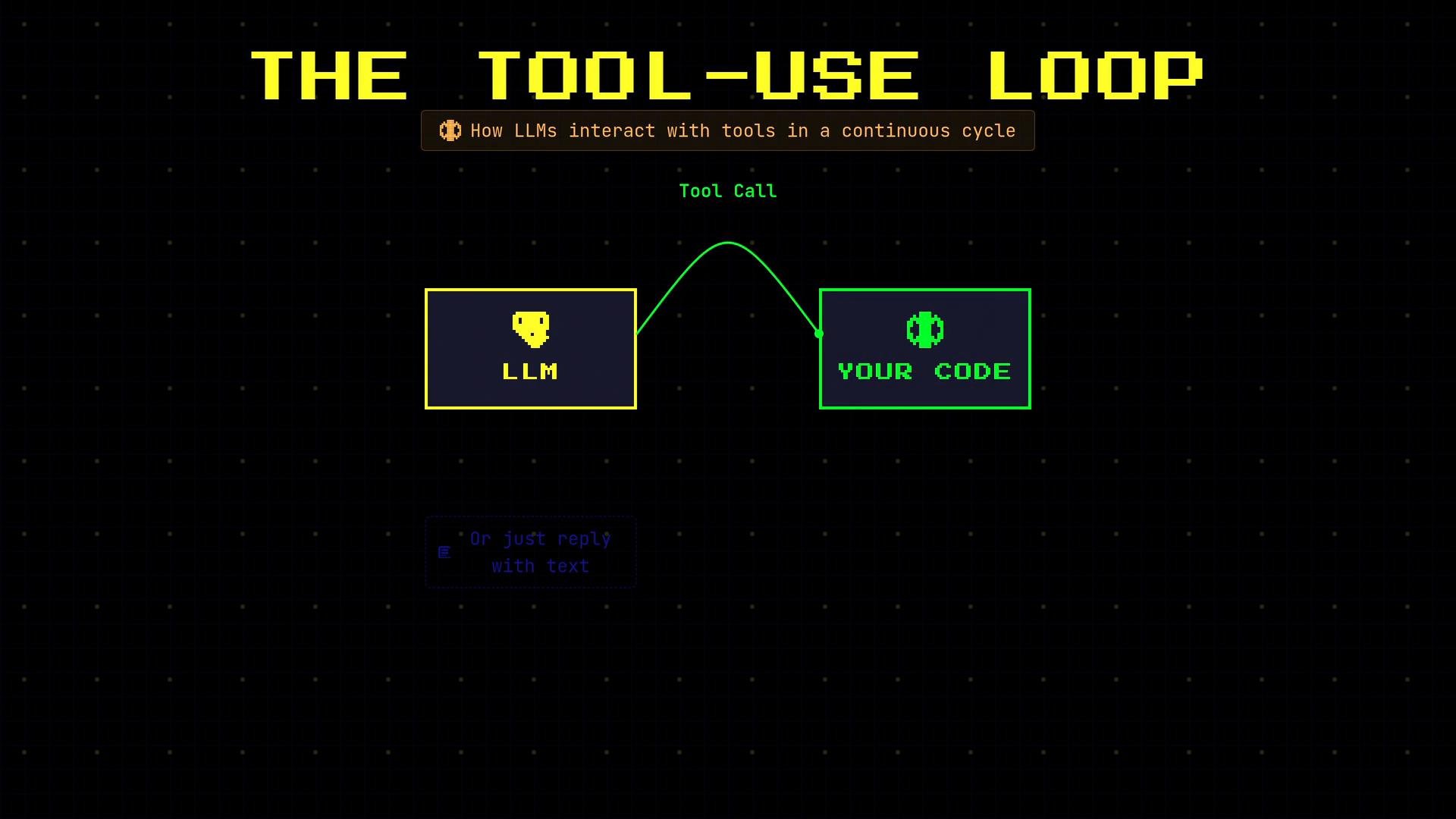 ## What is the tool-use loop?
When you grant an LLM access to tools, the model can either:
* reply with plain text, or
* output a structured tool call (often JSON) expressing an intent.
If the model requests a tool, your application must execute that action and return the result to the model. This back-and-forth creates the tool-use loop (a.k.a. function calling), where the LLM delegates work to your application and then continues reasoning with the returned outputs.
Key benefits:
* Lets the model perform concrete actions (e.g., read a calendar, call an API, query a database).
* Keeps the model’s reasoning connected to external state and real-time data.
* Enables multi-step workflows that combine model planning with programmatic execution.
## Typical sequence (example: scheduling a meeting)
A single user request may lead to several tool calls in sequence. For example: “Schedule lunch with Sarah tomorrow at noon” might produce the following steps:
* check\_calendar → verify availability
* search\_contact → find Sarah’s contact info
* create\_event → schedule the meeting
Example flow (human-readable):
"Schedule lunch with Sarah tomorrow at noon"
1. check\_calendar\
date: "2026-03-06"\
→ 12:00–1:00 PM is free
2. search\_contact\
name: "Sarah"\
→ [sarah@email.com](mailto:sarah@email.com)
3. create\_event\
title: "Lunch with Sarah"\
→ Event created
Sequential: 1 → 2 → 3
## Implementation pattern
In practice you maintain a `messages` list (the conversation), send it with tool definitions to the LLM, detect returned tool calls, execute them in your application, and append the results back into `messages` so the model can continue.
Example Python-style workflow:
```python theme={null}
messages = [
{"role": "user", "content": "Schedule lunch with Sarah tomorrow at noon"},
]
# Send messages and the available tools to the model
response = llm.chat(messages, tools=tools)
# If the LLM returned one or more tool calls, execute them
if response.tool_calls:
for tc in response.tool_calls:
# execute_tool is your application function that performs the requested action
result = execute_tool(tc["name"], tc.get("arguments", {}))
# Append the tool's output back to the conversation so the LLM can continue
messages.append({
"role": "tool",
"content": result
})
# Ask the model to continue processing with the tool outputs included
final = llm.chat(messages)
```
Common tool-call payloads resemble function calls represented as JSON. Example:
```json theme={null}
{
"id": "call_abc123",
"type": "function",
"function": {
"name": "check_calendar",
"arguments": {
"date": "2026-03-06",
"user": "me"
}
}
}
```
The LLM outputs intent (e.g., a JSON function call). Your application acts as the middleman: run the requested action, return the result as a `tool` message, and continue the conversation so the model can finalize the response.
## Tool-use loop lifecycle (quick reference)
| Stage | What happens | Example artifacts |
| - | - | - |
| User request | User asks the LLM to perform a task | `"Schedule lunch with Sarah tomorrow at noon"` |
| Model plans | LLM decides to call one or more tools | JSON tool call(s) |
| App executes | Your code runs the requested actions | `execute_tool("check_calendar", {...})` |
| App returns results | Application appends tool outputs to `messages` | `{"role": "tool", "content": "12:00–1:00 PM is free"}` |
| Model finalizes | LLM continues reasoning and replies to the user | Final message confirming the event |
## Best practices
* Define clear tool interfaces (names, arguments, expected outputs) so the model’s tool calls are predictable.
* Validate tool arguments before executing to avoid unintended side effects.
* Return structured, machine-readable tool results that the model can consume reliably.
* Keep the `messages` history complete: include user input, model tool calls, tool outputs, and any follow-up model messages.
* Consider idempotency and retries for tools that perform side-effecting operations (e.g., creating calendar events).
Further reading and references:
* [OpenAI Function Calling (examples and design patterns)](https://platform.openai.com/docs/guides/gpt/function-calling)
* [Designing agent pipelines — practical patterns for model + tool orchestration](https://research.google/pubs/)
Tool integration transforms a text generator into an action-capable agent by coordinating model reasoning with your application’s execution logic. Use the tool-use loop to build robust multi-step workflows that combine the strengths of LLMs with deterministic programmatic actions.
This documentation is built and hosted on [Mintlify](https://mintlify.com), a developer documentation platform.
## What is the tool-use loop?
When you grant an LLM access to tools, the model can either:
* reply with plain text, or
* output a structured tool call (often JSON) expressing an intent.
If the model requests a tool, your application must execute that action and return the result to the model. This back-and-forth creates the tool-use loop (a.k.a. function calling), where the LLM delegates work to your application and then continues reasoning with the returned outputs.
Key benefits:
* Lets the model perform concrete actions (e.g., read a calendar, call an API, query a database).
* Keeps the model’s reasoning connected to external state and real-time data.
* Enables multi-step workflows that combine model planning with programmatic execution.
## Typical sequence (example: scheduling a meeting)
A single user request may lead to several tool calls in sequence. For example: “Schedule lunch with Sarah tomorrow at noon” might produce the following steps:
* check\_calendar → verify availability
* search\_contact → find Sarah’s contact info
* create\_event → schedule the meeting
Example flow (human-readable):
"Schedule lunch with Sarah tomorrow at noon"
1. check\_calendar\
date: "2026-03-06"\
→ 12:00–1:00 PM is free
2. search\_contact\
name: "Sarah"\
→ [sarah@email.com](mailto:sarah@email.com)
3. create\_event\
title: "Lunch with Sarah"\
→ Event created
Sequential: 1 → 2 → 3
## Implementation pattern
In practice you maintain a `messages` list (the conversation), send it with tool definitions to the LLM, detect returned tool calls, execute them in your application, and append the results back into `messages` so the model can continue.
Example Python-style workflow:
```python theme={null}
messages = [
{"role": "user", "content": "Schedule lunch with Sarah tomorrow at noon"},
]
# Send messages and the available tools to the model
response = llm.chat(messages, tools=tools)
# If the LLM returned one or more tool calls, execute them
if response.tool_calls:
for tc in response.tool_calls:
# execute_tool is your application function that performs the requested action
result = execute_tool(tc["name"], tc.get("arguments", {}))
# Append the tool's output back to the conversation so the LLM can continue
messages.append({
"role": "tool",
"content": result
})
# Ask the model to continue processing with the tool outputs included
final = llm.chat(messages)
```
Common tool-call payloads resemble function calls represented as JSON. Example:
```json theme={null}
{
"id": "call_abc123",
"type": "function",
"function": {
"name": "check_calendar",
"arguments": {
"date": "2026-03-06",
"user": "me"
}
}
}
```
The LLM outputs intent (e.g., a JSON function call). Your application acts as the middleman: run the requested action, return the result as a `tool` message, and continue the conversation so the model can finalize the response.
## Tool-use loop lifecycle (quick reference)
| Stage | What happens | Example artifacts |
| - | - | - |
| User request | User asks the LLM to perform a task | `"Schedule lunch with Sarah tomorrow at noon"` |
| Model plans | LLM decides to call one or more tools | JSON tool call(s) |
| App executes | Your code runs the requested actions | `execute_tool("check_calendar", {...})` |
| App returns results | Application appends tool outputs to `messages` | `{"role": "tool", "content": "12:00–1:00 PM is free"}` |
| Model finalizes | LLM continues reasoning and replies to the user | Final message confirming the event |
## Best practices
* Define clear tool interfaces (names, arguments, expected outputs) so the model’s tool calls are predictable.
* Validate tool arguments before executing to avoid unintended side effects.
* Return structured, machine-readable tool results that the model can consume reliably.
* Keep the `messages` history complete: include user input, model tool calls, tool outputs, and any follow-up model messages.
* Consider idempotency and retries for tools that perform side-effecting operations (e.g., creating calendar events).
Further reading and references:
* [OpenAI Function Calling (examples and design patterns)](https://platform.openai.com/docs/guides/gpt/function-calling)
* [Designing agent pipelines — practical patterns for model + tool orchestration](https://research.google/pubs/)
Tool integration transforms a text generator into an action-capable agent by coordinating model reasoning with your application’s execution logic. Use the tool-use loop to build robust multi-step workflows that combine the strengths of LLMs with deterministic programmatic actions.
This documentation is built and hosted on [Mintlify](https://mintlify.com), a developer documentation platform.