> ## Documentation Index
> Fetch the complete documentation index at: https://notes.kodekloud.com/llms.txt
> Use this file to discover all available pages before exploring further.
# Task Automation in AI Agents
> Overview of task automation for AI agents covering planning, tool integration, memory, workflows, triggers, and best practices for building reliable autonomous task-executing systems
Welcome back. In this lesson we explore task automation for AI agents: how agents move from conversation to autonomous action. You’ll learn why automation matters, how agents plan and execute tasks, what tools and architectures enable reliable workflows, and practical patterns for production systems.
What we cover
* Task automation fundamentals for AI agents
* Benefits and challenges
* Types of tasks and integrations
* The agent–task loop (Observe → Design/Plan → Act)
* Task decomposition and planning
* Tools, APIs, and environment integration
* Memory and context management
* Automation patterns, triggers, and schedulers
* Real-world use cases
* Best practices for safe, observable automation
Task automation turns agents into autonomous workers that take input, reason, plan, and act — for example: processing files, scheduling actions, calling APIs, or generating reports. Core enabling capabilities include planning, tool use, memory, and reliability mechanisms. When done well, automated agents function as digital collaborators that reliably execute repeatable tasks at scale.
How a modern AI agent functions
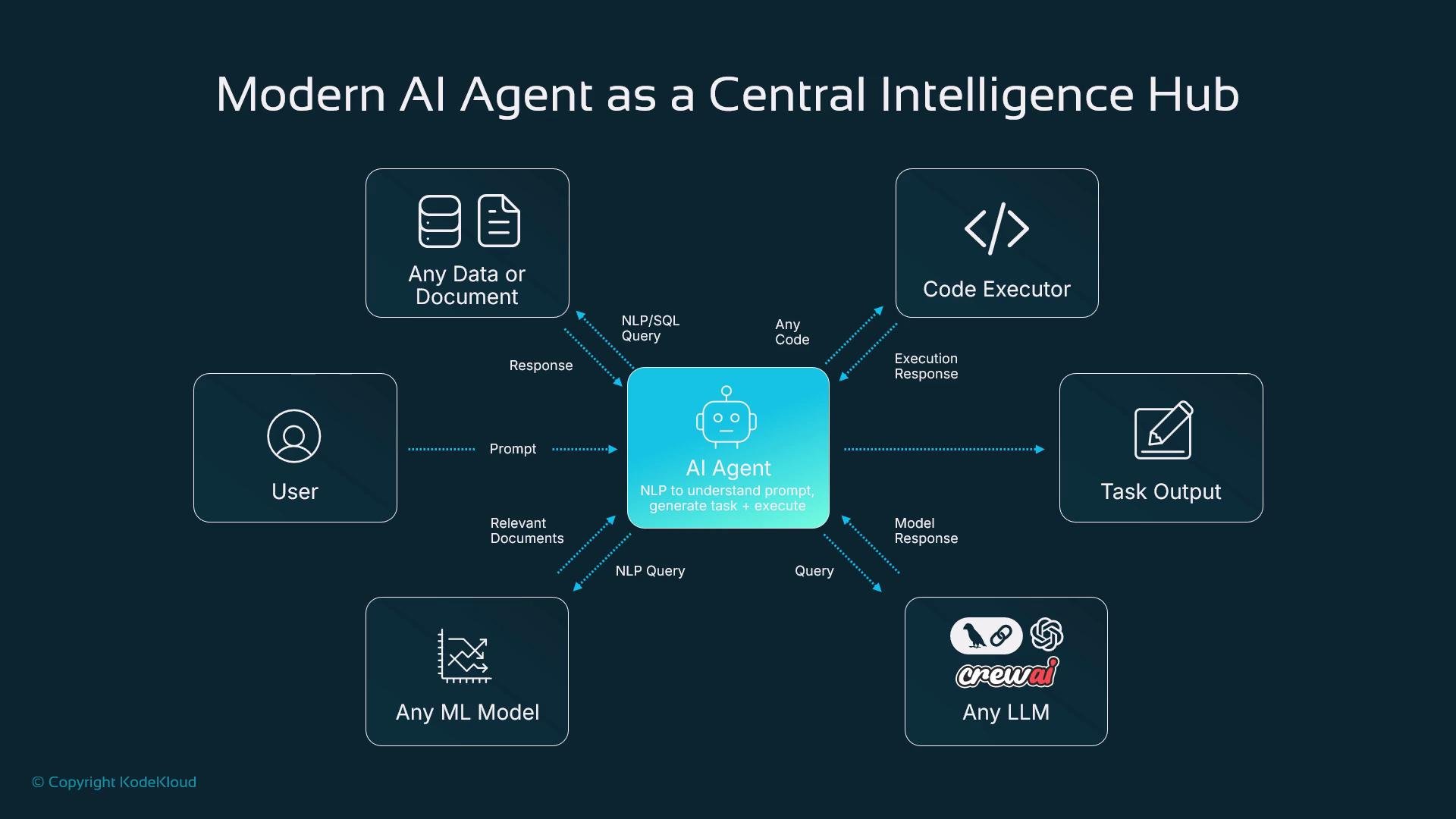
This diagram shows a modern AI agent acting as a central intelligence hub. The flow starts with a user prompt; the agent interprets intent, generates a task list, and executes actions. It interacts with data sources, a code executor, specialized models, and LLMs, then returns outputs to the user.
 Key integratable components
* Data: Query SQL, search indexes, or structured/unstructured sources.
* Code executor: Run generated code in sandboxed environments and return execution results.
* Specialized ML models: Forecasting, optimization, or domain-specific inference.
* LLMs: Planning, summarization, and complex natural language understanding (e.g., GPT-style or LLaMA-family models).
Benefits and trade-offs
Task automation delivers clear advantages:
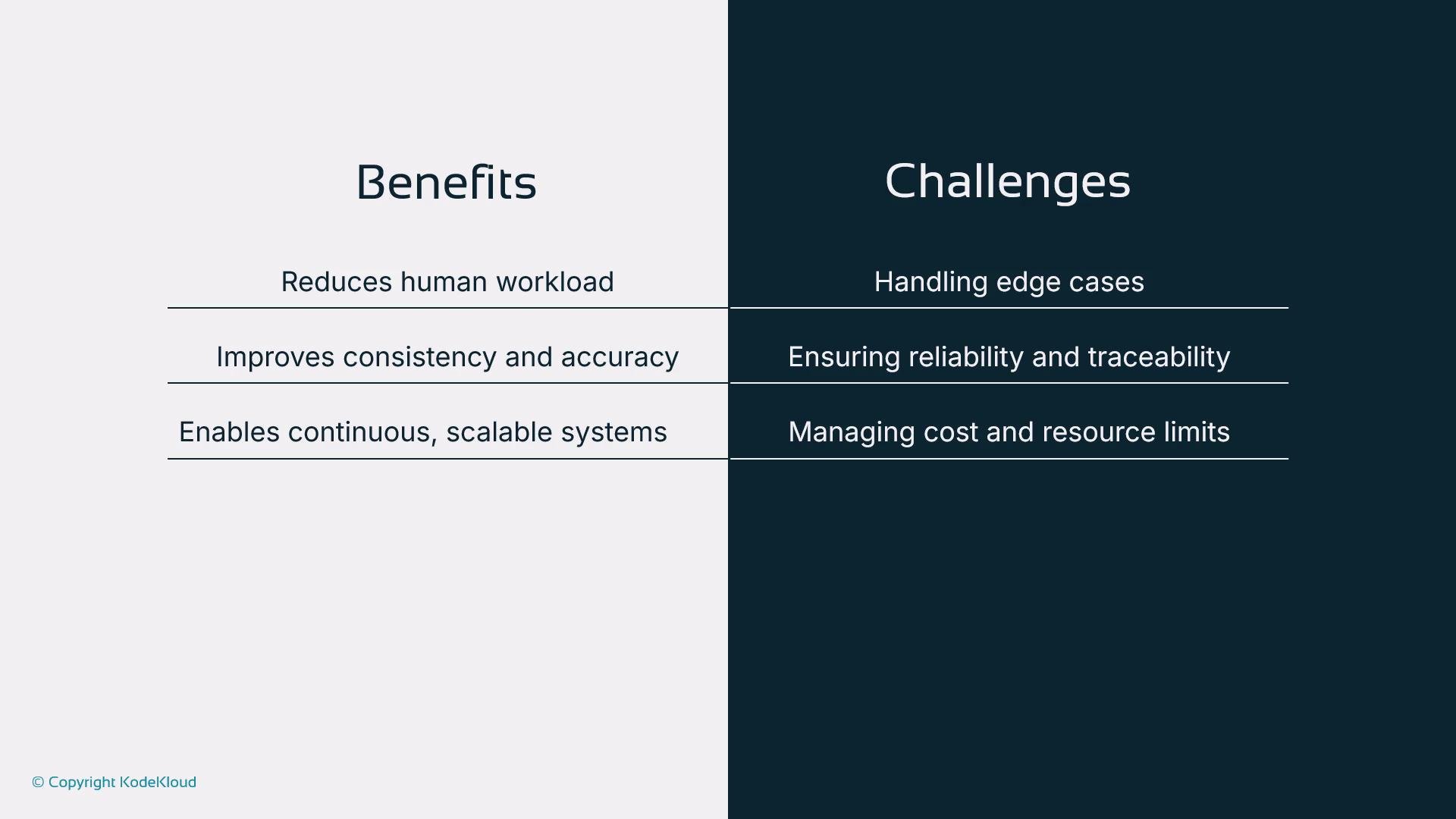
* Reduced human workload for repetitive tasks
* Consistent, accurate execution of instructions
* Continuous operation and scaling across time zones
But automation also introduces challenges:
* Handling edge cases and ambiguous inputs
* Maintaining traceability, auditability, and reliability
* Managing compute costs and resource usage as systems scale
Key integratable components
* Data: Query SQL, search indexes, or structured/unstructured sources.
* Code executor: Run generated code in sandboxed environments and return execution results.
* Specialized ML models: Forecasting, optimization, or domain-specific inference.
* LLMs: Planning, summarization, and complex natural language understanding (e.g., GPT-style or LLaMA-family models).
Benefits and trade-offs
Task automation delivers clear advantages:
* Reduced human workload for repetitive tasks
* Consistent, accurate execution of instructions
* Continuous operation and scaling across time zones
But automation also introduces challenges:
* Handling edge cases and ambiguous inputs
* Maintaining traceability, auditability, and reliability
* Managing compute costs and resource usage as systems scale
 Types of tasks apt for automation
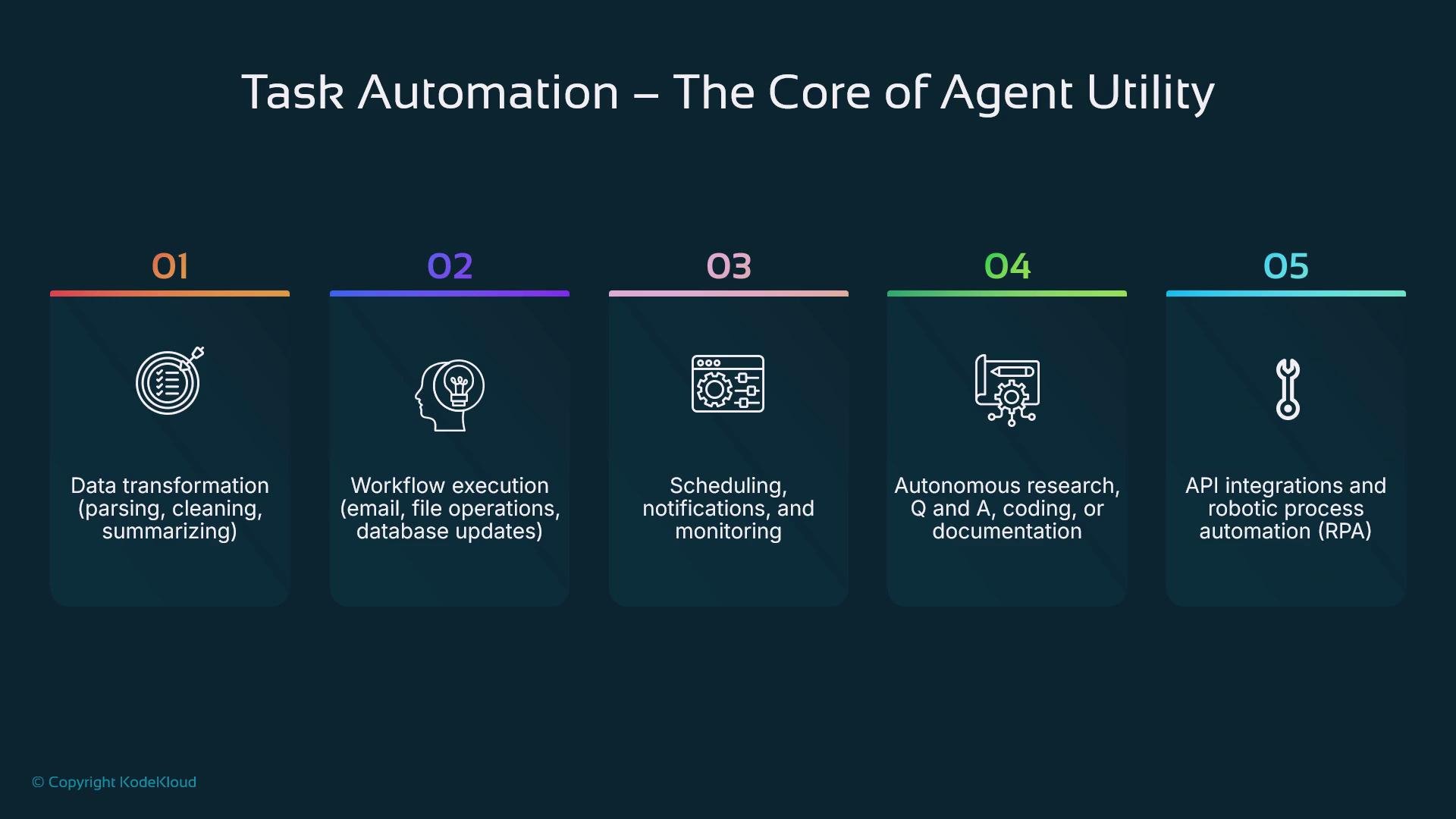
Below are common categories that map to typical agent capabilities.
| Task Category | Typical Actions | Example integrations |
| ----------------------- | ------------------------------------------------ | ----------------------------------- |
| Data operations | Parsing, transform, cleaning, summarization | `SQL`, Elasticsearch, cloud storage |
| Workflow tasks | Email, file moves, DB updates, spreadsheet edits | Email APIs, Google Drive, Notion |
| Scheduling & monitoring | Reminders, threshold alerts, periodic checks | Cron, cloud schedulers, task queues |
| Advanced autonomy | Research, code generation, testing | LLMs + sandboxed executors |
| API & RPA | Enterprise workflows and low-code automations | Slack, Jira, RPA platforms |
You can automate across tools like [Notion](https://www.notion.so/), [Slack](https://slack.com/), [Google Drive](https://drive.google.com/), and [Jira](https://www.atlassian.com/software/jira).
Types of tasks apt for automation
Below are common categories that map to typical agent capabilities.
| Task Category | Typical Actions | Example integrations |
| ----------------------- | ------------------------------------------------ | ----------------------------------- |
| Data operations | Parsing, transform, cleaning, summarization | `SQL`, Elasticsearch, cloud storage |
| Workflow tasks | Email, file moves, DB updates, spreadsheet edits | Email APIs, Google Drive, Notion |
| Scheduling & monitoring | Reminders, threshold alerts, periodic checks | Cron, cloud schedulers, task queues |
| Advanced autonomy | Research, code generation, testing | LLMs + sandboxed executors |
| API & RPA | Enterprise workflows and low-code automations | Slack, Jira, RPA platforms |
You can automate across tools like [Notion](https://www.notion.so/), [Slack](https://slack.com/), [Google Drive](https://drive.google.com/), and [Jira](https://www.atlassian.com/software/jira).
 The agent–task loop
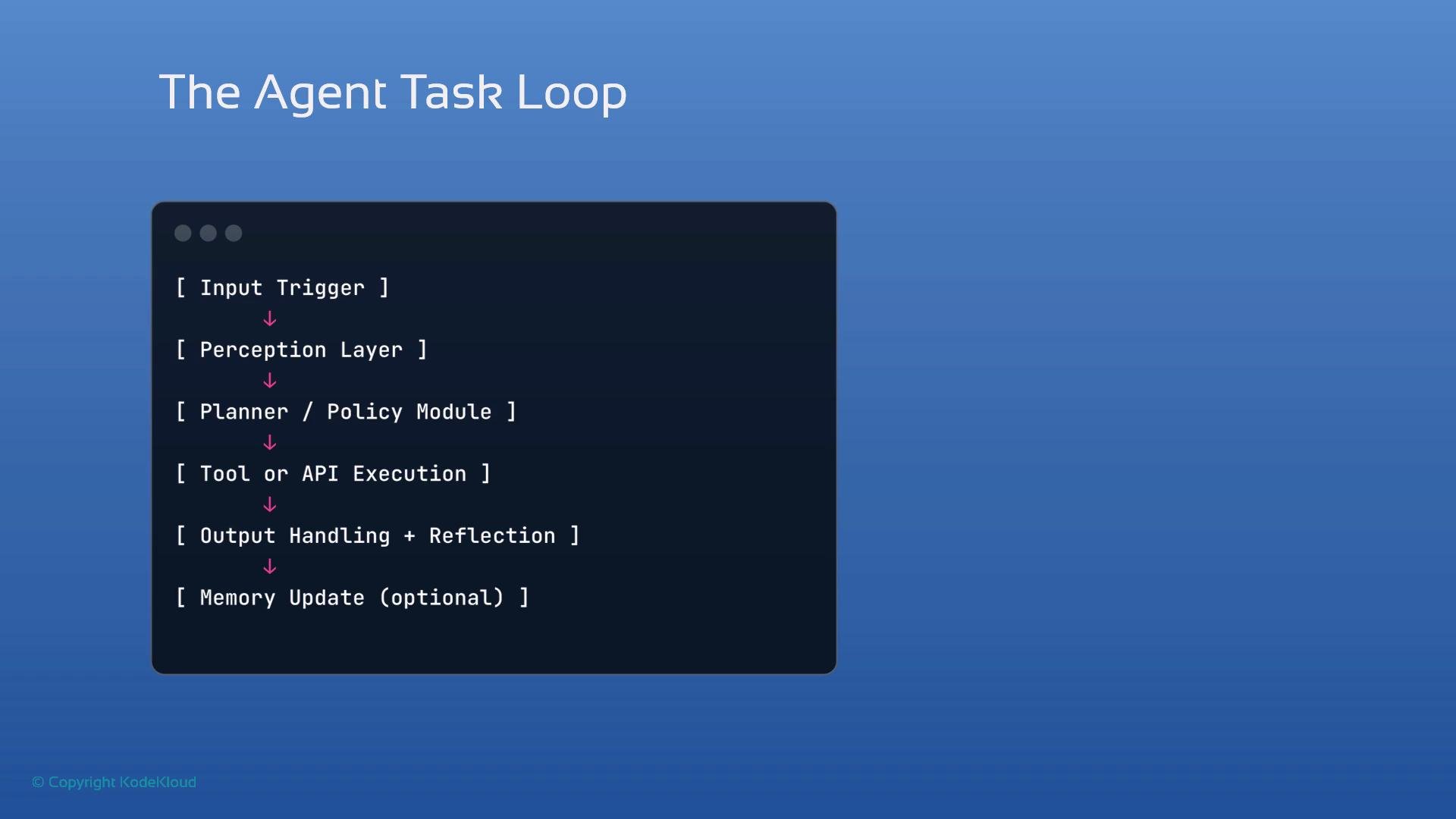
Every automation agent typically follows a closed loop:
1. Observe — receive input or perceive environment events (webhooks, file changes, user prompts).
2. Design / Plan — determine a sequence of steps or a task tree (static or LLM-driven).
3. Act — invoke tools, call APIs, run code, or produce artifacts.
4. (Optional) Reflect / Store — update memory, emit logs, and persist results for future decisions.
This loop supports iterative improvement, recovery from failures, and stateful behavior across steps.
The agent–task loop
Every automation agent typically follows a closed loop:
1. Observe — receive input or perceive environment events (webhooks, file changes, user prompts).
2. Design / Plan — determine a sequence of steps or a task tree (static or LLM-driven).
3. Act — invoke tools, call APIs, run code, or produce artifacts.
4. (Optional) Reflect / Store — update memory, emit logs, and persist results for future decisions.
This loop supports iterative improvement, recovery from failures, and stateful behavior across steps.
 Task decomposition and planning
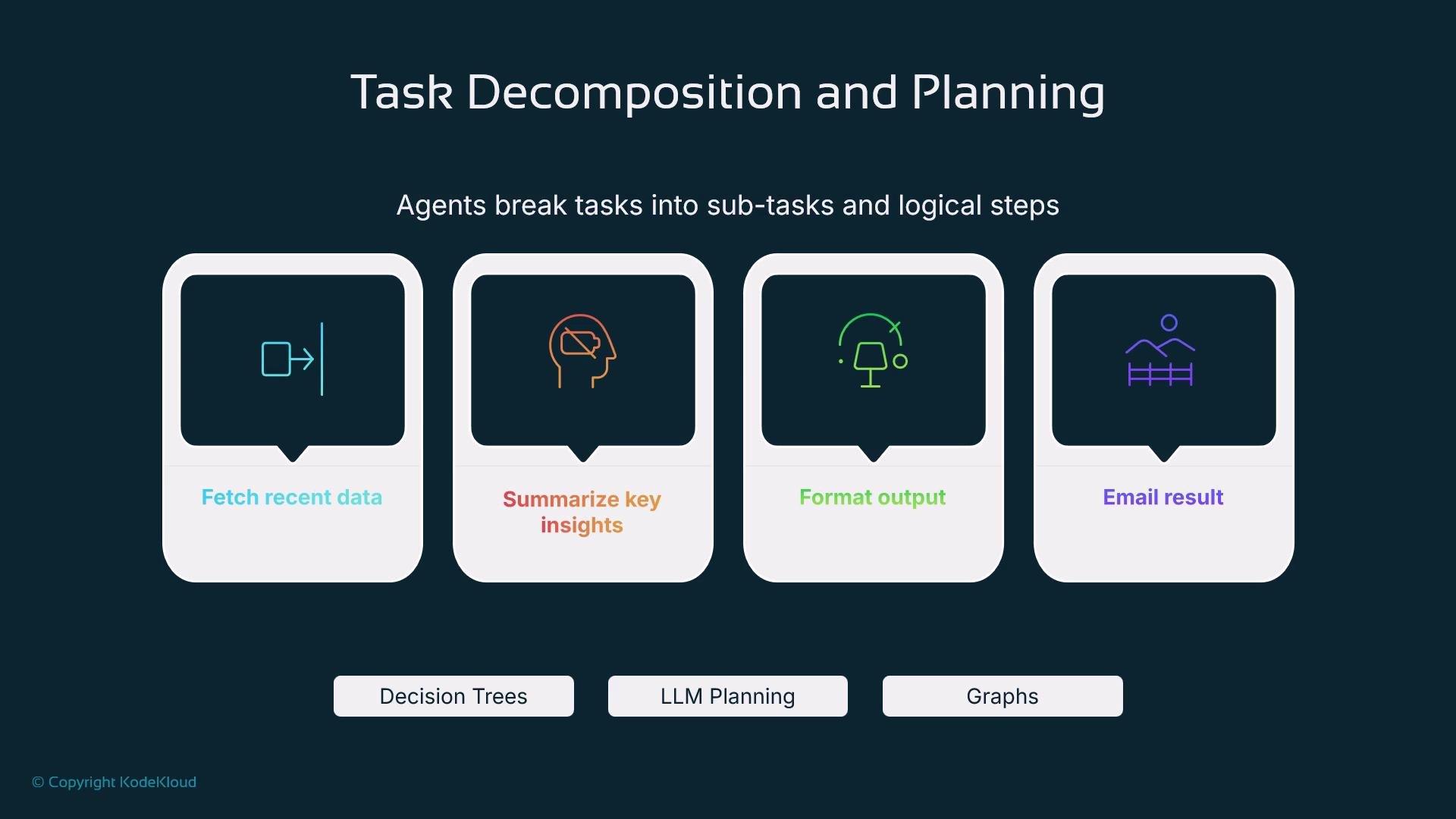
Large tasks are decomposed into smaller, testable subtasks. Example: “send a daily summary” decomposes to:
* Fetch the latest data
* Summarize key insights
* Format the message
* Send email or post to a channel
Decomposition enables stepwise execution, clearer tool responsibilities, retry strategies, and easier observability. Planning strategies:
* Static plans — predefined step lists for deterministic flows
* Dynamic plans — LLM or planner-generated task trees that adapt to context
Task decomposition and planning
Large tasks are decomposed into smaller, testable subtasks. Example: “send a daily summary” decomposes to:
* Fetch the latest data
* Summarize key insights
* Format the message
* Send email or post to a channel
Decomposition enables stepwise execution, clearer tool responsibilities, retry strategies, and easier observability. Planning strategies:
* Static plans — predefined step lists for deterministic flows
* Dynamic plans — LLM or planner-generated task trees that adapt to context
 Tools, APIs, and environment integration
Agents act through integrable tools and execution environments:
* REST APIs, RPCs, and SDKs
* Python functions and serverless sandboxes
* Shell commands and containerized runtimes
* Cloud services (storage, pub/sub, schedulers)
Frameworks such as [LangChain](https://learn.kodekloud.com/user/courses/langchain) and other agent frameworks abstract tools into callable primitives. Examples:
* Use the `Google Drive API` to fetch a spreadsheet
* Run a summarization model to condense content
* Call an email API to send results
This modular, tool-centric pattern ensures extensibility and safer execution boundaries.
Memory and context for reliable automation
Memory enables continuity and personalization:
* Short-term memory: session state, which step the agent is on
* Long-term memory: persisted preferences, processed documents, or user history
Memory reduces redundant work and supports adaptive behavior. Without memory, flows are stateless and repeat work on each trigger.
Architectural patterns
Choose a pattern depending on complexity, scale, and fault tolerance:
| Pattern | When to use | Characteristics |
| ---------------------- | --------------------------------------------------- | ------------------------------------------------- |
| Single-agent loop | Simple tasks (file renames, basic notifications) | Easier to implement; single point of control |
| Multi-agent pipeline | Complex workflows (research → summarize → validate) | Specialized workers, better fault isolation |
| Event-triggered agents | Real-time reactions (webhooks, file uploads) | Low latency, reactive |
| Scheduled agents | Periodic reports or maintenance | Cron-like cadence using schedulers or task queues |
Triggers and schedulers
Triggers (event-driven) and schedulers (time-driven) start automated flows:
* Triggers: incoming HTTP requests, webhook events, file-system watchers, messages
* Schedulers: cron jobs, cloud schedulers, or libraries like `Celery` for periodic tasks
Use event triggers for real-time workflows and schedulers for routine, time-based tasks.
Common production use cases
* Downloads Folder Organizer: monitor a folder to categorize, rename, and move files.
* Email Responder: classify incoming mail, draft replies, and escalate to humans when needed.
* GitHub PR Triage: review new PRs, assign reviewers, and add labels.
* Slack Daily Summarizer: aggregate unread messages into an end-of-day brief.
These patterns reduce cognitive load and speed up team workflows.
Best practices for safe, observable automation
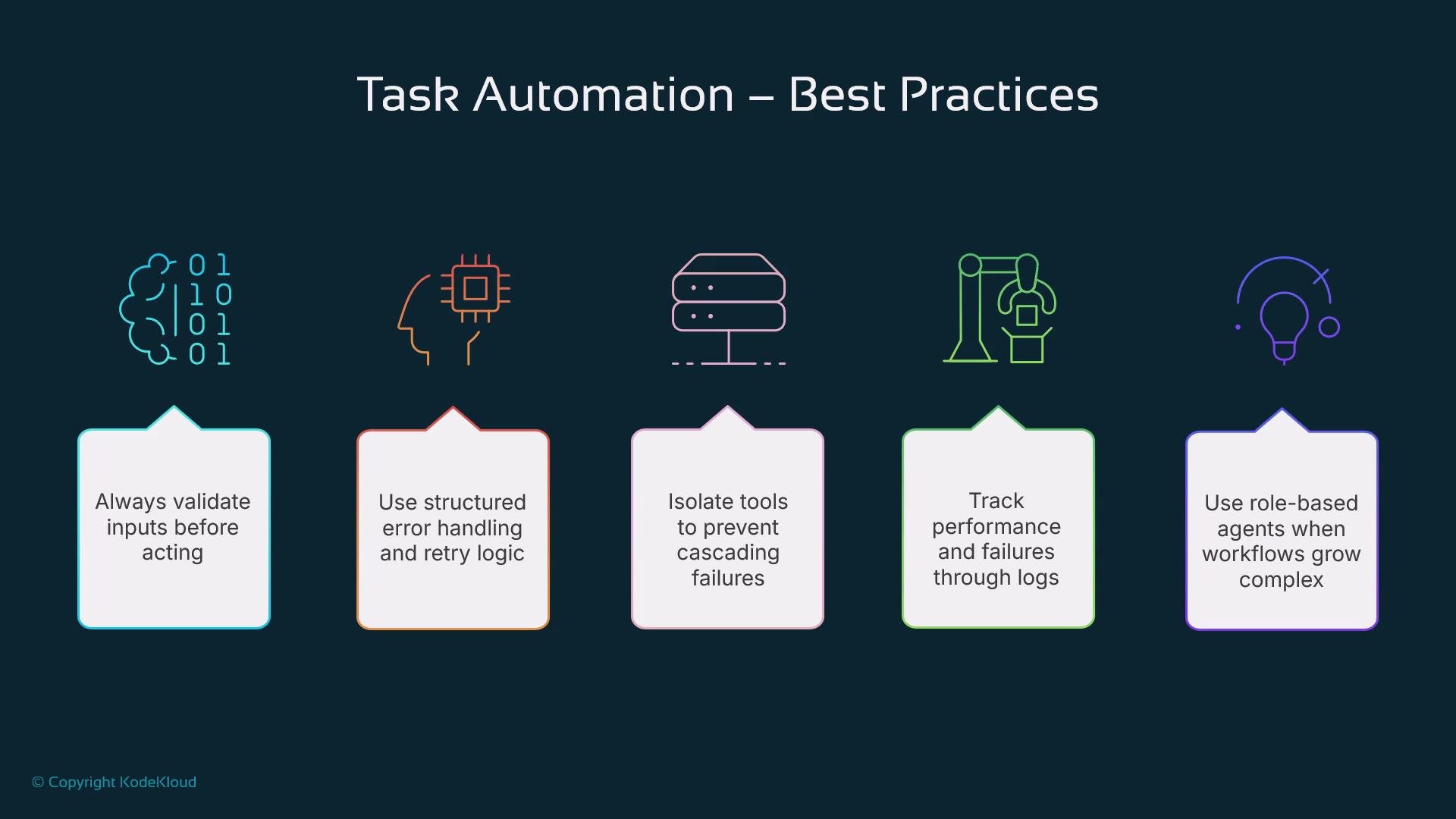
* Validate inputs before acting; ambiguous or malformed inputs should trigger clarification.
* Apply structured error handling, backoff, and retry logic to tolerate transient failures.
* Modularize components (parsing, summarizing, emailing) to limit blast radius on failures.
* Log actions, errors, and metrics for observability and troubleshooting.
* Use role separation: give each agent a clear, singular responsibility and defined interfaces.
* Enforce access controls and least privilege when calling external services.
Validate inputs, isolate tools, and log actions. These steps greatly reduce the risk of unexpected behavior and make debugging simpler.
Tools, APIs, and environment integration
Agents act through integrable tools and execution environments:
* REST APIs, RPCs, and SDKs
* Python functions and serverless sandboxes
* Shell commands and containerized runtimes
* Cloud services (storage, pub/sub, schedulers)
Frameworks such as [LangChain](https://learn.kodekloud.com/user/courses/langchain) and other agent frameworks abstract tools into callable primitives. Examples:
* Use the `Google Drive API` to fetch a spreadsheet
* Run a summarization model to condense content
* Call an email API to send results
This modular, tool-centric pattern ensures extensibility and safer execution boundaries.
Memory and context for reliable automation
Memory enables continuity and personalization:
* Short-term memory: session state, which step the agent is on
* Long-term memory: persisted preferences, processed documents, or user history
Memory reduces redundant work and supports adaptive behavior. Without memory, flows are stateless and repeat work on each trigger.
Architectural patterns
Choose a pattern depending on complexity, scale, and fault tolerance:
| Pattern | When to use | Characteristics |
| ---------------------- | --------------------------------------------------- | ------------------------------------------------- |
| Single-agent loop | Simple tasks (file renames, basic notifications) | Easier to implement; single point of control |
| Multi-agent pipeline | Complex workflows (research → summarize → validate) | Specialized workers, better fault isolation |
| Event-triggered agents | Real-time reactions (webhooks, file uploads) | Low latency, reactive |
| Scheduled agents | Periodic reports or maintenance | Cron-like cadence using schedulers or task queues |
Triggers and schedulers
Triggers (event-driven) and schedulers (time-driven) start automated flows:
* Triggers: incoming HTTP requests, webhook events, file-system watchers, messages
* Schedulers: cron jobs, cloud schedulers, or libraries like `Celery` for periodic tasks
Use event triggers for real-time workflows and schedulers for routine, time-based tasks.
Common production use cases
* Downloads Folder Organizer: monitor a folder to categorize, rename, and move files.
* Email Responder: classify incoming mail, draft replies, and escalate to humans when needed.
* GitHub PR Triage: review new PRs, assign reviewers, and add labels.
* Slack Daily Summarizer: aggregate unread messages into an end-of-day brief.
These patterns reduce cognitive load and speed up team workflows.
Best practices for safe, observable automation
* Validate inputs before acting; ambiguous or malformed inputs should trigger clarification.
* Apply structured error handling, backoff, and retry logic to tolerate transient failures.
* Modularize components (parsing, summarizing, emailing) to limit blast radius on failures.
* Log actions, errors, and metrics for observability and troubleshooting.
* Use role separation: give each agent a clear, singular responsibility and defined interfaces.
* Enforce access controls and least privilege when calling external services.
Validate inputs, isolate tools, and log actions. These steps greatly reduce the risk of unexpected behavior and make debugging simpler.
 Conclusion
By combining clear task decomposition, robust tool integration, contextual memory, and strong observability, you can design AI agents that safely automate meaningful work. For production-grade automation, prioritize input validation, modularity, and monitoring before optimizing for cost and scale.
Links and references
* [Kubernetes Basics](https://kubernetes.io/docs/concepts/overview/what-is-kubernetes/)
* [LangChain](https://learn.kodekloud.com/user/courses/langchain)
* [Google Drive API](https://developers.google.com/drive/api)
* [Celery documentation](https://docs.celeryq.dev/en/stable/)
Conclusion
By combining clear task decomposition, robust tool integration, contextual memory, and strong observability, you can design AI agents that safely automate meaningful work. For production-grade automation, prioritize input validation, modularity, and monitoring before optimizing for cost and scale.
Links and references
* [Kubernetes Basics](https://kubernetes.io/docs/concepts/overview/what-is-kubernetes/)
* [LangChain](https://learn.kodekloud.com/user/courses/langchain)
* [Google Drive API](https://developers.google.com/drive/api)
* [Celery documentation](https://docs.celeryq.dev/en/stable/)