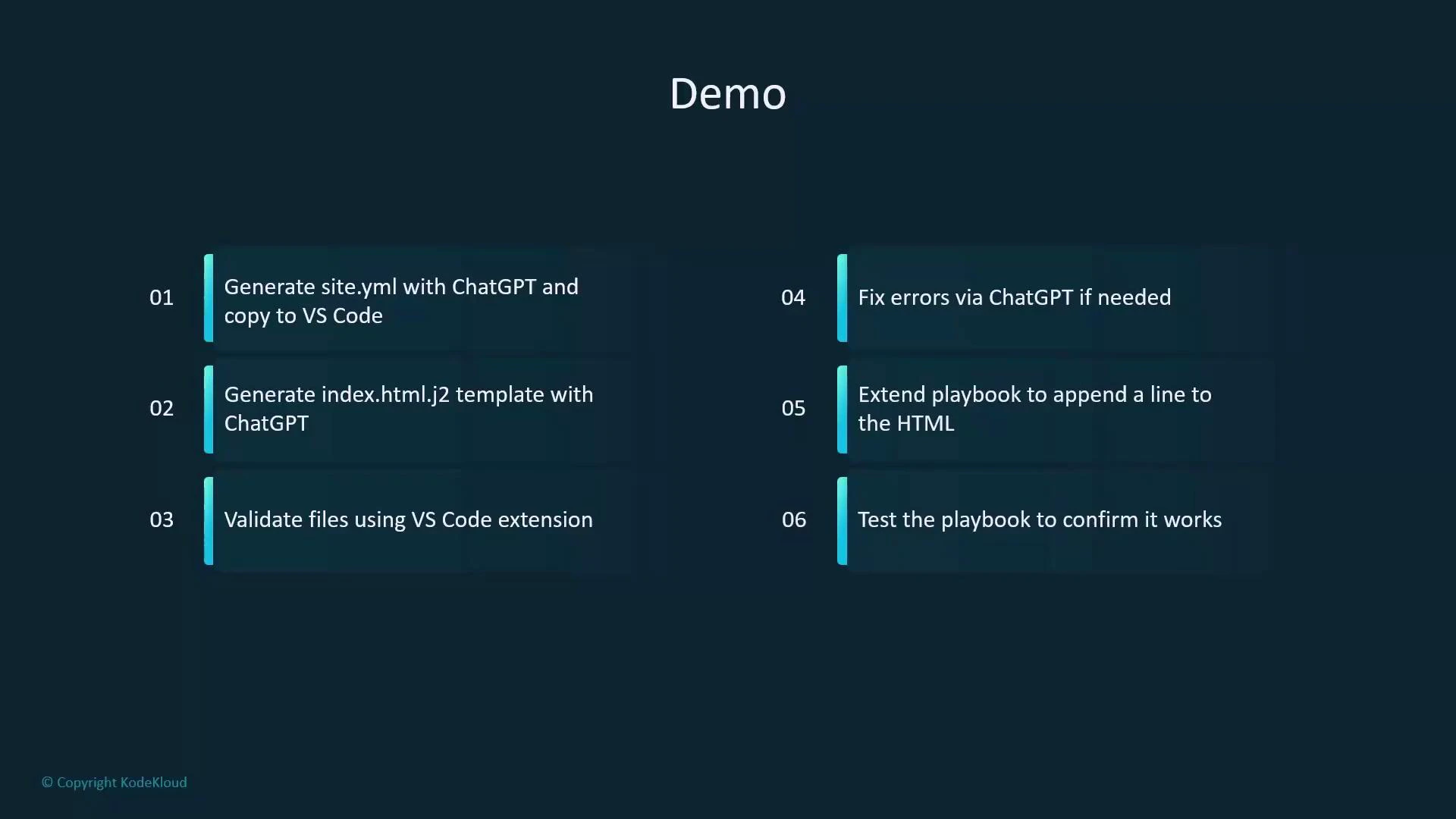
 Overview — workflow
* Ask ChatGPT to create a playbook (site.yml) that installs httpd and deploys a Jinja2 template.
* Paste the playbook into VS Code.
* Ask ChatGPT to generate the Jinja2 template file (index.html.j2).
* Validate files in VS Code using the Ansible extension and ansible-lint.
* If there are lint or validation issues, iterate by giving the errors back to ChatGPT.
* Once the base version is working, extend the playbook (for example, add an idempotent footer append).
* Run the playbook and confirm the results on the demo server.
Overview — workflow
* Ask ChatGPT to create a playbook (site.yml) that installs httpd and deploys a Jinja2 template.
* Paste the playbook into VS Code.
* Ask ChatGPT to generate the Jinja2 template file (index.html.j2).
* Validate files in VS Code using the Ansible extension and ansible-lint.
* If there are lint or validation issues, iterate by giving the errors back to ChatGPT.
* Once the base version is working, extend the playbook (for example, add an idempotent footer append).
* Run the playbook and confirm the results on the demo server.
 Step-by-step walkthrough
1. Environment setup
* Create a working directory and change into it:
```bash theme={null}
student@control:~$ mkdir chatgpt
student@control:~$ cd chatgpt
```
* Create a simple inventory file named `inventory` with a group `webservers`:
```ini theme={null}
[webservers]
servera
```
* Create `ansible.cfg` that points to the local inventory and configures privilege escalation:
```ini theme={null}
[defaults]
inventory = inventory
[privilege_escalation]
become = true
become_method = sudo
become_user = root
become_ask_pass = false
```
2. Generate the initial playbook with ChatGPT
* Prompt example used:\
"As a DevOps engineer, create an Ansible playbook called site.yml for RHEL-based hosts in the group webservers that installs httpd, deploys a Jinja2 template named index.html.j2 to /var/www/html/index.html, enables and starts the httpd service, uses handlers, and keeps tasks idempotent."
* After getting the reply, paste it into VS Code and make lint-friendly corrections:
* Use fully-qualified collection names (ansible.builtin.\
Step-by-step walkthrough
1. Environment setup
* Create a working directory and change into it:
```bash theme={null}
student@control:~$ mkdir chatgpt
student@control:~$ cd chatgpt
```
* Create a simple inventory file named `inventory` with a group `webservers`:
```ini theme={null}
[webservers]
servera
```
* Create `ansible.cfg` that points to the local inventory and configures privilege escalation:
```ini theme={null}
[defaults]
inventory = inventory
[privilege_escalation]
become = true
become_method = sudo
become_user = root
become_ask_pass = false
```
2. Generate the initial playbook with ChatGPT
* Prompt example used:\
"As a DevOps engineer, create an Ansible playbook called site.yml for RHEL-based hosts in the group webservers that installs httpd, deploys a Jinja2 template named index.html.j2 to /var/www/html/index.html, enables and starts the httpd service, uses handlers, and keeps tasks idempotent."
* After getting the reply, paste it into VS Code and make lint-friendly corrections:
* Use fully-qualified collection names (ansible.builtin.\This page is served by Apache HTTP Server (httpd) configured via Ansible.
``` Ensure the file ends with a newline to avoid subtle template issues. 4. Validate and run the playbook * Tools to use: * VS Code Ansible extension: [https://marketplace.visualstudio.com/items?itemName=redhat.ansible](https://marketplace.visualstudio.com/items?itemName=redhat.ansible) * ansible-lint: [https://ansible-lint.readthedocs.io/en/latest/](https://ansible-lint.readthedocs.io/en/latest/)This page is served by Apache HTTP Server (httpd) configured via Ansible.
``` 6. Extend the playbook — append a footer line idempotently * To demonstrate iterative improvements, add a `lineinfile` task that appends one footer line to `/var/www/html/index.html` only if it does not already exist. Place this task after the template task so it operates on the deployed file. Suggested task: ```yaml theme={null} - name: Append "This file was deployed by Ansible + ChatGPT" to index.html ansible.builtin.lineinfile: path: /var/www/html/index.html line: 'This file was deployed by Ansible + ChatGPT' insertafter: EOF create: yes notify: - Restart httpd ``` Concise full playbook including the appended task: ```yaml theme={null} --- - name: Configure webservers hosts: webservers become: true gather_facts: true tasks: - name: Install httpd package ansible.builtin.dnf: name: httpd state: present notify: - Restart httpd - name: Deploy index.html from Jinja2 template ansible.builtin.template: src: index.html.j2 dest: /var/www/html/index.html mode: '0644' notify: - Restart httpd - name: Append "This file was deployed by Ansible + ChatGPT" to index.html ansible.builtin.lineinfile: path: /var/www/html/index.html line: 'This file was deployed by Ansible + ChatGPT' insertafter: EOF create: yes notify: - Restart httpd - name: Ensure httpd is enabled and starts at boot ansible.builtin.service: name: httpd state: started enabled: true handlers: - name: Restart httpd ansible.builtin.service: name: httpd state: restarted ``` 7. Re-run the playbook and confirm idempotence * Run again: ```bash theme={null} student@control:~/chatgpt$ ansible-playbook site.yml ``` Expected pattern: * First run: template and lineinfile may be “changed” and will trigger the handler. * Subsequent runs: `lineinfile` reports ok (no change) if the footer already exists, and the handler will not run because no task reported changed. Final verification: ```bash theme={null} student@servera:~$ curl localhost:80This page is served by Apache HTTP Server (httpd) configured via Ansible.
This file was deployed by Ansible + ChatGPT ``` Quick reference — mapping tasks to modules | Task purpose | Ansible module | Notes | | ------------------------------ | --------------------------------------- | ------------------------------------------------- | | Install package | `ansible.builtin.dnf` | Use `state: present` for RHEL-based hosts | | Deploy Jinja2 template | `ansible.builtin.template` | Template source -> dest, set `mode` appropriately | | Append footer idempotently | `ansible.builtin.lineinfile` | Use `insertafter: EOF` and `create: yes` | | Ensure service enabled/started | `ansible.builtin.service` | Use `state: started`, `enabled: true` | | Restart as needed | handler using `ansible.builtin.service` | Triggered only on notify from changed tasks | Wrapping up — best practices * Use ChatGPT to scaffold and iterate quickly; always validate generated content with linters and human review before running in production. * Keep tasks idempotent (use modules like `template` and `lineinfile` rather than raw shell append). * Use handlers to restart services only when necessary, preventing needless restarts. * Fix lint errors progressively—feed the specific messages back to ChatGPT for faster iteration. Links and references * Ansible documentation: [https://docs.ansible.com/ansible/latest/index.html](https://docs.ansible.com/ansible/latest/index.html) * Jinja2: [https://jinja.palletsprojects.com/en/latest/](https://jinja.palletsprojects.com/en/latest/) * Apache HTTP Server: [https://httpd.apache.org/](https://httpd.apache.org/) * VS Code: [https://code.visualstudio.com/](https://code.visualstudio.com/) * Ansible extension for VS Code: [https://marketplace.visualstudio.com/items?itemName=redhat.ansible](https://marketplace.visualstudio.com/items?itemName=redhat.ansible) * ansible-lint: [https://ansible-lint.readthedocs.io/en/latest/](https://ansible-lint.readthedocs.io/en/latest/) You now have a repeatable pattern: generate → validate → iterate → run — using ChatGPT and VS Code to produce predictable, idempotent Ansible automation.