> ## Documentation Index
> Fetch the complete documentation index at: https://notes.kodekloud.com/llms.txt
> Use this file to discover all available pages before exploring further.
# Building Subagents Instructions Tools and Delegation
> Guide for designing reusable, secure sub-agents with isolated contexts, bounded tools, delegation patterns, routing metadata, file formats, and best practices for safe, efficient agent orchestration.
This lesson explains what a sub-agent is, when to create one, and how a main agent delegates work to sub-agents. Use this guide to design reusable, secure worker roles your main agent can route to for focused tasks.
A sub-agent is a reusable worker configuration the main agent invokes through a harness for specific tasks. Think of a sub-agent as a job description the harness can run: it includes its own instructions, an isolated context, a constrained toolset, and explicit permissions.
Core characteristics of a sub-agent:
| Characteristic | What it means |
| -: | - |
| Isolated context window | Runs in a separate conversation so searches, logs, and tool outputs don’t pollute the main conversation. |
| Custom system prompt | Explicit operating rules and expected deliverables, supplied in the sub-agent’s prompt body. |
| Tools and permissions | Bounded allow/deny lists and approval rules that limit actions and require human sign-off where necessary. |
| Independent model choice | Can inherit the main agent’s model or use a different one (e.g., smaller model for routine tasks, larger for deep reasoning). |
How delegation works (high-level)
1. The main agent matches the incoming request against each sub-agent’s description (routing).
2. The selected sub-agent executes in isolation with its own prompt and allowed tools.
3. The sub-agent returns a focused result; the main agent receives the final answer (not the intermediate logs or tool outputs) and verifies or re-delegates if needed.
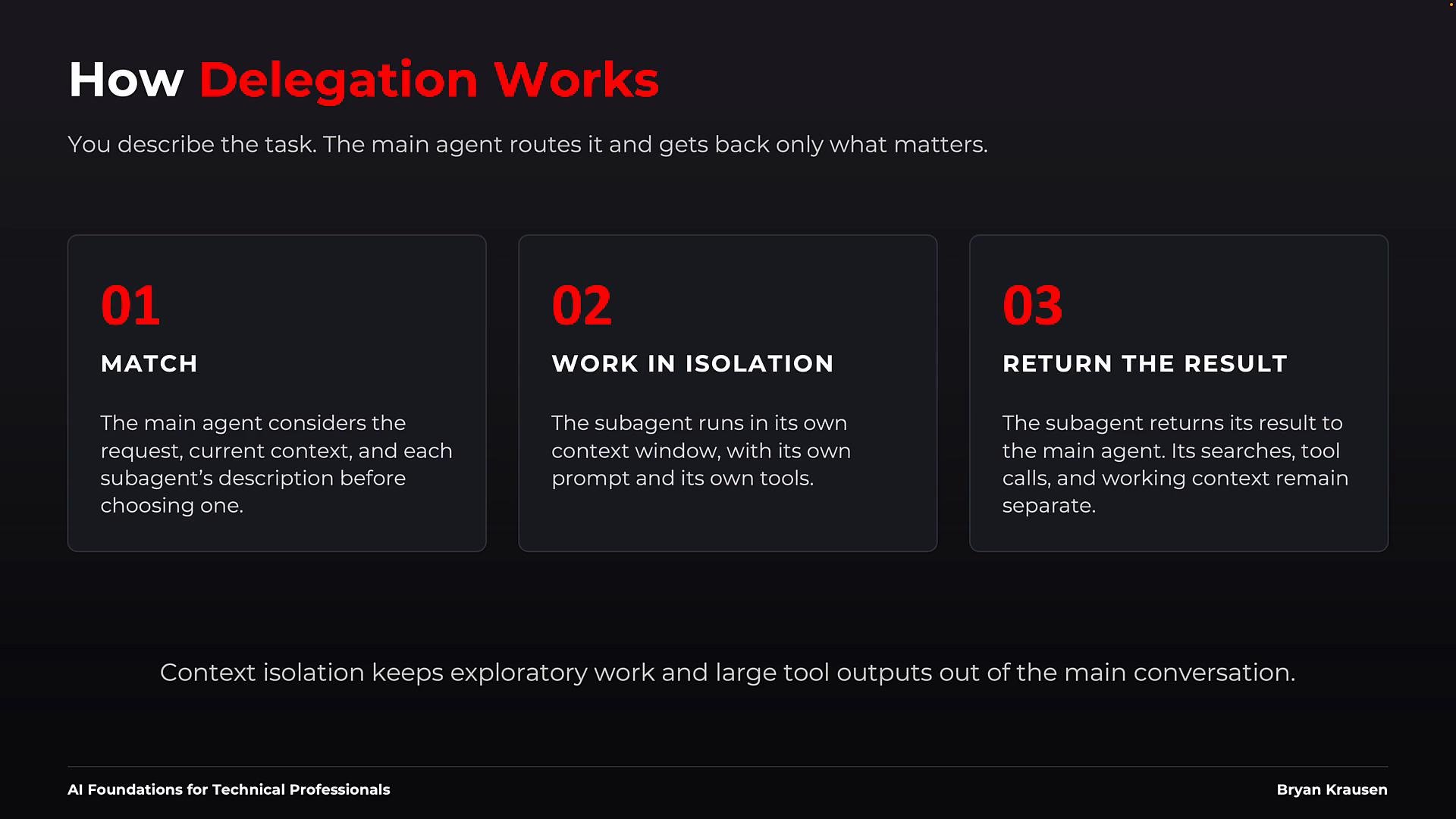 The main agent orchestrates: it routes requests, monitors sub-agents, and verifies outputs. The specialist sub-agent focuses on the detail work inside its defined boundaries.
Routing example
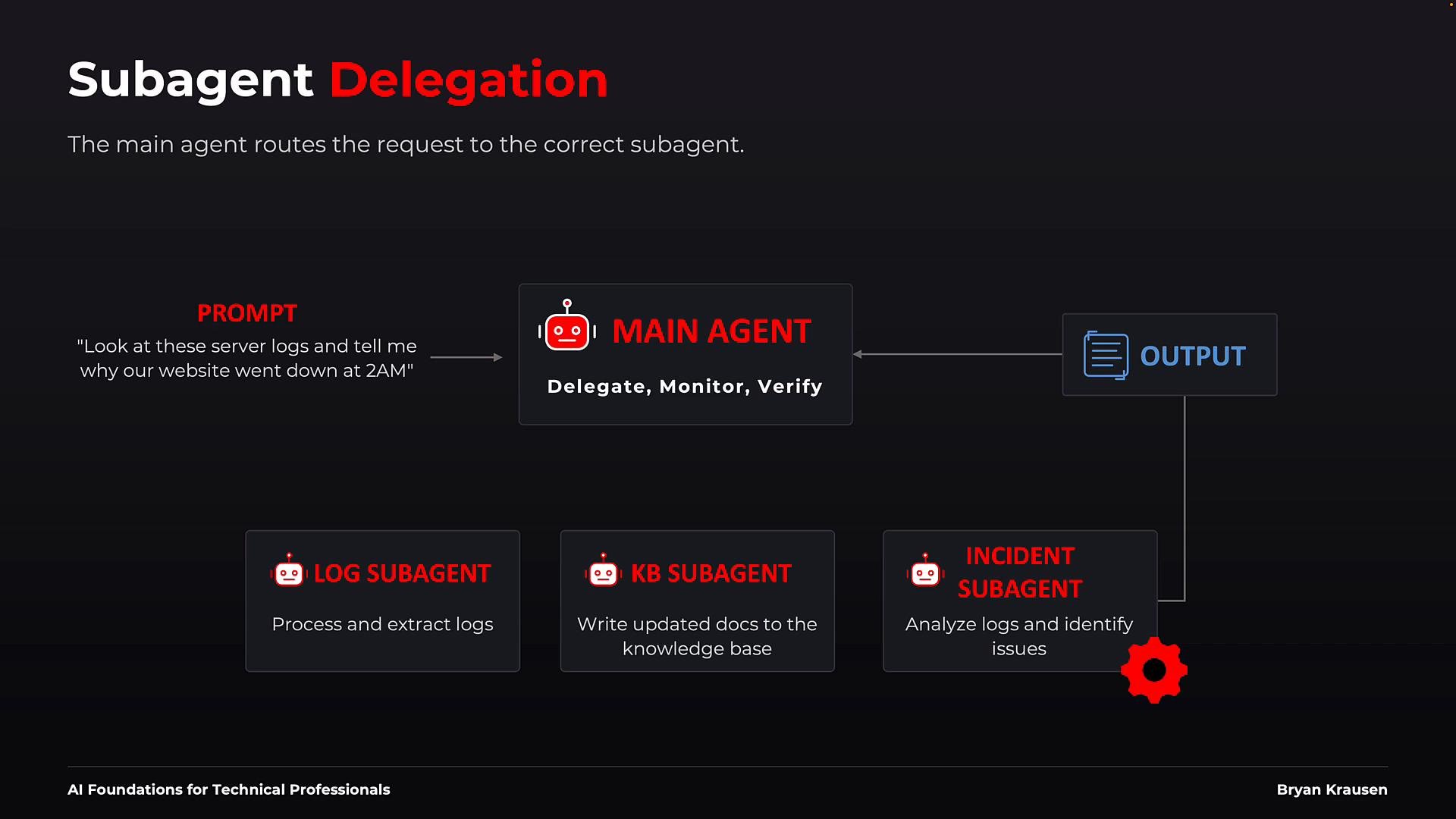
* Topology: The main agent sits centrally as the coordinator. Sub-agents provide specialized services:
* Log sub-agent: extracts and structures raw logs.
* Knowledge-Base (KB) sub-agent: updates documentation and KB entries.
* Incident sub-agent: analyzes evidence to determine root cause.
* Example flow:
1. A helpdesk request arrives: “Look at these server logs and tell me why our website went down at 2 a.m.”
2. The main agent compares the request to each sub-agent’s description and routes it to the incident sub-agent.
3. The incident sub-agent runs in isolation with its allowed tools, returns findings to the main agent.
4. The main agent verifies the result and returns a concise answer to the user (or delegates again if needed).
The main agent orchestrates: it routes requests, monitors sub-agents, and verifies outputs. The specialist sub-agent focuses on the detail work inside its defined boundaries.
Routing example
* Topology: The main agent sits centrally as the coordinator. Sub-agents provide specialized services:
* Log sub-agent: extracts and structures raw logs.
* Knowledge-Base (KB) sub-agent: updates documentation and KB entries.
* Incident sub-agent: analyzes evidence to determine root cause.
* Example flow:
1. A helpdesk request arrives: “Look at these server logs and tell me why our website went down at 2 a.m.”
2. The main agent compares the request to each sub-agent’s description and routes it to the incident sub-agent.
3. The incident sub-agent runs in isolation with its allowed tools, returns findings to the main agent.
4. The main agent verifies the result and returns a concise answer to the user (or delegates again if needed).
 Sub-agent file format (concept)
A practical pattern is a single Markdown file with YAML front matter containing routing metadata, tool boundaries, model preference, and approval behavior. A harness (for example, a file-based harness like Claude Code for Beginners) discovers these files and enforces runtime boundaries such as tool allowlists and approval policies.
Example sub-agent definition (compact):
```markdown theme={null}
---
name: expert-code-reviewer
description: "Expert Code Reviewer — leave proactive comments after code changes. Use this role when you are reviewing diffs or PRs for code quality, potential bugs, and style issues."
tools:
allow:
- repo.read
- repo.grep
- filesystem.glob
disallow:
- repo.write
- repo.edit
model: claude-2.1
approvals:
run: manual # require human approval before making changes (if any)
auto_plan: true # allow planning or read-only exploration automatically
---
You are an Expert Code Reviewer. When given a set of changed files, do the following:
1. Inspect the diffs and identify potential bugs, security issues, and missing tests.
2. Produce a concise summary with:
- A high-level risk assessment
- A prioritized list of findings (title, file, line, short rationale)
- Suggested fixes or code snippets where helpful
3. Do not modify any files. If a suggested change is required, mark it as "suggested" and include the exact patch or diff.
4. If you are uncertain about a finding, clearly mark it as "needs human review" with the reason.
```
Notes on the example
* The YAML front matter is used for routing description, tool boundaries, model preference, and approval behavior.
* The Markdown body functions as the system prompt: it contains the sub-agent’s operational instructions and expected outputs.
* The file is declarative; the harness discovers it and enforces execution-time restrictions.
Security and permissions
Start with the least-privilege principle: give a sub-agent only the tools and permissions absolutely required for the job. If the `tools` field is omitted, a harness may default to inheriting all available tools — convenient but risky. Use explicit allowlists and disallows (e.g., deny write/edit for read-only roles) and require human approval for actions that change state or have safety implications.
Start with least privilege: give a sub-agent only the tools and permissions it absolutely needs, and require approval for any action that can change state or has safety implications.
When to build a sub-agent
You don’t need a sub-agent for every prompt. Consider creating one when:
| Trigger | Why create a sub-agent |
| - | - |
| Repeated needs | You repeatedly reuse the same specialist role and instructions. |
| Context-heavy work | Logs, large file sets, or long outputs that would clutter the main conversation. |
| Specialized role | Tasks that require focused, prescriptive instructions for reliable results. |
| Tighter security controls | The task needs stricter permissions than the main agent. |
| Cost or latency optimization | Run predictable tasks on smaller, cheaper models. |
| Team reuse & governance | Version-controlled sub-agents enable collaboration, review, and audit trails. |
Sub-agent file format (concept)
A practical pattern is a single Markdown file with YAML front matter containing routing metadata, tool boundaries, model preference, and approval behavior. A harness (for example, a file-based harness like Claude Code for Beginners) discovers these files and enforces runtime boundaries such as tool allowlists and approval policies.
Example sub-agent definition (compact):
```markdown theme={null}
---
name: expert-code-reviewer
description: "Expert Code Reviewer — leave proactive comments after code changes. Use this role when you are reviewing diffs or PRs for code quality, potential bugs, and style issues."
tools:
allow:
- repo.read
- repo.grep
- filesystem.glob
disallow:
- repo.write
- repo.edit
model: claude-2.1
approvals:
run: manual # require human approval before making changes (if any)
auto_plan: true # allow planning or read-only exploration automatically
---
You are an Expert Code Reviewer. When given a set of changed files, do the following:
1. Inspect the diffs and identify potential bugs, security issues, and missing tests.
2. Produce a concise summary with:
- A high-level risk assessment
- A prioritized list of findings (title, file, line, short rationale)
- Suggested fixes or code snippets where helpful
3. Do not modify any files. If a suggested change is required, mark it as "suggested" and include the exact patch or diff.
4. If you are uncertain about a finding, clearly mark it as "needs human review" with the reason.
```
Notes on the example
* The YAML front matter is used for routing description, tool boundaries, model preference, and approval behavior.
* The Markdown body functions as the system prompt: it contains the sub-agent’s operational instructions and expected outputs.
* The file is declarative; the harness discovers it and enforces execution-time restrictions.
Security and permissions
Start with the least-privilege principle: give a sub-agent only the tools and permissions absolutely required for the job. If the `tools` field is omitted, a harness may default to inheriting all available tools — convenient but risky. Use explicit allowlists and disallows (e.g., deny write/edit for read-only roles) and require human approval for actions that change state or have safety implications.
Start with least privilege: give a sub-agent only the tools and permissions it absolutely needs, and require approval for any action that can change state or has safety implications.
When to build a sub-agent
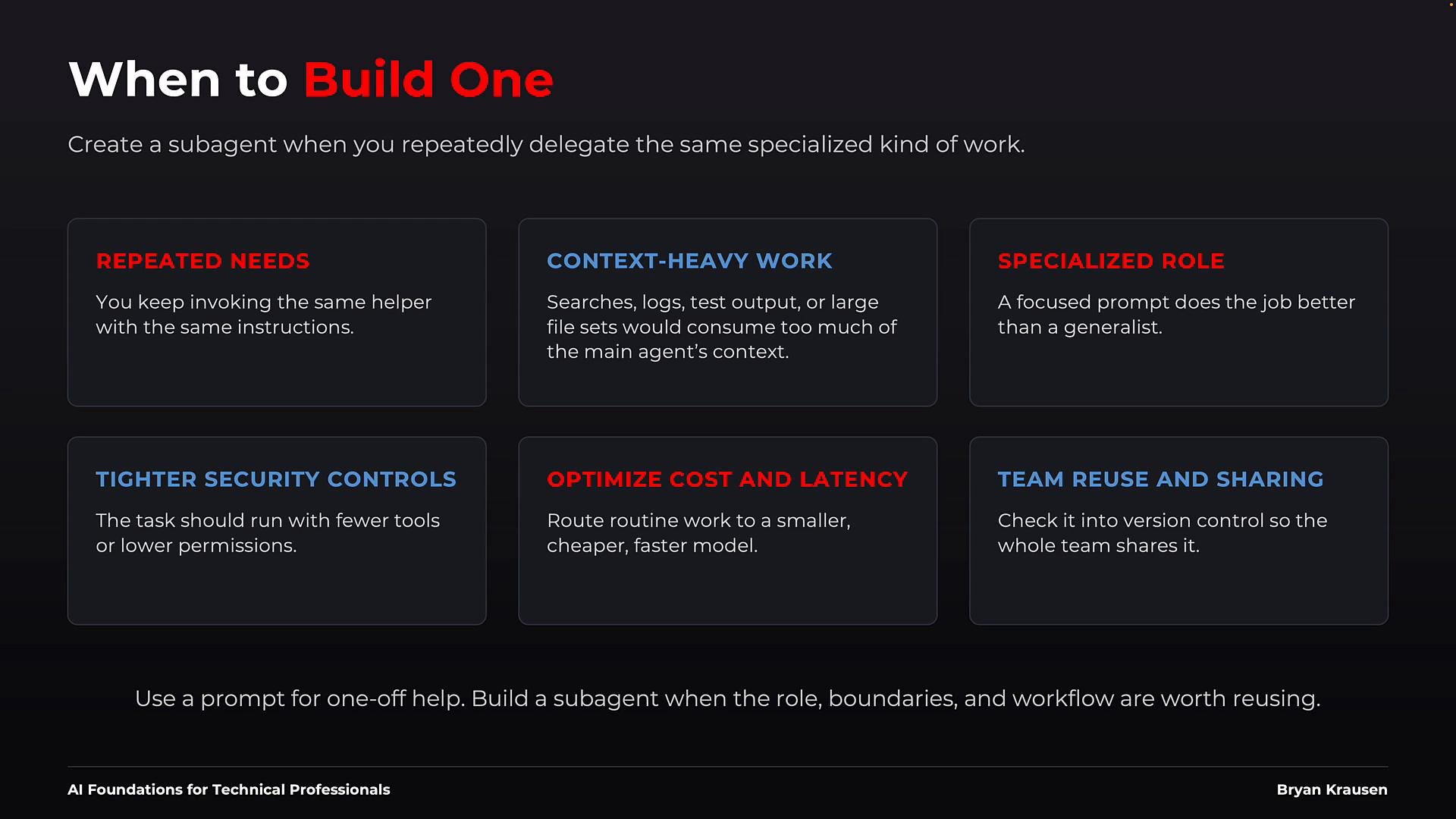
You don’t need a sub-agent for every prompt. Consider creating one when:
| Trigger | Why create a sub-agent |
| - | - |
| Repeated needs | You repeatedly reuse the same specialist role and instructions. |
| Context-heavy work | Logs, large file sets, or long outputs that would clutter the main conversation. |
| Specialized role | Tasks that require focused, prescriptive instructions for reliable results. |
| Tighter security controls | The task needs stricter permissions than the main agent. |
| Cost or latency optimization | Run predictable tasks on smaller, cheaper models. |
| Team reuse & governance | Version-controlled sub-agents enable collaboration, review, and audit trails. |
 Where to define sub-agents
Two common approaches:
* File-based:
* Store sub-agent Markdown files (YAML front matter + system prompt) in the project repository or in a personal directory.
* Advantages: version control, code review, team visibility, and easy discovery by file-based harnesses.
* Example: file-based harnesses like Claude Code for Beginners.
* Code-based:
* Register sub-agents via an agent SDK or configuration API, supplying the same pieces (description, prompt, tools, model).
* Advantages: programmatic registration, testing, feature flags, and tighter integration with CI/CD pipelines.
* Example: agent SDKs in developer-focused tutorials such as Learn By Doing: Building AI Agents with Claude Agent SDK.
Regardless of method, include the routing condition (description), the operating instructions (system prompt), tool boundaries, and model selection.
Best practices
* Single responsibility: give each sub-agent one clear role to simplify evaluation and testing.
* Precise trigger conditions: write the description so the main agent can route correctly from plain language.
* Minimal permissions: keep tools and approvals as small as possible.
* Right-sized model: match the model capability to task complexity to balance cost and latency.
* Version control: store shared definitions in git for review, history, and rollback.
* Test thoroughly: include success and failure cases plus negative tests that should not trigger the sub-agent.
Where to define sub-agents
Two common approaches:
* File-based:
* Store sub-agent Markdown files (YAML front matter + system prompt) in the project repository or in a personal directory.
* Advantages: version control, code review, team visibility, and easy discovery by file-based harnesses.
* Example: file-based harnesses like Claude Code for Beginners.
* Code-based:
* Register sub-agents via an agent SDK or configuration API, supplying the same pieces (description, prompt, tools, model).
* Advantages: programmatic registration, testing, feature flags, and tighter integration with CI/CD pipelines.
* Example: agent SDKs in developer-focused tutorials such as Learn By Doing: Building AI Agents with Claude Agent SDK.
Regardless of method, include the routing condition (description), the operating instructions (system prompt), tool boundaries, and model selection.
Best practices
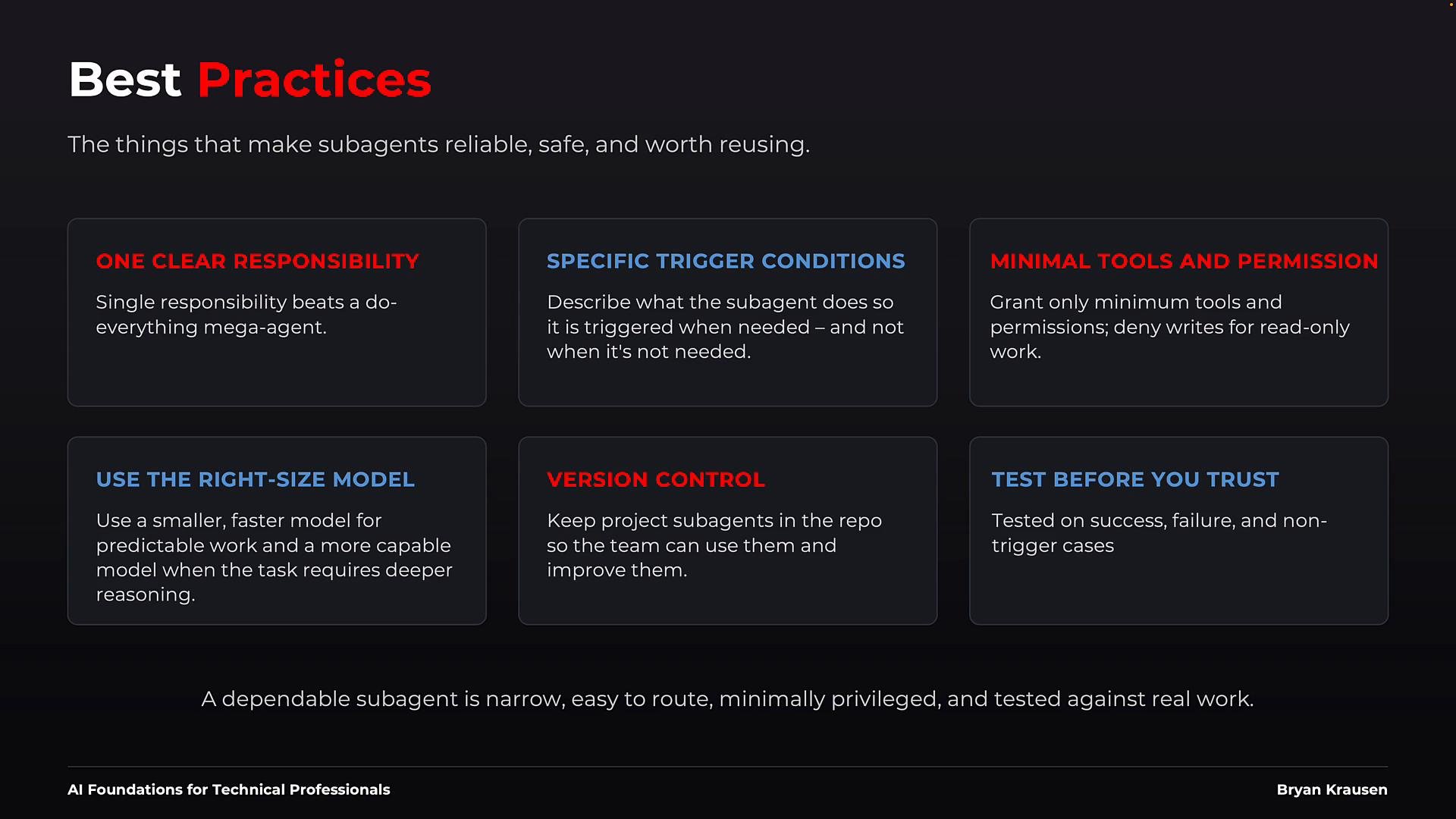
* Single responsibility: give each sub-agent one clear role to simplify evaluation and testing.
* Precise trigger conditions: write the description so the main agent can route correctly from plain language.
* Minimal permissions: keep tools and approvals as small as possible.
* Right-sized model: match the model capability to task complexity to balance cost and latency.
* Version control: store shared definitions in git for review, history, and rollback.
* Test thoroughly: include success and failure cases plus negative tests that should not trigger the sub-agent.
 Be cautious with omitted tool definitions: if you don’t explicitly define `allow`/`disallow`, the harness may grant broader access than intended. Always verify harness defaults before deploying sub-agents that touch sensitive systems.
Summary
When a specialist role is repeatedly needed or requires tight controls, formalize it as a sub-agent. Define a focused role with a clear routing description, minimal tool boundaries, and a tested system prompt. The harness will discover and enforce the configuration, letting the main agent coordinate, monitor, and verify outcomes while keeping the main conversation clean and secure.
Links and references
* [Claude Code for Beginners](https://learn.kodekloud.com/user/courses/claude-code-for-beginners)
* [Learn By Doing: Building AI Agents with Claude Agent SDK](https://learn.kodekloud.com/user/courses/learn-by-doing-building-ai-agents-with-claude-agent-sdk)
This documentation is built and hosted on [Mintlify](https://mintlify.com), a developer documentation platform.
Be cautious with omitted tool definitions: if you don’t explicitly define `allow`/`disallow`, the harness may grant broader access than intended. Always verify harness defaults before deploying sub-agents that touch sensitive systems.
Summary
When a specialist role is repeatedly needed or requires tight controls, formalize it as a sub-agent. Define a focused role with a clear routing description, minimal tool boundaries, and a tested system prompt. The harness will discover and enforce the configuration, letting the main agent coordinate, monitor, and verify outcomes while keeping the main conversation clean and secure.
Links and references
* [Claude Code for Beginners](https://learn.kodekloud.com/user/courses/claude-code-for-beginners)
* [Learn By Doing: Building AI Agents with Claude Agent SDK](https://learn.kodekloud.com/user/courses/learn-by-doing-building-ai-agents-with-claude-agent-sdk)
This documentation is built and hosted on [Mintlify](https://mintlify.com), a developer documentation platform.