> ## Documentation Index
> Fetch the complete documentation index at: https://notes.kodekloud.com/llms.txt
> Use this file to discover all available pages before exploring further.
# Demo Running a Local Model
> Guide to running AI models locally with Ollama, demonstrating setup, Python usage, hardware requirements, performance tradeoffs, and privacy and cost benefits.
Think about the last time you used an AI system: you typed into a browser or an app and the model (hosted by a provider such as [Anthropic](https://www.anthropic.com) or [OpenAI](https://openai.com)) responded from a remote data center. That hosted model is accessed by API calls and billed per request.
A model, however, is fundamentally a file — a very large file of numeric weights. Some vendors keep that file behind an API; others publish it. When a model is published you can download it and run it on your own hardware, including a laptop or desktop.
This article demonstrates running a model locally with Ollama, shows that no data leaves your machine, and explains the hardware resources you need to run models locally.
Demo setup
* Ollama is installed on the machine. Ollama downloads model files and runs them locally.
* Example models on disk:
```bash theme={null}
% ollama list
NAME ID SIZE MODIFIED
gemma4:31b 6316f0629137 19 GB 10 minutes ago
gpt-oss:20b 17052f91a42e 13 GB 43 minutes ago
```
Interactive local run
* Start an interactive session with a local model (example: `gpt-oss:20b`). The model loads into memory and you can chat directly from the terminal:
```bash theme={null}
% ollama run gpt-oss:20b
>>> in two sentences, what is a VPN?
Thinking...
...done thinking.
A VPN, or virtual private network, creates a secure, encrypted tunnel between your device and a remote server, masking your IP address and encrypting all traffic between them. This protects your privacy, helps bypass geographic restrictions, and secures connections on untrusted networks like public Wi‑Fi.
>>> /bye
%
```
At this point everything is local: Ollama loaded the model file from disk into memory and generated the response on-device.
You can even verify that no external API calls are required by disabling network connectivity: with Wi‑Fi off the same session and responses still work because the model runs entirely on your hardware.
Example: calling a local model from Python
Below is a condensed and corrected example of a Python script that posts a system prompt and user text to Ollama’s local endpoint (`run_local.py`). The snippet highlights the important pieces: configuration, finding local prompt files, building the request body, and where streaming code would be implemented.
```python theme={null}
# run_local.py
import os
import sys
import pathlib
import argparse
import urllib.request
import json
DEFAULT_MODEL = "gpt-oss:20b"
OLLAMA = os.environ.get("OLLAMA_HOST", "http://localhost:11434").rstrip("/")
if not OLLAMA.startswith("http"):
OLLAMA = "http://" + OLLAMA
here = pathlib.Path(__file__).parent
SEARCH_DIRS = [here, here.parent / "Token Economics"]
def find(name):
for d in SEARCH_DIRS:
p = d / name
if p.exists():
return p
sys.exit(f"Could not find {name} next to this script or in ../Token Economics")
def preflight(model):
# placeholder: check model availability, memory, etc.
pass
def main():
ap = argparse.ArgumentParser()
ap.add_argument("--model", default=DEFAULT_MODEL)
ap.add_argument("--show-thinking", action="store_true", help="print the model's reasoning")
ap.add_argument("--think", choices=["off", "low", "medium", "high"], default="low", help="thinking level")
ap.add_argument("--ctx", type=int, default=16384)
ap.add_argument("--max-tokens", type=int, default=1024)
args = ap.parse_args()
system_text = find("system-prompt.txt").read_text()
user_text = find("ticket-and-logs.txt").read_text()
preflight(args.model)
body = {
"model": args.model,
"messages": [
{"role": "system", "content": system_text},
{"role": "user", "content": user_text},
],
"stream": True,
"options": {"num_ctx": args.ctx, "num_predict": args.max_tokens},
}
# Code to POST to Ollama and stream responses omitted for brevity.
# After run completes, parse stats and print usage like below.
```
Example structured output from a local run
* After running the script, the model prints a concise incident summary, supporting log evidence, remediation steps (runbook), escalation guidance, and local usage metrics:
```bash theme={null}
% python3 run_local.py
Summary: Dana’s VPN was rejected because the Endpoint Agent on her MacBook is too old – the policy requires version 5.4.0, but the log shows agent 5.2.1.
Root cause:
2026-09-21 08:02:22 vpn-gw-01 sslvpn[2213]: sess=c47d19 user=dwhitfield event=POSTURE_CHECK policy=Corp-Remote-Std rev=14 result=FAIL reason=agent_version_below_minimum agent=bwl-ea/5.2.1 required=5.4.0
2026-09-21 08:02:22 vpn-gw-01 sslvpn[2213]: sess=c47d19 user=dwhitfield event=SESSION_REJECT code=0x4C msg="Connection rejected by policy"
Fix (Runbook R3 – agent_version_below_minimum):
1. Ask Dana to open "Self Service" from the Dock.
2. In Self Service, locate "BWL Endpoint Agent" and click "Install" to upgrade to 5.4.0.
3. Instruct her to reboot the MacBook.
4. Have her retry the VPN connection.
If the Self Service install is missing or the update fails, escalate to Endpoint Engineering.
Escalate to: None (unless update cannot be installed).
Confidence: High – the log unambiguously shows a version mismatch causing the policy reject.
--- usage (what a local run gives you instead of a bill) ---
model gpt-oss:20b
input tokens 5,996
output tokens 662 (thinking tokens included)
load time 6.0 s
prompt processing 656 tokens/s
generation 38.1 tokens/s
total time 32.6 s
cost in tokens $0.00 (you paid in hardware and time)
(thinking hidden: 1,354 characters. Rerun with --show-thinking to watch it.)
%
```
Inspecting running models with Ollama
* You can inspect Ollama-managed processes to see memory usage and whether the model is running on GPU or CPU:
```bash theme={null}
% ollama ps
NAME ID SIZE PROCESSOR CONTEXT UNTIL
gpt-oss:20b 17052f91a42e 12 GB 100% GPU 16384 3 minutes from now
%
```
Key takeaways about running models locally
Running models locally keeps data on your machine and eliminates per-request billing, but it requires capable hardware, local storage for model files, and management of the runtime tooling.
Two simple rules determine whether a model will run well on a laptop or desktop:
* Rule 1 — Memory decides what fits
* On systems with unified memory (e.g., Apple Silicon), CPU and GPU share the same pool. The GPU-usable portion is often some fraction of total unified memory (a rough community rule of thumb is around three‑quarters).
* The model weights plus the context window must fit in that GPU-usable memory.
* Rough size rules (compressed/quantized precisions commonly used for local running):
| Precision | Approx. GB per billion parameters |
| - | - |
| 4-bit | \~0.5–0.7 GB |
| 8-bit | \~1.1 GB |
| 16-bit | \~2.0 GB |
* Longer context windows increase memory needs on top of the model weights.
* Rule 2 — Bandwidth decides how fast
* Each token generation step requires reading model weights (or the active parts) from memory; throughput is therefore limited by memory bandwidth.
* As a simple upper-bound estimate:
generation speed ≈ memory bandwidth ÷ model size (tokens/s).
* Example estimates for a system with \~273 GB/s memory bandwidth:
| Model size (approx) | Upper-bound tokens/s (estimate) |
| - | - |
| 7 GB | \~39 tokens/s |
| 14 GB | \~20 tokens/s |
| 20 GB | \~14 tokens/s |
* Models using mixture-of-experts (MoE) architectures can be faster per token when only a subset of experts are activated.
Warning: Trying to run a model that doesn’t fit in available memory will fail to load or will fallback to CPU-only execution, which is dramatically slower. Always check model size + context requirements before launching.
Example: swapping to a larger model
* Stopping a smaller model (`gpt-oss:20b`) and launching a much larger one (`gemma4:31b`) will often succeed on machines with sufficient memory but will load slower and generate tokens much more slowly. Example:
```bash theme={null}
% ollama stop gpt-oss:20b
% ollama run gemma4:31b
# After running the same request against the larger model:
--- usage (what a local run gives you instead of a bill) ---
model gemma4:31b
input tokens 7,369
output tokens 1,200 (thinking tokens included)
load time 11.6 s
prompt processing 85 tokens/s
generation 9.1 tokens/s
total time 230.0 s
cost in tokens $0.00 (you paid in hardware and time)
(thinking hidden: 2,513 characters. Rerun with --show-thinking to watch it.)
(stopped at --max-tokens before the answer finished; raise it or use --think low)
%
```
You’ll notice:
* Larger models take longer to load and reduce generation throughput.
* Fans, power draw, and thermal throttling can increase as the GPU/CPU works harder.
* Larger models may produce more thorough or higher-quality outputs, but at the cost of time and power.
Alternative local UIs: Unsloth (GUI)
* Ollama is one option; others provide local GUIs. Unsloth is an example: a model hub and chat interface that runs models locally and can manage downloads and fine-tuning.
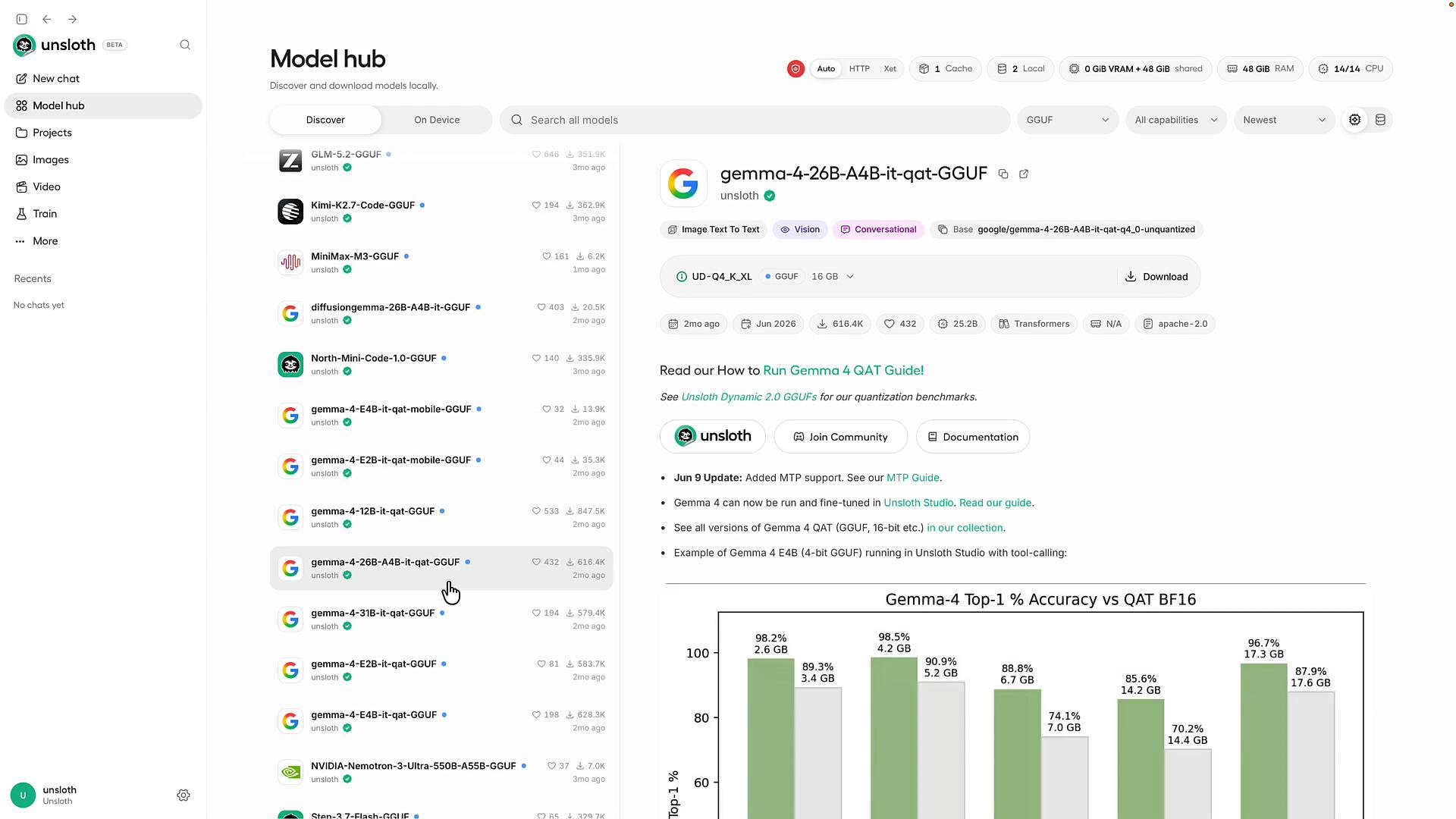 Unsloth highlights:
* A model hub UI to search and download models that fit your machine.
* Local chat interface ("New Chat") that behaves like hosted chat UIs.
* Options to fine-tune or instruct models on your own documents and datasets.
Conclusion
* Some models are available only as hosted services; others are downloadable and runnable locally.
* Running a model locally keeps data on your hardware and eliminates per-request bills, but requires sufficient memory and memory bandwidth and some operational effort.
* When deciding whether to run locally or use a hosted API, measure:
* Memory footprint = model weights + desired context window.
* Expected generation throughput ≈ memory bandwidth ÷ model size.
Links and references
* [Ollama — run LLMs locally](https://ollama.com)
* [Unsloth — local model hub and GUI](/) (link to the specific project as applicable)
* [Kubernetes Basics](https://kubernetes.io/docs/concepts/overview/what-is-kubernetes/) (general reference)
This documentation is built and hosted on [Mintlify](https://mintlify.com), a developer documentation platform.
Unsloth highlights:
* A model hub UI to search and download models that fit your machine.
* Local chat interface ("New Chat") that behaves like hosted chat UIs.
* Options to fine-tune or instruct models on your own documents and datasets.
Conclusion
* Some models are available only as hosted services; others are downloadable and runnable locally.
* Running a model locally keeps data on your hardware and eliminates per-request bills, but requires sufficient memory and memory bandwidth and some operational effort.
* When deciding whether to run locally or use a hosted API, measure:
* Memory footprint = model weights + desired context window.
* Expected generation throughput ≈ memory bandwidth ÷ model size.
Links and references
* [Ollama — run LLMs locally](https://ollama.com)
* [Unsloth — local model hub and GUI](/) (link to the specific project as applicable)
* [Kubernetes Basics](https://kubernetes.io/docs/concepts/overview/what-is-kubernetes/) (general reference)
This documentation is built and hosted on [Mintlify](https://mintlify.com), a developer documentation platform.