> ## Documentation Index
> Fetch the complete documentation index at: https://notes.kodekloud.com/llms.txt
> Use this file to discover all available pages before exploring further.
# Token Economics What AI Actually Costs
> Explains measuring LLM input and output tokens, converting usage to dollar costs, and estimating per-call and monthly expenses using a troubleshooting assistant example.
In this lesson we walk through a concrete example to see what actually drives the token cost of an LLM-powered feature. We run a troubleshooting assistant against a real ticket + log excerpt, capture the model usage (input and output tokens), and convert that into a dollar cost so you can estimate monthly spend for production.
Overview
* Build a small agent that receives a system prompt (the runbook and instructions) plus a ticket and log excerpt.
* Call the model once, inspect the model’s token usage (input\_tokens and output\_tokens), and compute the cost.
* Scale that single-call cost to a monthly estimate using expected traffic.
Why this matters: provider pricing pages give per-token rates (for example, dollars per million tokens) but not your workload. The only reliable way to estimate cost is to measure the tokens your inputs and outputs produce for representative requests.
Environment prompt (terminal)
```bash theme={null}
(.venv) bryankrausen@Bryan-Personal-MBP Token Economics %
```
Model pricing example
Many providers separate input and output pricing. Output tokens are often more expensive. For this lesson we’ll use these example rates from Anthropic’s Sonnet 4.5 pricing page:
| Token direction | Rate |
| - | - |
| Input tokens | \$2.00 per 1,000,000 tokens |
| Output tokens | \$5.00 per 1,000,000 tokens |
Input vs output pricing matters because even modest increases in output length can dominate costs. Measure both.
What we’ll do
1. Send a single, representative request (system prompt + ticket + logs) to the model.
2. Inspect exactly what the provider counts (input & output tokens) in the response usage metadata.
3. Compute the cost for that single call, then scale to monthly volume.
Agent code (streaming demo)
Below is the Python streaming code used to call Anthropic. The key parts are model selection, the system prompt, the user message (ticket + logs), streaming the response to the console, and printing response usage (token counts).
```python theme={null}
# run_demo.py (excerpt)
import anthropic
MODEL = "claude-sonnet-4.5"
system = "" # see the system prompt block below
user_text = "" # see the ticket and logs below
client = anthropic.Anthropic()
with client.messages.stream(
model=MODEL,
max_tokens=600,
system=system,
messages=[{"role": "user", "content": user_text}],
) as stream:
for text in stream.text_stream:
print(text, end="", flush=True)
response = stream.get_final_message()
print("\n\n--- usage (what the bill is based on) ---")
for name, value in response.usage.model_dump().items():
if isinstance(value, int) and value:
print(f"{name:30} {value:>8,}")
```
System prompt (the assistant’s instructions and runbook)
```text theme={null}
You are HelpDesk AI, the internal IT support assistant at Brightwater Logistics. You work alongside Tier 1 support agents.
WHAT YOU WILL RECEIVE
- A ticket: who the user is, what device they are on, what they tried, and what they saw.
- A log excerpt: lines from the system involved (VPN gateway, identity provider, endpoint management), already filtered to the user and the time window when possible.
HOW TO WORK
1. Read the ticket first. Note the user ID, device name, time window, and the exact error text the user reported.
2. Search the log excerpt for entries that match that user, device, or time window. Ignore entries for other users unless they show a system-wide problem.
3. Decide on a root cause only if the log lines support it. Quote the exact lines (timestamp and message) that prove it.
4. If the logs do not explain the problem, say so plainly and name the single log source or piece of information that would settle it. Do not guess.
5. Match the root cause to a runbook entry below and give the Tier 1 fix from that entry. If no entry matches, write "No runbook entry" and escalate.
6. Never ask the user for a password. Never recommend a password reset unless the logs show a credential failure (AUTH_RADIUS result=REJECT or result=LOCKED).
7. Do not invent hostnames, policy names, version numbers, or error codes. Use only what appears in the ticket, the logs, or this runbook.
8. Write for a Tier 1 agent who is on the phone with the user: short sentences, no jargon that is not already in the ticket.
OUTPUT FORMAT
Use exactly these five headings, in this order, and nothing else:
Summary: One or two sentences the agent can paste into the ticket as-is.
Root cause: What failed and why. Quote the log lines that prove it.
Fix: Numbered steps for the Tier 1 agent, in order, taken from the runbook.
Escalate to: One team from the escalation list, or "None".
Confidence: High, Medium, or Low, plus one sentence on why.
Keep the whole response under 220 words.
VPN TROUBLESHOOTING RUNBOOK (TIER 1)
R10. Everything passes but the user says it still does not work. Log shows SESSION_OPEN and bytes_in/bytes_out increasing. The VPN is up. The problem is the application, not the tunnel. Ask what specifically they cannot reach and route accordingly.
R11. Sign-in from an unexpected country, or two locations within minutes. Log shows RISK_FLAG. Do not troubleshoot. Escalate to SecOps immediately and do not tell the user the reason until SecOps confirms.
ESCALATION LIST
- NetOps (Network Operations): gateway health, IP pools, routing, the gateway certificate, outages.
- IAM (Identity & Access): account lockouts, MFA enrollment, group membership, access requests.
- Endpoint Engineering: the BWL Endpoint Agent, disk encryption reporting, OS compliance, device certificates.
- SecOps (Security Operations): risk flags, suspicious sign-ins, anything that looks like account compromise.
```
Ticket and log excerpt (the user-facing input)
Ticket summary and user description:
```text theme={null}
TICKET #48213 - VPN: "Connection rejected by policy (0x4C)"
Opened: 2026-09-21 08:19 ET
Requester: Dana Whitfield (dwhitfield), Regional Sales, remote (home office)
Device: BWL-LT-4471, MacBook Pro, macOS 15.6
Priority: High (customer calls start at 9:00)
User's description:
"I can't get on the VPN this morning. It worked fine on Friday. I type my password. I approve the push on my phone, then it sits for a few seconds and shows 'Connection rejected by policy (0x4C)' and disconnects. I've restarted the laptop twice. My home Wi‑Fi is fine. Nothing has changed on my laptop that I know of."
```
Log excerpt (vpn-gw-01)
```text theme={null}
2026-09-21 03:00:02 vpn-gw-01 policyd[801]: event=POLICY_SYNC policy=Corp-Remote-Std rev=14 result=APPLIED changes="min_agent_version 5.2.0->5.4.0; disk_encryption=required (unchanged); os min=unchanged" source=endpoint-mqmt
2026-09-21 08:07:56 vpn-gw-01 sslvpn[2213]: sess=c4d0b3 user=jlin event=AUTH_RADIUS result=ACCEPT realm=corp
2026-09-21 08:07:56 vpn-gw-01 sslvpn[2213]: sess=c4d0b3 user=jlin event=MFA_PUSH_SENT device="iPhone 14"
2026-09-21 08:08:03 vpn-gw-01 sslvpn[2213]: sess=c4d0b3 user=jlin event=MFA_PUSH_APPROVED latency=6.6s
2026-09-21 08:08:03 vpn-gw-01 sslvpn[2213]: sess=c4d0b3 user=jlin event=AUTHZ result=ALLOW group=VPN-Users-Corp
2026-09-21 08:08:04 vpn-gw-01 sslvpn[2213]: sess=c4d0b3 user=jlin event=POSTURE_CHECK policy=Corp-Remote-Std rev=14 result=PASS agent=bwl-ea/5.4.0 disk_encryption=reported os_build=ok
2026-09-21 08:08:04 vpn-gw-01 sslvpn[2213]: sess=c4d0b3 user=jlin event=SESSION_OPEN assigned_ip=10.40.12.18 tunnel=split dns_push=ok
2026-09-21 08:11:09 vpn-gw-01 sslvpn[2213]: sess=c51b77 user=dwhitfield src=192.0.2.144 event=TLS_HANDSHAKE_OK cipher=TLS_AES_256_GCM_SHA384
2026-09-21 08:11:09 vpn-gw-01 sslvpn[2213]: sess=c51b77 user=dwhitfield event=CLIENT_HELLO client=BrightConnect/6.1.0 os=macOS-15.6 device=BWL-LT-4471
2026-09-21 08:11:10 vpn-gw-01 sslvpn[2213]: sess=c51b77 user=dwhitfield event=AUTH_RADIUS result=ACCEPT realm=corp
2026-09-21 08:11:10 vpn-gw-01 sslvpn[2213]: sess=c51b77 user=dwhitfield event=MFA_PUSH_SENT device="iPhone (Dana)"
2026-09-21 08:11:16 vpn-gw-01 sslvpn[2213]: sess=c51b77 user=dwhitfield event=MFA_PUSH_APPROVED latency=6.3s
2026-09-21 08:11:16 vpn-gw-01 sslvpn[2213]: sess=c51b77 user=dwhitfield event=AUTHZ result=ALLOW group=VPN-Users-Corp
2026-09-21 08:11:17 vpn-gw-01 sslvpn[2213]: sess=c51b77 user=dwhitfield event=POSTURE_CHECK policy=Corp-Remote-Std rev=14 result=FAIL reason=agent_version_below_minimum agent=bwl-ea/5.2.1 required=5.4.0 disk_encryption=reported os_build=ok
2026-09-21 08:11:17 vpn-gw-01 sslvpn[2213]: sess=c51b77 user=dwhitfield event=SESSION_REJECT code=0x4C msg="Connection rejected by policy (0x4C)"
```
Run the demo and inspect usage
When the demo is executed, the model returns the formatted troubleshooting output and the response usage report. Example console output from the demo run:
```bash theme={null}
(.venv) bryankrausen@Bryan-Personal-MBP Token Economics % python3 run_demo.py
Summary: Dana's VPN connection is being rejected because her laptop's BWL Endpoint Agent is outdated. This started today because a policy update raised the minimum required agent version.
Root cause: A policy sync at 03:00:02 raised the minimum agent version: "event=POLICY_SYNC policy=Corp-Remote-Std rev=14 result=APPLIED changes='min_agent_version 5.2.0->5.4.0; ...'". Dana's device is still running the old version, causing posture check failures:
- "2026-09-21 08:11:17 ... POSTURE_CHECK ... result=FAIL reason=agent_version_below_minimum agent=bwl-ea/5.2.1 required=5.4.0" → "SESSION_REJECT code=0x4C"
Fix:
1. Tell Dana this is a device compliance issue, not her password.
2. Ask her to update the BWL Endpoint Agent to version 5.4.0 or later. If she cannot update, escalate to Endpoint Engineering (see runbook).
Escalate to: Endpoint Engineering
Confidence: High — multiple log lines show the same posture check failure and the policy change earlier in the day.
--- usage (what the bill is based on) ---
input_tokens 9,333
output_tokens 600
(.venv) bryankrausen@Bryan-Personal-MBP Token Economics %
```
Token counts and cost calculation
For this single run:
* Input tokens: 9,333
* Output tokens: 600
Using the Sonnet 4.5 example pricing (input = $2 / 1,000,000; output = $5 / 1,000,000):
| Item | Formula | Cost |
| - | - | - |
| Input cost | 9,333 / 1,000,000 \* \$2.00 | \$0.018666 |
| Output cost | 600 / 1,000,000 \* \$5.00 | \$0.003000 |
| Total cost per call | sum of the above | ≈ $0.021666 → ≈ $0.022 (2.2 cents) |
This matches the earlier statement that this Sonnet call costs roughly two cents. If you pick a higher-tier model with higher rates, the same token counts can cost several times more (for example, \~11 cents with a pricier frontier model in a comparative example).
Estimator UI (example)
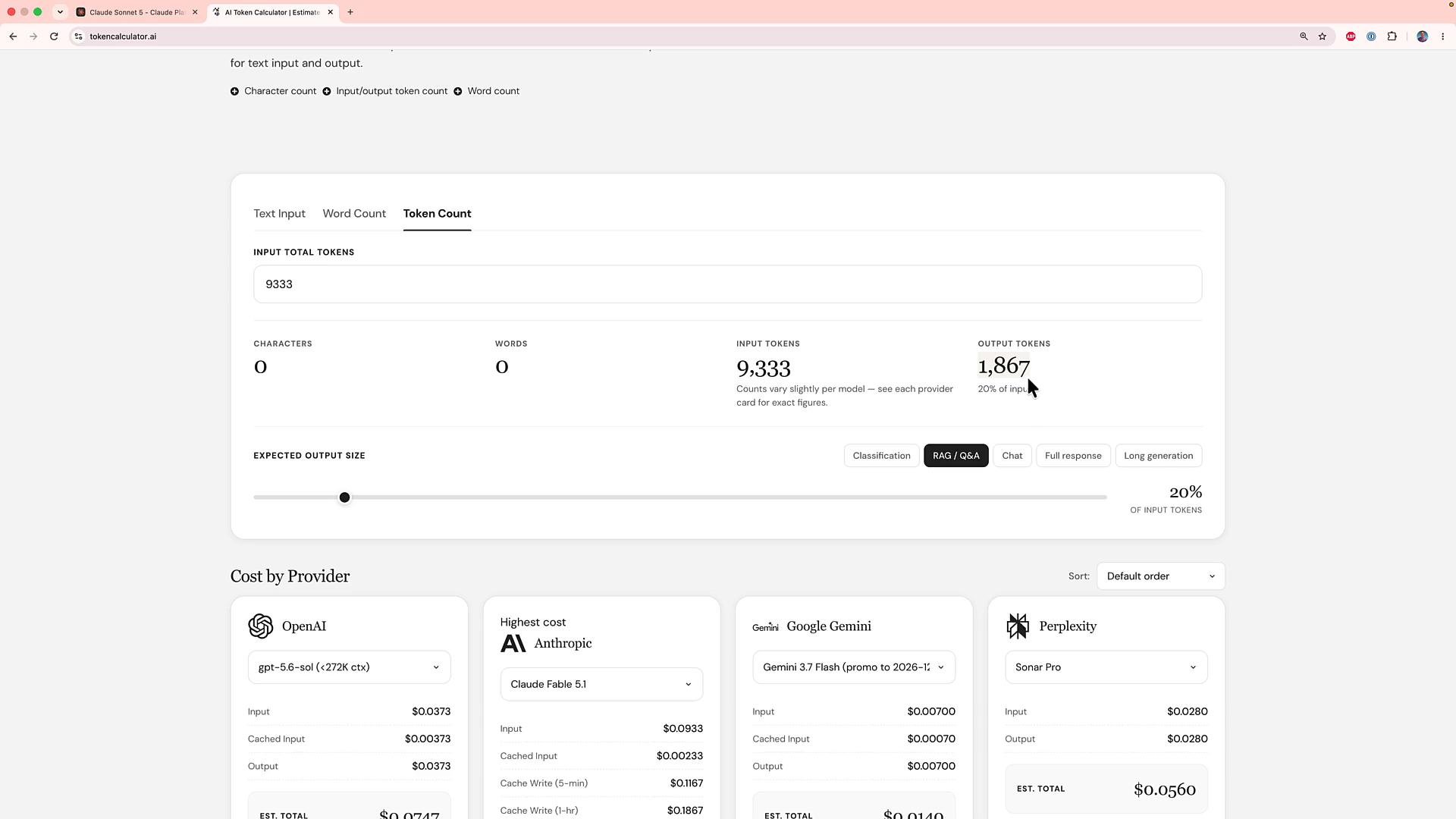
Use a token/cost calculator or a dashboard to experiment with different input/output mixes and providers. For projection you might assume output tokens are a percentage of input tokens (e.g., 20%). The screenshot below shows an input total of 9,333 tokens and an estimated output of \~1,867 tokens (20% of input).
 Model & provider comparisons
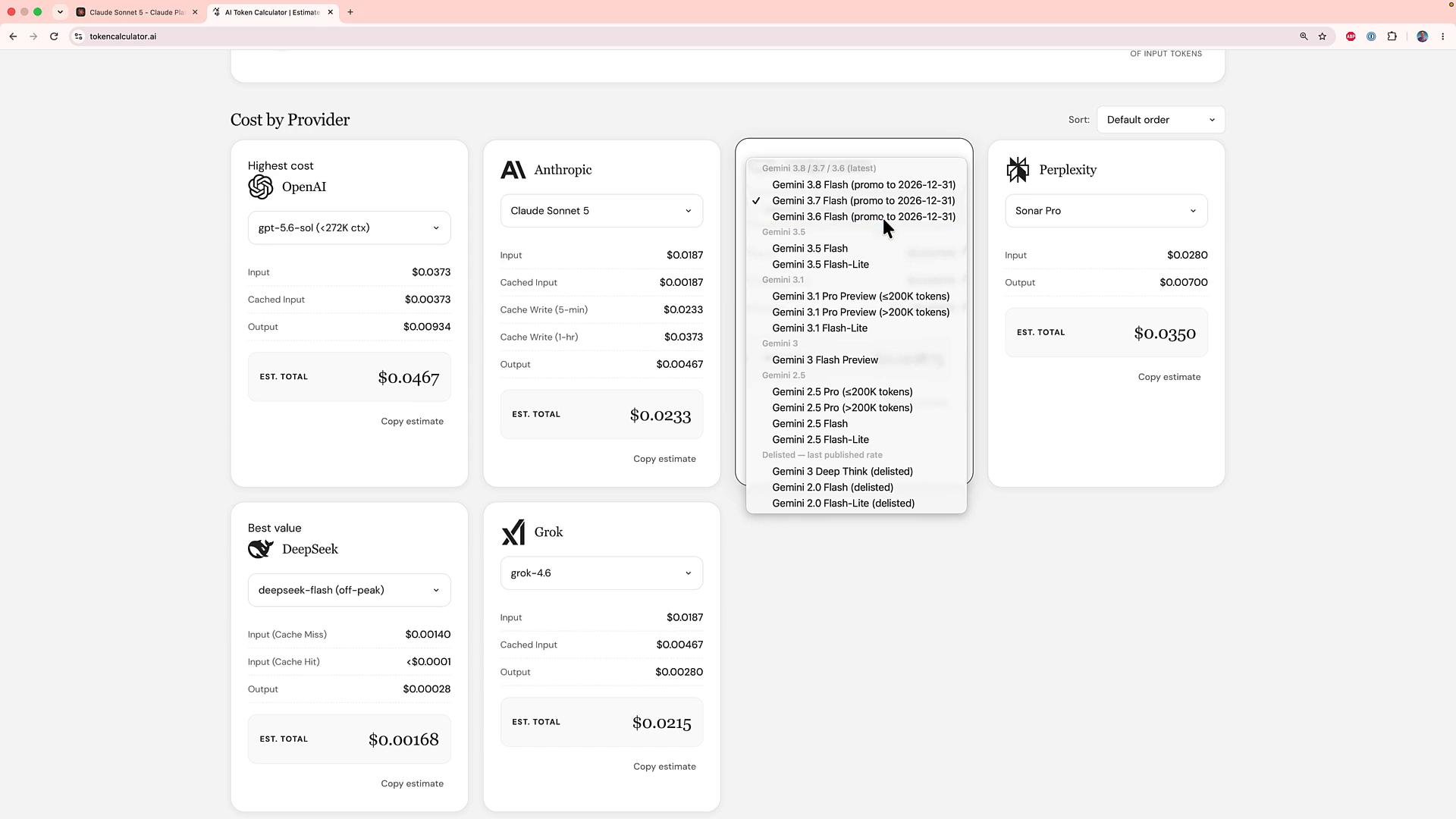
Dashboards that compare provider pricing side-by-side are useful when choosing a model for cost-sensitive features. They let you plug in measured input/output token counts to see provider-level costs and tradeoffs.
Model & provider comparisons
Dashboards that compare provider pricing side-by-side are useful when choosing a model for cost-sensitive features. They let you plug in measured input/output token counts to see provider-level costs and tradeoffs.
 Key takeaways
* Measure token usage on representative requests (input + output) — it’s the only reliable way to forecast costs for your workload.
* Output tokens often cost more than input tokens. Small differences in output size or model selection can change costs materially.
* Average over many tickets to produce a stable per-request estimate, then multiply by monthly call volume to get a monthly spend projection.
* Don’t default to the most expensive frontier model — cheaper models may meet accuracy requirements at a fraction of the cost.
Pricing and token accounting vary by provider and model. Always verify the provider's usage metadata (the response usage fields) and pricing page before projecting monthly costs.
Links and references
* [Anthropic Pricing](https://www.anthropic.com/pricing)
* [Kubernetes Basics](https://kubernetes.io/docs/concepts/overview/what-is-kubernetes/) (example reference for infrastructure-related cost comparisons)
* [OpenAI Pricing](https://openai.com/pricing)
Further reading
* Best practices for measuring model usage and reducing token costs
* Designing prompts and outputs to minimize expensive output tokens
* Building dashboards to track per-feature LLM costs and budget forecasts
This documentation is built and hosted on [Mintlify](https://mintlify.com), a developer documentation platform.
Key takeaways
* Measure token usage on representative requests (input + output) — it’s the only reliable way to forecast costs for your workload.
* Output tokens often cost more than input tokens. Small differences in output size or model selection can change costs materially.
* Average over many tickets to produce a stable per-request estimate, then multiply by monthly call volume to get a monthly spend projection.
* Don’t default to the most expensive frontier model — cheaper models may meet accuracy requirements at a fraction of the cost.
Pricing and token accounting vary by provider and model. Always verify the provider's usage metadata (the response usage fields) and pricing page before projecting monthly costs.
Links and references
* [Anthropic Pricing](https://www.anthropic.com/pricing)
* [Kubernetes Basics](https://kubernetes.io/docs/concepts/overview/what-is-kubernetes/) (example reference for infrastructure-related cost comparisons)
* [OpenAI Pricing](https://openai.com/pricing)
Further reading
* Best practices for measuring model usage and reducing token costs
* Designing prompts and outputs to minimize expensive output tokens
* Building dashboards to track per-feature LLM costs and budget forecasts
This documentation is built and hosted on [Mintlify](https://mintlify.com), a developer documentation platform.