> ## Documentation Index
> Fetch the complete documentation index at: https://notes.kodekloud.com/llms.txt
> Use this file to discover all available pages before exploring further.
# Temperature and Sampling Why the Same Prompt Gives Different Answers
> Explains how model token scoring, sampling, and temperature, plus top-k and top-p settings, cause output variation and how to tune them for repeatability or creativity.
If you run the exact same prompt twice and get different outputs, that’s expected behavior — not a bug. Generative models work by predicting the next token and assigning a score (probability) to every token in their vocabulary. Those scores are the model’s raw output; a separate step selects the token that becomes the next word in the response.
Quick review: the model does not directly pick one token. It produces a distribution of scores across tens of thousands of tokens, and sampling turns that scored list into a concrete choice.
 ## Model scoring (probabilities)
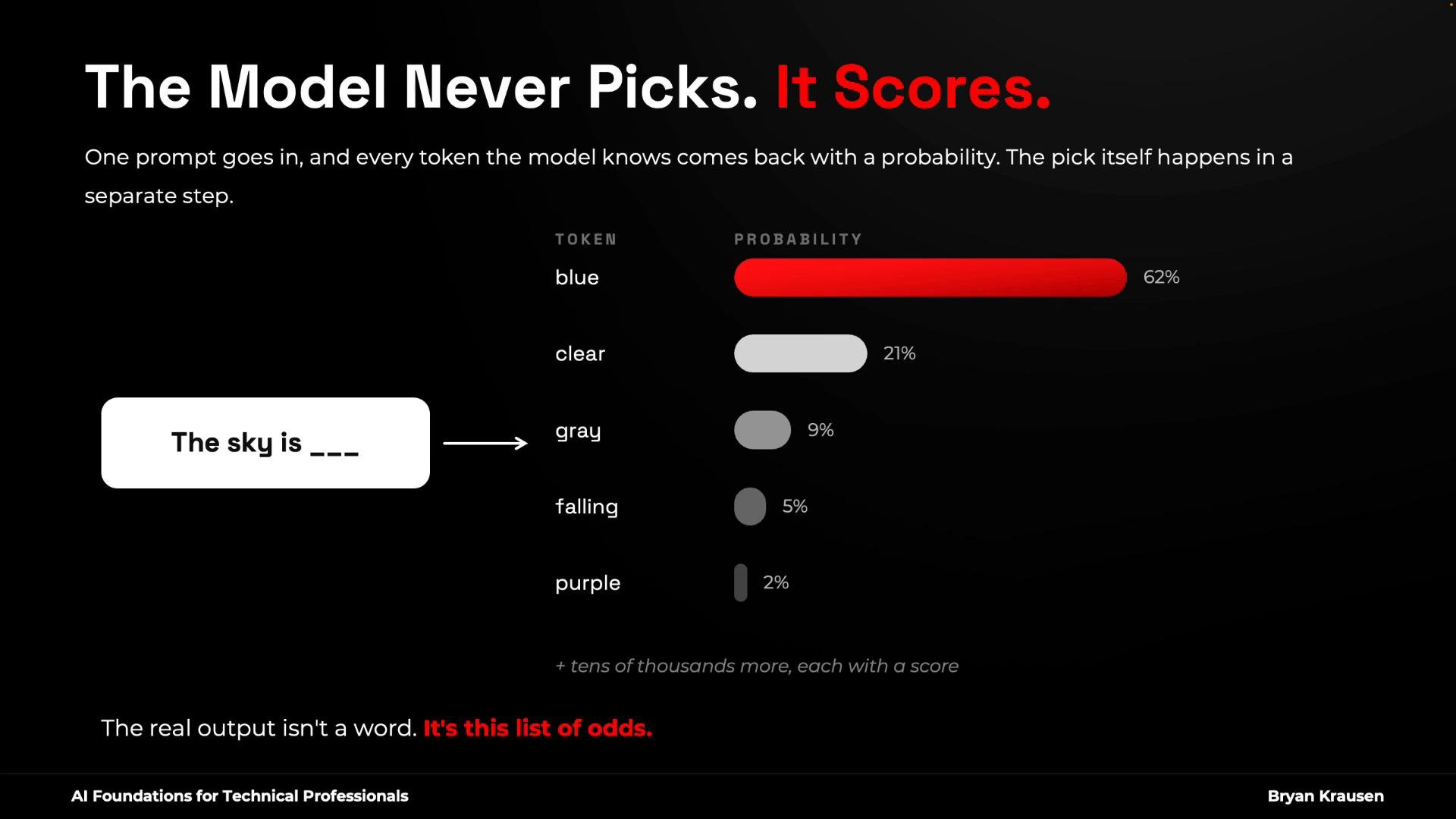
For each next-token step the model produces a probability distribution over possible tokens. For example, after the prompt “The sky is \_\_\_” the model might assign:
* “blue” — 62%
* “clear” — 21%
* “gray” — 9%
* “falling” — 5%
* “purple” — 2%
Those percentages are the model’s estimates. They are the starting point for how variation arises.
## Sampling: how a token is chosen
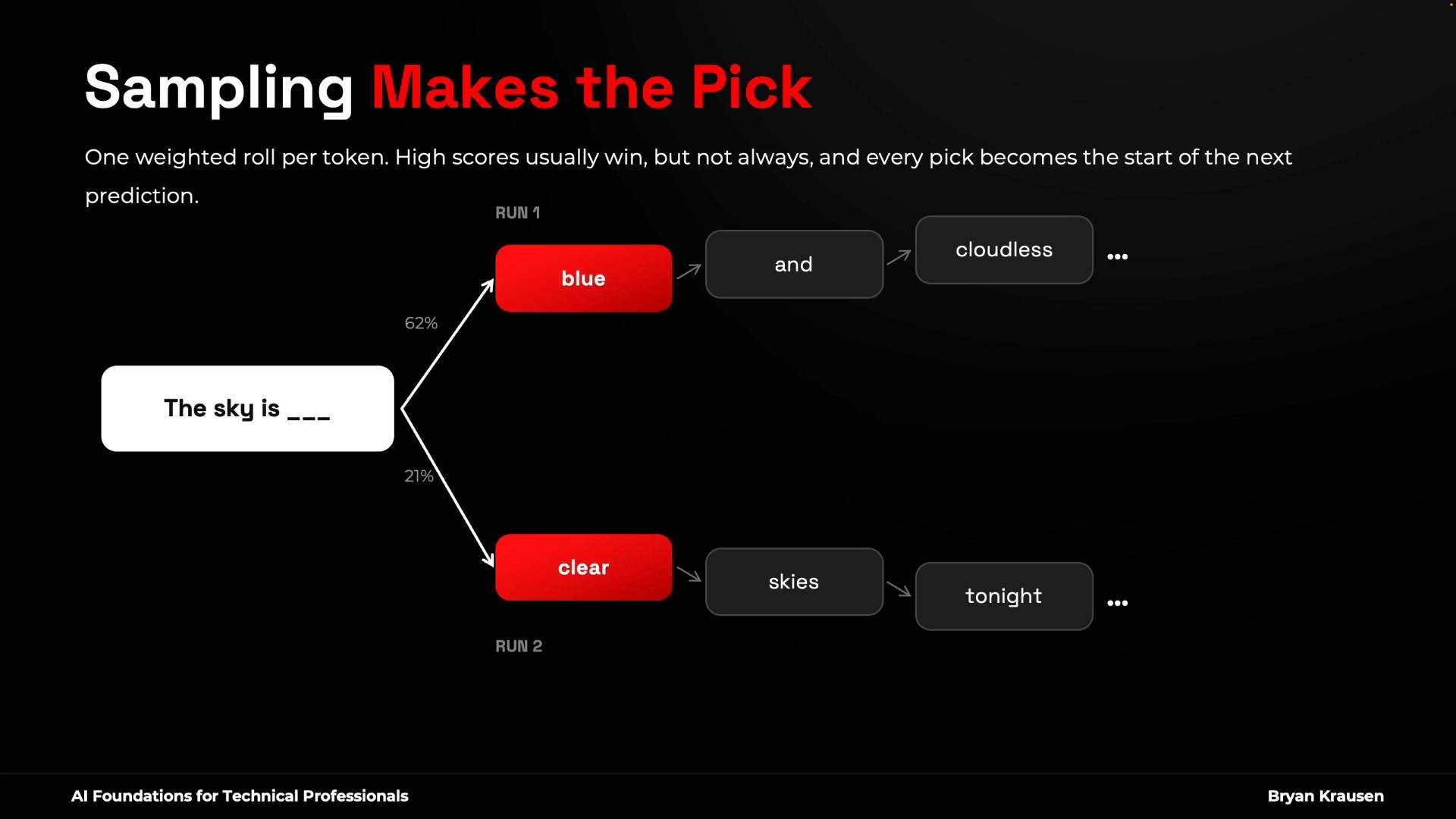
Sampling is the mechanism that picks a token from the scored list. Most implementations use weighted random sampling: each token’s probability becomes its chance of being selected. Because sampling can pick lower-probability tokens, repeated runs of the same prompt can produce different continuations. Once a different token is chosen, the subsequent context changes and the rest of the output can diverge significantly.
## Model scoring (probabilities)
For each next-token step the model produces a probability distribution over possible tokens. For example, after the prompt “The sky is \_\_\_” the model might assign:
* “blue” — 62%
* “clear” — 21%
* “gray” — 9%
* “falling” — 5%
* “purple” — 2%
Those percentages are the model’s estimates. They are the starting point for how variation arises.
## Sampling: how a token is chosen
Sampling is the mechanism that picks a token from the scored list. Most implementations use weighted random sampling: each token’s probability becomes its chance of being selected. Because sampling can pick lower-probability tokens, repeated runs of the same prompt can produce different continuations. Once a different token is chosen, the subsequent context changes and the rest of the output can diverge significantly.
 ## Temperature — the randomness dial
Temperature is a common control exposed in APIs and playgrounds that reshapes the model’s probability distribution before sampling. It doesn’t change the model’s knowledge; it changes how likely lower-scoring tokens are to get sampled.
* Near 0.0: distribution sharpens so the highest-scoring tokens dominate. Outputs become very repeatable — useful for tasks requiring deterministic answers (parsing, extraction, classification).
* Moderate values (e.g., 0.7–1.0): produce more natural, varied text. Many chat interfaces default here for conversational balance.
* High values (>1.0): flatten the distribution, making low-probability tokens much more likely. This increases creativity and randomness but can produce incoherent or off-topic outputs.
Example prompt to try in a playground:
```text theme={null}
create me an introduction to a mystery novel that begins in a lighthouse
```
* At `temperature = 0.0` you’ll usually get a restrained, repeatable introduction.
* At `temperature = 1.6` or `2.0` outputs are often more creative — sometimes unexpectedly so (different language, emojis, or odd phrasing).
Practical note about playgrounds: some models (especially those optimized for stepwise reasoning) expose alternative controls (e.g., “reasoning effort”) and may omit a temperature knob. To experiment with temperature, pick a non-reasoning model in the playground.
## Note — top-k and top-p sampling
Temperature is only one knob. Two other widely used sampling strategies operate on the same scored list:
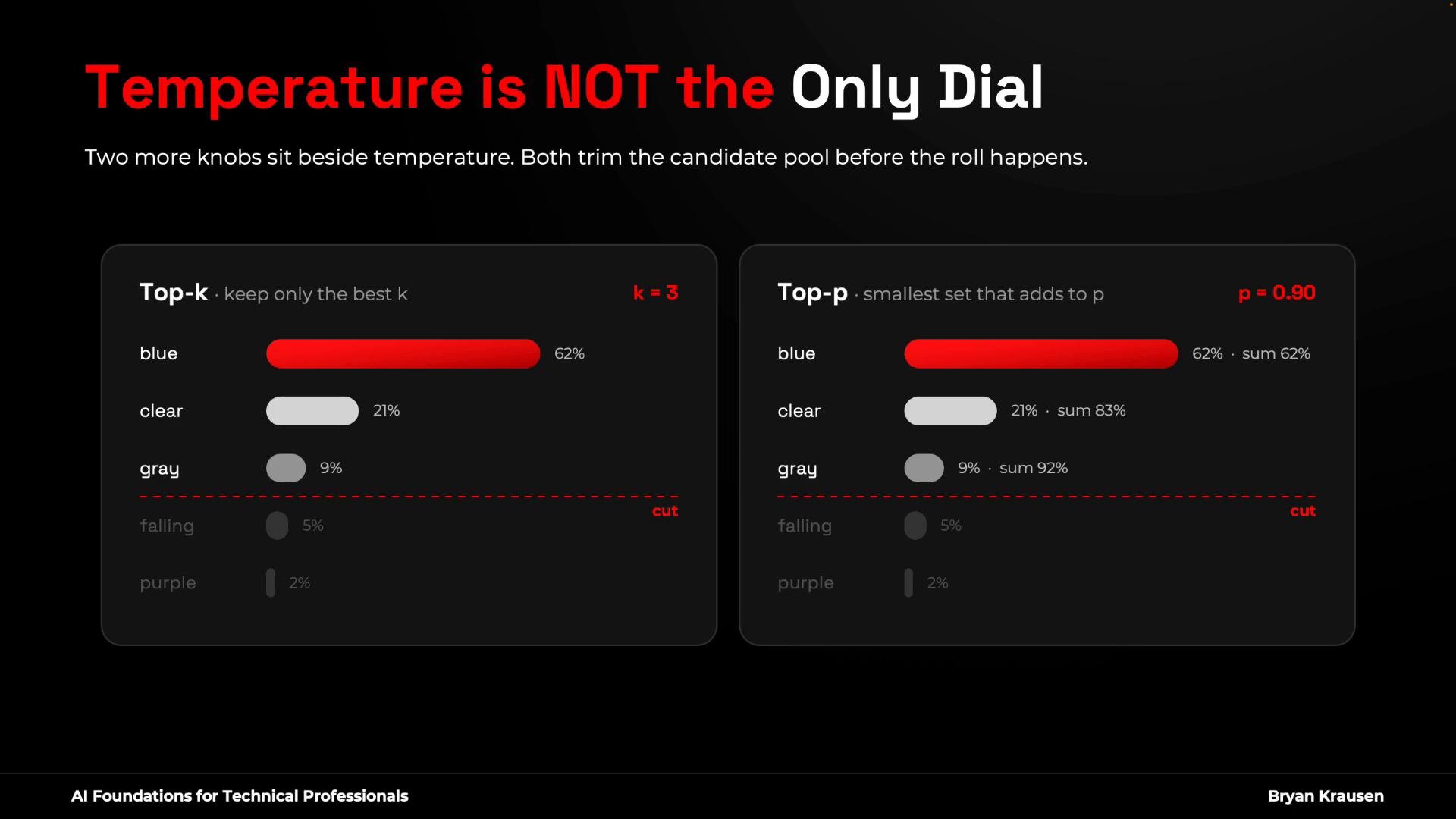
* Top-k: keep only the top `k` tokens by score and sample from that reduced set (a rank cutoff).
* Top-p (nucleus sampling): keep the smallest set of top tokens whose cumulative probability ≥ `p` (e.g., `p = 0.90`). This adapts the pool size based on model confidence: small when confident, larger when uncertain.
## Temperature — the randomness dial
Temperature is a common control exposed in APIs and playgrounds that reshapes the model’s probability distribution before sampling. It doesn’t change the model’s knowledge; it changes how likely lower-scoring tokens are to get sampled.
* Near 0.0: distribution sharpens so the highest-scoring tokens dominate. Outputs become very repeatable — useful for tasks requiring deterministic answers (parsing, extraction, classification).
* Moderate values (e.g., 0.7–1.0): produce more natural, varied text. Many chat interfaces default here for conversational balance.
* High values (>1.0): flatten the distribution, making low-probability tokens much more likely. This increases creativity and randomness but can produce incoherent or off-topic outputs.
Example prompt to try in a playground:
```text theme={null}
create me an introduction to a mystery novel that begins in a lighthouse
```
* At `temperature = 0.0` you’ll usually get a restrained, repeatable introduction.
* At `temperature = 1.6` or `2.0` outputs are often more creative — sometimes unexpectedly so (different language, emojis, or odd phrasing).
Practical note about playgrounds: some models (especially those optimized for stepwise reasoning) expose alternative controls (e.g., “reasoning effort”) and may omit a temperature knob. To experiment with temperature, pick a non-reasoning model in the playground.
## Note — top-k and top-p sampling
Temperature is only one knob. Two other widely used sampling strategies operate on the same scored list:
* Top-k: keep only the top `k` tokens by score and sample from that reduced set (a rank cutoff).
* Top-p (nucleus sampling): keep the smallest set of top tokens whose cumulative probability ≥ `p` (e.g., `p = 0.90`). This adapts the pool size based on model confidence: small when confident, larger when uncertain.
 ## Practical guidelines
* Adjust one knob at a time (temperature, top-k, or top-p) to understand each effect.
* For deterministic extraction pipelines: prefer `temperature ≈ 0.0`. Consider `top-k` or `top-p` to further constrain outputs.
* For brainstorming or creative writing: increase temperature or relax `top-p` to encourage variety.
* Lowering temperature increases repeatability, not correctness. If the model’s highest-scoring answer is wrong, `temperature = 0.0` will return the same wrong answer consistently.
| Control | What it does | When to use |
| - | - | - |
| `temperature` | Scales the distribution; higher values increase chance of low-probability tokens | Creative writing, ideation, chat |
| `top-k` | Cutoff by rank: keep only the top `k` tokens | Constrain outputs when you want a fixed candidate set |
| `top-p` | Keep smallest set with cumulative probability ≥ `p` (adaptive cutoff) | Balance diversity with safety; good default for natural language generation |
Lower temperature improves repeatability but does not fix factual errors. Use grounding, verification, or retrieval-augmented techniques if you need correctness.
Temperature controls randomness (repeatability vs. diversity). It does not change what the model “knows” — it only changes which scored tokens are allowed to win more often.
## Summary
* The model scores every candidate token at each step.
* Sampling (weighted random, top-k, top-p) chooses the actual token from that scored list.
* Temperature and sampling controls let you tune the trade-off between repeatability and creativity.
Different outputs from the same prompt are not a bug — they are a tunable behavior. With an understanding of scoring, sampling, and the temperature/top-k/top-p controls, you can select settings that match your use case (deterministic extraction vs. creative generation).
Next: hallucinations — why models make things up and why that behavior persists.
This documentation is built and hosted on [Mintlify](https://mintlify.com), a developer documentation platform.
## Practical guidelines
* Adjust one knob at a time (temperature, top-k, or top-p) to understand each effect.
* For deterministic extraction pipelines: prefer `temperature ≈ 0.0`. Consider `top-k` or `top-p` to further constrain outputs.
* For brainstorming or creative writing: increase temperature or relax `top-p` to encourage variety.
* Lowering temperature increases repeatability, not correctness. If the model’s highest-scoring answer is wrong, `temperature = 0.0` will return the same wrong answer consistently.
| Control | What it does | When to use |
| - | - | - |
| `temperature` | Scales the distribution; higher values increase chance of low-probability tokens | Creative writing, ideation, chat |
| `top-k` | Cutoff by rank: keep only the top `k` tokens | Constrain outputs when you want a fixed candidate set |
| `top-p` | Keep smallest set with cumulative probability ≥ `p` (adaptive cutoff) | Balance diversity with safety; good default for natural language generation |
Lower temperature improves repeatability but does not fix factual errors. Use grounding, verification, or retrieval-augmented techniques if you need correctness.
Temperature controls randomness (repeatability vs. diversity). It does not change what the model “knows” — it only changes which scored tokens are allowed to win more often.
## Summary
* The model scores every candidate token at each step.
* Sampling (weighted random, top-k, top-p) chooses the actual token from that scored list.
* Temperature and sampling controls let you tune the trade-off between repeatability and creativity.
Different outputs from the same prompt are not a bug — they are a tunable behavior. With an understanding of scoring, sampling, and the temperature/top-k/top-p controls, you can select settings that match your use case (deterministic extraction vs. creative generation).
Next: hallucinations — why models make things up and why that behavior persists.
This documentation is built and hosted on [Mintlify](https://mintlify.com), a developer documentation platform.