> ## Documentation Index
> Fetch the complete documentation index at: https://notes.kodekloud.com/llms.txt
> Use this file to discover all available pages before exploring further.
# The Full Picture Every Concept in One Architecture
> Overview of an AI support architecture explaining model, harness, RAG, tool integrations, human approvals, security, and cost considerations through a VPN reset example.
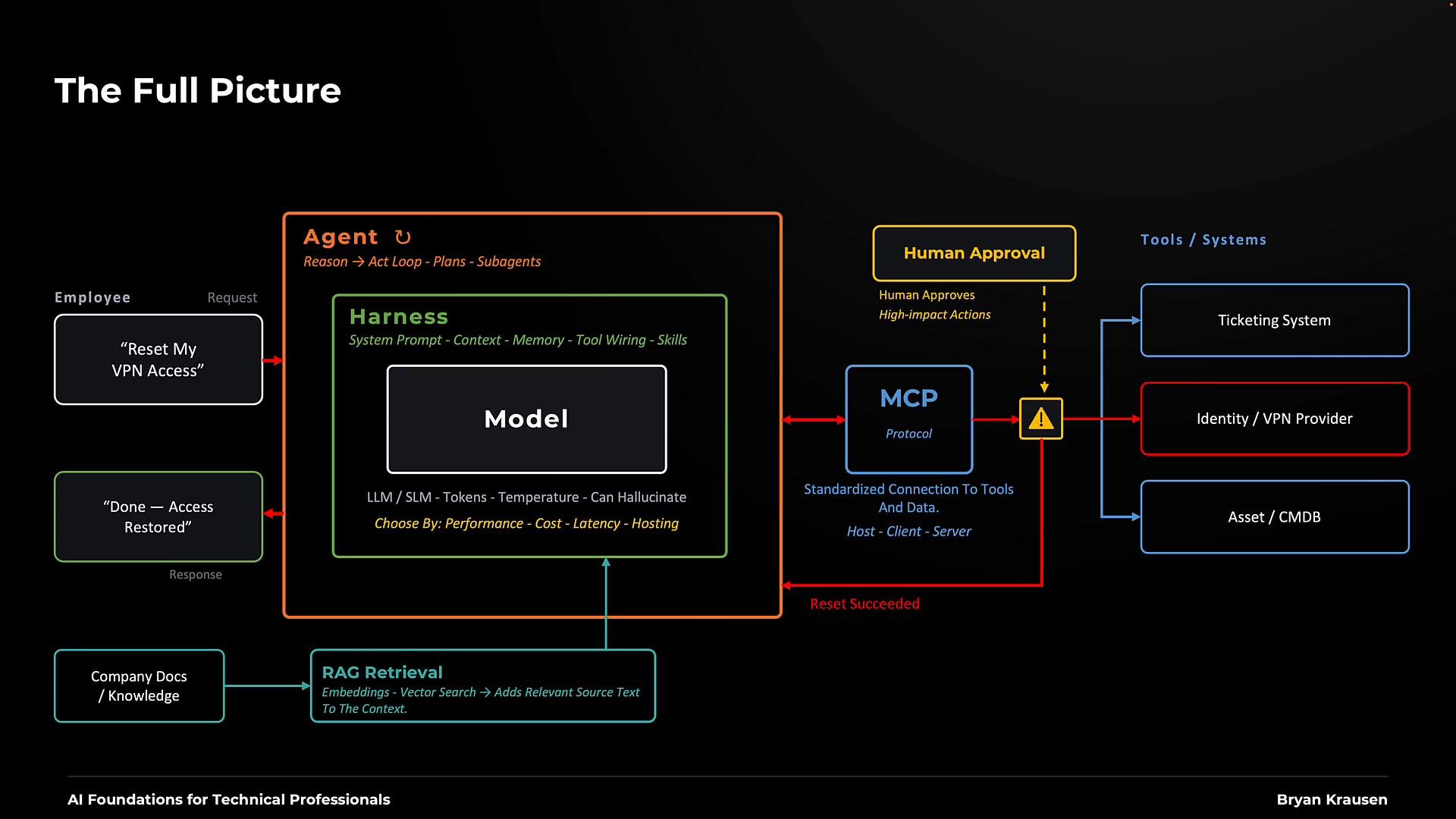
This lesson traces a single request end-to-end so you can see how the components discussed previously work together in a real support scenario. We follow a common support use case: an employee asks an assistant to restore VPN access. As the diagram builds out, observe where each piece of information comes from and which component is responsible for each step.
## Central element: the model
At the center sits the model. This may be:
* a large hosted LLM (for example, from [OpenAI](https://openai.com), [Anthropic](https://www.anthropic.com), or [Google](https://ai.google)),
* a smaller hosted model,
* or an open-weight model you host yourself.
The model performs tokenization, conditions on context, and samples outputs (shaped by decoding parameters such as temperature where applicable). Importantly, models can hallucinate—producing plausible but incorrect assertions—so treat their outputs as proposals that must be verified by deterministic checks or tooling before taking authoritative action.
Models can hallucinate. Treat generated statements as proposals that must be verified by deterministic checks or tooling when an action or authoritative fact is required.
## Harness: preparing requests and managing the loop
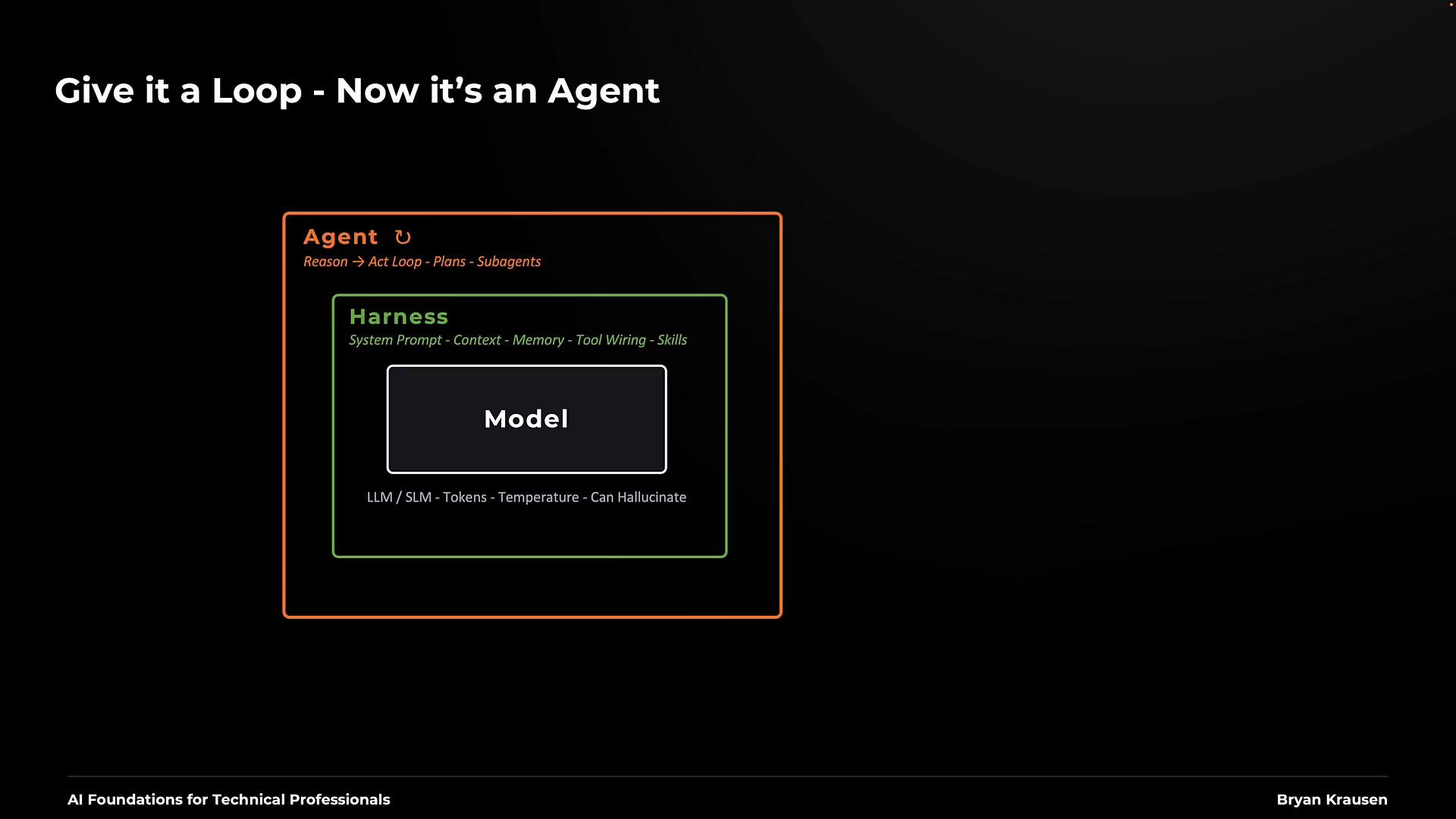
Surrounding the model is the harness (green in the diagram). The harness prepares requests and processes responses. Key responsibilities include:
* Supplying the system (embedded) prompt that defines initial behavior.
* Assembling the primary context: user request, supporting documents, account and manager IDs, etc.
* Managing memory: persisting useful context across interactions while ensuring relevant memory is included per request.
* Performing prompt/context engineering to shape downstream behavior.
* Loading and invoking skills — reusable, task-specific instruction sets the agent can call.
The harness executes the agent loop: the model selects next actions, may request tools, observes results, and decides whether to continue. The harness also enforces runtime limits and stop conditions. Agent behavior is represented in orange in the diagram.
 ## Sub-agents and orchestration
You can build hierarchical systems where a main agent orchestrates specialized sub-agents. For simple tasks like a VPN reset, a single agent is often sufficient. For complex workflows, sub-agents can offload specialized tasks (e.g., ticketing, identity lookup, approval automation).
## Example request flow (VPN reset)
1. Employee: "Please reset my VPN access."
2. Assistant interprets the request and determines what’s required for this account:
* Is the account locked from failed login attempts?
* Does a VPN access policy apply to this user?
3. If details are missing, the assistant issues follow-up questions.
To support the assistant, the harness can load a VPN recovery skill (a procedural checklist or runbook). The harness inserts the skill into the request context when needed, so the agent follows an agreed process. The agent still requires current account data and authorization to perform the change.
## Model selection tradeoffs
Choosing which model to use requires balancing:
* Performance: accuracy in selecting the correct tool and arguments.
* Cost: per-call and end-to-end costs, including repeated calls.
* Latency: time the user waits for a final response.
You don't always need a top-tier model for simple workflows. Smaller models can reduce cost and latency while meeting requirements. You can also route requests between models at runtime using an AI router (for example, [OpenRouter](https://openrouter.ai) or a custom solution) to optimize these tradeoffs.
## Retrieval-Augmented Generation (RAG)
RAG brings authoritative, organization-specific content (for example, the current VPN policy) into the model’s input because that policy may not be part of the model’s training data. RAG commonly uses embeddings and vector search to locate relevant passages. The harness inserts retrieved text into context alongside the user request and any skills or procedures.
If the retrieved policy requires manager approval before a reset, the VPN recovery skill encodes the workflow and RAG supplies the up-to-date policy. This augments context — it is not model retraining.
The harness must decide what fits in the model’s context window and avoid sending unnecessary content that consumes tokens.
## Integrations and tool protocol
The assistant will interact with organization systems, such as:
* Ticketing systems (support records)
* Identity provider / VPN provider (execute reset)
* Asset database / CMDB (device and manager information)
[Model Context Protocol (MCP)](https://learn.kodekloud.com/user/courses/mcp-for-beginners) is one way to standardize connections to these tools and data sources. Applications can expose MCP servers that reveal tool capabilities; internal clients call these servers. Alternatively, you can call tools directly via APIs. The crucial requirements are that tool calls are authorized, auditable, and validated.
When the model intends to perform an action, it requests a tool call with specific arguments (for example, `accountID`, `managerID`). MCP or the tool integration validates and executes permitted calls against the VPN provider or other systems.
Before executing high-impact actions, the application must implement policy checkpoints: if a workflow requires human approval, the system should present the proposed change to the reviewer (for example, the user's manager) and block execution until explicit approval arrives. Prompts alone are insufficient to enforce this boundary—enforcement must be implemented in software and tooling.
Human approval must be enforced as a hard checkpoint in the application/tooling. Relying on a model prompt to "be careful" is insufficient to prevent unauthorized actions.
## Putting it all together: VPN reset sequence
A typical flow for this request looks like:
* Assistant checks the account and retrieves relevant policy via RAG.
* Harness supplies the recovery instructions (skill) and context.
* Model requests a reset via MCP (or a direct API call) with required arguments.
* The application pauses for required human approval if policy demands it.
* Upon approval, the VPN provider executes the change and returns a result (for example, "Reset succeeded").
* The agent verifies the provider response and, where appropriate, performs independent checks (attempt a sign-in simulation or validate access flags) before reporting back to the employee.
Pop quiz: If the assistant reports "Done" but the employee still cannot connect, where should you investigate first?
Start with the tool result and the account impacted: did the provider confirm the change? Does the account now have the expected access? The tool return path provides primary evidence of where a failure may have occurred.
## Sub-agents and orchestration
You can build hierarchical systems where a main agent orchestrates specialized sub-agents. For simple tasks like a VPN reset, a single agent is often sufficient. For complex workflows, sub-agents can offload specialized tasks (e.g., ticketing, identity lookup, approval automation).
## Example request flow (VPN reset)
1. Employee: "Please reset my VPN access."
2. Assistant interprets the request and determines what’s required for this account:
* Is the account locked from failed login attempts?
* Does a VPN access policy apply to this user?
3. If details are missing, the assistant issues follow-up questions.
To support the assistant, the harness can load a VPN recovery skill (a procedural checklist or runbook). The harness inserts the skill into the request context when needed, so the agent follows an agreed process. The agent still requires current account data and authorization to perform the change.
## Model selection tradeoffs
Choosing which model to use requires balancing:
* Performance: accuracy in selecting the correct tool and arguments.
* Cost: per-call and end-to-end costs, including repeated calls.
* Latency: time the user waits for a final response.
You don't always need a top-tier model for simple workflows. Smaller models can reduce cost and latency while meeting requirements. You can also route requests between models at runtime using an AI router (for example, [OpenRouter](https://openrouter.ai) or a custom solution) to optimize these tradeoffs.
## Retrieval-Augmented Generation (RAG)
RAG brings authoritative, organization-specific content (for example, the current VPN policy) into the model’s input because that policy may not be part of the model’s training data. RAG commonly uses embeddings and vector search to locate relevant passages. The harness inserts retrieved text into context alongside the user request and any skills or procedures.
If the retrieved policy requires manager approval before a reset, the VPN recovery skill encodes the workflow and RAG supplies the up-to-date policy. This augments context — it is not model retraining.
The harness must decide what fits in the model’s context window and avoid sending unnecessary content that consumes tokens.
## Integrations and tool protocol
The assistant will interact with organization systems, such as:
* Ticketing systems (support records)
* Identity provider / VPN provider (execute reset)
* Asset database / CMDB (device and manager information)
[Model Context Protocol (MCP)](https://learn.kodekloud.com/user/courses/mcp-for-beginners) is one way to standardize connections to these tools and data sources. Applications can expose MCP servers that reveal tool capabilities; internal clients call these servers. Alternatively, you can call tools directly via APIs. The crucial requirements are that tool calls are authorized, auditable, and validated.
When the model intends to perform an action, it requests a tool call with specific arguments (for example, `accountID`, `managerID`). MCP or the tool integration validates and executes permitted calls against the VPN provider or other systems.
Before executing high-impact actions, the application must implement policy checkpoints: if a workflow requires human approval, the system should present the proposed change to the reviewer (for example, the user's manager) and block execution until explicit approval arrives. Prompts alone are insufficient to enforce this boundary—enforcement must be implemented in software and tooling.
Human approval must be enforced as a hard checkpoint in the application/tooling. Relying on a model prompt to "be careful" is insufficient to prevent unauthorized actions.
## Putting it all together: VPN reset sequence
A typical flow for this request looks like:
* Assistant checks the account and retrieves relevant policy via RAG.
* Harness supplies the recovery instructions (skill) and context.
* Model requests a reset via MCP (or a direct API call) with required arguments.
* The application pauses for required human approval if policy demands it.
* Upon approval, the VPN provider executes the change and returns a result (for example, "Reset succeeded").
* The agent verifies the provider response and, where appropriate, performs independent checks (attempt a sign-in simulation or validate access flags) before reporting back to the employee.
Pop quiz: If the assistant reports "Done" but the employee still cannot connect, where should you investigate first?
Start with the tool result and the account impacted: did the provider confirm the change? Does the account now have the expected access? The tool return path provides primary evidence of where a failure may have occurred.
 ## Cost considerations
Key items that affect cost:
| Area | What to watch | Notes |
| - | - | - |
| Token usage | Input (prompts, conversation, retrieved documents, skills) and output (model responses, generated tool calls) | Each agent loop consumes tokens; larger contexts increase cost. |
| Repeated contexts | Re-sending large documents or long conversation histories | Use summarization or selective context inclusion. |
| Embeddings & vectors | Build-time and query-time costs for indexes | Indexing and frequent queries add both compute and storage costs. |
| Tool interactions | MCP/tool definitions, arguments, and return values included in context | Tool calls add tokens and may incur external API charges. |
| Infrastructure | Self-hosted model compute, storage, and networking | Self-hosting has fixed and variable costs—include them in per-request estimates. |
Measure total cost per successfully resolved request to get an accurate view of operational expense.
## Security considerations
Implement layered controls across these areas:
1. Prompt injection — treat retrieved documents as untrusted input; validate actions with deterministic checks.
2. Poisoned retrieval content — do not allow retrieved content to alter application rules. Retrieval must never grant authority to change system behavior.
3. Least privilege — scope agent tools narrowly (e.g., limit reset tool to authorized account ranges); restrict runtime file and network access.
4. Identity & authorization — run agents with their own service identity (do not impersonate human users). Use secure auth and token exchange (for example, [SPIFFE](https://spiffe.io)) and enforce RBAC.
5. Observability & audit — record decisions, approvals, and tool results for post-incident investigations, protecting sensitive data in logs.
These controls are complementary: implementing several reduces risk more than relying on a single control. Human approvals are important but not sufficient as a sole control.
## Quick reference: responsibilities by component
| Component | Primary responsibilities | Examples |
| - | - | - |
| Model | Generate proposals, select next actions | Tokenization, decoding, possible hallucination |
| Harness | Build context, manage memory, load skills, run agent loop | System prompt, runtime limits, tool invocation |
| RAG / Retrieval | Surface authoritative, organization-specific content | VPN policy, runbooks |
| MCP / Tooling | Validate and execute actions against systems | Ticketing API, Identity/VPN provider |
| Humans | Approve high-impact actions | Manager approvals, security reviews |
## Wrap-up
You should now be able to:
* Trace where an AI application gets authoritative information.
* Understand how it decides and requests actions.
* Verify results through tool return paths and independent checks.
Different applications will use different subsets of these components. Use this architecture as a practical framework to evaluate design choices, trade-offs, costs, and risks for your AI-enabled support workflows.
Thanks for sticking with this lesson. Before we close, let's quickly talk about how to iterate safely and measure success:
* Start with narrow, auditable capabilities and expand with telemetry.
* Monitor resolution rate, rework rate (how often contacts reopen issues), and mean time to resolution (MTTR).
* Continually update retrieval indexes and skills to reflect policy and procedure changes.
## Links and references
* [OpenAI](https://openai.com)
* [Anthropic](https://www.anthropic.com)
* [Google AI](https://ai.google)
* [OpenRouter](https://openrouter.ai)
* [Model Context Protocol (MCP) course](https://learn.kodekloud.com/user/courses/mcp-for-beginners)
* [RAG fundamentals course](https://learn.kodekloud.com/user/courses/fundamentals-of-rag)
* [SPIFFE](https://spiffe.io)
This documentation is built and hosted on [Mintlify](https://mintlify.com), a developer documentation platform.
## Cost considerations
Key items that affect cost:
| Area | What to watch | Notes |
| - | - | - |
| Token usage | Input (prompts, conversation, retrieved documents, skills) and output (model responses, generated tool calls) | Each agent loop consumes tokens; larger contexts increase cost. |
| Repeated contexts | Re-sending large documents or long conversation histories | Use summarization or selective context inclusion. |
| Embeddings & vectors | Build-time and query-time costs for indexes | Indexing and frequent queries add both compute and storage costs. |
| Tool interactions | MCP/tool definitions, arguments, and return values included in context | Tool calls add tokens and may incur external API charges. |
| Infrastructure | Self-hosted model compute, storage, and networking | Self-hosting has fixed and variable costs—include them in per-request estimates. |
Measure total cost per successfully resolved request to get an accurate view of operational expense.
## Security considerations
Implement layered controls across these areas:
1. Prompt injection — treat retrieved documents as untrusted input; validate actions with deterministic checks.
2. Poisoned retrieval content — do not allow retrieved content to alter application rules. Retrieval must never grant authority to change system behavior.
3. Least privilege — scope agent tools narrowly (e.g., limit reset tool to authorized account ranges); restrict runtime file and network access.
4. Identity & authorization — run agents with their own service identity (do not impersonate human users). Use secure auth and token exchange (for example, [SPIFFE](https://spiffe.io)) and enforce RBAC.
5. Observability & audit — record decisions, approvals, and tool results for post-incident investigations, protecting sensitive data in logs.
These controls are complementary: implementing several reduces risk more than relying on a single control. Human approvals are important but not sufficient as a sole control.
## Quick reference: responsibilities by component
| Component | Primary responsibilities | Examples |
| - | - | - |
| Model | Generate proposals, select next actions | Tokenization, decoding, possible hallucination |
| Harness | Build context, manage memory, load skills, run agent loop | System prompt, runtime limits, tool invocation |
| RAG / Retrieval | Surface authoritative, organization-specific content | VPN policy, runbooks |
| MCP / Tooling | Validate and execute actions against systems | Ticketing API, Identity/VPN provider |
| Humans | Approve high-impact actions | Manager approvals, security reviews |
## Wrap-up
You should now be able to:
* Trace where an AI application gets authoritative information.
* Understand how it decides and requests actions.
* Verify results through tool return paths and independent checks.
Different applications will use different subsets of these components. Use this architecture as a practical framework to evaluate design choices, trade-offs, costs, and risks for your AI-enabled support workflows.
Thanks for sticking with this lesson. Before we close, let's quickly talk about how to iterate safely and measure success:
* Start with narrow, auditable capabilities and expand with telemetry.
* Monitor resolution rate, rework rate (how often contacts reopen issues), and mean time to resolution (MTTR).
* Continually update retrieval indexes and skills to reflect policy and procedure changes.
## Links and references
* [OpenAI](https://openai.com)
* [Anthropic](https://www.anthropic.com)
* [Google AI](https://ai.google)
* [OpenRouter](https://openrouter.ai)
* [Model Context Protocol (MCP) course](https://learn.kodekloud.com/user/courses/mcp-for-beginners)
* [RAG fundamentals course](https://learn.kodekloud.com/user/courses/fundamentals-of-rag)
* [SPIFFE](https://spiffe.io)
This documentation is built and hosted on [Mintlify](https://mintlify.com), a developer documentation platform.