> ## Documentation Index
> Fetch the complete documentation index at: https://notes.kodekloud.com/llms.txt
> Use this file to discover all available pages before exploring further.
# Orchestration Frameworks LangChain LangGraph and CrewAI
> Comparison of orchestration frameworks (LangChain, LangGraph, CrewAI) for managing agent loops, state, retries, branching, approvals, and role-based workflows
We already know the agent loop: the model receives context, decides whether to call a tool, the application runs that tool, the agent receives the result, and the loop repeats until the agent can answer. In this article we step one level outside that loop to examine the orchestration layer — the application code that keeps the loop running reliably.
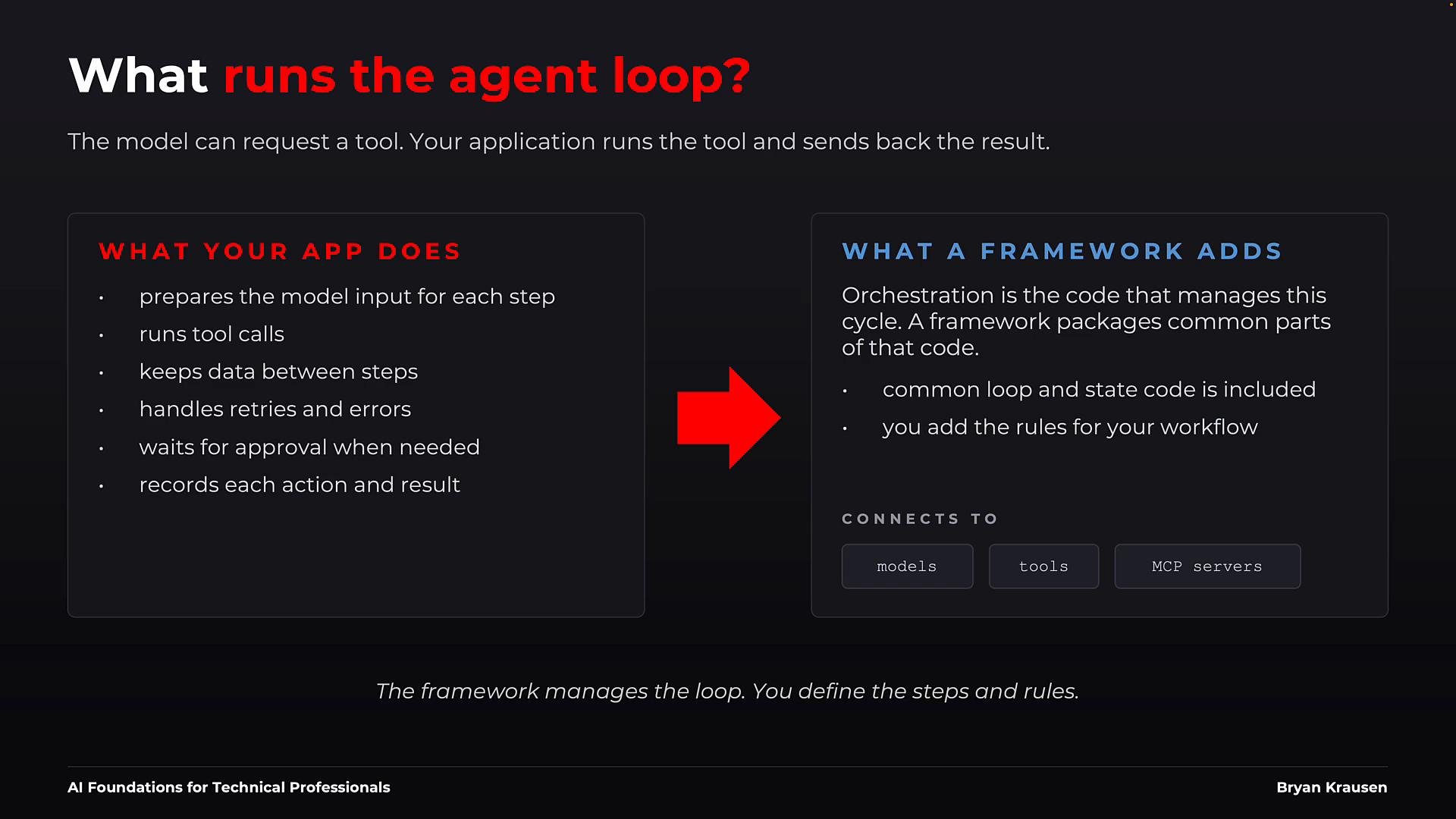
A framework packages common orchestration responsibilities so you don't implement every piece from scratch. Your application still defines the workflow: which models and tools are available, the rules that control the steps, and how the application connects to other services. The framework handles the repeated work: state management, retries, pauses for human approval, logging, and recovery.
 What orchestration covers
* Preparing the next model input and running tool calls.
* Carrying state forward between steps and persisting it for resumability.
* Handling transient failures, retry logic, and human approvals.
* Recording audit logs, execution traces, and results for observability and debugging.
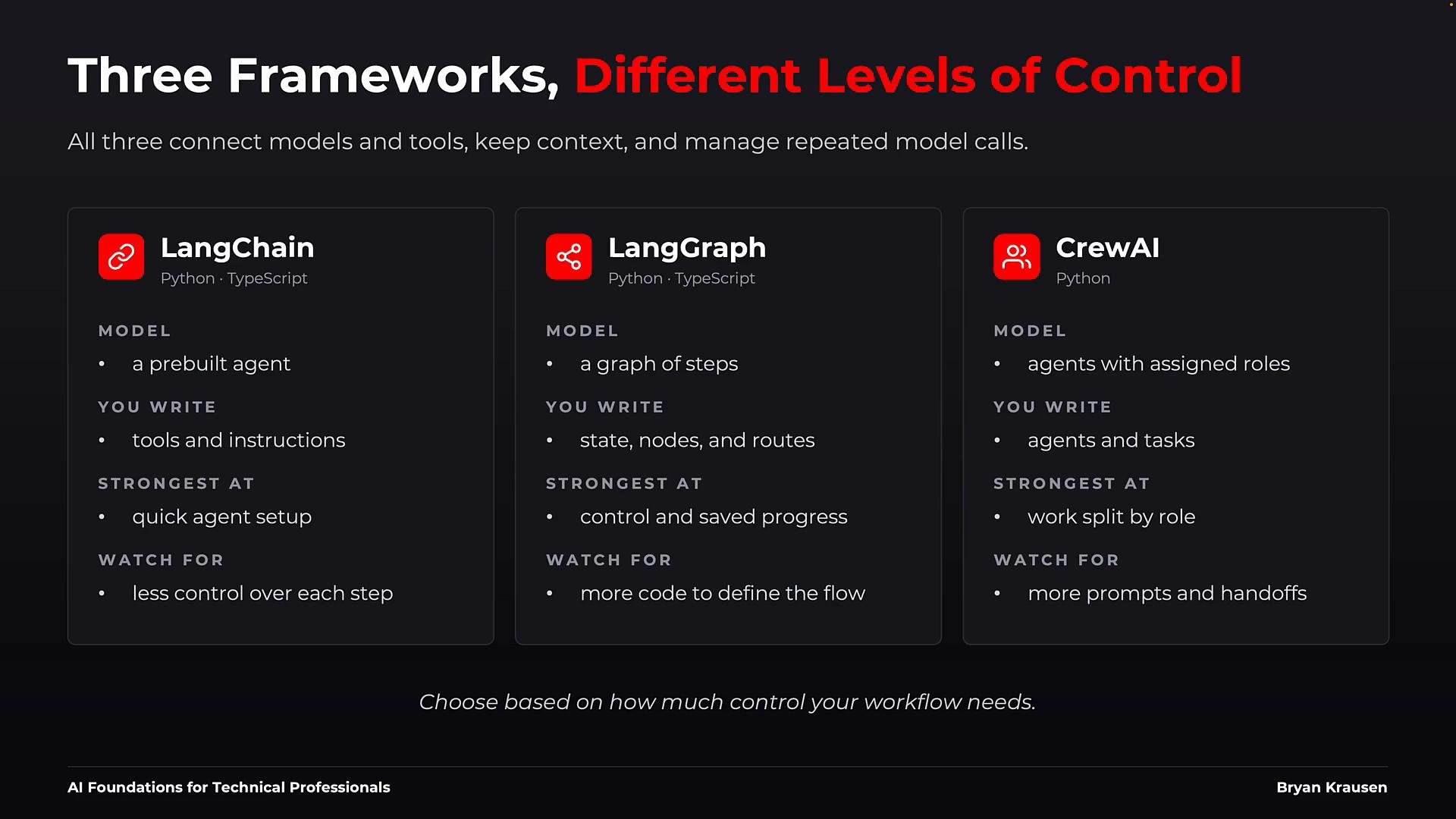
Frameworks vary by how much control they take over the workflow. Below are three common design points you’ll encounter: [LangChain](https://learn.kodekloud.com/user/courses/langchain), [LangGraph](https://learn.kodekloud.com/user/courses/langgraph), and CrewAI. These are representative examples — choose the one that best fits your workflow requirements.
LangChain: pre-built agents and a common interface
* Purpose: Fast path to a working agent; provides pre-built agent implementations and standardizes the model/tool interface.
* When to use: You want minimal boilerplate and just need the built-in loop behavior.
* What you supply: model selection, tools, and instructions; the agent manages the interaction and tool invocation.
Example (illustrative):
```bash theme={null}
# install the library (example)
pip install -U langchain
```
```python theme={null}
# Example usage (illustrative)
from langchain import Agent, Tool, OpenAIModel
model = OpenAIModel(name="gpt-4o")
tools = [
Tool(name="search", func=search_kb),
Tool(name="run_api", func=call_service)
]
agent = Agent(model=model, tools=tools, instructions="You are a helpful assistant.")
result = agent.run("Find latest policy on X and summarize for me.")
print(result)
```
LangChain is a good fit when a single agent + a few tools solve the problem and you want to iterate quickly. If you need explicit branching, persistent checkpoints, or more deterministic control, consider a graph-based framework.
LangGraph: explicit nodes, edges, and saved state
* Purpose: Make workflow steps explicit by modeling each step as a node in a state graph.
* When to use: Workflows require branching, recoverability, human pauses, or long-running stateful processes.
* What you supply: explicit node functions, routing logic, and state model; the framework provides persistence and resumability.
Example (illustrative):
```bash theme={null}
# install the library (example)
pip install -U langgraph
```
```python theme={null}
# Illustrative graph definition
from langgraph import StateGraph, InMemorySaver, START, END
g = StateGraph(TicketState)
g.add_node("triage", triage)
g.add_node("lookup", search_kb)
g.add_node("respond", draft_reply)
g.add_edge(START, "triage")
g.add_conditional_edges("triage", route) # route decides next step(s)
g.add_edge("lookup", "respond")
g.add_edge("respond", END)
app = g.compile(checkpointer=InMemorySaver())
```
Each node is a discrete step (triage, lookup, respond). Edges represent transitions; conditional edges enable branching. Because state is persisted, runs can resume after failures and pause for approvals, making LangGraph suitable for workflows requiring visibility and recoverability.
CrewAI: role-based agents and sequential processes
* Purpose: Organize work around roles; group agents into crews and assign role-specific tasks with clear handoffs.
* When to use: You have distinct agents that should act independently with explicit role responsibilities and backstories.
* What you supply: agent roles, goals, backstories, and task definitions; the framework coordinates handoffs and task execution.
Example (illustrative):
```bash theme={null}
# install the library (example)
pip install crewai
```
```python theme={null}
# Illustrative CrewAI usage
from crewai import Agent, Task, Crew, Process
triager = Agent(
role="Ticket Triage Specialist",
goal="Classify and route tickets",
backstory="Veteran support lead who works with users"
)
engineer = Agent(
role="Issue Resolver",
goal="Investigate and resolve technical tickets",
backstory="Experienced engineer who debugs system issues"
)
classify = Task(
description="Triage ticket {id}",
expected_output="Routed ticket",
agent=triager
)
resolve = Task(
description="Resolve ticket {id}",
expected_output="Resolution summary",
agent=engineer
)
crew = Crew(agents=[triager, engineer],
tasks=[classify, resolve],
process=Process.sequential)
crew.kickoff()
```
CrewAI is hierarchical by design: a coordinator assigns tasks and passes results among agents. It’s ideal when you want readable, role-based workflows and explicit handoffs, at the cost of more prompts and model calls.
What orchestration covers
* Preparing the next model input and running tool calls.
* Carrying state forward between steps and persisting it for resumability.
* Handling transient failures, retry logic, and human approvals.
* Recording audit logs, execution traces, and results for observability and debugging.
Frameworks vary by how much control they take over the workflow. Below are three common design points you’ll encounter: [LangChain](https://learn.kodekloud.com/user/courses/langchain), [LangGraph](https://learn.kodekloud.com/user/courses/langgraph), and CrewAI. These are representative examples — choose the one that best fits your workflow requirements.
LangChain: pre-built agents and a common interface
* Purpose: Fast path to a working agent; provides pre-built agent implementations and standardizes the model/tool interface.
* When to use: You want minimal boilerplate and just need the built-in loop behavior.
* What you supply: model selection, tools, and instructions; the agent manages the interaction and tool invocation.
Example (illustrative):
```bash theme={null}
# install the library (example)
pip install -U langchain
```
```python theme={null}
# Example usage (illustrative)
from langchain import Agent, Tool, OpenAIModel
model = OpenAIModel(name="gpt-4o")
tools = [
Tool(name="search", func=search_kb),
Tool(name="run_api", func=call_service)
]
agent = Agent(model=model, tools=tools, instructions="You are a helpful assistant.")
result = agent.run("Find latest policy on X and summarize for me.")
print(result)
```
LangChain is a good fit when a single agent + a few tools solve the problem and you want to iterate quickly. If you need explicit branching, persistent checkpoints, or more deterministic control, consider a graph-based framework.
LangGraph: explicit nodes, edges, and saved state
* Purpose: Make workflow steps explicit by modeling each step as a node in a state graph.
* When to use: Workflows require branching, recoverability, human pauses, or long-running stateful processes.
* What you supply: explicit node functions, routing logic, and state model; the framework provides persistence and resumability.
Example (illustrative):
```bash theme={null}
# install the library (example)
pip install -U langgraph
```
```python theme={null}
# Illustrative graph definition
from langgraph import StateGraph, InMemorySaver, START, END
g = StateGraph(TicketState)
g.add_node("triage", triage)
g.add_node("lookup", search_kb)
g.add_node("respond", draft_reply)
g.add_edge(START, "triage")
g.add_conditional_edges("triage", route) # route decides next step(s)
g.add_edge("lookup", "respond")
g.add_edge("respond", END)
app = g.compile(checkpointer=InMemorySaver())
```
Each node is a discrete step (triage, lookup, respond). Edges represent transitions; conditional edges enable branching. Because state is persisted, runs can resume after failures and pause for approvals, making LangGraph suitable for workflows requiring visibility and recoverability.
CrewAI: role-based agents and sequential processes
* Purpose: Organize work around roles; group agents into crews and assign role-specific tasks with clear handoffs.
* When to use: You have distinct agents that should act independently with explicit role responsibilities and backstories.
* What you supply: agent roles, goals, backstories, and task definitions; the framework coordinates handoffs and task execution.
Example (illustrative):
```bash theme={null}
# install the library (example)
pip install crewai
```
```python theme={null}
# Illustrative CrewAI usage
from crewai import Agent, Task, Crew, Process
triager = Agent(
role="Ticket Triage Specialist",
goal="Classify and route tickets",
backstory="Veteran support lead who works with users"
)
engineer = Agent(
role="Issue Resolver",
goal="Investigate and resolve technical tickets",
backstory="Experienced engineer who debugs system issues"
)
classify = Task(
description="Triage ticket {id}",
expected_output="Routed ticket",
agent=triager
)
resolve = Task(
description="Resolve ticket {id}",
expected_output="Resolution summary",
agent=engineer
)
crew = Crew(agents=[triager, engineer],
tasks=[classify, resolve],
process=Process.sequential)
crew.kickoff()
```
CrewAI is hierarchical by design: a coordinator assigns tasks and passes results among agents. It’s ideal when you want readable, role-based workflows and explicit handoffs, at the cost of more prompts and model calls.
 Quick comparison table
| Framework | Control model | Best for | Install example |
| - | - | - | - |
| LangChain | High-level agent interface; framework owns loop | Quick iterations, simple tool sets, rapid prototyping | `pip install -U langchain` |
| LangGraph | Graph of nodes/edges with persisted state | Branching workflows, approvals, resumability | `pip install -U langgraph` |
| CrewAI | Role-based agents and sequential processes | Role handoffs, readable processes, multi-agent coordination | `pip install crewai` |
How to choose
* Start with the simplest solution that satisfies your workflow constraints.
* If one model and a few tools are sufficient, keep orchestration in application code without a framework.
* Choose LangChain-style frameworks for a fast, pre-built agent and fewer infrastructure concerns.
* Pick a graph-based framework like LangGraph for explicit branching, saved progress, or multi-step approvals.
* Use a role-based approach (CrewAI) when work should be divided among specialized agents with clear role handoffs.
Quick comparison table
| Framework | Control model | Best for | Install example |
| - | - | - | - |
| LangChain | High-level agent interface; framework owns loop | Quick iterations, simple tool sets, rapid prototyping | `pip install -U langchain` |
| LangGraph | Graph of nodes/edges with persisted state | Branching workflows, approvals, resumability | `pip install -U langgraph` |
| CrewAI | Role-based agents and sequential processes | Role handoffs, readable processes, multi-agent coordination | `pip install crewai` |
How to choose
* Start with the simplest solution that satisfies your workflow constraints.
* If one model and a few tools are sufficient, keep orchestration in application code without a framework.
* Choose LangChain-style frameworks for a fast, pre-built agent and fewer infrastructure concerns.
* Pick a graph-based framework like LangGraph for explicit branching, saved progress, or multi-step approvals.
* Use a role-based approach (CrewAI) when work should be divided among specialized agents with clear role handoffs.
 Practical rule of thumb
* Only add a framework when it saves you work you would otherwise implement and maintain (persistence, retries, auditability, pauses).
* Prefer frameworks that match your required guarantees: persistence, approval gates, observability, and operational simplicity.
* Evolve from simple to structured: start small and adopt more structured orchestration as complexity grows.
Choose the simplest framework that provides the control and guarantees (e.g., persistence, approvals, auditability) your workflow requires. Start small and evolve to a more structured orchestration framework only when the benefits outweigh the additional coordination overhead.
Summary
* Orchestration is the application layer that keeps the agent loop running reliably (model/tool calls, state, retries, approvals, logging).
* LangChain, LangGraph, and CrewAI represent three orchestration design points: pre-built agent interface, graph/stateful workflows, and role-based multi-agent coordination.
* Match the framework to your workflow’s branching, persistence, and role-hand-off needs to minimize complexity while maximizing reliability.
Links and references
* [LangChain course](https://learn.kodekloud.com/user/courses/langchain)
* [LangGraph course](https://learn.kodekloud.com/user/courses/langgraph)
* [CrewAI course](https://learn.kodekloud.com/user/courses/crewai)
* For more on orchestration best practices, look for resources on state management, long-running workflows, and auditability in agent-based systems.
This documentation is built and hosted on [Mintlify](https://mintlify.com), a developer documentation platform.
Practical rule of thumb
* Only add a framework when it saves you work you would otherwise implement and maintain (persistence, retries, auditability, pauses).
* Prefer frameworks that match your required guarantees: persistence, approval gates, observability, and operational simplicity.
* Evolve from simple to structured: start small and adopt more structured orchestration as complexity grows.
Choose the simplest framework that provides the control and guarantees (e.g., persistence, approvals, auditability) your workflow requires. Start small and evolve to a more structured orchestration framework only when the benefits outweigh the additional coordination overhead.
Summary
* Orchestration is the application layer that keeps the agent loop running reliably (model/tool calls, state, retries, approvals, logging).
* LangChain, LangGraph, and CrewAI represent three orchestration design points: pre-built agent interface, graph/stateful workflows, and role-based multi-agent coordination.
* Match the framework to your workflow’s branching, persistence, and role-hand-off needs to minimize complexity while maximizing reliability.
Links and references
* [LangChain course](https://learn.kodekloud.com/user/courses/langchain)
* [LangGraph course](https://learn.kodekloud.com/user/courses/langgraph)
* [CrewAI course](https://learn.kodekloud.com/user/courses/crewai)
* For more on orchestration best practices, look for resources on state management, long-running workflows, and auditability in agent-based systems.
This documentation is built and hosted on [Mintlify](https://mintlify.com), a developer documentation platform.