> ## Documentation Index
> Fetch the complete documentation index at: https://notes.kodekloud.com/llms.txt
> Use this file to discover all available pages before exploring further.
# The Pause and the Stream
> Describes LLM latency phases, prefill initial pause from prompt processing, and decode streaming limited by VRAM bandwidth, plus optimization strategies.
What are the two halves of an LLM? When you paste text into ChatGPT and press Enter you typically notice two distinct latency behaviors: an initial pause, then streaming tokens. Those correspond to two different phases of model execution — *prefill* and *decode* — and each phase has different resource bottlenecks and performance characteristics. Understanding both helps explain why long prompts slow the first response and why per-token throughput is limited during streaming.
## Prefill (the initial pause)
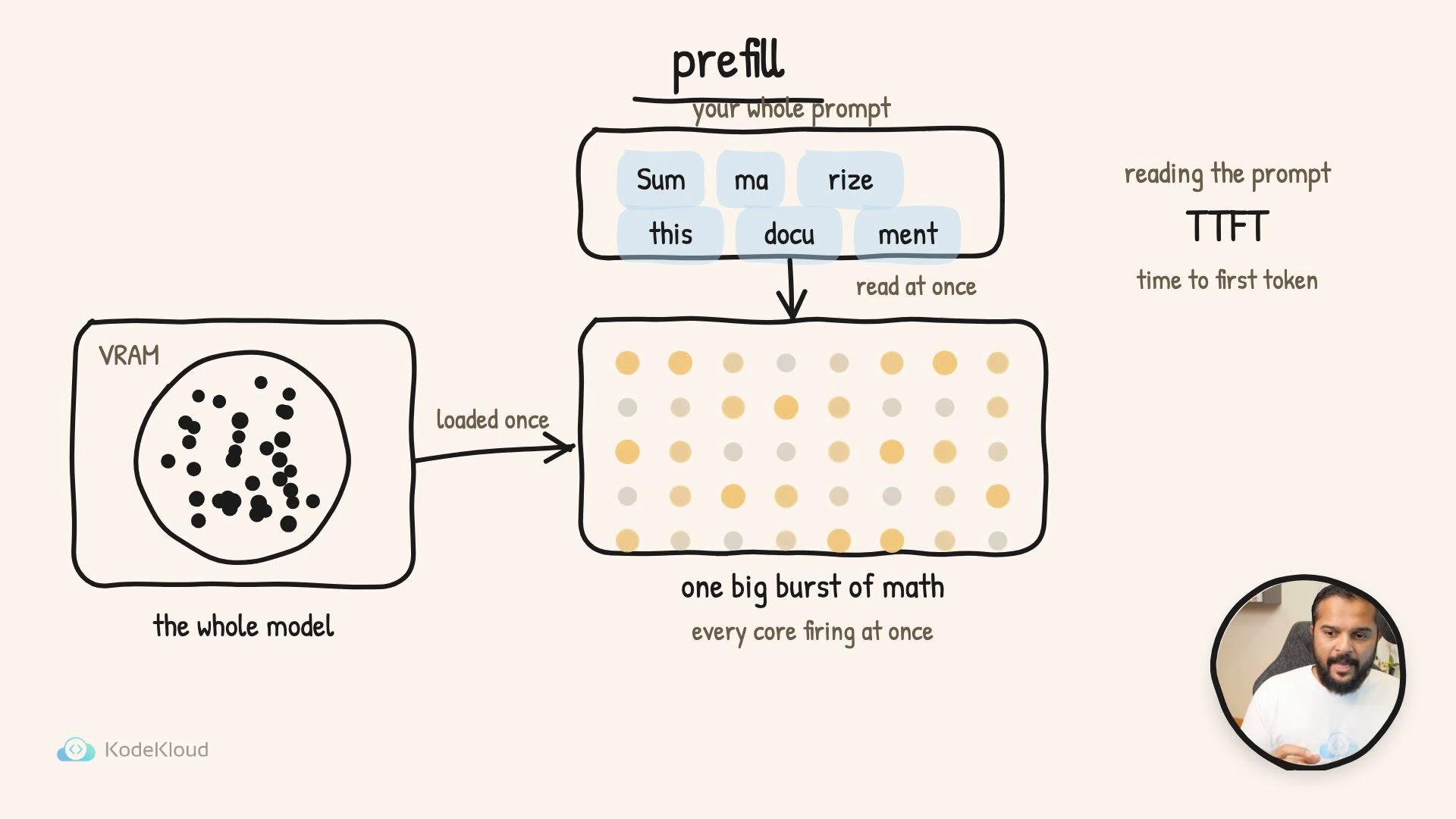
Before the model emits a single token, it must read and process the entire prompt. The model consumes the prompt tokens in parallel: the tokens flow through the full network in one large, compute-heavy operation. If the model weights are not already resident on the device, they must be loaded into GPU VRAM; once available, many compute cores run a burst of matrix math to transform the prompt into the initial model state and produce the first output token.
That waiting time is called TTFT — time to first token. TTFT grows with the size (token count) of the prompt: a short question produces an imperceptible pause, while a very long document can create a noticeable delay before any output appears.
 ## Decode (the streaming output)
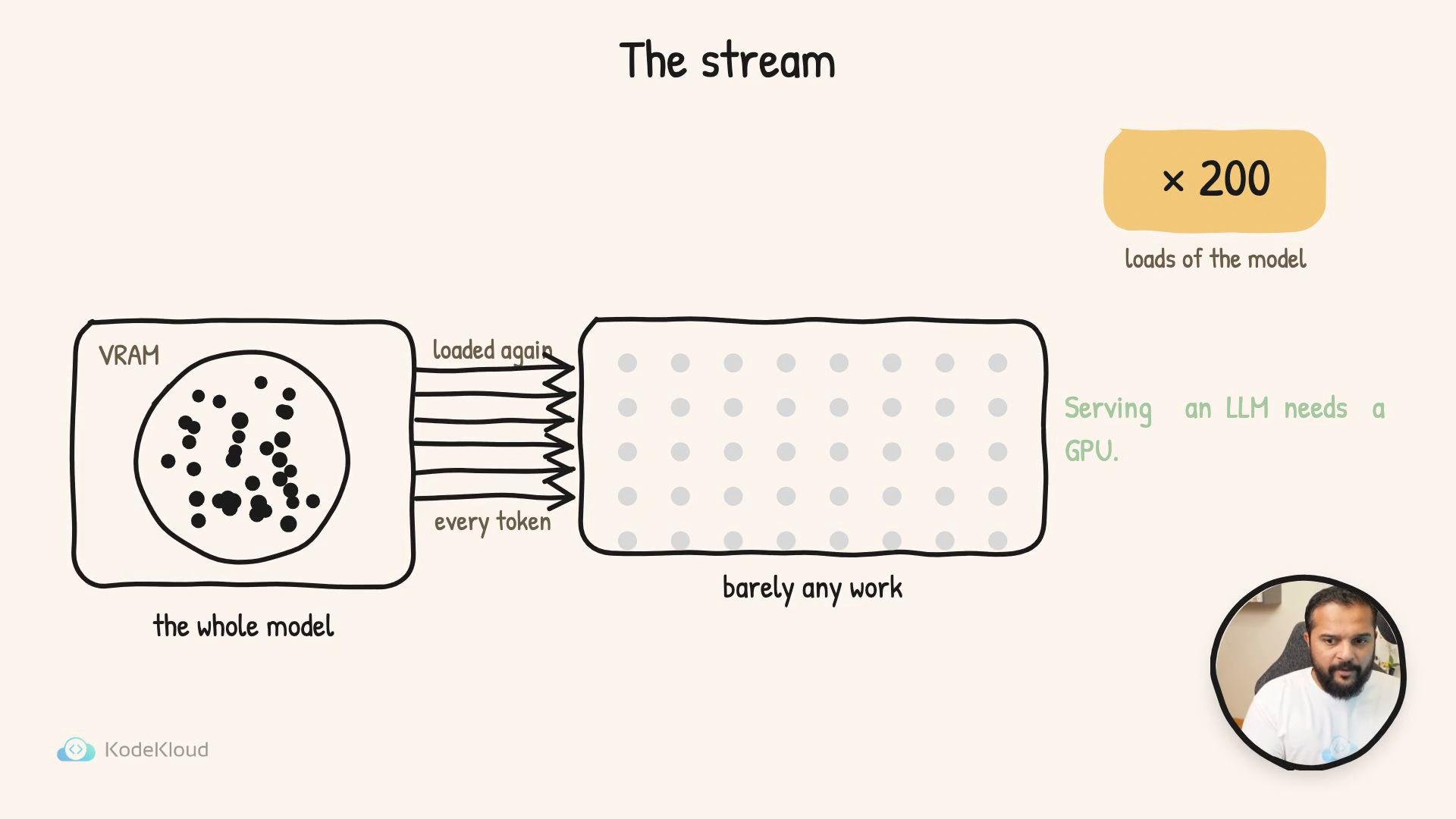
After the model produces the first token it enters the token-by-token loop that generates the remainder of the response. Each new token requires a full forward pass conditioned on the current context (the previous tokens). For large models that do not fit entirely in the GPU’s fastest caches, this means model weights are streamed repeatedly from VRAM into on‑chip memory and compute units — roughly one streaming pass per output token.
Because decode repeatedly moves weights, the bottleneck shifts from raw compute to memory bandwidth. Producing a 200-token reply can require streaming most of the model from VRAM roughly 200 times. During decode, compute cores perform useful work on each pass, but the rate at which weights can be supplied from VRAM limits token throughput.
## Decode (the streaming output)
After the model produces the first token it enters the token-by-token loop that generates the remainder of the response. Each new token requires a full forward pass conditioned on the current context (the previous tokens). For large models that do not fit entirely in the GPU’s fastest caches, this means model weights are streamed repeatedly from VRAM into on‑chip memory and compute units — roughly one streaming pass per output token.
Because decode repeatedly moves weights, the bottleneck shifts from raw compute to memory bandwidth. Producing a 200-token reply can require streaming most of the model from VRAM roughly 200 times. During decode, compute cores perform useful work on each pass, but the rate at which weights can be supplied from VRAM limits token throughput.
 ## The speed limit and TPOT
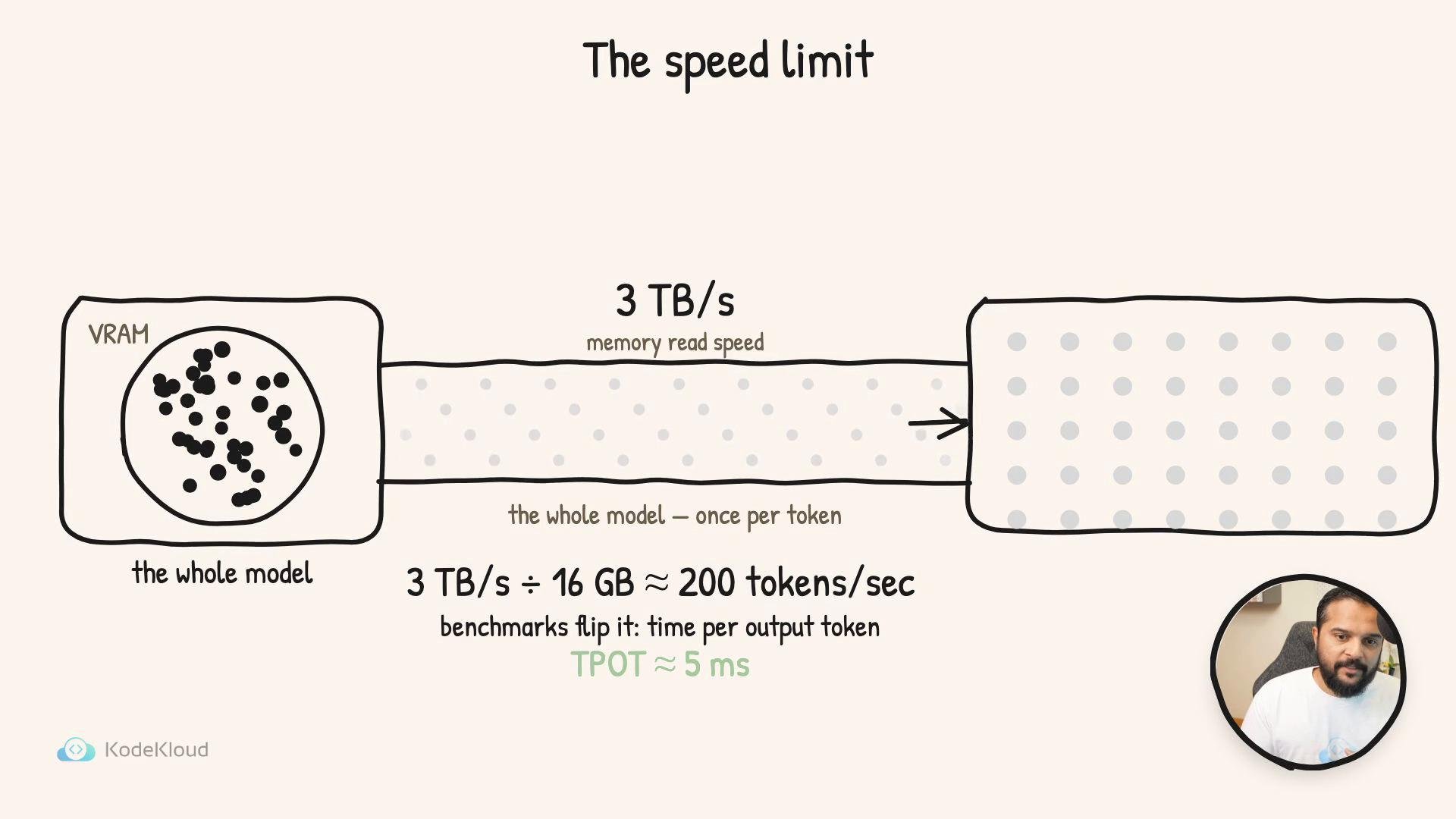
Why does memory bandwidth dominate during decode? Model weights are far too large to live in tiny register files — they remain in VRAM and must be streamed into the compute units. High-end GPUs can read their VRAM at multi‑terabyte-per-second rates. For example, with \~3 TB/s effective VRAM read throughput, a 16 GB model could be read entirely about:
`3 TB/s ÷ 16 GB ≈ 187 reads/s` (≈ 200 reads/s)
That rough calculation corresponds to approximately 200 tokens per second — one token every \~5 ms — in an optimistic steady-state. Real-world per-token latency (TPOT, time per output token) is higher because of kernel launch overheads, attention recomputation, token sampling, and other runtime costs.
Benchmarks typically report TPOT because it reflects the steady-state gap between successive tokens during decoding. Together, TTFT and TPOT describe the two main latency components you’ll see when interacting with an LLM.
## The speed limit and TPOT
Why does memory bandwidth dominate during decode? Model weights are far too large to live in tiny register files — they remain in VRAM and must be streamed into the compute units. High-end GPUs can read their VRAM at multi‑terabyte-per-second rates. For example, with \~3 TB/s effective VRAM read throughput, a 16 GB model could be read entirely about:
`3 TB/s ÷ 16 GB ≈ 187 reads/s` (≈ 200 reads/s)
That rough calculation corresponds to approximately 200 tokens per second — one token every \~5 ms — in an optimistic steady-state. Real-world per-token latency (TPOT, time per output token) is higher because of kernel launch overheads, attention recomputation, token sampling, and other runtime costs.
Benchmarks typically report TPOT because it reflects the steady-state gap between successive tokens during decoding. Together, TTFT and TPOT describe the two main latency components you’ll see when interacting with an LLM.
 ## Quick comparison: Prefill vs Decode
| Phase | What it does | Main bottleneck | Latency metric |
| - | - | - | - |
| Prefill | Read and process the entire prompt in one parallel computation | Compute (large matrix multiplications) and model load time | TTFT (time to first token) |
| Decode | Generate tokens one-by-one in a sequential loop | Memory bandwidth (VRAM → on-chip) and per-token overhead | TPOT (time per output token) |
## Practical implications
* Long prompts increase TTFT. For latency-sensitive apps, minimize prompt token count or precompute embeddings/contexts where possible.
* TPOT limits streaming throughput. High VRAM bandwidth, model quantization, attention compression, or caching frequently accessed weight blocks can improve TPOT.
* Serving architectures often try to optimize both: place model weights in GPU memory to reduce prefill overhead and use optimizations (e.g., kernel fusion, quantized kernels, model sharding) to increase effective read throughput.
* Tools and libraries that target high-throughput inference (for example, vLLM or DeepSpeed inference) focus on reducing both prefill and decode costs through smarter memory management and kernel optimizations.
## Quick comparison: Prefill vs Decode
| Phase | What it does | Main bottleneck | Latency metric |
| - | - | - | - |
| Prefill | Read and process the entire prompt in one parallel computation | Compute (large matrix multiplications) and model load time | TTFT (time to first token) |
| Decode | Generate tokens one-by-one in a sequential loop | Memory bandwidth (VRAM → on-chip) and per-token overhead | TPOT (time per output token) |
## Practical implications
* Long prompts increase TTFT. For latency-sensitive apps, minimize prompt token count or precompute embeddings/contexts where possible.
* TPOT limits streaming throughput. High VRAM bandwidth, model quantization, attention compression, or caching frequently accessed weight blocks can improve TPOT.
* Serving architectures often try to optimize both: place model weights in GPU memory to reduce prefill overhead and use optimizations (e.g., kernel fusion, quantized kernels, model sharding) to increase effective read throughput.
* Tools and libraries that target high-throughput inference (for example, vLLM or DeepSpeed inference) focus on reducing both prefill and decode costs through smarter memory management and kernel optimizations.
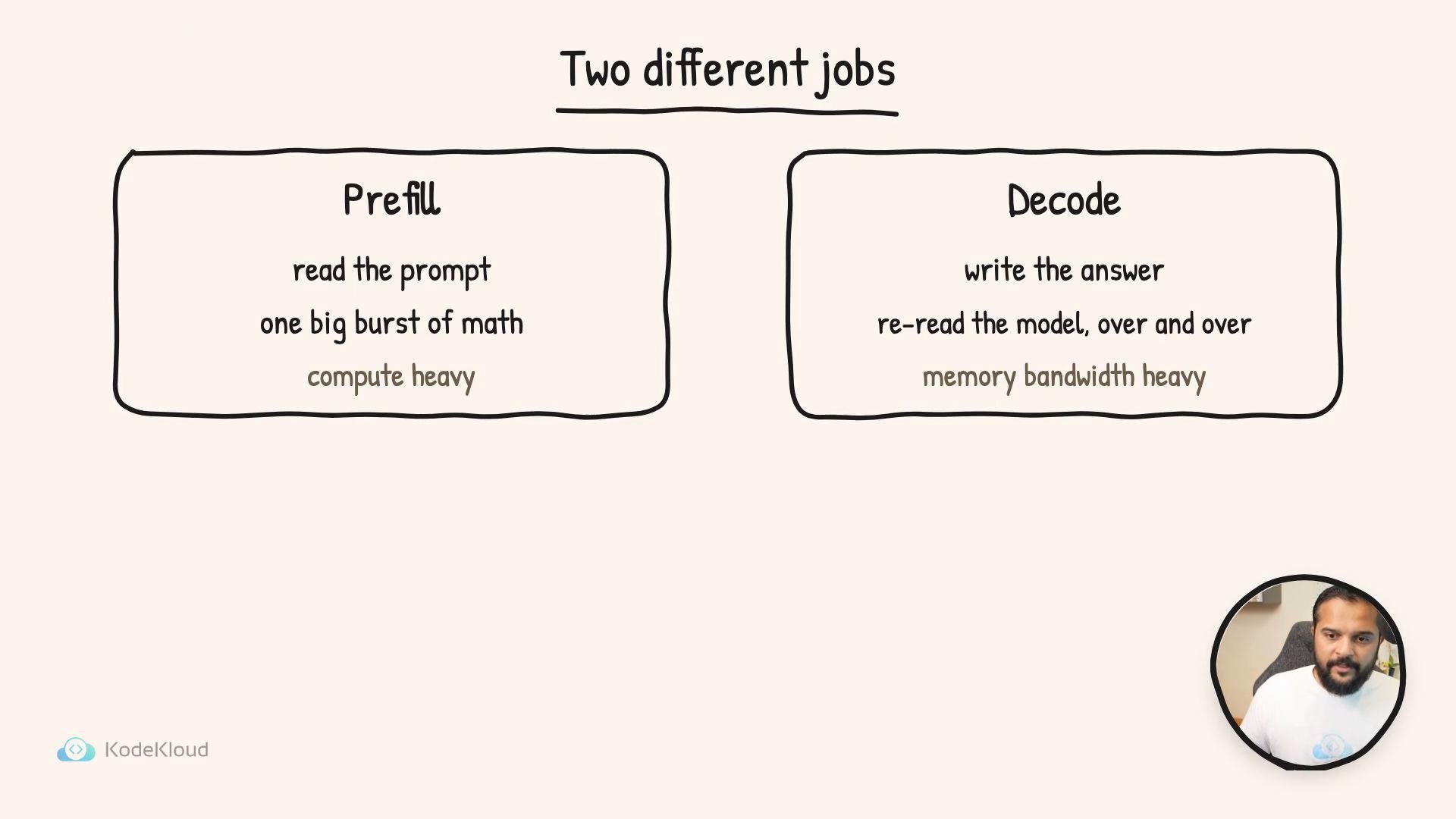 TTFT (time to first token) measures the initial pause while the prompt is processed (prefill). TPOT (time per output token) measures the steady per-token latency during decoding, typically limited by VRAM read bandwidth.
## Links and references
* vLLM (high-performance LLM serving): [https://github.com/vllm-project/vllm](https://github.com/vllm-project/vllm)
* DeepSpeed Inference: [https://github.com/microsoft/DeepSpeed](https://github.com/microsoft/DeepSpeed)
* NVIDIA: GPU memory and bandwidth concepts — [https://developer.nvidia.com/what-is-memory-bandwidth](https://developer.nvidia.com/what-is-memory-bandwidth)
* Tokenization and prompts: [https://huggingface.co/docs/tokenizers/index](https://huggingface.co/docs/tokenizers/index)
This documentation is built and hosted on [Mintlify](https://mintlify.com), a developer documentation platform.
TTFT (time to first token) measures the initial pause while the prompt is processed (prefill). TPOT (time per output token) measures the steady per-token latency during decoding, typically limited by VRAM read bandwidth.
## Links and references
* vLLM (high-performance LLM serving): [https://github.com/vllm-project/vllm](https://github.com/vllm-project/vllm)
* DeepSpeed Inference: [https://github.com/microsoft/DeepSpeed](https://github.com/microsoft/DeepSpeed)
* NVIDIA: GPU memory and bandwidth concepts — [https://developer.nvidia.com/what-is-memory-bandwidth](https://developer.nvidia.com/what-is-memory-bandwidth)
* Tokenization and prompts: [https://huggingface.co/docs/tokenizers/index](https://huggingface.co/docs/tokenizers/index)
This documentation is built and hosted on [Mintlify](https://mintlify.com), a developer documentation platform.