> ## Documentation Index
> Fetch the complete documentation index at: https://notes.kodekloud.com/llms.txt
> Use this file to discover all available pages before exploring further.
# Serving the Giants
> Explains how large language models are sharded across GPUs using pipeline and tensor parallelism, choosing strategies based on interconnect bandwidth and latency.
As model sizes grow, a single GPU can’t always hold the entire network. Large language models (LLMs) commonly exceed the memory capacity of one device: "large" models can be \~140 GB on disk, while the true giants — models with 500B+ parameters — can be several hundred gigabytes. If your GPU only has \~80 GB of memory, the model simply won’t fit.
vLLM, a production model server, can shard a model across multiple GPUs. Point it at a giant model and tell it how many GPUs you have; vLLM coordinates distributing the model across those devices so the model behaves like a single logical server. See the vLLM repo for details: [https://github.com/vllm-project/vllm](https://github.com/vllm-project/vllm).
Before cutting the model up, it helps to understand what we’re splitting. Transformer-style models are a stack of layers. Each layer executes a well-defined computation (typically large matrix multiplications and nonlinearities). Inputs enter at the top and flow down layer-by-layer; each layer transforms the activations before passing them on to the next.
Two broad strategies are used to distribute that computation across multiple GPUs:
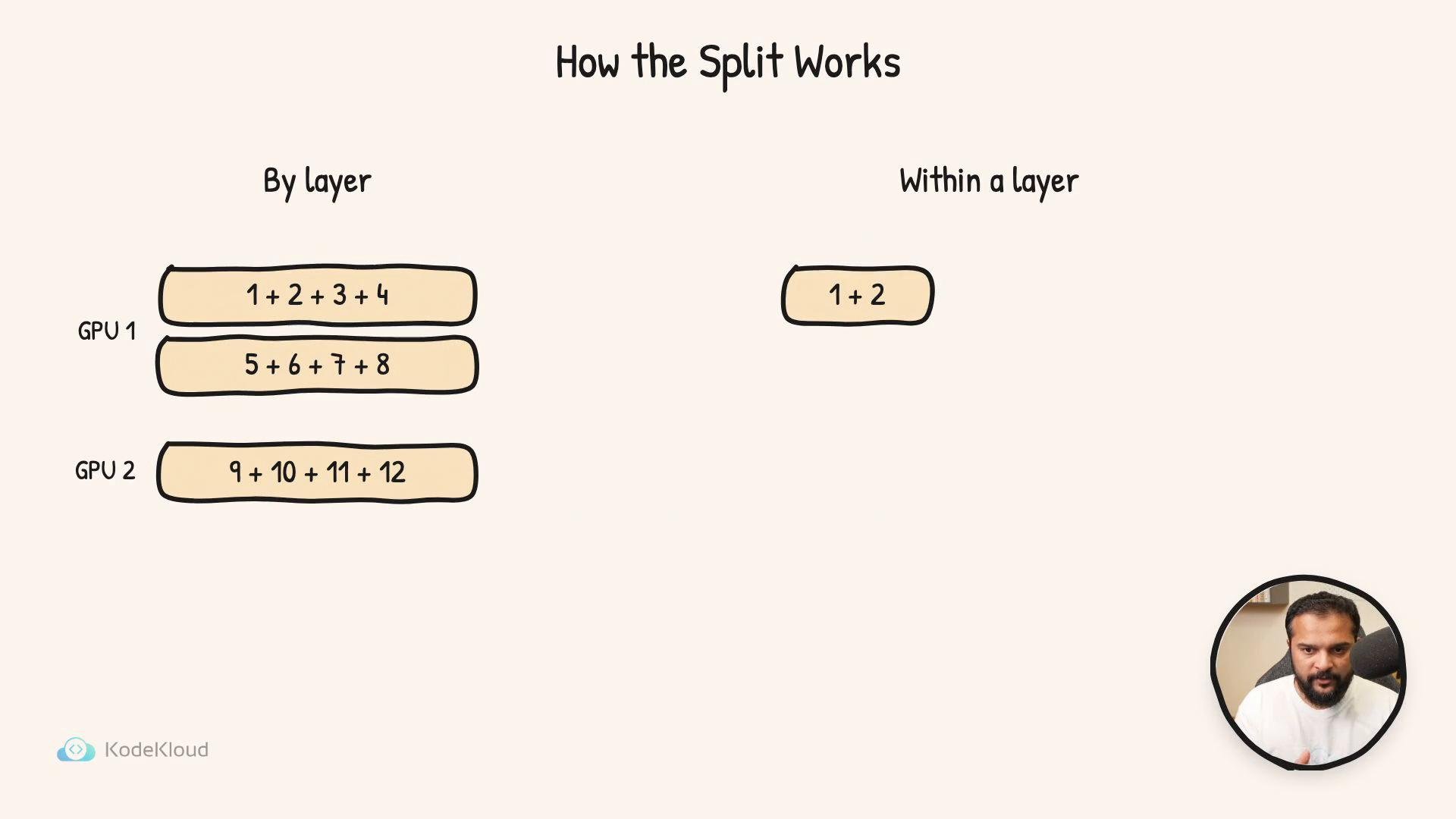
* Layer-wise splitting (pipeline parallelism): assign contiguous whole layers to each GPU. GPU 1 runs the first group of layers, GPU 2 runs the next group, and so on. Each GPU processes full layers and sends relatively small activation tensors to the next device.
* Within-layer splitting (tensor or model parallelism): split the internal computation of a single layer across several GPUs — for example, partition matrices or attention heads. Each GPU computes a piece of the layer’s output; the pieces are combined to produce the full result.
 Which approach you choose depends mostly on the bandwidth and latency of the links between GPUs:
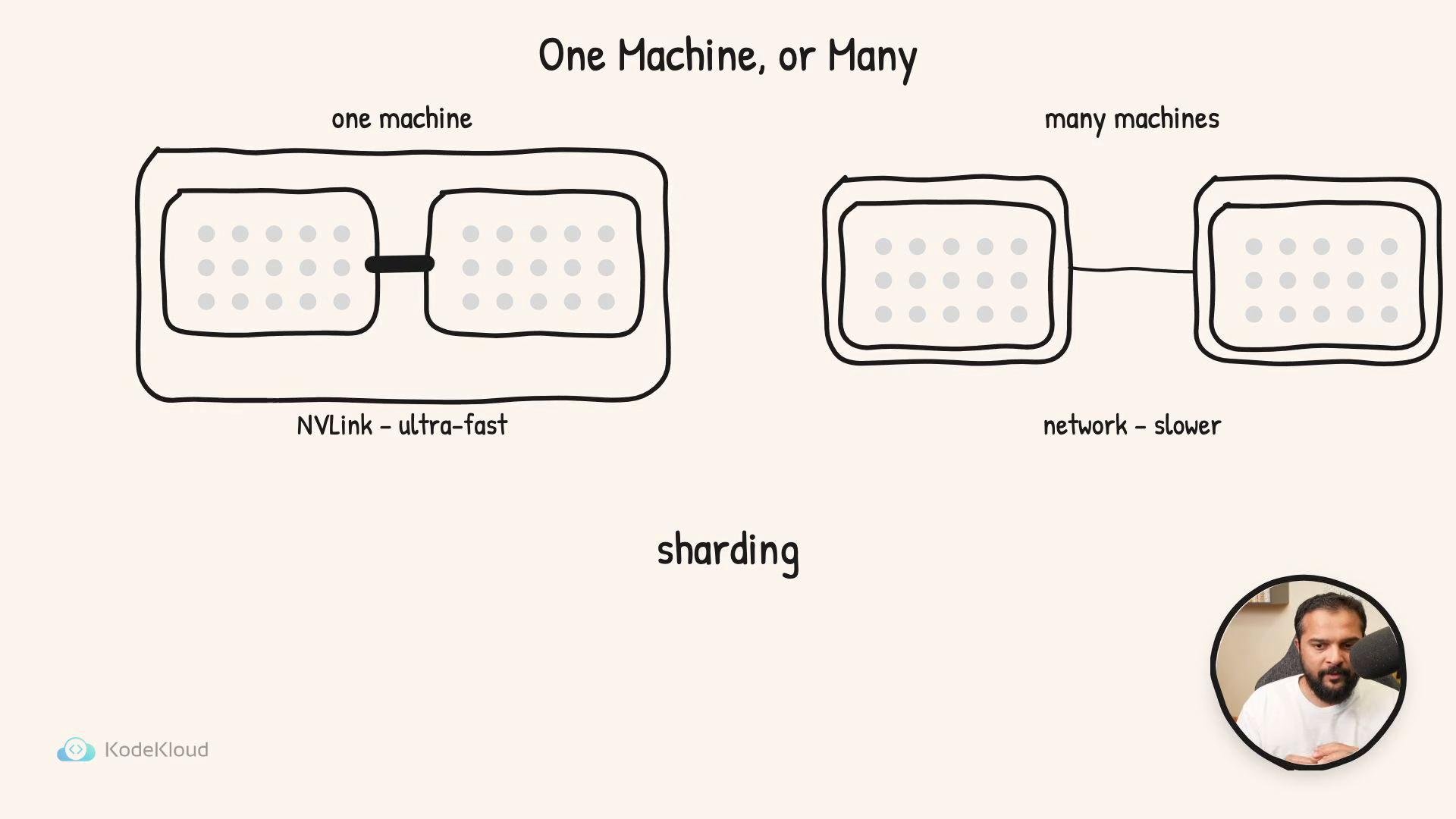
* Inside one machine, GPUs are often connected by NVLink (or similar high-bandwidth interconnects), which supports frequent, high-throughput exchanges. In this setting, chatty within-layer (tensor) parallelism performs well: multiple GPUs act like one tightly-coupled device, exchanging partial results rapidly. It’s common to pack 4–8 NVLink-connected GPUs into a single server and shard a giant model across them.
* Across machines, GPUs communicate over the network (Ethernet/InfiniBand) which is typically slower and higher-latency than NVLink. For multi-node setups, layer-wise (pipeline) parallelism is usually better: each server owns whole layers and only needs to send relatively small activation tensors to the next server, minimizing cross-machine traffic.
Rule of thumb: keep the high-bandwidth, chatty communication inside a machine (NVLink) and use lighter-weight communication between machines (network).
This act of splitting a model across GPUs is called sharding. Sharding addresses the memory-fitting problem: a model too big for a single GPU can run across multiple GPUs (within one machine or across several machines) to behave like one logical model server. The decision between tensor (within-layer) and pipeline (layer-wise) parallelism is governed by hardware topology, interconnect performance, and the latency/bandwidth trade-offs of your cluster.
Key trade-offs at a glance:
| Parallelism Type | Best for | Communication Pattern | Pros | Cons |
| - | -: | - | - | - |
| Layer-wise (pipeline) | Multi-node clusters with slower interconnects | Low-frequency transfers of whole activations between nodes | Minimizes cross-machine bandwidth; simpler synchronization | Higher pipeline latency, potential bubble/fill inefficiencies |
| Within-layer (tensor/model) | Single-node NVLink-connected GPUs | High-frequency, fine-grained exchange of partial results | Efficient compute scaling on tightly-coupled GPUs; better utilization for some ops | Requires very fast interconnect; more complex orchestration |
References and further reading:
* vLLM model server: [https://github.com/vllm-project/vllm](https://github.com/vllm-project/vllm)
* NVIDIA NVLink overview: [https://developer.nvidia.com/nvlink](https://developer.nvidia.com/nvlink)
* Pipeline and tensor parallelism concepts: see transformer model parallelism literature
Which approach you choose depends mostly on the bandwidth and latency of the links between GPUs:
* Inside one machine, GPUs are often connected by NVLink (or similar high-bandwidth interconnects), which supports frequent, high-throughput exchanges. In this setting, chatty within-layer (tensor) parallelism performs well: multiple GPUs act like one tightly-coupled device, exchanging partial results rapidly. It’s common to pack 4–8 NVLink-connected GPUs into a single server and shard a giant model across them.
* Across machines, GPUs communicate over the network (Ethernet/InfiniBand) which is typically slower and higher-latency than NVLink. For multi-node setups, layer-wise (pipeline) parallelism is usually better: each server owns whole layers and only needs to send relatively small activation tensors to the next server, minimizing cross-machine traffic.
Rule of thumb: keep the high-bandwidth, chatty communication inside a machine (NVLink) and use lighter-weight communication between machines (network).
This act of splitting a model across GPUs is called sharding. Sharding addresses the memory-fitting problem: a model too big for a single GPU can run across multiple GPUs (within one machine or across several machines) to behave like one logical model server. The decision between tensor (within-layer) and pipeline (layer-wise) parallelism is governed by hardware topology, interconnect performance, and the latency/bandwidth trade-offs of your cluster.
Key trade-offs at a glance:
| Parallelism Type | Best for | Communication Pattern | Pros | Cons |
| - | -: | - | - | - |
| Layer-wise (pipeline) | Multi-node clusters with slower interconnects | Low-frequency transfers of whole activations between nodes | Minimizes cross-machine bandwidth; simpler synchronization | Higher pipeline latency, potential bubble/fill inefficiencies |
| Within-layer (tensor/model) | Single-node NVLink-connected GPUs | High-frequency, fine-grained exchange of partial results | Efficient compute scaling on tightly-coupled GPUs; better utilization for some ops | Requires very fast interconnect; more complex orchestration |
References and further reading:
* vLLM model server: [https://github.com/vllm-project/vllm](https://github.com/vllm-project/vllm)
* NVIDIA NVLink overview: [https://developer.nvidia.com/nvlink](https://developer.nvidia.com/nvlink)
* Pipeline and tensor parallelism concepts: see transformer model parallelism literature
 This documentation is built and hosted on [Mintlify](https://mintlify.com), a developer documentation platform.