> ## Documentation Index
> Fetch the complete documentation index at: https://notes.kodekloud.com/llms.txt
> Use this file to discover all available pages before exploring further.
# Modifying RDS Configurations With Performance Insights and RDS Proxy
> Guidance on improving Amazon RDS performance and availability using Performance Insights for diagnostics and RDS Proxy for connection pooling and failover resilience.
Welcome.
This lesson shows which Amazon RDS configuration options to adjust for better performance and availability, with a focus on Performance Insights and RDS Proxy. Both features help you monitor, diagnose, and scale transactional databases that receive many concurrent connections — common in web apps, microservices, and serverless architectures.
 ## Amazon RDS Performance Insights — overview and value
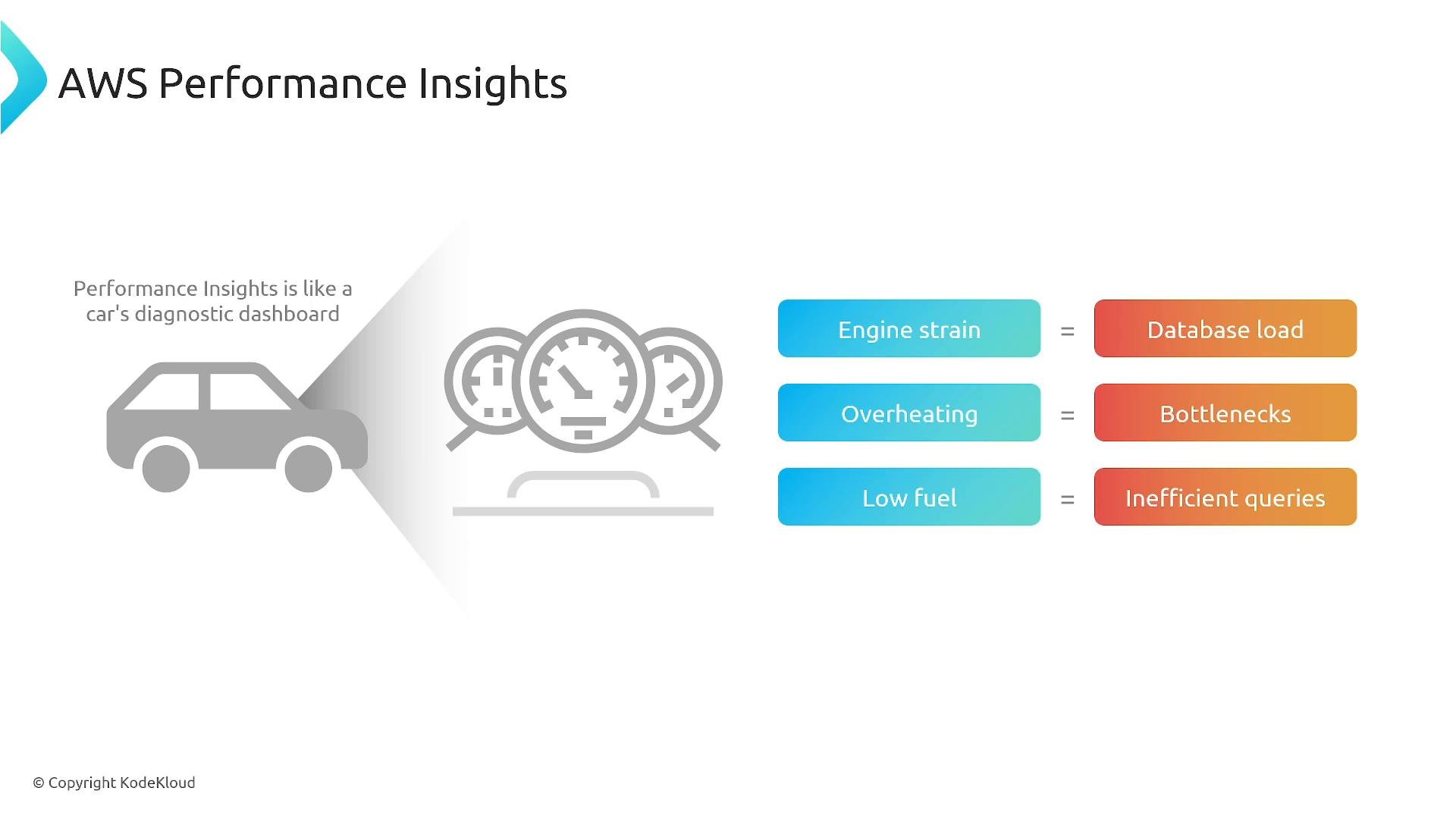
Performance Insights is a lightweight diagnostics dashboard for RDS. It surfaces database load, wait categories, and the SQL statements that consume the most resources — much like a vehicle dashboard highlights engine strain or overheating.
## Amazon RDS Performance Insights — overview and value
Performance Insights is a lightweight diagnostics dashboard for RDS. It surfaces database load, wait categories, and the SQL statements that consume the most resources — much like a vehicle dashboard highlights engine strain or overheating.
 What Performance Insights gives you
* Visualization of DB load (DB load) and wait categories to show where time is spent.
* Top SQL: identify long-running queries or queries using the most CPU/IO.
* Historical and near-real-time analysis to compare trends and seasonality.
* Actionable recommendations: instance sizing, parameter group adjustments, indexing, and query tuning.
Example problematic queries Performance Insights might reveal:
```sql theme={null}
SELECT SUM(order_amount) FROM orders WHERE order_status = 'Pending';
SELECT * FROM customers ORDER BY last_name;
SELECT * FROM customers WHERE email LIKE '%gmail.com';
```
Common corrective actions
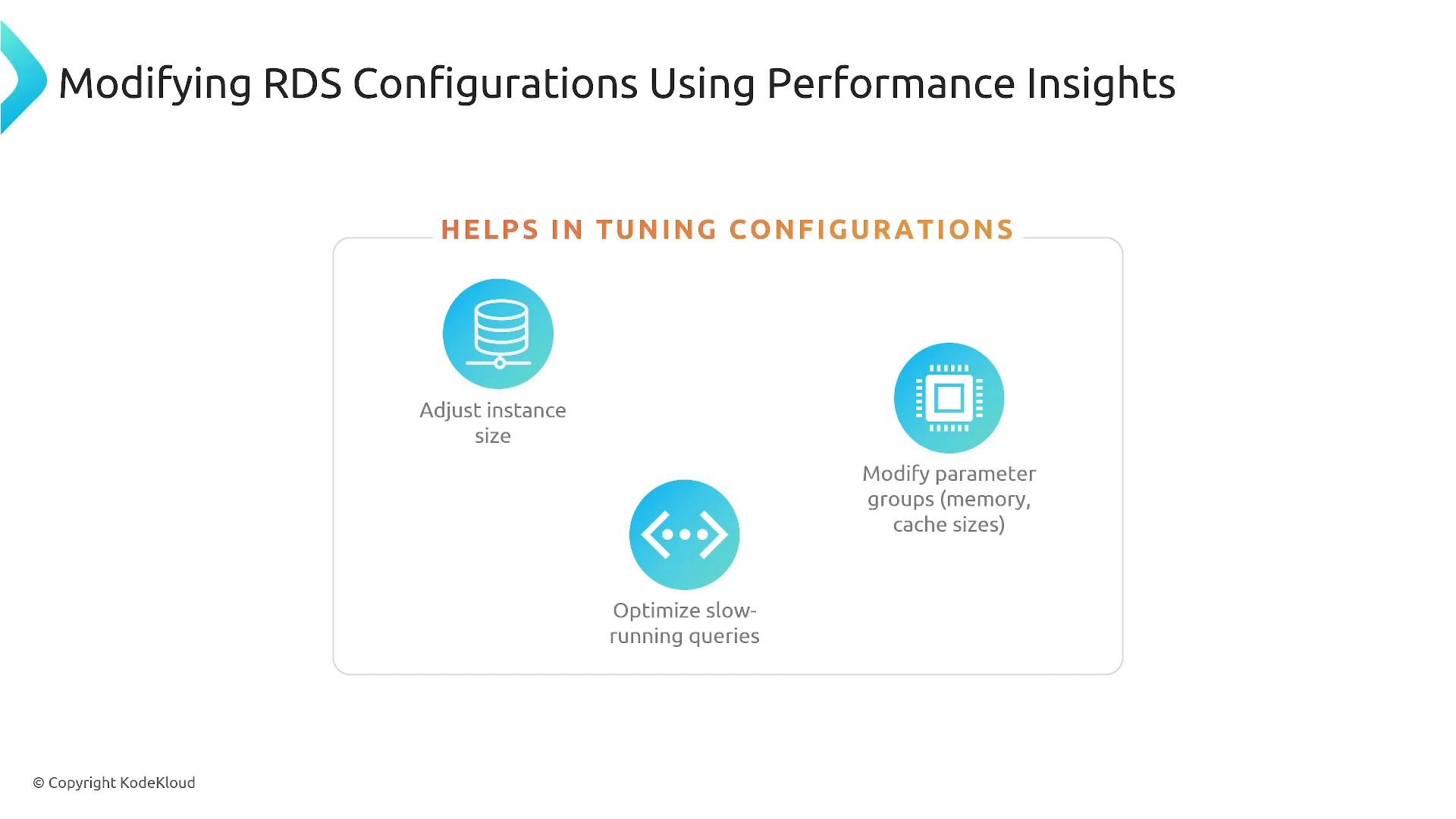
* Increase instance size if CPU, memory, or I/O are constraining throughput.
* Tune parameter groups (cache sizes, buffer pool settings, timeouts).
* Add or change indexes and rewrite queries to avoid full table scans.
What Performance Insights gives you
* Visualization of DB load (DB load) and wait categories to show where time is spent.
* Top SQL: identify long-running queries or queries using the most CPU/IO.
* Historical and near-real-time analysis to compare trends and seasonality.
* Actionable recommendations: instance sizing, parameter group adjustments, indexing, and query tuning.
Example problematic queries Performance Insights might reveal:
```sql theme={null}
SELECT SUM(order_amount) FROM orders WHERE order_status = 'Pending';
SELECT * FROM customers ORDER BY last_name;
SELECT * FROM customers WHERE email LIKE '%gmail.com';
```
Common corrective actions
* Increase instance size if CPU, memory, or I/O are constraining throughput.
* Tune parameter groups (cache sizes, buffer pool settings, timeouts).
* Add or change indexes and rewrite queries to avoid full table scans.
 Real-world impact
* On transactional systems (for example, e‑commerce checkouts), addressing inefficient queries and adding appropriate indexes often reduces latency and DB load substantially — improvements of tens of percent are common depending on the root cause.
Tip: you can enable Performance Insights when creating or modifying an instance. For the AWS CLI:
```bash theme={null}
# Example: enable Performance Insights when creating a DB instance
aws rds create-db-instance \
--db-instance-identifier mydb \
--db-instance-class db.t3.medium \
--engine mysql \
--allocated-storage 20 \
--enable-performance-insights
```
Check the AWS docs for engine-specific options and retention settings.
## RDS Proxy — connection management and resilience
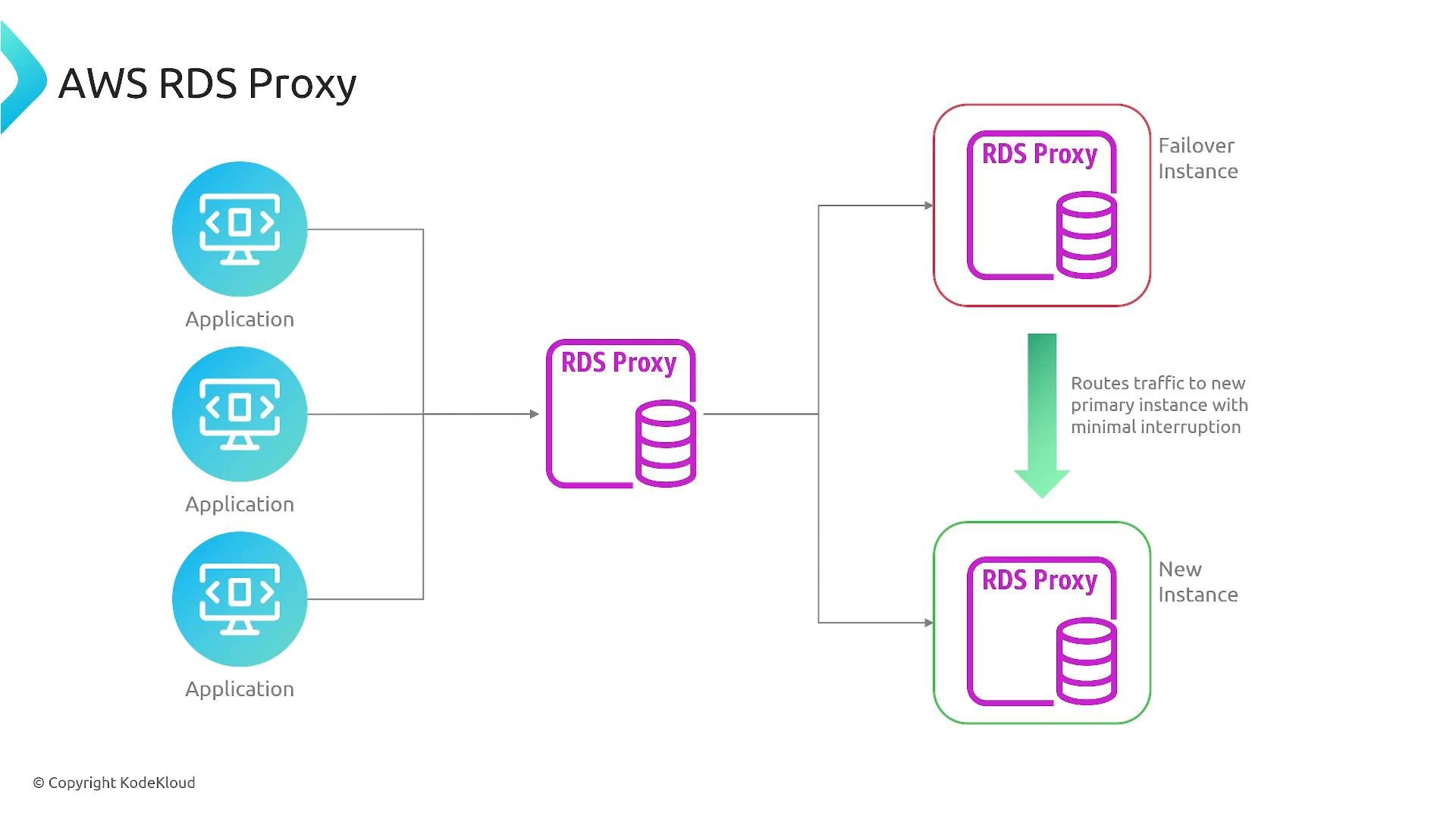
RDS Proxy sits between your application and the database as a connection-management layer. Instead of every client opening/closing a direct DB connection, clients connect to the proxy, which maintains a pool of warm backend connections.
Key benefits
* Connection pooling and reuse: reduces total concurrent DB connections and connection churn.
* Improved scalability: smooths bursts of connection requests from many short-lived clients (e.g., serverless functions).
* Reduced failover impact: during Multi‑AZ failover, the proxy can manage reconnections and reduce visible disruption.
* Security integration: supports AWS Secrets Manager and IAM authentication for supported engines.
Notes on engine support: RDS Proxy supports Amazon RDS and Aurora for compatible MySQL and PostgreSQL engines. Refer to the official docs for the latest supported versions: [https://docs.aws.amazon.com/AmazonRDS/latest/UserGuide/rds-proxy.html](https://docs.aws.amazon.com/AmazonRDS/latest/UserGuide/rds-proxy.html)
How it works (high level)
* Applications connect to the proxy endpoint.
* The proxy keeps a pool of persistent backend DB connections.
* The proxy hands out connections from that pool instead of creating new DB connections per client request.
* During failover, the proxy can transparently reconnect and route traffic to the new primary, minimizing client-side errors.
Real-world impact
* On transactional systems (for example, e‑commerce checkouts), addressing inefficient queries and adding appropriate indexes often reduces latency and DB load substantially — improvements of tens of percent are common depending on the root cause.
Tip: you can enable Performance Insights when creating or modifying an instance. For the AWS CLI:
```bash theme={null}
# Example: enable Performance Insights when creating a DB instance
aws rds create-db-instance \
--db-instance-identifier mydb \
--db-instance-class db.t3.medium \
--engine mysql \
--allocated-storage 20 \
--enable-performance-insights
```
Check the AWS docs for engine-specific options and retention settings.
## RDS Proxy — connection management and resilience
RDS Proxy sits between your application and the database as a connection-management layer. Instead of every client opening/closing a direct DB connection, clients connect to the proxy, which maintains a pool of warm backend connections.
Key benefits
* Connection pooling and reuse: reduces total concurrent DB connections and connection churn.
* Improved scalability: smooths bursts of connection requests from many short-lived clients (e.g., serverless functions).
* Reduced failover impact: during Multi‑AZ failover, the proxy can manage reconnections and reduce visible disruption.
* Security integration: supports AWS Secrets Manager and IAM authentication for supported engines.
Notes on engine support: RDS Proxy supports Amazon RDS and Aurora for compatible MySQL and PostgreSQL engines. Refer to the official docs for the latest supported versions: [https://docs.aws.amazon.com/AmazonRDS/latest/UserGuide/rds-proxy.html](https://docs.aws.amazon.com/AmazonRDS/latest/UserGuide/rds-proxy.html)
How it works (high level)
* Applications connect to the proxy endpoint.
* The proxy keeps a pool of persistent backend DB connections.
* The proxy hands out connections from that pool instead of creating new DB connections per client request.
* During failover, the proxy can transparently reconnect and route traffic to the new primary, minimizing client-side errors.
 When to use each feature
| Feature | Helps with | Typical use cases |
| - | -: | - |
| Performance Insights | Identify load, waits, slow SQL, and trends | Query tuning, indexing, sizing decisions, historical analysis |
| RDS Proxy | Connection pooling, scaling, smoother failovers | Serverless/back-end APIs with many short connections, multi-tenant apps, reducing failover disruption |
Comparison: when both help
| Problem | Use Performance Insights | Use RDS Proxy |
| - | -: | - |
| High DB CPU from expensive queries | Analyze top SQL and optimize queries/indexes | — |
| High connection churn from many clients | — | Use proxy to pool and reuse connections |
| Multi-AZ failover causes brief outages | Check causing queries and wait behavior with Performance Insights | Proxy can reduce reconnection overhead and minimize visible downtime |
Use cases and exam relevance
* Use Performance Insights to find top resource consumers and to guide indexing and parameter changes.
* Use RDS Proxy for workloads that create many short-lived connections (serverless functions, lambda-based backends) or to minimize failover impact in Multi‑AZ setups.
* Both features are commonly referenced in AWS exams for database monitoring, scaling, and resilience scenarios.
Performance Insights and RDS Proxy are complementary: Performance Insights helps you find and fix load- or query-related issues, while RDS Proxy helps manage connection scale and reduce failover disruption.
## Links and references
* Performance Insights docs: [https://docs.aws.amazon.com/AmazonRDS/latest/UserGuide/USER\_PerfInsights.html](https://docs.aws.amazon.com/AmazonRDS/latest/UserGuide/USER_PerfInsights.html)
* RDS Proxy docs: [https://docs.aws.amazon.com/AmazonRDS/latest/UserGuide/rds-proxy.html](https://docs.aws.amazon.com/AmazonRDS/latest/UserGuide/rds-proxy.html)
* AWS RDS CLI reference: [https://docs.aws.amazon.com/cli/latest/reference/rds/index.html](https://docs.aws.amazon.com/cli/latest/reference/rds/index.html)
This documentation is built and hosted on [Mintlify](https://mintlify.com), a developer documentation platform.
When to use each feature
| Feature | Helps with | Typical use cases |
| - | -: | - |
| Performance Insights | Identify load, waits, slow SQL, and trends | Query tuning, indexing, sizing decisions, historical analysis |
| RDS Proxy | Connection pooling, scaling, smoother failovers | Serverless/back-end APIs with many short connections, multi-tenant apps, reducing failover disruption |
Comparison: when both help
| Problem | Use Performance Insights | Use RDS Proxy |
| - | -: | - |
| High DB CPU from expensive queries | Analyze top SQL and optimize queries/indexes | — |
| High connection churn from many clients | — | Use proxy to pool and reuse connections |
| Multi-AZ failover causes brief outages | Check causing queries and wait behavior with Performance Insights | Proxy can reduce reconnection overhead and minimize visible downtime |
Use cases and exam relevance
* Use Performance Insights to find top resource consumers and to guide indexing and parameter changes.
* Use RDS Proxy for workloads that create many short-lived connections (serverless functions, lambda-based backends) or to minimize failover impact in Multi‑AZ setups.
* Both features are commonly referenced in AWS exams for database monitoring, scaling, and resilience scenarios.
Performance Insights and RDS Proxy are complementary: Performance Insights helps you find and fix load- or query-related issues, while RDS Proxy helps manage connection scale and reduce failover disruption.
## Links and references
* Performance Insights docs: [https://docs.aws.amazon.com/AmazonRDS/latest/UserGuide/USER\_PerfInsights.html](https://docs.aws.amazon.com/AmazonRDS/latest/UserGuide/USER_PerfInsights.html)
* RDS Proxy docs: [https://docs.aws.amazon.com/AmazonRDS/latest/UserGuide/rds-proxy.html](https://docs.aws.amazon.com/AmazonRDS/latest/UserGuide/rds-proxy.html)
* AWS RDS CLI reference: [https://docs.aws.amazon.com/cli/latest/reference/rds/index.html](https://docs.aws.amazon.com/cli/latest/reference/rds/index.html)
This documentation is built and hosted on [Mintlify](https://mintlify.com), a developer documentation platform.