> ## Documentation Index
> Fetch the complete documentation index at: https://notes.kodekloud.com/llms.txt
> Use this file to discover all available pages before exploring further.
# DynamoDB Conditional writes
> This article explores how DynamoDB Conditional Writes maintain data integrity by allowing write operations only when specified conditions are met.
In this article, we explore how DynamoDB Conditional Writes help maintain data integrity by allowing write operations to be executed only when specified conditions are met. Conditional writes are particularly useful in scenarios where multiple users attempt to update the same item simultaneously. For instance, if User 1 tries to update item A to 1 and User 2 tries to update item A to 2 at the same time, the second operation might overwrite the first. With conditional writes, you can enforce a check—such as updating only if the current value is 0—thereby preventing unintended overwrites and ensuring consistency.
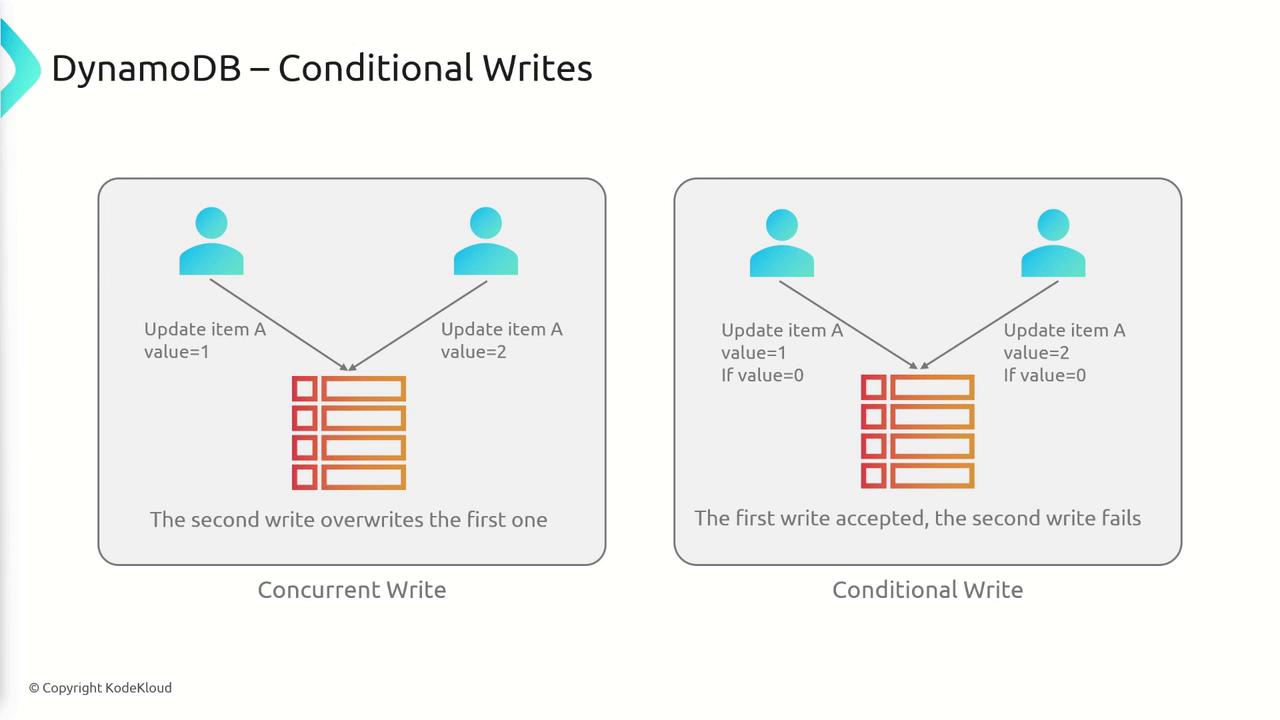
DynamoDB Conditional Writes can be applied across several API calls, including PutItem, DeleteItem, UpdateItem, BatchWriteItem, and more. The database supports various conditional expressions, such as:
* attribute\_exists
* attribute\_not\_exists
* attribute\_type
* begins\_with
* contains
* size
Below, we provide detailed examples and code snippets to help you understand and implement these conditional expressions.
***
Before using conditional writes, make sure to evaluate your application's concurrency needs to avoid conflicts when multiple writes occur at the same time.
## Attribute Existence Check
The `attribute_exists` condition verifies whether a particular attribute exists in an item. For example, to delete an item only if the attribute `ProductReviews.OneStar` exists, use the following command:
```bash theme={null}
aws dynamodb delete-item \
--table-name ProductCatalog \
--key '{"id": {"N": "456"}}' \
--condition-expression "attribute_exists(ProductReviews.OneStar)"
```
Conversely, you can use `attribute_not_exists` to ensure that an operation is executed only when a specified attribute does not exist. The following command deletes the item only if the `Price` attribute is absent:
```bash theme={null}
aws dynamodb delete-item \
--table-name ProductCatalog \
--key '{"id": {"N": "456"}}' \
--condition-expression "attribute_not_exists(Price)"
```
## Attribute Type Check
The `attribute_type` expression ensures that an attribute is of a specific type. For example, if you have an attribute named `Color` and want to ensure it is stored as a string, execute the following command:
```bash theme={null}
aws dynamodb delete-item \
--table-name ProductCatalog \
--key '{"Id": {"N": "456"}}' \
--condition-expression "attribute_type(Color, :v_sub)" \
--expression-attribute-values file://expression-attribute-values.json
```
Create the accompanying JSON file named `expression-attribute-values.json` with the following content:
```json theme={null}
{
":v_sub": {"S": "SS"}
}
```
If the `Color` attribute is of type String, the condition evaluates to true, and the `delete-item` operation is executed.
## String Expressions: begins\_with and contains
### begins\_with Expression
The `begins_with` function checks if a string attribute starts with a specific substring. For example, to delete an item only when the attribute `Pictures.FrontView` begins with `"http://"`, use this command:
```bash theme={null}
aws dynamodb delete-item \
--table-name ProductCatalog \
--key '{"Id": {"N": "456"}}' \
--condition-expression "begins_with(Pictures.FrontView, :v_sub)" \
--expression-attribute-values file://expression-attribute-values.json
```
Ensure your `expression-attribute-values.json` file contains:
```json theme={null}
{
":v_sub": {"S": "http://"}
}
```
### contains Expression
The `contains` function determines whether an attribute contains a specified value. For instance, to delete an item if the `Color` attribute contains `"Red"`, run the following command:
```bash theme={null}
aws dynamodb delete-item \
--table-name ProductCatalog \
--key '{"Id": {"N": "456"}}' \
--condition-expression "contains(Color, :v_sub)" \
--expression-attribute-values file://expression-attribute-values.json
```
Your JSON file should include:
```json theme={null}
{
":v_sub": {"S": "Red"}
}
```
## Size Expression
The `size` function evaluates the length or size of an attribute. For example, if you want to delete an item only when the size of the `VideoClip` attribute is greater than 64,000, you can use this command:
```bash theme={null}
aws dynamodb delete-item \
--table-name ProductCatalog \
--key '{"Id": {"N": "456"}}' \
--condition-expression "size(VideoClip) > :v_sub" \
--expression-attribute-values file://expression-attribute-values.json
```
This condition ensures that the deletion occurs only when the `VideoClip` attribute exceeds the specified size threshold.
***
DynamoDB Conditional Writes provide a robust mechanism to safeguard data integrity during concurrent data modifications. By using supported expressions such as `attribute_exists`, `attribute_not_exists`, `attribute_type`, `begins_with`, `contains`, and `size`, you can ensure write operations occur only when specific conditions are met, thereby preventing unintended data overwrites.
In summary, conditional writes are an essential feature for managing concurrent updates in DynamoDB, ensuring that your data remains consistent and reliable even in complex multi-user environments.