> ## Documentation Index
> Fetch the complete documentation index at: https://notes.kodekloud.com/llms.txt
> Use this file to discover all available pages before exploring further.
# KMS Envelope Encryption Demo
> Learn to encrypt large files using AWS KMS envelope encryption, generating data keys for secure file handling and decryption.
In this lesson, you'll learn how to encrypt large files using AWS KMS envelope encryption. By leveraging envelope encryption, AWS KMS generates a data key from a primary KMS key that encrypts files of any size. Although we will use a sample file named "db-creds," the same steps apply to larger files.
## Generating a Data Key
A KMS key (for example, one named "demo") can directly encrypt or decrypt data up to 4 KB. To handle larger files, we generate a data key through our KMS key. This data key is provided in two forms:
* The plaintext key, used by OpenSSL for file encryption.
* The encrypted key, stored securely for later decryption.
To generate a data key, run the following command:
```bash theme={null}
aws kms generate-data-key --key-id alias/demo --key-spec AES_256
```
The command returns output similar to this:
```json theme={null}
{
"CiphertextBlob": "AQIDAHhPIn5jWlOkyhcTrOUNemva4jMiIW9RNFBBMjDPJwngHbFmSd7rWYRpzC32pUfq/AAAAfjfERTNoj8WtmQvDnN+ahOOU/1CB9U8odPg+UoEfgjdRiwahNNYgki76w==",
"Plaintext": "2gy7bq/apUh36hT39xYkEy+gHVA2yM2Y9RHM=",
"KeyId": "arn:aws:us-east-1:841869029733:key/5e6696c5-de46-4d56-bb50-a9b71e187cad"
}
```
The returned plaintext key is base64 encoded. Save it to a file after decoding. Similarly, decode and store the encrypted key. For instance:
```bash theme={null}
echo '2gy7bp/qPhuH36NTR9xYKY+VHG+0VaM2Y9n/RHM=' | base64 -d > plaintext.key
```
```bash theme={null}
echo 'AQIdAHIpIn5jWLoKhyTrOUNemva4jMiIwi9NRFBMjMDPJwNgBHF5dr7wRhp3zC32pFuHlxZxUz80Qo/fERTNoj8wtmQvDnN+a+oOUb/1C9bU8odPG+uOefgXlDrwsGiahNNYgki76w==' | base64 -d > encrypted-key
```
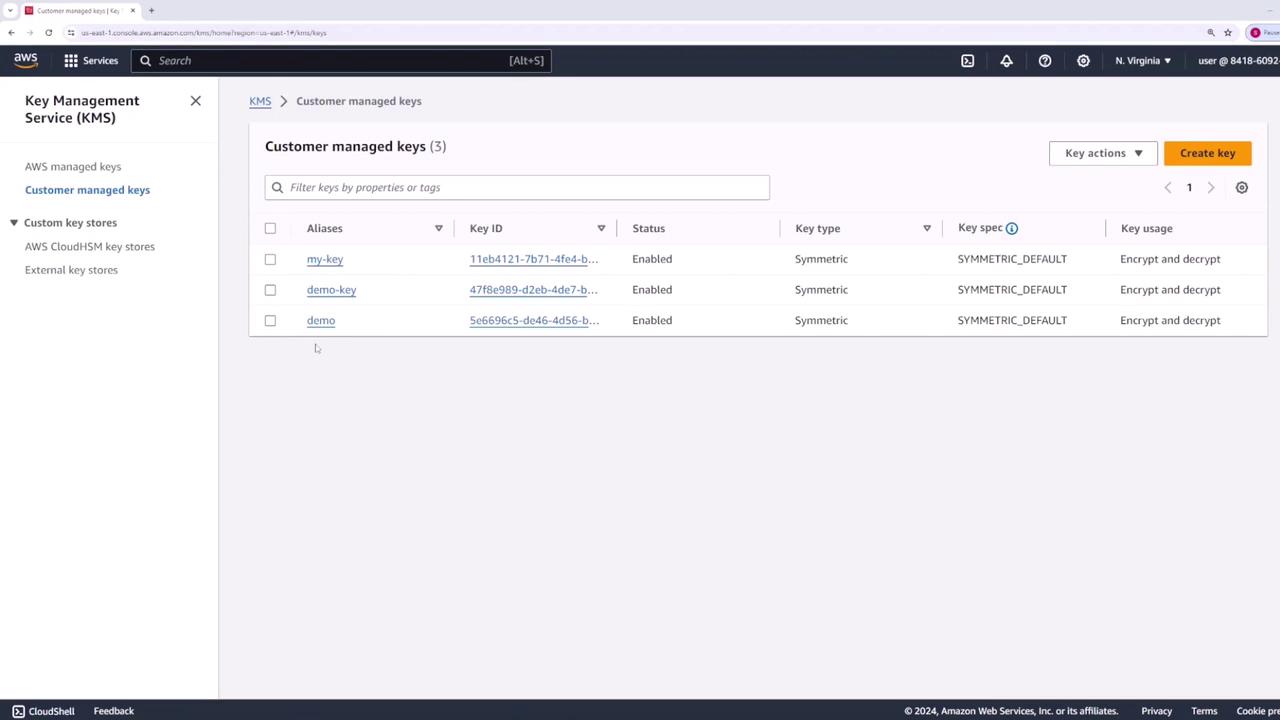
This diagram from the AWS KMS console displays your customer-managed keys, including the "demo" key:
## Encrypting Data
With your plaintext data key ready, use it to encrypt the "db-creds" file with OpenSSL. Execute the following command:
```bash theme={null}
openssl enc -e -aes256 -pass file:plaintext.key -in db-creds -pbkdf2 > encrypted-data
```
In this command:
* OpenSSL employs the AES-256 cipher.
* The encryption key is read from the provided plaintext key file.
* The `-pbkdf2` flag ensures a secure key derivation and prevents warnings.
For enhanced security, remove the plaintext key file after encryption:
```bash theme={null}
rm plaintext.key
```
Removing the plaintext key from disk prevents it from being compromised, ensuring the security of your encrypted data.
## Decrypting Data
To decrypt the encrypted data file later, follow these steps:
1. **Decrypt the Encrypted Key Using AWS KMS**
Run the command below to decrypt the stored encrypted key:
```bash theme={null}
aws kms decrypt --ciphertext-blob fileb://encrypted-key
```
The output will resemble:
```json theme={null}
{
"KeyId": "arn:aws:kms:us-east-1:841860927337:key/5e6696c5-de46-4d56-bb50-a9b71e187cad",
"Plaintext": "2gyy7bp/qPhuH36N3T9xKY+VHG+0BVaM2Y9n/RHM=",
"EncryptionAlgorithm": "SYMMETRIC_DEFAULT"
}
```
2. **Store the Decrypted Plaintext Key**
Decode the returned plaintext key and save it:
```bash theme={null}
echo '2gyy7bp/qPhuH36N3T9xKY+VHG+0BVaM2Y9n/RHM=' | base64 -d > plaintext.key
```
3. **Decrypt the Data Using OpenSSL**
Now decrypt the file with this command:
```bash theme={null}
openssl enc -d -aes256 -pass file:plaintext.key -in encrypted-data -out decrypted-data -pbkdf2
```
The `-d` flag indicates decryption. After executing this command, the file "decrypted-data" will match the original "db-creds" file.
## Final Notes
Envelope encryption requires you to store both the encrypted data and the corresponding encrypted data key. When decryption is necessary, AWS KMS can be used to extract the plaintext key from the encrypted key. Then, OpenSSL uses this plaintext key to restore your original data. This method ensures the data key is never stored in plaintext for an extended period, enhancing your overall security.
By following this workflow, you effectively safeguard your sensitive data while leveraging the robust encryption capabilities offered by AWS KMS and OpenSSL.
That concludes our walkthrough on AWS KMS envelope encryption. Happy encrypting!
## Additional Resources
* [AWS Key Management Service Documentation](https://aws.amazon.com/kms/)
* [OpenSSL Documentation](https://www.openssl.org/docs/)
* [AWS Security Best Practices](https://aws.amazon.com/architecture/security-best-practices/)