> ## Documentation Index
> Fetch the complete documentation index at: https://notes.kodekloud.com/llms.txt
> Use this file to discover all available pages before exploring further.
# S3 Pre Signed URLs Demo
> Demonstrates creating and using AWS S3 pre-signed URLs from the console, showing temporary object access and how creator permissions affect URL access
This demo shows how S3 pre-signed URLs work and how to create them from the AWS Management Console. Pre-signed URLs let you give time-limited access to a specific S3 object without making the bucket or object publicly readable. For more details, see the AWS guide: [https://docs.aws.amazon.com/AmazonS3/latest/userguide/ShareObjectPreSignedURL.html](https://docs.aws.amazon.com/AmazonS3/latest/userguide/ShareObjectPreSignedURL.html).
## 1. Create a private bucket
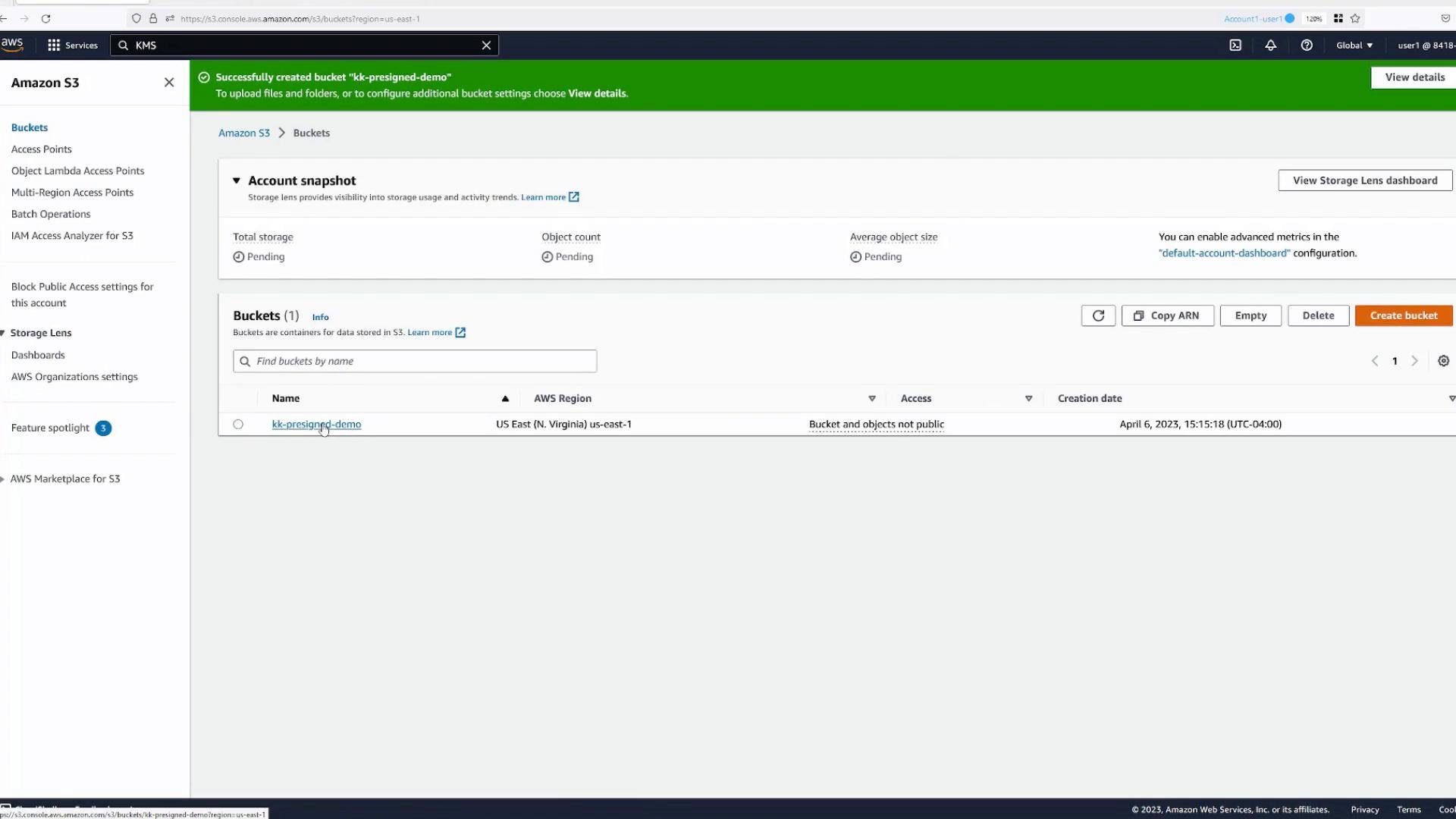
I created a new S3 bucket using the console with all default settings and left **Block all public access** enabled. With this configuration the bucket and its objects are accessible only to the AWS account root user and to IAM principals that have explicit permissions.
 ## 2. Upload an object and observe default access
I uploaded an object (boat.jpg) into the bucket. As an authenticated user in this account I can open the object in the console and view it. Unauthenticated or anonymous users will receive Access Denied because the bucket blocks public access and there is no bucket policy permitting anonymous reads.
If I need to grant temporary access to someone who does not have an AWS account, I can create a pre-signed URL for that object.
## 3. Generate a pre-signed URL from the console
From the object details page select the “Share with a pre-signed URL” option, pick an expiration (for example, 30 minutes), and generate the URL. The console copies the pre-signed URL to your clipboard.
## 2. Upload an object and observe default access
I uploaded an object (boat.jpg) into the bucket. As an authenticated user in this account I can open the object in the console and view it. Unauthenticated or anonymous users will receive Access Denied because the bucket blocks public access and there is no bucket policy permitting anonymous reads.
If I need to grant temporary access to someone who does not have an AWS account, I can create a pre-signed URL for that object.
## 3. Generate a pre-signed URL from the console
From the object details page select the “Share with a pre-signed URL” option, pick an expiration (for example, 30 minutes), and generate the URL. The console copies the pre-signed URL to your clipboard.
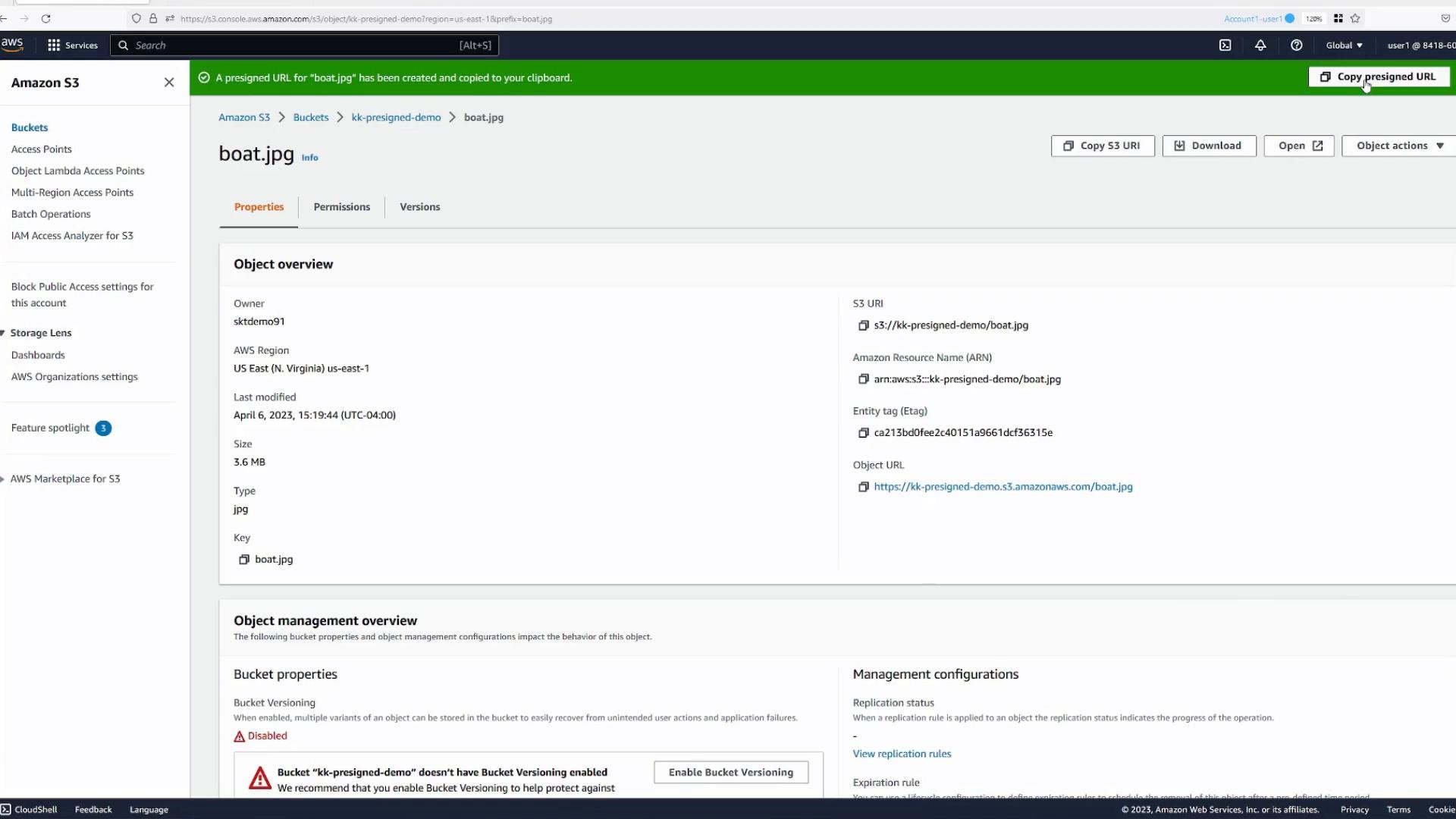 If you paste the pre-signed URL into a browser you can see the authentication query parameters embedded in the URL. Anyone who has that URL can access the object until it expires (30 minutes in this example). In production systems you typically generate pre-signed URLs programmatically using the AWS SDKs or AWS CLI; the underlying mechanism is the same.
## Object identifiers used in this demo
| Identifier | Value |
| - | - |
| S3 URI | `s3://kk-presigned-demo/boat.jpg` |
| Amazon Resource Name (ARN) | `arn:aws:s3:::kk-presigned-demo/boat.jpg` |
| Entity tag (Etag) | `ca213bd0fee2c40151a9661dcf36315e` |
| Object URL | `https://kk-presigned-demo.s3.amazonaws.com/boat.jpg` |
## 4. Inspect a different IAM principal (user2)
Next I opened the IAM console to inspect another user in the account, `user2`, and to show the permissions attached to that user.
If you paste the pre-signed URL into a browser you can see the authentication query parameters embedded in the URL. Anyone who has that URL can access the object until it expires (30 minutes in this example). In production systems you typically generate pre-signed URLs programmatically using the AWS SDKs or AWS CLI; the underlying mechanism is the same.
## Object identifiers used in this demo
| Identifier | Value |
| - | - |
| S3 URI | `s3://kk-presigned-demo/boat.jpg` |
| Amazon Resource Name (ARN) | `arn:aws:s3:::kk-presigned-demo/boat.jpg` |
| Entity tag (Etag) | `ca213bd0fee2c40151a9661dcf36315e` |
| Object URL | `https://kk-presigned-demo.s3.amazonaws.com/boat.jpg` |
## 4. Inspect a different IAM principal (user2)
Next I opened the IAM console to inspect another user in the account, `user2`, and to show the permissions attached to that user.
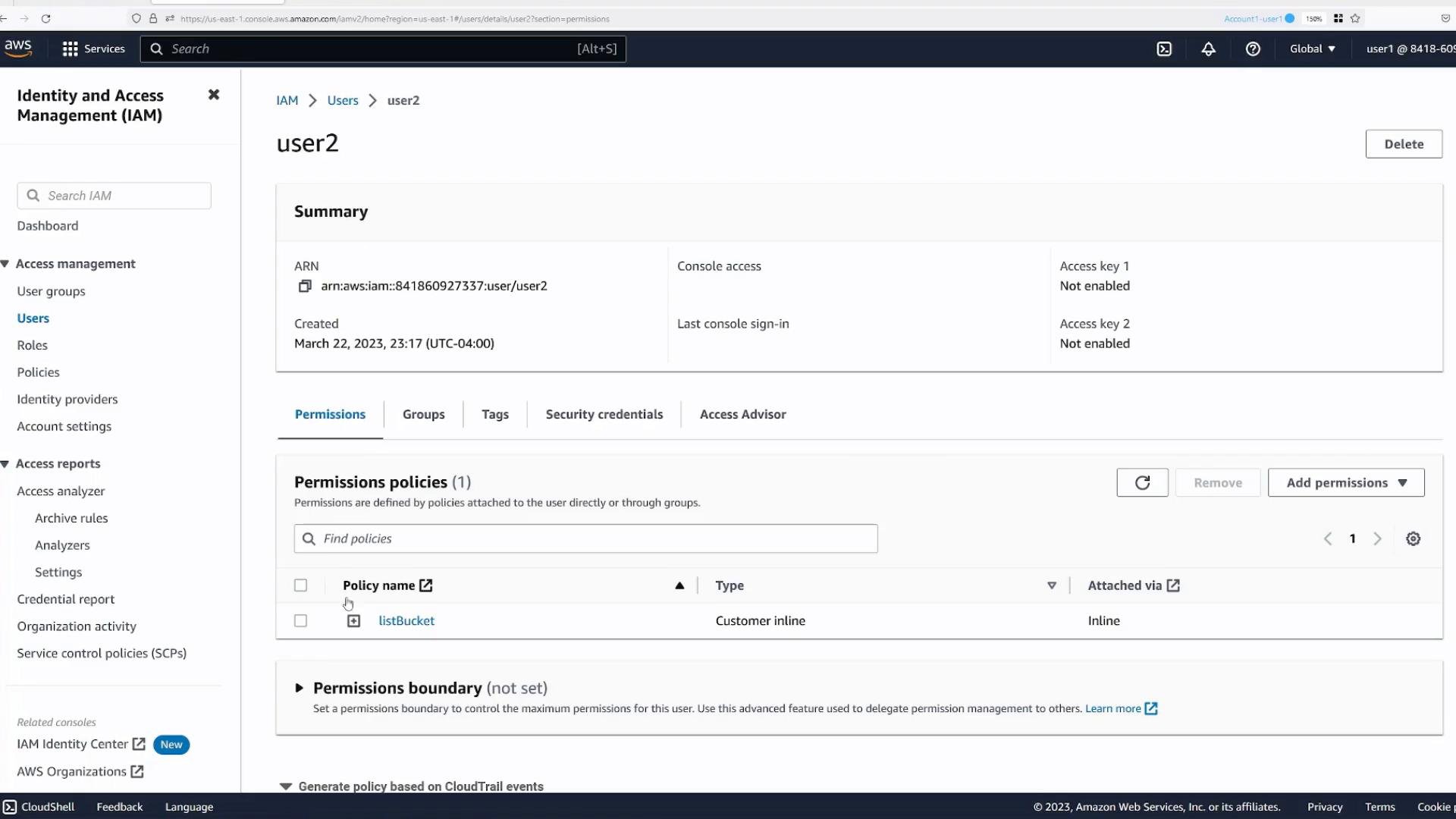 user2 has an inline policy that allows only listing buckets and listing a bucket’s contents — not reading objects:
```json theme={null}
{
"Version": "2012-10-17",
"Statement": [
{
"Sid": "VisualEditor0",
"Effect": "Allow",
"Action": [
"s3:ListAllMyBuckets",
"s3:ListBucket"
],
"Resource": "*"
}
]
}
```
Because user2 lacks `s3:GetObject`, attempting to view the object produces Access Denied:
```xml theme={null}
user2 has an inline policy that allows only listing buckets and listing a bucket’s contents — not reading objects:
```json theme={null}
{
"Version": "2012-10-17",
"Statement": [
{
"Sid": "VisualEditor0",
"Effect": "Allow",
"Action": [
"s3:ListAllMyBuckets",
"s3:ListBucket"
],
"Resource": "*"
}
]
}
```
Because user2 lacks `s3:GetObject`, attempting to view the object produces Access Denied:
```xml theme={null}
AccessDenied
Access Denied
R4HYNH3DN9619F4V
nAAbHunl4wcbQPzYycPoVOc2tSEtDMrCg4DcyjhwbNWfa1KydLXodADgJf/MlLrUijzX9oCK8W0=
```
A pre-signed URL grants the bearer the permissions of the AWS principal who generated the URL. It does not grant additional permissions. The URL allows requests to act as that principal for the specified operation and time window — but only if that principal already has the necessary permissions.
## 5. What happens when a restricted principal creates a pre-signed URL?
To demonstrate the principle above: user2 can use the console to generate a pre-signed URL for the object and copy it. However, because user2 does not have permission to `s3:GetObject`, any public or anonymous user who tries to use that pre-signed URL will also receive Access Denied. The pre-signed URL triggers a request that is evaluated against user2’s permissions — it does not elevate privileges.
A public user accessing the URL created by user2 will see:
```xml theme={null}
AccessDenied
Access Denied
SNG86SRVMH5J2S8T
Lkg7QUv2wnD6v+vzGr7bGlWcxRjdmixx7tSj6EJgFHBOPAvtn3xFjdunqy4/4ZRpB8rlFhF+FoZnq=
```
Do not share pre-signed URLs longer than necessary. Anyone with the URL can access the object until it expires. If a principal with broad permissions generates a long-lived pre-signed URL, that URL effectively extends those permissions to anyone who holds it.
## Summary
* Pre-signed URLs provide temporary, shareable access to specific S3 objects without changing bucket ACLs or bucket policies.
* The URL conveys the permissions of the principal who created it — it does not add privileges.
* Generate pre-signed URLs from the console for quick sharing or programmatically for integration using the AWS SDKs or AWS CLI.
Links and references
* AWS: Share an S3 object using a pre-signed URL — [https://docs.aws.amazon.com/AmazonS3/latest/userguide/ShareObjectPreSignedURL.html](https://docs.aws.amazon.com/AmazonS3/latest/userguide/ShareObjectPreSignedURL.html)
* AWS SDKs and Tools — [https://aws.amazon.com/tools/](https://aws.amazon.com/tools/)
* AWS CLI — [https://aws.amazon.com/cli/](https://aws.amazon.com/cli/)
This documentation is built and hosted on [Mintlify](https://mintlify.com), a developer documentation platform.