> ## Documentation Index
> Fetch the complete documentation index at: https://notes.kodekloud.com/llms.txt
> Use this file to discover all available pages before exploring further.
# Demo AWS Glue ETL Jobs for ML Data Preparation
> Demonstrates using AWS Glue Studio Visual ETL to transform Titanic CSV data, change schema, drop columns, and write processed CSV to S3 for ML workflows
Welcome back. This guide demonstrates how to use AWS Glue Studio's Visual ETL to prepare data for machine learning workflows. We'll change a dataset schema (type casting and column removal) and write the processed CSV back to Amazon S3.
AWS Glue, AWS Data Wrangler, and AWS Glue DataBrew each help with data transformation:
* AWS Glue provides a full managed ETL service (including streaming integration with Amazon Kinesis).
* AWS Data Wrangler and AWS Glue DataBrew provide interactive, built-in transformations for ad hoc or notebook-based workflows.
In this lesson we focus on Glue Studio's Visual ETL (the graphical job authoring experience).
For this demo we use the Titanic dataset stored in an S3 bucket with the following layout: models, predictions, processed, raw, and training.
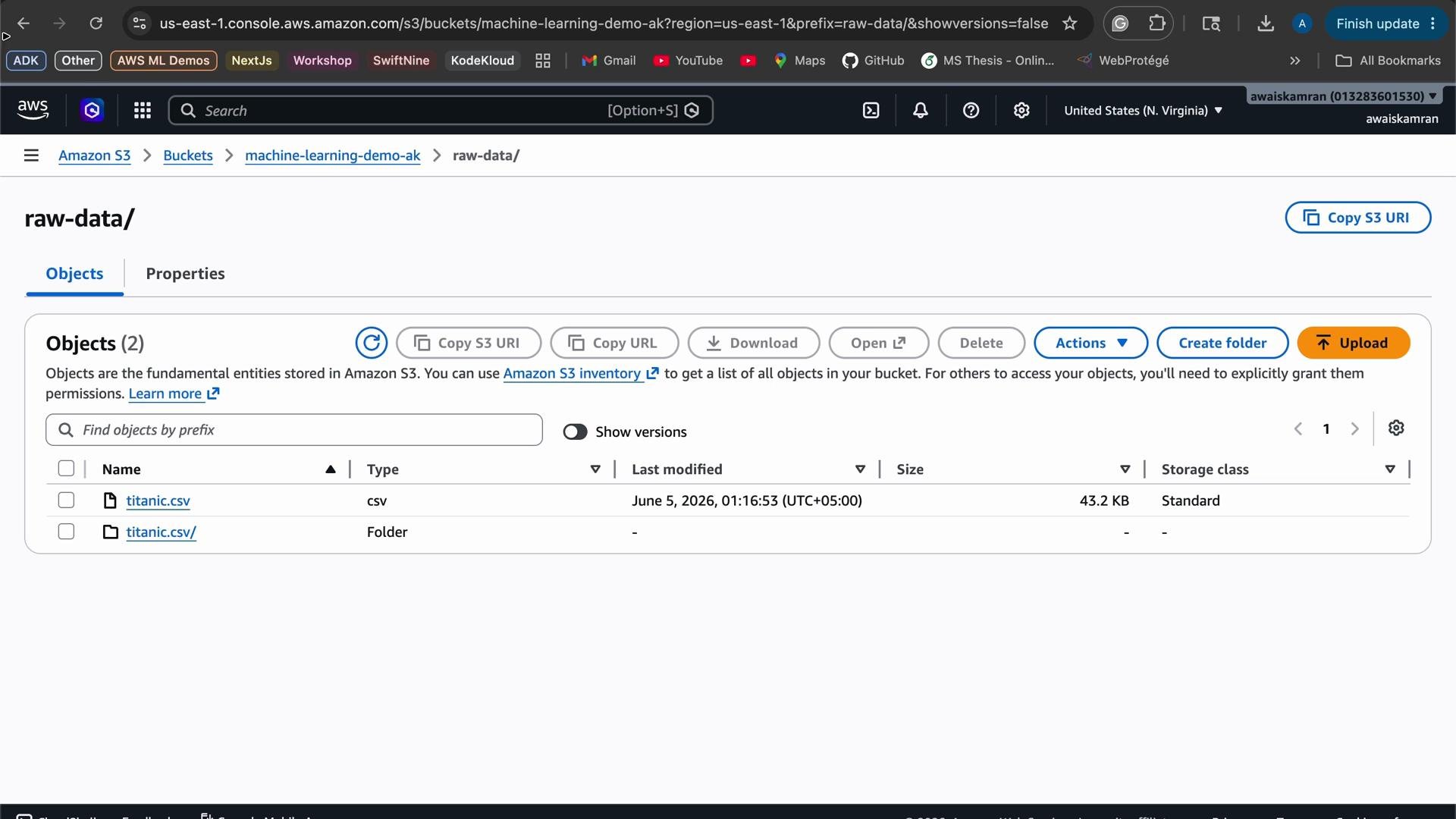
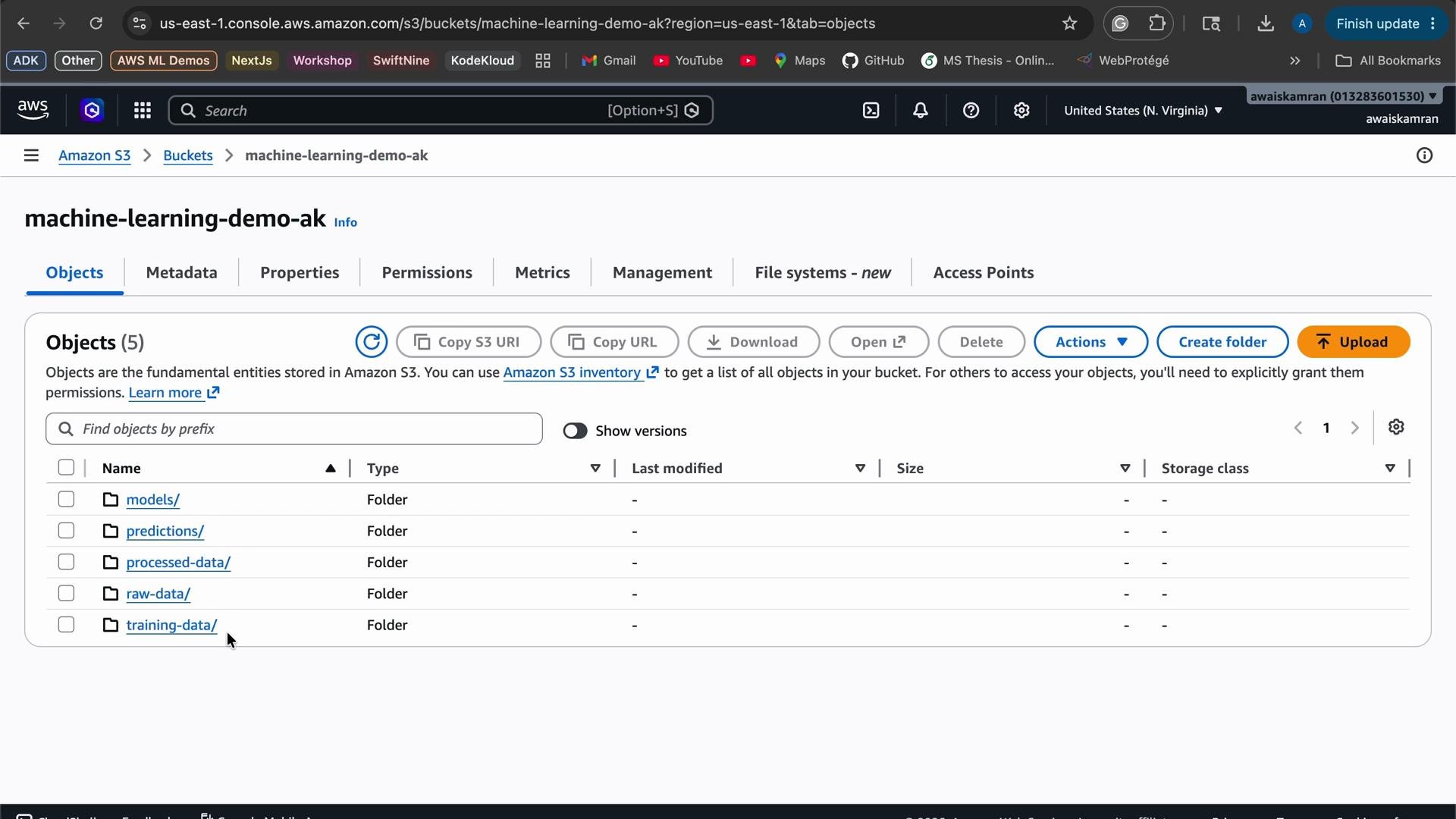 Most raw training data lives in the `raw` folder. Our goal:
* Cast a few columns to appropriate types (e.g., convert `pclass` to integer).
* Drop an unnecessary column (`parents/children`).
* Write the cleaned CSV to the `processed` folder.
Most raw training data lives in the `raw` folder. Our goal:
* Cast a few columns to appropriate types (e.g., convert `pclass` to integer).
* Drop an unnecessary column (`parents/children`).
* Write the cleaned CSV to the `processed` folder.
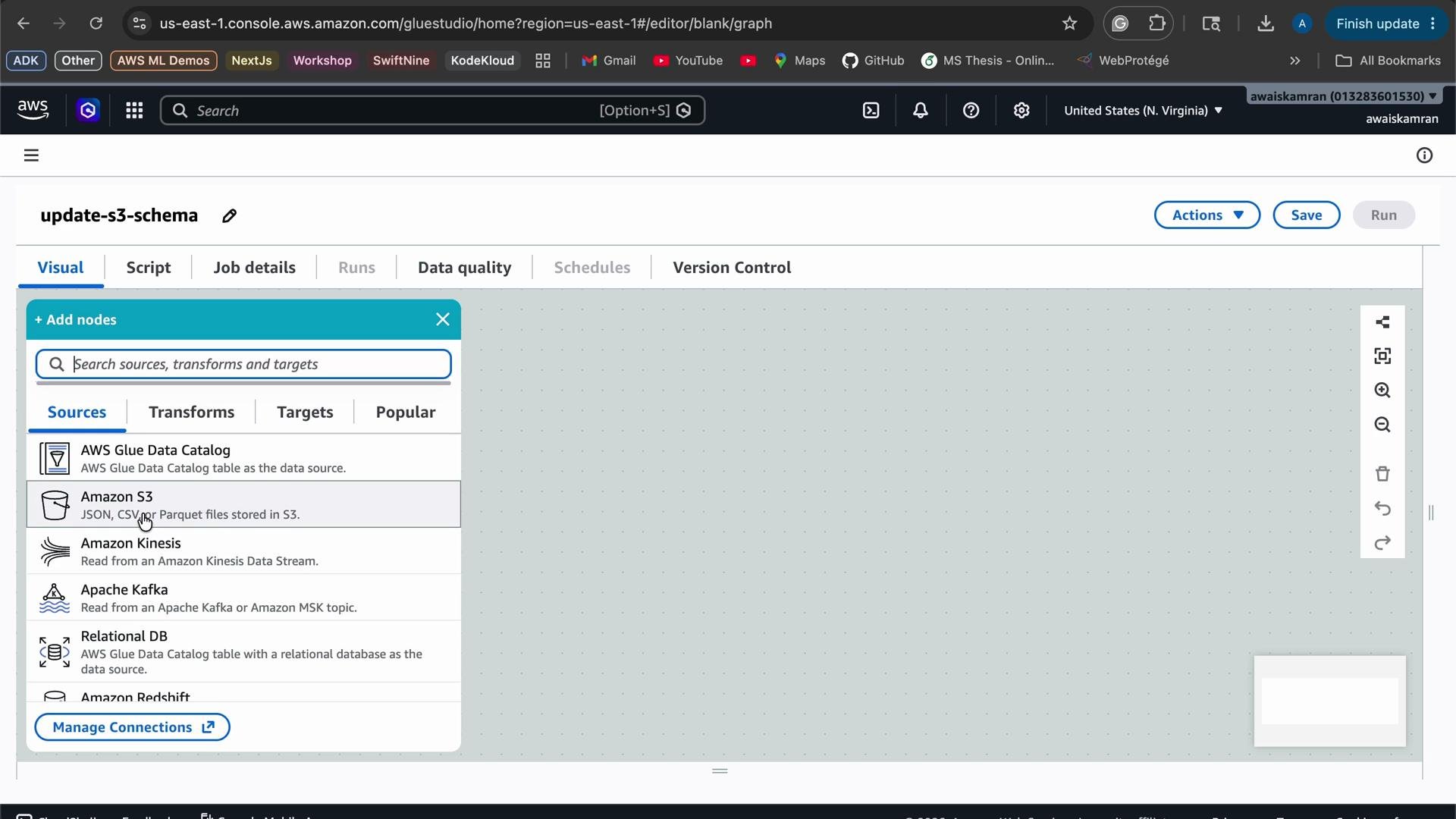
 ## Visual ETL (Glue Studio) — Graph-based authoring
Glue Studio uses a graph model: nodes = sources, transformations, targets. For this job we choose Amazon S3 as the source.
## Visual ETL (Glue Studio) — Graph-based authoring
Glue Studio uses a graph model: nodes = sources, transformations, targets. For this job we choose Amazon S3 as the source.
 Steps (high level)
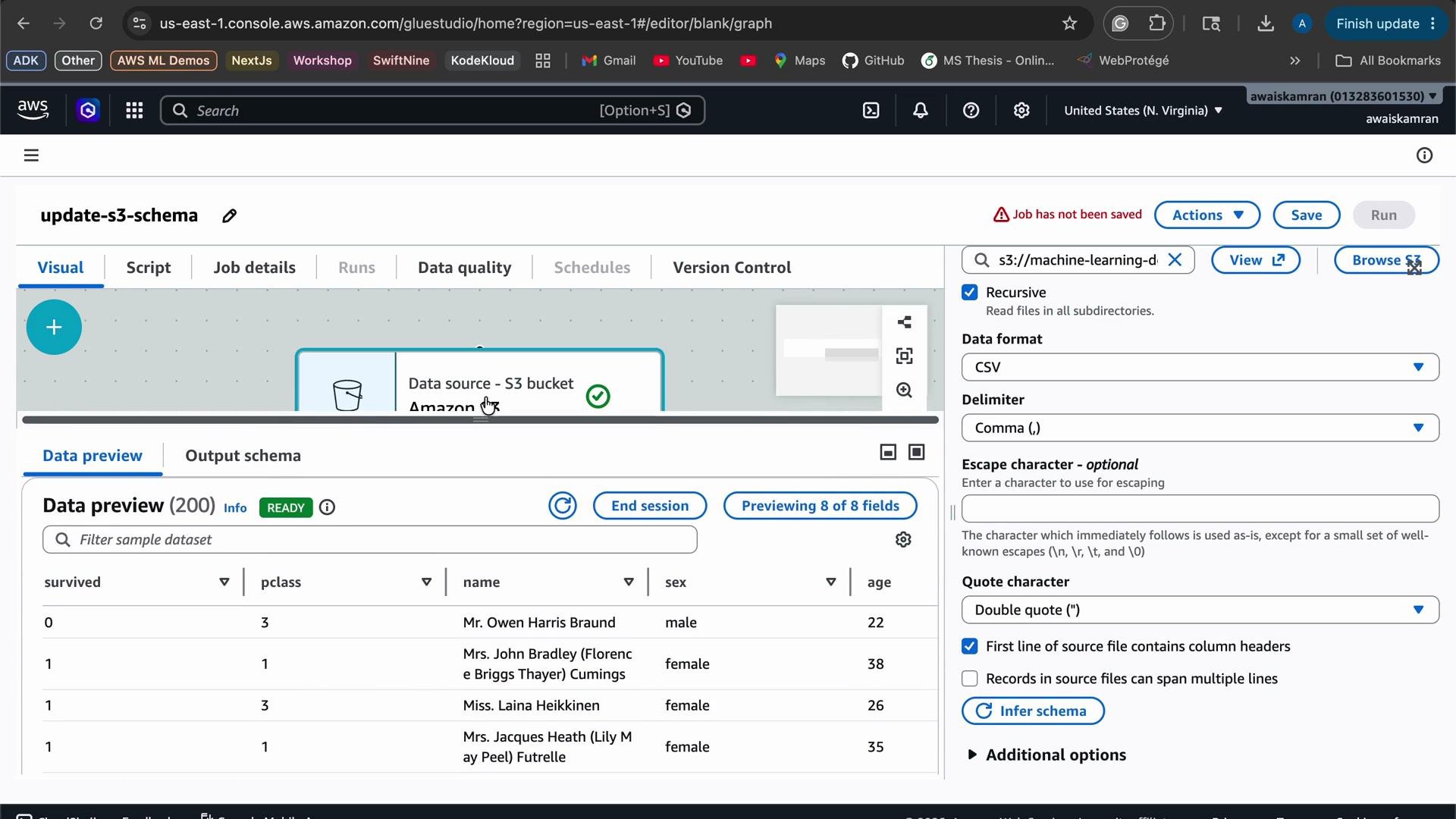
1. Add an S3 source node and point it to the `raw/titanic.csv` path; select CSV format.
2. Choose or create an IAM role that grants Glue read/write access to S3.
3. Preview the inferred schema and data.
4. Add a "Change Schema" transformation node to cast types and drop columns.
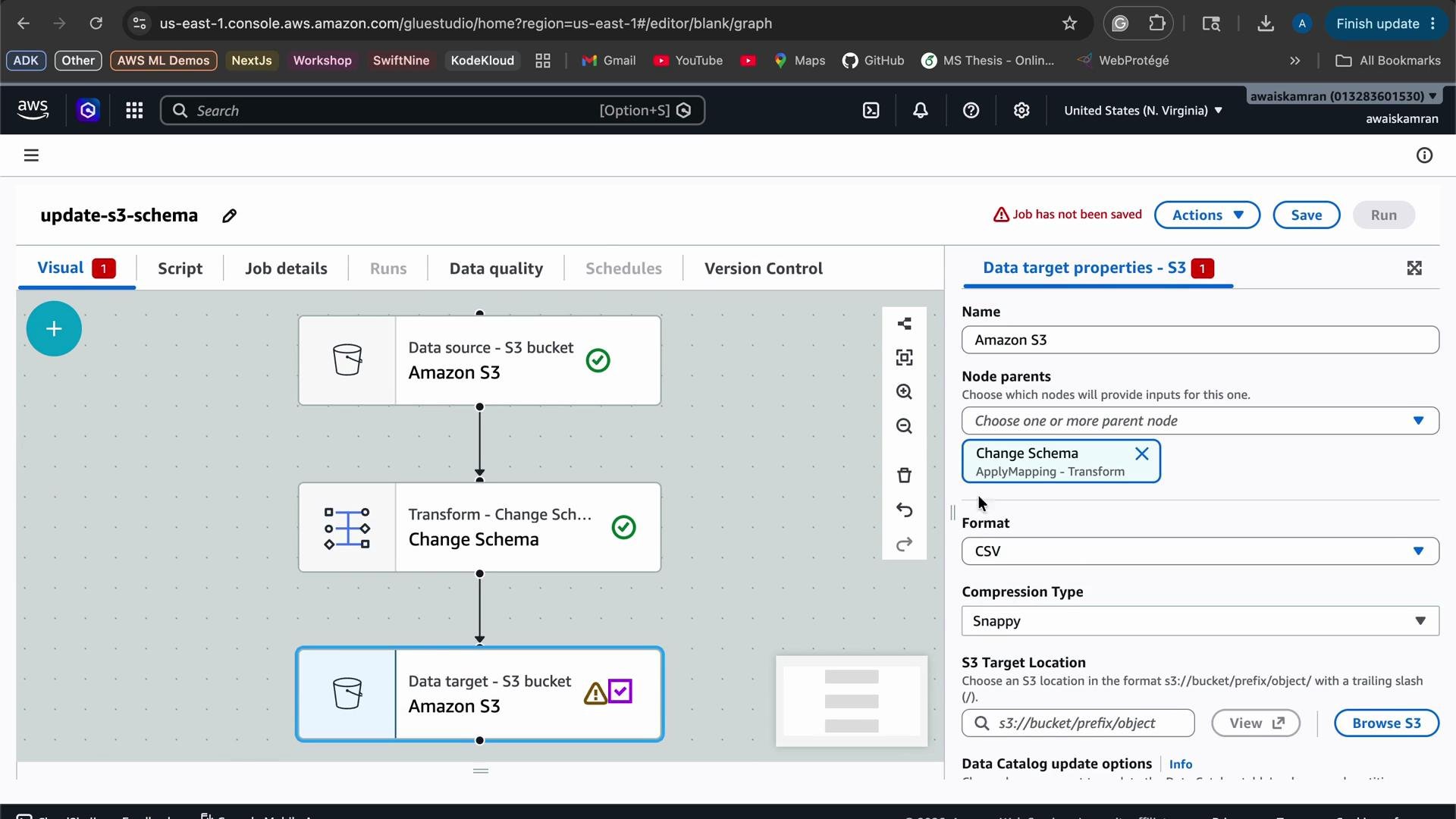
5. Add an S3 target node and configure output path (`processed/`) and CSV settings.
6. Save and run the job; verify the processed output.
Make sure the IAM role provided to the Glue job has S3 read access to the source and S3 write access to the target path. If you need a starting point, attach a policy that grants `s3:GetObject`, `s3:ListBucket`, and `s3:PutObject` for the relevant prefixes. This avoids runtime failures due to permission errors.
You can preview the dataset and confirm the schema before applying transformations.
Steps (high level)
1. Add an S3 source node and point it to the `raw/titanic.csv` path; select CSV format.
2. Choose or create an IAM role that grants Glue read/write access to S3.
3. Preview the inferred schema and data.
4. Add a "Change Schema" transformation node to cast types and drop columns.
5. Add an S3 target node and configure output path (`processed/`) and CSV settings.
6. Save and run the job; verify the processed output.
Make sure the IAM role provided to the Glue job has S3 read access to the source and S3 write access to the target path. If you need a starting point, attach a policy that grants `s3:GetObject`, `s3:ListBucket`, and `s3:PutObject` for the relevant prefixes. This avoids runtime failures due to permission errors.
You can preview the dataset and confirm the schema before applying transformations.
 ## Apply schema changes
Add a transformation node. Glue Studio supports schema mapping and other transformations; DataBrew recipes are an alternate interactive option. For this example we use the "Change Schema" transformation to:
* Cast `pclass` (currently inferred as string) to `integer`.
* Drop the `parents/children` column (not needed for the ML workflow).
## Apply schema changes
Add a transformation node. Glue Studio supports schema mapping and other transformations; DataBrew recipes are an alternate interactive option. For this example we use the "Change Schema" transformation to:
* Cast `pclass` (currently inferred as string) to `integer`.
* Drop the `parents/children` column (not needed for the ML workflow).
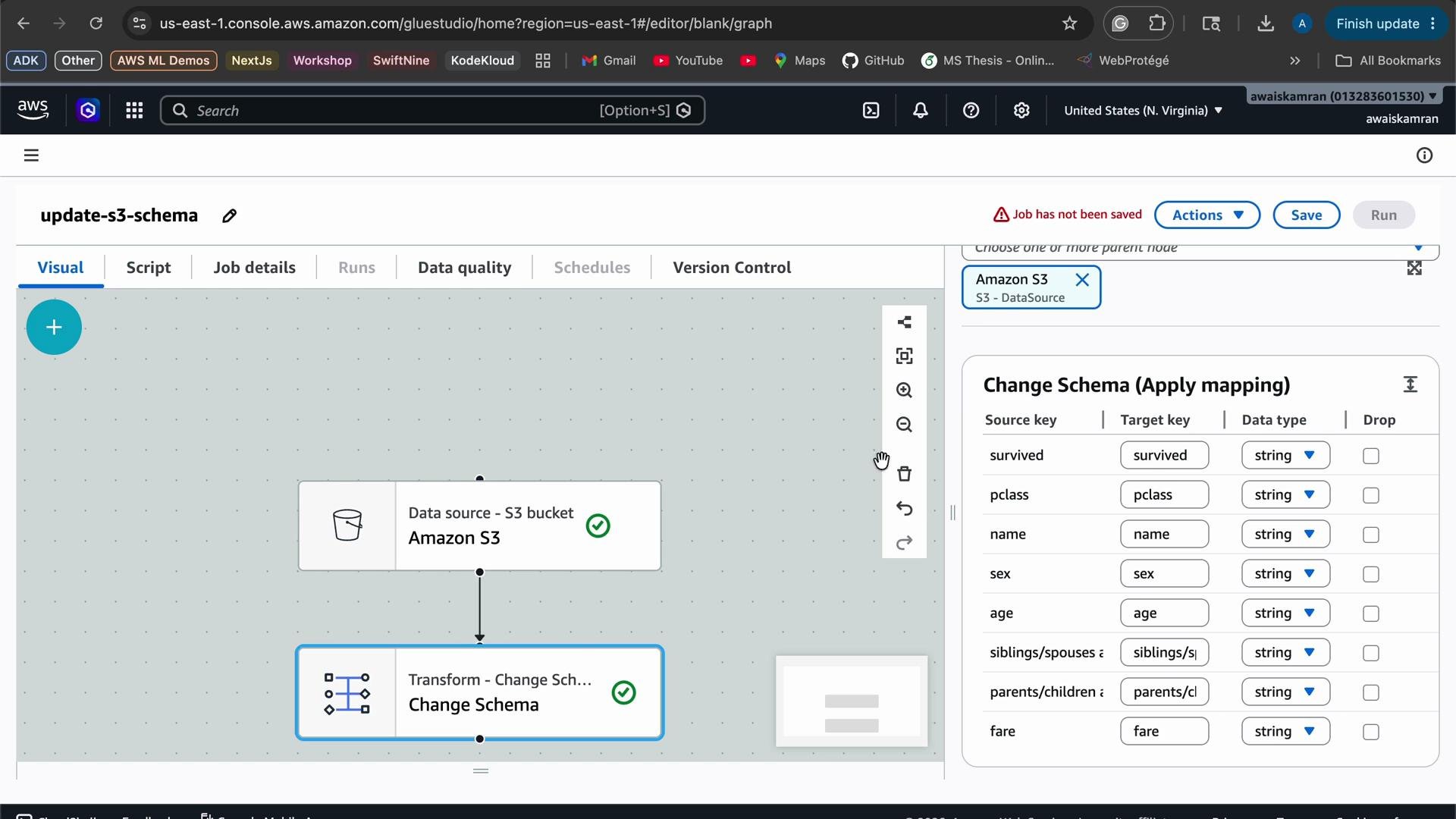 Transformation summary
| Column | Source Type (inferred) | Target Type / Action |
| ------------------------------------------------------------ | ---------------------: | ------------------------------------------------------- |
| `pclass` | `string` | Cast to `integer` |
| `parents/children` | `string` | Drop column |
| `survived`, `name`, `sex`, `siblings/spouses aboard`, `fare` | various | Keep as-is (ensure quoting for names containing commas) |
After adding the schema mappings, add an S3 target node and configure the output format to CSV (no compression) and set the output prefix to the `processed` folder.
Transformation summary
| Column | Source Type (inferred) | Target Type / Action |
| ------------------------------------------------------------ | ---------------------: | ------------------------------------------------------- |
| `pclass` | `string` | Cast to `integer` |
| `parents/children` | `string` | Drop column |
| `survived`, `name`, `sex`, `siblings/spouses aboard`, `fare` | various | Keep as-is (ensure quoting for names containing commas) |
After adding the schema mappings, add an S3 target node and configure the output format to CSV (no compression) and set the output prefix to the `processed` folder.
 ## Run the job and verify output
* Save and run the job. In this demo the job ran for \~1 minute and 6 seconds and used 10 DPUs.
* After the job completes, check the S3 `processed/` folder for the output CSV file and download it for inspection.
Example excerpt from the processed CSV (note: `pclass` is now integer and `parents/children` is removed; names with commas are quoted):
```csv theme={null}
"survived","pclass","name","sex","siblings/spouses aboard","fare"
"1",3,"Braund, Mr. Owen Harris","male","1","7.25"
"1",1,"Cumings, Mrs. John Bradley (Florence Briggs Thayer)","female","1","71.2833"
"0",3,"Heikkinen, Miss. Laina","female","0","7.925"
"1",1,"Futrelle, Mrs. Jacques Heath (Lily May Peel)","female","1","53.1"
"0",3,"Allen, Mr. William Henry","male","0","8.05"
"1",3,"Moran, Mr. James","male","0","8.4583"
```
This pattern—source → transformation(s) → target—can be reused for other data sources, schema changes, aggregations, and target formats (Parquet, JSON, etc.).
## Quick reference
| Task | Notes / Example |
| ------------------- | -------------------------------------------------------------------------------------------- |
| Source | Amazon S3 path to `raw/titanic.csv` (CSV) |
| IAM role | Provide a role with `s3:GetObject`, `s3:ListBucket`, `s3:PutObject` for relevant prefixes |
| Transformation | Use "Change Schema" in Glue Studio to cast `pclass` to `integer` and drop `parents/children` |
| Target | S3 prefix `processed/` — output CSV, no compression |
| Cost considerations | Glue job size (DPUs) and runtime affect cost; test on small data and scale as needed |
## Links and references
* [AWS Glue Studio — Visual ETL documentation](https://docs.aws.amazon.com/glue/latest/ug/glue-studio.html)
* [AWS Glue product page](https://aws.amazon.com/glue/)
* [AWS Data Wrangler docs](https://aws-data-wrangler.readthedocs.io/en/stable/)
* [AWS Glue DataBrew product page](https://aws.amazon.com/databrew/)
* [Amazon Kinesis](https://aws.amazon.com/kinesis/)
* [Amazon S3](https://aws.amazon.com/s3/)
* [IAM (Identity and Access Management)](https://aws.amazon.com/iam/)
After testing, remember to delete any temporary files, Glue jobs, and IAM roles you no longer need to avoid unexpected costs.
## Run the job and verify output
* Save and run the job. In this demo the job ran for \~1 minute and 6 seconds and used 10 DPUs.
* After the job completes, check the S3 `processed/` folder for the output CSV file and download it for inspection.
Example excerpt from the processed CSV (note: `pclass` is now integer and `parents/children` is removed; names with commas are quoted):
```csv theme={null}
"survived","pclass","name","sex","siblings/spouses aboard","fare"
"1",3,"Braund, Mr. Owen Harris","male","1","7.25"
"1",1,"Cumings, Mrs. John Bradley (Florence Briggs Thayer)","female","1","71.2833"
"0",3,"Heikkinen, Miss. Laina","female","0","7.925"
"1",1,"Futrelle, Mrs. Jacques Heath (Lily May Peel)","female","1","53.1"
"0",3,"Allen, Mr. William Henry","male","0","8.05"
"1",3,"Moran, Mr. James","male","0","8.4583"
```
This pattern—source → transformation(s) → target—can be reused for other data sources, schema changes, aggregations, and target formats (Parquet, JSON, etc.).
## Quick reference
| Task | Notes / Example |
| ------------------- | -------------------------------------------------------------------------------------------- |
| Source | Amazon S3 path to `raw/titanic.csv` (CSV) |
| IAM role | Provide a role with `s3:GetObject`, `s3:ListBucket`, `s3:PutObject` for relevant prefixes |
| Transformation | Use "Change Schema" in Glue Studio to cast `pclass` to `integer` and drop `parents/children` |
| Target | S3 prefix `processed/` — output CSV, no compression |
| Cost considerations | Glue job size (DPUs) and runtime affect cost; test on small data and scale as needed |
## Links and references
* [AWS Glue Studio — Visual ETL documentation](https://docs.aws.amazon.com/glue/latest/ug/glue-studio.html)
* [AWS Glue product page](https://aws.amazon.com/glue/)
* [AWS Data Wrangler docs](https://aws-data-wrangler.readthedocs.io/en/stable/)
* [AWS Glue DataBrew product page](https://aws.amazon.com/databrew/)
* [Amazon Kinesis](https://aws.amazon.com/kinesis/)
* [Amazon S3](https://aws.amazon.com/s3/)
* [IAM (Identity and Access Management)](https://aws.amazon.com/iam/)
After testing, remember to delete any temporary files, Glue jobs, and IAM roles you no longer need to avoid unexpected costs.