> ## Documentation Index
> Fetch the complete documentation index at: https://notes.kodekloud.com/llms.txt
> Use this file to discover all available pages before exploring further.
# Demo Setting up a Labeling Job with SageMaker Ground Truth
> Guide to creating and launching an image labeling job in Amazon SageMaker Ground Truth including S3 setup, IAM roles, workforce selection, and labeling interface configuration.
Welcome back. This guide shows how to create an image labeling job in Amazon SageMaker Ground Truth. Follow the steps below to point Ground Truth to your S3 dataset, configure the labeling task and workforce, and launch the job.
## What you'll accomplish
* Prepare images in Amazon S3 for labeling
* Configure a Ground Truth labeling job (image classification)
* Choose a workforce and customize the labeling UI
* Launch the job and validate the input connection
Prerequisites:
* An AWS account with permissions to create SageMaker jobs and access S3
* Images uploaded to S3 (see recommended structure below)
* An IAM execution role with S3 access and SageMaker Ground Truth permissions
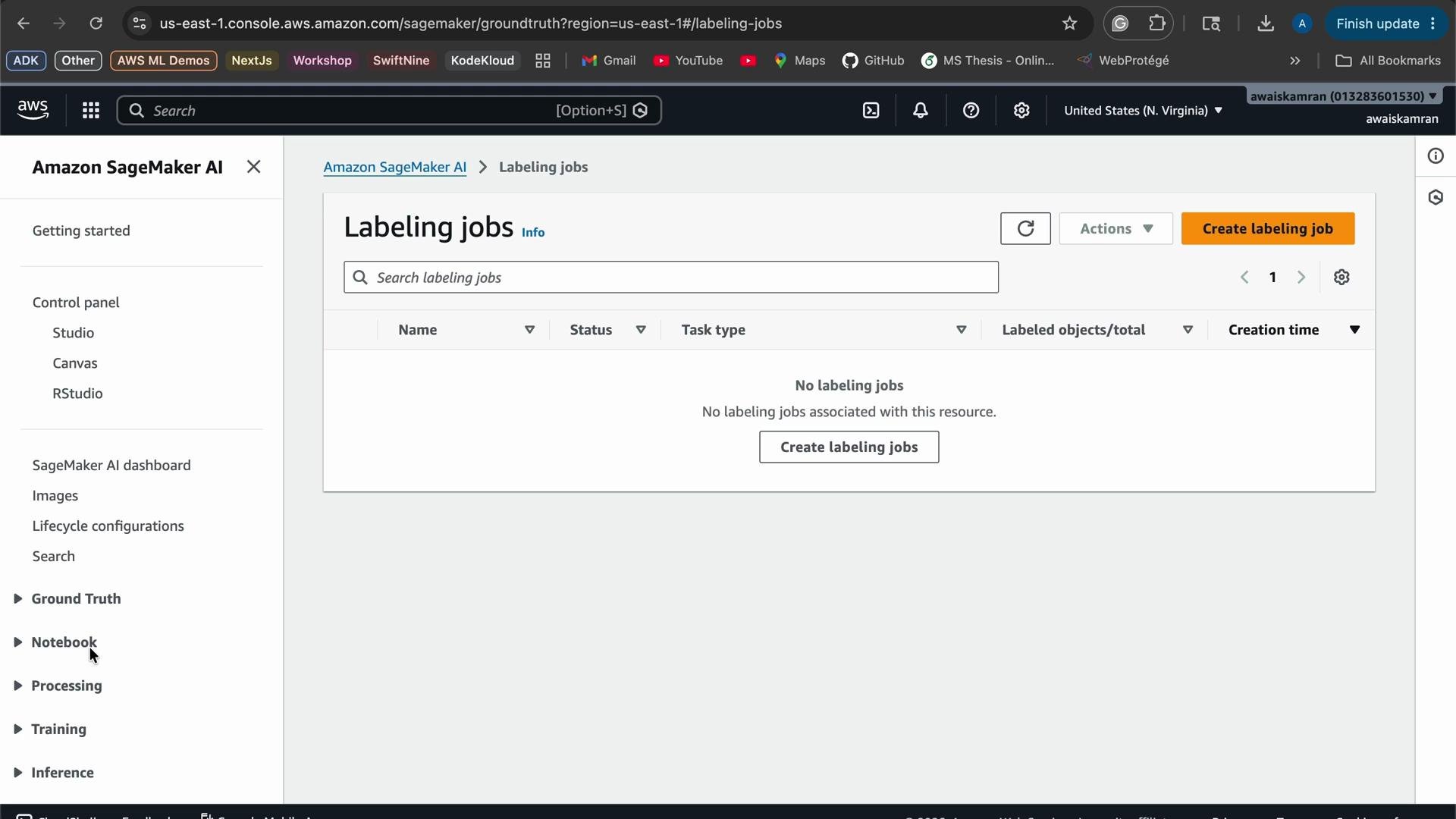
1. Navigate to the Ground Truth console
Open Amazon SageMaker and select Ground Truth → Labeling jobs to view existing jobs or create a new one.
 2. Create a new labeling job
* Click “Create labeling job”.
* Enter a descriptive job name, for example: `Cats-and-Dog-Labeling-Job`.
* For a quick setup, use the console’s automated data setup option to generate a manifest from an S3 prefix, or upload your own manifest.
Recommended S3 layout for image classification:
* `s3://your-bucket/train/cats/...`
* `s3://your-bucket/train/dogs/...`
Example manifest entry (Ground Truth accepts a JSONL manifest where each line is a JSON object):
```json theme={null}
{ "source-ref": "s3://your-bucket/train/cats/cat1.jpg" }
{ "source-ref": "s3://your-bucket/train/dogs/dog1.jpg" }
```
3. Browse S3 and select the data type
From the Ground Truth setup screen, browse to your S3 bucket and pick the data prefix or manifest. Select the task type as `Classification` and the data type as `Image`.
2. Create a new labeling job
* Click “Create labeling job”.
* Enter a descriptive job name, for example: `Cats-and-Dog-Labeling-Job`.
* For a quick setup, use the console’s automated data setup option to generate a manifest from an S3 prefix, or upload your own manifest.
Recommended S3 layout for image classification:
* `s3://your-bucket/train/cats/...`
* `s3://your-bucket/train/dogs/...`
Example manifest entry (Ground Truth accepts a JSONL manifest where each line is a JSON object):
```json theme={null}
{ "source-ref": "s3://your-bucket/train/cats/cat1.jpg" }
{ "source-ref": "s3://your-bucket/train/dogs/dog1.jpg" }
```
3. Browse S3 and select the data type
From the Ground Truth setup screen, browse to your S3 bucket and pick the data prefix or manifest. Select the task type as `Classification` and the data type as `Image`.
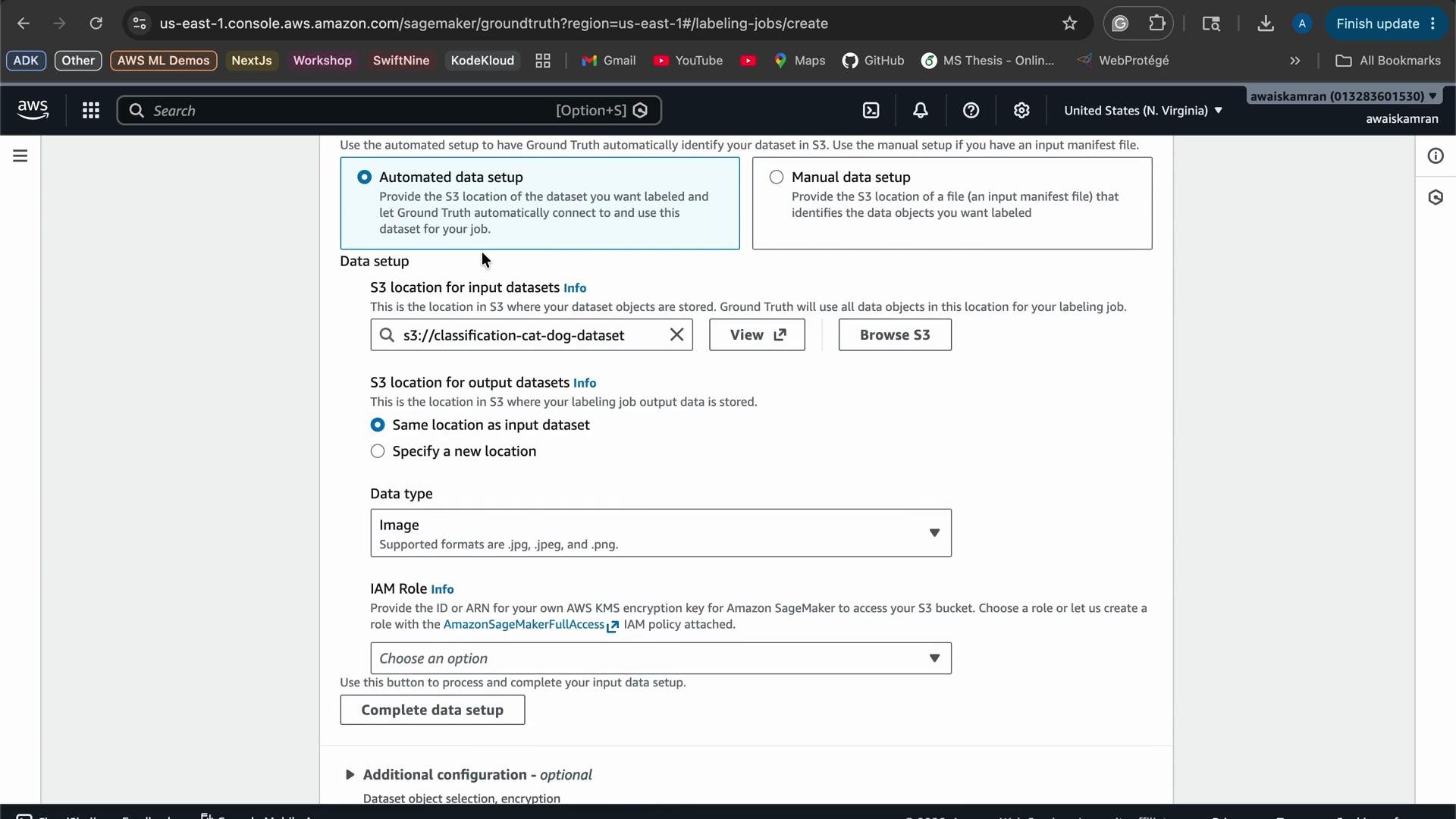 4. Choose an IAM execution role
Select an execution role that allows Ground Truth to read from your S3 bucket and write outputs. In this demo the existing IAM role `Lab4955` was used. Typical permissions required include:
* `s3:GetObject`, `s3:ListBucket` on the input bucket
* Permissions to create and manage labeling job resources in SageMaker
Tip: Use a least-privilege role that only allows access to the specific S3 prefix used by the job.
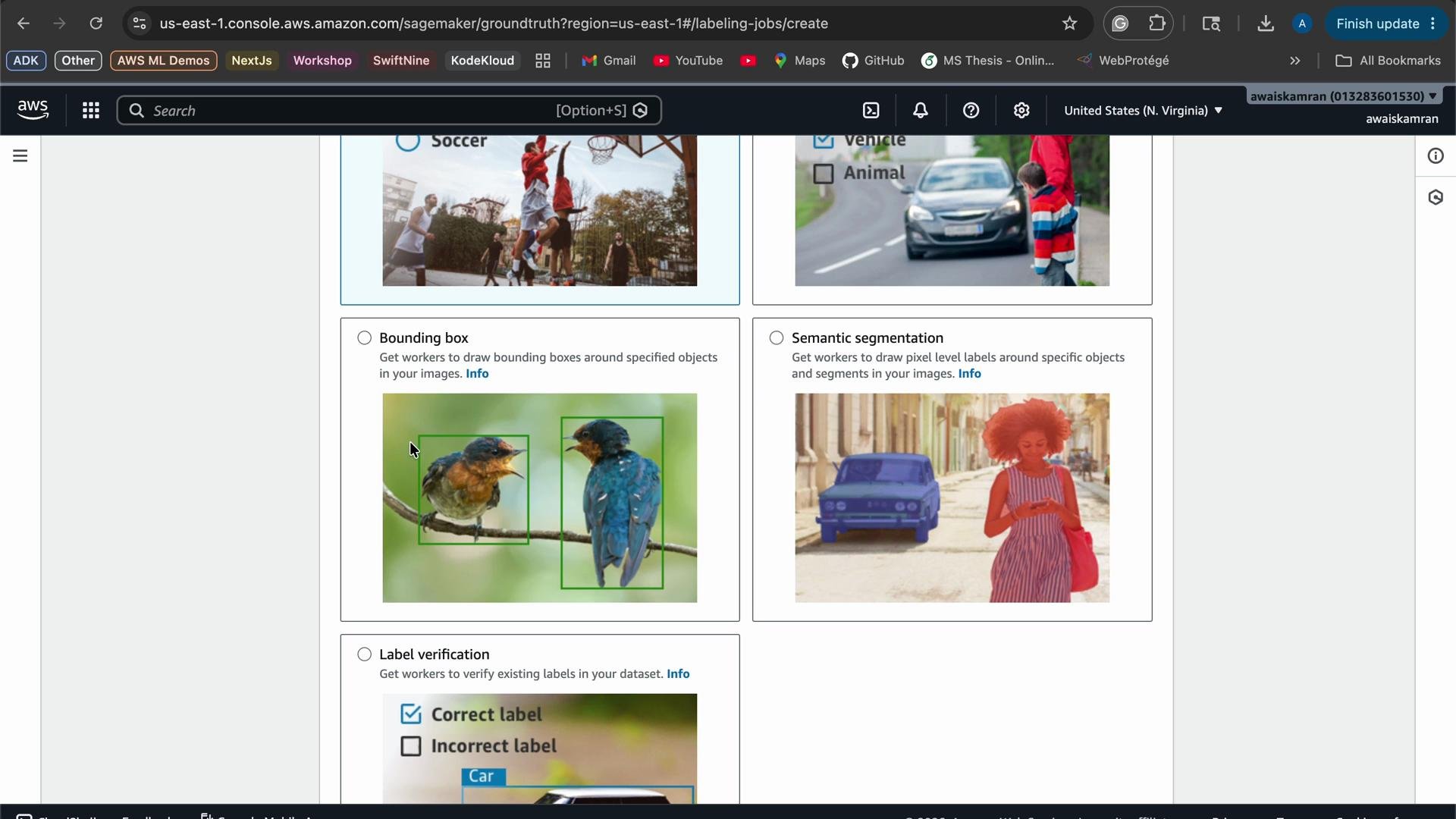
5. Select the labeling task and labeling interface
For this demo we select Image classification with a single label per image (each image is either "cat" or "dog").
Ground Truth supports multiple annotation types:
| Task Type | Use Case | Notes |
| --------------------------------- | ---------------------------------------------------- | ---------------------------------------------- |
| Single-label image classification | One label per image (e.g., basketball vs. soccer) | Use when each image belongs to a single class |
| Multi-label classification | Multiple labels per image (e.g., person and bicycle) | Use when multiple objects/classes can co-occur |
| Bounding box annotation | Detect objects and localize with rectangles | Useful for object detection models |
| Semantic segmentation | Pixel-level masks for precise regions | Useful for segmentation models |
| Label verification | Review or verify automated labels | Use for human-in-the-loop validation |
4. Choose an IAM execution role
Select an execution role that allows Ground Truth to read from your S3 bucket and write outputs. In this demo the existing IAM role `Lab4955` was used. Typical permissions required include:
* `s3:GetObject`, `s3:ListBucket` on the input bucket
* Permissions to create and manage labeling job resources in SageMaker
Tip: Use a least-privilege role that only allows access to the specific S3 prefix used by the job.
5. Select the labeling task and labeling interface
For this demo we select Image classification with a single label per image (each image is either "cat" or "dog").
Ground Truth supports multiple annotation types:
| Task Type | Use Case | Notes |
| --------------------------------- | ---------------------------------------------------- | ---------------------------------------------- |
| Single-label image classification | One label per image (e.g., basketball vs. soccer) | Use when each image belongs to a single class |
| Multi-label classification | Multiple labels per image (e.g., person and bicycle) | Use when multiple objects/classes can co-occur |
| Bounding box annotation | Detect objects and localize with rectangles | Useful for object detection models |
| Semantic segmentation | Pixel-level masks for precise regions | Useful for segmentation models |
| Label verification | Review or verify automated labels | Use for human-in-the-loop validation |
 6. Configure the workforce and labeler experience
Choose a workforce:
* Private workforce — your internal team or contractors (recommended for sensitive data).
* Amazon Mechanical Turk — a public, on-demand workforce (consider privacy and cost).
For a private workforce:
* Configure team name and invite labelers.
* Set per-task timeouts and review policies.
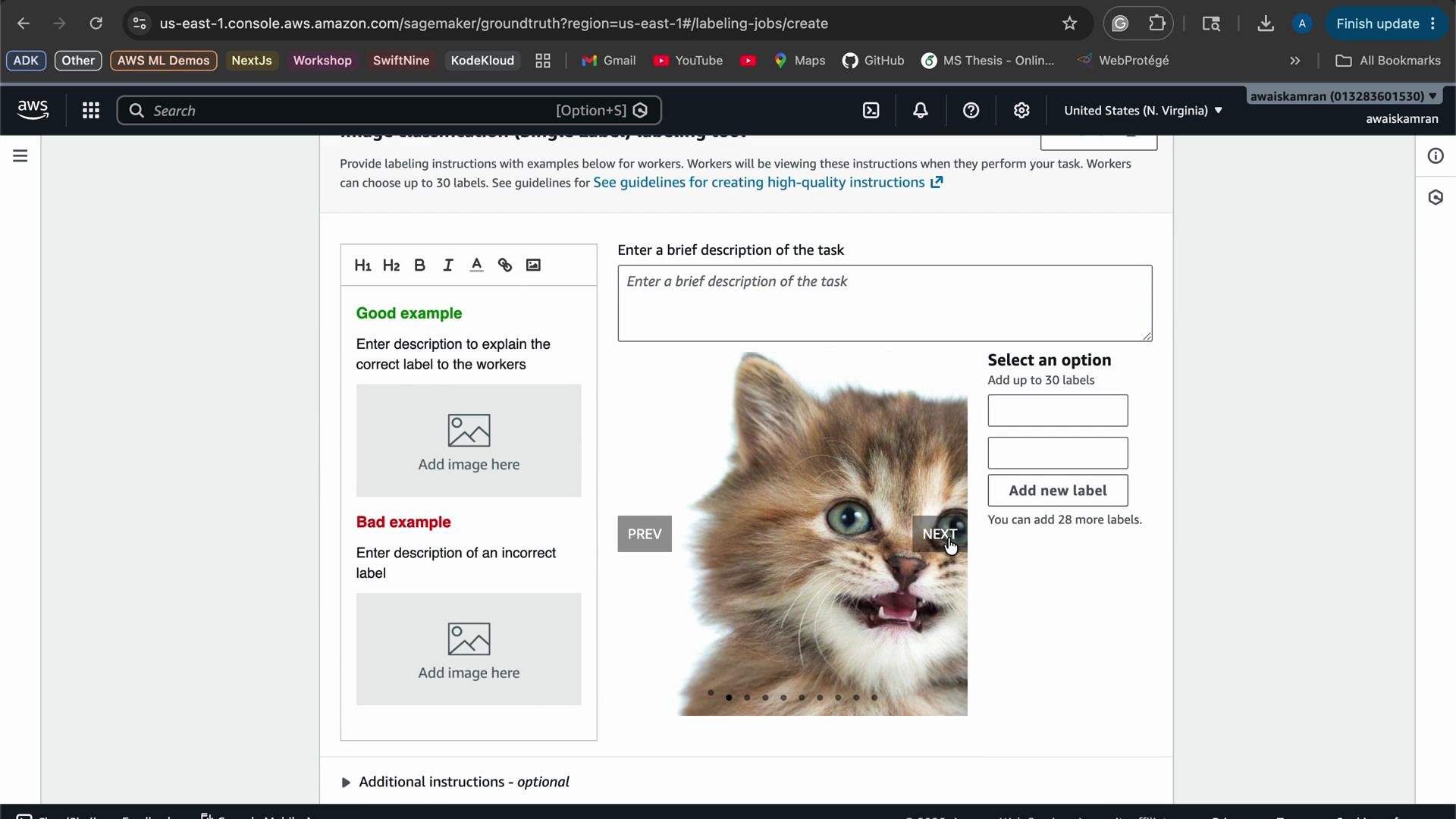
* Provide clear instructions, good/bad examples, and the set of classes labelers should choose from.
Ground Truth allows you to preview the labeling UI so you can confirm the experience before launching. Include example images and precise instructions to reduce ambiguity.
6. Configure the workforce and labeler experience
Choose a workforce:
* Private workforce — your internal team or contractors (recommended for sensitive data).
* Amazon Mechanical Turk — a public, on-demand workforce (consider privacy and cost).
For a private workforce:
* Configure team name and invite labelers.
* Set per-task timeouts and review policies.
* Provide clear instructions, good/bad examples, and the set of classes labelers should choose from.
Ground Truth allows you to preview the labeling UI so you can confirm the experience before launching. Include example images and precise instructions to reduce ambiguity.
 7. Launch and monitor the job
* Review configuration and IAM role.
* Start the job.
* Monitor progress on the Labeling jobs page; Ground Truth provides metrics and job logs to inspect worker performance and completed labels.
Make sure the IAM execution role has S3 access to the input prefix and permissions required by SageMaker Ground Truth. If you plan to use a public workforce (Mechanical Turk), review cost and data privacy implications before starting the job.
If your dataset contains PII or sensitive content, avoid public workforces and verify your data handling policies. Always limit the IAM role scope to the required S3 prefixes.
Further reading and references:
* [Amazon SageMaker Ground Truth documentation](https://docs.aws.amazon.com/sagemaker/latest/dg/sms.html)
* [Amazon S3 documentation](https://docs.aws.amazon.com/s3/index.html)
* [AWS IAM best practices](https://docs.aws.amazon.com/IAM/latest/UserGuide/best-practices.html)
Explore the Labeling jobs page to try different task types and refine settings for your dataset and model goals.
7. Launch and monitor the job
* Review configuration and IAM role.
* Start the job.
* Monitor progress on the Labeling jobs page; Ground Truth provides metrics and job logs to inspect worker performance and completed labels.
Make sure the IAM execution role has S3 access to the input prefix and permissions required by SageMaker Ground Truth. If you plan to use a public workforce (Mechanical Turk), review cost and data privacy implications before starting the job.
If your dataset contains PII or sensitive content, avoid public workforces and verify your data handling policies. Always limit the IAM role scope to the required S3 prefixes.
Further reading and references:
* [Amazon SageMaker Ground Truth documentation](https://docs.aws.amazon.com/sagemaker/latest/dg/sms.html)
* [Amazon S3 documentation](https://docs.aws.amazon.com/s3/index.html)
* [AWS IAM best practices](https://docs.aws.amazon.com/IAM/latest/UserGuide/best-practices.html)
Explore the Labeling jobs page to try different task types and refine settings for your dataset and model goals.