> ## Documentation Index
> Fetch the complete documentation index at: https://notes.kodekloud.com/llms.txt
> Use this file to discover all available pages before exploring further.
# Demo Exploring SageMaker Built in Algorithms
> Guide to using AWS SageMaker JumpStart to discover, evaluate, deploy, and fine-tune prebuilt machine learning models while managing costs and cleaning up resources
Welcome — in this lesson we’ll explore AWS SageMaker JumpStart and how it helps you quickly access, evaluate, deploy, and fine-tune pre-built models for common machine learning tasks.
Before we begin, a quick note about cost and cleanup.
Resources you create in SageMaker (instances, endpoints, training jobs, etc.) can incur charges. If you're following along, be sure to delete any endpoints, notebook kernels, or Studio apps you no longer need.
SageMaker Studio is the main UI for JumpStart and many other SageMaker features. Here’s an example Studio view showing applications such as JupyterLab and the Code Editor.
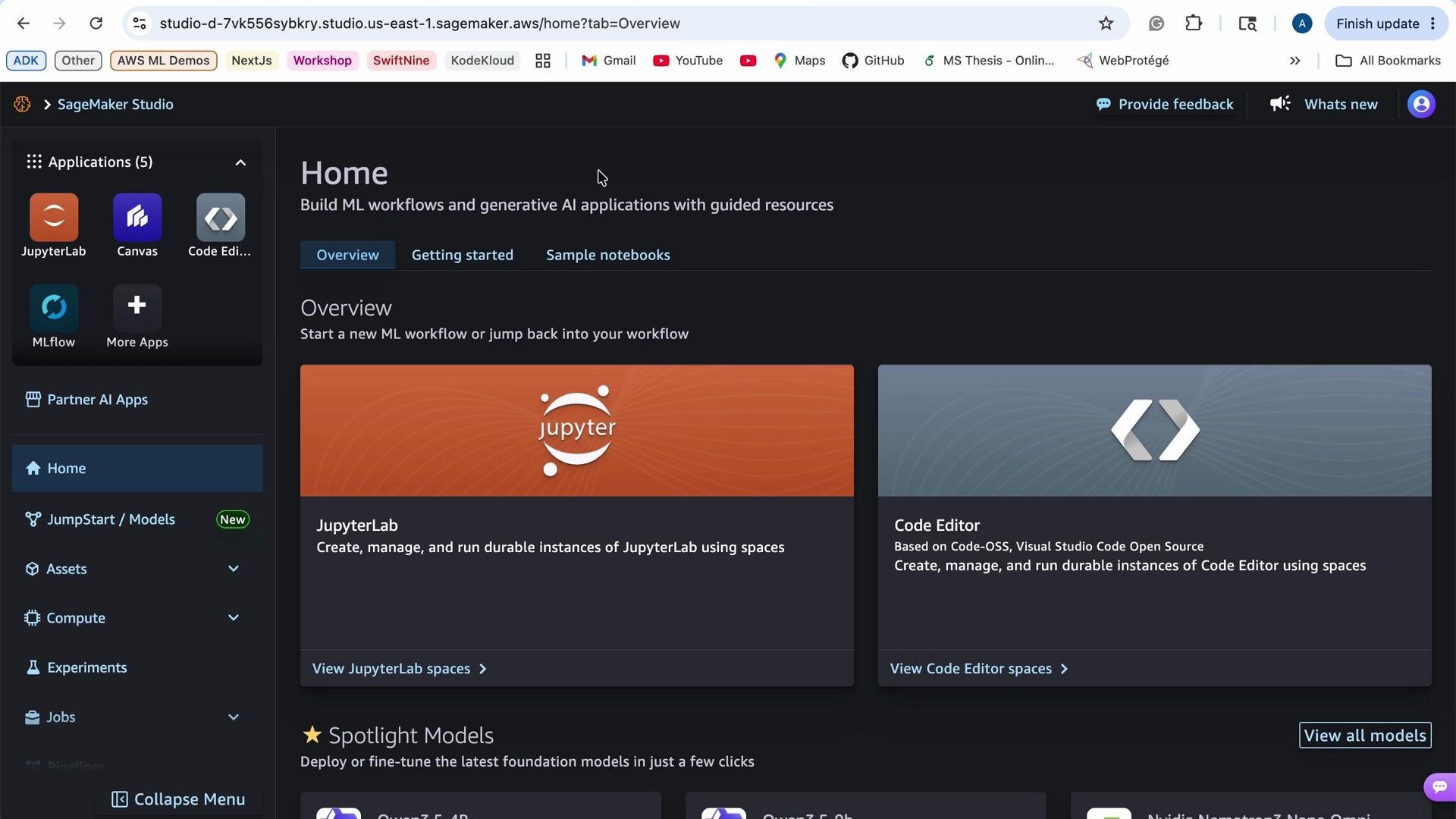 Cost matters because training and hosting use compute resources. If you run experiments in Studio Classic (US East (N. Virginia) for example), review on-demand pricing for instance types you might launch to estimate costs.
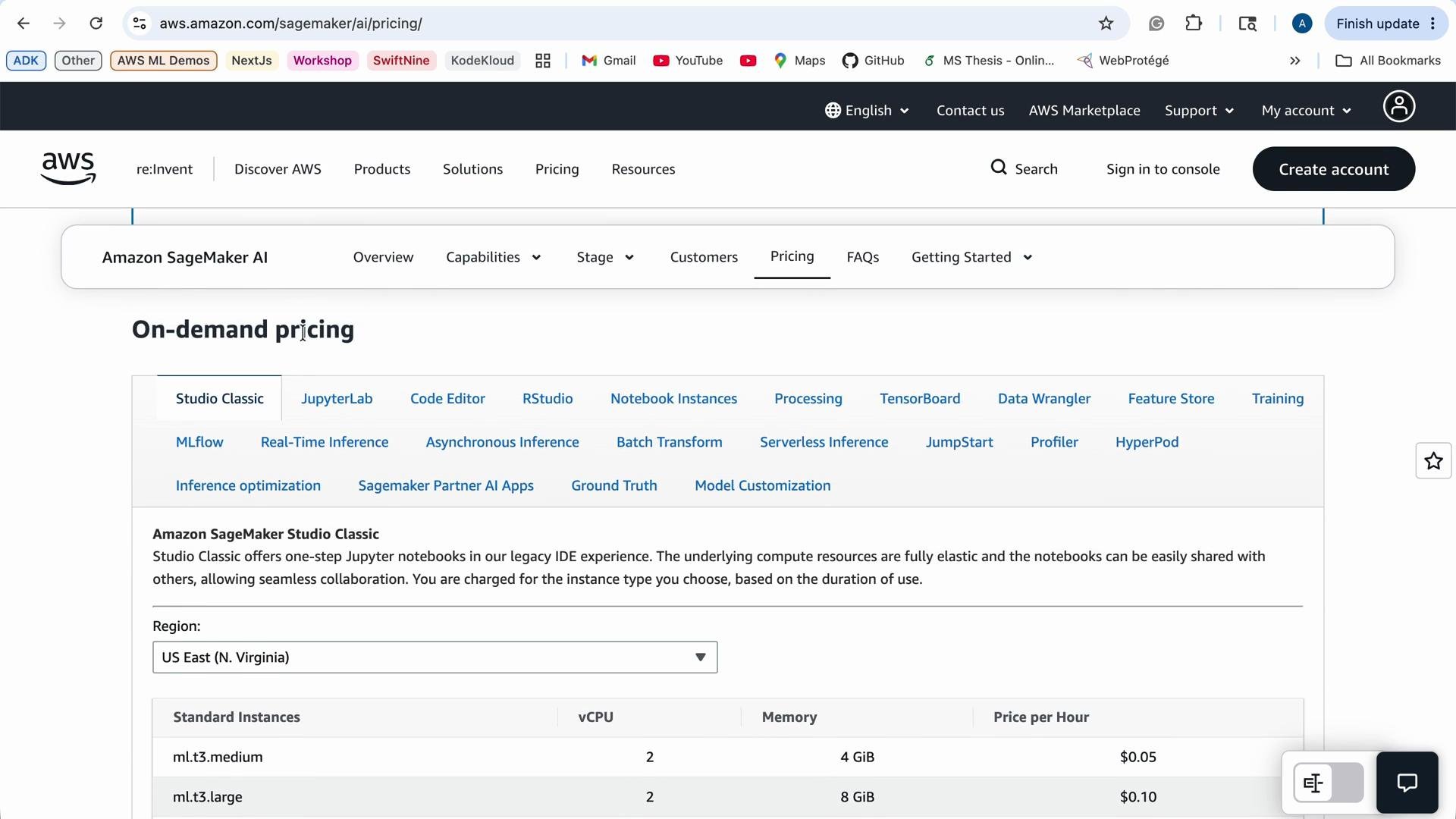 The pricing table summarizes available instance families, vCPU counts, memory, and hourly rates. Select instance types based on whether you’re experimenting, training, or running production inference to optimize cost vs. performance.
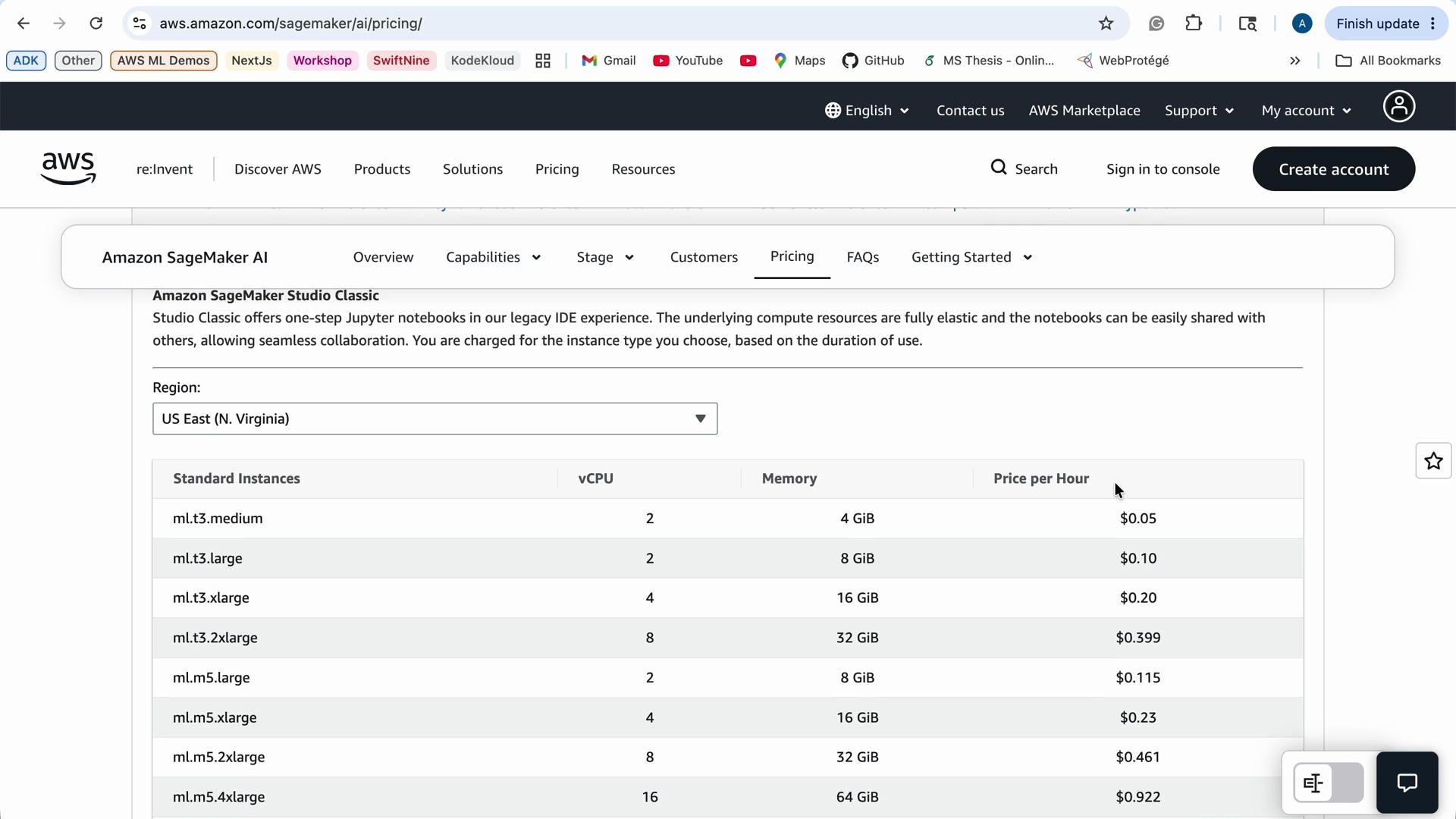 Tip: When you prototype, prefer smaller and cheaper instance types. Reserve GPU or large-memory instances for training or large-scale inference only. Use the AWS Management Console or the AWS CLI to monitor running resources and billing.
## What is JumpStart?
SageMaker JumpStart is an ML hub that accelerates model experimentation and deployment by providing:
* Pre-trained models across modalities (image, audio, text, tabular, etc.).
* End-to-end solution templates and example notebooks.
* One-click deployment options and fine-tuning recipes.
JumpStart is ideal when a pre-built model already fits your use case or can be adapted quickly through fine-tuning rather than training from scratch.
## JumpStart discovery and filters
JumpStart provides filters to narrow down models by:
* Input modality (image, audio, tabular, text).
* Use case (classification, segmentation, regression, anomaly detection).
* Customization or fine-tuning technique (supervised fine-tuning, direct preference optimization, etc.).
Explore models by use case (for example, image classification or audio classification) or by model families such as XGBoost for tabular regression/classification and scikit-learn linear classifiers for simpler tabular tasks.
Tip: When you prototype, prefer smaller and cheaper instance types. Reserve GPU or large-memory instances for training or large-scale inference only. Use the AWS Management Console or the AWS CLI to monitor running resources and billing.
## What is JumpStart?
SageMaker JumpStart is an ML hub that accelerates model experimentation and deployment by providing:
* Pre-trained models across modalities (image, audio, text, tabular, etc.).
* End-to-end solution templates and example notebooks.
* One-click deployment options and fine-tuning recipes.
JumpStart is ideal when a pre-built model already fits your use case or can be adapted quickly through fine-tuning rather than training from scratch.
## JumpStart discovery and filters
JumpStart provides filters to narrow down models by:
* Input modality (image, audio, tabular, text).
* Use case (classification, segmentation, regression, anomaly detection).
* Customization or fine-tuning technique (supervised fine-tuning, direct preference optimization, etc.).
Explore models by use case (for example, image classification or audio classification) or by model families such as XGBoost for tabular regression/classification and scikit-learn linear classifiers for simpler tabular tasks.
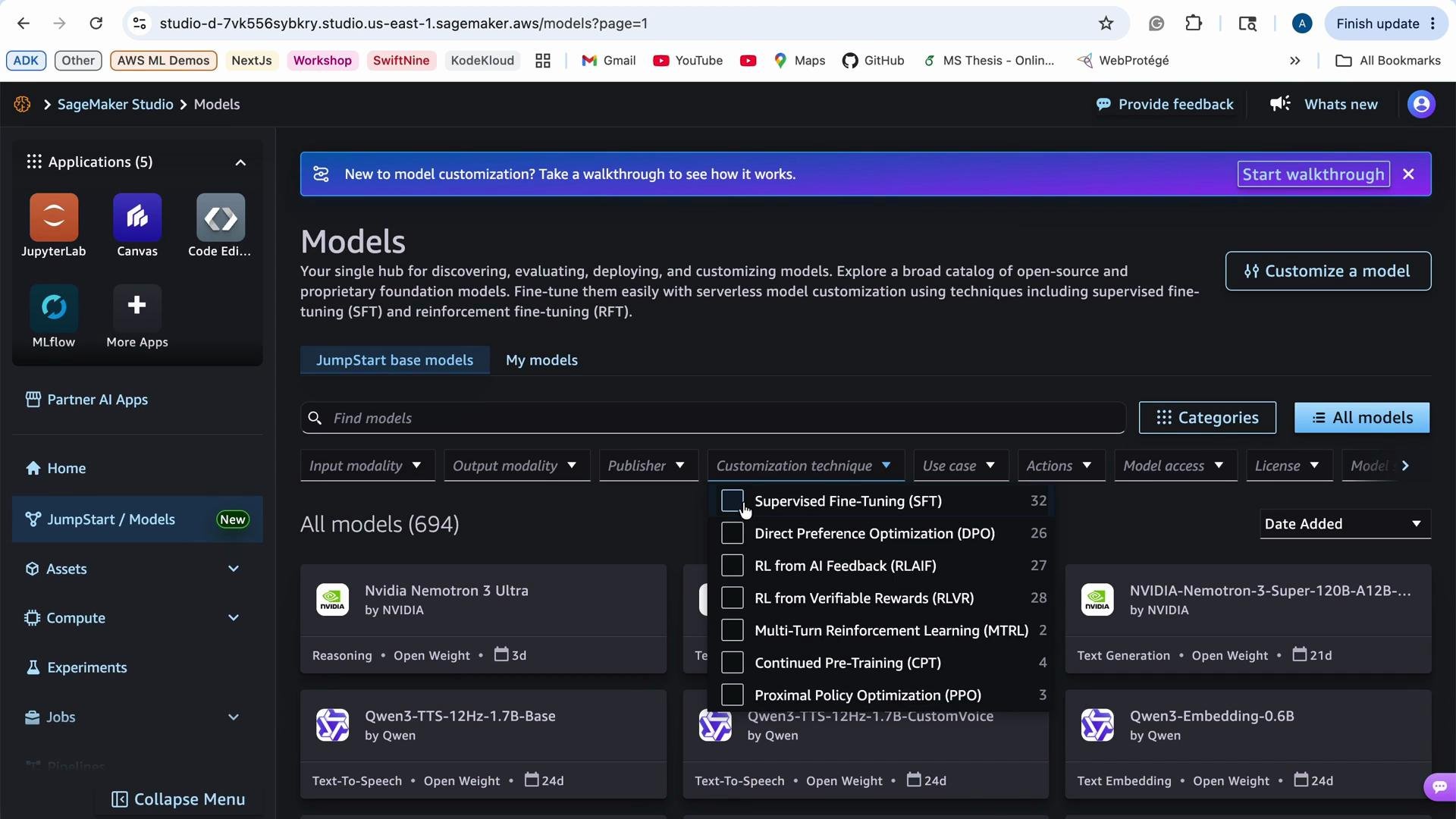 For each JumpStart model you’ll commonly see:
* A concise model description and intended use cases.
* Actions to evaluate (run an evaluation notebook or inference demo), deploy (create an endpoint), or retrain/fine-tune on your data.
For each JumpStart model you’ll commonly see:
* A concise model description and intended use cases.
* Actions to evaluate (run an evaluation notebook or inference demo), deploy (create an endpoint), or retrain/fine-tune on your data.
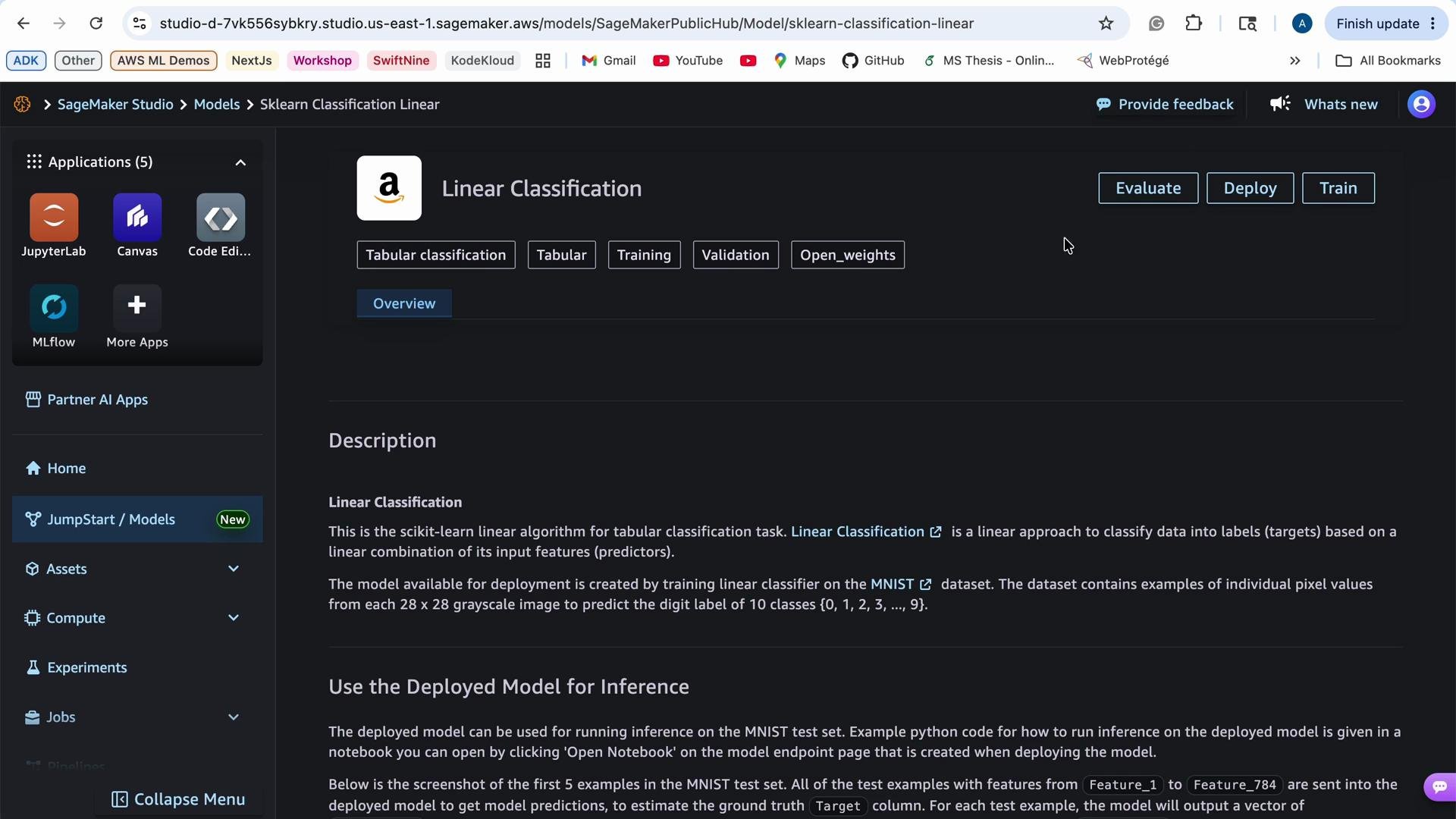 ## Typical JumpStart workflow
1. Search JumpStart for models that match your input modality and use case.
2. Read the model description and review the included example notebooks or evaluation scripts.
3. Run an evaluation notebook or inference demo to confirm baseline behavior on sample data.
4. Deploy the model to a SageMaker endpoint for real-time inference if it meets your needs.
5. Optionally fine-tune the model on your dataset using the provided training recipe or notebook to improve performance.
6. Clean up: delete endpoints and any other resources you no longer need to avoid ongoing charges.
Use JumpStart to prototype quickly: either deploy models immediately for inference or adapt them through fine-tuning to improve results for your data.
## Quick cleanup commands
Use the AWS CLI to list and delete endpoints when you finish:
* List endpoints:
```bash theme={null}
aws sagemaker list-endpoints
```
* Delete an endpoint (replace `my-endpoint`):
```bash theme={null}
aws sagemaker delete-endpoint --endpoint-name `my-endpoint`
```
* Delete the endpoint configuration (if needed):
```bash theme={null}
aws sagemaker delete-endpoint-config --endpoint-config-name `my-endpoint-config`
```
Replace backticked placeholders (for example, `my-endpoint`) with your actual endpoint names.
## JumpStart feature summary
| Feature | Benefits | Typical use case |
| ---------------------------- | ------------------------------------------ | ---------------------------------------------- |
| Pre-trained models | Fast prototyping, reduced development time | Proof-of-concept or baseline model |
| Evaluation notebooks | Validate model on sample data | Model selection and benchmarking |
| One-click deployment | Quickly create endpoints for inference | Real-time or batch inference |
| Fine-tuning recipes | Adapt models to your data | Improve model accuracy on domain-specific data |
| Filters by modality/use case | Easier discovery of relevant models | Find suitable models quickly |
## Links and references
* [AWS SageMaker JumpStart](https://aws.amazon.com/sagemaker/jumpstart/)
* [XGBoost](https://xgboost.ai/)
* [scikit-learn](https://scikit-learn.org/stable/)
* [SageMaker documentation](https://docs.aws.amazon.com/sagemaker/latest/dg/whatis.html)
Summary: JumpStart streamlines model discovery, evaluation, deployment, and fine-tuning. Start by finding a model that matches your use case, validate it with the provided notebooks, deploy it for inference if appropriate, or fine-tune it to better suit your data — and always remember to clean up resources to control costs.
## Typical JumpStart workflow
1. Search JumpStart for models that match your input modality and use case.
2. Read the model description and review the included example notebooks or evaluation scripts.
3. Run an evaluation notebook or inference demo to confirm baseline behavior on sample data.
4. Deploy the model to a SageMaker endpoint for real-time inference if it meets your needs.
5. Optionally fine-tune the model on your dataset using the provided training recipe or notebook to improve performance.
6. Clean up: delete endpoints and any other resources you no longer need to avoid ongoing charges.
Use JumpStart to prototype quickly: either deploy models immediately for inference or adapt them through fine-tuning to improve results for your data.
## Quick cleanup commands
Use the AWS CLI to list and delete endpoints when you finish:
* List endpoints:
```bash theme={null}
aws sagemaker list-endpoints
```
* Delete an endpoint (replace `my-endpoint`):
```bash theme={null}
aws sagemaker delete-endpoint --endpoint-name `my-endpoint`
```
* Delete the endpoint configuration (if needed):
```bash theme={null}
aws sagemaker delete-endpoint-config --endpoint-config-name `my-endpoint-config`
```
Replace backticked placeholders (for example, `my-endpoint`) with your actual endpoint names.
## JumpStart feature summary
| Feature | Benefits | Typical use case |
| ---------------------------- | ------------------------------------------ | ---------------------------------------------- |
| Pre-trained models | Fast prototyping, reduced development time | Proof-of-concept or baseline model |
| Evaluation notebooks | Validate model on sample data | Model selection and benchmarking |
| One-click deployment | Quickly create endpoints for inference | Real-time or batch inference |
| Fine-tuning recipes | Adapt models to your data | Improve model accuracy on domain-specific data |
| Filters by modality/use case | Easier discovery of relevant models | Find suitable models quickly |
## Links and references
* [AWS SageMaker JumpStart](https://aws.amazon.com/sagemaker/jumpstart/)
* [XGBoost](https://xgboost.ai/)
* [scikit-learn](https://scikit-learn.org/stable/)
* [SageMaker documentation](https://docs.aws.amazon.com/sagemaker/latest/dg/whatis.html)
Summary: JumpStart streamlines model discovery, evaluation, deployment, and fine-tuning. Start by finding a model that matches your use case, validate it with the provided notebooks, deploy it for inference if appropriate, or fine-tune it to better suit your data — and always remember to clean up resources to control costs.