> ## Documentation Index
> Fetch the complete documentation index at: https://notes.kodekloud.com/llms.txt
> Use this file to discover all available pages before exploring further.
# Shadow Deployment for Model Evaluation
> Shadow deployment strategy for validating candidate ML models by mirroring production traffic to collect telemetry and evaluate performance without impacting users.
Shadow deployment is a model-release strategy that mirrors real production requests to a candidate (shadow) model while only returning responses from the production model to end users. This lets you validate a new model, container, preprocessing change, or instance type on real traffic patterns without exposing users to untested behavior. Shadow deployments are commonly used to detect regressions, measure performance differences, and collect realistic telemetry for offline evaluation.
Why use shadow deployments?
* Validate candidate models on real-world inputs without impacting user experience.
* Test changes to model code, container runtime, or instance types under production load.
* Gather input/output pairs and operational telemetry for offline comparison and debugging.
Common deployment strategies (when to use each)
| Strategy | Use Case | User Impact | When to choose |
| ----------------- | ------------------------------------------------------------------------------------ | ----------------------------------------------------- | ----------------------------------------------------------------------------------------- |
| Shadow deployment | Run a candidate model in parallel to production to collect predictions and telemetry | No direct user impact (shadow outputs are not served) | Use when you need risk-free validation on live traffic before promotion |
| A/B testing | Route a percentage of users to different model variants to compare live performance | Directly affects a subset of users | Use to measure impact on business KPIs or user-facing metrics under production conditions |
| Canary deployment | Gradually shift a small portion of traffic to a new model | Limited user exposure by design | Use to reduce risk during rollout; monitor and increase traffic if stable |
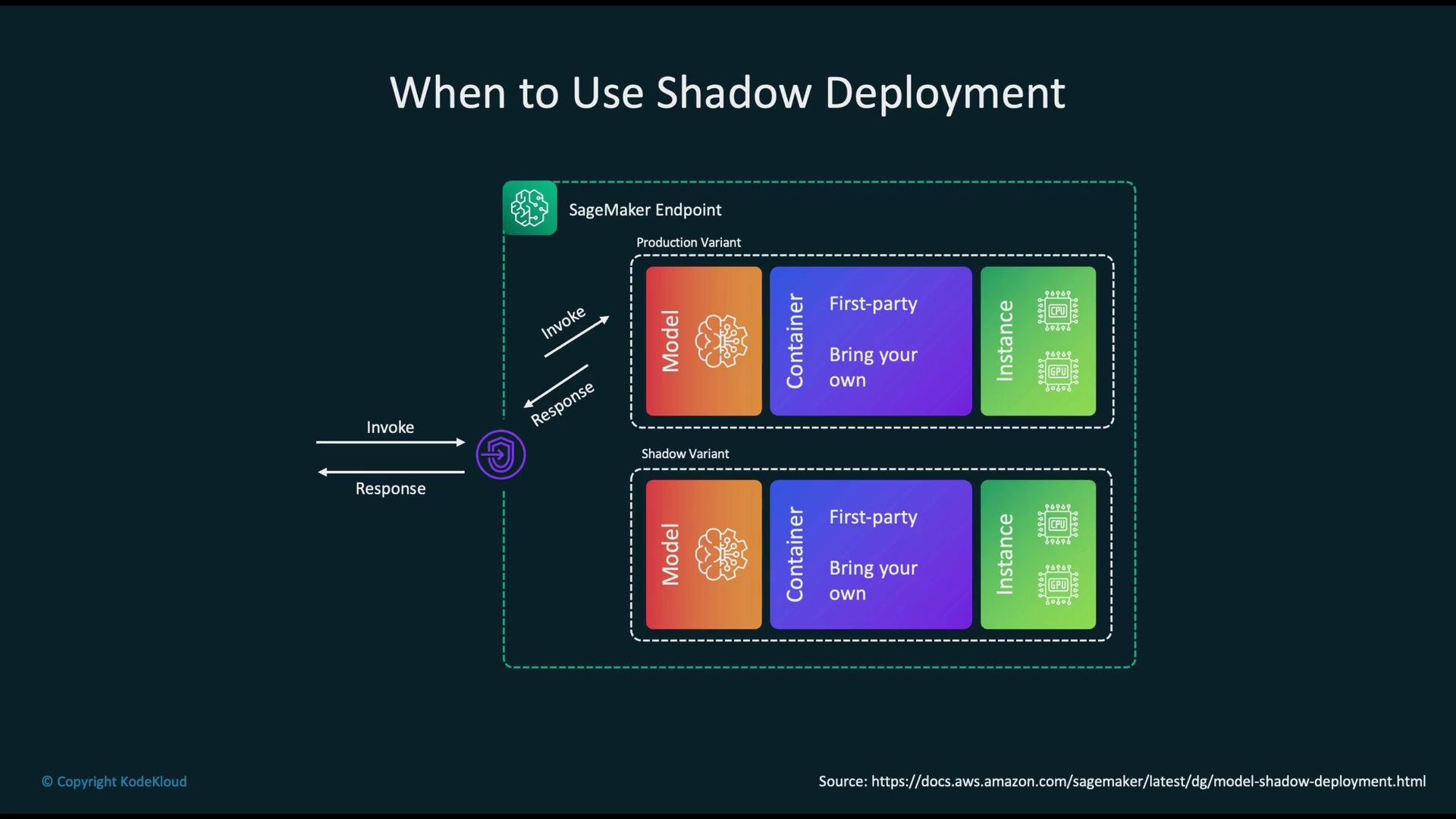
You can implement shadow deployments in [Amazon SageMaker](https://aws.amazon.com/sagemaker/) to run long-running shadow variants for any component of your model-serving stack (model, container, instance type, feature preprocessing, etc.). The usual pattern is to duplicate inference requests to a separate shadow endpoint or variant while serving live responses only from the production variant.
 How shadow deployment works (SageMaker example)
* User requests arrive at the endpoint’s load balancer.
* 100% of requests are served by the primary (production) model variant for real responses.
* Each incoming request is mirrored to the shadow variant running on separate ML instances.
* The shadow model processes requests in parallel; its outputs are not returned to users.
* Input/output pairs, timestamps, latencies, resource metrics, and error traces are persisted (for example, to [Amazon S3](https://aws.amazon.com/s3/)) for offline analysis and comparison.
Recommended telemetry to persist
| Category | Examples |
| -------------------- | -------------------------------------------------------------- |
| Input/output | Raw request, prediction, confidence score |
| Timing & performance | Timestamp, request latency (p50/p95/p99), cold-start duration |
| Resource telemetry | CPU/GPU utilization, memory usage, instance type |
| Errors & reliability | Error codes, exception traces, timeouts |
| Metadata | Model version, container image, preprocess version, request ID |
Example telemetry record (persist to S3 for offline analysis)
```json theme={null}
{
"request_id": "abc-123",
"timestamp": "2026-07-30T12:34:56Z",
"model_version": "candidate-v2",
"input": {"features": [0.1, 0.3, 0.9]},
"prediction": {"label": "A", "score": 0.92},
"latency_ms": 48,
"instance_type": "ml.m5.xlarge",
"error": null
}
```
Key metrics to evaluate shadow deployments
* Technical metrics: accuracy, precision, recall, AUC, prediction distribution shifts, calibration.
* Performance metrics: latency percentiles (p50/p95/p99), throughput, CPU/GPU and memory usage, cold-start time.
* Reliability metrics: error rates, timeouts, exception types.
* Data/behavioral metrics: input distribution drift, feature importance changes, differences in upstream preprocessing.
* Business/robustness metrics: downstream KPIs, fairness/bias checks, cost impact and resource efficiency.
Typical shadow deployment lifecycle
1. Train and validate a new model candidate offline.
2. Deploy the candidate as a shadow variant alongside the current primary model so it receives mirrored traffic.
3. Collect and store predictions and operational telemetry for both variants.
4. Compare production and shadow metrics via automated dashboards and offline analysis; trigger alerts on regressions.
5. If the candidate meets technical, reliability, and business criteria, promote it to the primary variant; otherwise iterate or roll back.
Best practices and operational tips
* Persist only the telemetry needed for evaluation; mask or avoid storing sensitive input fields to meet privacy and compliance requirements.
* Automate metric comparisons and set alert thresholds for regressions (e.g., significant drop in accuracy or increased p99 latency).
* Run shadow variants on isolated instances or accounts to avoid interference with production capacity.
* Consider sampling mirrored traffic if full duplication is cost-prohibitive, but ensure samples remain representative.
* Use feature flags or configuration to enable/disable mirroring dynamically during incidents.
Links and references
* [Amazon SageMaker — Model deployment](https://docs.aws.amazon.com/sagemaker/latest/dg/how-it-works-deployment.html)
* [Amazon S3 — Storage for telemetry](https://aws.amazon.com/s3/)
* [Kubernetes — Canary and rollout strategies](https://kubernetes.io/docs/concepts/overview/working-with-objects/)
Shadow deployments are ideal when you need to validate changes to model code, container runtime, or instance types on real production traffic without exposing users to potential regressions.
When mirroring production traffic, enforce data governance: mask or redact sensitive inputs, comply with retention policies, and follow your organization’s privacy and compliance rules.
How shadow deployment works (SageMaker example)
* User requests arrive at the endpoint’s load balancer.
* 100% of requests are served by the primary (production) model variant for real responses.
* Each incoming request is mirrored to the shadow variant running on separate ML instances.
* The shadow model processes requests in parallel; its outputs are not returned to users.
* Input/output pairs, timestamps, latencies, resource metrics, and error traces are persisted (for example, to [Amazon S3](https://aws.amazon.com/s3/)) for offline analysis and comparison.
Recommended telemetry to persist
| Category | Examples |
| -------------------- | -------------------------------------------------------------- |
| Input/output | Raw request, prediction, confidence score |
| Timing & performance | Timestamp, request latency (p50/p95/p99), cold-start duration |
| Resource telemetry | CPU/GPU utilization, memory usage, instance type |
| Errors & reliability | Error codes, exception traces, timeouts |
| Metadata | Model version, container image, preprocess version, request ID |
Example telemetry record (persist to S3 for offline analysis)
```json theme={null}
{
"request_id": "abc-123",
"timestamp": "2026-07-30T12:34:56Z",
"model_version": "candidate-v2",
"input": {"features": [0.1, 0.3, 0.9]},
"prediction": {"label": "A", "score": 0.92},
"latency_ms": 48,
"instance_type": "ml.m5.xlarge",
"error": null
}
```
Key metrics to evaluate shadow deployments
* Technical metrics: accuracy, precision, recall, AUC, prediction distribution shifts, calibration.
* Performance metrics: latency percentiles (p50/p95/p99), throughput, CPU/GPU and memory usage, cold-start time.
* Reliability metrics: error rates, timeouts, exception types.
* Data/behavioral metrics: input distribution drift, feature importance changes, differences in upstream preprocessing.
* Business/robustness metrics: downstream KPIs, fairness/bias checks, cost impact and resource efficiency.
Typical shadow deployment lifecycle
1. Train and validate a new model candidate offline.
2. Deploy the candidate as a shadow variant alongside the current primary model so it receives mirrored traffic.
3. Collect and store predictions and operational telemetry for both variants.
4. Compare production and shadow metrics via automated dashboards and offline analysis; trigger alerts on regressions.
5. If the candidate meets technical, reliability, and business criteria, promote it to the primary variant; otherwise iterate or roll back.
Best practices and operational tips
* Persist only the telemetry needed for evaluation; mask or avoid storing sensitive input fields to meet privacy and compliance requirements.
* Automate metric comparisons and set alert thresholds for regressions (e.g., significant drop in accuracy or increased p99 latency).
* Run shadow variants on isolated instances or accounts to avoid interference with production capacity.
* Consider sampling mirrored traffic if full duplication is cost-prohibitive, but ensure samples remain representative.
* Use feature flags or configuration to enable/disable mirroring dynamically during incidents.
Links and references
* [Amazon SageMaker — Model deployment](https://docs.aws.amazon.com/sagemaker/latest/dg/how-it-works-deployment.html)
* [Amazon S3 — Storage for telemetry](https://aws.amazon.com/s3/)
* [Kubernetes — Canary and rollout strategies](https://kubernetes.io/docs/concepts/overview/working-with-objects/)
Shadow deployments are ideal when you need to validate changes to model code, container runtime, or instance types on real production traffic without exposing users to potential regressions.
When mirroring production traffic, enforce data governance: mask or redact sensitive inputs, comply with retention policies, and follow your organization’s privacy and compliance rules.