> ## Documentation Index
> Fetch the complete documentation index at: https://notes.kodekloud.com/llms.txt
> Use this file to discover all available pages before exploring further.
# Demo Conditional resource based creation Part 1
> Demonstrates using AWS CloudFormation conditions, mappings, and parameters to apply environment-specific S3 public access settings and conditional bucket policy creation.
This lesson demonstrates how to use AWS CloudFormation Conditions to control resource properties and conditional resource creation. We'll build an S3 bucket whose public-access configuration and bucket policy depend on a developer name mapped to an environment. The same template can therefore apply different, environment-specific configurations at deployment time.
Key concepts covered:
* Mappings to link developer names to environment metadata
* Parameters for runtime choices
* Conditions with intrinsic functions (!FindInMap, !Equals, !If)
* Conditional resource creation using the Condition attribute
## Template structure — Mappings and Parameters
The template uses a Mapping named `DevMap` to associate each developer with a profession and an environment. Parameters accept the S3 bucket name and the developer name used to determine the environment at deploy/update time.
```yaml theme={null}
Mappings:
DevMap:
Arno:
Field: Quality assurance
Env: Testing/development
Alice:
Field: Backend developer
Env: Production
Parameters:
InputBucketName:
Type: String
Description: Please enter your desired S3 bucket name
InputDeveloperName:
Type: String
AllowedValues:
- Arno
- Alice
Description: Developer name used to look up environment in the mapping
```
When the stack is applied, the template uses these values to tag the bucket, select public-access behavior, and optionally create a public-read bucket policy.
## Runtime view — bucket tags in the console
When the stack was deployed with InputDeveloperName set to Arno, the bucket tags reflect the mapping (Developer = Arno, Environment = Testing/development):
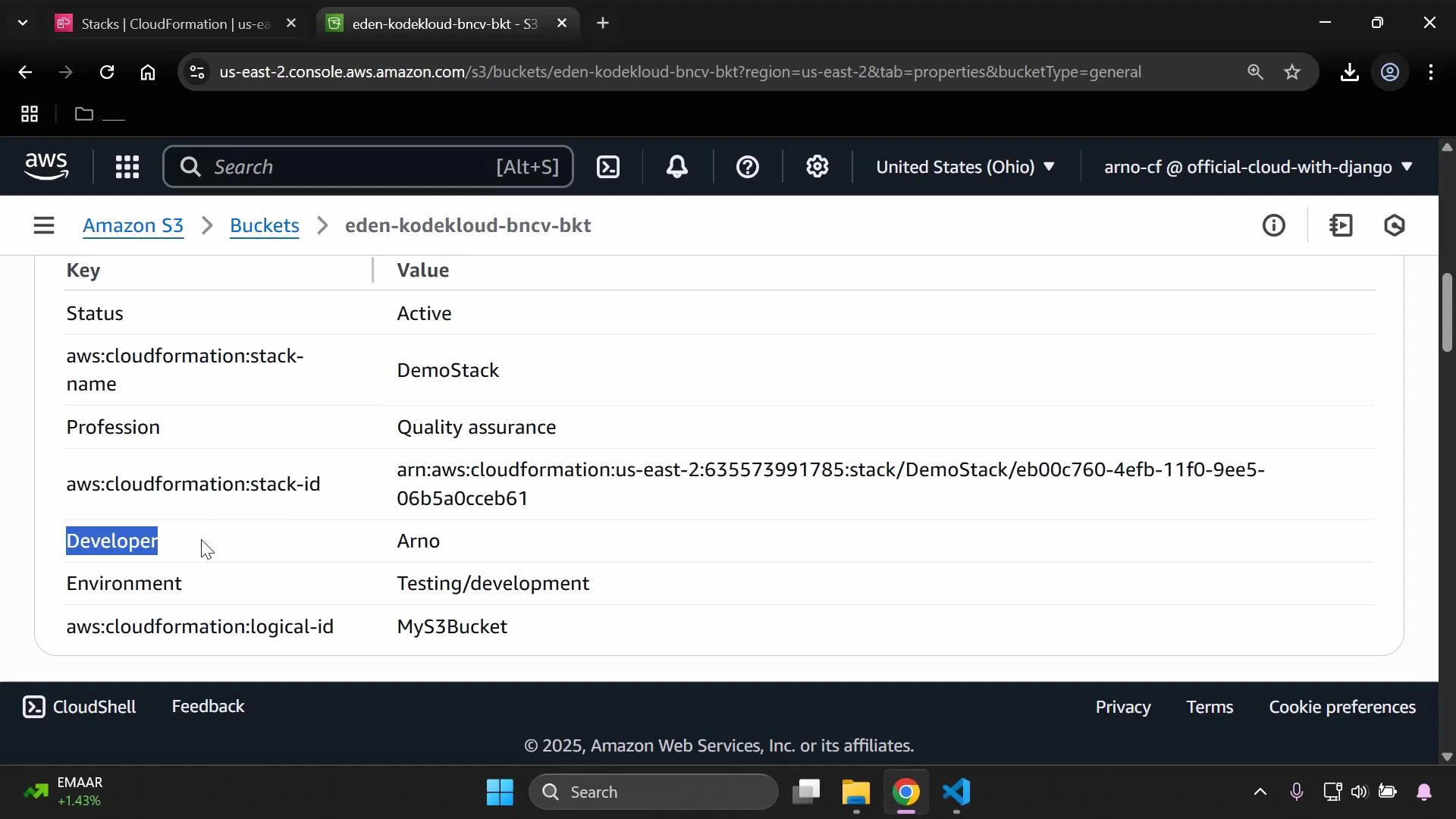 Because Arno maps to Testing/development, the production condition evaluated to false. This resulted in two outcomes:
* The PublicAccessBlockConfiguration used the non-production branch (blocking public access).
* The bucket policy that would allow anonymous GetObject was not created (it is gated by the production Condition).
## Conditions — detect production vs non-production
The template defines a Condition to check whether the mapped environment equals "Production":
```yaml theme={null}
Conditions:
IsProd: !Equals
- !FindInMap [DevMap, !Ref InputDeveloperName, Env]
- "Production"
```
This Condition (`IsProd`) becomes the switch that drives resource property selection and conditional resource creation.
## Conditional resource properties — S3 bucket configuration
The S3 bucket resource sets tags from the mapping and uses `!If` to choose between production and non-production values for `PublicAccessBlockConfiguration`. When `IsProd` is true, public-access-block flags are set to false to allow public access. When false, the flags are set to true to block public access.
```yaml theme={null}
Resources:
MyS3Bucket:
Type: AWS::S3::Bucket
Properties:
BucketName: !Ref InputBucketName
Tags:
- Key: Developer
Value: !Ref InputDeveloperName
- Key: Profession
Value: !FindInMap [DevMap, !Ref InputDeveloperName, Field]
- Key: Environment
Value: !FindInMap [DevMap, !Ref InputDeveloperName, Env]
PublicAccessBlockConfiguration: !If
- IsProd
- BlockPublicAcls: false
BlockPublicPolicy: false
IgnorePublicAcls: false
RestrictPublicBuckets: false
- BlockPublicAcls: true
BlockPublicPolicy: true
IgnorePublicAcls: true
RestrictPublicBuckets: true
```
Summary of the `IsProd` effect:
| IsProd value | PublicAccessBlockConfiguration | BucketPolicy created |
| ----------------- | --------------------------------------- | -------------------------------- |
| true (Production) | All flags false (public access allowed) | Yes — public-read policy created |
| false (Non-prod) | All flags true (public access blocked) | No — bucket policy not created |
## Conditional resource creation — bucket policy
The bucket policy that allows public reads is created only when `IsProd` is true. This is implemented using the `Condition` attribute on the BucketPolicy resource:
```yaml theme={null}
MyPublicReadPolicy:
Condition: IsProd
DependsOn: MyS3Bucket
Type: AWS::S3::BucketPolicy
Properties:
Bucket: !Ref InputBucketName
PolicyDocument:
Version: "2012-10-17"
Statement:
- Effect: Allow
Principal: "*"
Action: "s3:GetObject"
Resource: !Sub "arn:aws:s3:::${InputBucketName}/*"
```
The Condition attribute prevents the BucketPolicy resource from being created when `IsProd` is false. The `!If` intrinsic function is used to select the appropriate `PublicAccessBlockConfiguration` object for production and non-production branches.
## Demonstration: switching the developer parameter
* With InputDeveloperName = Arno:
* `IsProd` = false
* The template applies the branch that blocks public access
* The public-read bucket policy is not created
* After updating the stack with InputDeveloperName = Alice:
* `IsProd` = true (Alice maps to Production)
* `PublicAccessBlockConfiguration` flags are set to false (Block all public access = Off)
* `MyPublicReadPolicy` is created and attaches a public-read policy to the bucket
The console after switching to Alice shows the environment tag updated to Production and "Block all public access" switched Off:
Because Arno maps to Testing/development, the production condition evaluated to false. This resulted in two outcomes:
* The PublicAccessBlockConfiguration used the non-production branch (blocking public access).
* The bucket policy that would allow anonymous GetObject was not created (it is gated by the production Condition).
## Conditions — detect production vs non-production
The template defines a Condition to check whether the mapped environment equals "Production":
```yaml theme={null}
Conditions:
IsProd: !Equals
- !FindInMap [DevMap, !Ref InputDeveloperName, Env]
- "Production"
```
This Condition (`IsProd`) becomes the switch that drives resource property selection and conditional resource creation.
## Conditional resource properties — S3 bucket configuration
The S3 bucket resource sets tags from the mapping and uses `!If` to choose between production and non-production values for `PublicAccessBlockConfiguration`. When `IsProd` is true, public-access-block flags are set to false to allow public access. When false, the flags are set to true to block public access.
```yaml theme={null}
Resources:
MyS3Bucket:
Type: AWS::S3::Bucket
Properties:
BucketName: !Ref InputBucketName
Tags:
- Key: Developer
Value: !Ref InputDeveloperName
- Key: Profession
Value: !FindInMap [DevMap, !Ref InputDeveloperName, Field]
- Key: Environment
Value: !FindInMap [DevMap, !Ref InputDeveloperName, Env]
PublicAccessBlockConfiguration: !If
- IsProd
- BlockPublicAcls: false
BlockPublicPolicy: false
IgnorePublicAcls: false
RestrictPublicBuckets: false
- BlockPublicAcls: true
BlockPublicPolicy: true
IgnorePublicAcls: true
RestrictPublicBuckets: true
```
Summary of the `IsProd` effect:
| IsProd value | PublicAccessBlockConfiguration | BucketPolicy created |
| ----------------- | --------------------------------------- | -------------------------------- |
| true (Production) | All flags false (public access allowed) | Yes — public-read policy created |
| false (Non-prod) | All flags true (public access blocked) | No — bucket policy not created |
## Conditional resource creation — bucket policy
The bucket policy that allows public reads is created only when `IsProd` is true. This is implemented using the `Condition` attribute on the BucketPolicy resource:
```yaml theme={null}
MyPublicReadPolicy:
Condition: IsProd
DependsOn: MyS3Bucket
Type: AWS::S3::BucketPolicy
Properties:
Bucket: !Ref InputBucketName
PolicyDocument:
Version: "2012-10-17"
Statement:
- Effect: Allow
Principal: "*"
Action: "s3:GetObject"
Resource: !Sub "arn:aws:s3:::${InputBucketName}/*"
```
The Condition attribute prevents the BucketPolicy resource from being created when `IsProd` is false. The `!If` intrinsic function is used to select the appropriate `PublicAccessBlockConfiguration` object for production and non-production branches.
## Demonstration: switching the developer parameter
* With InputDeveloperName = Arno:
* `IsProd` = false
* The template applies the branch that blocks public access
* The public-read bucket policy is not created
* After updating the stack with InputDeveloperName = Alice:
* `IsProd` = true (Alice maps to Production)
* `PublicAccessBlockConfiguration` flags are set to false (Block all public access = Off)
* `MyPublicReadPolicy` is created and attaches a public-read policy to the bucket
The console after switching to Alice shows the environment tag updated to Production and "Block all public access" switched Off:
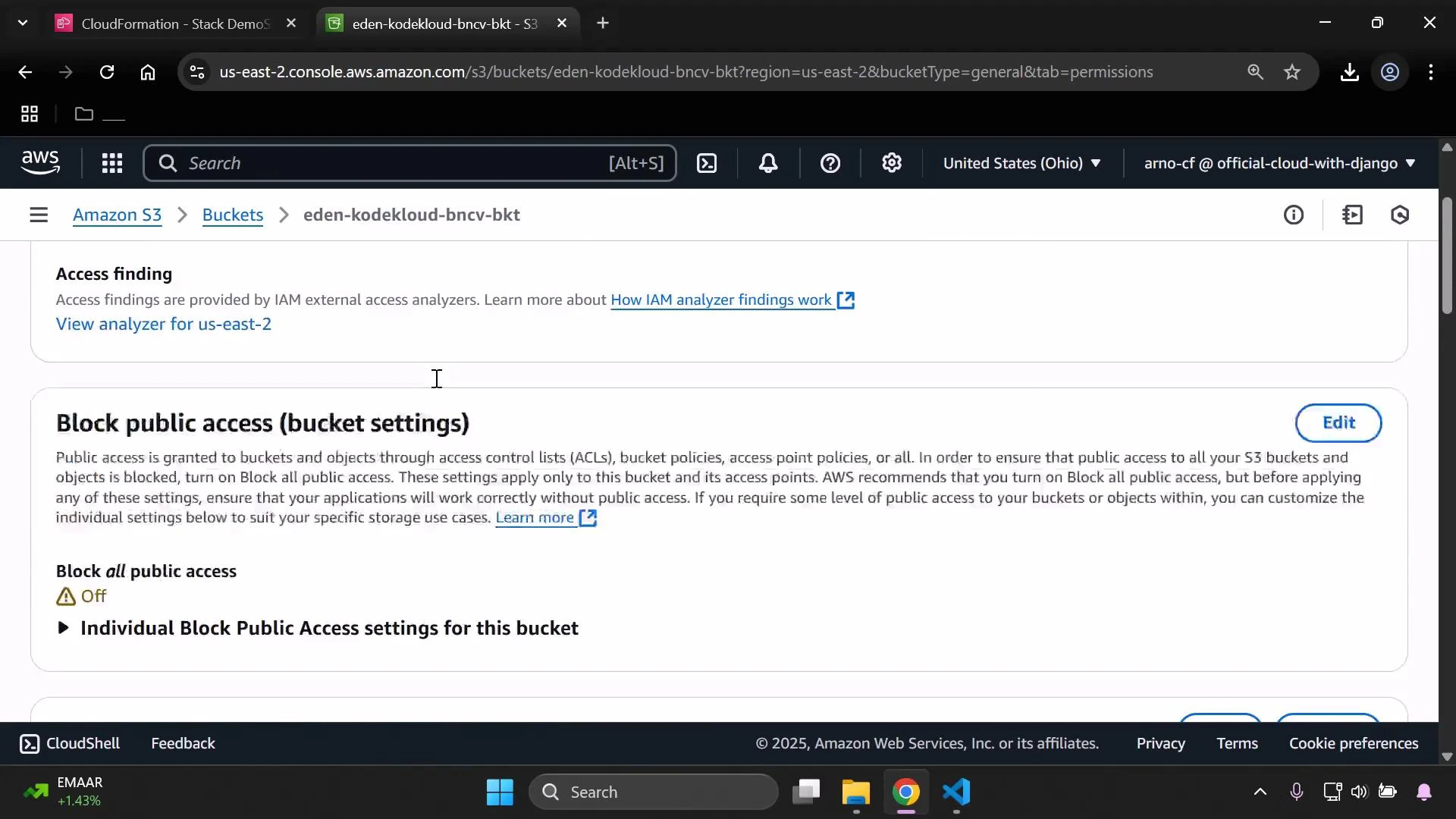 Because public access was allowed, the policy permitting s3:GetObject for all principals became effective. To verify public-read behavior, upload a small test object (image or file) to the bucket.
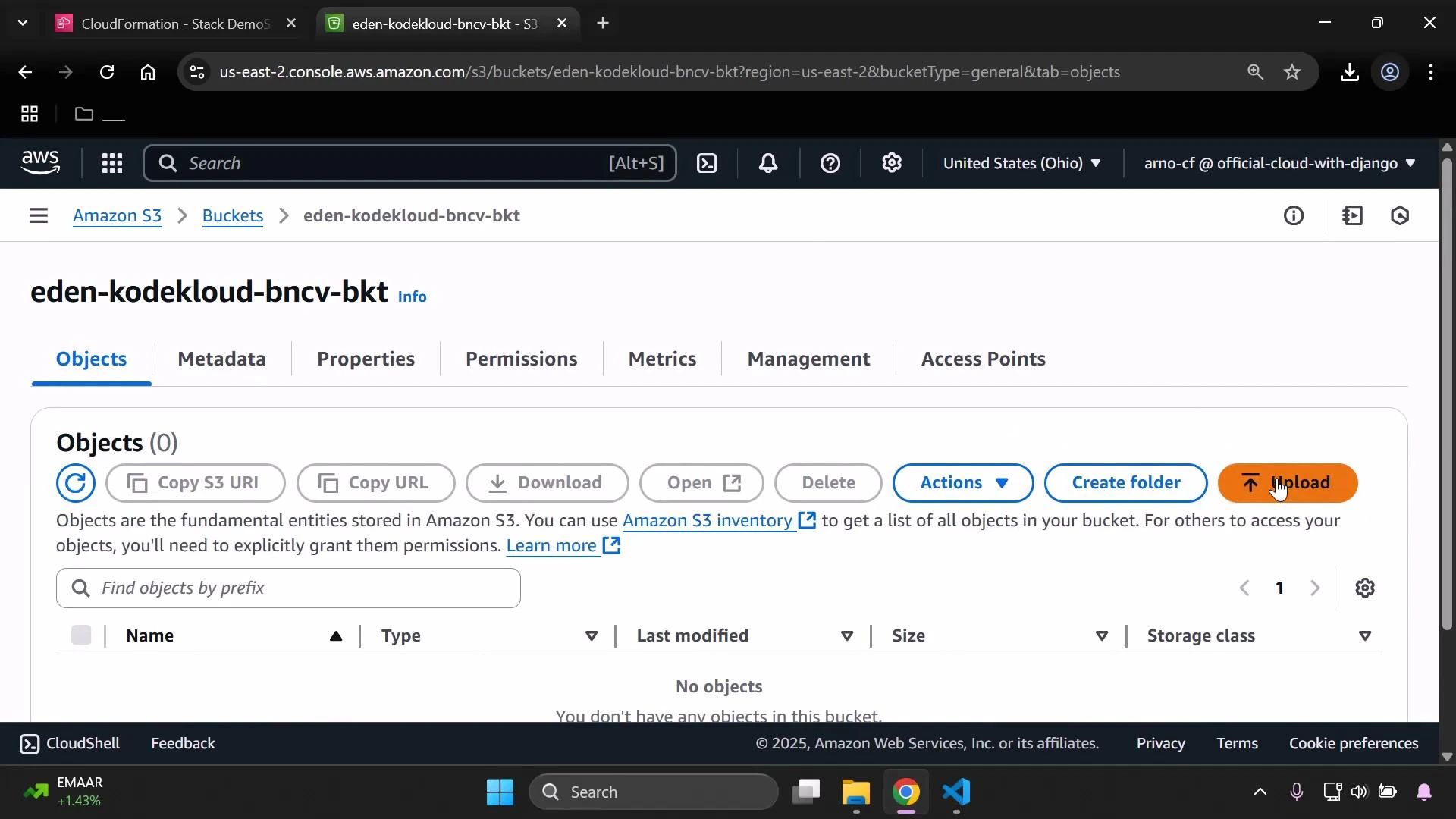
Objects view before upload:
Because public access was allowed, the policy permitting s3:GetObject for all principals became effective. To verify public-read behavior, upload a small test object (image or file) to the bucket.
Objects view before upload:
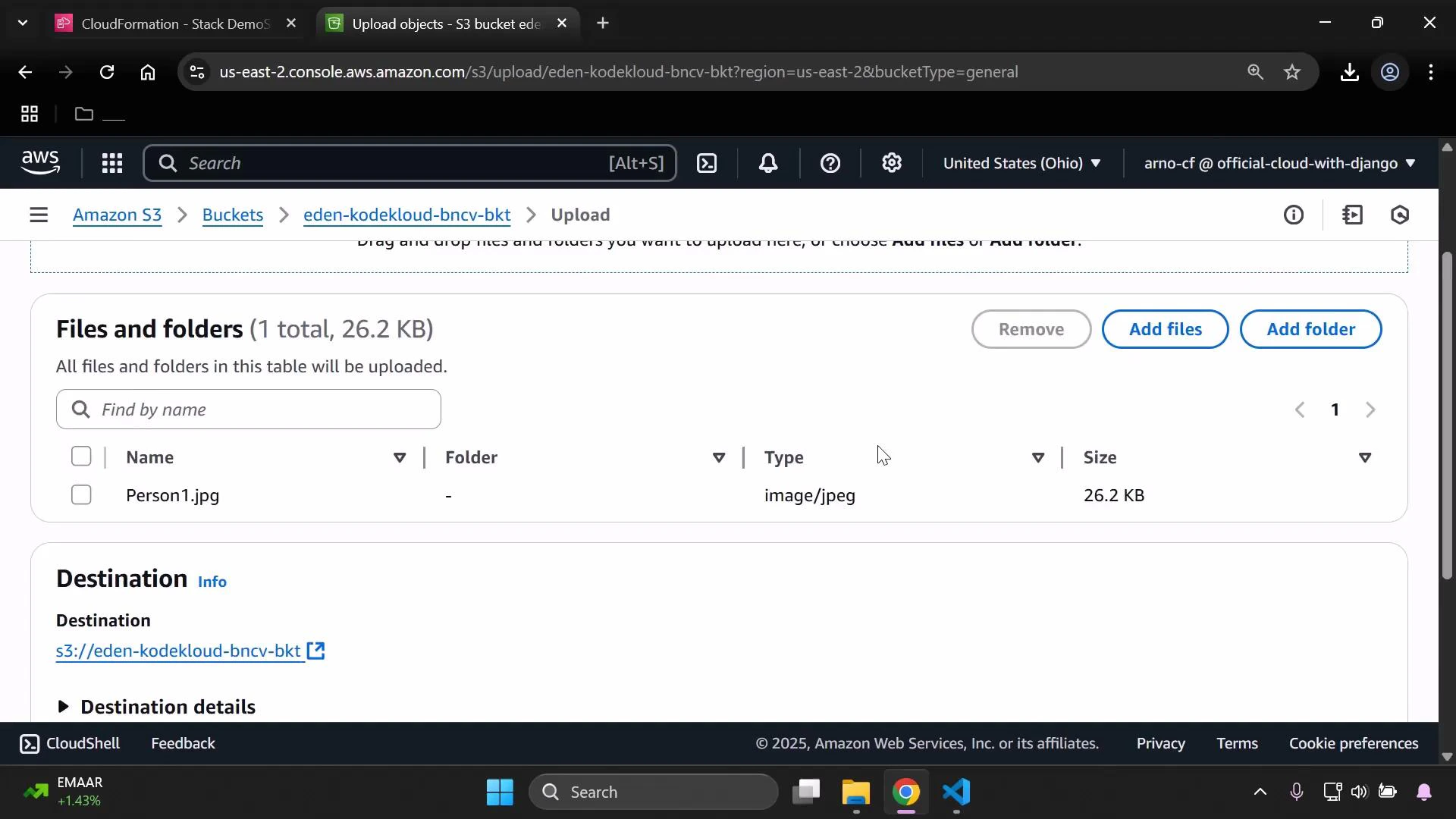
 Upload a test image (e.g., Person1.jpg):
 After the upload, the CloudFormation-created bucket policy is visible under the bucket Permissions tab. The policy document uses `!Sub` to reference the bucket name and allows `s3:GetObject` for all principals when `IsProd` is true:
```yaml theme={null}
PolicyDocument:
Version: "2012-10-17"
Statement:
- Effect: Allow
Principal: "*"
Action: "s3:GetObject"
Resource: !Sub "arn:aws:s3:::${InputBucketName}/*"
```
Open the uploaded object's public URL (e.g., in an incognito window) to verify it is publicly accessible — this confirms the template's conditional logic worked as intended.
## Validation and deployment tips
* Always lint and validate your CloudFormation template before updating stacks. A quick lint step:
```bash theme={null}
[cfn-lint](https://github.com/aws-cloudformation/cfn-lint) template.yaml
```
Validate templates and test different parameter combinations in a non-production account to ensure Conditions and !If branches behave as expected. Use the AWS CloudFormation documentation for intrinsic function details: [https://docs.aws.amazon.com/AWSCloudFormation/latest/UserGuide/intrinsic-function-reference.html](https://docs.aws.amazon.com/AWSCloudFormation/latest/UserGuide/intrinsic-function-reference.html)
* In the AWS Console to update the stack:
1. Select the stack → Update stack
2. Replace current template → Upload template file → Next
3. Provide new parameter values (for example, set InputDeveloperName = Alice) → Update
## Summary
This example demonstrates how to:
* Use Mappings and Parameters to drive deployment-time decisions
* Define Conditions with `!FindInMap` and `!Equals`
* Use `!If` to select resource property values
* Use the `Condition` resource attribute to create resources only for specific environments
You can extend this pattern to other resource types (EC2, IAM, RDS, etc.) to enforce environment-specific configuration and policies during automated deployments.
Further reading and references:
* [AWS CloudFormation documentation](https://docs.aws.amazon.com/cloudformation/index.html)
* [CloudFormation intrinsic functions](https://docs.aws.amazon.com/AWSCloudFormation/latest/UserGuide/intrinsic-function-reference.html)
* [Amazon S3 documentation](https://docs.aws.amazon.com/s3/index.html)
After the upload, the CloudFormation-created bucket policy is visible under the bucket Permissions tab. The policy document uses `!Sub` to reference the bucket name and allows `s3:GetObject` for all principals when `IsProd` is true:
```yaml theme={null}
PolicyDocument:
Version: "2012-10-17"
Statement:
- Effect: Allow
Principal: "*"
Action: "s3:GetObject"
Resource: !Sub "arn:aws:s3:::${InputBucketName}/*"
```
Open the uploaded object's public URL (e.g., in an incognito window) to verify it is publicly accessible — this confirms the template's conditional logic worked as intended.
## Validation and deployment tips
* Always lint and validate your CloudFormation template before updating stacks. A quick lint step:
```bash theme={null}
[cfn-lint](https://github.com/aws-cloudformation/cfn-lint) template.yaml
```
Validate templates and test different parameter combinations in a non-production account to ensure Conditions and !If branches behave as expected. Use the AWS CloudFormation documentation for intrinsic function details: [https://docs.aws.amazon.com/AWSCloudFormation/latest/UserGuide/intrinsic-function-reference.html](https://docs.aws.amazon.com/AWSCloudFormation/latest/UserGuide/intrinsic-function-reference.html)
* In the AWS Console to update the stack:
1. Select the stack → Update stack
2. Replace current template → Upload template file → Next
3. Provide new parameter values (for example, set InputDeveloperName = Alice) → Update
## Summary
This example demonstrates how to:
* Use Mappings and Parameters to drive deployment-time decisions
* Define Conditions with `!FindInMap` and `!Equals`
* Use `!If` to select resource property values
* Use the `Condition` resource attribute to create resources only for specific environments
You can extend this pattern to other resource types (EC2, IAM, RDS, etc.) to enforce environment-specific configuration and policies during automated deployments.
Further reading and references:
* [AWS CloudFormation documentation](https://docs.aws.amazon.com/cloudformation/index.html)
* [CloudFormation intrinsic functions](https://docs.aws.amazon.com/AWSCloudFormation/latest/UserGuide/intrinsic-function-reference.html)
* [Amazon S3 documentation](https://docs.aws.amazon.com/s3/index.html)