> ## Documentation Index
> Fetch the complete documentation index at: https://notes.kodekloud.com/llms.txt
> Use this file to discover all available pages before exploring further.
# Demo Managing public access settings with conditions
> Demonstrates using CloudFormation Conditions to toggle S3 PublicAccessBlockConfiguration and conditionally create a public-read bucket policy for Production environments.
Welcome — in this lesson you'll learn how to manage Amazon S3 public access using CloudFormation Conditions. We'll demonstrate how to:
* Map developers to environments,
* Define a Condition that detects Production,
* Use that Condition to toggle the S3 PublicAccessBlockConfiguration with the !If intrinsic,
* Create a public-read bucket policy only when the stack is in Production.
Below is a consolidated CloudFormation YAML template that implements the full workflow. Explanations follow the template.
```yaml theme={null}
AWSTemplateFormatVersion: "2010-09-09"
Description: Manage S3 public access using a Condition that enables public access only for Production.
Mappings:
DevMap:
Arno:
Field: "Quality assurance"
Env: "Testing/development"
Alice:
Field: "Backend developer"
Env: "Production"
Parameters:
InputBucketName:
Type: String
Description: "Please enter your desired S3 bucket name"
InputDeveloperName:
Type: String
Description: "Developer name (used to determine environment)"
AllowedValues:
- Arno
- Alice
Conditions:
# Condition evaluates to true if the mapped environment for the selected developer is "Production"
IsProd: !Equals [ !FindInMap [ DevMap, !Ref InputDeveloperName, Env ], "Production" ]
Resources:
MyS3Bucket:
Type: AWS::S3::Bucket
Properties:
BucketName: !Ref InputBucketName
Tags:
- Key: Developer
Value: !Ref InputDeveloperName
- Key: Environment
Value: !FindInMap [ DevMap, !Ref InputDeveloperName, Env ]
- Key: Profession
Value: !FindInMap [ DevMap, !Ref InputDeveloperName, Field ]
# Toggle PublicAccessBlockConfiguration based on the IsProd Condition:
# - When IsProd is true -> allow public access (all four flags set to false)
# - When IsProd is false -> block all public access (all four flags set to true)
PublicAccessBlockConfiguration: !If
- IsProd
- BlockPublicAcls: false
BlockPublicPolicy: false
IgnorePublicAcls: false
RestrictPublicBuckets: false
- BlockPublicAcls: true
BlockPublicPolicy: true
IgnorePublicAcls: true
RestrictPublicBuckets: true
Metadata:
Purpose: "Creating an S3 bucket"
Reviewed: "02-07-2025"
Owner: "John Doe"
Contact: "johndoe@mail.com"
# Create a public-read bucket policy only when the stack is in Production
MyPublicReadPolicy:
Type: AWS::S3::BucketPolicy
Condition: IsProd
DependsOn: MyS3Bucket
Properties:
Bucket: !Ref MyS3Bucket
PolicyDocument:
Version: "2012-10-17"
Statement:
- Effect: Allow
Principal: "*"
Action: "s3:GetObject"
Resource: !Sub "arn:aws:s3:::${InputBucketName}/*"
```
New AWS accounts enable S3 Block Public Access by default; account-level or existing bucket-level settings may differ. The PublicAccessBlockConfiguration flags (BlockPublicAcls, BlockPublicPolicy, IgnorePublicAcls, RestrictPublicBuckets) are boolean. Setting a flag to true enforces blocking behavior; setting it to false permits that type of public access. For CloudFormation docs, see [Template Anatomy](https://docs.aws.amazon.com/AWSCloudFormation/latest/UserGuide/template-anatomy.html).
Explanation and workflow
1. Mappings and Parameters
* DevMap maps developer names to two values: Field (role) and Env (environment).
* The InputDeveloperName parameter selects the mapping entry; the mapped Env determines whether this is Production or another environment (e.g., "Testing/development").
* InputBucketName is the S3 bucket name provided at stack creation.
2. Condition (IsProd)
* IsProd uses !Equals with !FindInMap to check whether the selected developer’s Env equals "Production".
* IsProd evaluates to true only when the mapping indicates a Production environment for the chosen developer.
3. PublicAccessBlockConfiguration controlled by !If
* The bucket’s PublicAccessBlockConfiguration property is set using the !If intrinsic:
* If IsProd is true: all flags are false — public access is allowed (Policy-level control can then grant s3:GetObject).
* If IsProd is false: all flags are true — public access is blocked (recommended secure default).
* Using !If ensures the block settings change automatically with the Condition and avoids manual edits per environment.
4. Bucket policy created conditionally for Production
* The AWS::S3::BucketPolicy resource includes Condition: IsProd, so the policy only exists when IsProd is true.
* When present, the policy allows anonymous principals (*) to perform s3:GetObject on objects in the bucket (arn:aws:s3:::\${InputBucketName}/*).
* This creates a dual-layer control: bucket-level public access blocking and an explicit policy granting public read only in Production.
Comparison — PublicAccessBlockConfiguration by environment
| Environment | BlockPublicAcls | BlockPublicPolicy | IgnorePublicAcls | RestrictPublicBuckets |
| ------------------------------- | --------------: | ----------------: | ---------------: | --------------------: |
| Production | false | false | false | false |
| Non-Production (default secure) | true | true | true | true |
Testing and expected S3 console behavior
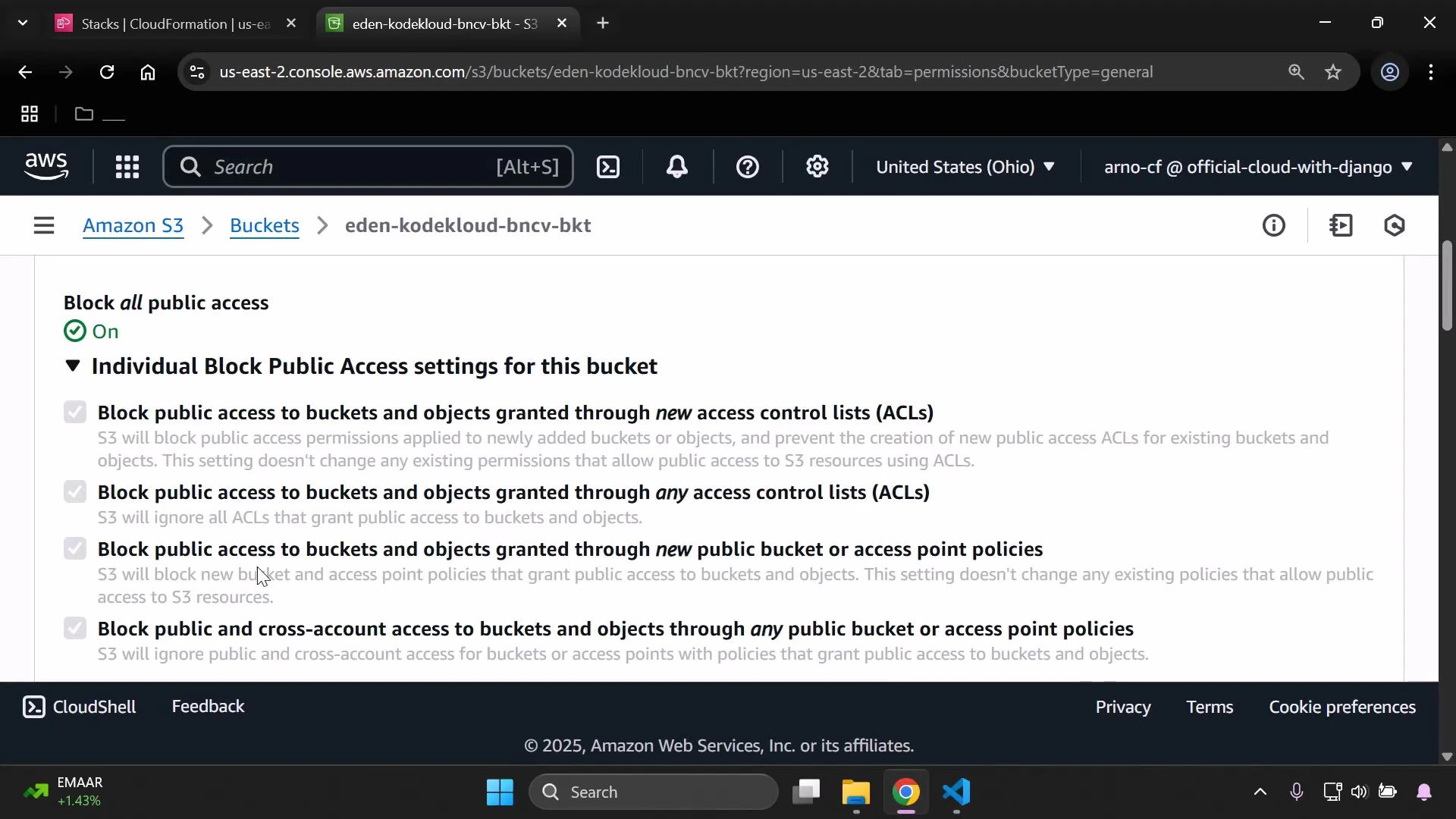
* If PublicAccessBlockConfiguration flags are true (blocking enabled), the S3 console Permissions page will show "Block all public access: On" and list the four block options as checked.
* If you run the template for a developer mapped to Production (IsProd == true), the flags will be set to false and the conditional public-read bucket policy will be created.
 Enabling public access and attaching a policy that grants s3:GetObject to "\*" makes your objects publicly readable. Confirm this is intentional before enabling in Production. Review your account-level Block Public Access settings as well — they may override bucket-level changes.
Quick references and further reading
* CloudFormation template anatomy: [https://docs.aws.amazon.com/AWSCloudFormation/latest/UserGuide/template-anatomy.html](https://docs.aws.amazon.com/AWSCloudFormation/latest/UserGuide/template-anatomy.html)
* S3 PublicAccessBlockConfiguration: [https://docs.aws.amazon.com/AWSCloudFormation/latest/UserGuide/aws-properties-s3-bucket-publicaccessblockconfiguration.html](https://docs.aws.amazon.com/AWSCloudFormation/latest/UserGuide/aws-properties-s3-bucket-publicaccessblockconfiguration.html)
* S3 Block Public Access (console docs): [https://docs.aws.amazon.com/AmazonS3/latest/userguide/access-control-block-public-access.html](https://docs.aws.amazon.com/AmazonS3/latest/userguide/access-control-block-public-access.html)
This pattern provides a secure default (block public access) while allowing a controlled, auditable override for environments that require public-read buckets.
Enabling public access and attaching a policy that grants s3:GetObject to "\*" makes your objects publicly readable. Confirm this is intentional before enabling in Production. Review your account-level Block Public Access settings as well — they may override bucket-level changes.
Quick references and further reading
* CloudFormation template anatomy: [https://docs.aws.amazon.com/AWSCloudFormation/latest/UserGuide/template-anatomy.html](https://docs.aws.amazon.com/AWSCloudFormation/latest/UserGuide/template-anatomy.html)
* S3 PublicAccessBlockConfiguration: [https://docs.aws.amazon.com/AWSCloudFormation/latest/UserGuide/aws-properties-s3-bucket-publicaccessblockconfiguration.html](https://docs.aws.amazon.com/AWSCloudFormation/latest/UserGuide/aws-properties-s3-bucket-publicaccessblockconfiguration.html)
* S3 Block Public Access (console docs): [https://docs.aws.amazon.com/AmazonS3/latest/userguide/access-control-block-public-access.html](https://docs.aws.amazon.com/AmazonS3/latest/userguide/access-control-block-public-access.html)
This pattern provides a secure default (block public access) while allowing a controlled, auditable override for environments that require public-read buckets.