> ## Documentation Index
> Fetch the complete documentation index at: https://notes.kodekloud.com/llms.txt
> Use this file to discover all available pages before exploring further.
# Demo Analyzing a StackSet
> Demonstrates inspecting a CloudFormation StackSet, verifying stack instances across regions/accounts, and how pseudoparameters produce unique per-instance S3 bucket names.
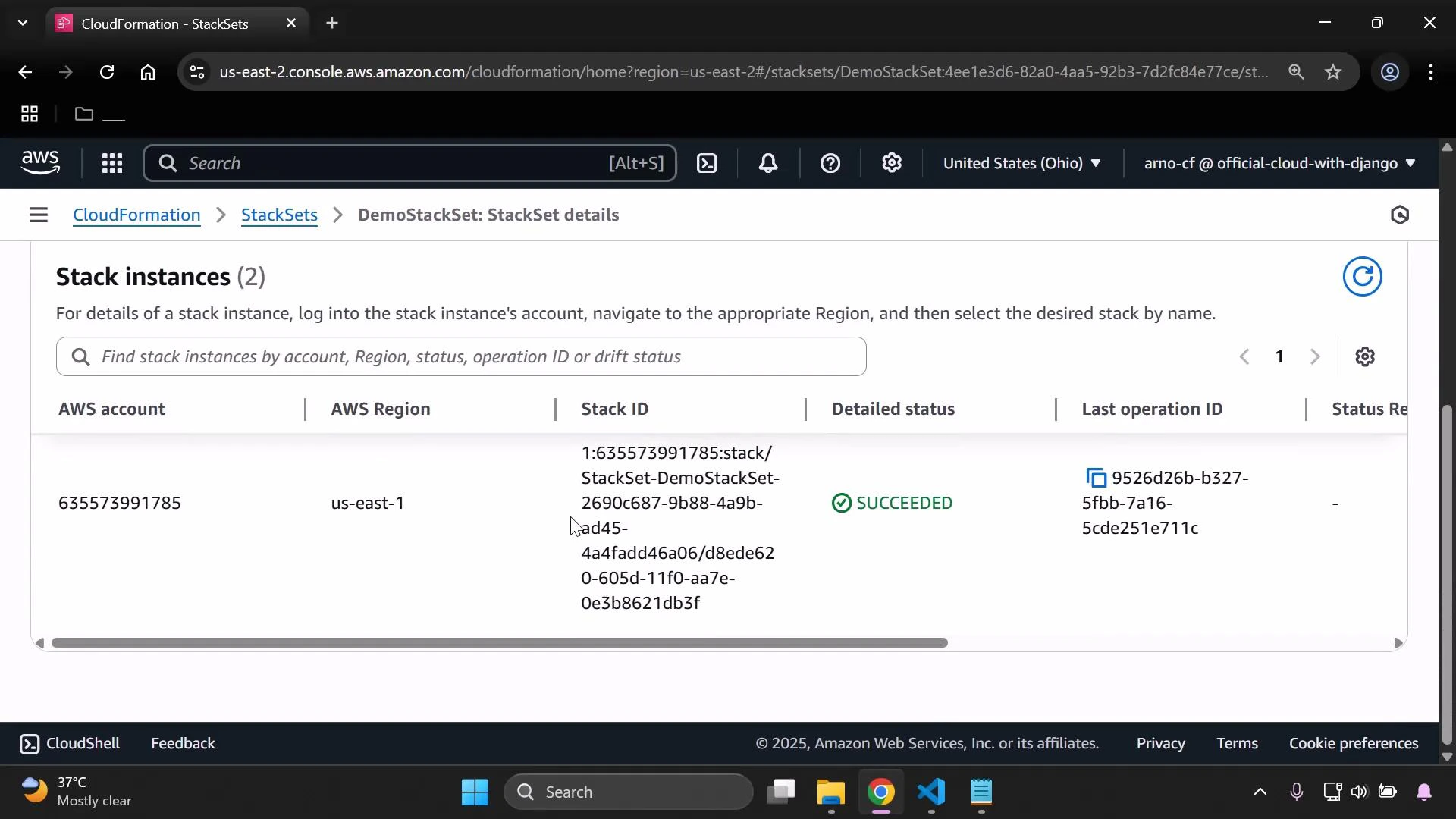
This demo shows how to inspect a CloudFormation StackSet and verify where its resources were deployed. We'll walk through the StackSet structure, the deployed stack instances, and how pseudoparameters produce unique resource names per target region/account.
What you'll see in this example:
* StackSet name: `demo-stack-set`
* Stack instances deployed to: `eu-west-1` and `us-east-1`
* A single CloudFormation template that creates an S3 bucket; its name is derived from pseudoparameters so each instance gets a unique bucket name
A StackSet is the managing entity that stores the shared template and deployment configuration. Each stack instance is an independent CloudFormation stack created in the specified target account and region, based on the StackSet template.
 Think of the relationship like this:
* StackSet = master template + deployment settings
* Stack instance = per-region / per-account stack created from that template
Template example (creates an S3 bucket with a per-instance name)
```yaml theme={null}
Resources:
MyBucket:
Type: AWS::S3::Bucket
Properties:
BucketName: !Sub 'stackset-bucket-${AWS::Region}-${AWS::AccountId}'
```
Notes about the example:
* The template uses CloudFormation pseudoparameters `AWS::Region` and `AWS::AccountId` via `!Sub`.
* Pseudoparameters are resolved at deployment time for each target account/region, producing unique bucket names per stack instance.
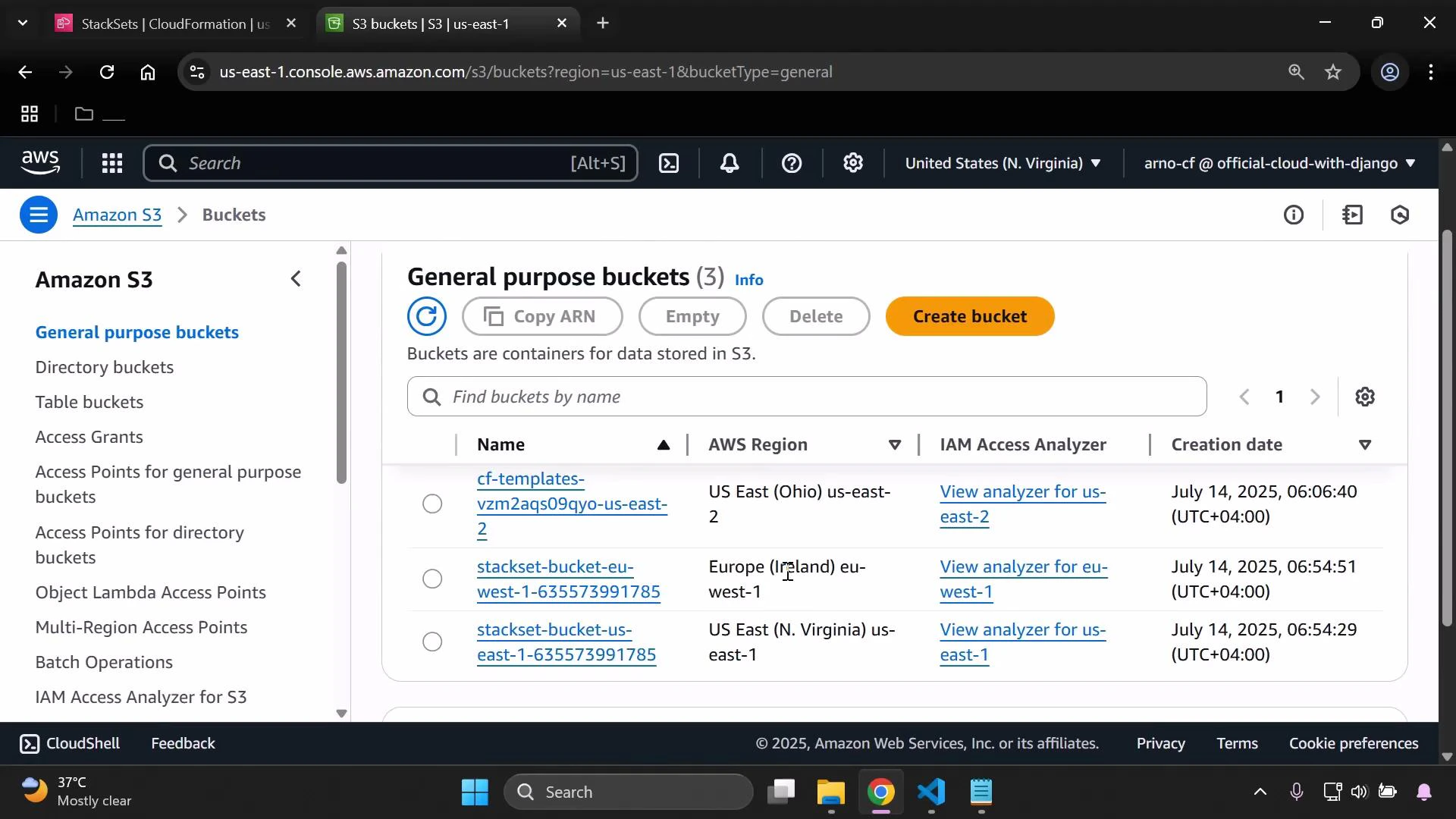
Because the StackSet was deployed to two regions, CloudFormation created two S3 buckets—one in each target region/account—using the substituted values for `AWS::Region` and `AWS::AccountId`. You can confirm those buckets in the S3 console.
Think of the relationship like this:
* StackSet = master template + deployment settings
* Stack instance = per-region / per-account stack created from that template
Template example (creates an S3 bucket with a per-instance name)
```yaml theme={null}
Resources:
MyBucket:
Type: AWS::S3::Bucket
Properties:
BucketName: !Sub 'stackset-bucket-${AWS::Region}-${AWS::AccountId}'
```
Notes about the example:
* The template uses CloudFormation pseudoparameters `AWS::Region` and `AWS::AccountId` via `!Sub`.
* Pseudoparameters are resolved at deployment time for each target account/region, producing unique bucket names per stack instance.
Because the StackSet was deployed to two regions, CloudFormation created two S3 buckets—one in each target region/account—using the substituted values for `AWS::Region` and `AWS::AccountId`. You can confirm those buckets in the S3 console.
 Quick reference table
| Resource Type | Purpose in this demo | Example / Notes |
| -------------- | ------------------------------------------- | -------------------------------------------------------------------------- |
| StackSet | Central template & deployment configuration | `demo-stack-set` deployed to multiple regions |
| Stack instance | Per-region/per-account CloudFormation stack | One in `eu-west-1`, one in `us-east-1` |
| S3 bucket | Resource created by the template | `stackset-bucket-${AWS::Region}-${AWS::AccountId}` (resolved per instance) |
How to verify deployments
1. Open the CloudFormation console and inspect the StackSet’s "Stack instances" to see per-region/account status and Stack IDs.
2. In each target region, open the S3 console to confirm the bucket names and creation dates.
3. Review the StackSet template to see where pseudoparameters are used (for example, in `BucketName`).
Pseudoparameters such as AWS::Region and AWS::AccountId are resolved at deployment time for each target account/region. That’s why names generated with !Sub are unique per stack instance.
Links and references
* [AWS CloudFormation Overview](https://learn.kodekloud.com/user/courses/aws-cloud-formation)
* [Amazon S3 Overview](https://learn.kodekloud.com/user/courses/amazon-simple-storage-service-amazon-s3)
This is the process you can follow to analyze StackSet deployments and confirm where and how template values were resolved across multiple regions and accounts.
Quick reference table
| Resource Type | Purpose in this demo | Example / Notes |
| -------------- | ------------------------------------------- | -------------------------------------------------------------------------- |
| StackSet | Central template & deployment configuration | `demo-stack-set` deployed to multiple regions |
| Stack instance | Per-region/per-account CloudFormation stack | One in `eu-west-1`, one in `us-east-1` |
| S3 bucket | Resource created by the template | `stackset-bucket-${AWS::Region}-${AWS::AccountId}` (resolved per instance) |
How to verify deployments
1. Open the CloudFormation console and inspect the StackSet’s "Stack instances" to see per-region/account status and Stack IDs.
2. In each target region, open the S3 console to confirm the bucket names and creation dates.
3. Review the StackSet template to see where pseudoparameters are used (for example, in `BucketName`).
Pseudoparameters such as AWS::Region and AWS::AccountId are resolved at deployment time for each target account/region. That’s why names generated with !Sub are unique per stack instance.
Links and references
* [AWS CloudFormation Overview](https://learn.kodekloud.com/user/courses/aws-cloud-formation)
* [Amazon S3 Overview](https://learn.kodekloud.com/user/courses/amazon-simple-storage-service-amazon-s3)
This is the process you can follow to analyze StackSet deployments and confirm where and how template values were resolved across multiple regions and accounts.