> ## Documentation Index
> Fetch the complete documentation index at: https://notes.kodekloud.com/llms.txt
> Use this file to discover all available pages before exploring further.
# Understanding CloudWatch Pricing
> This article explains AWS CloudWatch pricing, detailing cost components and providing a breakdown to help optimize observability and manage expenses.
Welcome back! In this lesson, we’ll dive into AWS CloudWatch pricing to understand how costs are structured across its core features: metrics, dashboards, alarms, logs, and events. A clear cost breakdown helps you optimize observability while keeping your AWS bill in check.
## High-Level Pricing Components
AWS CloudWatch billing is composed of the following elements:
* **Metrics** – Standard and custom metric data points
* **Dashboards** – Visual consoles to monitor your metrics
* **Alarms** – Threshold-based notifications on metric data
* **Logs** – Ingestion, storage, and analysis of log data
* **Events** – Custom event deliveries and rule evaluations
AWS CloudWatch offers a [Free Tier](https://aws.amazon.com/free/) across metrics, logs, and events. Always check your usage against free-tier limits to avoid unexpected charges.
## Example Scenario: Mid-Sized E-commerce Website
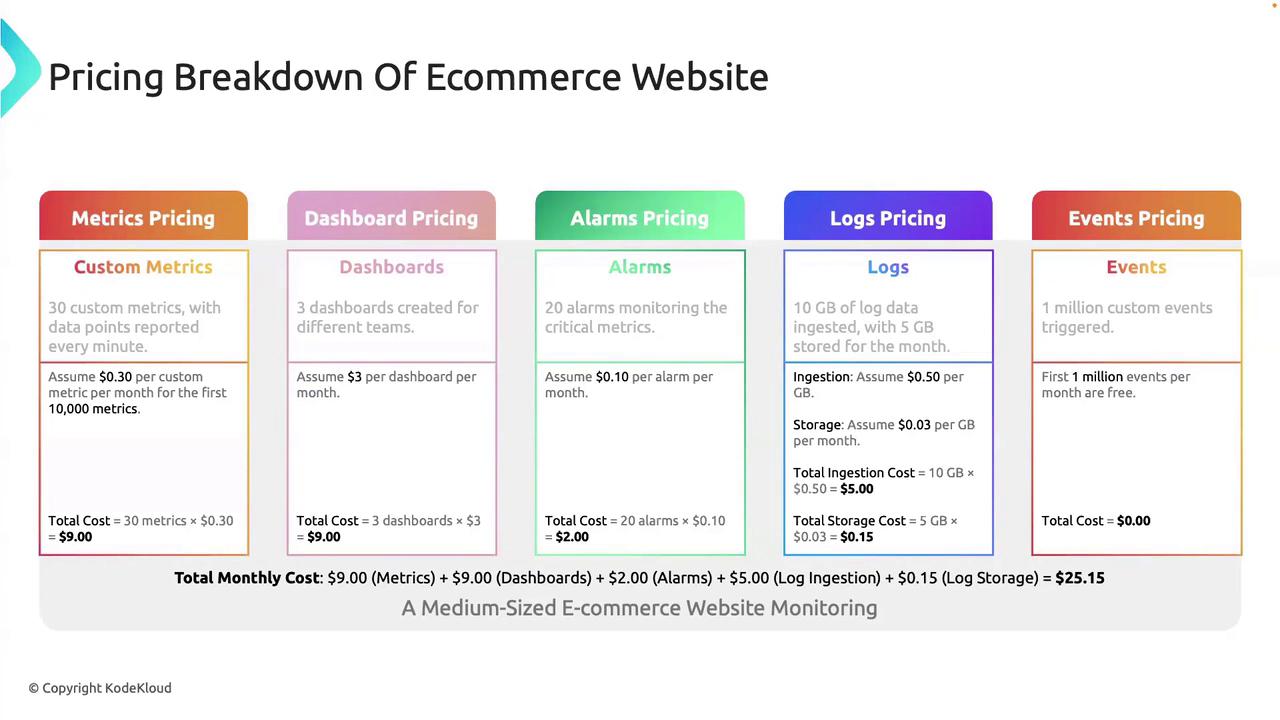
Consider a mid-sized e-commerce company monitoring its application with these monthly usage patterns:
* **Custom metrics**\
30 metrics reporting once per minute
* **Dashboards**\
3 CloudWatch dashboards for real-time visualization
* **Alarms**\
20 critical alarms to trigger on threshold breaches
* **Logs**\
10 GB of data ingested\
5 GB of log data stored
* **Events**\
1 million custom events delivered\
(AWS CloudWatch Events includes 100,000 free events per month; \$1.00 per additional million)
## Monthly Cost Breakdown
| Feature | Usage | Unit Price | Cost |
| -------------- | -------------------------------------- | ----------------------- | ----------- |
| Custom Metrics | 30 metrics × \$0.30 per metric-month | \$0.30 / metric-month | \$9.00 |
| Dashboards | 3 dashboards × \$3.00 per dashboard | \$3.00 / dashboard | \$9.00 |
| Alarms | 20 alarms × \$0.10 per alarm-month | \$0.10 / alarm-month | \$2.00 |
| Logs Ingestion | 10 GB × \$0.50 per GB | \$0.50 / GB | \$5.00 |
| Logs Storage | 5 GB × \$0.03 per GB-month | \$0.03 / GB-month | \$0.15 |
| Custom Events | 1 M events × \$1.00 per million events | \$1.00 / million events | \$1.00 |
| **Total** | | | **\$26.15** |
AWS pricing varies by Region and can change over time. Always confirm the rates for your specific region in the AWS Console.
Refer to the [official AWS CloudWatch pricing page](https://aws.amazon.com/cloudwatch/pricing/) for the latest cost information.
## Why Understanding Pricing Matters
Breaking down your CloudWatch usage helps you to:
* Compare built-in AWS monitoring costs versus third-party tools
* Decide if you should augment CloudWatch with external services
* Optimize your architecture to balance observability needs and budget
## Additional Resources
* [AWS CloudWatch Documentation](https://docs.aws.amazon.com/cloudwatch/index.html)
* [AWS Pricing Overview](https://aws.amazon.com/pricing/)
* [AWS Free Tier Details](https://aws.amazon.com/free/)
That’s it for this lesson! Thank you for reading, and see you in the next article.