> ## Documentation Index
> Fetch the complete documentation index at: https://notes.kodekloud.com/llms.txt
> Use this file to discover all available pages before exploring further.
# Introduction to CloudWatch Logs
> This article introduces AWS CloudWatch Logs and Agent for collecting, monitoring, and storing log files from AWS resources and on-premises servers.
AWS CloudWatch Logs is a fully managed service for collecting, monitoring, and storing log files from AWS resources and on-premises servers. When paired with the CloudWatch Agent, you gain deep visibility into system-level metrics (CPU, memory, disk) and custom application logs.
Together, these capabilities help you:
* Maintain application health
* Simplify troubleshooting
* Support security and compliance audits
## Key Capabilities of CloudWatch Logs
| Capability | Description | AWS CLI Example |
| ---------------- | ---------------------------------------------------------------- | --------------------------------------------------------------------------------------------------------------------------------------------------------------------------------------------------------------------------------------------------------------------------------------------- |
| Retention | Store logs indefinitely or for a custom retention period | `aws logs put-retention-policy --log-group-name MyGroup --retention-in-days 30` |
| Real-time search | Search and filter log data on the fly | `aws logs filter-log-events --log-group-name MyGroup --filter-pattern "ERROR"` |
| Metric Filters | Convert log patterns into CloudWatch metrics | `aws logs put-metric-filter --filter-name ErrorCount --log-group-name MyGroup --filter-pattern "ERROR" --metric-transformations metricName=ErrorCount,metricNamespace=AppMetrics,metricValue=1` |
| Alarms & Actions | Trigger alarms or automated actions based on log-derived metrics | `aws cloudwatch put-metric-alarm --alarm-name HighErrorRate --metric-name ErrorCount --namespace AppMetrics --statistic Sum --period 60 --threshold 1 --comparison-operator GreaterThanOrEqualToThreshold --evaluation-periods 1 --alarm-actions arn:aws:sns:us-east-1:123456789012:NotifyMe` |
Defining an **indefinite retention** policy can increase storage costs. Always monitor your log volume and set a realistic retention period.
## Installing and Configuring the CloudWatch Agent
You install the CloudWatch Agent on EC2 instances or on-premises servers to collect metrics and logs:
```bash theme={null}
# 1. Install the agent (Amazon Linux example)
sudo yum install -y amazon-cloudwatch-agent
# 2. Generate a JSON configuration
sudo /opt/aws/amazon-cloudwatch-agent/bin/amazon-cloudwatch-agent-config-wizard
# 3. Start the agent service
sudo systemctl start amazon-cloudwatch-agent
```
After installation, update the JSON config to specify:
* **Log files** to monitor
* **Metrics** to collect
* **Destination** (CloudWatch Logs or CloudWatch Metrics)
You can also store your agent configuration in SSM Parameter Store and reference it in the `start` command:\
`sudo /opt/aws/amazon-cloudwatch-agent/bin/amazon-cloudwatch-agent-ctl -a fetch-config -m ec2 -c ssm:YourParameterName -s`
## Core Concepts: Log Groups vs. Log Streams
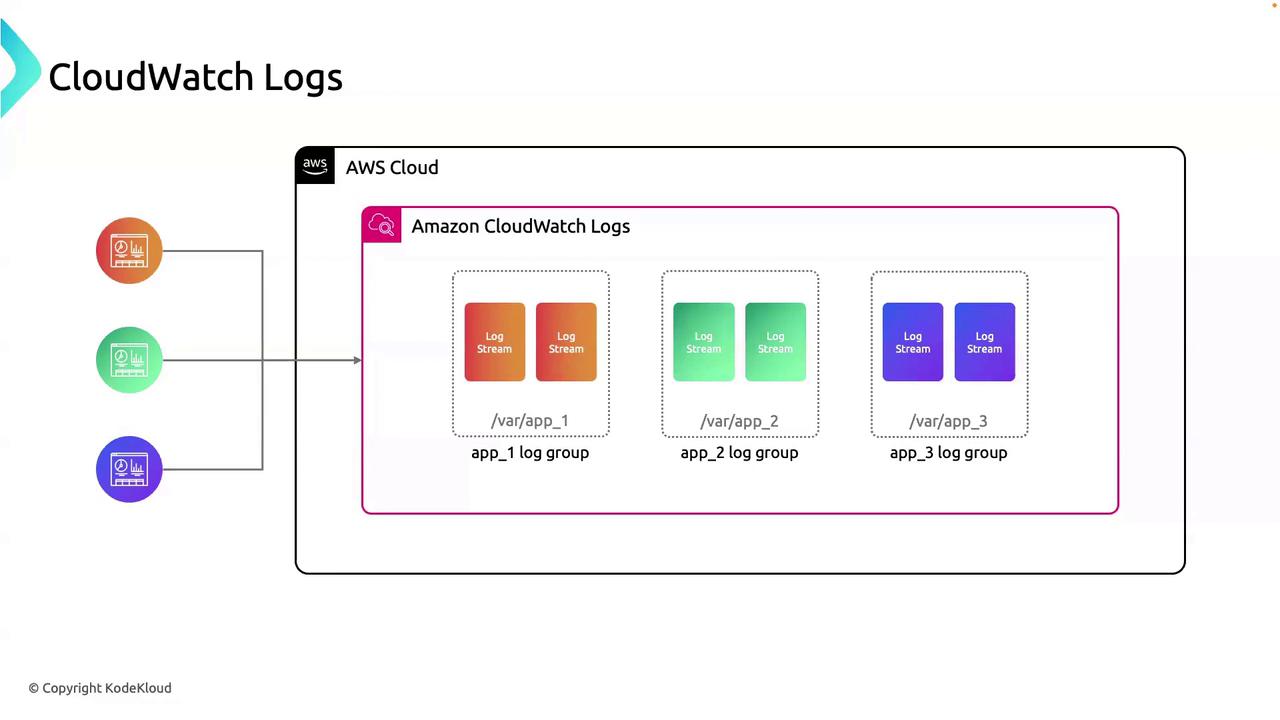
CloudWatch Logs structures data using two primary concepts:
| Concept | Definition | AWS CLI Example |
| ---------- | ----------------------------------------------------------- | ---------------------------------------------------------------------------------------- |
| Log Group | A container for log streams with shared retention and ACLs. | `aws logs create-log-group --log-group-name app_01` |
| Log Stream | An ordered sequence of log events from a single source. | `aws logs create-log-stream --log-group-name app_01 --log-stream-name stream_2024-06-01` |
* **Log Group**: Use to separate environments (dev, prod) or applications.
* **Log Stream**: Each instance or component can have its own stream.
Here’s how your applications integrate:
## Use Case: Debugging with CloudWatch Logs
When troubleshooting `app_01`:
1. Go to the **app\_01** log group.
2. Select the relevant log stream for your instance or task.
3. Use real-time filtering (e.g., `ERROR`, `WARN`) to pinpoint exceptions.
4. If needed, create a **metric filter** to track error rates over time.
This structured approach avoids sifting through unrelated logs and accelerates root-cause analysis.
## Links and References
* [AWS CloudWatch Logs Documentation](https://docs.aws.amazon.com/cloudwatch/latest/logs/)
* [Installing the CloudWatch Agent](https://docs.aws.amazon.com/AmazonCloudWatch/latest/monitoring/install-CloudWatch-Agent.html)
* [AWS CLI Command Reference](https://docs.aws.amazon.com/cli/latest/reference/)