> ## Documentation Index
> Fetch the complete documentation index at: https://notes.kodekloud.com/llms.txt
> Use this file to discover all available pages before exploring further.
# How networking works
> This guide explains how the AWS VPC CNI plugin assigns IPs to EKS cluster nodes and pods, optimizing pod density and scaling parameters.
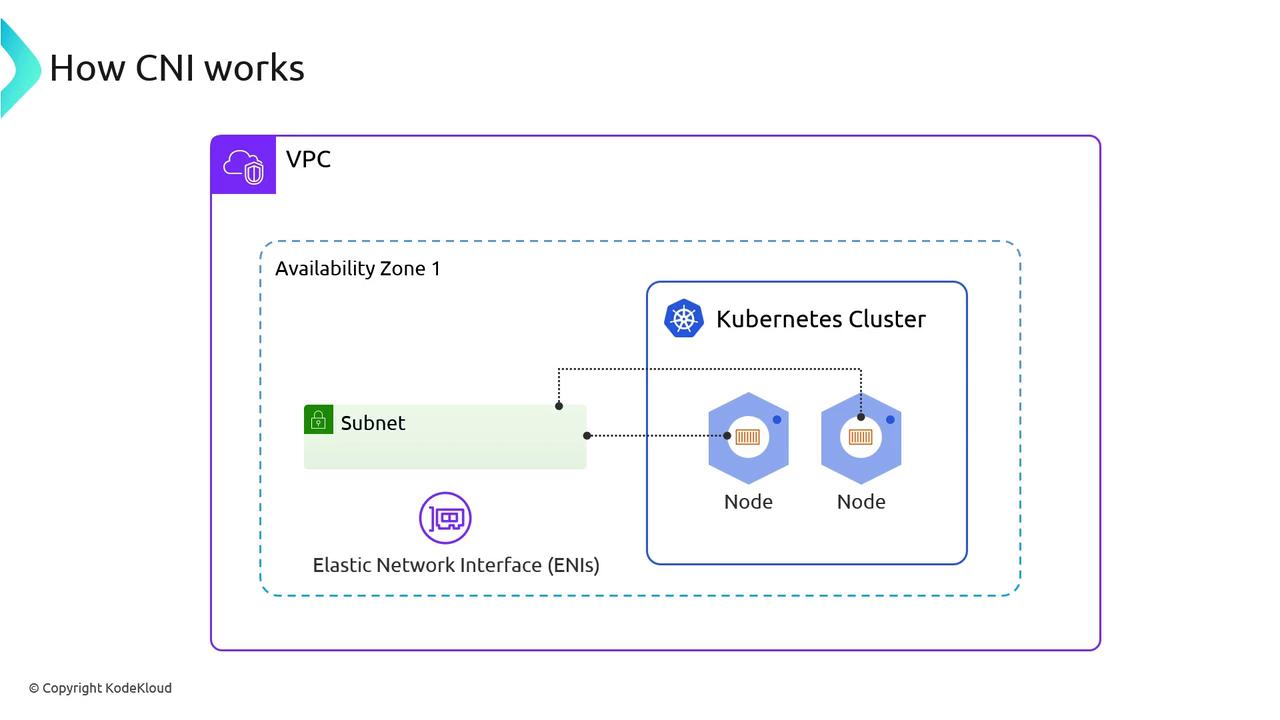
In this guide, we’ll walk through how the AWS VPC CNI plugin assigns IPs to your EKS cluster’s nodes and pods. Each node and pod runs on Elastic Network Interfaces (ENIs) within the VPC subnets in their Availability Zone. Understanding this CNI integration helps you optimize pod density, avoid IP exhaustion, and fine-tune scaling parameters.
## 1. Confirm Your EKS Cluster
Start by verifying which EKS cluster is active:
```bash theme={null}
eksdemo get clusters
+-----------+--------+-----------+---------+----------+
| Age | Status | Cluster | Version | Platform |
+-----------+--------+-----------+---------+----------+
| 45 minutes| ACTIVE | *kodekloud| 1.28 | eks.7 | Public |
+-----------+--------+-----------+---------+----------+
* Indicates current context in local kubeconfig
```
## 2. Inspect VPCs and Subnets
It’s recommended to dedicate one VPC per EKS cluster to simplify IP management:
```bash theme={null}
eksdemo get vpc
```
```bash theme={null}
eksdemo get subnets
```
A `/16` VPC block yields \~65,000 IPv4 addresses—enough for control plane, nodes, pods, and endpoints.
Running multiple clusters in a single VPC can lead to IP exhaustion. Always project your pod and node scale before choosing CIDR sizes.
## 3. List ENIs in the VPC
AWS attaches ENIs for both control-plane interfaces and worker-node networking. Use this table to distinguish primary vs. secondary ENIs:
| ENI Type | Description | Attached To | IPs per ENI |
| ------------- | ---------------------------------------- | --------------------- | ----------- |
| Primary ENI | eth0, node’s main interface | EC2 instances (nodes) | 1 |
| Secondary ENI | eth1, eth2… for pod traffic | EC2 instances (nodes) | Up to 12 |
| Control-Plane | Managed by AWS for the EKS API endpoints | `eks_control_plane` | 1 |
```bash theme={null}
eksdemo get network-interfaces
```
## 4. Kubernetes Data Plane: Nodes & Pods
Verify that your nodes are Ready and system pods are running:
```bash theme={null}
kubectl get nodes
```
```bash theme={null}
kubectl get pods -A -o wide
```
By default, EKS runs:
* **aws-node** DaemonSet (VPC CNI plugin)
* **kube-proxy**
* **coredns** for DNS resolution
## 5. Examine the aws-node DaemonSet
Describe the DaemonSet to view replicas and container images:
```bash theme={null}
kubectl describe ds aws-node -n kube-system
```
Key fields:
* **Desired / Current / Ready** pod counts
* **Init Container**: `aws-vpc-cni-init`
* **Main Container**: `aws-node` (configures ENIs, warm IP pools)
* **Sidecar**: `aws-eks-nodeagent` (eBPF network policies)
## 6. aws-node Pod Spec Breakdown
Below is a trimmed excerpt of the DaemonSet pod spec:
```yaml theme={null}
initContainers:
- name: aws-vpc-cni-init
image: amazon-k8s-cni-init:v1.6.3
env:
- name: ENABLE_IPv6
value: "false"
volumeMounts:
- name: cni-bin-dir
mountPath: /host/opt/cni/bin
containers:
- name: aws-node
image: amazon-k8s-cni:v1.16.2-eksbuild.1
env:
- name: WARM_ENI_TARGET
value: "1"
- name: WARM_PREFIX_TARGET
value: "1"
- name: VPC_ID
value: "vpc-068d84bd223c3afd6"
volumeMounts:
- name: cni-net-dir
mountPath: /host/etc/cni/net.d
- name: run-dir
mountPath: /var/run/aws-node
- name: aws-eks-nodeagent
image: aws-network-policy-agent:v1.0.7-eksbuild.1
args:
- --enable-network-policy=true
- --enable-ipv6=false
volumeMounts:
- name: bpf-pin-path
mountPath: /sys/fs/bpf
```
Adjust environment variables like `WARM_ENI_TARGET` and `WARM_PREFIX_TARGET` to control how many spare IPs the plugin keeps ready.
## 7. View Init Container Logs
The init container seeds CNI binaries and tunes sysctls:
```bash theme={null}
kubectl logs -n kube-system aws-node-xxxxx -c aws-vpc-cni-init
```
Sample output:
```text theme={null}
Copying CNI plugin binaries ...
Updated net/ipv4/conf/eth0/rp_filter to 2
CNI init container done
```
## 8. Inspect Node Network Interfaces
SSH into any worker node to see eth0 (primary) and secondary ENIs:
```bash theme={null}
ip a
```
Typical output:
```text theme={null}
2: eth0: inet 192.168.132.239/19 ...
3: eniXXXX@if3: inet 192.168.141.232/19 ...
```
* **eth0**: Node’s primary IP
* **eni…**: Pod IPs handled by the CNI
## 9. Review Host CNI Configuration
The init container writes `/etc/cni/net.d/10-aws.conflist` on each node:
```bash theme={null}
cat /etc/cni/net.d/10-aws.conflist
```
Key sections:
* `"type": "aws-cni"` plugin
* `"vethPrefix": "eni"`
* `"mtu": "9001"`
* Egress CNI stub
## 10. List CNI Plugin Binaries
CNI executables live under `/opt/cni/bin` on each node:
```bash theme={null}
ls -1 /opt/cni/bin
```
Examples include:
* aws-cni
* egress-cni
* bridge, dhcp, host-local, bandwidth, firewall
## 11. Verify the aws-cni Binary
Confirm supported CNI versions using the help flag:
```bash theme={null}
/opt/cni/bin/aws-cni --help
```
Output shows supported protocols:
```text theme={null}
CNI protocol versions supported: 0.1.0, 0.2.0, 0.3.0, 0.3.1, 0.4.0, 1.0.0
```
***
## Further Reading
* [AWS VPC CNI Plugin](https://github.com/aws/amazon-vpc-cni-k8s)
* [Kubernetes Networking Concepts](https://kubernetes.io/docs/concepts/cluster-administration/networking/)
* [EKS Best Practices Guide](https://aws.github.io/aws-eks-best-practices/)