> ## Documentation Index
> Fetch the complete documentation index at: https://notes.kodekloud.com/llms.txt
> Use this file to discover all available pages before exploring further.
# AWS Private Link
> AWS PrivateLink enables private, low-latency connectivity between Amazon VPC and AWS services without using the public internet.
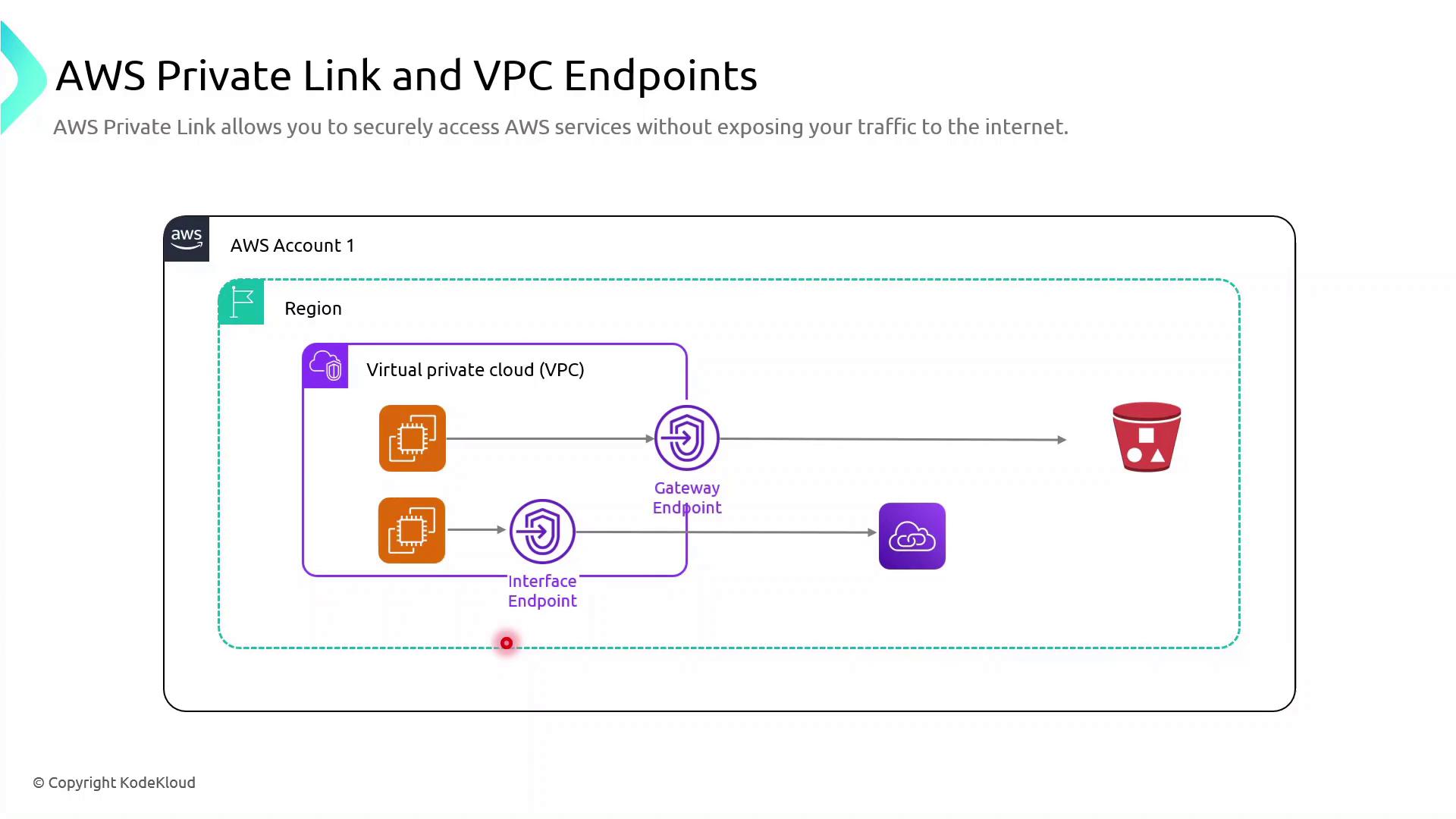
AWS PrivateLink provides private, low-latency connectivity between your Amazon VPC and supported AWS services without using the public internet. By leveraging VPC endpoints, you can enhance security, improve performance, and simplify network architecture.
## AWS VPC Endpoint Types
AWS VPC endpoints come in two flavors:
| Endpoint Type | Supported Services | Mechanism | Primary Use Case |
| ------------------ | ---------------------------------------------- | --------------------------------- | ---------------------------------- |
| Gateway Endpoint | Amazon S3, DynamoDB | Route tables | Private data access to S3/DynamoDB |
| Interface Endpoint | 100+ AWS services (Lambda, Kinesis, SNS, etc.) | Elastic Network Interfaces (ENIs) | Private API calls to AWS services |
Gateway endpoints are free of data processing charges, whereas interface endpoints incur hourly and per-GB data processing fees.
## Gateway Endpoint: Accessing Amazon S3 Privately
To keep traffic between your VPC and Amazon S3 entirely on the AWS network, create a gateway endpoint:
```bash theme={null}
aws ec2 create-vpc-endpoint \
--vpc-id vpc-12345678 \
--service-name com.amazonaws.us-east-1.s3 \
--route-table-ids rtb-12345678
```
All S3 requests from your EC2 instances now use the private endpoint in your VPC, reducing latency and eliminating exposure to the public internet.
Gateway endpoints support **only** Amazon S3 and DynamoDB. For other services, use interface endpoints.
## Interface Endpoint: Calling AWS Lambda Privately
When your applications need to invoke Lambda functions without leaving the AWS backbone, deploy an interface endpoint:
```bash theme={null}
aws ec2 create-vpc-endpoint \
--vpc-id vpc-12345678 \
--service-name com.amazonaws.us-east-1.lambda \
--subnet-ids subnet-abcdefgh \
--security-group-ids sg-1234abcd
```
This command provisions ENIs in your selected subnets, each with private IP addresses mapped to the Lambda service endpoint. All Lambda invocations remain on the Amazon network, ensuring secure, low-latency communication.
## Links and References
* [AWS PrivateLink Documentation](https://docs.aws.amazon.com/privatelink/latest/userguide/what-is-privatelink.html)
* [VPC Endpoints Overview](https://docs.aws.amazon.com/vpc/latest/privatelink/vpc-endpoints.html)
* [Amazon S3 User Guide](https://docs.aws.amazon.com/AmazonS3/latest/userguide/Welcome.html)
* [AWS Lambda Developer Guide](https://docs.aws.amazon.com/lambda/latest/dg/welcome.html)