> ## Documentation Index
> Fetch the complete documentation index at: https://notes.kodekloud.com/llms.txt
> Use this file to discover all available pages before exploring further.
# Demo Resource Based Policy
> This tutorial explains how to attach a resource-based policy to an S3 bucket using the Policy Generator in AWS.
In this tutorial, we’ll walk through attaching a resource-based policy to an existing S3 bucket in your AWS account. You’ll learn how to use the **Policy Generator**, customize the JSON, and apply it to grant fine-grained access.
## 1. Navigate to the S3 Console
1. Open the AWS Management Console and go to **S3**.
2. Click **Buckets** and use the filter to find **company1-sales**.
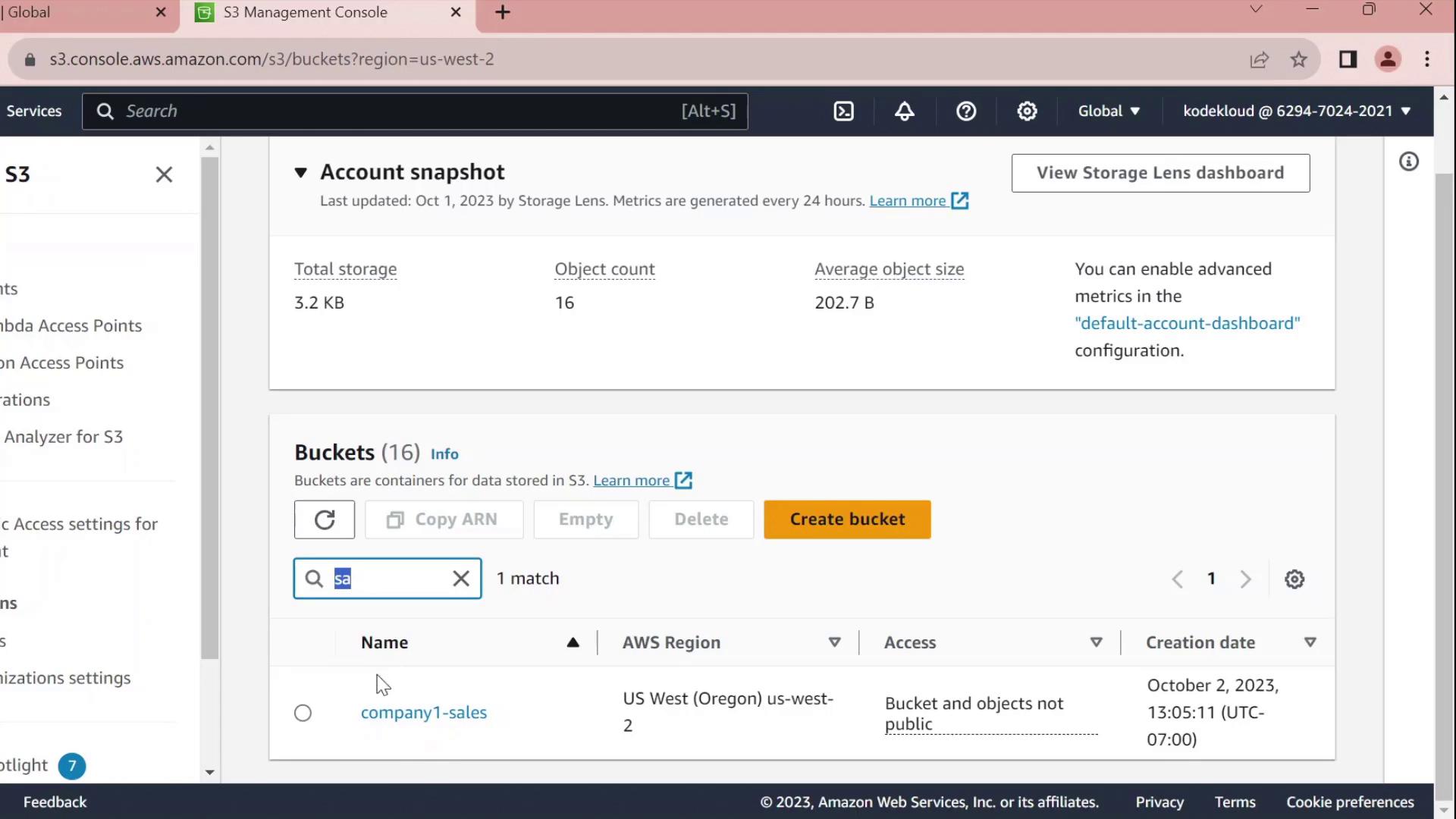
3. Select **company1-sales** and switch to the **Permissions** tab.
4. Scroll to **Bucket policy** and click **Edit**.
5. At the top of the editor, choose **Policy Generator** instead of writing raw JSON.
## 2. Generate a Bucket Policy
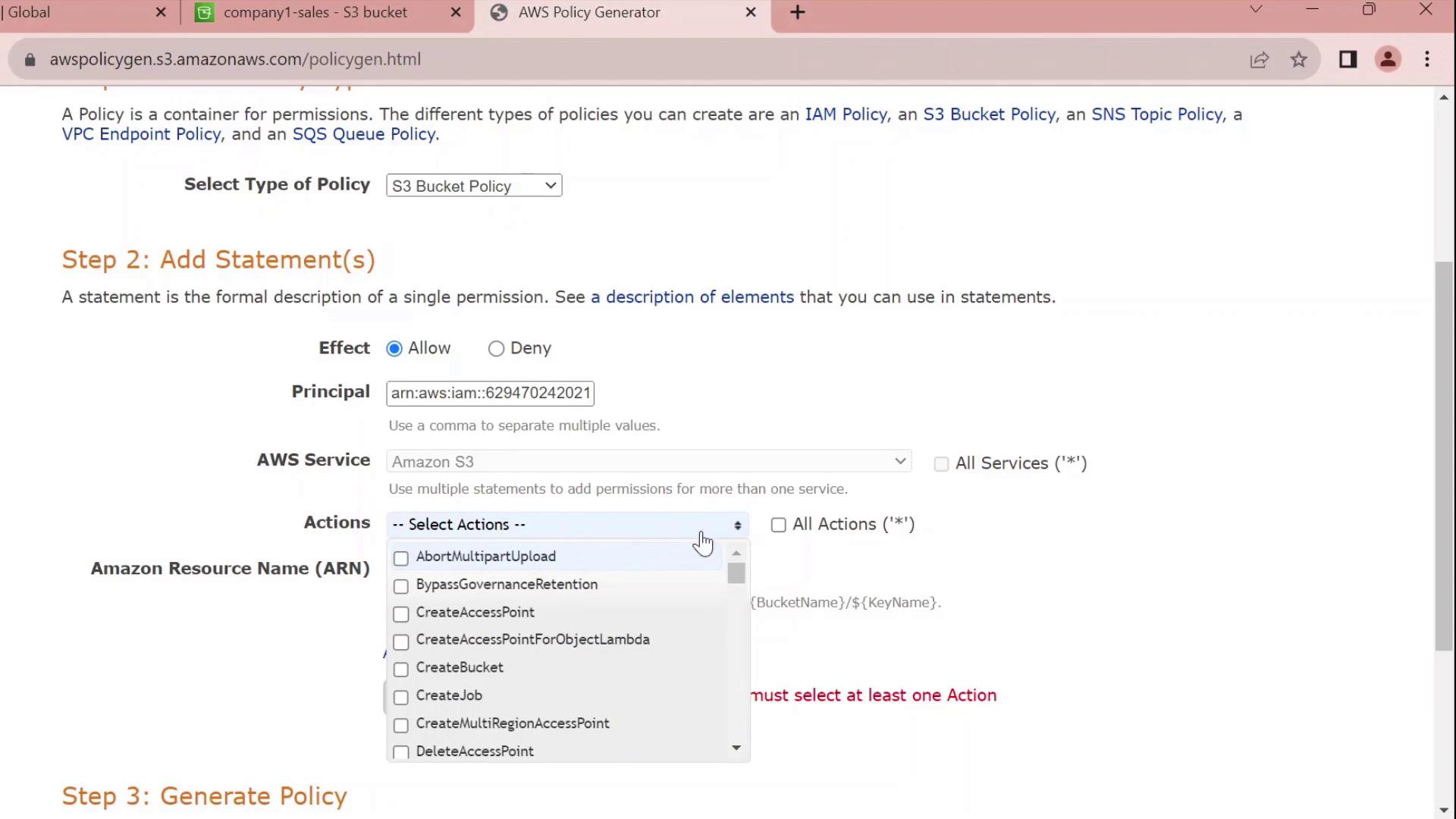
In the **Policy Generator** form:
| Field | Value |
| --------- | ----------------------------------- |
| Effect | Allow |
| Principal | arn:aws:iam::629470242021:user/john |
| Service | S3 |
| Actions | All Actions (`s3:*`) |
| Resource | arn:aws:s3:::company1-sales |
Click **Add Statement**, then **Generate Policy**.
## 3. Review and Customize the JSON
The generator outputs a JSON policy similar to this:
```json theme={null}
{
"Id": "Policy1696277356902",
"Version": "2012-10-17",
"Statement": [
{
"Sid": "Stmt1696277354841",
"Effect": "Allow",
"Principal": {
"AWS": [
"arn:aws:iam::629470242021:user/john"
]
},
"Action": "s3:*",
"Resource": "arn:aws:s3:::company1-sales"
}
]
}
```
### Customize the Statement ID
Replace the auto-generated SID with something meaningful, for example `JohnFullAccessToCompany1SalesBucket`:
```json theme={null}
{
"Id": "Policy1696277356902",
"Version": "2012-10-17",
"Statement": [
{
"Sid": "JohnFullAccessToCompany1SalesBucket",
"Effect": "Allow",
"Principal": {
"AWS": "arn:aws:iam::629470242021:user/john"
},
"Action": "s3:*",
"Resource": "arn:aws:s3:::company1-sales"
}
]
}
```
By default, this policy grants permissions only on the bucket itself. To allow object-level actions (e.g., `GetObject`, `PutObject`), add the ARN `arn:aws:s3:::company1-sales/*` to the `Resource` array.
## 4. Apply the Policy
1. Copy the finalized JSON.
2. Paste it into the **Bucket policy** editor.
3. Click **Save changes**.
You’ve now successfully attached a resource-based policy that grants the IAM user **john** full control over the `company1-sales` bucket.
***
## Policy Statement Elements
| Element | Description | Example |
| --------- | ----------------------------------- | ------------------------------------------------------------------ |
| Sid | Unique identifier for the statement | `JohnFullAccessToCompany1SalesBucket` |
| Effect | Allow or Deny the action | `Allow` |
| Principal | The IAM user, role, or service | `arn:aws:iam::629470242021:user/john` |
| Action | The S3 operations permitted | `s3:*` |
| Resource | The bucket or object ARNs | `arn:aws:s3:::company1-sales`
`arn:aws:s3:::company1-sales/*` |
***
## Links and References
* [Amazon S3 Bucket Policies](https://docs.aws.amazon.com/AmazonS3/latest/userguide/using-iam-policies.html#bucket-policies)
* [AWS IAM Policy Reference](https://docs.aws.amazon.com/IAM/latest/UserGuide/reference_policies.html)
* [Kubernetes Basics](https://kubernetes.io/docs/concepts/overview/what-is-kubernetes/)