> ## Documentation Index
> Fetch the complete documentation index at: https://notes.kodekloud.com/llms.txt
> Use this file to discover all available pages before exploring further.
# Access Permissions
> This article explains AWS Lambda access permissions, focusing on invocation permissions and execution roles for secure function operation.
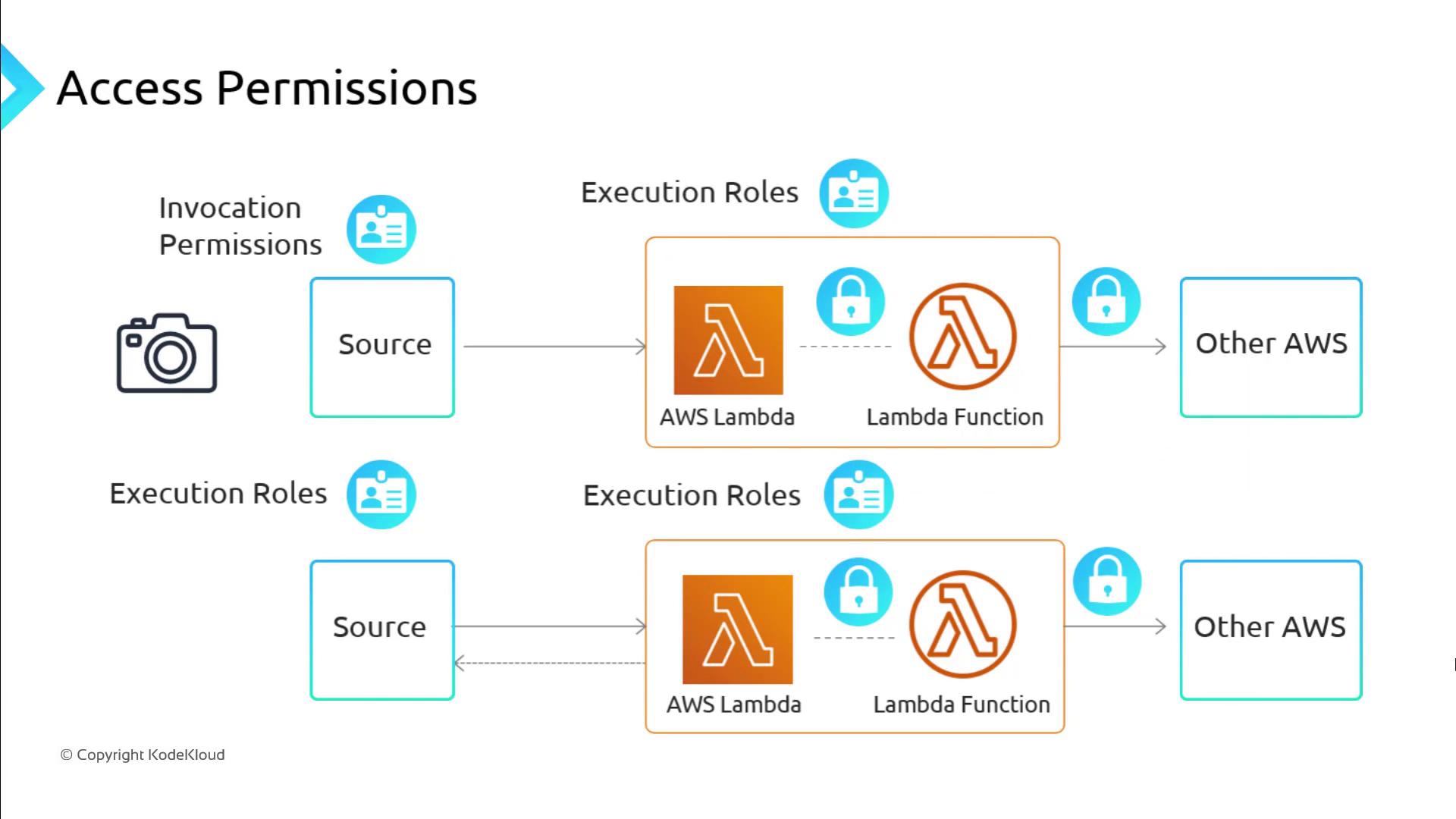
Securing AWS Lambda functions involves two distinct permission models that control how functions are invoked and what AWS services they can access. Understanding these models is essential for both security and functionality.
| Permission Type | Event Source | Managed By | Purpose |
| --------------------- | ------------------- | --------------------- | ------------------------------------------------------------ |
| Invocation Permission | Push (e.g., SNS) | IAM Resource Policy | Allow an external service or account to invoke your function |
| Execution Role | Pull or AWS actions | IAM Role (AssumeRole) | Grant your function permissions to use other AWS services |
***
## Invocation Permissions
Invocation permissions are required only when a *push* event source directly triggers your Lambda function (for example, Amazon SNS, Amazon API Gateway, or CloudWatch Events). You grant these permissions by attaching an IAM resource policy to your function.
When you configure a push-based event source in the AWS Management Console, AWS Lambda automatically creates the necessary invocation policy.
To add invocation permission via the CLI:
```bash theme={null}
aws lambda add-permission \
--function-name my-function \
--statement-id AllowSNSInvoke \
--action lambda:InvokeFunction \
--principal sns.amazonaws.com \
--source-arn arn:aws:sns:us-east-1:123456789012:my-topic
```
For more details, see [AWS Lambda AddPermission](https://docs.aws.amazon.com/cli/latest/reference/lambda/add-permission.html).
***
## Execution Role
The execution role is an IAM role that your Lambda function assumes when it runs. It must include:
1. **Permissions policy**: Defines the AWS service actions your function can perform.
2. **Trust policy**: Specifies that the Lambda service (`lambda.amazonaws.com`) is allowed to assume the role.
Avoid overly broad permissions (e.g., `Action": "*"`) in your execution role. Grant only the minimum privileges your function requires.
### Example Permissions Policy
```json theme={null}
{
"Version": "2012-10-17",
"Statement": [
{
"Sid": "AllowS3PutFromSpecificSource",
"Effect": "Allow",
"Action": "s3:PutObject",
"Resource": "arn:aws:s3:::lambda_bucket/*",
"Condition": {
"ArnEquals": {
"lambda:SourceFunctionArn": "arn:aws:lambda:us-east-1:123456789012:function:source_lambda"
}
}
}
]
}
```
* **Action**: `s3:PutObject` grants write access to the specified S3 bucket.
* **Condition**: Restricts this permission to invocations originating from a particular Lambda function.
### Example Trust Policy
```json theme={null}
{
"Version": "2012-10-17",
"Statement": [
{
"Effect": "Allow",
"Principal": {
"Service": "lambda.amazonaws.com"
},
"Action": "sts:AssumeRole"
}
]
}
```
* **Principal**: Specifies `lambda.amazonaws.com` as the trusted entity.
* **Action**: `sts:AssumeRole` allows Lambda to assume this role at runtime.
After defining both policies, attach the execution role to your Lambda function via the console or CLI:
```bash theme={null}
aws lambda create-function \
--function-name my-function \
--runtime python3.9 \
--role arn:aws:iam::123456789012:role/my-execution-role \
--handler handler.lambda_handler \
--zip-file fileb://function.zip
```
***
## References
* [AWS Lambda Permissions Model](https://docs.aws.amazon.com/lambda/latest/dg/access-control.html)
* [IAM Roles in AWS](https://docs.aws.amazon.com/IAM/latest/UserGuide/id_roles.html)
* [AWS CLI Lambda Commands](https://docs.aws.amazon.com/cli/latest/reference/lambda/index.html)