> ## Documentation Index
> Fetch the complete documentation index at: https://notes.kodekloud.com/llms.txt
> Use this file to discover all available pages before exploring further.
# Read Replicas
> Explains RDS read replicas as read only copies of primary databases using asynchronous replication to offload read traffic, scale read workloads and guide routing, monitoring and promotion.
Welcome back. In this lesson we’ll cover RDS read replicas — what they are, when to use them, and operational best practices to scale read-heavy workloads.
## Use case and problem statement
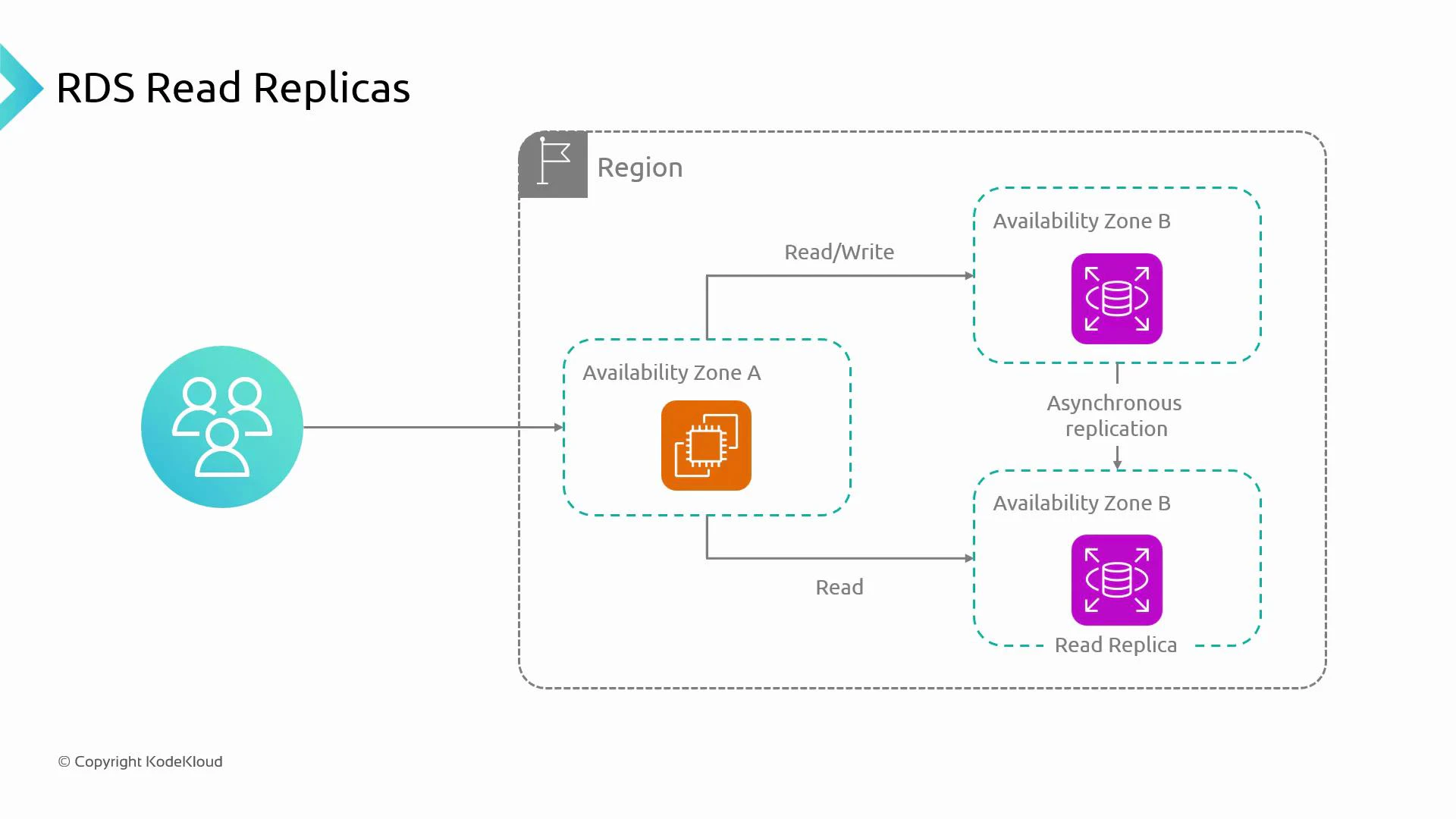
* Imagine an application running on a compute platform ([EC2](https://learn.kodekloud.com/user/courses/amazon-elastic-compute-cloud-ec2), [ECS](https://learn.kodekloud.com/user/courses/amazon-elastic-container-service-aws-ecs), [EKS](https://learn.kodekloud.com/user/courses/aws-eks), or an [Auto Scaling Group](https://aws.amazon.com/autoscaling/)) deployed in one Availability Zone.
* The application performs reads and writes against a database hosted in a different Availability Zone (separating compute and data for scalability and recovery).
* When traffic is light, a single database instance handling both reads and writes is fine.
* As traffic grows, the primary database becomes a bottleneck: it must serve all read and write requests, increasing latency and reducing throughput.
## What is a read replica?
* A read replica is a read-only copy of the primary database instance.
* Writes to the primary are propagated to replicas via asynchronous replication.
* Applications route read-only queries to read replica(s) and send write queries to the primary to offload read traffic and improve scalability.
## Practical example
* An e-commerce site validates an existing user’s login (read) and creates a new account on registration (write).
* Route read operations (customer profile lookups, product catalog reads, reporting queries) to replicas and direct write operations (transactions, updates) to the primary.
 ## Key characteristics and operational considerations
| Characteristic | What it means | Operational impact / guidance |
| ------------------------ | -------------------------------------------------------------- | -------------------------------------------------------------------------------------------------------------- |
| Read-only | Replicas accept only read queries while configured as replicas | Use replicas for reporting, analytics, and read scaling — not for writes unless promoted |
| Asynchronous replication | Data is copied asynchronously from primary to replicas | Replicas can lag; they provide eventual consistency (except for engines with different models) |
| Separate endpoints | Each replica is its own DB instance with its own endpoint | Applications or proxies must route reads to replica endpoints and writes to the primary endpoint |
| Horizontal read scaling | Add replicas to increase read throughput (scale-out) | More replicas reduce read pressure on the primary but add cost and management overhead |
| Cost | Each replica incurs instance and storage costs | Balance performance needs against operational expense |
| Promotion | A replica can be promoted to a standalone writable primary | Promotion is usually manual and useful for disaster recovery; it’s not the same as automated Multi‑AZ failover |
Note: replication behavior can differ by engine. For example, [Amazon Aurora](https://aws.amazon.com/rds/aurora/) uses a distinct storage/replication model — consult the engine documentation for specifics.
## Replication vs. High Availability
* Multi‑AZ vs Read Replicas: [Multi‑AZ](https://docs.aws.amazon.com/AmazonRDS/latest/UserGuide/Concepts.MultiAZ.html) provides synchronous replication to a standby for high availability and automated failover. Read replicas use asynchronous replication and are intended for read scaling, not automatic failover.
* Replication lag: Applications that require read-after-write consistency must read from the primary or implement logic to handle stale reads from replicas.
Read replicas are ideal for offloading heavy read traffic, running read-only reporting/analytics, or providing geographically distributed read endpoints. Do not rely on replicas for immediate read-after-write consistency.
## Operational tips
* Application routing
* Use separate connection strings or data sources for read vs write.
* Consider a proxy or query router (e.g., PgBouncer, HAProxy, RDS Proxy) to direct reads to replicas and writes to the primary.
* Monitoring
* Track replication lag metrics and set alerts when lag exceeds acceptable thresholds.
* Monitor replica health, CPU, memory, and I/O to determine when to add replicas or scale instances.
* Backups and maintenance
* Understand how backups, maintenance windows, and failover operations affect replicas for your chosen engine.
* Test promotion and recovery procedures to ensure readiness for disaster scenarios.
When routing and scaling, common approaches include:
| Routing approach | Pros | Cons |
| -------------------------------------------------- | ------------------------------------: | ---------------------------------------------------------- |
| App-level routing (separate read/write DB clients) | Simple, transparent to DB | Requires code changes and careful handling of transactions |
| Proxy/router (connection pooling + routing) | Centralized routing, can balance load | Additional component to manage and scale |
| Read replicas per region | Lower latency for regional reads | Higher cost and data replication considerations |
Avoid using read replicas for operations that require strict read-after-write consistency. If your application needs immediate consistency, direct read traffic to the primary or implement application-level consistency controls.
## Summary
* Read replicas are read-only copies of the primary database that use asynchronous replication to offload read traffic and scale horizontally.
* Benefits: improved read throughput, isolation of heavy read workloads, and regional read endpoints.
* Trade-offs: potential replication lag (eventual consistency), increased cost, and manual promotion if a replica needs to become writable.
## Next steps
* Practice creating and configuring read replicas for your RDS engine and test routing read traffic from your application.
* Validate replication lag, promote a replica in a test scenario, and compare behavior against a Multi‑AZ configuration.
## Links and references
* [Amazon RDS](https://aws.amazon.com/rds/)
* [Amazon Aurora](https://aws.amazon.com/rds/aurora/)
* [Multi‑AZ for Amazon RDS](https://docs.aws.amazon.com/AmazonRDS/latest/UserGuide/Concepts.MultiAZ.html)
## Key characteristics and operational considerations
| Characteristic | What it means | Operational impact / guidance |
| ------------------------ | -------------------------------------------------------------- | -------------------------------------------------------------------------------------------------------------- |
| Read-only | Replicas accept only read queries while configured as replicas | Use replicas for reporting, analytics, and read scaling — not for writes unless promoted |
| Asynchronous replication | Data is copied asynchronously from primary to replicas | Replicas can lag; they provide eventual consistency (except for engines with different models) |
| Separate endpoints | Each replica is its own DB instance with its own endpoint | Applications or proxies must route reads to replica endpoints and writes to the primary endpoint |
| Horizontal read scaling | Add replicas to increase read throughput (scale-out) | More replicas reduce read pressure on the primary but add cost and management overhead |
| Cost | Each replica incurs instance and storage costs | Balance performance needs against operational expense |
| Promotion | A replica can be promoted to a standalone writable primary | Promotion is usually manual and useful for disaster recovery; it’s not the same as automated Multi‑AZ failover |
Note: replication behavior can differ by engine. For example, [Amazon Aurora](https://aws.amazon.com/rds/aurora/) uses a distinct storage/replication model — consult the engine documentation for specifics.
## Replication vs. High Availability
* Multi‑AZ vs Read Replicas: [Multi‑AZ](https://docs.aws.amazon.com/AmazonRDS/latest/UserGuide/Concepts.MultiAZ.html) provides synchronous replication to a standby for high availability and automated failover. Read replicas use asynchronous replication and are intended for read scaling, not automatic failover.
* Replication lag: Applications that require read-after-write consistency must read from the primary or implement logic to handle stale reads from replicas.
Read replicas are ideal for offloading heavy read traffic, running read-only reporting/analytics, or providing geographically distributed read endpoints. Do not rely on replicas for immediate read-after-write consistency.
## Operational tips
* Application routing
* Use separate connection strings or data sources for read vs write.
* Consider a proxy or query router (e.g., PgBouncer, HAProxy, RDS Proxy) to direct reads to replicas and writes to the primary.
* Monitoring
* Track replication lag metrics and set alerts when lag exceeds acceptable thresholds.
* Monitor replica health, CPU, memory, and I/O to determine when to add replicas or scale instances.
* Backups and maintenance
* Understand how backups, maintenance windows, and failover operations affect replicas for your chosen engine.
* Test promotion and recovery procedures to ensure readiness for disaster scenarios.
When routing and scaling, common approaches include:
| Routing approach | Pros | Cons |
| -------------------------------------------------- | ------------------------------------: | ---------------------------------------------------------- |
| App-level routing (separate read/write DB clients) | Simple, transparent to DB | Requires code changes and careful handling of transactions |
| Proxy/router (connection pooling + routing) | Centralized routing, can balance load | Additional component to manage and scale |
| Read replicas per region | Lower latency for regional reads | Higher cost and data replication considerations |
Avoid using read replicas for operations that require strict read-after-write consistency. If your application needs immediate consistency, direct read traffic to the primary or implement application-level consistency controls.
## Summary
* Read replicas are read-only copies of the primary database that use asynchronous replication to offload read traffic and scale horizontally.
* Benefits: improved read throughput, isolation of heavy read workloads, and regional read endpoints.
* Trade-offs: potential replication lag (eventual consistency), increased cost, and manual promotion if a replica needs to become writable.
## Next steps
* Practice creating and configuring read replicas for your RDS engine and test routing read traffic from your application.
* Validate replication lag, promote a replica in a test scenario, and compare behavior against a Multi‑AZ configuration.
## Links and references
* [Amazon RDS](https://aws.amazon.com/rds/)
* [Amazon Aurora](https://aws.amazon.com/rds/aurora/)
* [Multi‑AZ for Amazon RDS](https://docs.aws.amazon.com/AmazonRDS/latest/UserGuide/Concepts.MultiAZ.html)