> ## Documentation Index
> Fetch the complete documentation index at: https://notes.kodekloud.com/llms.txt
> Use this file to discover all available pages before exploring further.
# BlueGreen Deployments
> Blue-green database deployments using a synchronized green staging cluster for safe major upgrades, testing, cutover, rollback, and operational considerations to minimize user impact.
Welcome back. This lesson explains how to use blue–green deployments for databases so you can perform major and minor upgrades with minimal user impact.
Consider a mobile application whose backend uses two database instances: a primary (main) database in Availability Zone A and a read replica in Availability Zone C. Mobile clients perform reads and writes against the database. As the app scales to millions of users, upgrading the database without downtime becomes challenging.
Database upgrades fall into two broad categories:
| Upgrade Type | Risk | Typical Strategy |
| --------------------------- | --------------------------------------- | -------------------------------------------------------------- |
| Minor (e.g., 5.4.1 → 5.4.2) | Low — bug fixes, small behavior changes | Rolling upgrades, in-place patching after smoke tests |
| Major (e.g., 5.4.1 → 6.4.1) | High — behavioral and storage changes | Blue–green deployment with thorough testing on staging cluster |
Minor upgrades are often straightforward. Major upgrades can introduce incompatible behavior or storage format changes that require application adjustments and careful validation. To avoid impacting production users, teams often adopt a blue–green deployment pattern for databases.
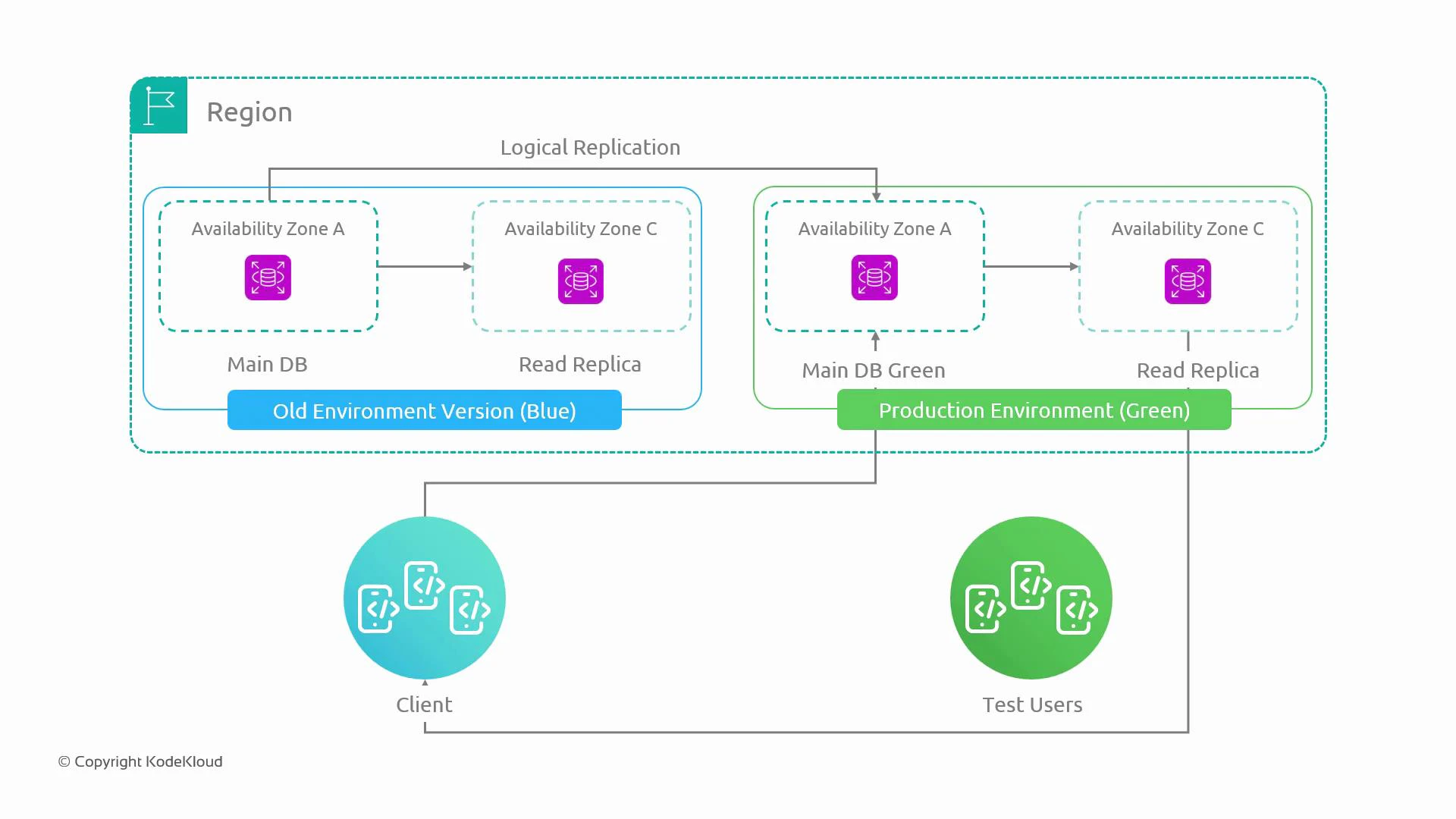
Key elements of a blue–green database deployment:
* Blue is the current production database cluster.
* Green is a separate, identical cluster provisioned as staging.
* Logical replication from blue to green keeps green up-to-date so tests run on real-like data.
* Test users and automated test suites exercise green; schema changes and upgrades are applied there first.
* After validation, traffic is switched to green (promoting it to production). If issues occur, switching back to blue is fast by updating endpoints, DNS, or load-balancer routing.
This approach gives you an identical staging cluster that receives realistic data and traffic, enabling safe validation of major changes before cutover.
 Practical operational considerations
* Replication model: Use one-way logical replication from blue → green so green can be tested with up-to-date production data. Avoid bidirectional writes to prevent conflicts and divergence.
* Cutover methods: Promote green by switching connection endpoints — DNS flip with a short TTL, updating client configuration, or changing load-balancer targets. Ensure clients reconnect and any pooled connections are drained.
* Gradual traffic shift: Reduce risk by ramping traffic (for example: 10% → 20% → 50% → 100%) while monitoring metrics and errors.
* Rollback: Since blue remains intact, rollback is fast — re-point clients to blue if problems appear.
* Data consistency: Verify green has replayed all changes and replication lag is acceptable before accepting writes on green.
* Operational parity: Green should mirror production in topology, Multi-AZ setup, and parameter settings to surface potential issues.
Keep replication-lag checks and write-drain procedures in your runbook. A successful cutover requires green to be fully caught up and clients to reconnect cleanly.
Practical operational considerations
* Replication model: Use one-way logical replication from blue → green so green can be tested with up-to-date production data. Avoid bidirectional writes to prevent conflicts and divergence.
* Cutover methods: Promote green by switching connection endpoints — DNS flip with a short TTL, updating client configuration, or changing load-balancer targets. Ensure clients reconnect and any pooled connections are drained.
* Gradual traffic shift: Reduce risk by ramping traffic (for example: 10% → 20% → 50% → 100%) while monitoring metrics and errors.
* Rollback: Since blue remains intact, rollback is fast — re-point clients to blue if problems appear.
* Data consistency: Verify green has replayed all changes and replication lag is acceptable before accepting writes on green.
* Operational parity: Green should mirror production in topology, Multi-AZ setup, and parameter settings to surface potential issues.
Keep replication-lag checks and write-drain procedures in your runbook. A successful cutover requires green to be fully caught up and clients to reconnect cleanly.
 Common pitfalls and constraints
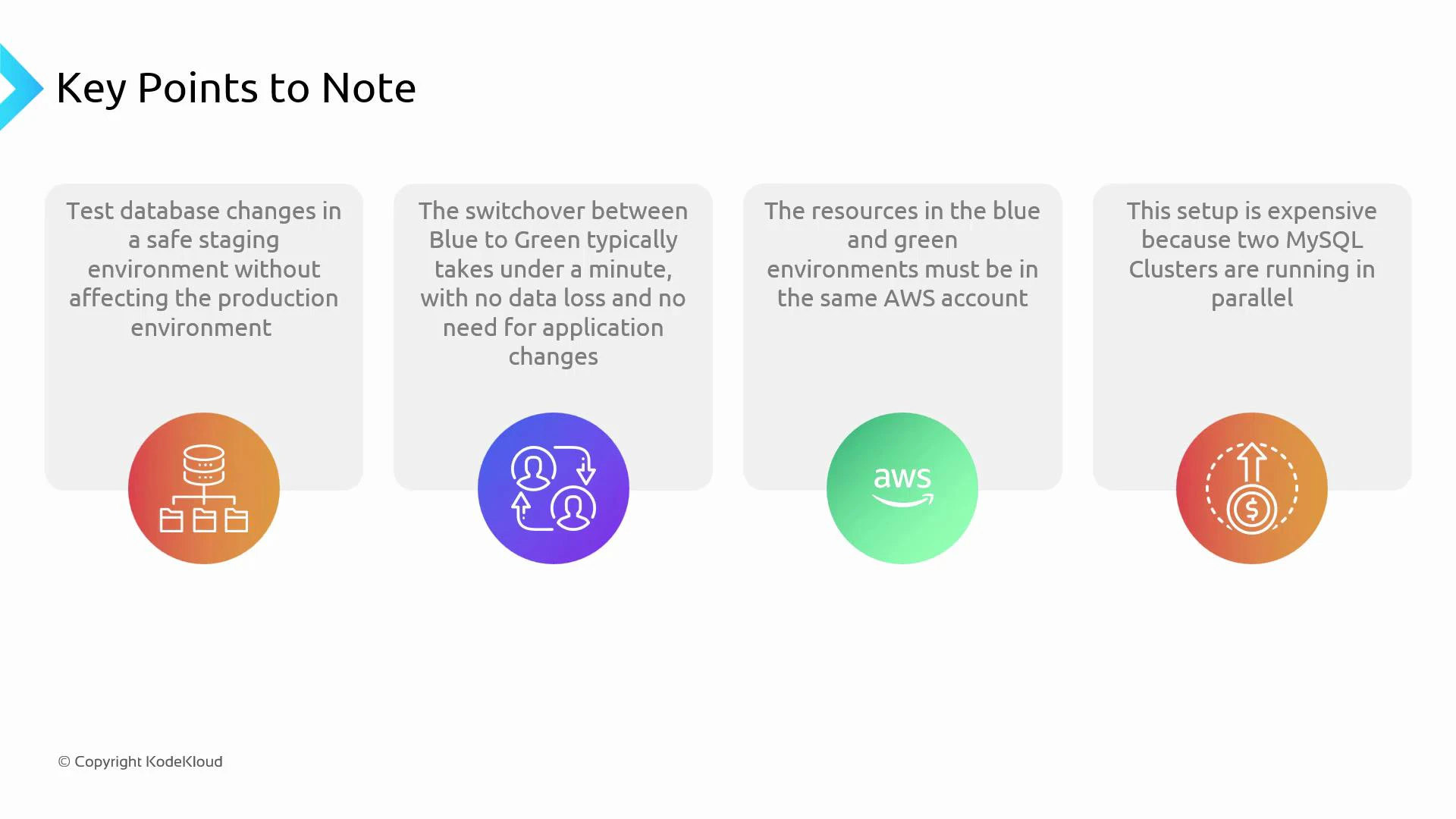
* Same account / networking: Keep blue and green in the same AWS account and VPC (or connect them securely). Cross-account/network setups complicate replication, IAM, and access controls.
* Cost: Running a duplicate production cluster (primary + read replicas, Multi-AZ copies, backups, monitoring) is expensive. Reserve this pattern for systems where scale and risk justify the expense.
* Multi-AZ & cluster parity: If production uses Multi-AZ clusters, ensure green has the same Multi-AZ configuration to surface related issues.
* Data model changes: Some schema changes are not backwards compatible. Design zero-downtime schema migrations (backward/forward compatible changes, feature toggles, or dual-write strategies) where possible.
| Consideration | Recommendation |
| ------------------- | ----------------------------------------------------------------------------------------------- |
| Replication lag | Measure and require zero (or acceptable) lag before cutover |
| Connection draining | Implement graceful connection draining and client reconnection logic |
| Testing scope | Run functional, performance, and failover tests on green under real-like load |
| Cost control | Use smaller instance types for green where appropriate, but ensure parity for critical features |
Cutting over while replication is lagging or without draining writes risks data loss or split-brain. Validate a pre-cutover checklist before switching traffic.
Summary
Blue–green deployments for databases provide a safe staging environment that mirrors production, enabling comprehensive testing of major upgrades and a quick rollback path. The trade-offs are increased cost and operational complexity — use this approach for high-risk, high-scale systems where minimizing user impact outweighs additional expense.
Further reading and references
* [AWS RDS Documentation](https://docs.aws.amazon.com/rds/index.html) — guidance on Multi-AZ, replicas, and maintenance
* [Logical Replication Concepts](https://www.postgresql.org/docs/current/logical-replication.html) — for PostgreSQL-style logical replication
* Articles on zero-downtime schema migrations and feature flag strategies
That is it for this lesson.
Common pitfalls and constraints
* Same account / networking: Keep blue and green in the same AWS account and VPC (or connect them securely). Cross-account/network setups complicate replication, IAM, and access controls.
* Cost: Running a duplicate production cluster (primary + read replicas, Multi-AZ copies, backups, monitoring) is expensive. Reserve this pattern for systems where scale and risk justify the expense.
* Multi-AZ & cluster parity: If production uses Multi-AZ clusters, ensure green has the same Multi-AZ configuration to surface related issues.
* Data model changes: Some schema changes are not backwards compatible. Design zero-downtime schema migrations (backward/forward compatible changes, feature toggles, or dual-write strategies) where possible.
| Consideration | Recommendation |
| ------------------- | ----------------------------------------------------------------------------------------------- |
| Replication lag | Measure and require zero (or acceptable) lag before cutover |
| Connection draining | Implement graceful connection draining and client reconnection logic |
| Testing scope | Run functional, performance, and failover tests on green under real-like load |
| Cost control | Use smaller instance types for green where appropriate, but ensure parity for critical features |
Cutting over while replication is lagging or without draining writes risks data loss or split-brain. Validate a pre-cutover checklist before switching traffic.
Summary
Blue–green deployments for databases provide a safe staging environment that mirrors production, enabling comprehensive testing of major upgrades and a quick rollback path. The trade-offs are increased cost and operational complexity — use this approach for high-risk, high-scale systems where minimizing user impact outweighs additional expense.
Further reading and references
* [AWS RDS Documentation](https://docs.aws.amazon.com/rds/index.html) — guidance on Multi-AZ, replicas, and maintenance
* [Logical Replication Concepts](https://www.postgresql.org/docs/current/logical-replication.html) — for PostgreSQL-style logical replication
* Articles on zero-downtime schema migrations and feature flag strategies
That is it for this lesson.