> ## Documentation Index
> Fetch the complete documentation index at: https://notes.kodekloud.com/llms.txt
> Use this file to discover all available pages before exploring further.
# Optimized ReadsWrites
> Explains RDS optimized reads/writes using local NVMe for transient I/O to reduce latency while keeping persistent data on EBS and discussing InnoDB double-write trade-offs
Welcome back. This lesson explains optimized reads and writes in Amazon RDS and why they matter for database performance. We cover how MySQL/InnoDB protects on-disk data with the double-write buffer, the performance trade-offs, and how RDS can reduce latency by moving transient I/O to local instance storage (NVMe/instance store) while keeping persistent data on durable network storage (EBS).
## How the classical double-write buffer works (high level)
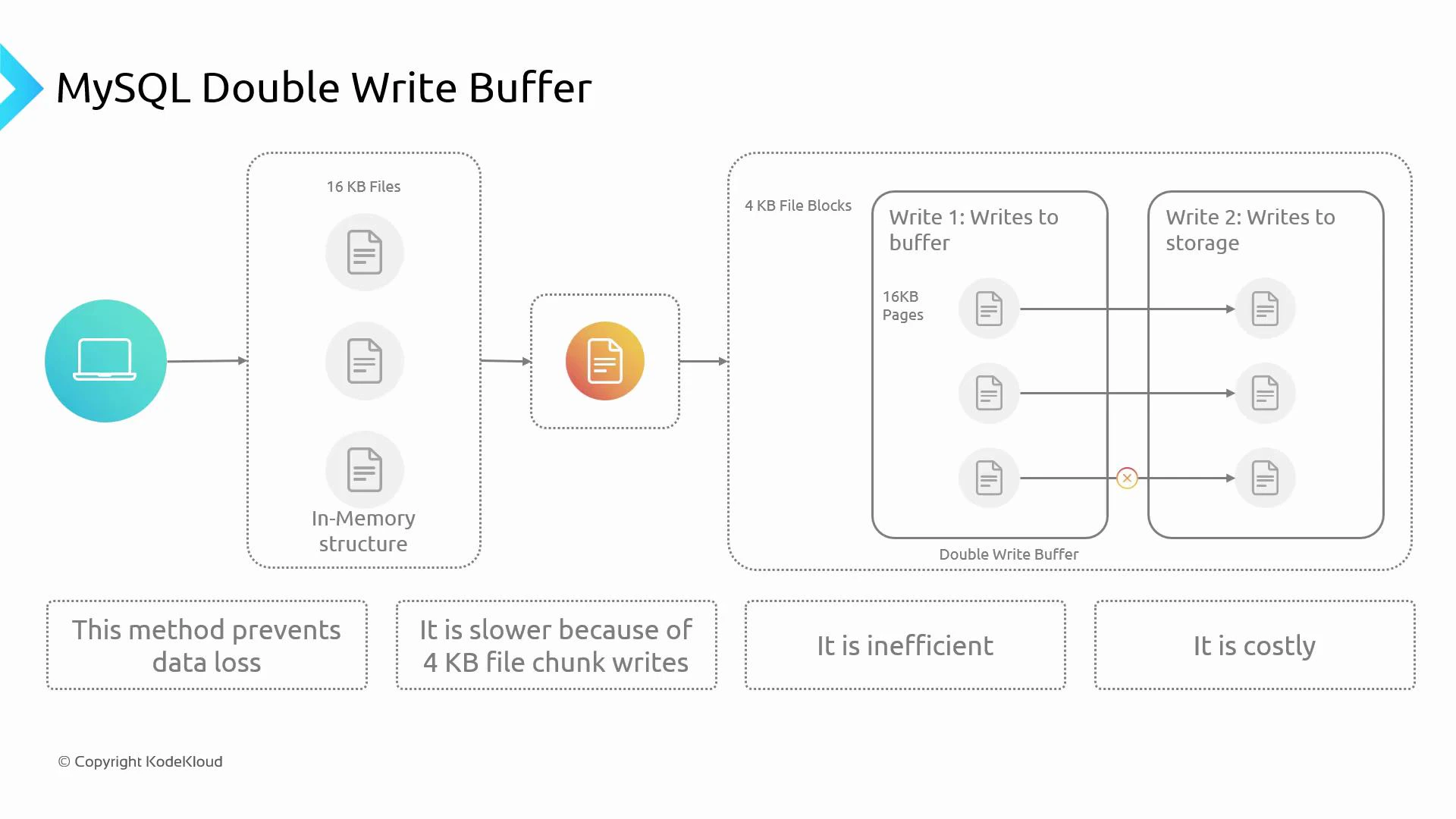
When an application writes to a relational database, several internal steps ensure durability and consistency. InnoDB uses a double-write buffer to protect data against partial page writes. At a high level:
* InnoDB manages data in memory pages (default page size is 16 KB).
* Modified pages become "dirty" in the buffer pool. InnoDB writes a write-ahead redo log to guarantee durability before page flushes.
* Before flushing dirty pages to their final tablespace locations, InnoDB writes them to a double-write buffer. This buffer guards against partial-page corruption caused by hardware, firmware, or OS crashes.
* Typical storage devices use 4 KB sectors/blocks. Writing a full 16 KB page directly to a device composed of 4 KB blocks risks partial-page corruption if a failure interrupts the write. The double-write buffer writes contiguous full pages first, then copies them to their final disk locations.
* Advantage: strong protection against partial-page corruption and data loss. Drawback: extra I/O (pages are written twice), which increases write latency and affects cost on write-heavy workloads.
This design favors safety and correctness, but it adds I/O overhead that can hurt throughput for write-intensive workloads.
 ## Rethinking where the temporary/working I/O happens
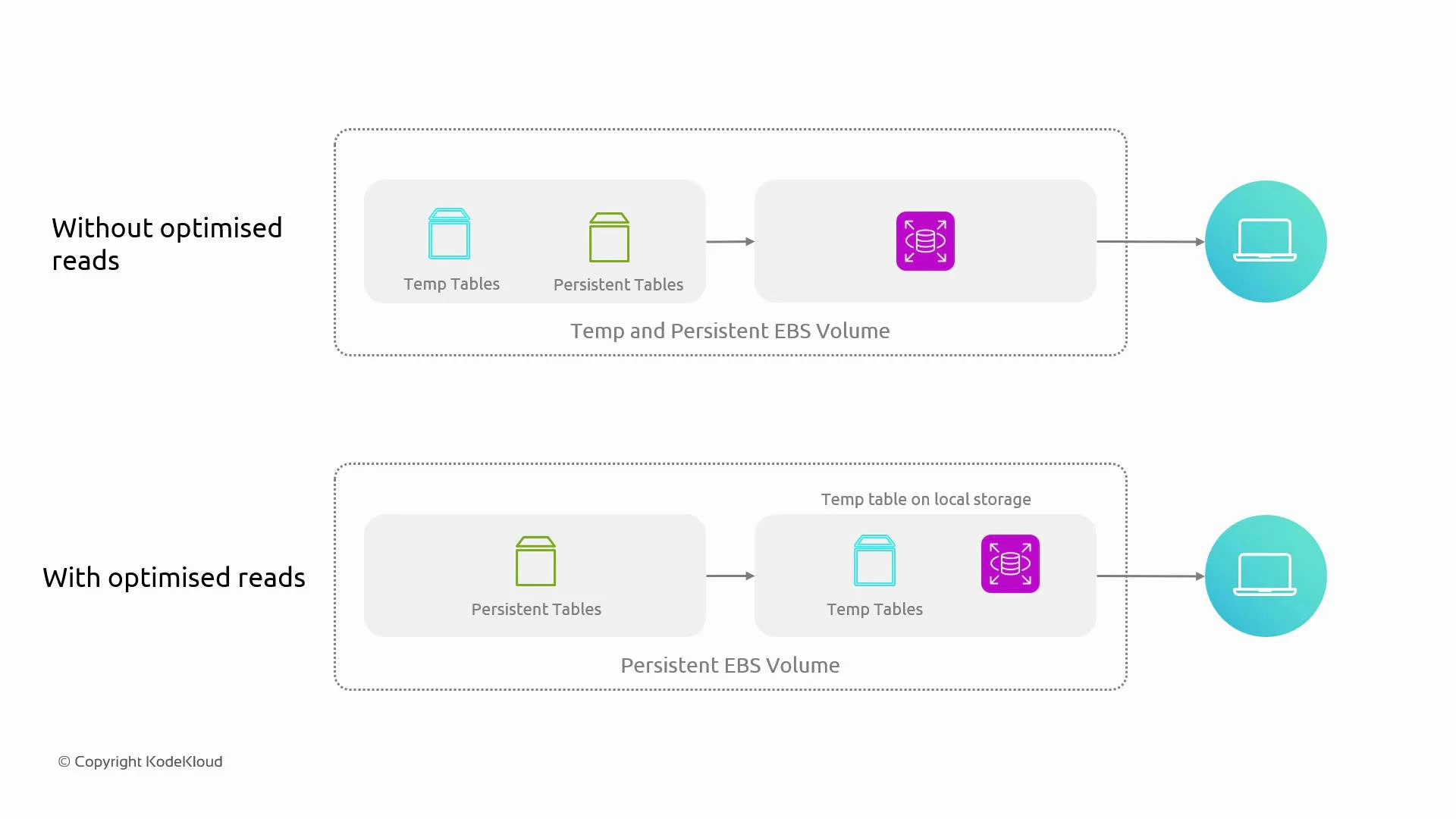
To reduce latency caused by multiple writes, we can change where intermediate I/O occurs. Instead of sending all intermediate writes to remote or network-attached volumes, place temporary and working files on storage that is physically attached to the database host (local instance store / NVMe). The pattern:
* Keep transient I/O (temporary tables, sort/merge files, caches, spill files, some redo or double-write temporary areas when supported) on local, low-latency media.
* Keep authoritative persistent data (tablespaces, primary data files) on durable network storage such as EBS for backups, snapshotting, and multi-AZ replication.
Using local NVMe/instance store for transient I/O reduces round-trips and I/O pressure on EBS, improving latency and throughput for operations that frequently produce temporary or intermediate I/O.
## How RDS applies this idea
* On RDS instance types that provide local instance store or NVMe (and where the RDS engine/configuration supports it), RDS can place temporary database files on local storage instead of EBS.
* Persistent data—authoritative tablespaces and backups—remain on EBS volumes to preserve durability and restore capability.
* This split reduces effective I/O latency for transient operations while maintaining the durability guarantees of network storage for persistent data.
* The 16 KB page vs 4 KB block concerns still apply, but local NVMe reduces the latency of intermediate steps and mitigates the performance cost of double writes.
## Rethinking where the temporary/working I/O happens
To reduce latency caused by multiple writes, we can change where intermediate I/O occurs. Instead of sending all intermediate writes to remote or network-attached volumes, place temporary and working files on storage that is physically attached to the database host (local instance store / NVMe). The pattern:
* Keep transient I/O (temporary tables, sort/merge files, caches, spill files, some redo or double-write temporary areas when supported) on local, low-latency media.
* Keep authoritative persistent data (tablespaces, primary data files) on durable network storage such as EBS for backups, snapshotting, and multi-AZ replication.
Using local NVMe/instance store for transient I/O reduces round-trips and I/O pressure on EBS, improving latency and throughput for operations that frequently produce temporary or intermediate I/O.
## How RDS applies this idea
* On RDS instance types that provide local instance store or NVMe (and where the RDS engine/configuration supports it), RDS can place temporary database files on local storage instead of EBS.
* Persistent data—authoritative tablespaces and backups—remain on EBS volumes to preserve durability and restore capability.
* This split reduces effective I/O latency for transient operations while maintaining the durability guarantees of network storage for persistent data.
* The 16 KB page vs 4 KB block concerns still apply, but local NVMe reduces the latency of intermediate steps and mitigates the performance cost of double writes.
 ## Durability considerations
Local instance store (including NVMe) is typically ephemeral. It improves latency for temporary/working I/O but is not a durable replacement for EBS. RDS keeps persistent data on durable EBS volumes and relies on EBS for backups and restores. Before changing storage settings, ensure your backup/replication strategy and instance replacement processes account for ephemeral storage behavior.
Do not store authoritative, single-copy data on instance store. If an instance is stopped, terminated, or fails, instance-store data is lost. Always preserve durability by keeping persistent data on EBS and using regular snapshot/replication strategies.
## Key points to remember
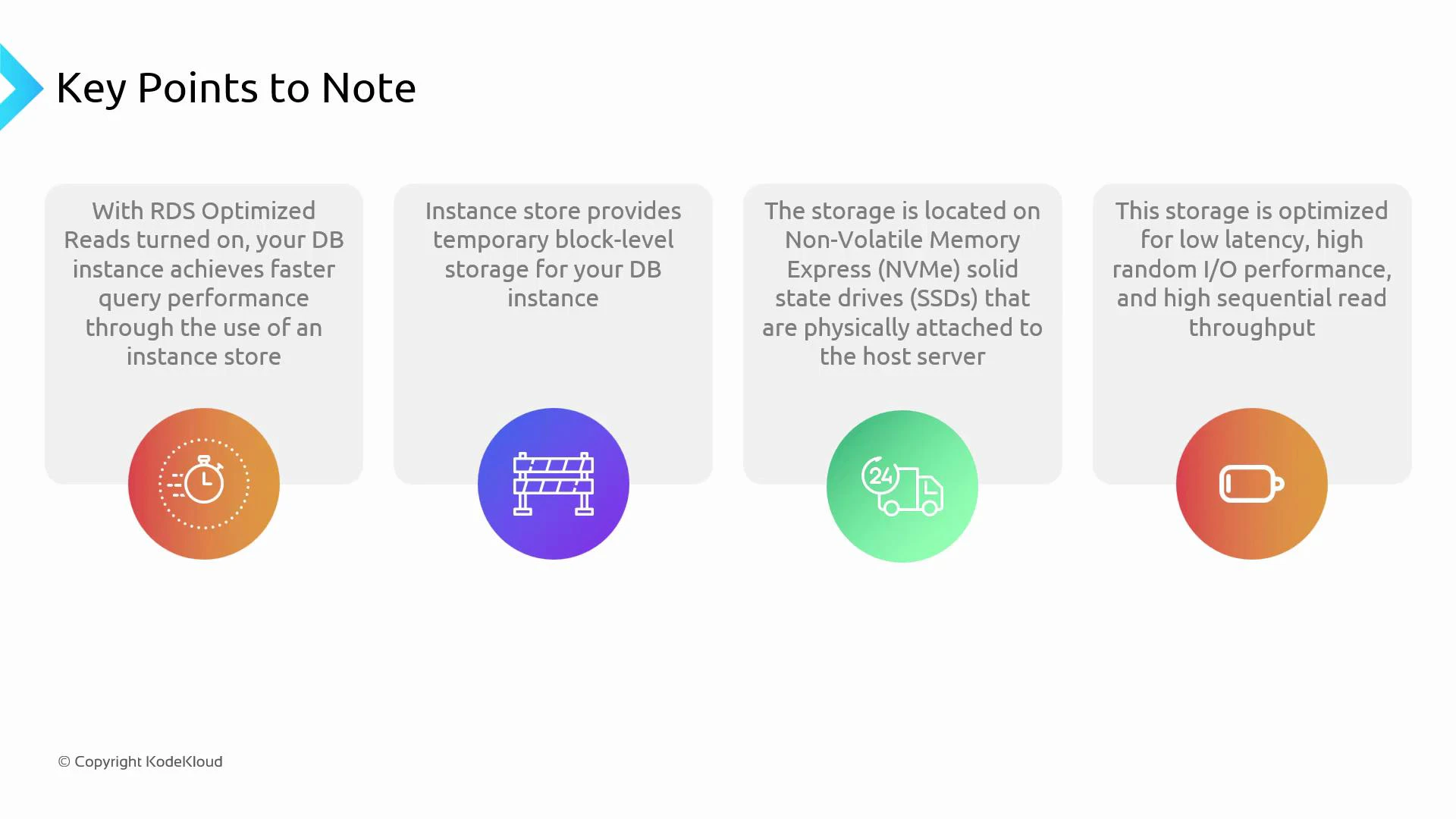
* Use local instance store / NVMe for transient, high-I/O temporary/working files when supported on the RDS instance type.
* Keep persistent data on durable EBS volumes for backup/restore and multi-AZ replication guarantees.
* Moving transient I/O to local NVMe reduces EBS I/O pressure, lowering read/write latency and improving throughput for I/O-bound workloads.
* Best suited for workloads that generate heavy temporary/working I/O (large sorts, temporary tables, spill files, heavy buffer pool flushes).
If your application experiences high DB latency and diagnostics show excessive temporary I/O or flush pressure, select RDS instance types that expose local instance store for transient I/O. This reduces latencies and improves scaling while preserving durability through EBS for persistent data.
## Durability considerations
Local instance store (including NVMe) is typically ephemeral. It improves latency for temporary/working I/O but is not a durable replacement for EBS. RDS keeps persistent data on durable EBS volumes and relies on EBS for backups and restores. Before changing storage settings, ensure your backup/replication strategy and instance replacement processes account for ephemeral storage behavior.
Do not store authoritative, single-copy data on instance store. If an instance is stopped, terminated, or fails, instance-store data is lost. Always preserve durability by keeping persistent data on EBS and using regular snapshot/replication strategies.
## Key points to remember
* Use local instance store / NVMe for transient, high-I/O temporary/working files when supported on the RDS instance type.
* Keep persistent data on durable EBS volumes for backup/restore and multi-AZ replication guarantees.
* Moving transient I/O to local NVMe reduces EBS I/O pressure, lowering read/write latency and improving throughput for I/O-bound workloads.
* Best suited for workloads that generate heavy temporary/working I/O (large sorts, temporary tables, spill files, heavy buffer pool flushes).
If your application experiences high DB latency and diagnostics show excessive temporary I/O or flush pressure, select RDS instance types that expose local instance store for transient I/O. This reduces latencies and improves scaling while preserving durability through EBS for persistent data.
 ## Quick comparison
| Approach | Primary Use | Pros | Cons |
| -------------------------------------------------------------- | ------------------------------------------------------------------------- | ------------------------------------------------------------------------------------------ | ---------------------------------------------------------------------------------------------- |
| Classical double-write (InnoDB) | Protect full-page writes and ensure durability | Strong protection against partial-page writes and corruption | Extra I/O and higher write latency |
| Optimized reads/writes (RDS with local NVMe for transient I/O) | Reduce latency for temporary/working I/O while keeping persistence on EBS | Lower read/write latency; reduced EBS I/O; better throughput for transient-heavy workloads | Instance store is ephemeral; requires careful backup/restore and instance replacement planning |
## When to consider optimized reads/writes
* Profiling shows heavy temporary table usage, sorts, or frequent buffer-pool flushes.
* Your workload is I/O-bound and sensitive to write latency.
* You can tolerate ephemeral local storage for temporary files and keep all persistent state on EBS.
* Your architecture includes robust backups, snapshots, or replication to handle instance replacement.
## Links and references
* [Amazon RDS documentation on storage and instance types](https://docs.aws.amazon.com/AmazonRDS/latest/UserGuide/Welcome.html)
* [AWS EBS introduction](https://docs.aws.amazon.com/AWSEC2/latest/UserGuide/ebs-intro.html)
* [MySQL InnoDB storage engine](https://dev.mysql.com/doc/refman/8.0/en/innodb-storage-engine.html)
* [MySQL InnoDB doublewrite buffer](https://dev.mysql.com/doc/refman/8.0/en/innodb-doublewrite.html)
* [MySQL InnoDB redo log (write-ahead log)](https://dev.mysql.com/doc/refman/8.0/en/innodb-redo-log.html)
* [NVMe specification and resources](https://nvmexpress.org/)
I hope this lesson clarified how the double-write buffer protects data and how RDS reduces latency by using local instance storage for transient I/O while keeping persistent data on EBS. Consider optimized reads/writes when your workload benefits from lower-latency temporary I/O, and always account for the ephemeral nature of instance store in your durability and recovery planning.
## Quick comparison
| Approach | Primary Use | Pros | Cons |
| -------------------------------------------------------------- | ------------------------------------------------------------------------- | ------------------------------------------------------------------------------------------ | ---------------------------------------------------------------------------------------------- |
| Classical double-write (InnoDB) | Protect full-page writes and ensure durability | Strong protection against partial-page writes and corruption | Extra I/O and higher write latency |
| Optimized reads/writes (RDS with local NVMe for transient I/O) | Reduce latency for temporary/working I/O while keeping persistence on EBS | Lower read/write latency; reduced EBS I/O; better throughput for transient-heavy workloads | Instance store is ephemeral; requires careful backup/restore and instance replacement planning |
## When to consider optimized reads/writes
* Profiling shows heavy temporary table usage, sorts, or frequent buffer-pool flushes.
* Your workload is I/O-bound and sensitive to write latency.
* You can tolerate ephemeral local storage for temporary files and keep all persistent state on EBS.
* Your architecture includes robust backups, snapshots, or replication to handle instance replacement.
## Links and references
* [Amazon RDS documentation on storage and instance types](https://docs.aws.amazon.com/AmazonRDS/latest/UserGuide/Welcome.html)
* [AWS EBS introduction](https://docs.aws.amazon.com/AWSEC2/latest/UserGuide/ebs-intro.html)
* [MySQL InnoDB storage engine](https://dev.mysql.com/doc/refman/8.0/en/innodb-storage-engine.html)
* [MySQL InnoDB doublewrite buffer](https://dev.mysql.com/doc/refman/8.0/en/innodb-doublewrite.html)
* [MySQL InnoDB redo log (write-ahead log)](https://dev.mysql.com/doc/refman/8.0/en/innodb-redo-log.html)
* [NVMe specification and resources](https://nvmexpress.org/)
I hope this lesson clarified how the double-write buffer protects data and how RDS reduces latency by using local instance storage for transient I/O while keeping persistent data on EBS. Consider optimized reads/writes when your workload benefits from lower-latency temporary I/O, and always account for the ephemeral nature of instance store in your durability and recovery planning.