> ## Documentation Index
> Fetch the complete documentation index at: https://notes.kodekloud.com/llms.txt
> Use this file to discover all available pages before exploring further.
# Single vs multi az instance deployment vs multi az cluster deployment
> Compares single-instance, Multi-AZ instance options, and Multi-AZ cluster deployments for AWS RDS, outlining when to use each, availability and read-scaling trade-offs, and cost implications.
This lesson expands on core RDS concepts and compares three common AWS RDS deployment topologies: a single RDS instance, Multi-AZ instance options, and Multi-AZ cluster deployments (for managed cluster engines such as Amazon Aurora). For each approach we explain when to use it, the operational trade-offs, and the cost/availability implications.
Single RDS database setup
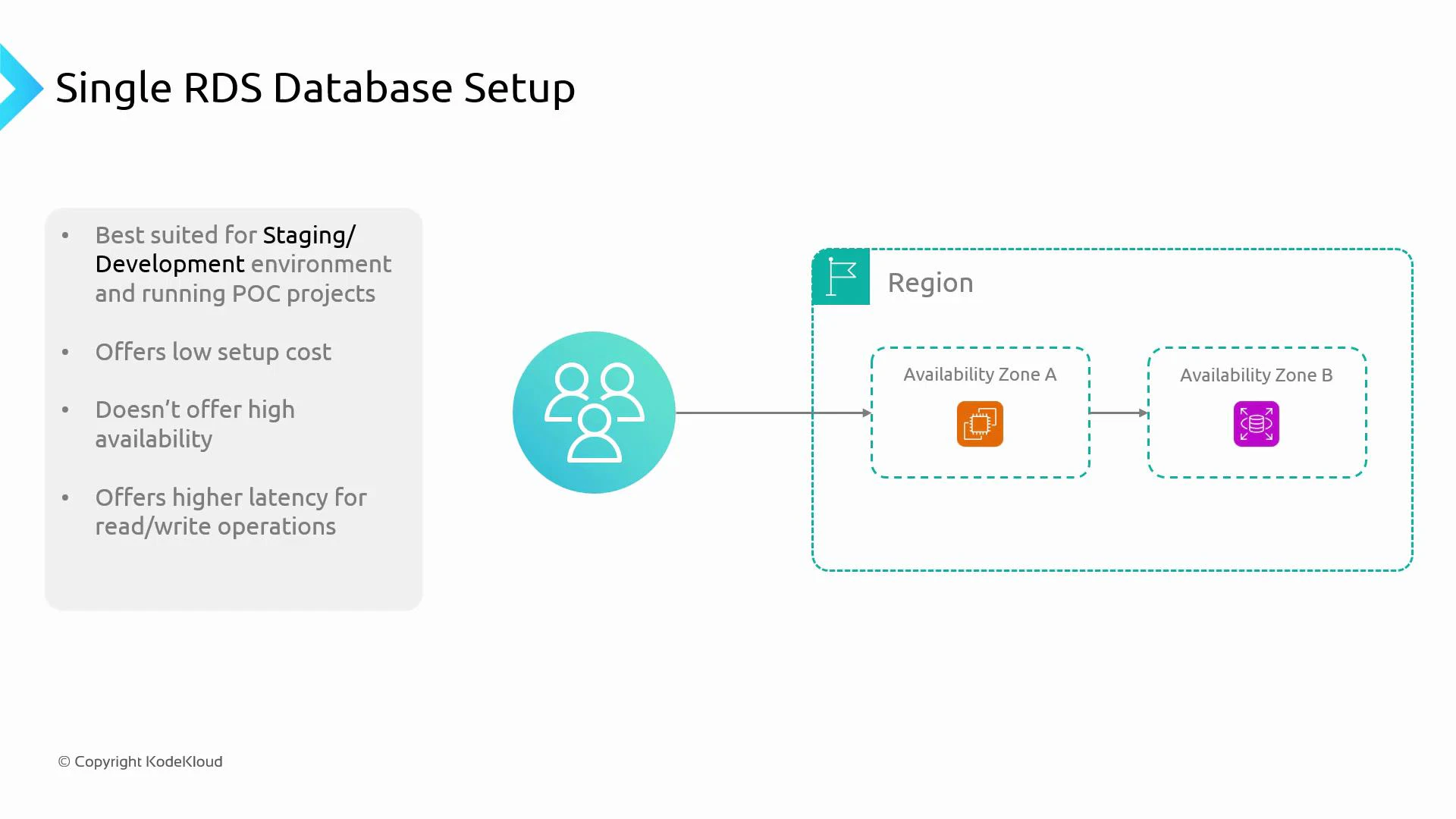
A single RDS database setup consists of one database instance running in a single Availability Zone (AZ). Application compute may run in the same or a different AZ and connects to this single instance for all reads and writes. This configuration is straightforward and inexpensive, making it ideal for development, testing, and proof-of-concept environments.
Key properties:
* Low infrastructure cost and fast provisioning.
* No built-in high availability—if the instance or its AZ fails, the database is unavailable.
* Suitable for small workloads with modest concurrency; does not scale read capacity.
 Multi-AZ instance setup (read scaling vs high availability)
“Multi-AZ” can refer to two different RDS strategies—read replicas for scaling, and Multi-AZ standby deployments for high availability. Understanding the distinction is important when designing for either performance or uptime.
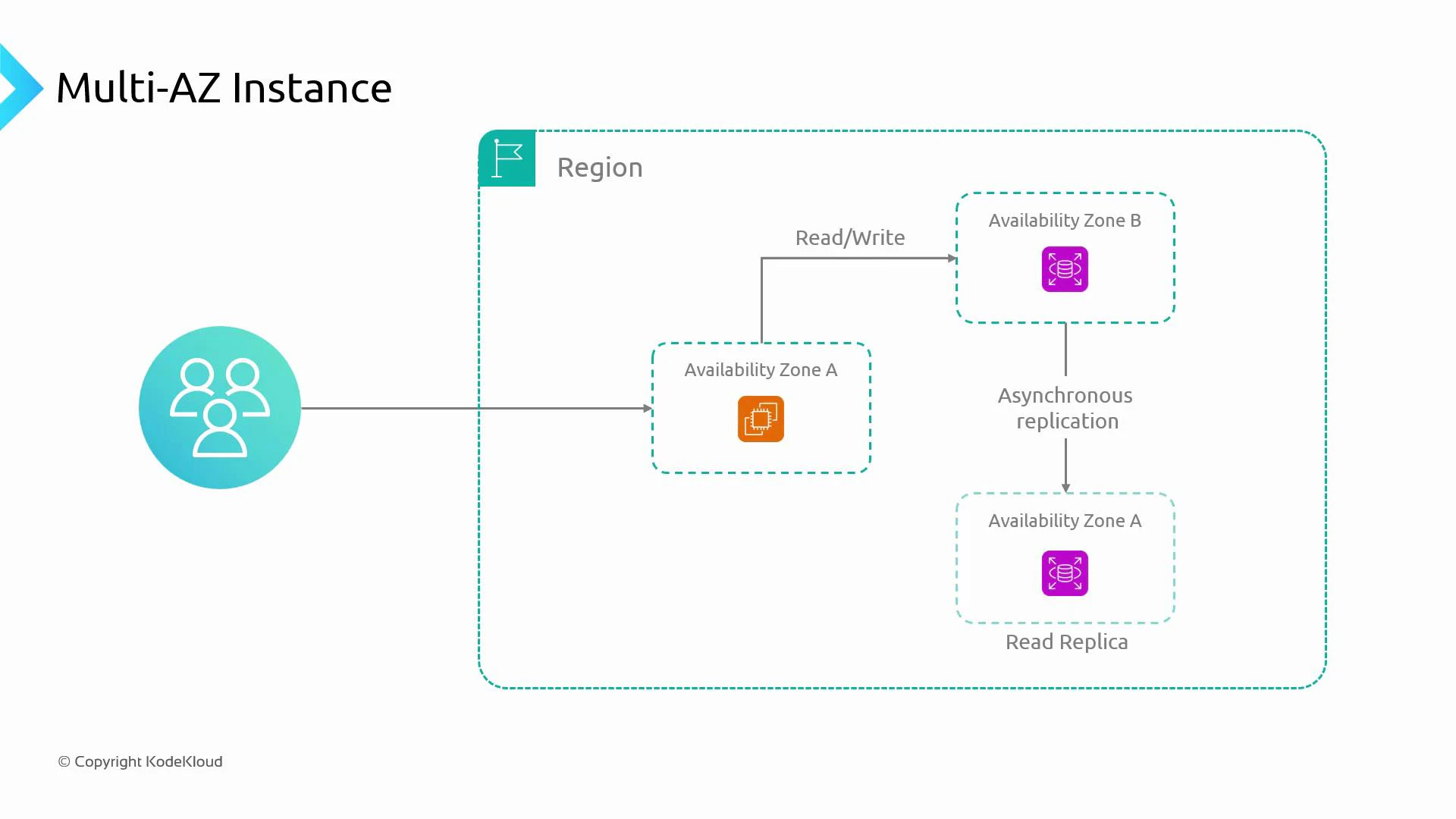
1. Read replicas (asynchronous replication)
* Deploy one or more read-only replicas in other AZs or regions to offload read traffic from the primary instance.
* Improves read throughput and can reduce read latency for geographically distributed users.
* Replication is asynchronous, so replicas may experience replication lag and eventual consistency.
* Each replica is an additional instance and increases cost.
2. Multi-AZ standby (synchronous replication for HA)
* RDS Multi-AZ (non-Aurora engines) provisions a synchronous standby replica in a different AZ.
* The standby is not used for serving reads during normal operation; it exists to enable fast failover.
* Failover is automatic and designed to minimize downtime, but the standby does not improve read capacity.
* Multi-AZ standby increases cost because of the additional instance.
The diagram below illustrates a typical primary (read/write) database with an asynchronously replicated read replica in a different AZ—this pattern is commonly used to scale reads across AZs.
Multi-AZ instance setup (read scaling vs high availability)
“Multi-AZ” can refer to two different RDS strategies—read replicas for scaling, and Multi-AZ standby deployments for high availability. Understanding the distinction is important when designing for either performance or uptime.
1. Read replicas (asynchronous replication)
* Deploy one or more read-only replicas in other AZs or regions to offload read traffic from the primary instance.
* Improves read throughput and can reduce read latency for geographically distributed users.
* Replication is asynchronous, so replicas may experience replication lag and eventual consistency.
* Each replica is an additional instance and increases cost.
2. Multi-AZ standby (synchronous replication for HA)
* RDS Multi-AZ (non-Aurora engines) provisions a synchronous standby replica in a different AZ.
* The standby is not used for serving reads during normal operation; it exists to enable fast failover.
* Failover is automatic and designed to minimize downtime, but the standby does not improve read capacity.
* Multi-AZ standby increases cost because of the additional instance.
The diagram below illustrates a typical primary (read/write) database with an asynchronously replicated read replica in a different AZ—this pattern is commonly used to scale reads across AZs.
 Benefits and trade-offs
* Read replicas:
* Pros: Improves read throughput and geographic distribution; helps scale read-heavy workloads.
* Cons: Asynchronous replication → potential lag; extra cost for replica instances.
* Multi-AZ standby:
* Pros: Synchronous replication → predictable failover behavior and improved uptime.
* Cons: Standby is not readable during normal operation → no read scaling benefit; higher cost.
Multi-AZ cluster deployments (clustered/managed engines like Amazon Aurora)
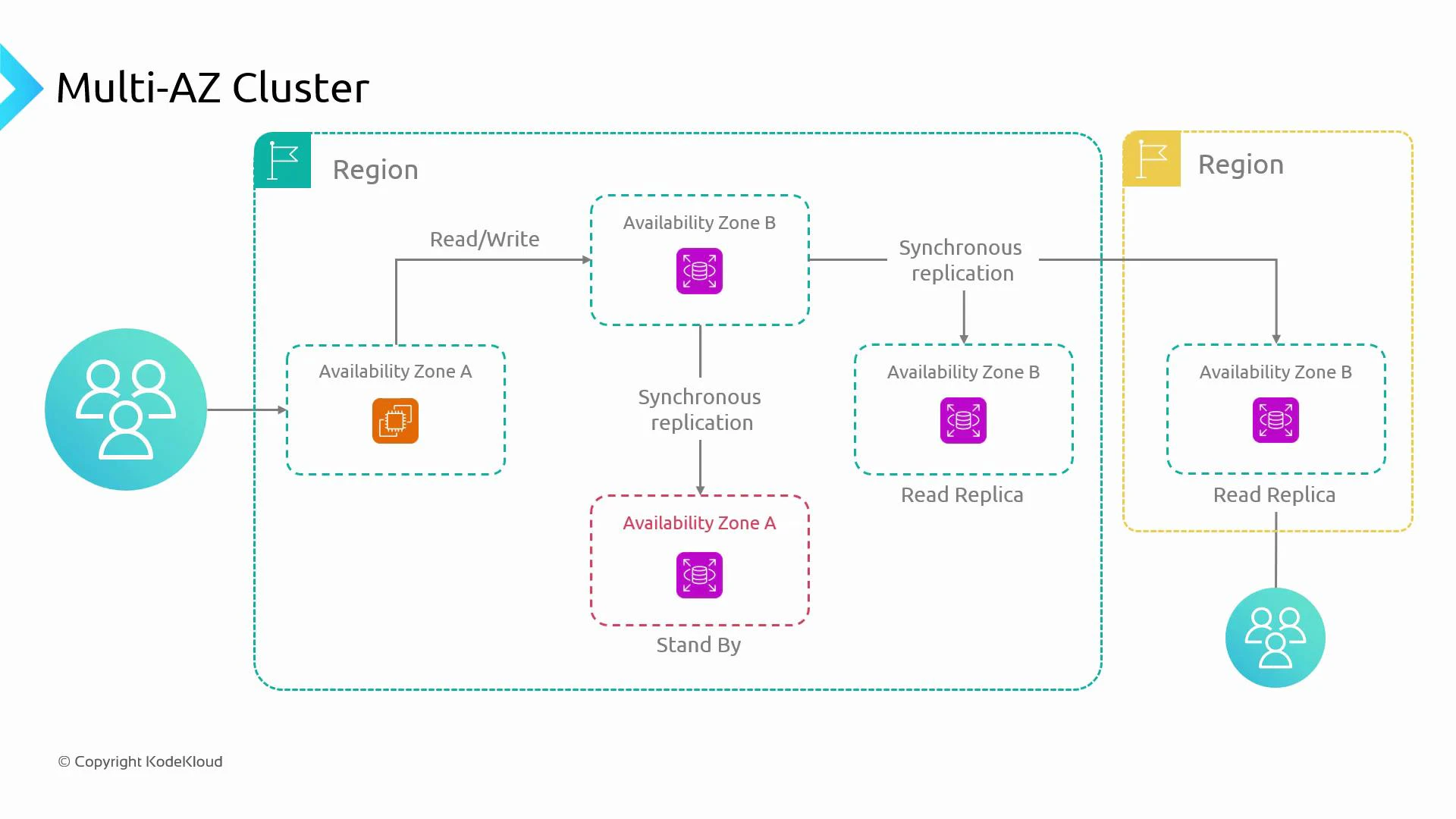
Clustered engines (for example, Amazon Aurora) use a distributed storage layer and often present a Multi-AZ cluster model that combines HA and read scaling more effectively than single-instance Multi-AZ setups.
* Aurora replicates data automatically across AZs at the storage layer and supports multiple reader instances with very low replication lag.
* Typical cluster components:
* One primary writer that accepts reads and writes.
* Multiple reader instances that serve read-only traffic and improve scalability.
* Fast failover and promotion mechanisms that reduce recovery time.
* Cross-region read replicas are supported (asynchronous) to enable disaster recovery and global scaling.
The diagram below depicts a production-ready Multi-AZ cluster with a primary writer, reader instances across AZs, and cross-region read replicas for global reads and DR.
Benefits and trade-offs
* Read replicas:
* Pros: Improves read throughput and geographic distribution; helps scale read-heavy workloads.
* Cons: Asynchronous replication → potential lag; extra cost for replica instances.
* Multi-AZ standby:
* Pros: Synchronous replication → predictable failover behavior and improved uptime.
* Cons: Standby is not readable during normal operation → no read scaling benefit; higher cost.
Multi-AZ cluster deployments (clustered/managed engines like Amazon Aurora)
Clustered engines (for example, Amazon Aurora) use a distributed storage layer and often present a Multi-AZ cluster model that combines HA and read scaling more effectively than single-instance Multi-AZ setups.
* Aurora replicates data automatically across AZs at the storage layer and supports multiple reader instances with very low replication lag.
* Typical cluster components:
* One primary writer that accepts reads and writes.
* Multiple reader instances that serve read-only traffic and improve scalability.
* Fast failover and promotion mechanisms that reduce recovery time.
* Cross-region read replicas are supported (asynchronous) to enable disaster recovery and global scaling.
The diagram below depicts a production-ready Multi-AZ cluster with a primary writer, reader instances across AZs, and cross-region read replicas for global reads and DR.
 Why clustered Multi-AZ architectures are common in production
* Scalability: Multiple readers (regional or cross-region) reduce read latency for distributed users.
* High availability: Synchronous replication or managed failover reduces downtime.
* Disaster recovery: Cross-region replicas and multi-AZ replication protect against zone or region failures.
RDS manages replication and failover behavior for you: RDS Multi-AZ uses synchronous replication for high availability, read replicas use asynchronous replication (including cross-region replicas), and automated failover behavior depends on the chosen engine and deployment model.
Comparison at a glance
| Architecture | Use Case | Read Scaling | High Availability | Typical Cost |
| ------------------------------ | ---------------------------------------- | --------------------- | ---------------------------------------------- | -------------------------- |
| Single-instance | Dev, staging, low-traffic apps | No | No | Low |
| Read replicas (Multi-AZ async) | Read-heavy workloads, geographic reads | Yes (async) | No (replicas not HA) | Medium (replicas add cost) |
| Multi-AZ standby | Mission-critical apps requiring uptime | No | Yes (sync standby, automatic failover) | Medium–High |
| Multi-AZ cluster (Aurora) | Production with both HA and read scaling | Yes (low-lag readers) | Yes (fast failover, storage-level replication) | High |
Key decision points
* Start with requirements: prioritize low cost, high availability (HA), read scalability, or global distribution.
* Choose single-instance for development, staging, or low-traffic apps where downtime tolerance is acceptable.
* Add read replicas when read throughput or geographic read latency is the bottleneck—but monitor replication lag and consistency.
* Enable Multi-AZ standby for high availability when uptime and automatic failover are required.
* Use clustered engines (Aurora) or combine Multi-AZ standby + read replicas for production systems that require both HA and read scalability.
* Always weigh cost vs. business requirements: additional AZs, standby instances, and replicas increase infrastructure cost.
Do not enable Multi-AZ or add read replicas just because they are available—assess traffic patterns, SLAs, and cost. For non-critical apps a single instance may be sufficient; for mission-critical systems, use Multi-AZ clusters or Multi-AZ with replicas.
References and further reading
* [AWS RDS overview](https://learn.kodekloud.com/user/courses/aws-rds)
* [Amazon Aurora](https://aws.amazon.com/rds/aurora/)
* [Kubernetes and Database Patterns](https://kubernetes.io/docs/tasks/run-application/run-replicated-stateful-application/)
* [AWS RDS Best Practices](https://docs.aws.amazon.com/AmazonRDS/latest/UserGuide/Welcome.html)
I hope this clarified the differences between single-instance, Multi-AZ instance setups, and Multi-AZ cluster deployments, so you can choose the right architecture for your application’s availability, performance, and budget needs.
Why clustered Multi-AZ architectures are common in production
* Scalability: Multiple readers (regional or cross-region) reduce read latency for distributed users.
* High availability: Synchronous replication or managed failover reduces downtime.
* Disaster recovery: Cross-region replicas and multi-AZ replication protect against zone or region failures.
RDS manages replication and failover behavior for you: RDS Multi-AZ uses synchronous replication for high availability, read replicas use asynchronous replication (including cross-region replicas), and automated failover behavior depends on the chosen engine and deployment model.
Comparison at a glance
| Architecture | Use Case | Read Scaling | High Availability | Typical Cost |
| ------------------------------ | ---------------------------------------- | --------------------- | ---------------------------------------------- | -------------------------- |
| Single-instance | Dev, staging, low-traffic apps | No | No | Low |
| Read replicas (Multi-AZ async) | Read-heavy workloads, geographic reads | Yes (async) | No (replicas not HA) | Medium (replicas add cost) |
| Multi-AZ standby | Mission-critical apps requiring uptime | No | Yes (sync standby, automatic failover) | Medium–High |
| Multi-AZ cluster (Aurora) | Production with both HA and read scaling | Yes (low-lag readers) | Yes (fast failover, storage-level replication) | High |
Key decision points
* Start with requirements: prioritize low cost, high availability (HA), read scalability, or global distribution.
* Choose single-instance for development, staging, or low-traffic apps where downtime tolerance is acceptable.
* Add read replicas when read throughput or geographic read latency is the bottleneck—but monitor replication lag and consistency.
* Enable Multi-AZ standby for high availability when uptime and automatic failover are required.
* Use clustered engines (Aurora) or combine Multi-AZ standby + read replicas for production systems that require both HA and read scalability.
* Always weigh cost vs. business requirements: additional AZs, standby instances, and replicas increase infrastructure cost.
Do not enable Multi-AZ or add read replicas just because they are available—assess traffic patterns, SLAs, and cost. For non-critical apps a single instance may be sufficient; for mission-critical systems, use Multi-AZ clusters or Multi-AZ with replicas.
References and further reading
* [AWS RDS overview](https://learn.kodekloud.com/user/courses/aws-rds)
* [Amazon Aurora](https://aws.amazon.com/rds/aurora/)
* [Kubernetes and Database Patterns](https://kubernetes.io/docs/tasks/run-application/run-replicated-stateful-application/)
* [AWS RDS Best Practices](https://docs.aws.amazon.com/AmazonRDS/latest/UserGuide/Welcome.html)
I hope this clarified the differences between single-instance, Multi-AZ instance setups, and Multi-AZ cluster deployments, so you can choose the right architecture for your application’s availability, performance, and budget needs.