> ## Documentation Index
> Fetch the complete documentation index at: https://notes.kodekloud.com/llms.txt
> Use this file to discover all available pages before exploring further.
# Demo Deploy a Hosted Model Using SageMaker Endpoints Part 2
> Guide to deploying and invoking Amazon SageMaker real-time endpoints using boto3 sagemaker-runtime and the SageMaker Python SDK, including testing, decoding responses, and cleanup steps.
Now that your endpoint shows as InService, the next step is to send a real-time inference request from your Jupyter notebook. This guide shows two common ways to call a SageMaker real-time endpoint:
* Using boto3 with the SageMaker Runtime client (low-level).
* Using the SageMaker Python SDK and the Predictor abstraction (higher-level).
We'll test the endpoint with a sample CSV-style feature row (latitude, longitude, bathrooms, bedrooms, floor area, living rooms, plus engineered features). The sample describes a multi-bedroom house in London, so we expect a comparatively high predicted price.
Important distinction between AWS clients:
* `boto3.client('sagemaker')` — used to create, configure, and delete SageMaker Models, EndpointConfigurations, and Endpoints.
* `boto3.client('sagemaker-runtime')` — used to invoke real-time endpoints.
When invoking a real-time endpoint from code, always use the SageMaker Runtime client (`'sagemaker-runtime'`). Calling `invoke_endpoint` on the SageMaker service client will not work for real-time inference requests.
## Test the endpoint using boto3 (SageMaker Runtime)
This example shows how to call the endpoint directly using the SageMaker Runtime API. Ensure the variable `endpoint_name` matches the endpoint you created earlier.
```python theme={null}
# boto3-based inference invocation using SageMaker runtime
import boto3
import json
# endpoint_name should match the endpoint you created earlier
# e.g., endpoint_name = 'my-endpoint-using-boto3'
# Example CSV input (features expected by the model)
input_data = (
'51.6215527,-0.2466031,2.0,6.0,517.0,3.0,289000.0,27.393364928999096,'
'1055000.0,37.01298701298701,285000.0,1354000.0,1.0,0.0,0.1,0.0,0.0,0.0,'
'0.0,0.0,0.0,0.0,0.0,0.0,0.0,0.0,0.0,0.0,0.0,0.0,0.0,0.0,0.0,0.0'
)
# Create the SageMaker runtime client for real-time invocation
sagemaker_runtime_client = boto3.client('sagemaker-runtime')
response = sagemaker_runtime_client.invoke_endpoint(
EndpointName=endpoint_name,
ContentType='text/csv',
Body=input_data
)
# Decode and print the response
prediction_payload = response['Body'].read().decode('utf-8')
print(f'Predicted house price: {prediction_payload}')
```
Example console output:
```text theme={null}
Predicted house price: {"predictions": [{"score": 1789161.25}]}
```
The response above is a JSON payload containing a numeric score (approx. 1,789,161.25). In this demo, the model is a linear regression predictor that returns a `predictions` array with a `score` field.
## Use the SageMaker Python SDK (Model.deploy + Predictor)
The SageMaker Python SDK provides a higher-level API to create and deploy models. `Model.deploy(...)` will create the EndpointConfiguration and Endpoint in one call. Behavior varies by the `Model` class used:
* Framework-specific model classes (e.g., `sagemaker.xgboost.XGBoostModel`, `sagemaker.sklearn.SKLearnModel`, `sagemaker.pytorch.PyTorchModel`, `sagemaker.tensorflow.TensorFlowModel`) — `model.deploy(...)` returns a `Predictor` instance.
* The base `sagemaker.model.Model` class — `model.deploy(...)` returns `None`; you must instantiate a `Predictor` and attach it to the created endpoint name.
Quick reference table
| Method | Use case | Returns |
| ---------------------------------- | ---------------------------------------------- | ---------------------------------------------------------- |
| `boto3` + `sagemaker-runtime` | Low-level control / direct invocation | Raw response stream; you decode bytes |
| `sagemaker.model.*.Model.deploy()` | Quick deployment for framework-specific models | `Predictor` (if framework-specific) or `None` (base Model) |
| `sagemaker.predictor.Predictor` | Explicit client for requests | `predict()` returns bytes or str (decode if bytes) |
Example that handles both deploy return cases:
```python theme={null}
# Using the SageMaker SDK to deploy and call an endpoint
from sagemaker.predictor import Predictor
# Deploy the model (creates endpoint config + endpoint)
# If 'model' is framework-specific, this returns a Predictor; otherwise returns None.
predictor_return = model.deploy(
initial_instance_count=1,
instance_type='ml.m5.large',
endpoint_name='my-endpoint-using-sagemaker-sdk'
)
print(f"Return type from model.deploy(): {type(predictor_return)}")
# If deploy returned None (base Model class), create a Predictor manually:
predictor = predictor_return
if predictor is None:
predictor = Predictor(endpoint_name='my-endpoint-using-sagemaker-sdk')
print(f"Predictor type: {type(predictor)}")
# Set content type as required by the model
predictor.content_type = 'text/csv'
# Reuse the same input_data from the boto3 example
response = predictor.predict(input_data)
# predictor.predict may return bytes; decode if necessary
if isinstance(response, (bytes, bytearray)):
response_text = response.decode('utf-8')
else:
response_text = response
print(f"Prediction result: {response_text}")
```
Example console output:
```text theme={null}
Return type from model.deploy():
Predictor type:
Prediction result: b'{"predictions": [{"score": 1789161.25}]}'
```
If the SDK returns bytes, decode as shown to parse it as JSON and extract the numeric score.
## Visual confirmation in the SageMaker console
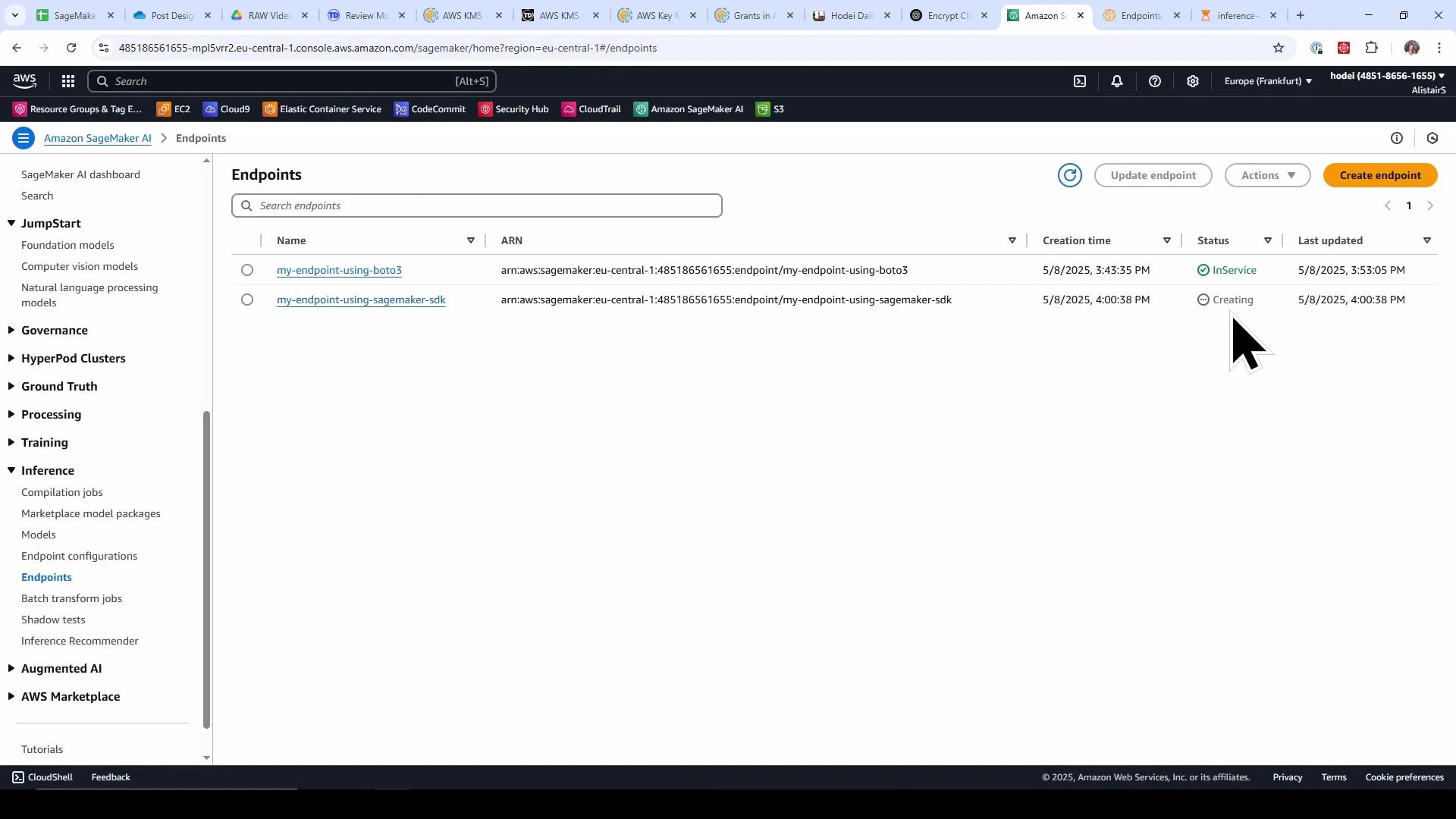
Once your SDK-created endpoint starts provisioning, check the SageMaker console to confirm status. The screenshot below shows one endpoint InService and another Creating while the SDK-created endpoint is provisioning.
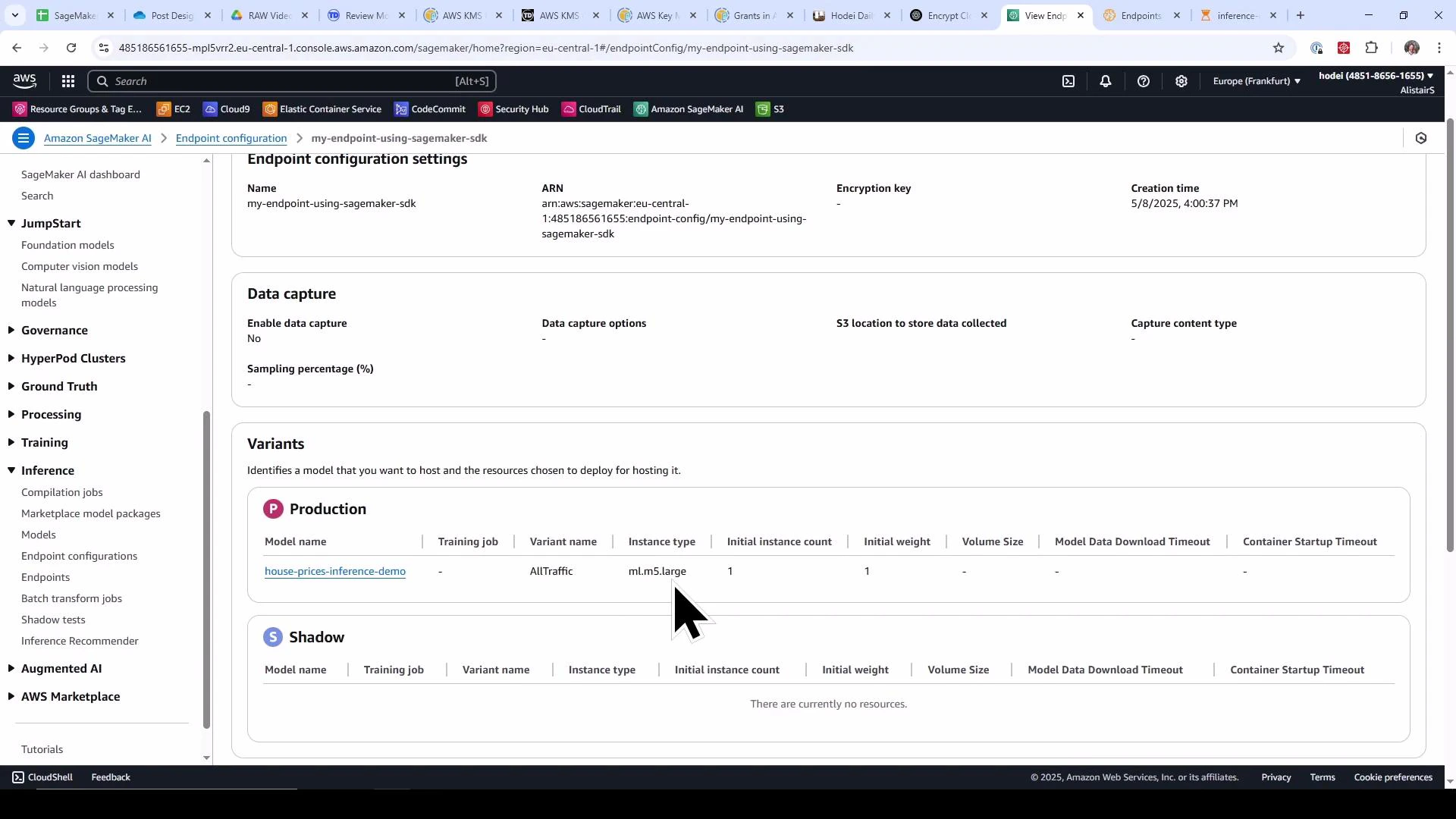
 Inspecting the endpoint configuration created by the SDK reveals the production variant using your model and the selected instance type (for example, `ml.m5.large`).
 ## Cleanup — remove endpoints and endpoint configurations
Running endpoints incurs charges. Use the snippet below to enumerate endpoints and delete each endpoint and its EndpointConfiguration. Confirm you want to remove these resources in the current AWS account/region before running it.
Deleting an endpoint is asynchronous. After calling `delete_endpoint`, the endpoint transitions to Deleting and may take time to reach Deleted. If you attempt to delete the endpoint configuration while the endpoint is still deleting, `delete_endpoint_config` may fail because the configuration is still in use. Poll `describe_endpoint` (or use a waiter) and wait for the endpoint to reach a terminal Deleted state before deleting the endpoint configuration.
```python theme={null}
# Cleanup endpoints and their configurations
endpoints = sagemaker_client.list_endpoints(MaxResults=100)['Endpoints']
for ep in endpoints:
endpoint_name = ep['EndpointName']
print(f"Deleting endpoint: {endpoint_name}")
# Get the endpoint config name
endpoint_desc = sagemaker_client.describe_endpoint(EndpointName=endpoint_name)
endpoint_config_name = endpoint_desc['EndpointConfigName']
# Delete endpoint
sagemaker_client.delete_endpoint(EndpointName=endpoint_name)
# Delete endpoint config
print(f"Deleting endpoint config: {endpoint_config_name}")
sagemaker_client.delete_endpoint_config(EndpointConfigName=endpoint_config_name)
print("Cleanup complete.")
```
Example console output:
```text theme={null}
Deleting endpoint: my-endpoint-using-sagemaker-sdk
Deleting endpoint config: my-endpoint-using-sagemaker-sdk
Deleting endpoint: my-endpoint-using-boto3
Deleting endpoint config: my-endpoint-config-using-boto3
Cleanup complete.
```
## Summary
* Use the SageMaker Runtime client (`boto3.client('sagemaker-runtime')`) to invoke real-time endpoints with `invoke_endpoint(...)`.
* The SageMaker Python SDK (`Model.deploy(...)`) simplifies endpoint creation by creating both the EndpointConfiguration and Endpoint in one step.
* If you deployed with a framework-specific `Model` class, `deploy()` returns a `Predictor`. If you used the base `Model` class, `deploy()` returns `None` and you must construct a `Predictor` bound to the endpoint name before calling `predict`.
* Always delete endpoints and endpoint configurations after demos or tests to avoid ongoing charges.
## Links and references
* [Amazon SageMaker documentation](https://docs.aws.amazon.com/sagemaker/latest/dg/whatis.html)
* [SageMaker Runtime API — invoke-endpoint](https://docs.aws.amazon.com/sagemaker/latest/dg/API_runtime_InvokeEndpoint.html)
* [SageMaker Python SDK — Predictor class](https://sagemaker.readthedocs.io/en/stable/predictors.html)
A lab exercise is available that walks through creating SageMaker endpoints hands-on.
## Cleanup — remove endpoints and endpoint configurations
Running endpoints incurs charges. Use the snippet below to enumerate endpoints and delete each endpoint and its EndpointConfiguration. Confirm you want to remove these resources in the current AWS account/region before running it.
Deleting an endpoint is asynchronous. After calling `delete_endpoint`, the endpoint transitions to Deleting and may take time to reach Deleted. If you attempt to delete the endpoint configuration while the endpoint is still deleting, `delete_endpoint_config` may fail because the configuration is still in use. Poll `describe_endpoint` (or use a waiter) and wait for the endpoint to reach a terminal Deleted state before deleting the endpoint configuration.
```python theme={null}
# Cleanup endpoints and their configurations
endpoints = sagemaker_client.list_endpoints(MaxResults=100)['Endpoints']
for ep in endpoints:
endpoint_name = ep['EndpointName']
print(f"Deleting endpoint: {endpoint_name}")
# Get the endpoint config name
endpoint_desc = sagemaker_client.describe_endpoint(EndpointName=endpoint_name)
endpoint_config_name = endpoint_desc['EndpointConfigName']
# Delete endpoint
sagemaker_client.delete_endpoint(EndpointName=endpoint_name)
# Delete endpoint config
print(f"Deleting endpoint config: {endpoint_config_name}")
sagemaker_client.delete_endpoint_config(EndpointConfigName=endpoint_config_name)
print("Cleanup complete.")
```
Example console output:
```text theme={null}
Deleting endpoint: my-endpoint-using-sagemaker-sdk
Deleting endpoint config: my-endpoint-using-sagemaker-sdk
Deleting endpoint: my-endpoint-using-boto3
Deleting endpoint config: my-endpoint-config-using-boto3
Cleanup complete.
```
## Summary
* Use the SageMaker Runtime client (`boto3.client('sagemaker-runtime')`) to invoke real-time endpoints with `invoke_endpoint(...)`.
* The SageMaker Python SDK (`Model.deploy(...)`) simplifies endpoint creation by creating both the EndpointConfiguration and Endpoint in one step.
* If you deployed with a framework-specific `Model` class, `deploy()` returns a `Predictor`. If you used the base `Model` class, `deploy()` returns `None` and you must construct a `Predictor` bound to the endpoint name before calling `predict`.
* Always delete endpoints and endpoint configurations after demos or tests to avoid ongoing charges.
## Links and references
* [Amazon SageMaker documentation](https://docs.aws.amazon.com/sagemaker/latest/dg/whatis.html)
* [SageMaker Runtime API — invoke-endpoint](https://docs.aws.amazon.com/sagemaker/latest/dg/API_runtime_InvokeEndpoint.html)
* [SageMaker Python SDK — Predictor class](https://sagemaker.readthedocs.io/en/stable/predictors.html)
A lab exercise is available that walks through creating SageMaker endpoints hands-on.