> ## Documentation Index
> Fetch the complete documentation index at: https://notes.kodekloud.com/llms.txt
> Use this file to discover all available pages before exploring further.
# Performance Optimization Concepts with Various AWS Services
> Practical strategies for AWS performance optimization emphasizing autoscaling, offloading and load distribution, and serverless architectures to improve scalability, latency, and operational efficiency.
Welcome, Solutions Architects.
This lesson is by Michael Forrester. We’ll cover practical strategies for tuning performance across multiple AWS services. The material maps to the Performance Pillar of the Well-Architected Framework and focuses on three core concepts that are useful for designing high-performing systems and for the SAA exam:
* Auto Scaling (beyond EC2)
* Offloading and load distribution (caching, read replicas, load balancers)
* Serverless options and how they affect performance and operations
Let’s dive into each area and map patterns to the AWS services and features you’ll commonly choose.
## Auto Scaling: prefer it when available
Auto Scaling adjusts capacity to match demand automatically. While EC2 Auto Scaling Groups are the most visible example (instances appearing and disappearing), autoscaling is available across many AWS services — containers, databases, and serverless offerings. Choosing managed autoscaling reduces operational overhead and often improves both performance and cost-efficiency.
Key points:
* Some services show capacity as visible resources (EC2 instances). Managed services often expose capacity changes only via metrics (DynamoDB capacity units, Aurora replica counts).
* Application Auto Scaling and built-in autoscaling features exist for ECS (service/task scaling), DynamoDB, Aurora (serverless/autoscaling modes), Lambda (provisioned concurrency, concurrency limits), and managed databases and streaming services.
* In design or exam scenarios, when an autoscaling or serverless option meets requirements, it is frequently the best choice over manual provisioning.
Tip: Prefer managed autoscaling when requirements allow — it simplifies operations, improves resiliency under load, and often reduces cost for spiky or variable workloads.
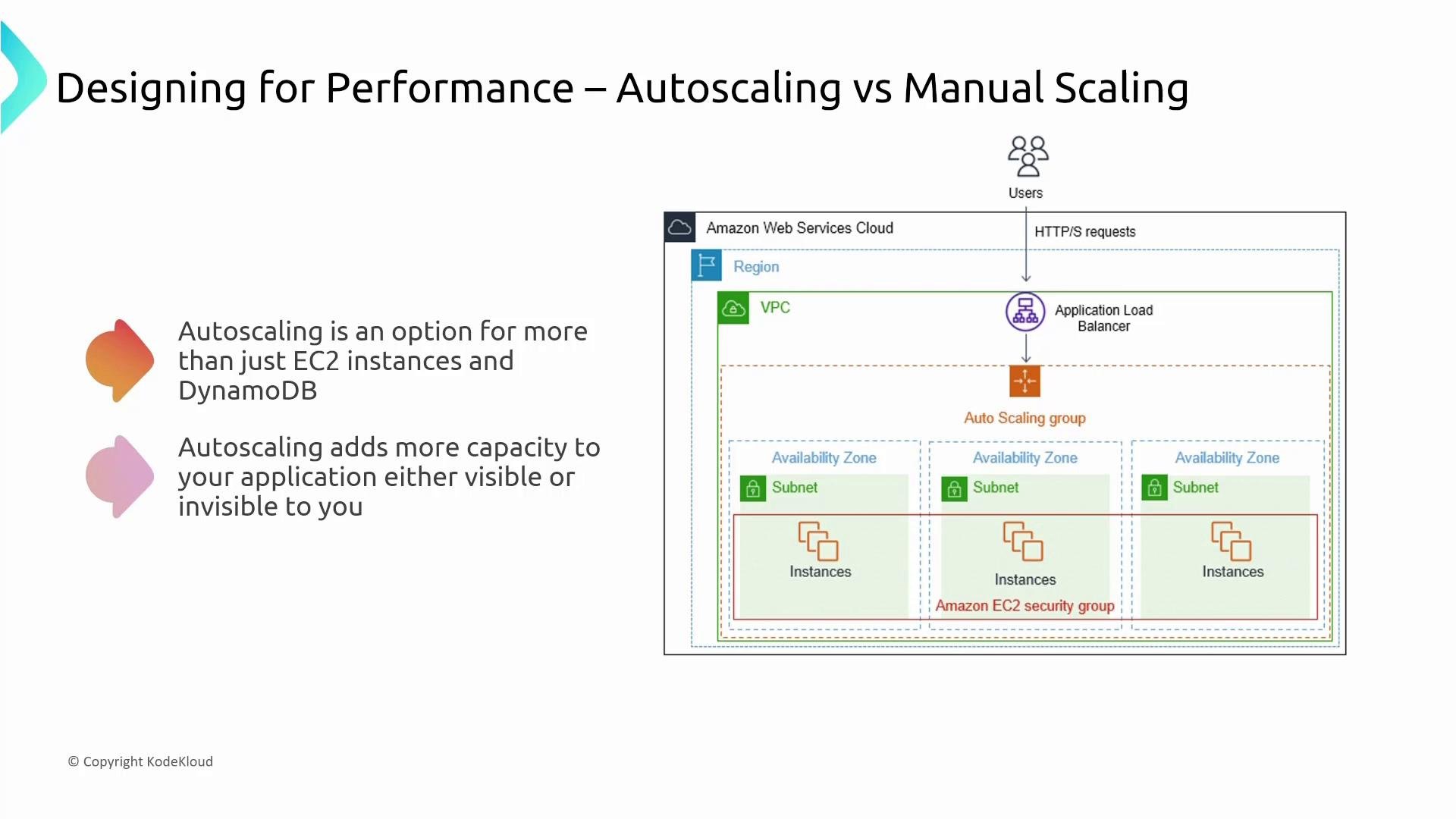 Table: Common AWS services and autoscaling patterns
| Service category | Autoscaling options | When to prefer |
| - | -: | - |
| Compute (EC2) | Auto Scaling Groups, Target Tracking, Scheduled scaling | Predictable scaling with custom AMIs or legacy workloads |
| Containers | ECS Service Auto Scaling, Fargate scales per task | Microservices requiring managed scaling without EC2 management |
| Databases | DynamoDB Auto Scaling, Aurora Serverless, RDS replicas | Read-heavy workloads, variable traffic, serverless DB use cases |
| Serverless | Lambda concurrency, Provisioned Concurrency | Event-driven or API workloads with variable throughput |
| Streaming & caches | Kinesis scaling, Elasticache nodes/replication | High-throughput streaming or caching scenarios |
## Offloading and load distribution
Offloading moves work from a primary system to specialized services so the primary can focus on core responsibilities. Load distribution spreads requests across multiple backends or caches to improve throughput and lower latency.
Common offloading patterns and when to use them:
* Load balancers (ALB/NLB) distribute traffic across healthy backends and terminate TLS.
* Static content offload: use S3 + CloudFront instead of serving from web servers for better global performance.
* Database read offload: add read replicas so read traffic doesn’t overload the primary writer.
* Caching layers: ElastiCache (Redis/Memcached), DAX for DynamoDB, CloudFront edge caches, API Gateway caching for REST APIs.
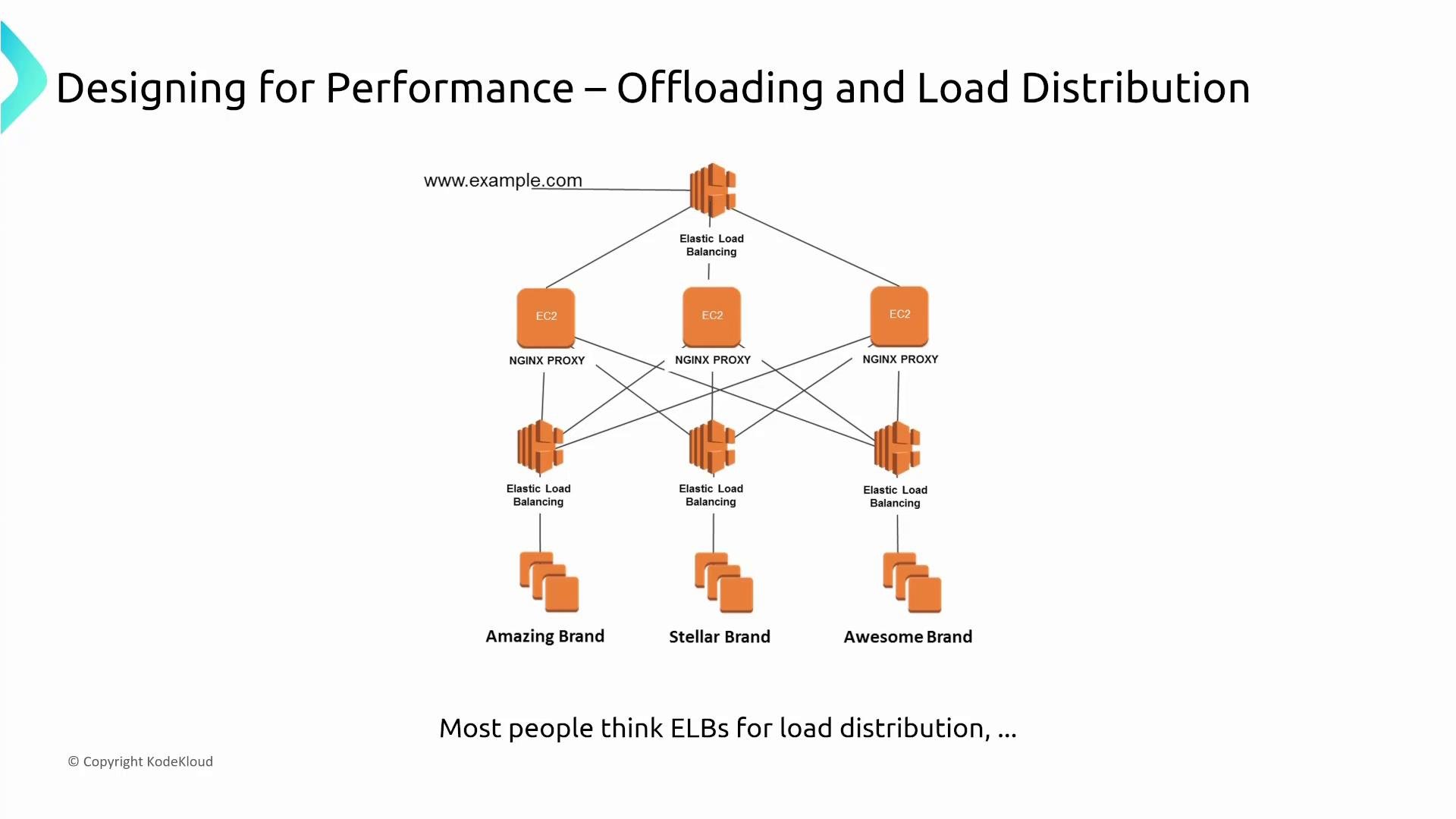
The diagram below demonstrates an architecture where traffic flows to NGINX proxies that perform routing or transformation before forwarding to backend load balancers. Although managed load balancing and edge services often replace custom proxies, this pattern is useful where custom logic or legacy routing is required.
Table: Common AWS services and autoscaling patterns
| Service category | Autoscaling options | When to prefer |
| - | -: | - |
| Compute (EC2) | Auto Scaling Groups, Target Tracking, Scheduled scaling | Predictable scaling with custom AMIs or legacy workloads |
| Containers | ECS Service Auto Scaling, Fargate scales per task | Microservices requiring managed scaling without EC2 management |
| Databases | DynamoDB Auto Scaling, Aurora Serverless, RDS replicas | Read-heavy workloads, variable traffic, serverless DB use cases |
| Serverless | Lambda concurrency, Provisioned Concurrency | Event-driven or API workloads with variable throughput |
| Streaming & caches | Kinesis scaling, Elasticache nodes/replication | High-throughput streaming or caching scenarios |
## Offloading and load distribution
Offloading moves work from a primary system to specialized services so the primary can focus on core responsibilities. Load distribution spreads requests across multiple backends or caches to improve throughput and lower latency.
Common offloading patterns and when to use them:
* Load balancers (ALB/NLB) distribute traffic across healthy backends and terminate TLS.
* Static content offload: use S3 + CloudFront instead of serving from web servers for better global performance.
* Database read offload: add read replicas so read traffic doesn’t overload the primary writer.
* Caching layers: ElastiCache (Redis/Memcached), DAX for DynamoDB, CloudFront edge caches, API Gateway caching for REST APIs.
The diagram below demonstrates an architecture where traffic flows to NGINX proxies that perform routing or transformation before forwarding to backend load balancers. Although managed load balancing and edge services often replace custom proxies, this pattern is useful where custom logic or legacy routing is required.
 ### Read replicas and writer endpoints (Aurora example)
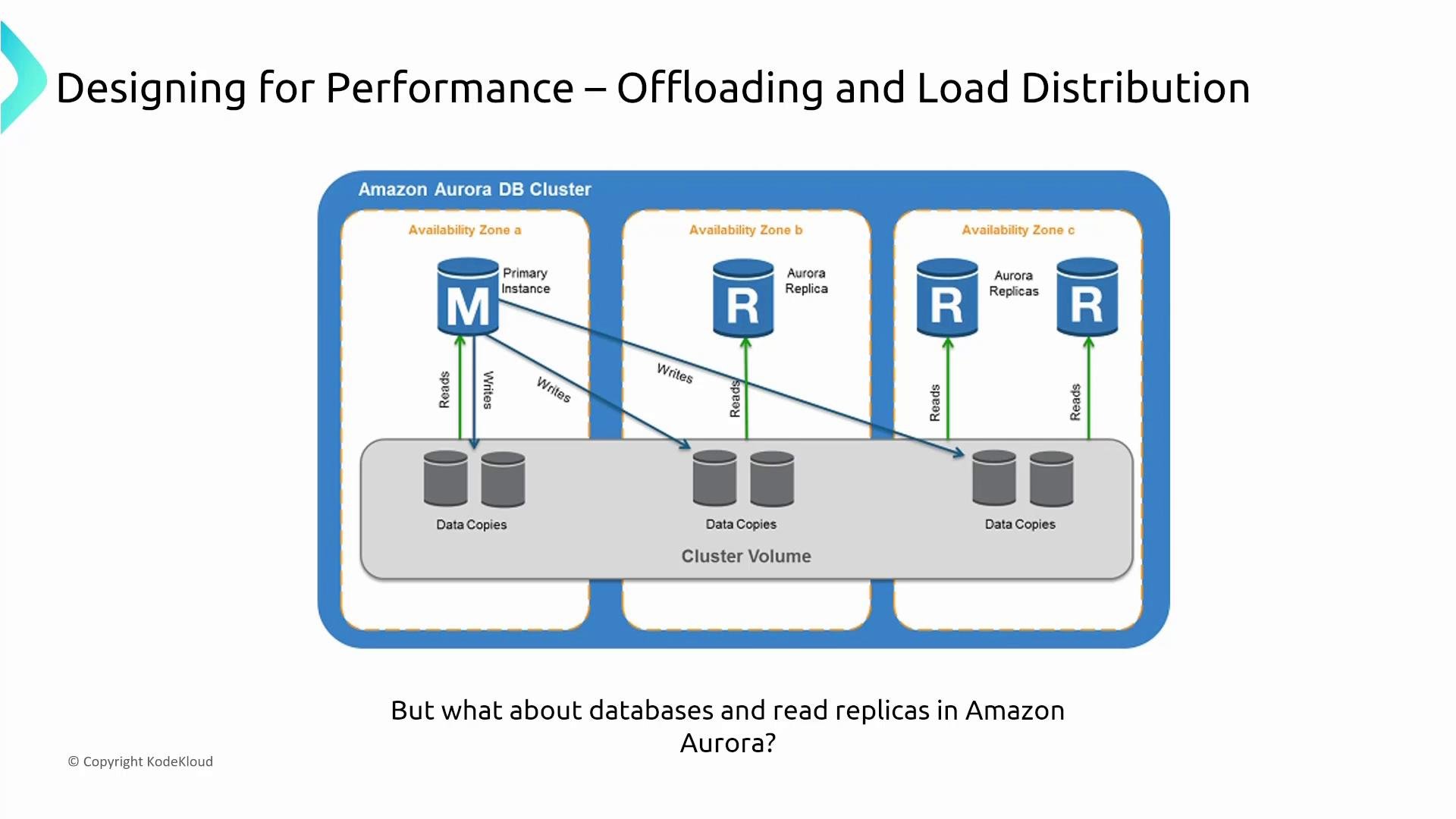
A common database pattern is to separate writes and reads: writes go to the cluster writer (primary) and reads are routed to reader endpoints that distribute queries across replicas. This reduces contention on the primary and improves read throughput.
### Read replicas and writer endpoints (Aurora example)
A common database pattern is to separate writes and reads: writes go to the cluster writer (primary) and reads are routed to reader endpoints that distribute queries across replicas. This reduces contention on the primary and improves read throughput.
 Practical items:
* Use reader endpoints to remove read load from the writer.
* For strong consistency requirements, be cautious with read-after-write semantics and replication lag.
* Consider scale-out read replicas for analytics or BI queries.
### ElastiCache replication and failover
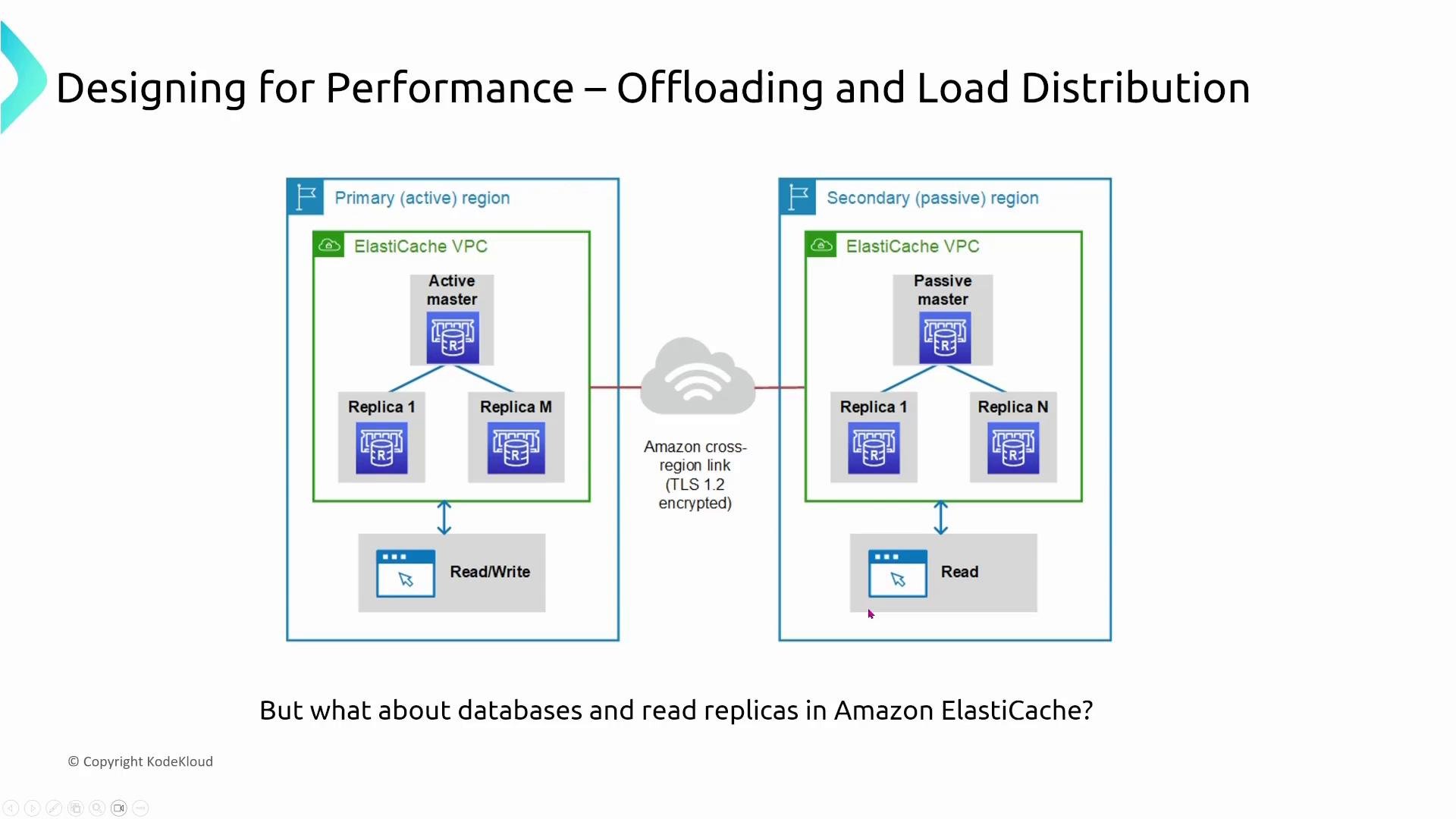
ElastiCache supports replication groups with one primary (read/write) and one or more read replicas. In multi-AZ or cross-region configurations, failover will promote an eligible replica to primary, and read/write endpoints will be updated accordingly.
Practical items:
* Use reader endpoints to remove read load from the writer.
* For strong consistency requirements, be cautious with read-after-write semantics and replication lag.
* Consider scale-out read replicas for analytics or BI queries.
### ElastiCache replication and failover
ElastiCache supports replication groups with one primary (read/write) and one or more read replicas. In multi-AZ or cross-region configurations, failover will promote an eligible replica to primary, and read/write endpoints will be updated accordingly.
 Best practices:
* Use replication groups for high read throughput and improved resilience.
* Configure automatic failover for availability and minimal operational intervention.
* Monitor replication lag and memory eviction metrics.
### Other managed data engines (DocumentDB, OpenSearch)
Managed engines apply similar offloading and role separation patterns:
* DocumentDB implements replicas and failover similar to RDS/Aurora.
* OpenSearch separates node roles (master, data, coordinating) to distribute indexing, query coordination, and storage across the cluster.
Best practices:
* Use replication groups for high read throughput and improved resilience.
* Configure automatic failover for availability and minimal operational intervention.
* Monitor replication lag and memory eviction metrics.
### Other managed data engines (DocumentDB, OpenSearch)
Managed engines apply similar offloading and role separation patterns:
* DocumentDB implements replicas and failover similar to RDS/Aurora.
* OpenSearch separates node roles (master, data, coordinating) to distribute indexing, query coordination, and storage across the cluster.
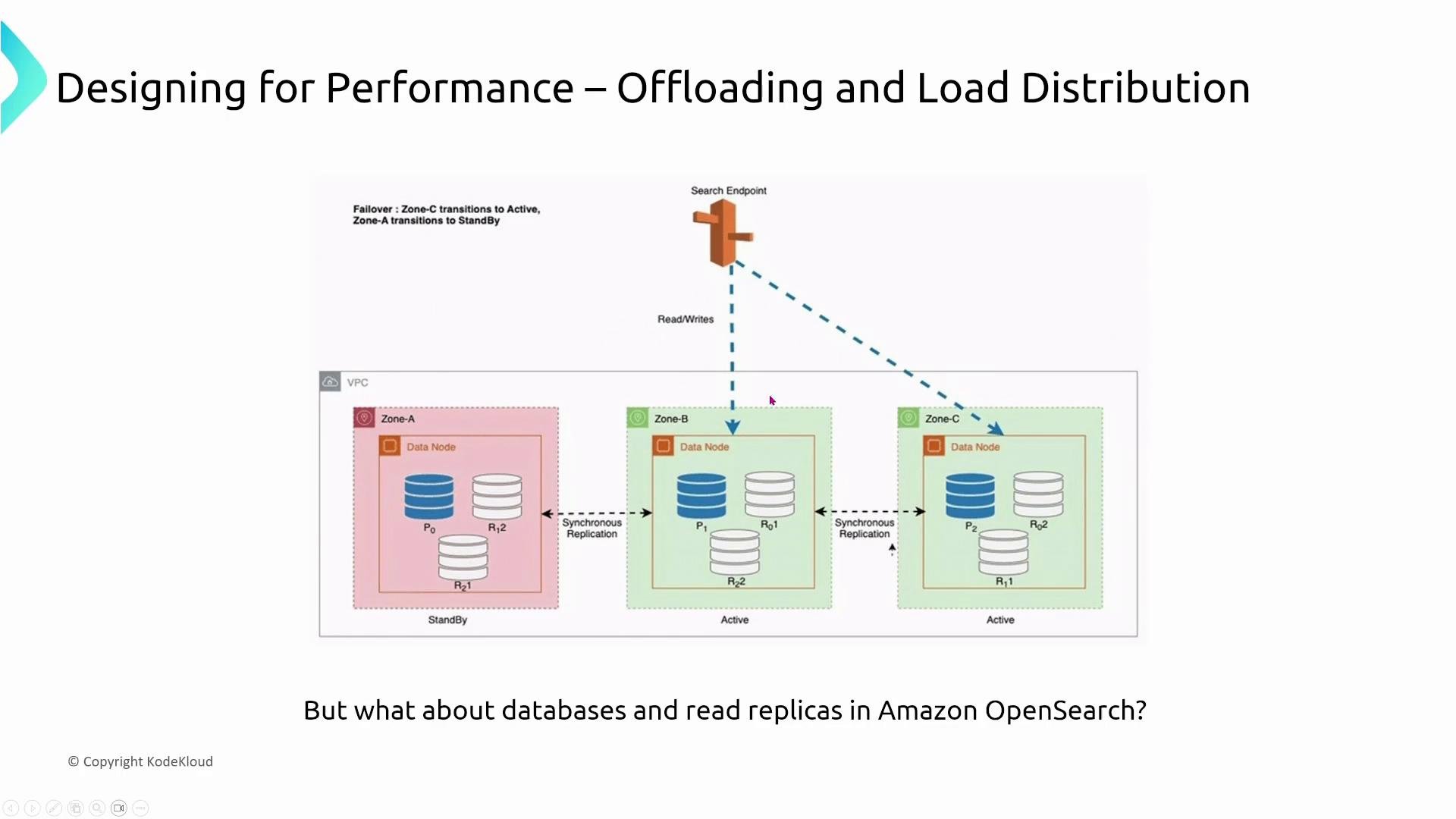 When designing search or analytics clusters:
* Separate roles to avoid coordinating nodes from being overloaded with data work.
* Scale data nodes for storage and throughput, and add coordinating/query nodes for increased query concurrency.
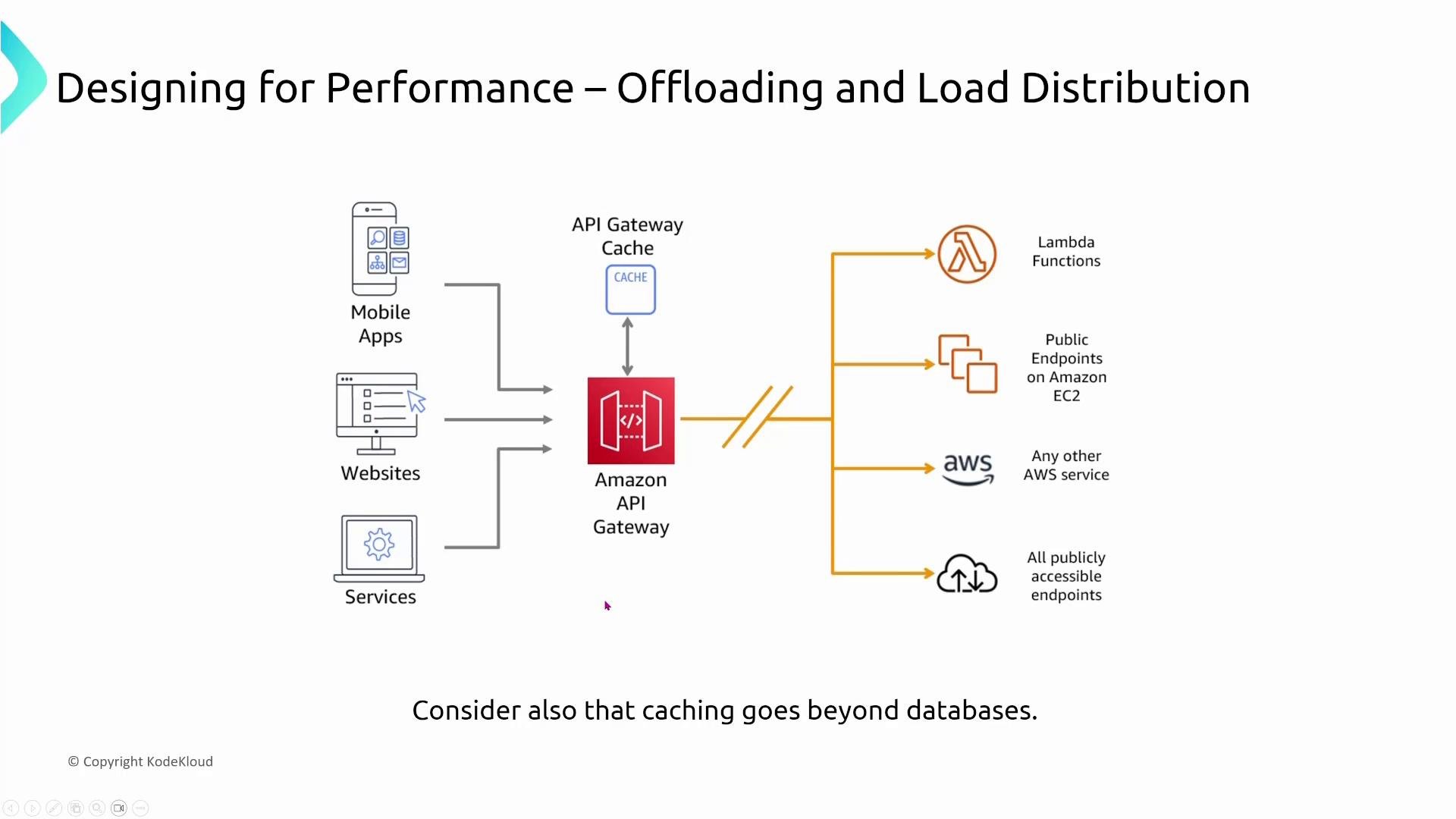
### Caching and edge delivery (CloudFront, API Gateway caching)
Caching at the edge and in-memory caches are among the most effective offloading strategies:
* CloudFront caches content at global edge locations, reducing origin load and improving latency for users worldwide.
* API Gateway cache accelerates REST API responses for idempotent and read-heavy endpoints.
* DAX provides an in-memory cache for DynamoDB to reduce read latency.
When designing search or analytics clusters:
* Separate roles to avoid coordinating nodes from being overloaded with data work.
* Scale data nodes for storage and throughput, and add coordinating/query nodes for increased query concurrency.
### Caching and edge delivery (CloudFront, API Gateway caching)
Caching at the edge and in-memory caches are among the most effective offloading strategies:
* CloudFront caches content at global edge locations, reducing origin load and improving latency for users worldwide.
* API Gateway cache accelerates REST API responses for idempotent and read-heavy endpoints.
* DAX provides an in-memory cache for DynamoDB to reduce read latency.
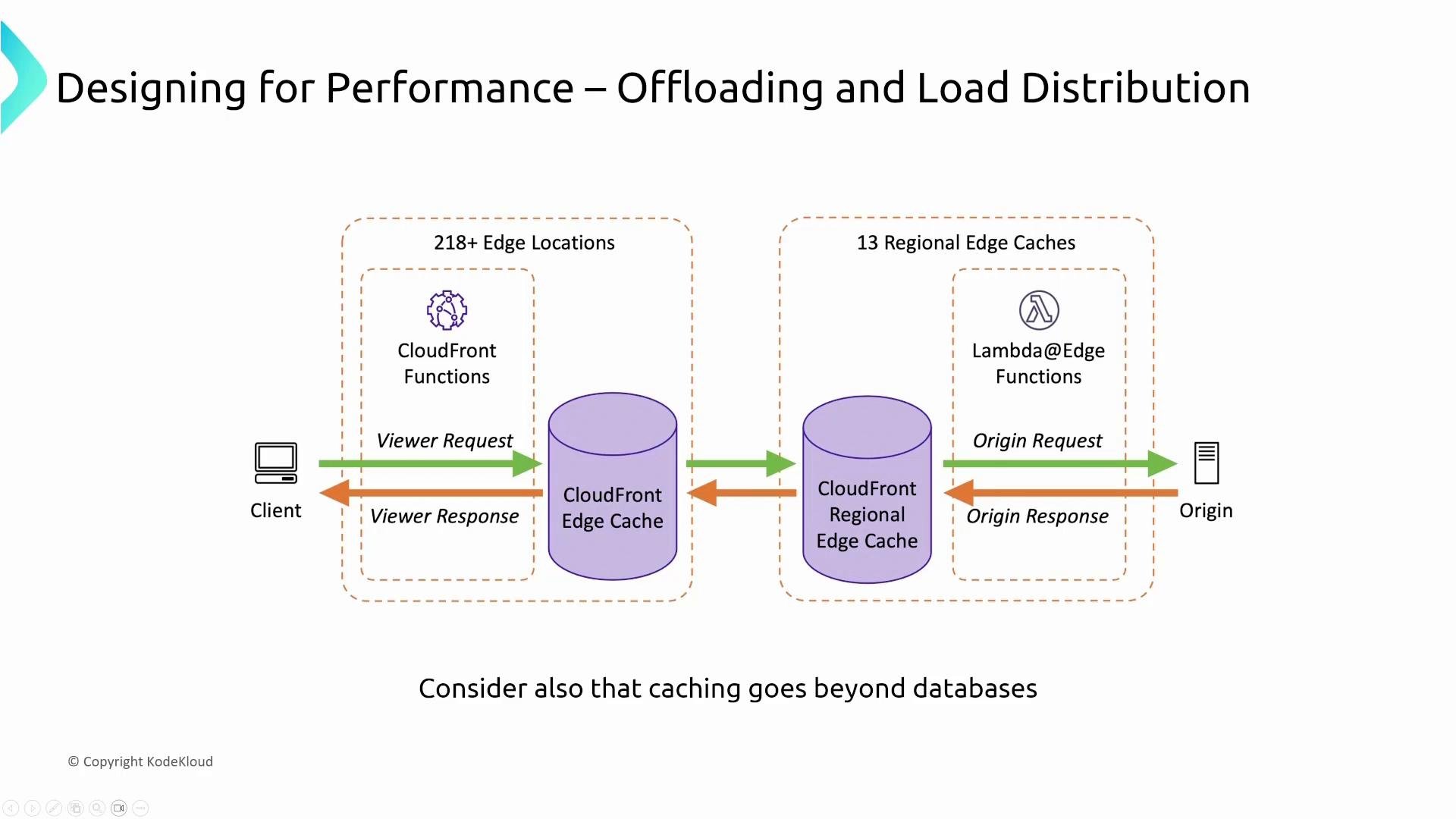 API Gateway caching reduces backend load and latency for read-heavy endpoints but requires a TTL/invalidation plan to avoid stale data.
 Caching strategy checklist:
* Determine cache TTLs and invalidation strategies.
* Prefer edge caching (CloudFront) for static or semi-static assets.
* Use in-memory cache (ElastiCache, DAX) for high-frequency reads with low-latency needs.
* Ensure cache consistency models fit your application's correctness requirements.
## Serverless: lower operational overhead and built-in scaling
Serverless services (Lambda, Fargate, Aurora Serverless, Redshift Serverless, EMR Serverless, etc.) abstract away infrastructure management and often include built-in scaling. These options reduce operational effort and can provide predictable scaling for many workloads.
Benefits:
* Automatic scaling without maintaining Auto Scaling Groups.
* Reduced operational overhead and simpler capacity planning.
* Better cost alignment for variable workloads (pay-per-use for compute).
When to choose serverless:
* Event-driven APIs, short-lived compute tasks, or microservices that tolerate statelessness.
* Variable or spiky traffic patterns where you want to avoid provisioning for peak capacity.
* Use caution for long-running, highly stateful, or latency-sensitive workloads where serverless cold starts or concurrency limits might be an issue.
## Summary — three pillars to remember
Focus on these three performance concepts when designing AWS architectures:
1. Auto Scaling: Use autoscaling beyond EC2 — containers, managed databases, and serverless DB options allow more resilient, cost-effective scaling.
2. Offloading and load distribution: Split reads and writes, use caches and read replicas, and employ load balancers and edge caches to reduce primary-system pressure.
3. Serverless: When applicable, serverless services reduce operations and provide smooth autoscaling and cost benefits.
When answering SAA exam questions:
* If a managed autoscaling or serverless option meets constraints, it is generally preferable to manual scaling.
* Identify opportunities to offload read traffic to replicas or caches and to distribute traffic using specialized services.
Exam tip: When choices include serverless or managed autoscaling vs. manual/server-based options and all other requirements are met, prefer the autoscaling/serverless option for better performance, cost efficiency, and reduced operational overhead.
I'm Michael Forrester. Catch you in the forums, on Slack, or on Discord.
This documentation is built and hosted on [Mintlify](https://mintlify.com), a developer documentation platform.
Caching strategy checklist:
* Determine cache TTLs and invalidation strategies.
* Prefer edge caching (CloudFront) for static or semi-static assets.
* Use in-memory cache (ElastiCache, DAX) for high-frequency reads with low-latency needs.
* Ensure cache consistency models fit your application's correctness requirements.
## Serverless: lower operational overhead and built-in scaling
Serverless services (Lambda, Fargate, Aurora Serverless, Redshift Serverless, EMR Serverless, etc.) abstract away infrastructure management and often include built-in scaling. These options reduce operational effort and can provide predictable scaling for many workloads.
Benefits:
* Automatic scaling without maintaining Auto Scaling Groups.
* Reduced operational overhead and simpler capacity planning.
* Better cost alignment for variable workloads (pay-per-use for compute).
When to choose serverless:
* Event-driven APIs, short-lived compute tasks, or microservices that tolerate statelessness.
* Variable or spiky traffic patterns where you want to avoid provisioning for peak capacity.
* Use caution for long-running, highly stateful, or latency-sensitive workloads where serverless cold starts or concurrency limits might be an issue.
## Summary — three pillars to remember
Focus on these three performance concepts when designing AWS architectures:
1. Auto Scaling: Use autoscaling beyond EC2 — containers, managed databases, and serverless DB options allow more resilient, cost-effective scaling.
2. Offloading and load distribution: Split reads and writes, use caches and read replicas, and employ load balancers and edge caches to reduce primary-system pressure.
3. Serverless: When applicable, serverless services reduce operations and provide smooth autoscaling and cost benefits.
When answering SAA exam questions:
* If a managed autoscaling or serverless option meets constraints, it is generally preferable to manual scaling.
* Identify opportunities to offload read traffic to replicas or caches and to distribute traffic using specialized services.
Exam tip: When choices include serverless or managed autoscaling vs. manual/server-based options and all other requirements are met, prefer the autoscaling/serverless option for better performance, cost efficiency, and reduced operational overhead.
I'm Michael Forrester. Catch you in the forums, on Slack, or on Discord.
This documentation is built and hosted on [Mintlify](https://mintlify.com), a developer documentation platform.