> ## Documentation Index
> Fetch the complete documentation index at: https://notes.kodekloud.com/llms.txt
> Use this file to discover all available pages before exploring further.
# Elastic Disaster Recovery
> Explains AWS Elastic Disaster Recovery architecture, replication flow, components, operational scenarios, and integrating EC2 EBS and S3 for cost‑effective failover and testing
This article explains AWS Elastic Disaster Recovery (DRS): the problems it solves, how the components fit together, and common operational scenarios. It focuses on practical architecture, replication flow, and the AWS services DRS uses so you can design reliable recovery plans.
## Why use AWS Elastic Disaster Recovery?
* Traditional disaster recovery often requires a fully provisioned secondary datacenter or always-on duplicate environment — expensive to operate and maintain.
* AWS DRS lets you use AWS as a recovery site without running a full standby site 24/7. You pay for replication storage and transient compute during failover or testing.
* DRS minimizes downtime and data loss with continuous block-level replication and point-in-time recovery to help you meet recovery time and point objectives (RTO/RPO).
Core idea: install a lightweight replication agent on each source server (on‑premises or in another cloud) to continuously stream block-level changes to a staging area in AWS. AWS stores that data on EBS volumes and uses snapshots of those volumes to launch recovery EC2 instances on failover.
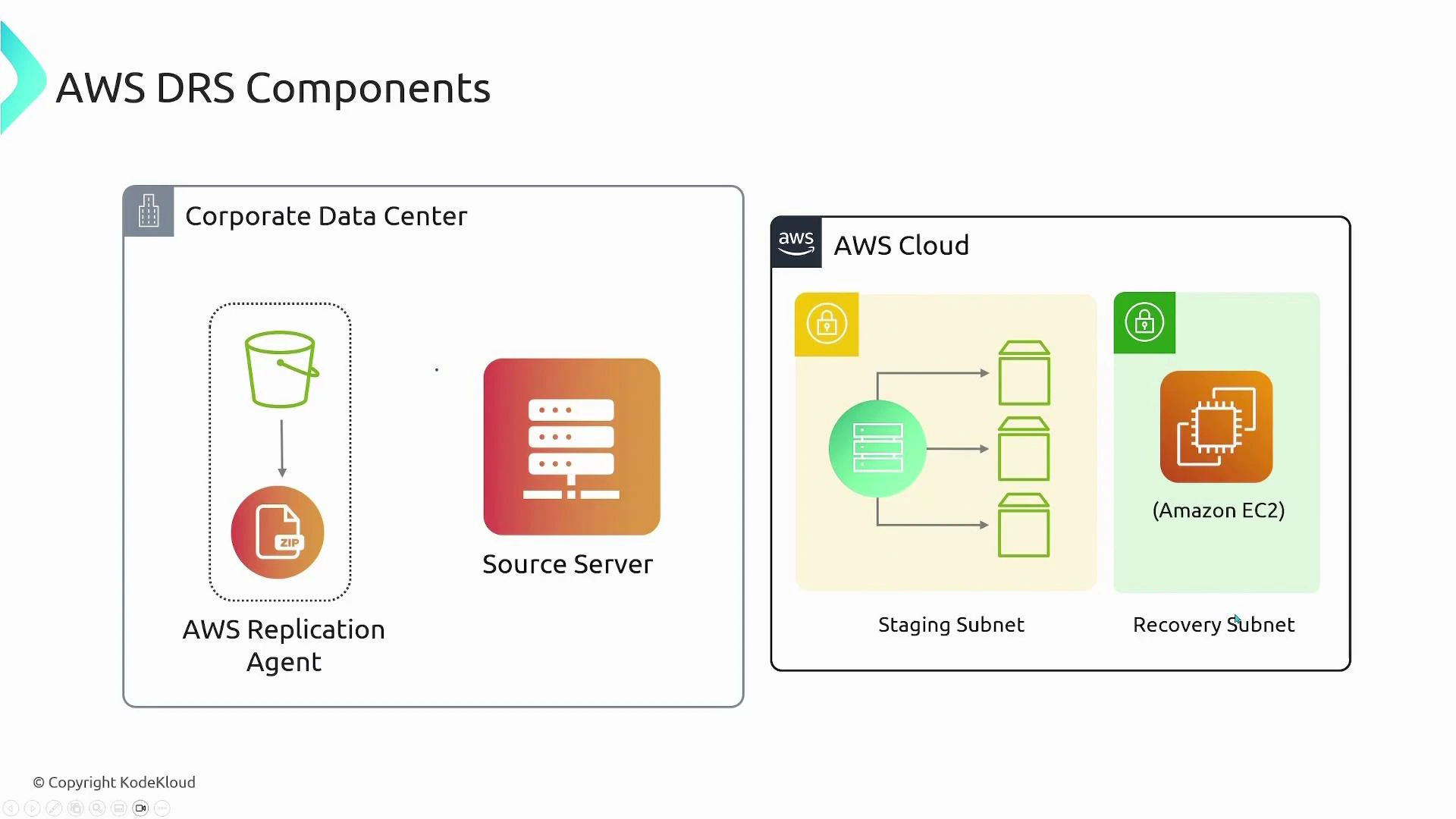
## How DRS components work together
| Component | Role | AWS resource |
| ------------------------------------- | ------------------------------------------------------------------ | ---------------------------------------- |
| Replication agent (on source servers) | Streams block-level disk changes to AWS | Agent installer hosted in S3 |
| Replication server (staging) | Receives and consolidates streams, writes to EBS | EC2 replication server in staging subnet |
| Staged EBS volumes | Store replicated block data; act as recovery source | Amazon EBS |
| Recovery instances | Launched in recovery subnet, boot from snapshots of staged volumes | Amazon EC2 |
| S3 | Hosts agent installer and stores workflow artifacts | Amazon S3 |
### On-prem / Source servers
* Install the AWS replication agent (downloaded from S3) on every server you want to protect.
* During configuration, choose which disks on each source server should be replicated.
* These protected machines are referred to as source servers and register with the DRS service so AWS can manage replication for them.
### Staging area (in AWS)
* The staging subnet runs an AWS-managed replication server (an EC2 instance) that receives block streams from the agents.
* Each replicated disk maps to an EBS volume in the staging area. The replication server writes incoming block-level data to those EBS volumes, keeping them continuously updated.
### Recovery area (in AWS)
* The recovery subnet is where DRS launches recovery EC2 instances during failover or testing.
* Recovery instances boot from point-in-time snapshots created from the staged EBS volumes, giving the instances access to the latest replicated data.
 ## End-to-end flow (example)
Example with two protected source servers (Server A and Server B):
1. Agent installation and registration:
* Server A and Server B run the replication agent and register with the DRS service endpoint.
* Server A replicates 2 disks; Server B replicates 3 disks.
2. Staging setup:
* In AWS, create a staging area: an EC2-based replication server and an EBS volume for each protected disk (five EBS volumes total in this example).
* The replication server accepts block-level streams and writes them to the corresponding EBS volumes.
3. Failover or test:
* When you trigger failover (for a real incident or a DR drill), DRS launches recovery instances in the recovery subnet.
* Recovery EC2 instances are sized per your settings and boot from snapshots of the staged EBS volumes so they contain the latest replicated data.
4. Failback:
* After the primary site is restored, you can replicate changes back and fail back to your primary environment.
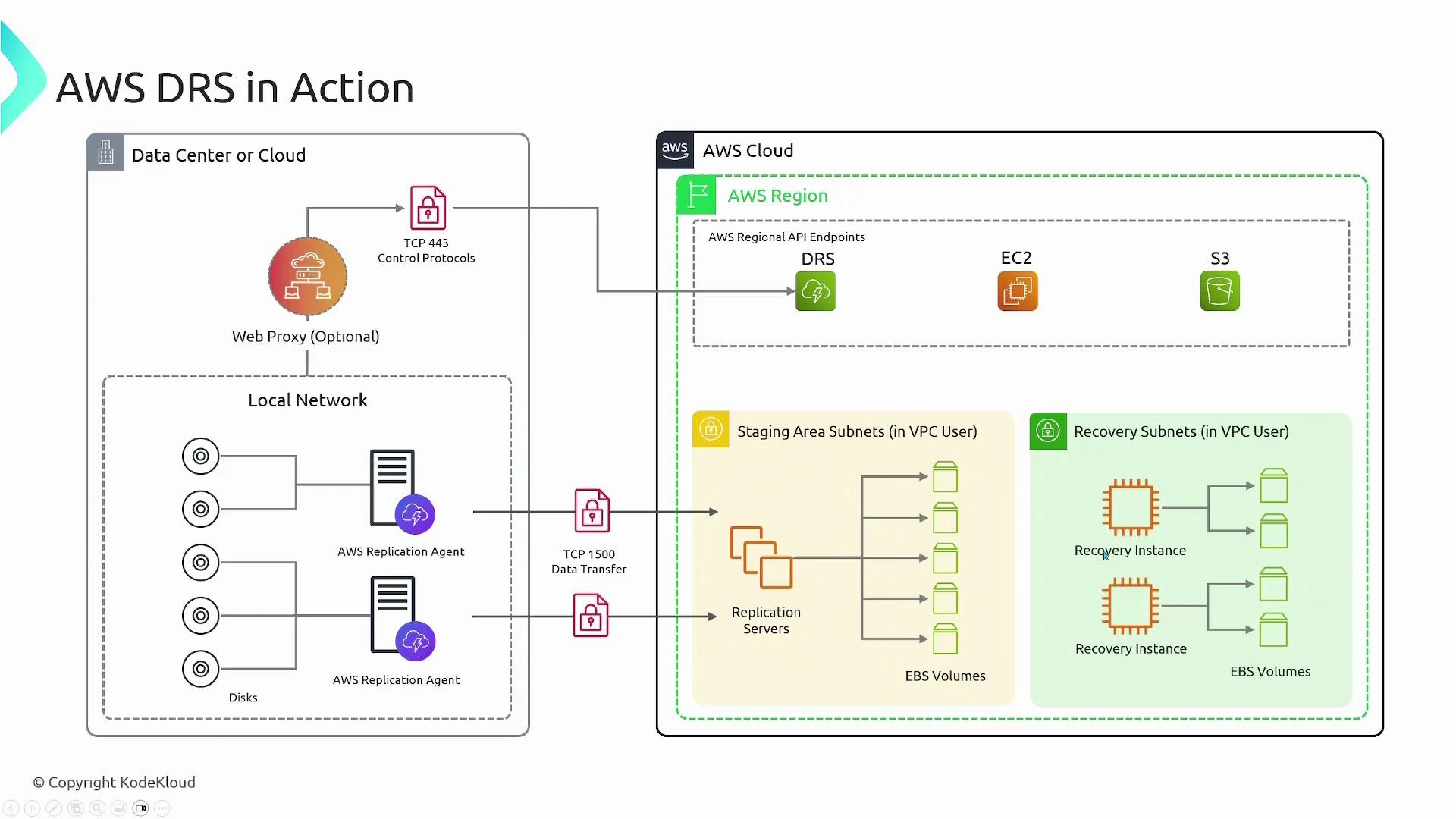
## End-to-end flow (example)
Example with two protected source servers (Server A and Server B):
1. Agent installation and registration:
* Server A and Server B run the replication agent and register with the DRS service endpoint.
* Server A replicates 2 disks; Server B replicates 3 disks.
2. Staging setup:
* In AWS, create a staging area: an EC2-based replication server and an EBS volume for each protected disk (five EBS volumes total in this example).
* The replication server accepts block-level streams and writes them to the corresponding EBS volumes.
3. Failover or test:
* When you trigger failover (for a real incident or a DR drill), DRS launches recovery instances in the recovery subnet.
* Recovery EC2 instances are sized per your settings and boot from snapshots of the staged EBS volumes so they contain the latest replicated data.
4. Failback:
* After the primary site is restored, you can replicate changes back and fail back to your primary environment.
 ## Key features
* Continuous, near real-time block-level replication and point-in-time recovery.
* Non-disruptive disaster recovery testing and automated DR drills.
* Fast launch of recovery instances — typically minutes.
* Built-in failback workflows to return workloads to the primary site once it’s healthy.
* Cost-efficient: stage only storage and use compute only during failover or testing.
## Integration with AWS services
* EC2: replication server for staging and recovery instances.
* EBS: stores replicated block data and provides snapshots used for recovery.
* S3: hosts agent installers and workflow artifacts such as metadata and logs.
## Key features
* Continuous, near real-time block-level replication and point-in-time recovery.
* Non-disruptive disaster recovery testing and automated DR drills.
* Fast launch of recovery instances — typically minutes.
* Built-in failback workflows to return workloads to the primary site once it’s healthy.
* Cost-efficient: stage only storage and use compute only during failover or testing.
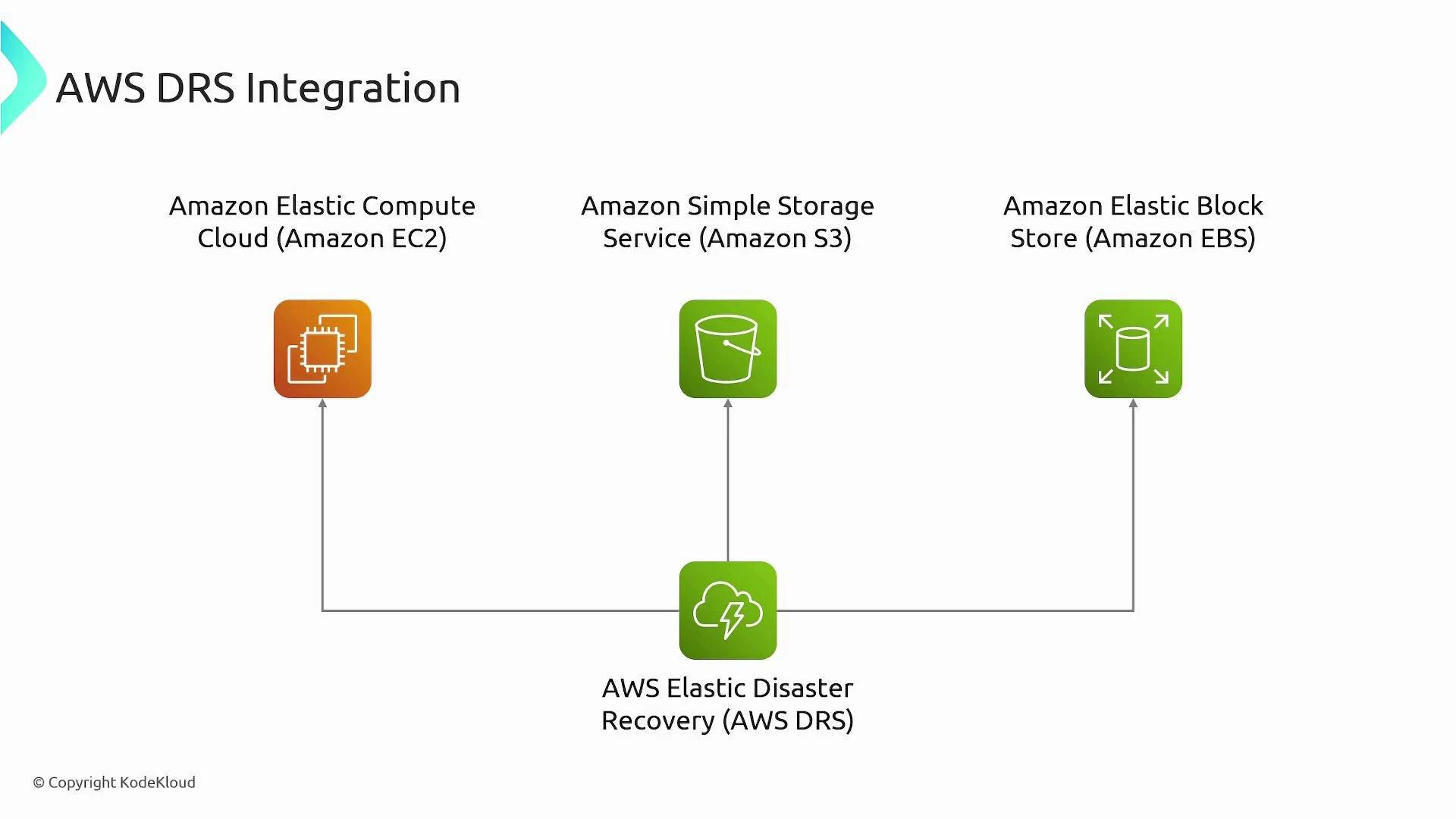
## Integration with AWS services
* EC2: replication server for staging and recovery instances.
* EBS: stores replicated block data and provides snapshots used for recovery.
* S3: hosts agent installers and workflow artifacts such as metadata and logs.
 ## Network and security considerations
| Requirement | Details |
| --------------------- | -------------------------------------------------------------------------------------------------------- |
| Outbound connectivity | Replication agents must reach the DRS service endpoint and replication servers (usually outbound HTTPS). |
| Ports | TCP 443 for control/management; additional TCP port (commonly 1500) for replication traffic. |
| Proxy support | Agents can be configured to route via an outbound web proxy if required. |
| Firewall/NAT | Ensure stateful firewall/NAT rules allow long-lived replication streams and return traffic. |
Ensure the replication agents can reach the DRS service endpoint and the replication servers. Typical communication uses HTTPS (TCP 443) and an additional TCP port used by the replication protocol (for example TCP 1500). If your environment requires it, route traffic through an outbound web proxy and open those ports on firewalls and NAT gateways.
Bandwidth and latency affect how quickly replicas catch up. Estimate replication throughput and consider scheduling large initial syncs or seeding options. Also secure agent credentials and IAM roles: limit permissions to only what’s required for replication and recovery operations.
## Common operational tasks & tips
* DR testing: use non-disruptive failover tests to validate recovery time and data integrity without impacting production.
* Right-size recovery instances: configure recovery EC2 sizes to match performance needs during failover and to control costs.
* Monitoring: track replication lag and staging storage usage to detect issues before a failover is needed.
* Cost control: retain only required staging snapshots and clean up unused recovery resources after drills.
## Common use cases
* Rapid recovery of on-premises applications after hardware failures, software corruption, or ransomware events.
* Cloud-to-AWS or cross-cloud recovery for migrations or multi-cloud resilience.
* Regular, non-disruptive DR testing for compliance and business continuity validation.
* Cost-effective DR strategy that avoids paying for a fully provisioned secondary datacenter 24/7.
## Links and references
* [AWS Elastic Disaster Recovery (DRS) documentation](https://docs.aws.amazon.com/drs/latest/userguide/what-is-aws-elastic-disaster-recovery.html)
* [Amazon EC2](https://aws.amazon.com/ec2/)
* [Amazon EBS](https://aws.amazon.com/ebs/)
* [Amazon S3](https://aws.amazon.com/s3/)
By using AWS Elastic Disaster Recovery you gain continuous block-level replication, point-in-time recovery, fast failover, and the flexibility to run recovered workloads in AWS or fail back to your primary site when it's ready.
## Network and security considerations
| Requirement | Details |
| --------------------- | -------------------------------------------------------------------------------------------------------- |
| Outbound connectivity | Replication agents must reach the DRS service endpoint and replication servers (usually outbound HTTPS). |
| Ports | TCP 443 for control/management; additional TCP port (commonly 1500) for replication traffic. |
| Proxy support | Agents can be configured to route via an outbound web proxy if required. |
| Firewall/NAT | Ensure stateful firewall/NAT rules allow long-lived replication streams and return traffic. |
Ensure the replication agents can reach the DRS service endpoint and the replication servers. Typical communication uses HTTPS (TCP 443) and an additional TCP port used by the replication protocol (for example TCP 1500). If your environment requires it, route traffic through an outbound web proxy and open those ports on firewalls and NAT gateways.
Bandwidth and latency affect how quickly replicas catch up. Estimate replication throughput and consider scheduling large initial syncs or seeding options. Also secure agent credentials and IAM roles: limit permissions to only what’s required for replication and recovery operations.
## Common operational tasks & tips
* DR testing: use non-disruptive failover tests to validate recovery time and data integrity without impacting production.
* Right-size recovery instances: configure recovery EC2 sizes to match performance needs during failover and to control costs.
* Monitoring: track replication lag and staging storage usage to detect issues before a failover is needed.
* Cost control: retain only required staging snapshots and clean up unused recovery resources after drills.
## Common use cases
* Rapid recovery of on-premises applications after hardware failures, software corruption, or ransomware events.
* Cloud-to-AWS or cross-cloud recovery for migrations or multi-cloud resilience.
* Regular, non-disruptive DR testing for compliance and business continuity validation.
* Cost-effective DR strategy that avoids paying for a fully provisioned secondary datacenter 24/7.
## Links and references
* [AWS Elastic Disaster Recovery (DRS) documentation](https://docs.aws.amazon.com/drs/latest/userguide/what-is-aws-elastic-disaster-recovery.html)
* [Amazon EC2](https://aws.amazon.com/ec2/)
* [Amazon EBS](https://aws.amazon.com/ebs/)
* [Amazon S3](https://aws.amazon.com/s3/)
By using AWS Elastic Disaster Recovery you gain continuous block-level replication, point-in-time recovery, fast failover, and the flexibility to run recovered workloads in AWS or fail back to your primary site when it's ready.