> ## Documentation Index
> Fetch the complete documentation index at: https://notes.kodekloud.com/llms.txt
> Use this file to discover all available pages before exploring further.
# Design for Azure Synapse Analytics
> This article provides an overview of Azure Synapse Analytics, its architecture, core components, analytics types, and comparisons with related services.
Azure Synapse Analytics is a fully managed service by Microsoft that unifies data ingestion, enterprise data warehousing, and big data analytics into a single, integrated platform. This comprehensive service offers scalability, robust performance, and flexibility to seamlessly analyze large volumes of data.
## Azure Synapse Analytics Architecture
Azure Synapse Analytics leverages a Massively Parallel Processing (MPP) architecture, similar to that used by Azure Databricks. The core components include a control node and multiple compute nodes:
* The **control node** acts as the brain of the system. It receives T-SQL (Transact-SQL) queries from applications, orchestrating operations across multiple compute nodes.
* **T-SQL queries** are submitted via application SDKs or REST APIs.
* **PolyBase** efficiently retrieves data from both relational and nonrelational external data sources, distributing it across compute nodes for processing.
* Processed results are subsequently stored in Azure Storage.
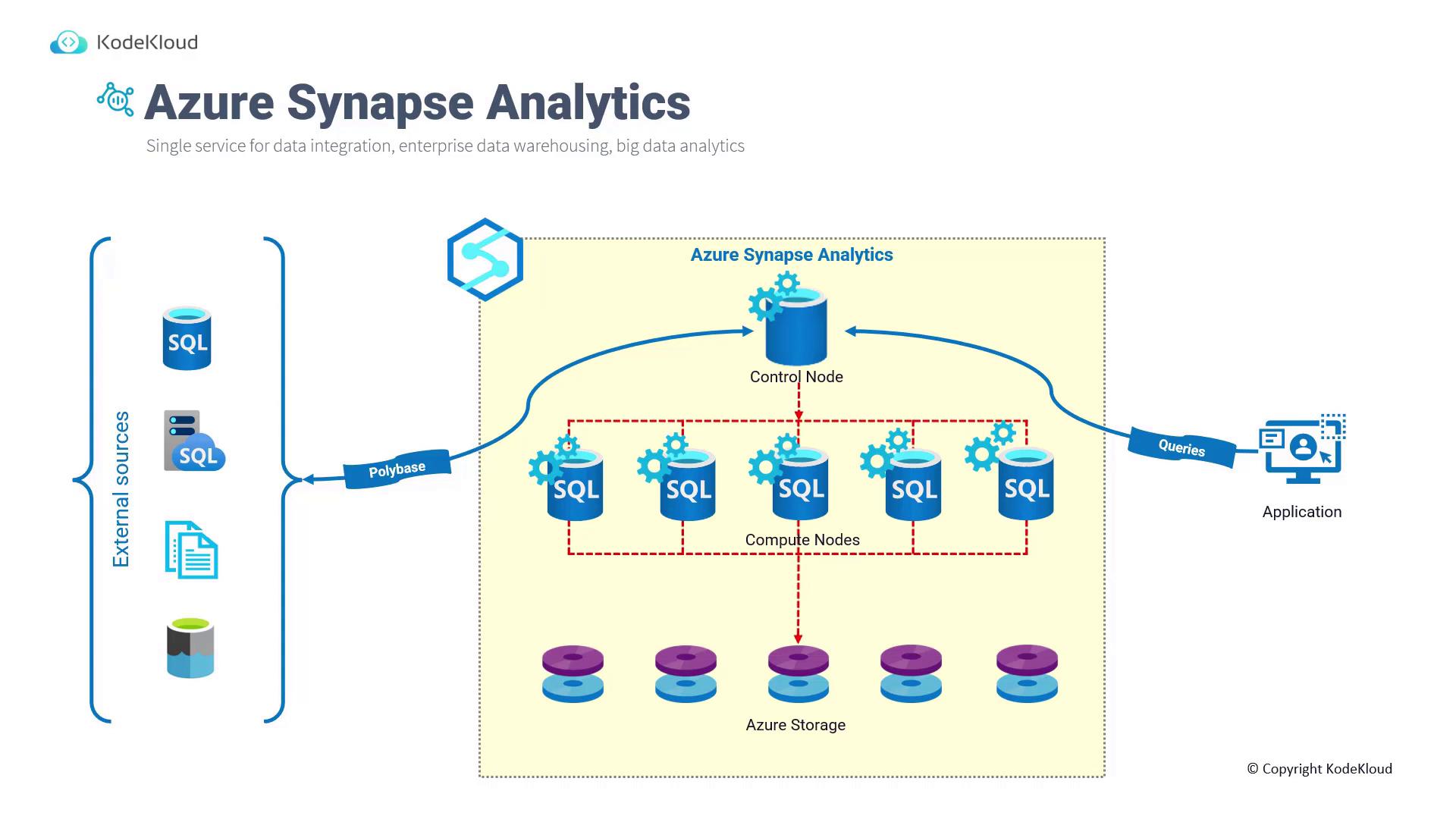
The MPP design of Azure Synapse Analytics ensures that large-scale data processing is highly efficient and scalable.
## Core Components of Azure Synapse Analytics
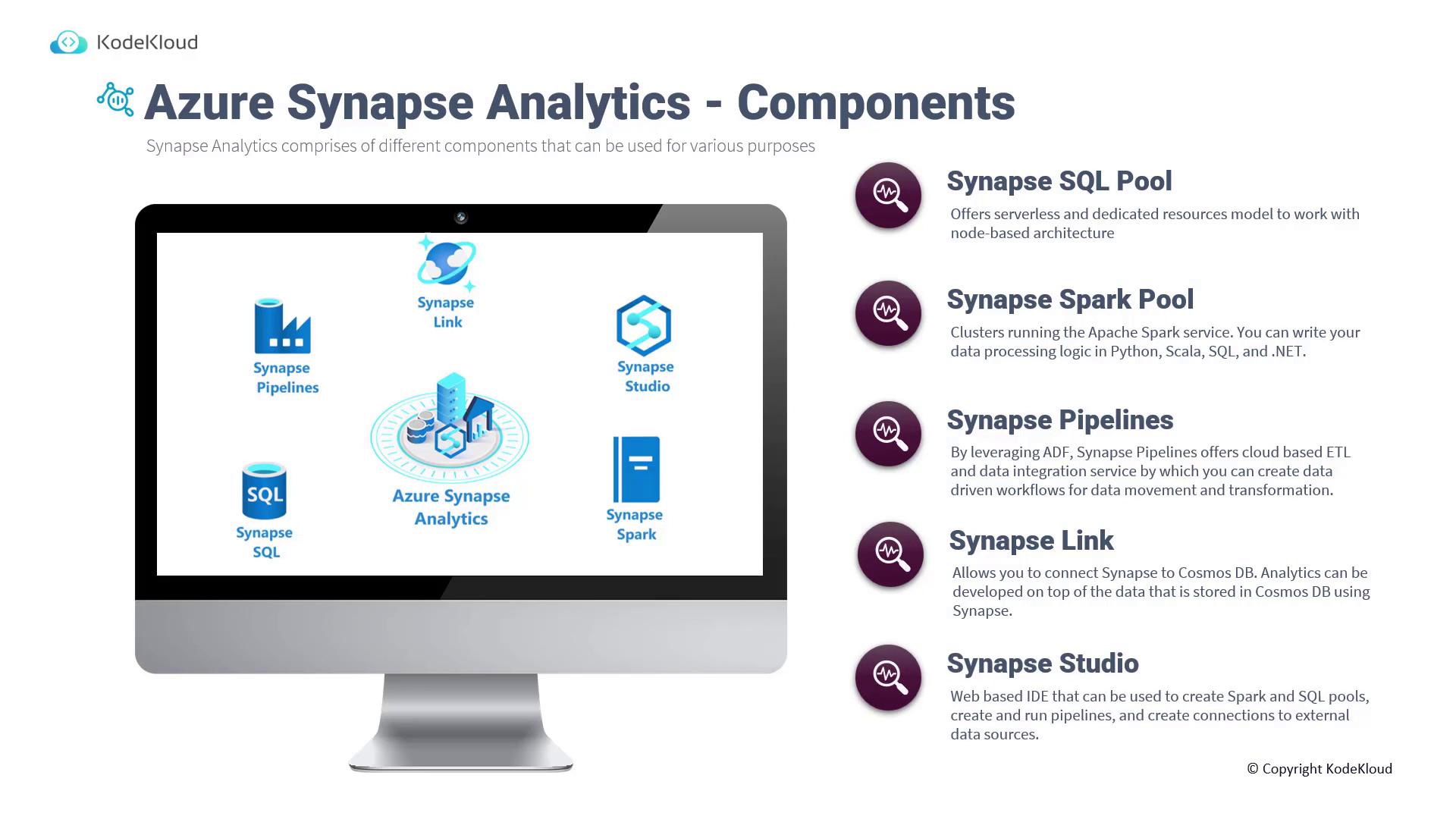
Azure Synapse Analytics consists of several key components that work in tandem to deliver a robust end-to-end analytics solution:
1. **Synapse SQL Pool**\
Provides both dedicated resources for predictable, high-performance workloads and serverless resources for ad-hoc, on-demand queries.
2. **Synapse Spark Pool**\
Fully integrates Apache Spark, allowing development of data processing logic in popular languages such as Python, Scala, SQL, and .NET.
3. **Synapse Pipelines**\
Builds on Azure Data Factory capabilities to enable cloud-based ETL (Extract, Transform, Load) workflows for seamless data integration and transformation.
4. **Synapse Link**\
Establishes a direct connection between Synapse Analytics and Cosmos DB, enabling the development of analytics solutions directly on your Cosmos DB data.
5. **Synapse Studio**\
A comprehensive, web-based integrated development environment (IDE) that simplifies the management and creation of Spark pools, SQL pools, pipelines, and external data source connections.
## Types of Analytics with Azure Synapse
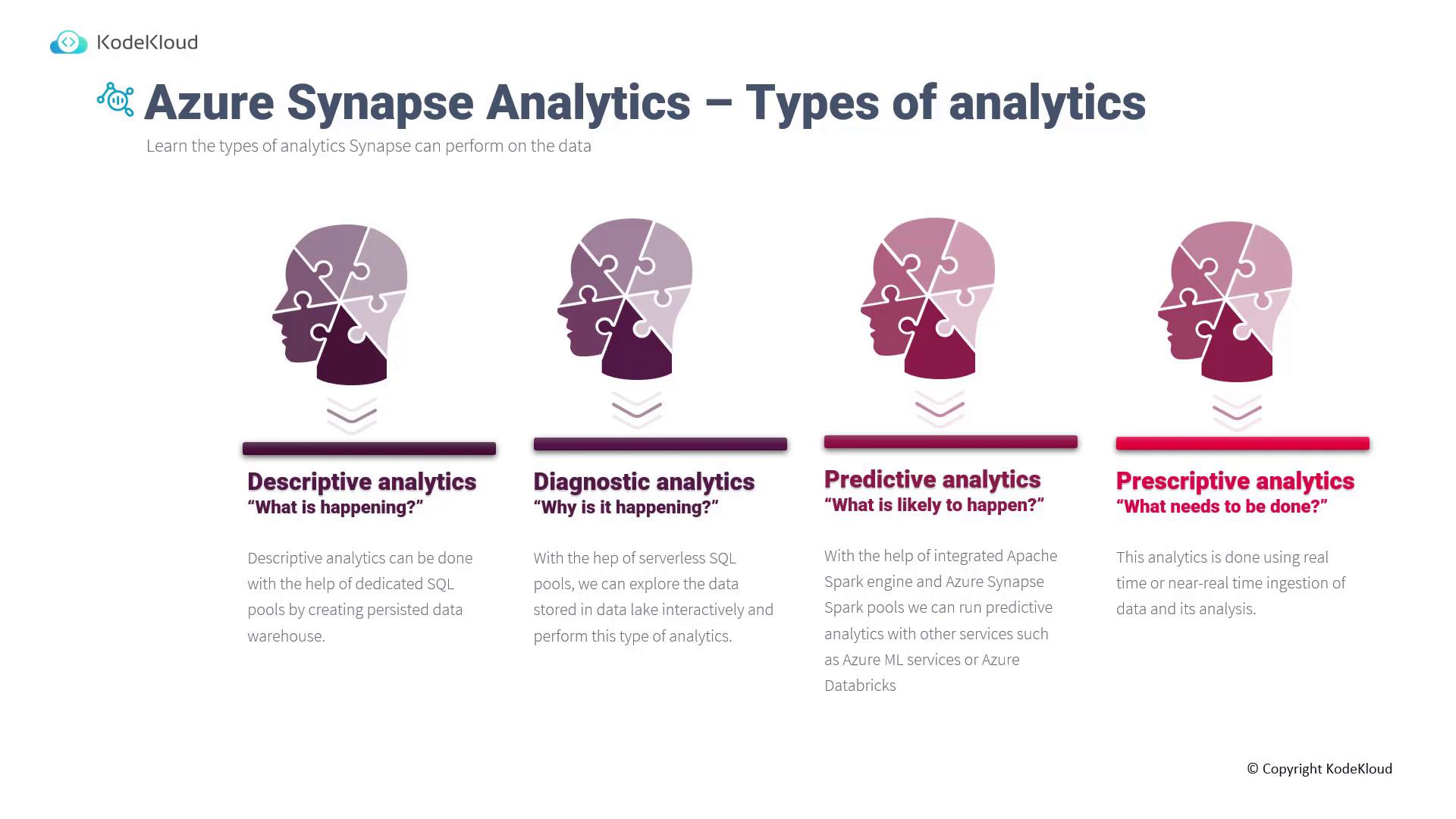
Azure Synapse Analytics supports a variety of analytics methodologies to meet diverse business needs:
* **Descriptive Analytics (What is happening?)**\
Utilize dedicated SQL pools to construct a persistent data warehouse, helping you understand the current state of data from sources such as IoT devices and relational databases.
* **Diagnostic Analytics (Why is it happening?)**\
Leverage the serverless SQL pool to interactively explore data lakes, uncovering underlying reasons behind trends or anomalies.
* **Predictive Analytics (What is likely to happen?)**\
The integrated Spark pools enable the deployment of machine learning models through Azure Machine Learning or Azure Databricks, forecasting future trends based on historical data.
* **Prescriptive Analytics (What needs to be done?)**\
Engage in real-time or near-real-time data ingestion and analysis—such as streaming data from IoT sensors via Azure Stream Analytics—to determine actionable strategies.
## Comparing Azure Synapse Analytics with Related Services
Understanding the differences among Azure Synapse Analytics, Azure Data Factory, and Azure Databricks is essential for crafting the optimal data strategy.
### Azure Data Factory vs. Azure Synapse Analytics
| Feature | Azure Data Factory | Azure Synapse Analytics |
| ----------------------------------- | ----------------------------------------------------- | --------------------------------------------------------------------- |
| Integration Runtime Sharing | Supports sharing integration runtime across factories | Does not support sharing integration runtime |
| Solution Templates | Offers hundreds of templates for common tasks | Provides similar templates via the Synapse Workspace Knowledge Center |
| Cross-Region Data Flow | Supports cross-region data flows | Does not support cross-region data flows |
| Spark Jobs for Data Flow Monitoring | Does not support Spark job creation | Offers Spark tools for creating and monitoring Spark jobs |

### Azure Databricks vs. Azure Synapse Analytics
| Feature | Azure Databricks | Azure Synapse Analytics |
| ----------------------------- | -------------------------------------------------------------------- | ----------------------------------------------------------------------------------------------------------------------------------------------- |
| Machine Learning Capabilities | Supports frameworks like TensorFlow, PyTorch, Keras with GPU support | Includes built-in support for Azure Machine Learning, along with OSS libraries such as Spark ML and MLlib, with recent GPU-accelerated features |
| Feature Set | Optimized for an Apache Spark environment | Integrates distributed Transact-SQL, Spark, data integration, and Synapse Studio for a comprehensive experience |
| Reporting | Integrates with Power BI via a dedicated connector | Offers direct Power BI integration through Synapse Studio |
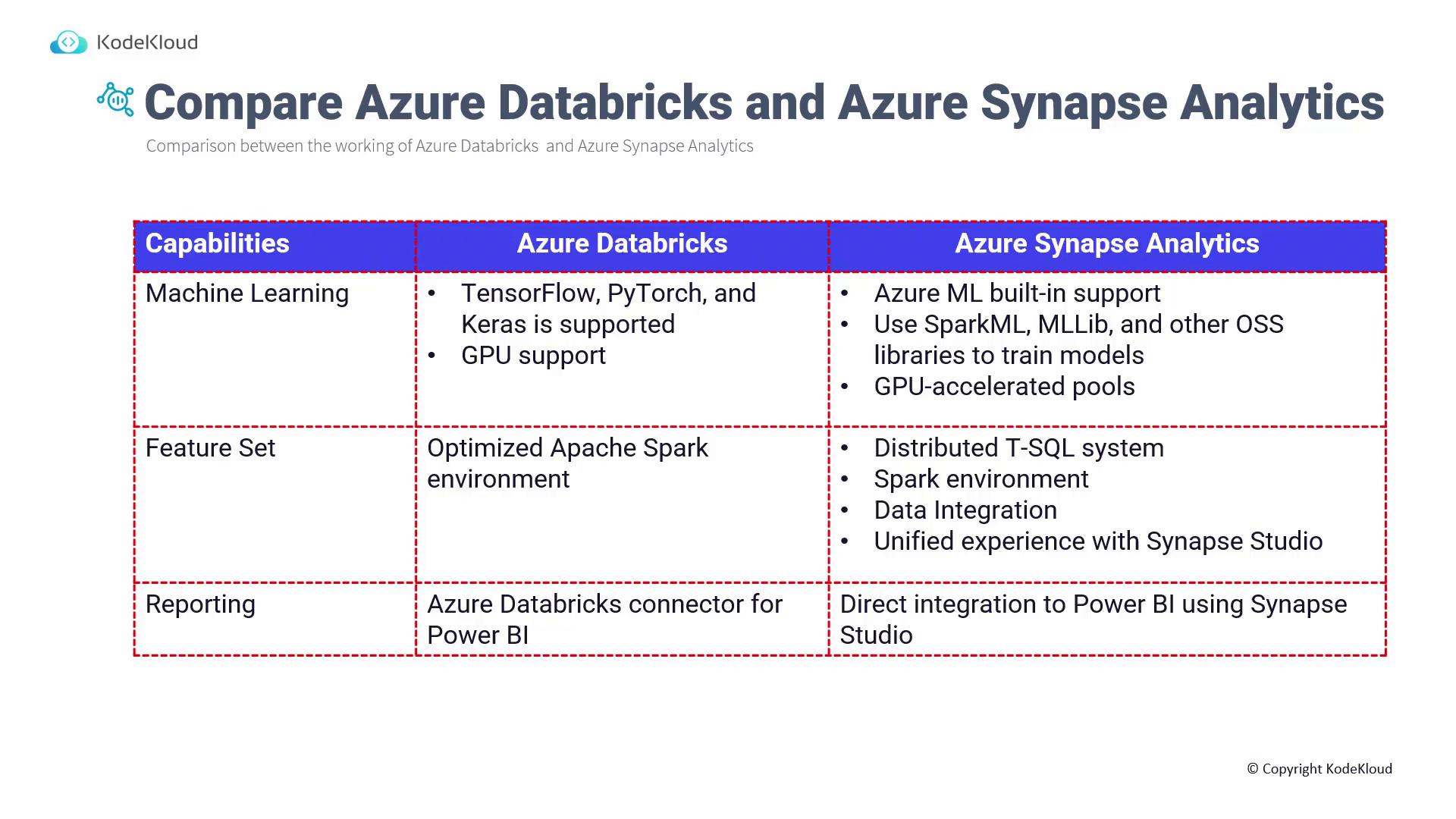
Understanding the unique capabilities of each service helps organizations select the best tool based on specific data processing and analytics requirements.
## Next Steps
Stay tuned as we delve into Azure Stream Analytics, an integral component that further enhances modern data-driven architectures by seamlessly integrating multiple data paths and services.
For additional insights and best practices on designing advanced analytics solutions with Azure Synapse Analytics, explore the following resources:
* [Azure Synapse Analytics Documentation](https://docs.microsoft.com/en-us/azure/synapse-analytics/)
* [Azure Data Factory Documentation](https://docs.microsoft.com/en-us/azure/data-factory/)
* [Azure Databricks Documentation](https://docs.microsoft.com/en-us/azure/databricks/)